Note
Access to this page requires authorization. You can try signing in or changing directories.
Access to this page requires authorization. You can try changing directories.
A migration wave is a group of applications and workloads that you want to migrate together. Grouping migration work into waves helps you coordinate related resources, whether you use Azure Migrate or other migration tools.
This article explains how wave migrations work in Azure Migrate through an example application with two virtual machines (VMs) and a SQL Server database. In this example, the VMs must move to Azure VMs, and the database must move to Azure SQL Managed Instance. Although these workloads use different migration methods, they belong to the same wave.
In Azure Migrate, an execution plan defines the workflow for migrating a wave. Azure Migrate generates the plan from the wave's workloads, target services, and migration methods, bringing together the migration steps, their dependencies, and approval checkpoints. The example shows how these parts fit together, from preparing the workloads to completing the migration.
Waves, applications, and workloads
A workload is an individual resource to migrate, such as a VM, database, or file share. An application is a logical grouping of related workloads. A wave can also include workloads that aren't associated with an application.
The wave defines the scope of execution, but its workloads don't all have to move at the same time. Their migration methods and dependencies determine which activities can overlap and which must wait.
Execution plan
You describe where each workload should go and how to migrate it by choosing its target Azure service and migration method respectively. Azure Migrate turns those choices into an execution plan for the wave.
Plan generation is automatic. Waves created from a wave plan already have the target services and migration methods configured. For a manually created wave, generation happens as soon as you configure those settings for every workload. If any workloads in the wave do not yet have a target Azure service and migration method configured, the wave remains in Pending configuration state, with no execution plan generated.
For the example wave, the plan combines VM migration work with database migration work. It also includes shared preparation and checkpoints where people must make a decision or complete external work. You review and customize the generated plan before starting the wave.
Steps and step groups
The execution plan is built from individual activities called steps. Step groups organize those activities into the wave's overall workflow.
Steps
A step represents one activity, such as preparing a migration tool, replicating VMs, migrating a database, or waiting for approval. Each step has its own dependencies, inputs, and execution status.
A workload-scoped step can apply to several workloads, with a separate execution for each. In the following example, a VM replication step applies to VM 1 and VM 2, and each VM progresses independently. A non-workload-scoped step performs shared work, such as setting up a migration tool once for an appliance.
Step groups
A step group organizes related steps. Azure Migrate creates a step group for each application's workloads in the wave. The example's VM and database steps belong to the same application group.
| Group | Work it contains |
|---|---|
| Initialization | Shared setup and validation before migration step groups start |
| Application step groups | Migration work for each application's workloads in the wave |
| Ungrouped-workload step group | Migration work for workloads without an application |
| Finalization | Final checks, closure work, and sign-off after migration groups finish |
Initialization finishes first. Application and ungrouped-workload groups can then run in parallel, subject to their step dependencies. Finalization waits for those groups to finish. Groups organize the work; they don't create separate runs or independent execution controls.
The following diagram shows a simplified plan for the example wave. It illustrates the ordering rather than an exact migration-method template. Actual plans can include additional preparation, validation, testing, and approval steps.
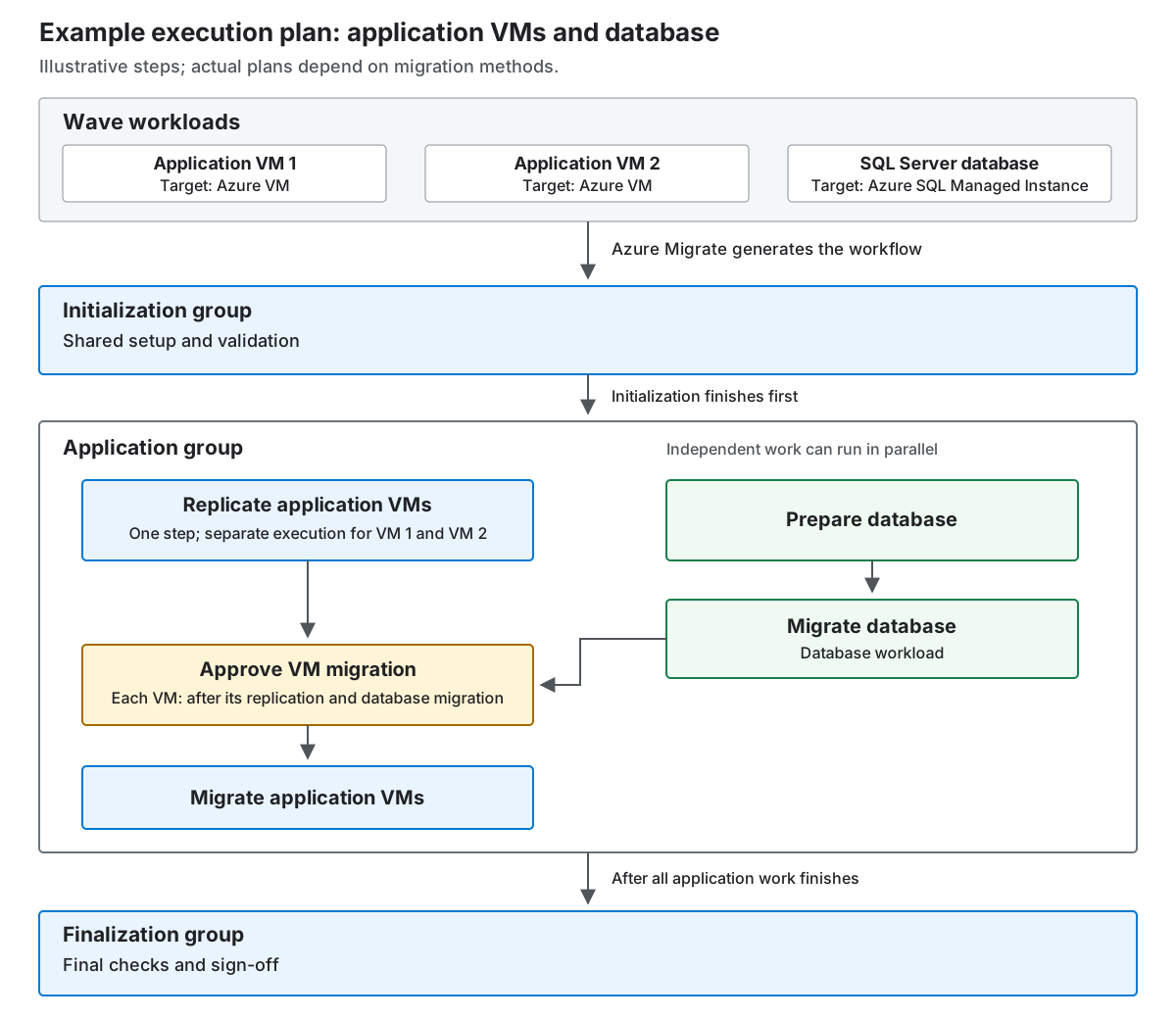
In this example, VM replication overlaps database preparation and migration. For each VM, migration approval waits for that VM's replication and the database migration. The next section explains how dependencies express that ordering.
Dependencies and parallelism
A dependency makes a step wait for earlier work. It doesn't require every step in the wave to run in sequence.
In the example, VM replication doesn't need to wait for database preparation. Both can begin after initialization. However, the application team wants the database migrated before authorizing VM migration, so the VM approval also depends on the database migration step.
Azure Migrate uses two kinds of dependencies, and both must be satisfied:
- System-owned prerequisites preserve the ordering required by the migration method. You can't edit them.
- User dependencies add coordination for your migration, including work that you add to the plan.
Independent steps and workloads can run in parallel. A step can start only after its group becomes eligible and its dependencies are satisfied. Until then, it remains in the Not Started state.
Dependencies can coordinate whole steps or individual workload executions. The dependency reference explains the detailed matching rules and advanced scopes.
Plan parameters and customization
The generated plan provides the workflow, but it doesn't replace your environment-specific settings or your organization's migration requirements. Input parameters configure the work a step performs; customizations change the workflow itself.
Input parameters
Input parameters describe the configuration of source, target, migration tool, or other settings a step needs. Azure Migrate populates available values from discovery and assessment; you review them and provide the rest.
A step-level value is the default for its workloads. A workload-level override takes precedence. For example, the application VMs can share a target-network setting while one VM uses an override for a different network.
Input values are stored separately from the workflow definition in a parameters file. Changing a value doesn't change the plan's steps or dependencies. You can save incomplete configuration and return later, but all supplied values must be valid. Every required input must be complete before execution; static input checks don't replace live validation during the run.
Customization
Customization adapts the plan to your organization's needs. For the example wave, you might add a script to validate the migrated database or a manual step for a network change. Dependencies determine where that work fits and whether later steps must wait for it.
Before execution, you can add approval, manual, and custom-script steps, change supported descriptions and user dependencies, and remove unnecessary optional steps. Required steps and system prerequisites remain protected. For detailed edit support, see the customization reference. For portal procedures, see Configure and customize a wave.
Approvals and manual work
An approval step asks a person to authorize work to proceed. A manual step waits for a person to complete work outside Azure Migrate and record that it is done. Both are part of the execution plan, not separate checklists.
In the example, approving VM migration authorizes the next migration activity. A manual network-change step instead records an action the team performs outside the workflow. Azure Migrate can generate these checkpoints where applicable, and you can add your own before execution.
Approval is granted per ready workload. The team can approve one VM, a subset, or all ready VMs together. Approval can be provided or withheld; it isn't a configurable requirement to approve every workload at once.
A step waiting for approval or manual completion needs human action before its dependent work can proceed. The step and wave show status as Needs Action when a step is waiting. However other independent work in the wave still proceeds.
The execution guide describes approval and manual-completion actions. Required roles are in the permissions reference.
Execution lifecycle and recovery
Once the plan and its inputs are ready, starting the execution puts the workflow into action. Execution controls, failures, and changes affect that workflow at different levels.
Runs and execution controls
A run is one execution of the wave's plan. Only one run can be active at a time. Starting it approves the current plan version; there isn't a separate approved-plan state before execution.
The wave's steps report execution details, while workload progress rolls up to applications and the wave. Project-level workload status remains available after the wave ends.
Pause and cancellation apply to the whole wave:
- Pause stops scheduling new work while work in progress reaches a logical stopping point. Resume lets eligible work continue.
- Cancel also stops new scheduling and lets current work reach a logical stopping point, but ends the run, skipping all the other steps. Continuing requires a fresh run.
Neither action immediately terminates migration-tool operations. Wave execution doesn't provide rollback. A paused or canceled wave shows Needs action, not Completed. Detailed control behavior and timeouts are in the execution reference.
Failures and recovery
A failed workload stops at the failed step while independent work can continue. In the following example, a database migration failure holds the dependent VM approval, but doesn't stop VM replication if it can still progress independently.
- Failed: The step failed for all its workloads.
- Partially succeeded: Some workloads succeeded and others failed in that step attempt.
Retrying a workload-scoped step runs all its failed workloads again. Successful workloads aren't retried. A non-workload-scoped step retries as a whole job. Input corrections during an active run are limited to the failed step being retried; they don't change inputs on other steps or the workflow definition.
For diagnosis and retry actions, see Recover from failures. Full status definitions are in the status reference.
Wave changes
Changing wave membership, target services, or migration methods after generation requires regeneration. Structural edits during an active run require cancellation and a fresh run instead of changing the running workflow.
Important
Regeneration creates the plan afresh and discards all user edits, including custom steps, dependencies, grouping, descriptions, and input values.
A fresh run starts from the first step rather than resuming the canceled run. Migration steps check the existing state in the migration tool, but this isn't a general promise that custom scripts or other actions can be repeated safely. Detailed edit restrictions are in the customization reference.
Successful completion
The wave can't complete with unresolved failures or pending work. After migration work finishes, finalization includes the required sign-off.
When at least one run completes successfully, the wave is marked as Completed. Successful completion permanently locks its workloads, configuration, and execution plan; no further run or regeneration is available.
The execution guide describes finalization and completion checks. For progress views and historical runs, see Track and troubleshoot wave migrations.