Note
Access to this page requires authorization. You can try signing in or changing directories.
Access to this page requires authorization. You can try changing directories.
This article is part of a series about how to migrate an n-tier workload from on-premises to Azure.
Migration phases: Plan > Prepare > Execute > Evaluate > Decommission
The execution phase includes these stages:
- Before cutover
- During cutover
- After cutover
 The goal of this phase is to move production to Azure within the accepted downtime and data-loss limits, and with the state boundary understood before traffic moves.
Before cutover includes the final readiness checks and validation completed before the approved maintenance window. Use the full test suite and migration rehearsal completed in the Prepare phase as evidence, and repeat targeted checks if the configuration changes. Some of these activities can take place days or weeks before the workload goes live on Azure.
During cutover is the go-live window itself, when you pause or redirect traffic, complete the final synchronization, and make Azure the production environment.
Before and during cutover are related stages, but they don't need to happen on the same day.
This phase carries the highest outage and data-consistency risk. Successful replication can't prove application compatibility by itself, and a traffic switch alone can't reverse writes that already diverged.
Caution
Don't rush testing or skip validation steps. The Execute phase has the highest risk of service disruption. Data sync problems, network misconfigurations, or unexpected application behavior can cause outages or data loss.
Before cutover
Staff a cutover war room: Establish a dedicated physical or virtual coordination space, such as a room, Microsoft Teams meeting or chat, or similar channel. Bring together representatives from architecture, networking, security, operations, and the workload team so they're all present and aligned before cutover begins.
Confirm database approval: Before moving production data, confirm that the source, target, versions, migration method, and application release match the approved plan. Verify that required remediation is complete.
Confirm that the identities and credentials used by the migration method can access the source and target databases, and that the backup, restore procedure, monitoring, and database operator access are ready. If the configuration changed or required evidence is missing, stop and return the decision to the Plan phase.
Execute your data migration: Align the order of operations with your cutover model. Fully script and test all data migration steps in a nonproduction environment to help ensure that these steps run reliably during cutover.
For live or active replication scenarios, set up continuous data sync between on-premises and Azure. This approach minimizes downtime and helps ensure data consistency during cutover.
For backup-and-restore models, back up all of your on-premises data. Securely transfer the backup to Azure and then restore it in the target environment. Validate the integrity of the data before you take the next step.
If the application runs in Azure while the database remains on-premises, measure the added network latency and validate connection behavior under representative load. Treat this design as temporary coexistence with an explicit exit plan, not as proof that the final architecture is ready.
Set up your application's components: Connect each component to its dependencies. Some of these dependencies might remain on-premises. For example, in a phased migration approach, you might keep your database on-premises initially and migrate it later.
Modify connectivity and networking settings: Ensure that your Azure resources can reach on-premises dependencies and that your on-premises resources can reach Azure dependencies when required. Adjust your firewall rules, network security group (NSG) rules and policies, and routing to meet your requirements. Confirm that the approved configuration and planned connectivity changes you tested and validated in the Prepare phase still work before cutover.
Perform targeted validation tests: Perform targeted functional, performance, and failure checks to confirm that the workload is ready for cutover. Complete extensive functional, regression, load, and migration testing from the Prepare phase. After cutover, run the release-blocking checks again to verify that the production workload works as expected.
Iterate and fix problems early: Plan thoroughly to minimize fixes during this stage. If you run into problems, resolve them now. Common problems include script paths or API calls that don't match expected values, Azure service-limit violations, and insufficient quota limits.
Reduce the Domain Name System (DNS) time-to-live (TTL): Reduce the TTL for DNS records before cutover so that clients receive routing changes sooner. Account for DNS caching and propagation delays in both the cutover and rollback plans.
Prepare components to accept production traffic, and automate the health checks. Before the cutover window opens, confirm that architecture, networking, security, operations, and workload owners are available through a coordinated cutover channel. Assign decision owners, escalation paths, and the person or people authorized to trigger rollback.
During cutover
How you complete this step depends on your chosen strategy. In the recommended blue-green approach, you switch all traffic at the same time during a cutover window.
Before you switch traffic over, confirm that you synced all your data. Then switch all connections to Azure and bring up Azure as the primary environment. During the maintenance window, briefly pause traffic or the application to avoid inconsistencies.
Important
Follow your runbook and communicate with stakeholders about cutover progress, any expected changes to the timeline, or other problems they should know about.
Maintain war room availability: Keep the cutover war room team reachable for the duration of the maintenance window to make fast, coordinated decisions if problems arise.
Activate the offline page: Activate your offline page so your users know about the maintenance window.
Stop source traffic and writes: Pause user traffic and stop every process that can change production data, including database writes, file changes, queues, scheduled jobs, background workers, integrations, and session updates. Use logs and system status to confirm that no transactions or processing remain running. If you can't confirm that all writes stopped, stop the cutover and follow the runbook's recovery procedure.
Complete synchronization and check the data: Complete the final synchronization for every stateful component. Check database consistency, file counts and required metadata, queue state, scheduled jobs, integration checkpoints, and session state.
Important
Stop the cutover if a check fails or shows an unexplained difference.
Make Azure the production system: Get approval from the decision owner that the runbook identified. Record the approval time, enable production writes in Azure, and record the first Azure production write. Keep source writes blocked after this transfer.
Send production traffic to Azure: Update DNS, load balancers, and application routing only after the preceding checks pass. Monitor for unexpected source writes, duplicate processing, synchronization errors, and failed transactions.
Maintain rollback readiness: Keep the on-premises environment available until the validation window closes and the rollback criteria are cleared.
Monitor in real time: Work closely with operations teams to address emerging problems immediately. The migration team and operations engineers should actively monitor a real-time health dashboard by using Azure Monitor or custom telemetry. Any anomalies should trigger immediate alerts and responses. Prepare to roll back if you can't resolve problems within the rollback criteria that you defined in the Plan phase.
After cutover
Do post-cutover verification: Monitor workload health, performance, security signals, and critical business functions. If a problem invokes a recovery trigger from the runbook, follow the recorded recovery procedure. After Azure accepts production writes, don't send traffic back to the on-premises environment unless the tested reverse-synchronization or reconciliation procedure restores it to a complete and consistent state. If the recovery path is unavailable or unsafe, keep Azure as the production system and fix the problem in Azure. Continue monitoring costs and usage for unexpected consumption.
Update your deployment processes: Update the workload's deployment processes to stop targeting on-premises and target only Azure. If you use continuous integration/continuous delivery (CI/CD), update the deployment pipelines accordingly.
Update documentation and procedures: Revise all production runbooks, support documents, and operational procedures to match the new Azure environment.
Hand off operational monitoring: Confirm that the operations team assumes monitoring ownership of the Azure environment. They should use the Azure Monitor dashboards and alerts that you set up earlier to monitor the workload's health. Address any knowledge gaps as the team transitions into primary support for the Azure deployment.
Reference workload checkpoint
After cutover, Azure serves production traffic and owns database, file, job, and queue state. Before final synchronization or failover, the source database primary and replica are fenced from production writes, and remain fenced throughout the transfer of write authority to Azure.
The selected session path is authoritative, whether it uses Azure-local affinity, an Azure shared store, a deliberately retained shared store, or the recorded expiration and reauthentication model. Identity, integrations, DNS, monitoring, and support work correctly under load. Source components that aren't explicitly retained receive no planned traffic or writes and remain in their recorded recovery state. A retained shared session store receives only the traffic defined by its recorded path.
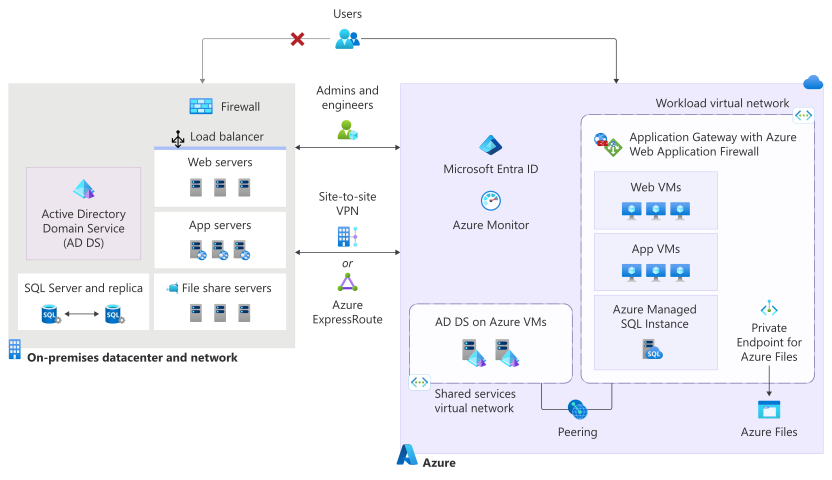
The following diagram shows a hybrid migration state where an on-premises application environment operates alongside equivalent services in Azure during workload migration. Arrows and connectivity paths indicate that application traffic and workloads are transitioning from the on-premises datacenter to Azure while both environments remain active. This side-by-side deployment supports validation, synchronization, monitoring, and phased cutover activities before the migration is completed.
Decision and handoff
The workload owners decide whether production is ready for evaluation. The Evaluate phase receives the state record, first-write time, cutover log, recovery direction, baselines, temporary controls, and open fixes.
Checklist
| Deliverable tasks | |
|---|---|
| ☐ | Staff the cutover war room and confirm decision owners and escalation paths. |
| ☐ | Confirm database approval, migration access, backups, monitoring, and operator readiness. |
| ☐ | Complete the scripted data migration or replication and validate data integrity. |
| ☐ | Connect workload components and validate hybrid connectivity and health checks. |
| ☐ | Run final functional, performance, and failure tests and resolve blocking issues. |
| ☐ | Reduce DNS TTL and prepare the Azure environment to accept production traffic. |
| ☐ | Activate the offline page and stop all source traffic, processing, and writes. |
| ☐ | Complete final synchronization and consistency checks for every stateful component. |
| ☐ | Record approval, enable Azure production writes, and record the first production write. |
| ☐ | Route production traffic to Azure and monitor health and state in real time. |
| ☐ | Keep the source environment available until validation and recovery criteria are cleared. |
| ☐ | Update deployment targets, operational documentation, and monitoring ownership. |
For more information, see Migrate to the cloud.