Note
Access to this page requires authorization. You can try signing in or changing directories.
Access to this page requires authorization. You can try changing directories.
This article is part of a series about how to migrate an n-tier workload from on-premises to Azure.
Migration phases: Plan > Prepare > Execute > Evaluate > Decommission
After migration, your workload serves its users from Azure.
The evaluation phase consists of these steps:
- Validate the cutover.
- Sign off on the migration.
 The goal of this phase is to confirm that your workload in Azure meets the functional, performance, reliability, security, and cost success criteria that you established in the on-premises planning phase.
Caution
Incomplete monitoring, insufficient performance testing, or ineffective cost and security reviews can hide problems that lead to later outages, data exposure, or budget overruns.
Validate successful cutover
Monitor and fine-tune the workload: Track your workload trends closely for errors, performance bottlenecks, or unusual patterns, especially during the first one to two weeks. Cover representative business cycles, including monthly or less frequent critical jobs. If a critical process doesn't run during the evaluation window, validate it in a controlled test or obtain approval for an owned follow-up that records the test date, monitoring responsibility, and remaining risk.
Don't treat a quiet initial period as proof that all processes work. Right-size components, ensure that your scaling strategy works as intended, monitor budget thresholds, and validate your disaster recovery (DR) configurations and backups. Prioritize fixing security problems. Work with your operations team to fine-tune alert thresholds and dashboard views as needed.
Measure against baselines: Verify that you meet the baseline key performance indicators (KPIs) that you documented in the planning phase, like throughput, latency, and error rates. The KPIs should be comparable to on-premises values.
Validate cutover via on-premises logs: Review the on-premises application, database, identity, firewall, load balancer, deployment, and network logs identified in your migration plan. Confirm that the logs show no unintended traffic, writes, or deployments.
Check firewall and network flow logs: Review firewall and network flow logs in Azure to ensure that only the anticipated network traffic occurs. After the workload stabilizes, remove obsolete allowances and temporary migration exceptions only after confirming that the workload no longer depends on them. Record any retained rule with an owner and an expiration or review date.
Confirm data authority: Confirm that Azure serves all in-scope production reads and writes. Keep replication, synchronization, backups, and required source recovery assets available until the recovery test passes. If retaining a recovery path creates a security or data-consistency risk, document the risk and obtain approval for an alternative before you remove the path.
Compare resource sizing: Compare Azure resource sizing with measured workload behavior after migration. If utilization is consistently too low or high, investigate whether the source hardware was oversized, constrained, or masking a bottleneck before you change the size in Azure.
Do key routine tasks: Do tasks like certificate rotation and off-site backups. Practice gated operations, such as just-in-time (JIT) access admin elevation, even if you don't need elevated access for a task. These exercises ensure that your workload operations team and automation settings have sufficient management control over the environment.
Set budgets and alerts: Set budgets and cost alerts for the migrated workload. Review actual usage against the expected baseline, and investigate unexpected consumption before it becomes a recurring cost. Where supported, configure Cost Management anomaly alerts at subscription scope and send notifications to the team responsible for investigating unexpected spending changes.
Test workload recovery: Run the recovery procedure defined during planning and record the time and recovery point achieved. Restore the workload through its Azure recovery paths, then validate data, identity, networking, critical application functions, monitoring, and operator access. Compare the results with the workload's recovery time objective (RTO) and recovery point objective (RPO).
If the test fails, keep the required source recovery assets and correct the recovery path before you approve decommissioning. If a complete recovery test isn't safe or practical, document the limitation, associated risk, and alternative validation, and get the required approval before decommissioning the source recovery assets.
Confirm complete operations handover: Confirm that the operations team accepts full responsibility for monitoring and supporting the Azure workload. Make sure that the team can use the updated runbooks, dashboards, Azure Monitor alerts, and Azure Service Health notifications and can perform routine, unplanned, and emergency tasks without depending on the migration partner as the de facto operator. Complete the handoff with access, escalation paths, and recovery evidence.
Sign off on the migration
Update the architectural knowledge base: Make sure your workload's knowledge base documents any last-minute changes to the infrastructure or operational procedures that deviate from the original plan.
Meet sign-off milestones: Sign off only after the migration meets all predefined success criteria and after you test to confirm that the migration succeeded. Use the acceptance criteria defined in the planning phase.
Conduct a post-migration retrospective: Document the lessons learned from the workload migration. The migration team should identify what succeeded, what to improve, and any unexpected problems they encountered. Share the assessment with the stakeholders and other teams in your organization that might plan a workload migration.
Plan for future improvements: Create work items in your backlog for nonurgent improvements like cost optimization, improved resilience, stronger security controls, or reduced technical debt.
Reference workload checkpoint
The checkpoint for this phase meets the following criteria:
The Azure workload meets its baselines.
A recorded recovery test confirms that the team can restore the workload through Azure recovery paths within the accepted RTO and RPO, or a designated approver accepts a documented exception.
Identity follows its documented authority path without any accidental source-only dependency.
The selected session model is stable. Any retained shared path is documented, owned, supported, reachable, recoverable, and covered by an exit or retention decision. No active session has an accidental source-only dependency.
Connectivity, telemetry, partners, and operators don't rely on unrecorded or nonretained source components. Every retained source item has another owner or obligation.
The following diagram illustrates the end result of a like-for-like migration approach. On-premises infrastructure is decommissioned, and equivalent Azure services now provide identity, networking, monitoring, compute, database, and storage capabilities for the migrated workload.
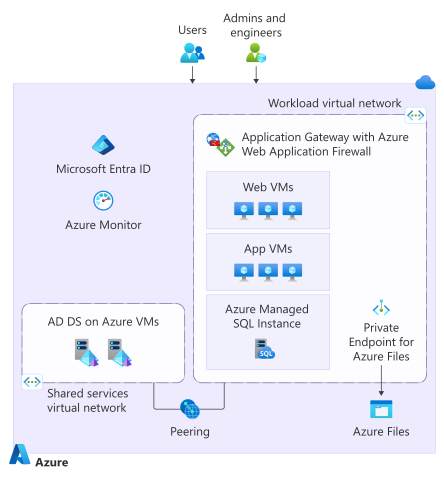
In the post-migration state of the application in Azure:
Users access the application through Azure networking and load-balancing services, while admins and engineers manage the environment through Azure management and monitoring tools.
The Azure environment includes Microsoft Entra ID for identity and access management and Azure Monitor for observability.
Security services and networking components support application connectivity.
Azure virtual machines (VMs) represent the migrated web and application server tiers.
Azure SQL services replace the on-premises SQL Server deployment, and Azure storage services replace file share servers for application and data storage.
Decision and handoff
After reviewing the recovery results or an approved exception, the workload owners decide whether source retirement can begin. The Decommission phase receives the evidence window, recovery results, retained recovery assets, approved exceptions, legal duties, asset inventory, and information about actions that must remain reversible.
Checklist
| Deliverable tasks | |
|---|---|
| ☐ | Monitor workload trends across representative business cycles and validate or record approved follow-ups for infrequent critical jobs. |
| ☐ | Compare throughput, latency, error rates, and resource use to the approved baselines. |
| ☐ | Review on-premises logs for unintended traffic, writes, or deployments. |
| ☐ | Review Azure firewall and network flow logs and remove obsolete access. |
| ☐ | Confirm that Azure owns all production reads and writes. |
| ☐ | Set budgets and alerts and investigate unexpected consumption. |
| ☐ | Perform routine and gated operational tasks in the Azure environment. |
| ☐ | Test Azure recovery paths and verify the achieved RTO and RPO. |
| ☐ | Remove temporary migration controls and record retained exceptions. |
| ☐ | Complete the operations handover with runbooks, access, monitoring, and escalation paths. |
| ☐ | Record architecture changes, migration lessons, and backlog improvements. |
| ☐ | Obtain migration sign-off before approving source retirement. |