Note
Access to this page requires authorization. You can try signing in or changing directories.
Access to this page requires authorization. You can try changing directories.
By using data encryption with customer-managed keys for Azure Database for MySQL, you can bring your own key (BYOK) for data protection at rest to implement separation of duties for managing keys and data. When you use customer managed keys (CMKs), you control:
- Key lifecycle management, including key creation, upload, rotation, and deletion
- Key usage permissions
- Auditing operations on keys
Benefits of customer managed keys (CMK)
Data encryption with customer-managed keys for Azure Database for MySQL provides the following benefits:
- You fully control data access by removing the key and making the database inaccessible.
- You have full control over the key lifecycle, including rotation of the key to align with corporate policies.
- You can centrally manage and organize keys in Azure Key Vault or Managed HSM.
- You can implement separation of duties between security officers, DBA, and system administrators.
How does data encryption with a customer-managed key work?
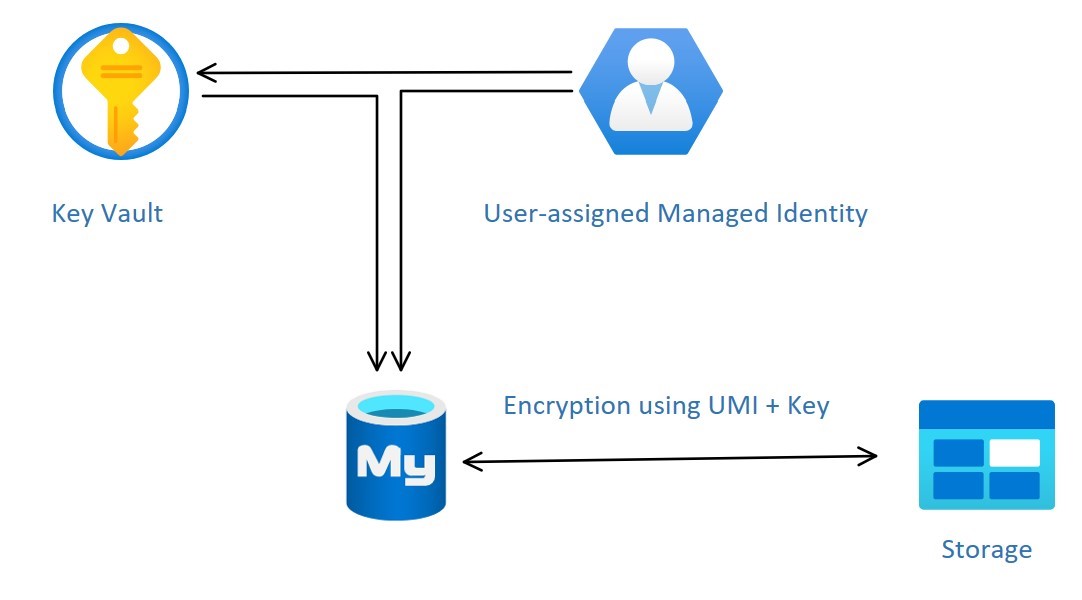
Managed identities in Microsoft Entra ID provide a more secure way to authenticate clients to services. CMK encryption uses the Azure Database for MySQL server's managed identity to connect to the Azure Key Vault storing the CMK. Azure Database for MySQL currently supports only user-assigned managed identity (UAMI) for access to the Key Vault. For more information, see Managed identity types in Azure.
To configure the CMK for an Azure Database for MySQL, link the UAMI to the server and specify the Azure Key Vault and key to use.
The UAMI needs the following access to the key vault:
- Get: For retrieving the public part and properties of the key in the key vault.
- List: To list the versions of the key stored in a Key Vault.
- Wrap Key: To encrypt the DEK. The encrypted DEK is stored in the Azure Database for MySQL flexible server instance.
- Unwrap Key: To decrypt the DEK. Azure Database for MySQL needs the decrypted DEK to encrypt or decrypt the data.
If Azure RBAC is enabled, assign roles to the UAMI instead of individual access.
- Key Vault Crypto Service Encryption User or the role with the permissions:
- Microsoft.KeyVault/vaults/keys/wrap/action
- Microsoft.KeyVault/vaults/keys/unwrap/action
- Microsoft.KeyVault/vaults/keys/read like "Key Vault Crypto Service Encryption User"
- For Managed HSM, assign the Managed HSM Crypto Service Encryption User role
Set data encryption with CMKs at the server level. For a given server, use a CMK, called the key encryption key (KEK), to encrypt the service's data encryption key (DEK). The KEK is an asymmetric key stored in a customer-owned and customer-managed Azure Key Vault instance. Key Vault is highly available and scalable secure storage for RSA cryptographic keys, optionally backed by FIPS 140 validated hardware security modules (HSMs). Key Vault doesn't allow direct access to a stored key, but instead provides encryption and decryption services by using the key to authorized entities. The key vault can generate the key or transfer it to the key vault from an on-premises HSM device.
When you configure a flexible server to use a CMK stored in the key vault, the server sends the DEK to the key vault for encryption. Key Vault returns the encrypted DEK stored in the user database. Similarly, the flexible server sends the protected DEK to the key vault for decryption when needed.
After you enable logging, auditors can use Azure Monitor to review Key Vault audit event logs. To enable logging of Key Vault auditing events, see Monitoring your key vault service with Key Vault insights.
Note
Permission changes can take up to 10 minutes to impact the key vault.
Requirements for configuring data encryption for Azure Database for MySQL
Before you attempt to configure Key Vault or Managed HSM, be sure to address the following requirements.
- The Key Vault and Azure Database for MySQL flexible server instance must belong to the same Microsoft Entra tenant. Cross-tenant Key Vault and flexible server interactions need to be supported. You need to reconfigure data encryption if you move Key Vault resources after performing the configuration.
- The Key Vault and Azure Database for MySQL flexible server instance must reside in the same region.
- Enable the Soft Delete feature on the key vault.
- Enable the Purge Protection.
- Set the retention period to 90 days.
- The recover and purge actions have their own permissions in a Key Vault access policy.
- The soft-delete feature is off by default.
Before you attempt to configure the CMK, be sure to address the following requirements.
- The customer-managed key to encrypt the DEK can be only asymmetric, RSA\RSA-HSM(Vaults with Premium SKU) 2048, 3072, or 4096.
- The key activation date (if set) must be a date and time in the past. The expiration date isn't set.
- The key must be in the Enabled state.
- The key must have soft delete with retention period set to 90 days. This setting implicitly sets the required key attribute
recoveryLeveltoRecoverable. - The key must have purge protection enabled.
- If you're importing an existing key into the key vault, make sure to provide it in the supported file formats (
.pfx,.byok,.backup).
Note
For detailed, step-by-step instructions about how to configure data encryption, see Data encryption for Azure Database for MySQL with the Azure portal, or Data encryption for Azure Database for MySQL - Flexible Server with Azure CLI.
Recommendations for configuring data encryption
When you configure Key Vault or Managed HSM to use data encryption with a customer-managed key, keep the following recommendations in mind:
- Set a resource lock on Key Vault to control who can delete this critical resource and prevent accidental or unauthorized deletion.
- Enable auditing and reporting on all encryption keys. Key Vault provides logs that are easy to inject into other security information and event management tools.
- Keep a copy of the customer-managed key in a secure place or escrow it to the escrow service.
- If Key Vault generates the key, create a key backup before using the key for the first time. You can only restore the backup to Key Vault. For more information about the backup command, see Backup-AzKeyVaultKey.
Note
The key vault you use must be from the same region as the database server.
Inaccessible customer-managed key condition
When you configure data encryption with a CMK in Key Vault, the server requires continuous access to this key to stay online. If the flexible server loses access to the customer-managed key in Key Vault, the server begins denying all connections within 10 minutes. The flexible server issues a corresponding error message and changes the server state to Inaccessible. The server can reach this state for various reasons.
If you delete the key vault, the Azure Database for MySQL flexible server instance can't access the key and moves to Inaccessible state. To make the server instance Available:
- Recover the key vault.
- Revalidate the data encryption.
If you delete the key from the key vault, the Azure Database for MySQL flexible server instance can't access the key and moves to Inaccessible state. To make the server instance Available:
- Recover the key.
- Revalidate the data encryption.
Note
Even if the key expires, the server stays accessible by design to prevent downtime.
Accidental key access revocation from Key Vault
Someone with sufficient access rights to Key Vault might accidentally disable flexible server access to the key by:
- Revoking the key vault get, list, wrap key, and unwrapping key permissions from the server
- Deleting the key
- Deleting the key vault
- Changing the key vault's firewall rules
- Deleting the user managed identity used for encryption on the flexible server with a customer managed key in Microsoft Entra ID
Monitor the customer-managed key in Key Vault
To monitor the database state and to enable alerting for the loss of transparent data encryption protector access, configure the following Azure features:
- Activity log: When access to the Customer Key in the customer-managed Key Vault fails, entries are added to the activity log. You can reinstate access as soon as possible if you create alerts for these events.
- Action groups: Define these groups to send notifications and alerts based on your preferences.
Replica with a customer managed key in Key Vault
When you encrypt an Azure Database for MySQL flexible server instance with a customer's managed key stored in Key Vault, any newly created copy of the server is also encrypted. When you try to encrypt an Azure Database for MySQL flexible server instance with a customer managed key that already has a replica, configure one or more replicas by adding the managed identity and key. If you configure the Azure Database for MySQL flexible server instance with geo-redundancy backup, you must configure the replica with the managed identity and key to which the identity has access and which resides in the server's geo-paired region.
Restore with a customer managed key in Key Vault
When you restore an Azure Database for MySQL flexible server instance, select the user-managed identity and key to encrypt the restore server. If the Azure Database for MySQL flexible server instance is configured with geo-redundancy backup, you must configure the restore server with the managed identity and key to which the identity has access and that resides in the server's geo-paired region.
During restore or read replica creation, follow these steps on the source and restored or replica servers:
- Initiate the restore or read replica creation process from the source Azure Database for MySQL flexible server instance.
- On the restored or replica server, revalidate the CMK in the data encryption settings to validate the UAMI permissions to the key.
Note
You don't need to use the same identity (UAMI) and key as on the source server when you perform a restore.