Note
Access to this page requires authorization. You can try signing in or changing directories.
Access to this page requires authorization. You can try changing directories.
Frontier Tuning (early access preview) is an AI customization capability that enables organizations to create task-specific Copilot agents by tuning large language models (LLMs) with their own organizational data. AI admins manage Frontier Tuning through Copilot controls in the Microsoft 365 admin center. Frontier Tuning provides multiple layers of governance to balance innovation with oversight.
This overview helps Microsoft 365 administrators and service owners assess access, spending, published assets, and data protection. It includes a Frontier Tuning administrative review draft and retains the existing Frontier Tuning and Agent Builder guidance separately.
Scope and tuning entry points
Treat the authoring experience, tuning service, consuming host, and published asset as separate administrative scopes. Access or approval in one scope doesn't establish authorization in the others.
The shared notice is preserved here pending that decision:
Important
Microsoft Copilot Tuning is currently available to a limited set of customers through early access programs. Access through Frontier is planned for April 2026. Features and requirements are subject to change.
| Entry point or asset | Administrative boundary |
|---|---|
| Legacy Agent Builder templates. | Existing availability, tuning, and snapshot guidance is retained in Existing Frontier Tuning and Agent Builder guidance. |
| Direct tuning environment CLI or API. | Review service authorization and data access separately. See the tuning process and sample tuning environment. |
| GitHub Copilot maker plugin. | GitHub Copilot hosts the conversation; the Frontier Tuning CLI performs service operations. Host access, service access, storage, and billing need separate review. See Use the GitHub Copilot tuning plugin. |
| Cowork expert contribution. | The invited interview and Teams handoff aren't an environment deployment or an established direct-write path. See Share expertise and feedback. |
| Published agents and skills. | Confirm the output type, consuming host, audience, and supported management surface. Don't infer publication to Cowork from an authoring or contribution experience. |
Enable Frontier Tuning
Plan an initial audience, assign a service owner and business owner, and identify support contacts before enabling access. Eligibility, payment, environment permissions, and source-data authorization are separate decisions.
Confirm eligibility and roles
Use the platform-specific roles for each task rather than assigning one broad administrator role for the whole lifecycle.
| Responsibility | Platform guidance and boundary |
|---|---|
| Set up usage-based billing and the initial spending policy. | Use Billing Administrator for initial setup. Limit elevated access to the setup task. See Set up usage-based billing for Copilot Credits. |
| Maintain spending policies, limits, and alerts. | Confirm supported edit, read, and billing-method permissions. The billing guidance has conflicting License Administrator editor and reader descriptions; don't infer authority from either description alone. |
| Govern published agents. | Agent management roles and permissions distinguishes management from monitoring access. These roles don't establish environment or source-data access. |
| Manage containers. | SharePoint Embedded Administrator is the platform role for container administration. Application membership and environment authorization remain separate. |
| Configure compliance controls. | Use the roles and licenses required by the specific Microsoft Purview solution and supported scenario. |
Configure a spending policy
For generic setup, use Copilot > Cost management in the Microsoft 365 admin center and follow the linked billing procedure. Review the selected service, identity scope, billing method, policy limit, optional per-user limits, and alerts with the billing owner.
Public spending-policy guidance scopes individuals through security groups. Policies don't reserve credits. Overlapping policies have defined precedence, and deleting one policy can leave another applicable policy. Review Managing AI experiences enabled by usage-based billing rather than assuming that policy removal revokes effective eligibility.
Manage tuning environment access
Review service-policy eligibility, environment permissions, connected-source permissions, and consuming-host access independently. A spending policy isn't an environment membership assignment or permission to retrieve connected data.
Assign responsibilities and access
The supplied Frontier draft proposes both a service-policy assignment and maker-granted environment access. Keep an accountable business owner for each tuning environment, limit authoring access to the authoring team, and grant consumption access according to business need.
Distinguish the maker persona and accountable business owner from service roles such as owner, contributor, and user. Confirm authorization separately for creation, editing, tuning, evaluation, result visibility, access management, publication, and deletion. Container roles and published-asset audiences aren't substitutes for those checks.
For the intended release, request an action-specific visibility and download matrix for jobs, evaluation results, authored artifacts, job folders, and recorded tool calls. Assess environment roles, authoring rights, and raw-artifact access separately. The supplied security/privacy draft's role-based access and creator-only download rules need confirmation; neither authoring permission nor environment membership proves permission to browse or download every artifact.
Understand access changes
Before a change, identify affected users, in-flight work, consuming hosts, and dependent agents, skills, and tools. Use control-specific evidence rather than treating every access change as equivalent.
| Change under review | Evidence needed before proceeding |
|---|---|
| Remove or exhaust a spending policy. | Check effective policy precedence and other assignments, affected operations, and payment ownership. |
| Remove maker or contributor access, or change ownership. | Establish effects on running jobs, further tuning, published assets, and consumers. |
| Remove user access or change an asset audience. | Check environment execution, discovery, installation, and runtime access separately. |
| Change legacy tenant tuning availability. | Resolve the legacy disablement/inference inconsistency before relying on its transition table. |
Govern published agents and skills
Publication review needs an identified output, owner, audience, version, source tuning environment, and dependency record. Use Microsoft Agent 365 guidance only for assets and capabilities supported by the relevant authoring platform.
Review published agents
The Microsoft 365 admin center provides Agents > All agents > Registry. For supported agents, distinguish registry identity, availability, installation audience, and runtime authorization. Available tabs and actions depend on agent type, platform reporting, roles, licensing, and region.
Use Manage agent registry and Understand agent details to review:
- Purpose, publisher, ownership, status, and version information where available.
- Discovery, installation, and preinstallation audiences.
- Reported data sources, tools, connectors, and consented permissions.
- Available certification, security, and activity signals.
Reported data and tool metadata isn't necessarily a complete dependency inventory. Use only lifecycle actions supported for the selected agent; removing a registry entry isn't evidence that every related object is deleted.
Review published skills
For skill governance, request a supported inventory and identify the accountable owner, source tuning environment, version, data and tool dependencies, consuming agents, and sharing scope. Confirm available ownership reassignment and retirement controls before relying on them.
Review tenant-wide agent settings
Agent settings describes Agents > Settings. Evaluate settings alongside individual asset permissions; tenant-wide placement doesn't mean every control applies to every asset.
| Control area | Applicability to review |
|---|---|
| Agent management rules. | Check eligible agent types and supported actions. Ownerless-agent reassignment is currently scoped to Microsoft Copilot Agent Builder. |
| Agent and plugin access. | Review permitted publisher categories for the intended deployment. |
| Policy or security templates. | Verify the current label, eligible types, and supported rule behavior rather than assuming recurring enforcement. |
| Sharing. | The documented setting currently applies to agents built with Microsoft Copilot Agent Builder. |
| Tags and user access. | Keep organizational classification and permitted audiences distinct from environment roles and spending eligibility. |
| Agent feedback sharing. | Review recipients and privacy requirements for ratings and comments. |
Govern tuning environment containers
SharePoint Embedded provides application container administration. Its platform controls don't establish Frontier's container topology, membership synchronization, or stored data types.
Identify the container and review access
The SharePoint admin center provides SharePoint Embedded > Active containers for supported applications with existing containers. The documented inventory searches by container name. Use General to review application, ownership, storage, and label information, and Membership to review access.
SharePoint Embedded supports Owner, Manager, Writer, and Reader roles, but applications don't necessarily use all four or display the same names. Coordinate changes with the owning application's supported access workflow.
Understand persisted content
The supplied draft identifies curated sample prompts, skill definitions and supporting files, evaluation criteria, files, synthesized data, and training or evaluation data as proposed persisted container content.
Review protection and lifecycle
For SharePoint Embedded containers, platform controls include supported sensitivity labels, membership, download restrictions, and Conditional Access. Block download requires SharePoint Advanced Management, and relevant application behavior must support the controls. Review Apply security and compliance controls with the application owner before changing protection.
Manage containers in SharePoint admin center describes archive and deletion behavior. Archive for SharePoint Embedded is in preview. Recently archived containers within seven days reactivate quickly; fully archived containers require a 24-hour reactivation window. Deleted containers are normally recoverable for 93 days, with outcomes affected by retention. Permanent purge is irreversible.
Apply Microsoft Purview controls
Use Microsoft Purview guidance for the particular supported content or interaction, not as evidence that every tuning operation is covered. Retain the available environment, asset, version, application, and container identifiers needed to correlate an investigation.
Review posture and activity
Microsoft Purview for Agent 365 describes current Data Security Posture Management (DSPM) AI observability for supported agent instances. Classic DSPM isn't the Agent 365 surface. Licensing, enrollment, permissions, and supported interaction types affect coverage.
| Solution or capability | Scope to establish |
|---|---|
| Audit and Activity explorer. | Supported administrative, user, and agent events; available file, access, and label evidence. |
| Insider Risk Management. | Supported risky AI usage and exfiltration scenarios. |
| Communication Compliance. | Supported Teams and email interactions, not every tuning artifact. |
| Compliance Manager. | Assessment gaps, control owners, evidence, and remediation responsibilities. |
Protect and retain supported content
Keep controls over container content distinct from policies over agent instances and interactions.
| Protection or investigation | Platform boundary |
|---|---|
| Classification, sensitivity labels, and data loss prevention (DLP). | Review sensitive information types and trainable classifiers for supported labeling and DLP scenarios. Confirm content, policy audience, and interaction. For Agent 365 instances, encrypted-file access requires VIEW and EXTRACT rights; newly created content doesn't automatically inherit source labels. |
| eDiscovery. | Search, hold, review, and export supported interactions or content. Container-content investigations use the relevant SharePoint Embedded container URLs. |
| Retention and deletion. | Confirm the solution, content location, retention conflicts, legal holds, and application requirements before deletion. |
Assess security and privacy
Get evidence for the intended release, host, and stage before rollout. The following checks are administrative review requirements, not verified implementation guarantees.
Check data and tool permissions
| Stage | Evidence to request |
|---|---|
| Before evaluation or tuning. | Approved sources, authoring and consumption audiences, excluded-content decisions, sensitivity handling, and actual access control list (ACL) filtering and default-deny behavior. |
| During evaluation and tuning. | Tenant isolation, encryption, approved components, least-privileged identities, tool authorization, and support-access controls. |
| Publication and runtime. | Explicit publication approval, host and audience enforcement, live retrieval permission checks, tool status and consent, and supported failure behavior. |
Review tools' approval, authentication, Microsoft Entra consent, and runtime authorization independently of publication. Distinguish real, virtualized, and mock inputs using Tools and connectors. Confirm live-source permission-removal behavior separately from snapshot permissions captured at tuning time.
Preserve decision and version evidence
Retain publication approvals, data and audience scope, excluded-content decisions, tool and evaluation-criteria versions, publisher identity, and model lineage where supported. Identify gaps in the available records rather than promising a version schema or automatic rollback. Confirm comparison, fallback, and recovery support before making them part of an incident plan.
Review telemetry and improvement signals
Establish which host and service telemetry fields are retained, their purpose, retention, and access. Minimize customer content in routine quality telemetry. Review notice, privacy-policy, and works-council requirements where interactions or feedback are reused for improvement.
Plan removal and residency
Don't assume deleting source data removes its influence from a tuned model. Establish the supported removal, retraining, or fallback process, its timing, and audit evidence. Confirm regional availability, residency, Advanced Data Residency (ADR), sovereignty, and certification commitments for the release. Container location alone doesn't establish them.
The supplied security/privacy draft describes portable definitions that include prompts and source locations. Treat these bundles as sensitive project data and confirm destination organizational controls independently of environment sharing. Distinguish definition export/import from trained model weights, a full backup, and legal or support export. Confirm payload, exclusions, and import readiness with the responsible owners; portability doesn't authorize held-out Evaluation samples for training. Separately validate removal effects and retention or holds for each affected object with privacy and records-management owners, rather than treating export or deletion as complete erasure.
Monitor usage, quality, and costs
Assign owners to review the tuning environment and its published dependencies together. Use supported service, host, Agent 365, SharePoint, Purview, feedback, and support evidence rather than assuming a single dashboard covers them.
- Track ownership, version, status, audiences, and dependency changes.
- Review source access, storage, labels, DLP, retention, holds, and deletion requests.
- Investigate tool approval, consent, authentication failures, and security signals.
- Compare results against evaluation criteria; review available task success, latency, failures, retries, and drift evidence.
- Review adoption, feedback, and business outcomes separately from evaluation quality.
Separate cost categories
Plan the work you intend to improve separately from the operations you intend to run. Refining instructions, refining evaluation criteria, tuning a model, and evaluating results are different planning dimensions. Model availability, where applicable, and consumer traffic need their own assumptions. The table identifies inputs to confirm, not billable units, a rate card, or charges to add together.
| Planning category | Input to record | Repetition or sharing to check | Evidence to confirm |
|---|---|---|---|
| Skill-instruction improvement. | Existing instructions and training examples. | Planned refinement runs and shared skill versions. | Supported operation and measurement unit. |
| Evaluation-criteria refinement. | Existing criteria, criterion count, and training examples. | Criteria revisions and repeated refinement runs. | Whether the unit concerns examples, criteria, or another measure. |
| Model tuning. | Base model, training data, and training duration. | Repeated jobs and models shared across consumers. | Supported model/configuration and training-time definition. |
| Evaluation runs. | Test examples, evaluation criteria, and configurations to compare. | Scoring passes, repeats, and retries. | Evaluation scope and measurement unit, distinct from criteria refinement. |
| Model availability or hosting, if applicable. | Model/configuration and intended availability period. | Shared model use and duration within the planning period. | Supported availability arrangement, billing lifecycle, and inclusion or overlap. |
| Runtime strategy and traffic. | Harness, strategy configuration, and expected consumer tasks. | Repeated attempts, retries, and traffic over time. | Supported strategy and request/task unit, including covered work. |
Use the tuning process for evaluation context rather than treating every category as a required stage. A scenario can focus on instruction or evaluation-criteria changes without assuming that model tuning is the next investment.
Record assumptions before you approve spend
Keep a decision record with the business owner, maker, and billing owner. Use it to distinguish known inputs from unresolved commercial assumptions:
- Identify the target skill, agent, or model, its tuning environment, accountable owner, and intended consumers.
- Record the proposed operation, training and test set sizes, criterion count, and model, harness, and strategy configuration.
- Confirm planned run counts, iterations, repeats, and retries, including how failed or resumed work is treated.
- Define the planning period, expected consumer traffic, and model availability duration only where applicable. Keep training duration separate from availability duration.
- Identify shared environment, skill, model, and job resources before assigning per-user assumptions. Don't count the same shared training work again for every consumer.
- Confirm the payer, applicable policy, meter, measurement unit, and included or overlapping work. Keep service tokens, Copilot Credits, host usage measures, and currency distinct.
- Retain the source version, effective date, release/configuration scope, and unresolved assumptions supporting the decision.
- Record the baseline and proposed change to compare, along with quality, latency, and consumption evidence. Use the comparison to decide whether to continue, revise, or defer investment; it doesn't guarantee better results or authorize publication.
Review spending-policy behavior with the billing owner. Policy limits aren't reserved credits or substitutes for an assumptions-based plan. Confirm applicable policy coverage separately from environment permissions and host access.
For supported services, Copilot > Cost management provides spending-policy and consumption information. Keep Frontier service consumption, consuming-host charges, and SharePoint Embedded storage, archive, API, or egress charges separate until their billing relationship is confirmed. See Understand usage-based billing and cost management for Copilot Credits and SharePoint Embedded billing meters.
Contain and retire environments and published assets
Choose an action based on risk, dependencies, and preservation requirements. Establish object-specific effects before changing access or deleting content.
| Decision | Checks before proceeding |
|---|---|
| Restrict access or spending. | Review effective policies, environment permissions, host audiences, tool access, dependencies, and affected users. Don't treat maker-policy removal as a verified all-user containment mechanism. |
| Block a supported asset. | Preserve evidence, open an incident, identify dependencies, verify the action's runtime effect, and define unblock criteria. |
| Archive where supported. | Confirm application support, billing, retention, holds, unavailability, and reactivation requirements. |
| Delete an object. | Get approvals and confirm the exact object, downstream effects, retention, recovery window, and purge behavior. |
Use the access-change review and container lifecycle guidance when planning a change.
Existing Copilot Tuning and Agent Builder guidance — applicability pending
This review-draft holding group preserves the existing guidance, original heading anchors, and images while release applicability is confirmed. Its requirements and commitments aren't removed by their omission from the Frontier draft.
Tuning availability settings
Admins can control who can access Copilot Tuning at the tenant level. Three availability options are supported:
- Enable for all users: All Microsoft Copilot-licensed users in the tenant can tune agents, including context tuning, tool tuning, and model tuning. This setting is the default setting for eligible tenants.
- Enable for specific users or groups: Admins explicitly select individual users or Microsoft Entra security groups that are allowed to tune agents. Users who aren't enabled can request access through an in-product flow, which requires admin approval.
- Disable tuning: Admins can disable Copilot Tuning entirely for the tenant. This setting blocks new tuning activity and prevents the use of tuned agents until tuning is reenabled.
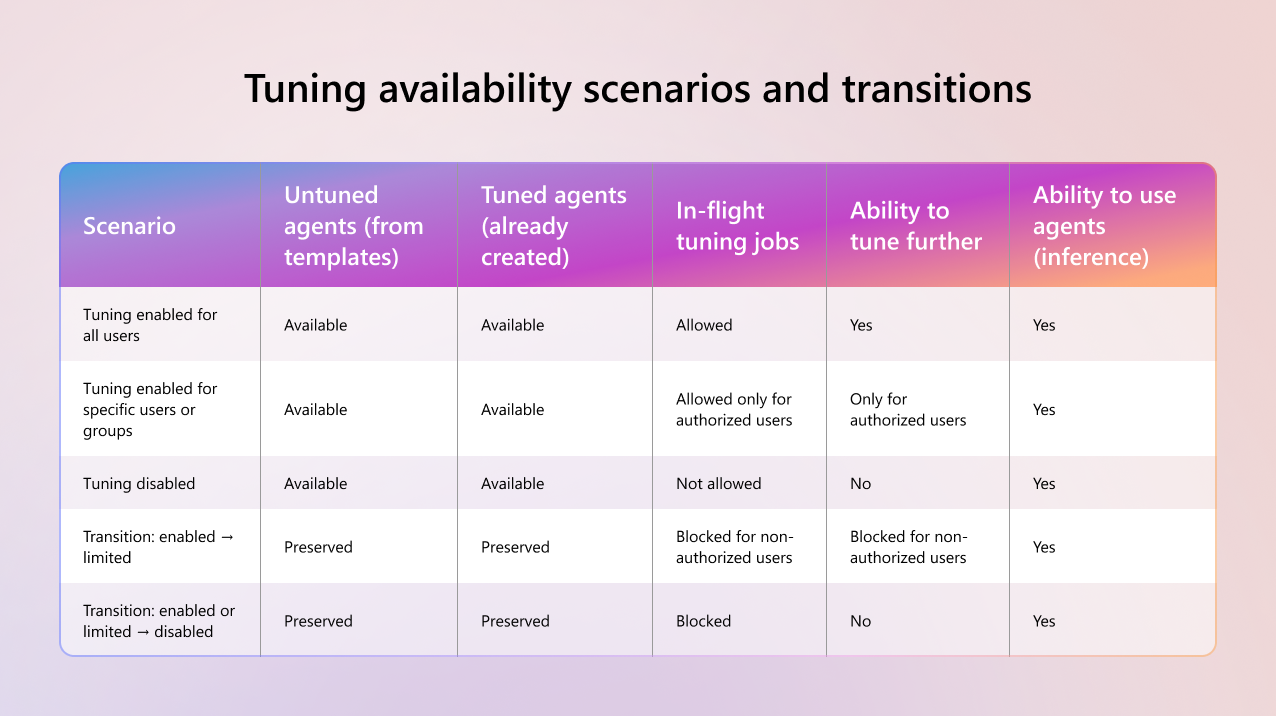
Tuning availability scenarios and transitions
The following table summarizes how Copilot Tuning behaves across common availability settings and transitions.
| Scenario | Untuned agents (from templates) | Tuned agents (already created) | In-flight tuning jobs | Ability to tune further | Ability to use agents (inference) |
|---|---|---|---|---|---|
| Tuning enabled for all users | Available | Available | Allowed | Yes | Yes |
| Tuning enabled for specific users or groups | Available | Available | Allowed only for authorized users | Only for authorized users | Yes |
| Tuning disabled | Available | Available | Not allowed | No | Yes |
| Transition: enabled → limited | Preserved | Preserved | Blocked for non-authorized users | Blocked for non-authorized users | Yes |
| Transition: enabled or limited → disabled | Preserved | Preserved | Blocked | No | Yes |
Request access flow
When tuning is enabled for specific users or groups, users without access can submit a request from within the product. Requests include a business justification and appear in the Microsoft 365 admin center for review.
Admins can approve or deny requests and control whether access is granted temporarily or on an ongoing basis.
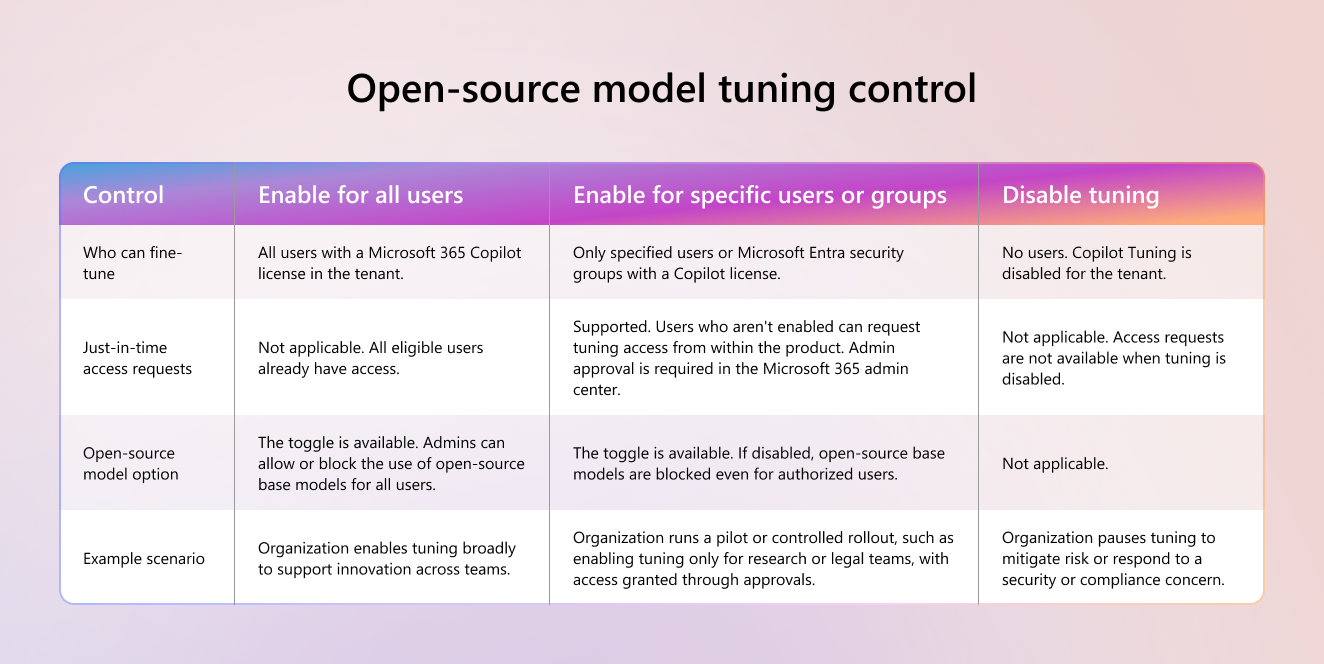
Open-source model tuning control
Copilot Tuning includes a dedicated control that allows admins to enable or disable the use of open-source or external base models.
This setting provides more governance for organizations that want to restrict tuning to Microsoft-managed models only. When disabled, users can still tune agents, but only with supported proprietary models.
The following table summarizes the Copilot Tuning admin controls.
| Control | Enable for all users | Enable for specific users or groups | Disable tuning |
|---|---|---|---|
| Who can fine-tune | All users with a Microsoft Copilot license in the tenant. | Only specified users or Microsoft Entra security groups with a Copilot license. | No users. Copilot Tuning is disabled for the tenant. |
| Just-in-time access requests | Not applicable. All eligible users already have access. | Supported. Users who aren't enabled can request tuning access from within the product. Admin approval is required in the Microsoft 365 admin center. | Not applicable. Access requests are not available when tuning is disabled. |
| Open-source model option | The toggle is available. Admins can allow or block the use of open-source base models for all users. | The toggle is available. If disabled, open-source base models are blocked even for authorized users. | Not applicable. |
| Example scenario | Organization enables tuning broadly to support innovation across teams. | Organization runs a pilot or controlled rollout, such as enabling tuning only for research or legal teams, with access granted through approvals. | Organization pauses tuning to mitigate risk or respond to a security or compliance concern. |
Agent visibility and lifecycle management
Fine-tuned agents appear as tuned agents in the Agent 365 portal. This portal provides a centralized inventory of all tuned agents in the tenant.
From the Agent 365 portal, admins can:
- View all tuned agents.
- Block or disable an agent to immediately restrict usage.
- Delete a tuned agent if it becomes obsolete or problematic.
Deleting a tuned agent also deletes the associated fine-tuned model and snapshot data.
Admins can change tuning availability settings at any time without service downtime. User interfaces update dynamically to reflect current access.
Eligibility requirements
Copilot Tuning is an advanced capability. During public preview, only tenants with at least 5,000 Microsoft Copilot licenses are eligible.
- If a tenant meets the eligibility threshold, Copilot Tuning appears in the admin center and is enabled by default.
- If a tenant doesn't meet the threshold, Copilot Tuning settings aren't available.
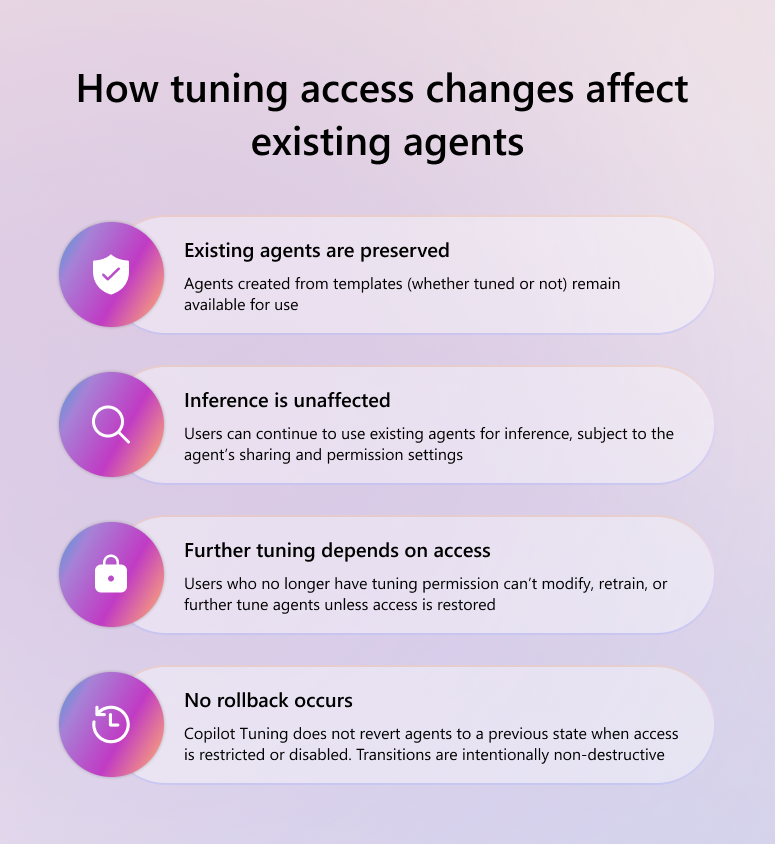
How tuning access changes affect existing agents
Changes to Copilot Tuning availability are forward-looking. Adjusting who can tune agents-or disabling tuning entirely-does not remove or break agents that already exist.
The following behaviors apply when tuning access is changed:
Existing agents are preserved.
Agents created from templates (whether tuned or not) remain available for use.Inference is unaffected.
Users can continue to use existing agents for inference, subject to the agent's sharing and permission settings.Further tuning depends on access.
Users who no longer have tuning permission can't modify, retrain, or further tune agents unless access is restored.No rollback occurs.
Copilot Tuning does not revert agents to a previous state when access is restricted or disabled. Transitions are intentionally non-destructive.
Data commitments, privacy, and compliance
Copilot Tuning adheres to Microsoft 365 data protection, privacy, and compliance commitments.
Data handling during tuning
When a user performs Copilot Tuning, only the SharePoint content explicitly selected by the user is used as training data. For tuning purposes, the system creates a snapshot copy of that data.
- Snapshot data is stored in a tenant-isolated Microsoft 365 environment.
- Snapshot data is used solely for tuning and isn't shared across tenants.
- Snapshot data enables efficient tuning without repeatedly accessing live content.
During public preview, snapshot data is retained for as long as the tuned agent remains active. When a tuned agent is deleted, its associated snapshot data is also deleted. Data used for tuning is subject to a maximum retention period of two years.
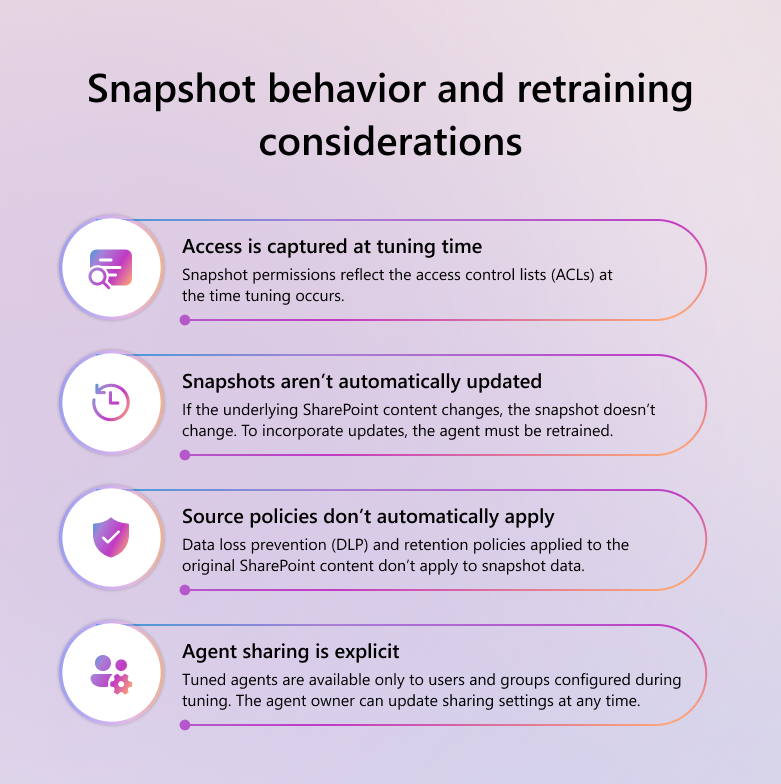
Snapshot behavior and retraining considerations
When an agent is tuned, the system creates a snapshot of the selected SharePoint content. That snapshot has the following characteristics:
Access is captured at tuning time.
Snapshot permissions reflect the access control lists (ACLs) at the time tuning occurs.Snapshots aren't automatically updated.
If the underlying SharePoint content changes, the snapshot doesn't change. To incorporate updates, the agent must be retrained.Source policies don't automatically apply.
Data loss prevention (DLP) and retention policies applied to the original SharePoint content don't apply to snapshot data.Agent sharing is explicit.
Tuned agents are available only to users and groups configured during tuning. The agent owner can update sharing settings at any time.
Data residency
Copilot Tuning isn't enabled by default for tenants with Advanced Data Residency (ADR) commitments during public preview.
- ADR tenants that want to use Copilot Tuning must formally waive ADR requirements through their Microsoft account team.
- When ADR is waived, snapshot data is stored in the nearest macro region within a tenant-isolated Microsoft 365 environment.
For EU-based tenants, Copilot Tuning respects EU Data Boundary commitments. During public preview, EU tenant data and traffic remain within the EU.
Data residency scope and limitations
Copilot Tuning follows Microsoft 365 data residency commitments at the macro region level. During public preview, the following considerations apply:
Macro region storage
Training, inference, and snapshot data are stored in the macro region associated with the tenant. For tenants in local regions, data is stored in the nearest macro region.EU Data Boundary
For EU-based tenants, Copilot Tuning respects EU Data Boundary commitments. Tenant data and traffic remain within the EU during tuning and inference.Advanced Data Residency (ADR)
Copilot Tuning isn't covered by Advanced Data Residency (ADR) or ADR for Education during public preview. Tenants with ADR that want to use Copilot Tuning must request access through their Microsoft account team.Multi-Geo
Multi-Geo data residency commitments don't apply to Copilot Tuning during public preview.
Admins should evaluate these considerations carefully.
GDPR and data subject rights
Microsoft acts as a data processor for content used in Copilot Tuning. The customer remains the data controller and is responsible for determining which data is used for tuning.
Copilot Tuning supports common data subject rights, including:
- Discovery: Admins can view all tuned agents in the Agent 365 portal.
- Deletion: Deleting a tuned agent removes the associated model and snapshot data.
- Access and export: Customers can request metadata about snapshot data through Microsoft Customer Support.
GDPR, data subject rights, and DPIA considerations
Microsoft acts as a data processor for content used in Copilot Tuning. The customer remains the data controller and is responsible for determining which data is appropriate for tuning.
Copilot Tuning supports common data subject rights:
Discovery
Admins can view all tuned agents in the Agent 365 portal.Deletion
Deleting a tuned agent removes the associated fine-tuned model and snapshot data.Access and export
Customers can request metadata related to snapshot data through Microsoft Customer Support.
Copilot Tuning doesn't inherently require a data protection impact assessment (DPIA).
Data protection impact assessments
Copilot Tuning doesn't inherently require a data protection impact assessment (DPIA). Whether a DPIA is required depends on factors such as:
- The type of data used for tuning.
- The scale of processing.
- Regulatory or industry-specific requirements.
- Whether tuned agents are used for automated decision-making.
Customers are responsible for determining whether a DPIA is required.
Microsoft access to customer data
Microsoft doesn't have default access to customer data used for tuning or stored at rest. Any access requires explicit customer approval through Customer Lockbox and is limited to approved support scenarios.