Note
Access to this page requires authorization. You can try signing in or changing directories.
Access to this page requires authorization. You can try changing directories.
This article provides information about the primitive data types that are supported in Electronic reporting (ER) expressions. Here is a list of the primitive data types:
Boolean
The boolean primitive data type contains a value that is evaluated as either true or false. You can use the reserved literal keywords True and False wherever a boolean expression is expected. The default value is false.
The internal representation of a boolean is an integer. The integer value 0 (zero) is evaluated as false, and all other integer values are evaluated as true. When you validate a configured expression that returns a boolean in the ER formula designer, the test result pane presents 0 (zero) when an expression returns false. Otherwise, the test result pane presents 1.
A boolean has no implicit conversions. However, you can use the TEXT function to explicitly converts a boolean to a string:
- The false value is converted to the text string False.
- The true value is converted to the text string True.
Note
This conversion doesn't depend on the provided language and culture context.
Comparison operators are the only type of operator that can be used with the boolean data type. The following operators can be used to compare two boolean values: <> and =.
Date
The date primitive data type contains the day, month, and year. Dates can be initiated by using the following functions:
The date data type can hold dates between January 1, 1900, and December 31, 2154. The default value is null, and the internal representation is the date January 1, 1900.
A date has no implicit conversions. However, you can use the following explicit conversion functions:
The ADDDAYS function lets you add and subtract days from dates. In this way, you can move the date a specific number of days into the future and the past. The DAYS function lets you subtract dates from each other and calculate the difference in days. For more information about the transformation of date values, see List of ER functions in the Date and time category.
Comparison operators are the only type of operator that can be used with the date data type. The following operators can be used to compare two date values: <>, <, <=, =, >, and >=.
Datetime
The datetime primitive data type combines the date type and a value that represents the time that has passed since midnight. The time is expressed in hours, minutes, seconds, and fractions of a second. A datetime value also holds information about the time zone.
The datetime data type can hold dates between January 1, 1900 (1900-01-01T00:00:00.0000000+00:00 in the round-trip format) and December 31, 2154 (2154/12/31T11:59:59.9999999+00:00 in the round-trip format). The smallest unit of time in a datetime is one ten millionth of a second.
Note
When the hh specifier is used for hours, time values above 12:59:59:9999999 can't be interpreted as valid times.
When the HH specifier is used for hours, time values above 23:59:59:9999999 can't be interpreted as valid times.
The default value is null, and the internal representation is the date January 1, 1900 (1900-01-01T00:00:00.0000000+00:00 in the round-trip format).
Datetimes can be initiated by using the following functions:
A datetime has no implicit conversions. However, you can use the following explicit conversion functions:
For more information about the transformation of datetime values, see List of ER functions in the Date and time category.
Comparison operators are the only type of operator that can be used with the datetime data type. The following operators can be used to compare two datetime values: <>, <, <=, =, >, and >=.
Enumeration
The enumeration primitive data type is a list of literals. You can use enumerations that are defined in the application source code. You can also introduce your own enumerations in the ER data model and ER format components.
An application enumeration can be used in expressions of any ER model mapping and ER format.
The following illustration shows how you can add the CustVendCorrectiveReasonCode model enumeration to the editable ER data model.

A model enumeration can be used in expressions of any ER model mapping and ER format that were created under a data model where the enumeration was introduced.
The following illustration shows how you can add the List of Natura reverse charge subcategories format enumeration to the editable ER format.
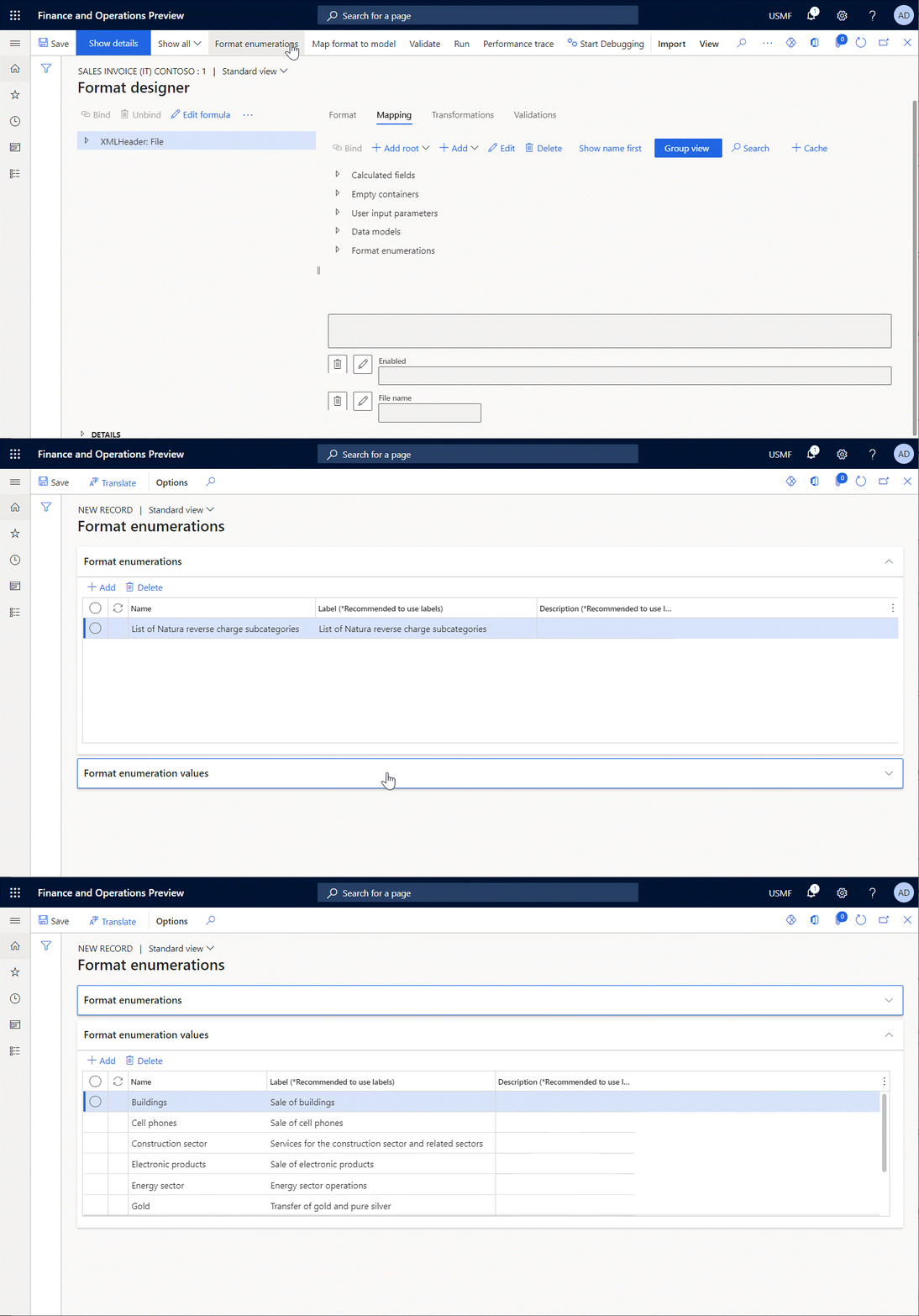
A format enumeration can be used only in expressions of the ER format where the enumeration was introduced.
You must use the appropriate type of ER data sources to bring a specific enumeration to a configured ER component as a constant or as a value that the user who is running an ER solution defined in the dialog box at runtime.
Application enumerations can be accessed by using the Dynamics 365 for Operations \ Enumeration and General \ User input parameters data sources. The following illustration shows how you can add to the editable ER format the appenumNoYes and uipNoYes data sources that refer to the NoYes application enumeration.

Data model enumerations can be accessed by using the Data model \ Enumeration and Data model \ Enumeration user input parameters data sources. The following illustration shows how you can add to the editable ER format the CustVendCorrectiveReasonCode data source that refers to the CustVendCorrectiveReasonCode data model enumeration.
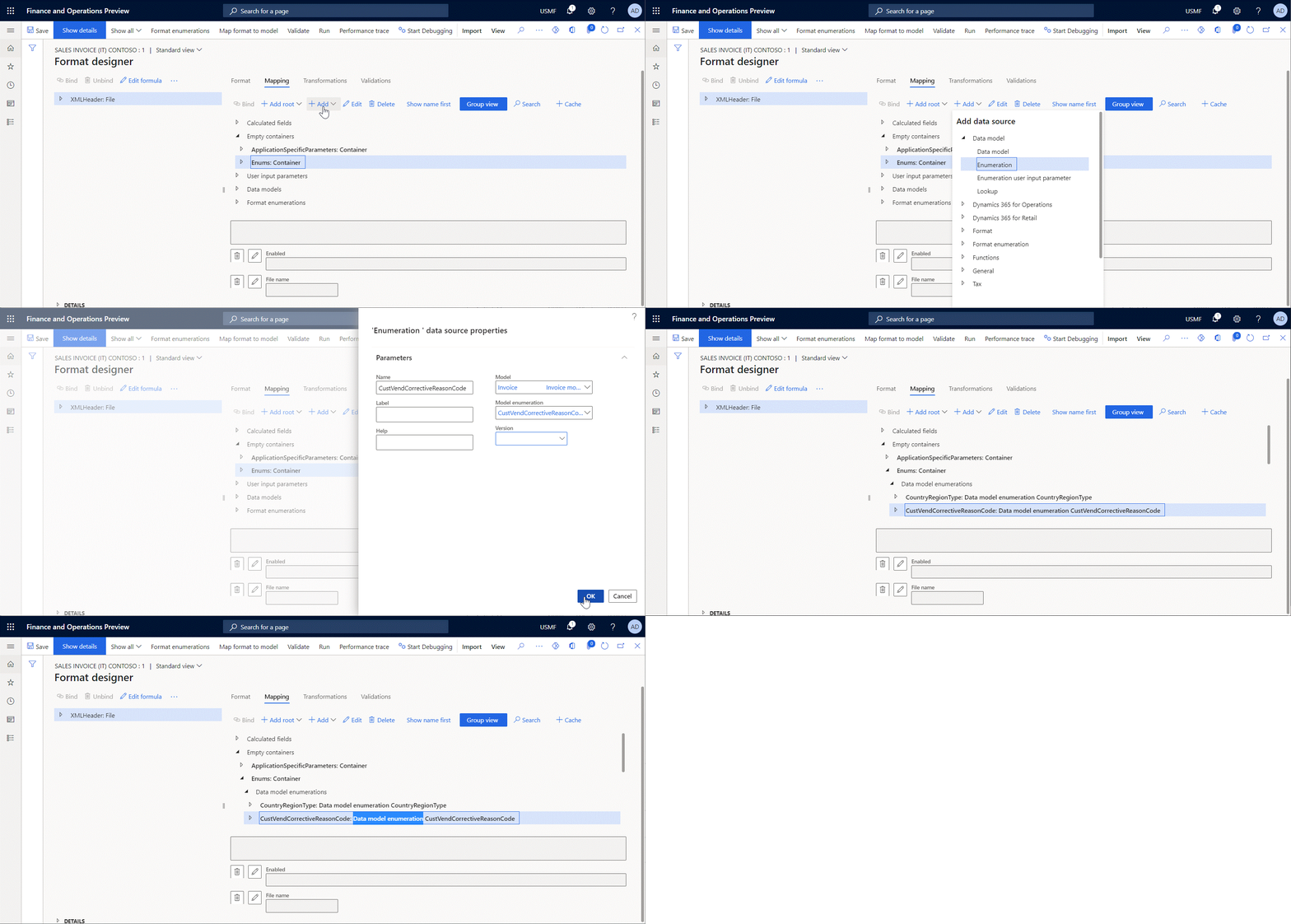
Format enumerations can be accessed by using the Format \ Enumeration and Format \ Enumeration user input parameters data sources. The following illustration shows how you can add to the editable ER format the NaturaReverseCharge data source that refers to the Natura reverse charge subcategories format enumeration.

An enumeration has no implicit conversions. However, you can use the TEXT conversion function to convert an enumeration to a text string. This conversion isn't language dependent. To learn how you can associate an enumeration value with the appropriate language-specific labels, see the usage examples for the LISTOFFIELDS and GETENUMVALUEBYNAME functions.
Comparison operators are the only type of operator that can be used with the enumeration data type. The following operators can be used to compare two enumeration values: <> and =.
Guid
The guid primitive data type holds a globally unique identifier (GUID) value. A GUID is a value that can be used across all computers and networks, wherever a unique identifier is required. It's unlikely that the number will be duplicated. A valid GUID meets all the following specifications:
- There must be 32 hexadecimal digits.
- In addition, there must be four dash characters that are embedded at the following locations: 8-4-4-4-12.
- In addition, optional braces {} can be added at the beginning and end of the string. For example, both {2CDB0FE7-D7B3-4938-A0F0-FE28FB8FE212} and 2CDB0FE7-D7B3-4938-A0F0-FE28FB8FE212 are valid GUID strings.
- Therefore, there must be a total of 36 or 38 characters, depending on whether braces are added.
- The letters that are used as hexadecimal digits can be uppercase (A–F), lowercase (a–f), or mixed.
The following explicit conversion functions can be used:
Comparison operators are the only type of operator that can be used with the guid data type. The following operators can be used to compare two guid values: <> and =.
Integer
The integer primitive data type represents a number that has no decimal places. Integers are used as control variables in repetitive statements or as indexes in record lists.
An integer literal is the integer as it's entered directly in an ER expression (formula), such as 12345. An integer is 32-bits wide. The default value is 0, and the internal representation is a long number. An integer is automatically converted to a real.
Additionally, the following explicit conversion functions can be used:
The range of an integer is [-2,147,483,647 : 2,147,483,647]. All integers of this range can be used as literals.
All comparison and mathematical operators can be used with the integer data type.
Int64
The int64 primitive data type represents a number that has no decimal places. Int64 values are used as control variables in repetitive statements or as record identifiers.
An int64 is 64-bits wide. The default value is 0, and the internal representation is a long number. An int64 is automatically converted to a real.
Additionally, the following explicit conversion functions can be used:
The range of an int64 is [-9,223,372,036,854,775,807 : 9,223,372,036,854,775,807].
All comparison and mathematical operators can be used with the int64 data type.
Real
The real primitive data type can hold decimal values in addition to integers. You can use decimal literals anywhere that a real is expected. A decimal literal is the decimal as it's entered directly in code, such as 2.19.
Note
In ER expressions, a period (.) is always used as the decimal separator.
Reals can be used in all expressions, and they can be used with both comparison and arithmetic operators. A real has a precision of 16 significant digits. The default value for a real is 0.0, and the internal representation is a binary-coded digital (BCD) number. The BCD encoding enables exact representations of values that are multiples of 0.1. The range of a real variable is -(10)127 through (10)127. All reals in this range can be used as literals in ER expressions.
A real has no implicit conversions. However, you can use the following functions to explicitly convert a real to other data types and other data types to a real:
All comparison and mathematical operators can be used with the real data type.
String
The string primitive data type represents a sequence of characters that are used as texts, account numbers, addresses, and telephone numbers.
String literals are characters that are enclosed in quotation marks (""). String literals can be used wherever string values are expected in ER expressions. You can use strings in logical expressions, such as comparisons. You can also concatenate string values by using the & operator or the CONCATENATE function.
Note
If you concatenate two string values, and you want the resulting string to span more than one line, use the line break separator between the values. For the TEXT output, this separator can be a character that is generated by using the CHAR(10) or CHAR(13) expression. For HTML, it can be the <br> tag.
The default value for a string is a blank text string that has no characters, and the internal representation is a list of characters.
There are no automatic conversions for strings. However, the following explicit conversion functions can be used:
For more about the transformation of string values, see List of ER functions of the text category.
A string can hold an indefinite number of characters.
All comparison operators can be used with the string data type.