Note
Access to this page requires authorization. You can try signing in or changing directories.
Access to this page requires authorization. You can try changing directories.
In this tutorial step, you load a bounded customer-signals result from an eligible Fabric source into Fabric HorizonDB. The Copy job writes to a staging table. You validate the load, and then publish it to a local serving table.
Important
Fabric HorizonDB is in public preview. Capabilities, limits, and behavior might change before general availability. Public preview doesn't promise incremental change capture, source-delete propagation, conflict handling, schema evolution, scheduling, checkpoints, or automatic replay for this destination. For more information, see Microsoft Fabric preview features.
Prerequisites
Reuse
dbo.customer_signalsincontoso-signals-warehouse, created in the previous step, with these columns:Column Required value customer_idA value that matches a customer in horizon_sample.customers.risk_scoreA numeric value from 0 through 100. recommended_actionA nonempty action for the customer. calculated_atThe source calculation timestamp. load_batch_idA stable identifier for this bounded load. Have permission to read the source and create a Copy job.
Sign in as the database creator for the PostgreSQL setup and Copy job destination connection. Other users and principals can't connect in the current preview.
Use a development or test source. Don't use sensitive production data for the tutorial.
If you skipped the federation step, complete Create a warehouse source first. Don't create the source table in the mirrored SQL analytics endpoint, which is read-only.
Create staging and serving tables
On the contoso-orders-db PostgreSQL endpoint, run:
CREATE SCHEMA IF NOT EXISTS analytics_ops;

CREATE TABLE IF NOT EXISTS analytics_ops.customer_signals (
    customer_id bigint PRIMARY KEY,
    risk_score numeric(5, 2) NOT NULL,
    recommended_action text NOT NULL,
    calculated_at timestamptz NOT NULL,
    loaded_at timestamptz NOT NULL DEFAULT now()
);

CREATE TABLE IF NOT EXISTS analytics_ops.customer_signals_stage (
    customer_id bigint NOT NULL,
    risk_score numeric(5, 2) NOT NULL,
    recommended_action text NOT NULL,
    calculated_at timestamptz NOT NULL,
    load_batch_id text NOT NULL,
    loaded_at timestamptz NOT NULL DEFAULT now()
);
The Copy job writes to customer_signals_stage. Application queries use customer_signals only after validation and publication.
Prepare the bounded load
Empty the staging table immediately before the tutorial run:
TRUNCATE TABLE analytics_ops.customer_signals_stage;
Don't truncate the serving table.
Create and run the Copy job
Follow the released Copy job creation guidance, and configure this bounded load:
Create a Copy job named
load-contoso-customer-signals.Select the
contoso-signals-warehousewarehouse anddbo.customer_signalstable.Select only
customer_id,risk_score,recommended_action,calculated_at, andload_batch_id.Choose the Azure Database for PostgreSQL destination connector.
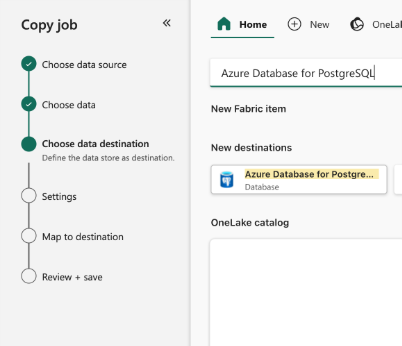
Copy the PostgreSQL host from the
contoso-orders-dbitem's Visual Studio Code pane, and use databasepostgres.Set Authentication kind to Organizational account, and sign in as the database creator. Keep Use encrypted connection selected.
Select Full copy on the read-method page.
Select
analytics_ops.customer_signals_stageas the destination table.Map each source column to the same-named destination column.
Leave
loaded_atunmapped so its PostgreSQL default supplies the load time, and confirm thatcalculated_atrepresents UTC.Select Save + Run.
Monitor the run, and record its run ID, row counts, duration, and errors.
A successful Copy job means rows reached staging. It doesn't prove that the rows are valid or published.
Validate the staged data
Replace <batch-id> with the batch identifier supplied by the source (preview-demo-001 for the tutorial warehouse):
SELECT
    count(*) AS staged_rows,
    count(DISTINCT customer_id) AS distinct_customers,
    min(calculated_at) AS oldest_calculation,
    max(calculated_at) AS newest_calculation
FROM analytics_ops.customer_signals_stage
WHERE load_batch_id = '<batch-id>';
Check duplicates and values that don't match the tutorial contract:
SELECT
    stage.customer_id,
    count(*) AS occurrences
FROM analytics_ops.customer_signals_stage AS stage
WHERE stage.load_batch_id = '<batch-id>'
GROUP BY stage.customer_id
HAVING count(*) > 1;
SELECT
    stage.customer_id,
    stage.risk_score,
    stage.recommended_action,
    stage.calculated_at
FROM analytics_ops.customer_signals_stage AS stage
LEFT JOIN horizon_sample.customers AS customer
  ON customer.customer_id = stage.customer_id
WHERE stage.load_batch_id = '<batch-id>'
  AND (
      customer.customer_id IS NULL
      OR stage.risk_score NOT BETWEEN 0 AND 100
      OR btrim(stage.recommended_action) = ''
  );
Don't publish the batch unless staged_rows and distinct_customers both match the expected source customer count (3 for the unchanged tutorial source), and both validation queries return no rows.
Publish the latest values
Run:
BEGIN;

INSERT INTO analytics_ops.customer_signals (
    customer_id,
    risk_score,
    recommended_action,
    calculated_at,
    loaded_at
)
SELECT DISTINCT ON (stage.customer_id)
    stage.customer_id,
    stage.risk_score,
    stage.recommended_action,
    stage.calculated_at,
    now()
FROM analytics_ops.customer_signals_stage AS stage
WHERE stage.load_batch_id = '<batch-id>'
ORDER BY
    stage.customer_id,
    stage.calculated_at DESC
ON CONFLICT (customer_id) DO UPDATE
SET
    risk_score = EXCLUDED.risk_score,
    recommended_action = EXCLUDED.recommended_action,
    calculated_at = EXCLUDED.calculated_at,
    loaded_at = EXCLUDED.loaded_at
WHERE analytics_ops.customer_signals.calculated_at <= EXCLUDED.calculated_at;

COMMIT;
The stable customer ID and ON CONFLICT clause prevent duplicate serving rows when you rerun the publish step for the same validated batch. Confirm that the batch is current before you publish it.
Query the operationalized data
SELECT
    customer.customer_id,
    customer.customer_name,
    customer.segment,
    signal.risk_score,
    signal.recommended_action,
    signal.calculated_at
FROM horizon_sample.customers AS customer
JOIN analytics_ops.customer_signals AS signal
  ON signal.customer_id = customer.customer_id
ORDER BY signal.risk_score DESC, customer.customer_name;
This query reads local PostgreSQL tables. Its freshness is determined by the Copy job and publish process.
Expected outcome
The load-contoso-customer-signals Copy job loads a bounded batch into staging, validation succeeds, and analytics_ops.customer_signals contains the published values for matching Contoso tutorial customer IDs.