Note
Access to this page requires authorization. You can try signing in or changing directories.
Access to this page requires authorization. You can try changing directories.
As a data consumer, use the Share Subscription created when you accepted an IQ Sharing invitation to review the Share's status, expiration, and shared items.
Note
IQ Sharing is currently in preview. This preview is provided without a service-level agreement and isn't recommended for production workloads. Certain features might not be supported or might have constrained capabilities. For more information, see Supplemental Terms of Use for Microsoft Azure Previews.
View Share information
You can also find your Share Subscriptions in the OneLake catalog.
Open the workspace where you accepted the Share.
Open the Share Subscription.
Review the Share name and Shared with you label.
Review the Shared items and Configuration cards. The configuration card displays the required expiration date.
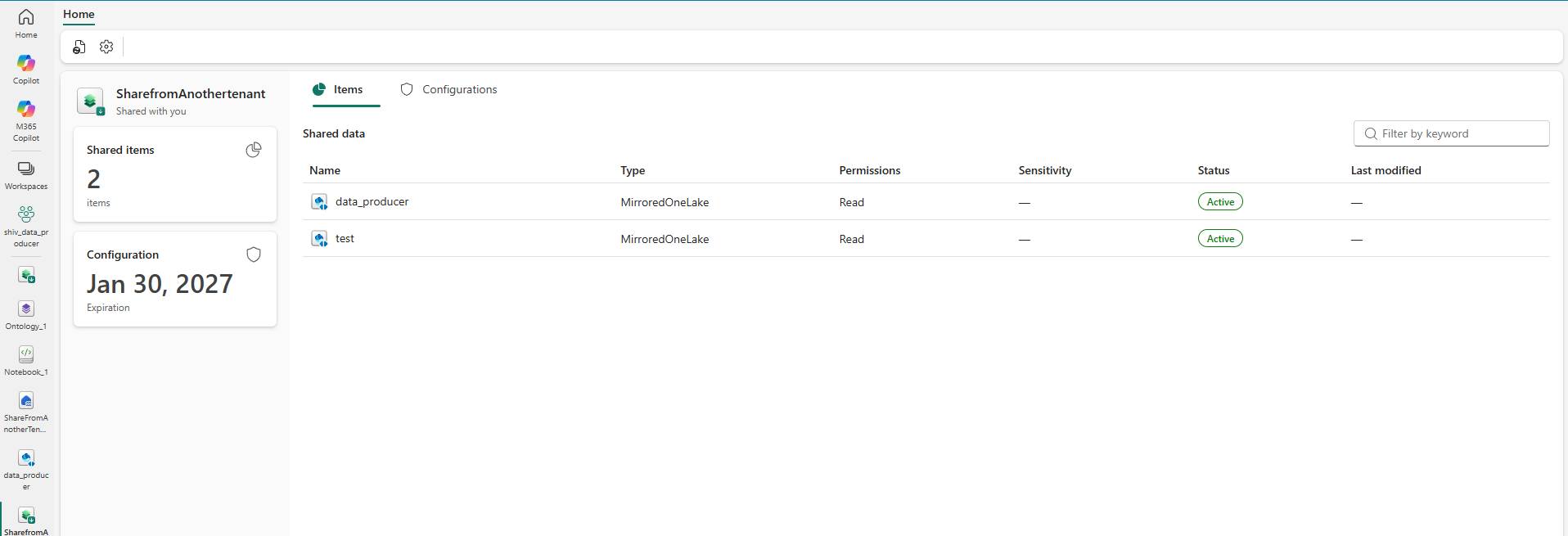
View the items included in the Share
In the Share Subscription, select Items.
Review each entry under Shared data. The list shows the item name, type, permission, sensitivity, status, and last-modified information.
Each supported shared item is represented in the consumer workspace by a OneLake Mirrored Item.
Delete or unsubscribe
Delete the Share Subscription to unsubscribe from the Share. Fabric removes all shared data and related items from the data consumer's workspace. The data producer isn't notified that the consumer deleted the data or unsubscribed.