Note
Access to this page requires authorization. You can try signing in or changing directories.
Access to this page requires authorization. You can try changing directories.
IQ Sharing is the Fabric feature for sharing data and context across tenants. As a data producer, you create a Share to select what to share and who can receive it. When a recipient accepts your invitation, Fabric creates a Share Subscription in their workspace to manage their access to the shared items. Share and Share Subscription are the item names you see in Fabric.
The current preview supports sharing Fabric data items, such as lakehouses, warehouses, and mirrored items. You can share context in Markdown (.md) files stored in a lakehouse. The data consumer doesn't need an identity in the data producer's tenant, and the shared data stays in the producer's tenant instead of being copied.
Note
IQ Sharing is currently in preview. This preview is provided without a service-level agreement and isn't recommended for production workloads. Certain features might not be supported or might have constrained capabilities. For more information, see Supplemental Terms of Use for Microsoft Azure Previews.
Terminology
| Term | Definition |
|---|---|
| Data producer | The organization or user that owns the source item, creates and manages the Share, and controls access to the shared data. |
| Data consumer | The person or organization that reviews an invitation and accepts a Share into a workspace in their Fabric tenant. |
| Share | The producer-side Fabric item that identifies the shared items, recipients, expiration configuration, and invitation. The data producer creates and manages this item. |
| Share Subscription | The consumer-side Fabric item created when a data consumer accepts a Share. It provides information about the Share and links to the shared items. The data consumer manages this item in the destination workspace. |
| OneLake Mirrored Item | The consumer-side item through which the data consumer accesses the shared item's data. When a Share is accepted, Fabric represents each shared item in the consumer's workspace through a OneLake Mirrored Item. A OneLake Mirrored Item can be created only through IQ Sharing. |
| Invitation | The URL that lets an intended recipient review and accept a Share. The URL alone doesn't replace recipient authorization. |
How IQ Sharing works
The following examples use a lakehouse and warehouse to illustrate the sharing workflow.
Create a Share and accept the invitation
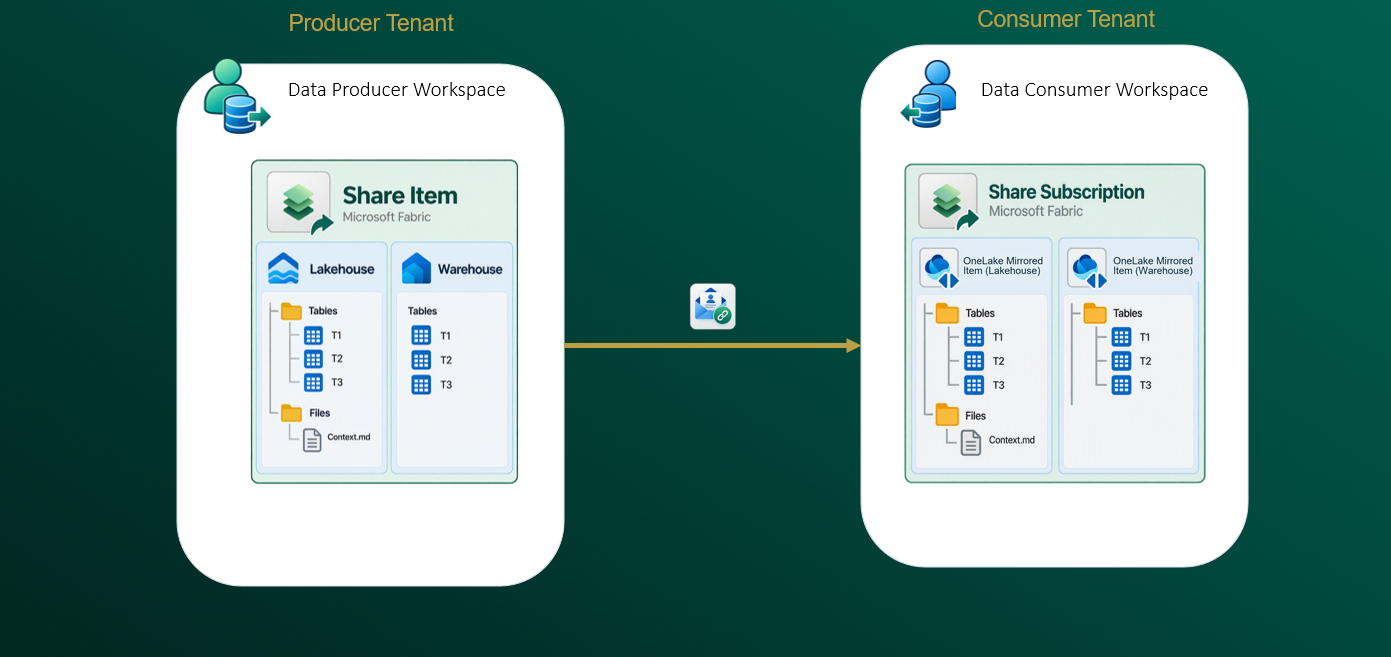
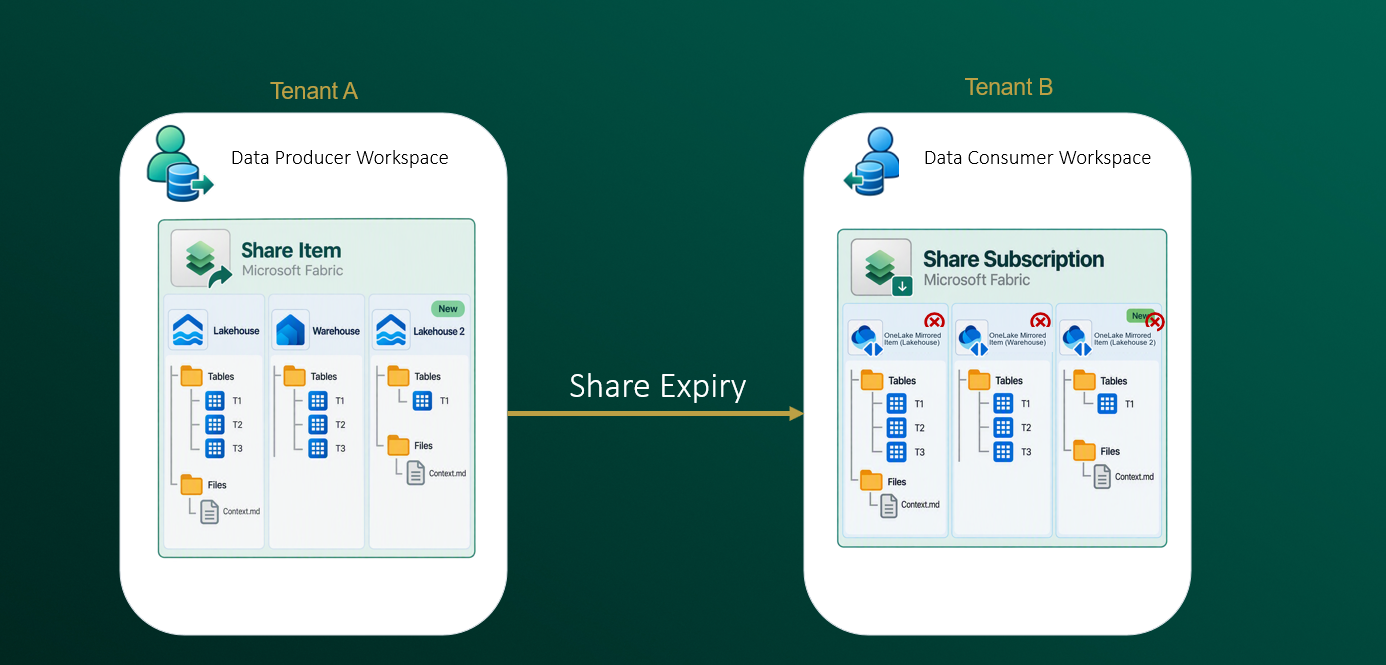
The data producer creates a Share, selects supported Fabric items, adds recipients, and sets the required expiration date. IQ Sharing generates an invitation URL that the producer sends to the intended consumers.
Each invited recipient uses the URL to review the Share and selects a destination workspace in their Fabric tenant. Fabric creates a Share Subscription where the consumer can monitor expiration and view all shared items. Fabric also creates a read-only OneLake Mirrored Item for each shared source item. Each OneLake Mirrored Item contains shortcuts to the shared data. A OneLake Mirrored Item doesn't copy data. Its shortcuts reference the producer's data.
Access data and context in place
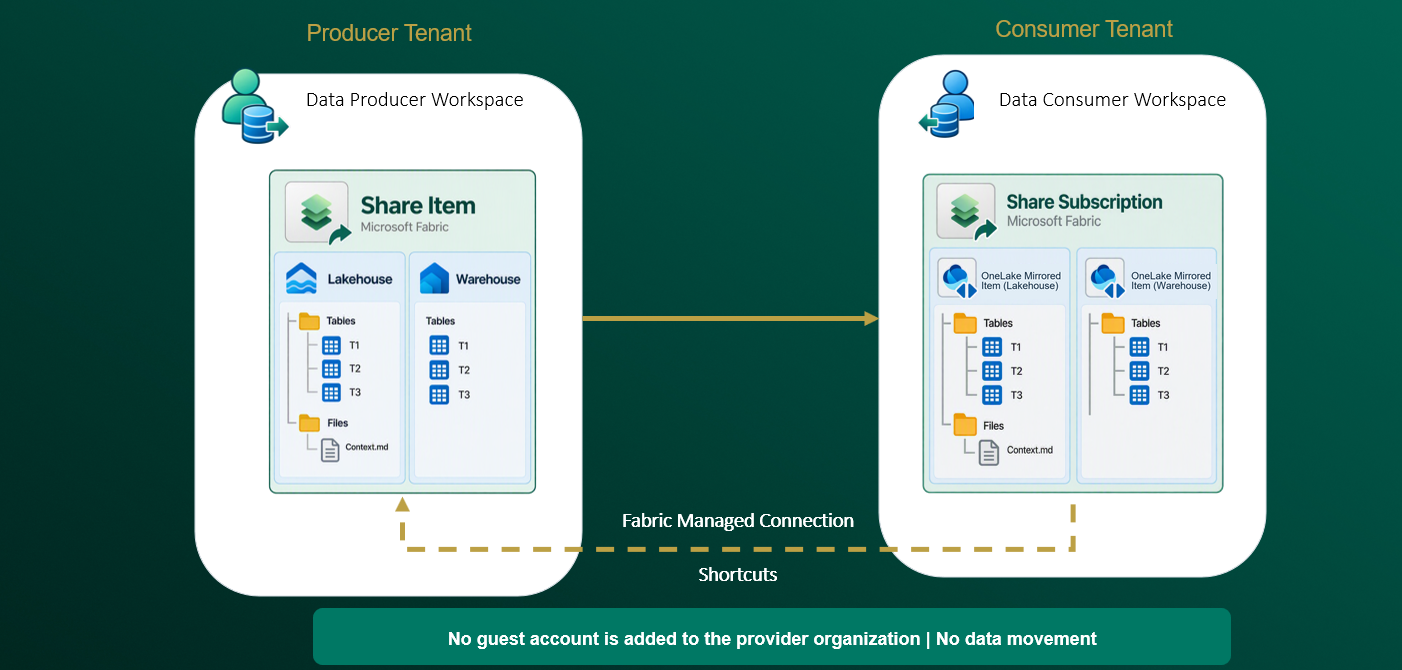
Fabric-managed shortcuts reference the producer's data without copying it to the consumer's tenant. The consumer doesn't need a guest identity in the producer's tenant.
For a shared lakehouse, Markdown files can provide business definitions, descriptions, and usage guidance alongside the data. These files help consumers interpret the data, but they don't automatically configure downstream analytics or data agents.
Receive table updates automatically
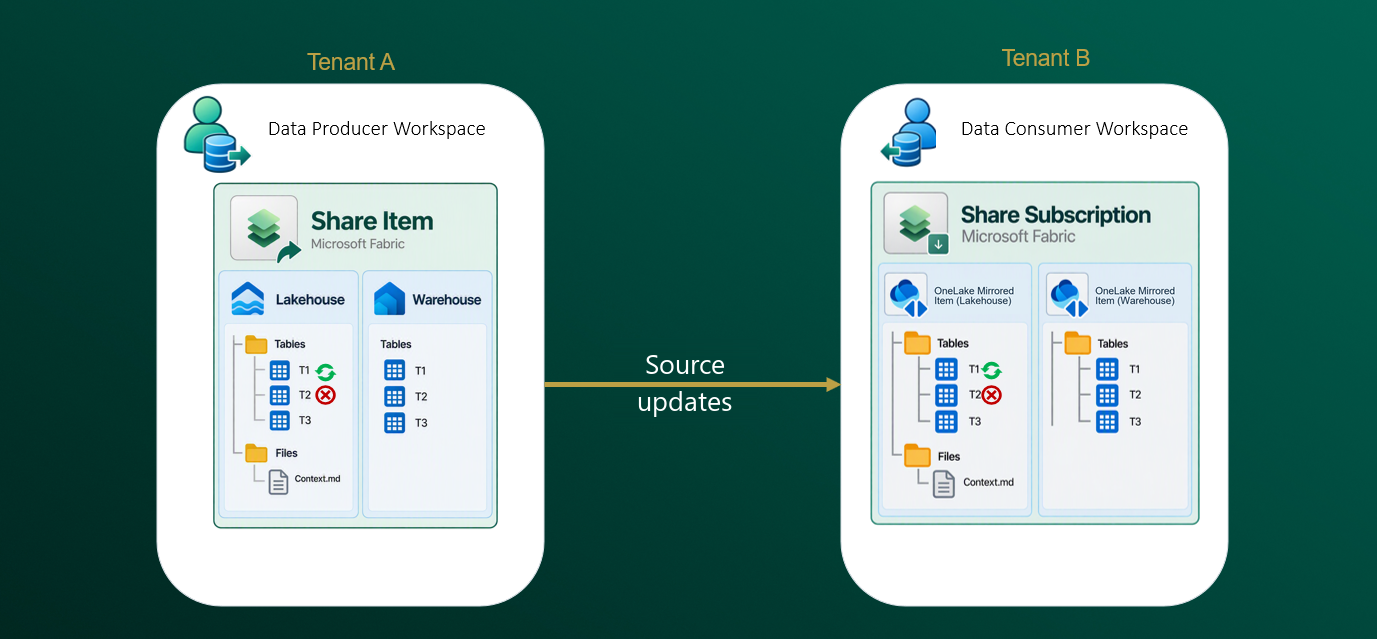
Changes to tables within an already shared item, including added or deleted tables, are automatically reflected for consumers. You don't need a separate export pipeline to propagate these source changes.
Refresh added or removed items
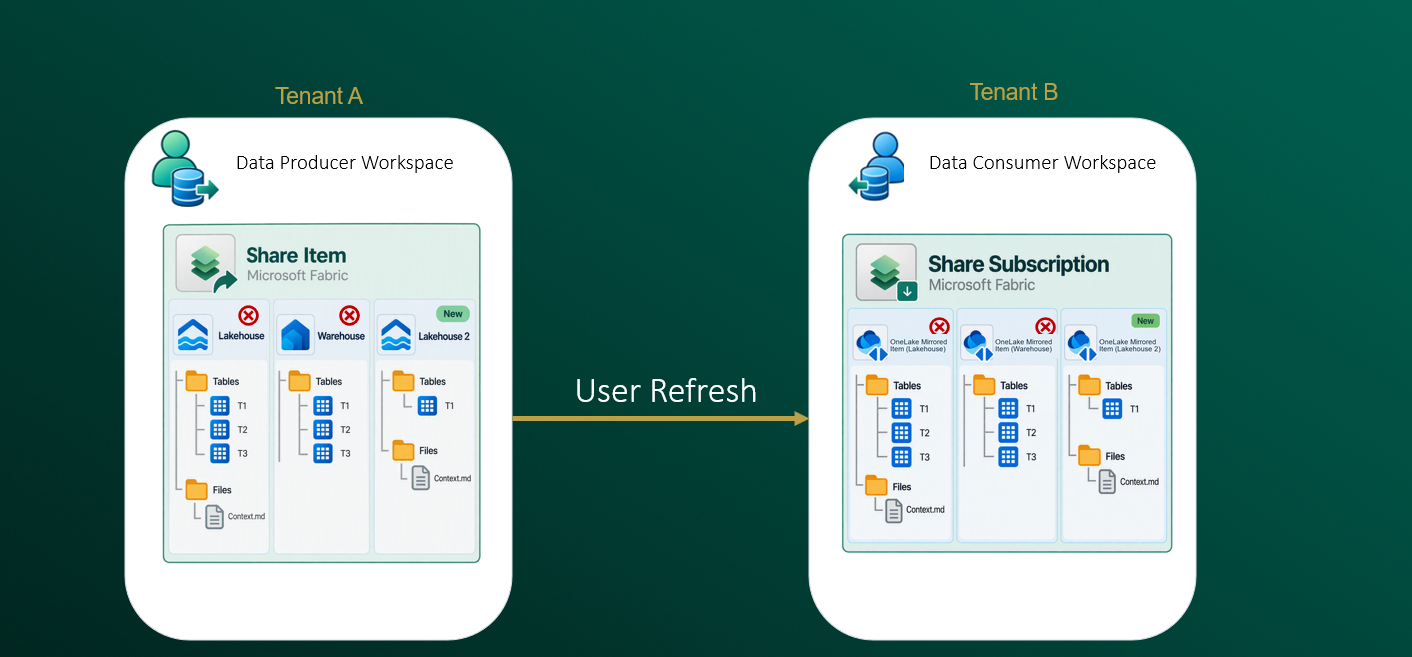
Adding or removing an entire item from a Share differs from changing tables within a shared item. When the producer adds or removes items, the consumer refreshes the Share Subscription to reflect those changes.
Manage recipients and expiration
The producer can add or revoke recipients and set the required Share expiration date. Expiration automatically ends access to the shared data. Revoking a recipient or deleting the Share also removes access.
As a data producer, track who has accepted your Share on the Recipients tab.
These lifecycle changes can interrupt dependent analytics. Plan ownership, access duration, and downstream dependencies before you onboard consumers.
Supported item types
The current preview supports sharing these Fabric item types:
- Lakehouse
- Warehouse
- Mirrored Azure Cosmos DB
- Mirrored Azure Database for MySQL (preview)
- Mirrored Azure Database for PostgreSQL
- Mirrored Azure Monitor
- Mirrored Azure SQL Database
- Mirrored Azure SQL Managed Instance
- Mirrored database
- Mirrored Dataverse
- Mirrored Dremio catalog
- Mirrored Google BigQuery
- Mirrored Google Lakehouse runtime catalog
- Mirrored Oracle
- Mirrored Salesforce
- Mirrored SAP
- Mirrored Sentinel
- Mirrored SharePoint Online List (preview)
- Mirrored Snowflake
- Mirrored SQL Server
- Azure Databricks storage
- Eventhouse
- KQL database
Compare data-sharing options
Fabric provides several ways to share data within and across tenants. Choose an option based on the recipient's tenant, identity, and required sharing unit.
| Consideration | IQ Sharing | External data sharing | Cross-tenant delegated OneLake shortcut | Fabric Share permission |
|---|---|---|---|---|
| Intended scenario | Share data and context with a data consumer in another tenant | Share selected tables or files with a data consumer in another tenant | Create a shortcut when the data consumer has an identity that can access data in the producer's tenant | Give another user permission to an existing Fabric item in the same tenant. This doesn't work across tenants. |
| Identity requirement | The data consumer doesn't need an identity in the producer's tenant | The data consumer doesn't need an identity in the producer's tenant | Requires an organizational account or service principal in the producer's tenant | Requires an organizational account or service principal in the producer's tenant |
| Sharing unit | An entire supported Fabric item | Selected tables and files | Selected folders or tables | The Fabric item |
| Setup model | The data producer creates a Share and shares the invitation URL | The data producer selects External Data Share, creates an external data share, and shares the invitation URL | The data consumer creates a delegated shortcut by using credentials for the producer's tenant | The data producer selects Share on an item and grants permissions to users |
| Consumer experience | Acceptance creates a Share Subscription and a OneLake Mirrored Item for each shared source item in the consumer's workspace | The data consumer accepts the invitation link and selects a lakehouse. This creates a shared table. | The selected data appears as a shortcut in a lakehouse | The user accesses the producer's item directly |
If you already use external data sharing, you can continue to use it. For new implementations that share an entire item, use IQ Sharing if it supports your scenario.
Cost
There's no additional charge to create or manage Shares through IQ Sharing. There's no separate charge to package, distribute, update, or revoke a Share.
Consumers incur usage charges when they query or process shared data. The consumer's Fabric capacity is charged for this usage, including applicable OneLake data-access usage.
Data producers currently don't incur networking charges when data consumers access shared data stored in OneLake. Networking charges might apply in the future, based on the source and destination of each storage access. Microsoft will provide at least 90 days' notice before networking billing starts, including information about pricing, timing, and usage monitoring. For more information, see Microsoft Fabric pricing and Bandwidth pricing.
Key considerations
Before you create or accept a Share through IQ Sharing, consider the following limitations:
- Shared data in other Fabric experiences. You can't use OneLake Mirrored Items directly in ontologies, data agents, semantic models, or notebooks. Create a lakehouse, create OneLake shortcuts to the OneLake Mirrored Item's data, and use that lakehouse in the other Fabric experiences.
- OneLake security rules aren't honored. You can share source items that have OneLake security enabled, but their OneLake security rules aren't honored when consumers access the shared data through IQ Sharing.
- Send invitations yourself. IQ Sharing doesn't send email notifications when you create a Share. Copy the invitation URL and send it to the intended data consumers.
- Allow time for large table counts. When you share a lakehouse or warehouse with thousands of tables, the SQL analytics endpoint can take time to register the table metadata. Allow time for this registration before you query the shared tables through the SQL analytics endpoint.
Region availability
IQ Sharing isn't available in capacities in the following regions. For Fabric region names and workload availability, see Fabric region availability.
| Region |
|---|
| Austria East |
| Belgium Central |
| Denmark East |
| US - East US |
| India - India West |
| Korea South |
| Europe - North Europe |
| Qatar Central |
| UAE Central |
| UK South |
| Europe - West Europe |
| US - West US |