Note
Access to this page requires authorization. You can try signing in or changing directories.
Access to this page requires authorization. You can try changing directories.
Only applies to:  Microsoft Copilot harness
The Copilot harness works toward a goal by reasoning across components such as instructions, knowledge, tools, skills, MCP servers, and connected agents. Nothing is committed in advance—the harness chooses each step at runtime based on available context and previous results rather than following a fixed sequence.
The component model
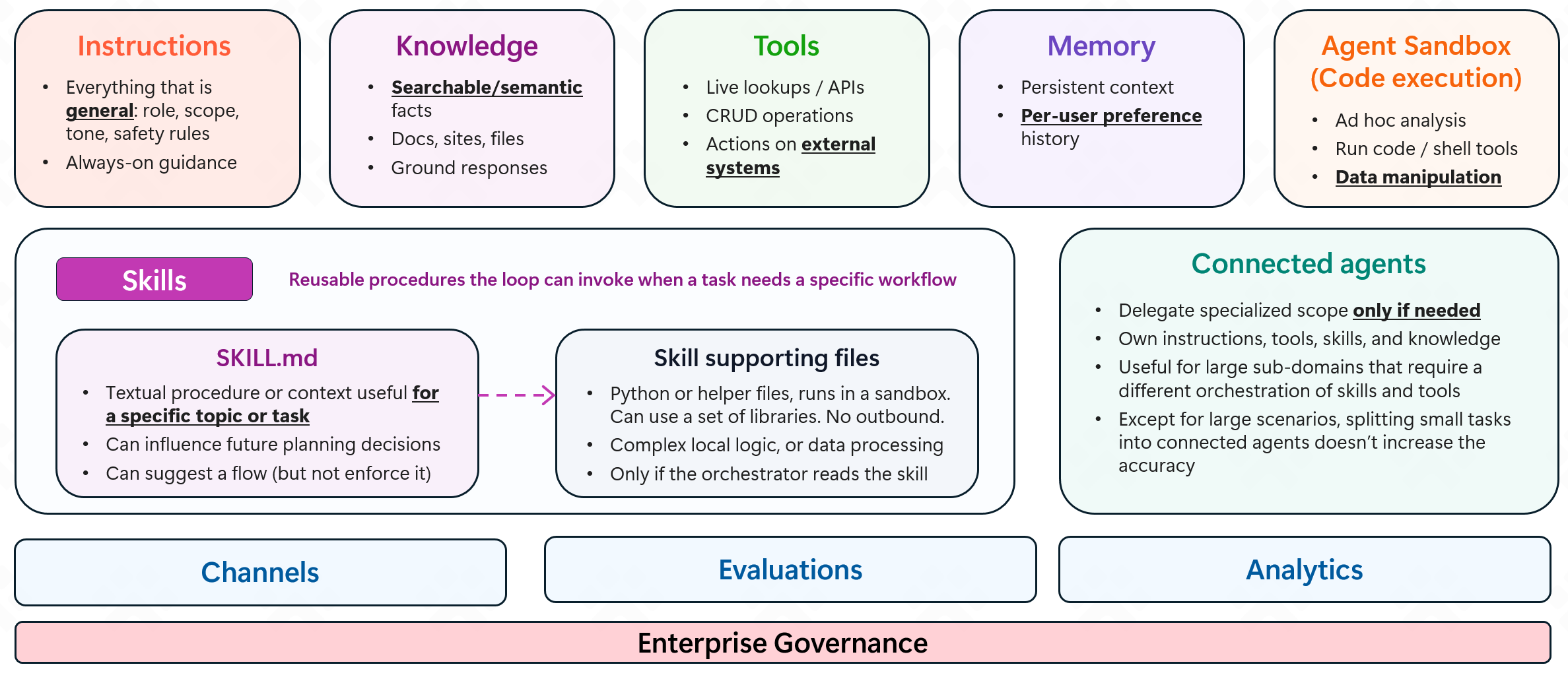
Each component of an agent powered by the Copilot harness has a distinct role in the reasoning loop. Instructions shape behavior, knowledge and tools provide information and actions, skills provide reusable procedures, memory carries context across interactions, the sandbox performs deterministic execution, and connected agents handle specialized domains.
Instructions
Instructions define the agent's role, scope, tone, and safety rules, and they apply on every turn.
Agents on the Copilot harness closely follow your instructions. You don't need to describe every possible situation. Define the goals, constraints, and expected behavior without trying to anticipate every scenario. Excessive prescription is counterproductive for complex tasks where the agent must combine tools and knowledge to find the best path.
Use instructions to tell the agent how to behave:
- Guide tool use when the tool descriptions aren't enough to tell which tool to use, which parameters to fill, or what to check first.
- Provide what it can't infer from common sense, such as your organization's conventions, rules, and context the model doesn't have.
- Set tone and voice and shape response formatting.
- Shape the conversational flow by directing the agent to ask the right questions at the right time.
Instructions load on every turn, so keep them focused on guidance that always applies. Put task-specific procedures in a skill.
Instructions shape behavior, but they don't give the agent new knowledge, access, or capabilities. Before adding an instruction, check whether the agent can access the information it needs and has a tool or skill to perform the action. If not, provide the missing knowledge or connect the right capability. Telling the agent to check a policy it can't retrieve doesn't make the policy available. It only adds tokens to every turn.
Knowledge
Searchable, semantic facts from documents, sites, and files. Sources include SharePoint files and lists, OneDrive documents, uploaded PDF, Word, Excel, and PowerPoint files, public websites, and indexes refreshed through Copilot connectors, such as ServiceNow and Confluence.
The Copilot harness retrieves knowledge differently from the standard harness. The orchestrator retrieves only the knowledge it needs:
- Search knowledge: Run semantic searches across the knowledge sources and get matching snippets back.
- Rank documents: Rank those snippets to decide which documents are genuinely relevant to the task.
- Fetch full files: Download the files into the agent's sandbox container for processing.
- File processing: Pre-process files, caching structure and metadata in the container for fast follow-ups.
The files stay in the sandbox for the rest of the conversation in their processed form, so follow-up questions are answered from what the agent already retrieved. Searches aren't repeated unless more information is needed.
Tools
Tools support live lookups, API calls, and create, read, update, and delete operations. They include connectors, workflows, prompts, and MCP servers. Tools can also retrieve information previously provided through knowledge sources:
- Search-backed retrieval tools: MCP servers or endpoints backed by search that return semantic results, as easy to use as knowledge.
- MCP tools and connector actions: Retrieve specific information, such as real-time data directly from the source, guided by your instructions and skills.
- Microsoft IQ: Work IQ adds managed MCP servers as agent tools that provide Microsoft 365 organizational context for user relevance.
Workflows provide deterministic automation. Use them when part of a process must always be executed in a specific way. Workflows combine deterministic execution with AI-powered capabilities and can orchestrate connectors, MCP servers, agents, and human approval steps. Keep reasoning within the agent and move repeatable business logic into a workflow.
Learn more:
- Use workflows to automate processes
- Choose deterministic or AI-powered steps in a workflow
- Choose inline or referenced agents in a workflow
- Add human-in-the-loop gates to workflows
- Plan cost and credit consumption for workflows
Skills
Skills are reusable procedures that the orchestrator loads when they're relevant to a task. A skill can guide planning and suggest a sequence of steps, but it can't enforce that sequence.
A skill is a folder containing a required SKILL.md, plus optional scripts/, references/, and assets/. Skills use progressive disclosure to load content as needed:
- The name and description are always in context so the orchestrator can identify relevant skills.
- The body loads only when a task matches.
- Bundled resources load only when the instructions call for them.
This approach limits how much skill content enters the agent's context.
Skills differ from other agent components:
- Not instructions: Instructions always apply; skills apply sometimes.
- Not a tool: Tools give the agent capabilities; skills give it procedures.
- Not a knowledge source: A skill guides; it doesn't store facts.
Learn more:
- Decide when to use a skill
- Structure a skill so it loads efficiently
- Balance agent flexibility and control in a skill
Memory
Memory preserves context for each user and agent. When you enable memory, the orchestrator records preferences, corrections, and observed patterns in a tenant-scoped store. It uses this information in future interactions to personalize responses and avoid asking the same clarifying questions.
Plan for the following memory controls and behaviors:
- Makers can turn memory on or off on the Build tab.
- Users can view and delete memories in a portal. Conversational agents can also manage memories in chat by using natural language.
- When memory is turned off, stored memories remain but aren't used.
- Inactive memories are deleted after 28 days.
- Each user's memories are never shared with other users or other agents.
Use memory when the agent needs to retain user-specific context across interactions.
Learn more: Memory (Microsoft Copilot) (preview)
Agent sandbox
The agent sandbox is an isolated Linux workspace with Python support. The orchestrator uses it to write and run scripts for deterministic tasks. In the sandbox, the agent can:
- Run Bash and Linux utilities.
- Write Python code for repeatable logic and data transformations.
- Generate charts, PowerPoint presentations, Word documents, Excel workbooks, PDF files, cleaned datasets, and images.
Preinstalled libraries support:
- Data and charts: pandas, numpy, matplotlib, plotly
- Files: openpyxl, python-pptx, python-docx, pypdf
- Parsing and optical character recognition (OCR): BeautifulSoup, lxml, pdfplumber, Pillow, OpenCV
- Math and templating: sympy, PyYAML, Jinja2, reportlab
The sandbox has no outbound internet access. External activity goes through tools and knowledge, so data loss prevention policies apply. Network isolation is one control boundary. Also review executable skill scripts, dependencies, and sandbox-generated files according to your organization's security and governance requirements.
Use the sandbox for tasks that require deterministic execution, such as calculations, file generation, parsing, chart creation, and validation, rather than relying on model reasoning alone.
Connected agents
Delegate specialized work only when needed. A connected agent has its own instructions, tools, skills, and knowledge. Use one for a large subdomain that requires a different combination of skills and tools.
Except in large, complex scenarios, splitting small tasks among connected agents doesn't improve accuracy.
The orchestrator delegates a specific task to a connected agent, whose work stays within that task's scope. The main agent manages the conversation and decides when to delegate.
Learn more: Connected agents overview (Microsoft Copilot)
Channels, analytics, evaluations, and governance
As with the standard harness, these components support publishing, monitoring, evaluation, and governance:
- Publish to the channels your users work in.
- Monitor agent behavior through analytics and the reasoning trace.
- Assess quality through evaluations.
- Apply inherited enterprise governance controls.
Troubleshoot with the reasoning trace
The orchestrator selects tools and knowledge sources based on their names and descriptions. Vague descriptions can lead to incorrect choices. When the agent selects the wrong tool, check whether its name and description clearly explain when to use it. Use the reasoning trace to investigate the agent's decisions and understand its behavior.