Note
Access to this page requires authorization. You can try signing in or changing directories.
Access to this page requires authorization. You can try changing directories.
IT service desks receive a constant flow of routine requests that employees can often handle themselves, including how-to questions, password and access issues, hardware and software orders, and ticket status inquiries. This reference architecture shows how to build a multilingual IT self-service agent in Copilot Studio that enables employees to get answers from IT knowledge sources, search the service catalog, and create, update, or track incidents directly within Microsoft Teams.
The solution also addresses integrations with IT service management (ITSM) platforms that don't use Microsoft Entra ID. By maintaining employee identity throughout the process, organizations can enforce the correct access controls, keep actions tied to the individual user, and preserve auditability while allowing the agent to interact securely with external ITSM systems.
Tip
This article provides an example scenario and a visual representation of an IT self-service agent built with Copilot Studio. This solution is a generalized example architecture that you can adapt to many scenarios and industries.
Architecture
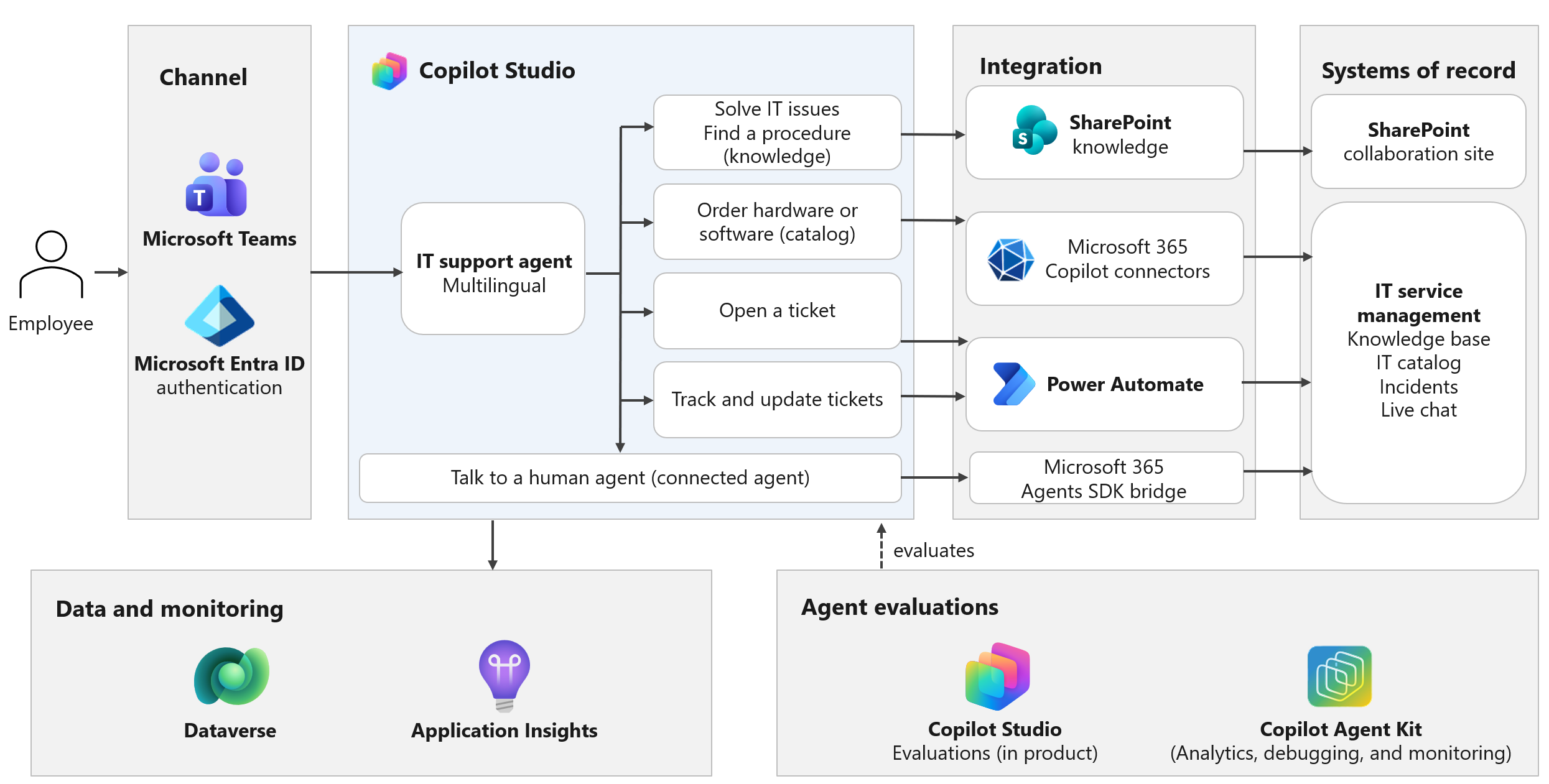
Workflow
The following workflow describes how employees interact with the IT self-service agent, how the agent processes requests, and how administrators monitor and improve it.
Sign in and ask: An employee opens the IT self-help agent in Microsoft Teams. The agent signs the employee in with Microsoft Entra ID, so every conversation starts with a known identity.
Detect language and orchestrate: The agent detects the employee's language and responds in that language. Generative orchestration in Copilot Studio routes each request to the right topic or to a knowledge search, and asks a clarifying question when the request is ambiguous. Adaptive Cards let employees select options instead of typing responses.
Ground the answer: For how-to questions and troubleshooting issues, the agent searches IT guides in SharePoint and knowledge articles in the ITSM platform, and returns a short summary with a link to the source.
Find a catalog item: For hardware and software requests, the agent searches the service catalog and returns a short list of matching items, each with a link to its order form in the ITSM platform.
Create, track, and update incidents: When an employee needs to open a ticket, the agent presents incident categories for the employee's country or region and prefills the description from the conversation. The employee can list their open tickets and add updates. The agent acts only on tickets the employee owns.
Connect to the ITSM platform: Topics call the ITSM platform through a Power Platform connector. Where the ITSM platform trusts a different identity provider than the agent, the connection uses a tightly scoped service account. It passes the employee's identity in every query so the ITSM platform can enforce access checks and record actions in its audit trail. When per-user sign-in to the ITSM platform is available in the chat, the connection switches to the employee's credentials.
Hand off to a person (optional): The agent offers employees the option to talk to a service desk analyst when it can't resolve their requests. Build a hand-off bridge by using the Microsoft 365 Agents SDK and connect a sub-agent to open a live chat with a service desk analyst in the same Teams conversation. The agent passes a conversation summary through the bridge to give the analyst context. Messages are translated in both directions so the employee and analyst can each use their preferred language.
Monitor and improve: Copilot Studio analytics, automated evaluations, Copilot Agent Kit (Agent Debugger and Agent Review Tool), and Azure Application Insights capture answer quality, resolution, hand-off, and error signals. Use these signals to fix content gaps, tune topics, and extend automation.
Components
| Component | Role in this architecture |
|---|---|
| Copilot Studio | Hosts the IT self-help agent. Provides language detection, knowledge search, Adaptive Cards, and evaluations. |
| Microsoft Teams | The channel employees use to reach the agent and, for hand-off, to chat with a service desk analyst in the same conversation. |
| Microsoft Entra ID | Authenticates employees and supplies the identity that the agent passes to downstream systems. |
| Power Platform connectors | Connect agent topics to the ITSM platform to search the catalog and create, list, and update incidents. |
| Microsoft SharePoint | Stores IT guides and procedures that the agent uses as knowledge sources. |
| Microsoft 365 Agents SDK | Enables the hand-off bridge that connects the agent, as a connected agent, to the ITSM platform's live chat queue. |
| Agent Debugger in Copilot Agent Kit | Provides analysis, monitoring, and debugging capabilities. Tracks agent quality over time. |
| Azure Application Insights | Captures conversation telemetry, errors, and custom events for monitoring and troubleshooting. |
| Power Platform environments and data policies | Separate development, test, and production, and restrict the agent to approved connectors. |
Other technologies involved include:
IT service management platform: A third-party ITSM platform, such as ServiceNow, is the system of record for knowledge articles, the service catalog, incidents, and live agent chat. The agent reads from and writes to the platform, which enforces its own access rules on every request.
Third-party identity provider: In the scenario from which this reference architecture originates, the ITSM platform trusts a separate identity provider rather than Microsoft Entra ID. The connection design in this architecture preserves the employee's identity across identity providers.
Scenario details
This scenario is based on an organization's move to a self-service-first IT support model, with an agent as the main entry point for IT help.
Note
For examples of similar employee-facing architectures, learn how the Copilot Studio agent MAIA supports Banco Hipotecario's employees and how Microsoft accelerates employee services with the Employee Self-Service Agent.
Business challenge
A large, multinational manufacturer supports tens of thousands of employees across several countries and regions. Employees reach IT support through a mix of portals, phone lines, and an outsourced live-chat desk. Many support requests involve repeated questions or simple tasks, such as finding a procedure, ordering a standard device, or checking a ticket's status. Each request takes service desk time. Employees must find the right portal for answers and often work in a language other than their own. They also have to reenter details when requests move between channels. Any new support channel must enforce existing ITSM access permissions, even though the ITSM platform and collaboration tools use different identity providers.
Solution
Build an IT self-help agent in Copilot Studio and publish it in Microsoft Teams as the default entry point for IT support. The agent:
Answers IT questions in the employee's language from approved IT guides and ITSM knowledge articles, with short summaries and clarifying questions.
Searches the service catalog and links directly to the right order form.
Creates incidents with categories specific to the employee's country or region and a prefilled description.
Lets employees track and update only their own tickets.
Connects to the ITSM platform through a governed connection that maintains the employee's identity in every request.
Designed to hand off to a live service desk analyst in the same chat, with a conversation summary and two-way translation.
Roll out the agent in waves, from a selected group of users to the full workforce, while monitoring answer quality and support volume at each step.
Considerations
These considerations implement the pillars of Power Platform Well-Architected, a set of guiding tenets that improve the quality of a workload. Learn more in Microsoft Power Platform Well-Architected.
Reliability
Treat the ITSM platform as a dependency the agent doesn't control. Handle connector timeouts and errors in every topic. Give employees a clear next step, such as a link to the ITSM portal. Roll out the agent in phases so you can monitor connector load and ITSM throttling before adding the next group of users.
Security
Include the employee's identity in every request to the ITSM platform. If you use a service account and sign-in across identity providers isn't available, take these steps:
- Grant the account only the permissions the agent's topics need.
- Store its secret securely.
- Pass the employee's identity in each query.
- Get approval from your security team.
Plan to move to per-user connections when you can share connection parameters with users. This approach lets employees sign in to the ITSM platform through an inline card without leaving the chat. Check ticket ownership before showing or updating a ticket.
Operational Excellence
Move the agent through development, test, and production environments with solutions and application lifecycle management. Assign owners to maintain IT knowledge articles in each supported language. Answer quality depends on keeping this content current and well structured. Evaluate against a fixed set of test questions in every supported language before each release. Use Copilot Agent Kit for continuous analysis, debugging and monitoring.
Performance Efficiency
Keep knowledge answers short and present catalog results as a compact list to help employees complete tasks in fewer turns. When possible, limit knowledge searches to content in the employee's language to improve relevance. Plan connector capacity for peak demand, such as the first day of a rollout phase or a major outage.
Experience Optimization
Use Adaptive Cards to let employees select options, such as incident categories or tickets, reducing typing and input errors. Prefill incident descriptions with details from the conversation to reduce repeated questions. When the agent hands off to a service desk analyst, share a conversation summary to help the analyst continue where the agent left off. Keep the employee in the same Teams chat.
Responsible AI
Ground answers in approved IT content and include source links so employees can verify the answers. Test answer quality and tone in every supported language. Confirm that translated messages preserve their meaning during hand-offs. Give employees a clear way to reach a service desk analyst. Use analytics and feedback to identify incorrect answers and questions the agent can't answer, then address those gaps.
Contributors
Microsoft maintains this article. The following contributors wrote this article.
Principal authors:
Petros Feleskouras, Senior Program Manager
Related resources
Copilot Studio
- Establish an application lifecycle management strategy for Copilot Studio
- Orchestrate agent behavior with generative AI
- Configure user authentication with Microsoft Entra ID
- Monitor agent performance in Copilot Studio
Copilot Agent Kit
- Copilot Agent Kit overview
- Analyze agents using Agent Review Tool in Copilot Agent Kit
- Troubleshoot agent conversations with Agent Debugger in Copilot Agent Kit