Note
Access to this page requires authorization. You can try signing in or changing directories.
Access to this page requires authorization. You can try changing directories.
This solution delivers an integrated workflow between Microsoft Outlook and SAP Customer Relationship Management (SAP CRM), enabling users to work smoothly across both environments. It removes the need to manually reenter customer relationship data and activities in SAP by providing a guided, context-aware experience directly in the Outlook reading pane.
Tip
This article provides an example scenario and a generalized example architecture to illustrate how to extend Outlook using Power Apps canvas apps, enabling users to work with SAP data without switching applications. The architecture example can be modified for many different scenarios and industries.
Architecture diagram
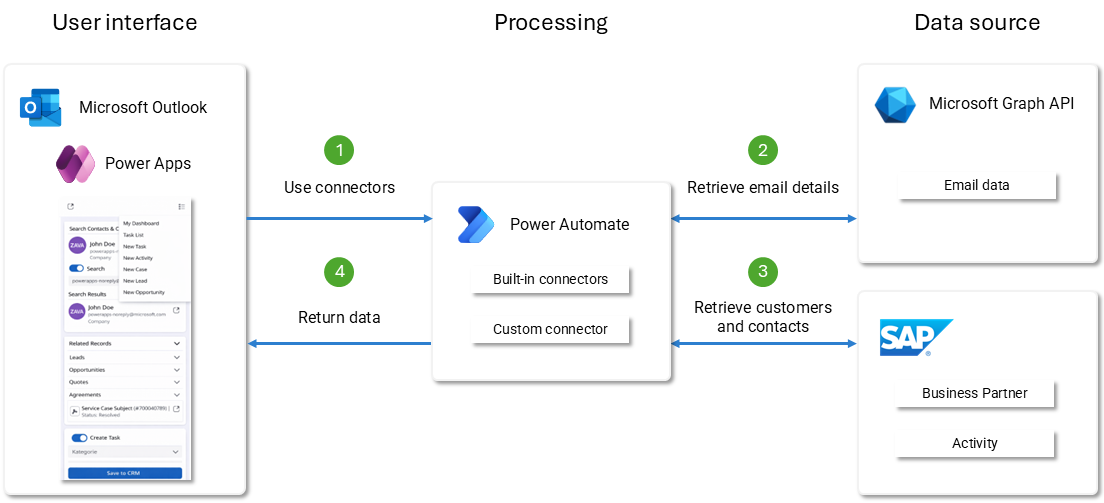
Workflow
User opens an email in Outlook
The embedded canvas app loads contextual metadata by using Microsoft Power Platform connectors, such as Office 365 Outlook and Office 365 Users.
Canvas app retrieves email details via connectors
- Sender and recipient addresses
- Email body
- Attachments
Canvas app queries SAP CRM/S/4HANA by using a custom connector
- Searches for business partner records, including customers and contacts
- Returns structured SAP data to the UI
User selects actions in the Outlook add-in
- Create SAP activity from email
- Save email and attachments into SAP CRM
- View related SAP records
- Create follow-up tasks
Custom connector sends operations to SAP OData services
- Implements OAuth 2.0 authentication
- Transforms and validates payloads
- Writes back activities or retrieves partner data
Dataverse and Power Automate orchestration (optional extension)
- Captures and visualizes logs
- Triggers workflow automation
- Enables extended processing scenarios
Components
This solution uses multiple components to provide seamless integration between Outlook, Power Apps, and SAP.
Power Apps canvas apps
Power Apps canvas apps provide the primary user interface for the solution. The app embeds directly into the Outlook reading pane by using the supported Power Apps in Outlook hosting model. It presents relevant SAP Business Partner and activity information related to the currently opened email. It guides users through common tasks such as creating activities, saving emails and attachments, and creating follow-up tasks.
The app is designed for lightweight, task-oriented interactions. It's optimized for speed and minimal context switching. It delegates integration and processing logic to backend layers to keep the UI responsive and maintainable. The app uses the Office JavaScript API (Office.js) only for lightweight context handoff from the active Outlook item to the embedded Power App and doesn't host UI or business logic.
Custom connectors
A Power Platform custom connector provides the integration layer between the Outlook add‑in and SAP OData services. It handles authentication (OAuth2, delegated permissions), passes parameters, calls SAP endpoints, and returns structured data to the canvas app.
The connector enables the solution to:
- Retrieve SAP business partner information related to email senders and recipients
- Create SAP activities from email content
- Store emails and attachments in SAP
- Create follow-up actions linked to SAP records
SAP remains the system of record for customer, contact, and activity data. Therefore, any integration must respect SAP's enterprise security model, identity propagation, and API exposure standards while supporting per-user access and full auditability.
Native SAP connector evaluation
Evaluate native SAP connectors as an initial option, primarily because they:
- Offer lower maintenance and lifecycle overhead
- Follow a standard, managed connector model
- Are preferred when functional and architectural requirements are met
However, during technical evaluation, native SAP connectors don't meet the requirements of this architecture, particularly in enterprise SAP landscapes where APIs are exposed through SAP API Management within SAP Business Technology Platform (SAP BTP).
Identified limitations include:
- Limited control over SAP-specific HTTP headers, such as cross-site request forgery (CSRF) handling and conditional headers
- Insufficient flexibility for custom SAP OData payload structures
- Constrained compatibility with SAP API Management–fronted services
- Reduced ability to support per-user delegated authentication models aligned with SAP identity propagation
- Requires end users to enter SAP-specific technical configuration details when creating a connection, which users typically don't know and shouldn't be responsible for. Technical SAP connection parameters should be centrally managed and abstracted from business users.
Why use a Power Platform custom connector
Use a Power Platform custom connector to meet the above requirements and align with enterprise SAP integration patterns.
This approach enables:
- Clean integration with SAP API Management as the official SAP enterprise boundary
- Full control over request and response structures, including SAP-specific protocol requirements
- Support for per-user delegated authentication (OAuth 2.0 via SAP API Management)
- Predictable behavior across SAP CRM and SAP S/4HANA environments
- Avoidance of unsupported direct connectivity to on‑premises SAP systems
The custom connector integrates exclusively with SAP API Management and never directly with SAP backend systems.
SAP API throttling and traffic management
SAP API throttling, rate limiting, and traffic‑control policies are explicitly out of scope of the Power Platform delivery.
These controls are:
- Configured within SAP API Management (SAP BTP)
- Governed and operated by the internal SAP platform team
From the Power Platform perspective, SAP API Management is treated as a governed HTTPS service. The custom connector doesn't implement or override throttling behavior and respects SAP API Management responses.
SAP connectivity and responsibility boundaries
SAP CRM is accessed exclusively through externally exposed SAP APIs fronted by SAP API Management (SAP BTP). Power Platform components don't connect directly to on-premises SAP systems and don't use the on-premises Data Gateway. SAP API Management acts as a reverse proxy, security boundary, and protocol-mediation layer, exposing SAP OData services over HTTPS in a controlled, enterprise-approved way.
End-to-end connectivity topology (enterprise deployment dependency)
While Power Platform connects only to the SAP API Management (SAP BTP) HTTPS endpoint, SAP API Management must have secure connectivity to the on-premises SAP backend.
Typically, the customer's SAP basis or infrastructure team implements this approach using SAP-standard connectivity patterns, such as SAP Cloud Connector and private network connectivity like VPN or peering.
Responsibility boundary
Power Platform scope: Calls only the externally exposed SAP API Management endpoint over HTTPS. Power Platform doesn't require direct network tunneling, VPN configuration, or private endpoint setup.
Customer/SAP scope: Establishes and governs BTP-to-on-premise routing, firewall rules, certificates, and network segmentation according to enterprise security policies.
This reference architecture assumes the SAP API endpoint is enterprise-approved, reachable from Microsoft cloud services, and protected through SAP API Management policies for authentication, authorization, throttling, and auditing.
Trade-offs and lifecycle ownership
Benefits: Predictable integration behavior, full control over SAP-specific protocol requirements including headers, cross-site request forgery (CSRF), and payload, and clean alignment with SAP API Management as the enterprise boundary.
Trade-offs: Requires explicit ownership for connector versioning, testing, monitoring, and change management, such as when SAP OData services evolve.
SAP CRM
SAP CRM serves as the system of record for customer, contact, and activity data. The solution interacts with SAP primarily through standardized OData services to perform business partner lookups, retrieve related records, and create or update activities based on user actions in Outlook. By keeping core business logic and data ownership within SAP, the architecture aligns with enterprise resource planning (ERP) principles and avoids unnecessary data duplication across systems.
Power Platform connectors
Use the Office 365 Outlook and Office 365 Users connectors to retrieve contextual information about the currently opened email, including sender and recipient details, email body, and attachments. The canvas app consumes this data to prefill SAP activity data and to enable attachment of emails and documents to SAP records. Use this data strictly for the required metadata. Ensure all access occurs through the context of the specific user's personal connection to support security and compliance.
Microsoft Dataverse (optional extension)
Introduce Dataverse as an optional extension layer to support cross-component governance, logs, and extended processing scenarios. It stores operational logs, integration metadata, and temporary data needed for advanced workflows and analytics. Dataverse also provides a foundation for future enhancements, including reporting, monitoring, and controlled data exposure, without impacting the core SAP systems.
Power Automate (optional extension)
Use Power Automate in later phases to orchestrate asynchronous workflows triggered by Outlook- or SAP-related events. Typical use cases include background processing, notifications, escalation flows, or integration with other systems. By keeping automation optional and loosely coupled, the architecture supports incremental adoption without adding unnecessary runtime dependencies to the core user interaction flow.
Scenario details
Sales and service teams often work across Outlook for customer communications and SAP CRM/S/4HANA for operational activities. Switching between systems increases manual effort and can lead to incomplete or inconsistent data. This solution provides a unified workspace directly inside Outlook, helping users identify customers, save emails to SAP as activities, and create follow-ups without switching systems. This approach helps reduce manual data entry and improves data completeness across customer-facing processes.
The Outlook add-in enables users to:
- Identify SAP business partners related to emails
- Create SAP activities from email content
- Store emails and attachments in SAP
- Create follow-up actions linked to SAP records
While similar capabilities exist in some native Microsoft extensions, there's currently no comparable solution that effectively integrates on-premises SAP CRM with an Outlook extension. This solution fills that gap by bringing key SAP CRM functionality into Outlook in a way that's intuitive for end users and aligned with enterprise integration requirements.
Prerequisites
This solution uses Power Platform custom connectors, which require Power Apps premium licensing for end users. Each Outlook user applying SAP integration must be licensed accordingly.
Note
Native SAP connectors were evaluated but not selected due to functional and architectural limitations. Assess licensing needs based on the number of Outlook users requiring SAP interaction and validate licensing requirements during solution planning.
Considerations
These considerations implement the pillars of Power Platform Well-Architected, a set of guiding tenets that improve the quality of a workload. Learn more in Microsoft Power Platform Well-Architected.
Reliability
This architecture uses resilient integration patterns to keep the solution working smoothly even when dependent systems are slow or temporarily unavailable. The custom connector uses retry logic and controlled timeouts for SAP OData calls to handle transient failures. When problems occur, the canvas app shows errors in a clear, helpful way and explains what to do next. The design also limits lookups to what's needed during user interactions, which reduces the risk of cascading failures.
Security
This architecture enforces security through end-to-end identity and access management aligned with Power Platform best practices. It transmits sensitive data, such as email metadata, attachments, and customer records, only over encrypted channels, with no local storage on user devices. It implements least-privileged access both in SAP and within the Power Platform environment. All communication between Outlook, Office 365 backend, the custom connector, and SAP follows a zero-trust mindset, ensuring that identity is validated for every call.
Identity and Authentication Model
Power Platform connectors that use OAuth 2.0 with delegated permissions access Microsoft Graph resources. They operate in the context of the signed-in Outlook user. SAP access uses per-user delegated authentication through SAP API Management. The enterprise identity provider (IdP) federates user authentication by using security assertion markup language (SAML) 2.0. The resulting SAML assertion is exchanged for an OAuth 2.0 access token (SAML Bearer Assertion flow). SAP API Management uses this token to call SAP OData services while preserving end-user identity.
Each user establishes their own Power Platform connection to the custom connector on first use. The architecture doesn't use shared runtime service accounts for business operations.
Identity mapping and user lifecycle
To support secure, per-user SAP access, organizations need a clear approach for mapping Microsoft identities to SAP principals and managing access throughout the user lifecycle.
Mapping principle: SAP operations use the end user's identity propagated through SAP API Management. The customer's identity strategy must define how a Microsoft identity, such as an Entra ID user principal name (UPN) or email address, maps to the corresponding SAP principal, like an SAP user ID. It must also include where that mapping is maintained, such as in the IdP, SAP, or as part of an identity and access management (IAM) process.
Provisioning and deprovisioning: Standard enterprise joiner, mover, and leaver processes grant and revoke access to SAP APIs. When a user is disabled in the corporate identity provider or removed from SAP authorization roles, subsequent connector calls fail closed (access denied).
No shared business accounts: The architecture doesn't use service accounts for runtime business operations. They might exist only for environment setup, deployment, and configuration activities under controlled DevOps processes.
Auditability: Because calls run per-user, SAP audit logs and API Management logs can attribute actions to the initiating user, supporting segregation of duties and compliance reporting.
Operational Excellence
This architecture follows operational best practices to support maintainability, observability, and smooth lifecycle management. Centralized logging, such as through Dataverse or monitoring tools, can capture connector calls, errors, and usage patterns to help administrators spot issues early and optimize performance.
You can update the canvas app centrally without requiring user reinstallation, reducing operational overhead. Clear separation of UI, integration logic, and backend systems also supports iterative improvements and controlled rollouts.
Performance Efficiency
Performance is optimized by minimizing data retrieval and executing only necessary operations. Scope SAP lookups to the smallest set of Business Partner attributes required for the Outlook scenario, which reduces the load on SAP OData endpoints. Streamline Power Platform connector calls to retrieve only essential email metadata. Avoid heavy transformations in the canvas app by delegating processing to the custom connector. This approach results in faster UI rendering and a smoother user experience.
Experience Optimization
Prioritize user efficiency and flow continuity. By embedding the interface directly in the Outlook reading pane, you reduce context switching, so users can complete SAP-related tasks faster. The canvas app provides prefilled forms, intuitive navigation, and immediate access to related SAP records, which helps reduce manual effort and cognitive load. By focusing on the most common actions—activity creation, saving email and attachments to SAP, and customer lookup—the experience stays fast, predictable, and aligned to user needs.
Other considerations
Beyond the core architecture considerations, plan for the supporting practices that help the solution remain governable, supportable, and compliant over time. These considerations address lifecycle management, observability, and connector governance for enterprise deployment.
Application lifecycle management (ALM)
This reference architecture assumes standard Power Platform ALM, where the native pipelines in Power Platform are sufficient to promote solutions across environments with approvals and auditing.
Maintain separate development, test, and production environments.
Use solutions for packaging and transport:
- Unmanaged in development.
- Managed in test and production.
Promote managed solutions across environments through pipelines in Power Platform with controlled approvals and run history. Rollback is handled by redeploying a known-good managed solution version when needed.
Use environment variables and connection references for endpoint URLs and connector bindings (no hardcoded values).
Store secrets and certificates in an approved secret store, such as Key Vault, and never in app formulas or connector definitions.
Apply solution quality gates, such as solution checker and static analysis, before production promotion.
Optional: Integrate with external CI/CD (Azure DevOps or GitHub) only if your organization requires advanced workloads.
Observability
The minimum observability baseline for enterprise supportability includes:
Capturing integration telemetry for each SAP call, including the timestamp, operation name, response status code, latency, and failure reason category. Include a correlation identifier to trace a single user action across Power Apps to connector to SAP API Management to SAP.
Centralizing logs in an enterprise-approved store, such as Dataverse tables or an external monitoring platform.
Defining alerting thresholds, such as elevated failure rate, sustained latency, and authentication failures, and maintaining an operational runbook for incident response.
Ensuring SAP API Management policies also emit logs and support tracing for troubleshooting and compliance.
Application monitoring
The solution uses Microsoft Application Insights to capture application-level telemetry from the Power Apps canvas app. It implements custom traces and events to monitor application behavior, user interactions, and key functional flows within the Outlook add-in. This monitoring provides visibility into user actions, feature usage, execution paths, and application-level errors, supporting both troubleshooting and continuous improvement of the user experience.
Integration and network monitoring
The centralized SAP platform manages network-level monitoring, traffic analysis, and API performance monitoring for SAP integrations through SAP API Management. From the Power Platform perspective, treat SAP API Management as a governed HTTPS endpoint. Power Platform doesn't implement network-level monitoring or throttling logic and relies on SAP API Management to provide traffic control, diagnostics, and audit logs for SAP API calls.
Data loss prevention (DLP) and connector governance
Use Managed Environments, data policies, and connector governance to restrict data movement and ensure only approved connectors, environments, and attachment handling practices are allowed.
Use governed environments: Deploy only to Managed Environments and manage development, test, and production environments through Environment groups (zones) so rules are consistent and not locally overridden.
Apply advanced connector policies (preferred): Explicitly allow only required connectors and restrict high-risk capabilities, including action-level and parameter or endpoint controls where available. Learn more in Apply advanced connector policies.
Classic data policy baseline: Classify Office 365 connectors and the SAP custom connector per policy, typically as Business, and block non-approved connector combinations. Learn more in Manage data policies.
Attachment safeguards: Enforce file type and size limits, scanning, labeling or classification, and retention requirements achievable through standard Microsoft security capabilities such as Microsoft Purview and Microsoft Defender.
Design decisions and alternatives considered
On-premises SAP connectivity: The solution doesn't use direct connectivity from Power Platform to on-premises SAP systems, such as through the On-Premises Data Gateway or private network tunneling. Instead, you access SAP systems exclusively through externally exposed SAP APIs fronted by SAP API Management.
Integration layer: The team considered middleware patterns such as Azure API Management or Logic Apps. They selected SAP API Management (SAP BTP) as the authoritative integration boundary because the SAP platform team owns and governs it. It supports SAP-native security, identity propagation, and lifecycle management.
Authentication model: The solution avoids shared service accounts for runtime business access. It uses per-user delegated authentication, which enables full auditability, segregation of duties, and compliance with enterprise identity policies.
Outlook extensibility model: The solution uses a supported Power Apps canvas app hosting model inside Outlook instead of a custom Office.js task-pane add-in. Office.js is used only for lightweight context handoff, while business logic and UI are implemented in Power Platform components.
Contributors
Microsoft maintains this article. The following contributors wrote this article.
Principal authors:
- Karel Beranek, Delivery Director
Related resources
- Outlook add-ins overview
- Outlook developer documentation
- Office 365 Outlook connector
- Office 365 Users connector
- Power Platform and SAP documentation
- Application lifecycle management (ALM) with Microsoft Power Platform
- Overview of pipelines in Power Platform
- Integrate Power Platform with SAP for data management