Note
Access to this page requires authorization. You can try signing in or changing directories.
Access to this page requires authorization. You can try changing directories.
Organizations that process sensitive documents often need to balance automation, security, compliance, and network isolation. This reference architecture shows how to use Microsoft Power Platform, Azure Document Intelligence, and Azure services with private network connectivity to automate document ingestion, processing, validation, and storage while protecting sensitive data.
Tip
This article provides an example scenario and a generalized example architecture to illustrate how to design secure intelligent document processing solutions using Power Platform, Azure Document Intelligence, and Power Platform virtual network (VNet) support. The architecture example can be modified for many different scenarios and industries.
Architecture diagram
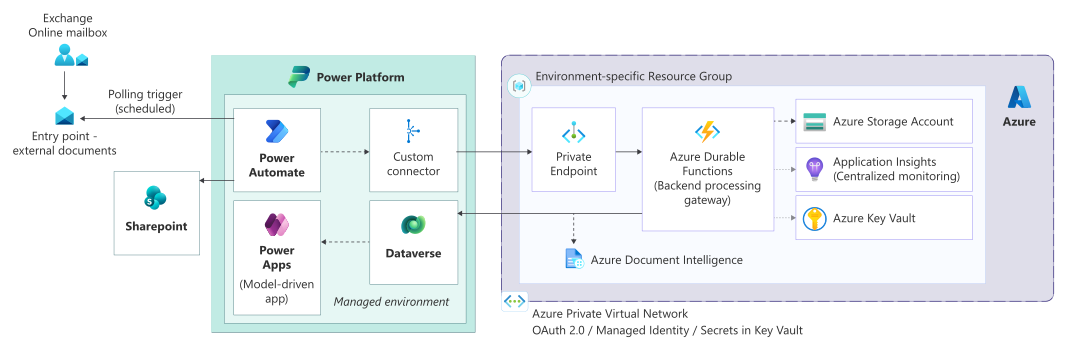
Workflow
This workflow describes how Power Platform and Azure services with private network isolation securely ingest, process, validate, and persist documents.
Secure document ingestion: Receive documents through dedicated Exchange Online mailboxes. Scheduled Power Automate flows use a polling pattern to pick up documents, ensuring controlled and reliable ingestion.
Orchestration and context creation: Power Automate extracts metadata and attachments, filters non-processable artifacts, and establishes a correlation context that's used throughout the processing lifecycle.
Private network execution: Flows run within a managed environment that uses VNet support for Power Platform, enabling private access to Azure services through Private Endpoints.
Backend processing via Azure Functions: Power Automate invokes a secured Azure Function through a custom connector that uses OAuth 2.0 client credentials. The function acts as a gateway for all backend processing.
Intelligent document processing: Use Azure Document Intelligence for document classification and data extraction. Handle long-running operations asynchronously.
Validation and case creation: Validate and persist extracted data in Dataverse, creating or updating business records and cases.
Secure document storage: Store original documents and artifacts in SharePoint Online with access controlled through Microsoft Entra ID security groups.
Downstream integrations: Trigger additional automations and integrations as required, including secure file exchange through Azure Blob Storage and on-premises systems.
Resilience and monitoring: Durable Azure Functions manage long-running processes, retries, and error handling, with centralized logging and auditing.
Components
The following components make up the secure document processing architecture.
Platform and identity
Microsoft Entra ID: Provides centralized identity, authentication, and conditional access for users and applications. Native integration with Power Platform enables secure user access, service principal authentication, and enforcement of organizational security policies.
Ingestion
Exchange Online Mailboxes: Provide a secure and auditable boundary for external submissions. Dedicated mailboxes act as controlled ingestion endpoints for incoming documents and requests.
Power Automate (polling pattern): Scheduled Power Automate flows monitor Exchange mailboxes by using a polling approach to ensure reliable processing, throttling control, and predictable execution. This approach avoids event storming from real-time triggers.
Orchestration
Power Automate: Acts as the primary orchestration layer, coordinating document ingestion, metadata extraction, validation logic, downstream integrations, and exception handling while delegating compute-intensive operations to backend services.
Custom connector: Provides a secure abstraction layer between Power Automate and backend services. Authentication uses OAuth 2.0 client credentials, ensuring controlled, environment-isolated access to APIs.
Processing
Azure Functions: Implements backend processing and orchestration logic, acting as a secure API gateway and integration layer. Azure Functions handle validation, routing, retries, long-running operations, and interaction with downstream services.
Azure Document Intelligence: Enables intelligent document classification and data extraction by using prebuilt and custom models. Processing is invoked asynchronously from backend services to support scalability and long-running workloads.
Data and storage
Microsoft Dataverse: Serves as the central data platform for structured business data, including cases, metadata, and processing outcomes. Dataverse provides built-in security, auditing, and role-based access control.
SharePoint Online: Stores documents securely and maintains links with associated Dataverse records. SharePoint provides versioning, retention, and fine-grained access control for document artifacts.
Azure Blob Storage: Supports secure file exchange and integration scenarios, including interaction with downstream or on-premises systems. Access is restricted by using private endpoints and service principal authentication.
Security and networking
Azure Virtual Network (VNet) support for Power Platform: Enables Power Automate flows to execute supported connectors within a delegated subnet in an Azure Virtual Network, allowing private connectivity to Azure services.
Azure Private Endpoints: Ensure that Azure services such as Azure Functions, Storage, and AI services are accessible only through private IP addresses, eliminating public exposure.
Azure Key Vault: Provides centralized and secure storage of secrets, certificates, and keys used by applications and automation components. Secrets are injected at runtime by using managed identities or service principals.
ALM and governance
Azure DevOps Pipelines: Automates solution build, validation, and deployment across environments by using YAML pipelines. Supports controlled promotion, environment isolation, and repeatable deployments that align with Power Platform application lifecycle management (ALM) best practices.
User experience
Power Apps model-driven apps: Provides secure, role-aware user interfaces for managing cases, reviewing documents, and interacting with business data. Model-driven apps automatically respect Dataverse security and auditing controls.
Scenario details
This architecture enables secure, scalable, and automated processing of highly sensitive financial and policy-related documents by using Power Platform and Azure services.
Organizations in regulated industries often rely on email-based document intake from external partners and customers. These organizations must process these documents reliably while meeting strict requirements around data security, network isolation, auditability, and compliance. Manual handling introduces operational risk, delays, and inconsistent outcomes, particularly when document volumes increase.
This architecture addresses these challenges by implementing a controlled document ingestion and processing pipeline that combines Power Automate orchestration, intelligent document processing, and secure backend services hosted within an Azure Virtual Network. All integrations with Azure services are performed through private endpoints, ensuring that sensitive data is never exposed to the public internet.
Use Azure Document Intelligence for document classification and data extraction. Use Azure Functions to abstract backend processing, centralize security, validation, and error handling. Validate and persist extracted data in Dataverse, enabling structured case management, downstream automation, and reporting through Power Platform applications.
This approach reduces manual effort, improves processing accuracy, and establishes a reusable enterprise pattern for secure document processing. It supports future extensibility, aligns with least-privilege security principles, and provides end-to-end traceability across Power Platform, Azure, and identity services.
Considerations
These considerations implement the pillars of Power Platform Well-Architected, a set of guiding tenets that improve the quality of a workload. Learn more in Microsoft Power Platform Well-Architected.
Reliability
Decoupled orchestration and processing ensures that transient failures in downstream services (Document Intelligence, Azure Functions, external systems) don't disrupt ingestion.
Polling-based email ingestion avoids missed events and reduces dependency on real-time triggers.
Retry, timeout, and error-handling policies are centralized within Azure Functions and Power Automate to support controlled reprocessing.
Asynchronous processing patterns (including durable functions where applicable) support long-running document analysis without blocking workflows.
High availability is provided by managed services including Power Automate, Dataverse, Azure Functions, and Azure AI services.
Security
Microsoft Entra ID provides centralized identity, authentication, and conditional access for users and service principals.
Least-privilege access is enforced across Power Automate flows, custom connectors, and Azure services by using app registrations and scoped permissions.
Virtual Network support for Power Platform ensures that automation runs within a private network boundary.
Private Endpoints prevent public exposure of Azure Functions, Storage Accounts, and AI services.
Secrets and credentials are stored securely in Azure Key Vault and injected at runtime.
Dataverse role-based security and auditing provide fine-grained access control and full traceability of data access and changes.
Operational Excellence
Clear separation of responsibilities between orchestration (Power Automate) and processing (Azure Functions) simplifies maintenance and troubleshooting.
Centralized backend gateway pattern avoids connector sprawl and ensures consistent validation, logging, and policy enforcement.
Azure DevOps YAML pipelines automate solution build, validation, and deployment across environments, supporting repeatable and governed releases.
Environment-specific configuration, such as model versions and endpoints, is managed through environment variables, reducing manual changes.
End-to-end monitoring is enabled via Power Platform run history, Azure logging, and platform-native audit capabilities.
Performance Efficiency
Heavy compute workloads, such as document classification, OCR (optical character recognition), and validation logic, are offloaded to Azure Functions rather than executed within Power Automate.
Asynchronous processing improves throughput and prevents flow execution limits from being reached.
Polling-based ingestion provides predictable load patterns and avoids trigger spikes.
Dataverse is used for structured business data, while documents are stored in SharePoint and Blob Storage to optimize storage costs and performance.
Private networking reduces latency between Power Platform and Azure services.
Experience Optimization
Power Apps model-driven apps provide secure, role-aware user experiences that automatically respect Dataverse security.
Human-in-the-loop paths reduce cognitive load by allowing users to intervene only when required.
Clear case and document associations improve traceability and usability for operational teams.
Consistent automation behavior across environments improves confidence and reduces user confusion.
Responsible AI
Not applicable.
This architecture uses Azure Document Intelligence for document classification and extraction and doesn't include generative AI features.
Contributors
Microsoft maintains this article. The following contributors wrote this article.
Principal authors:
- Meenakshi Gupta, Principal Technologist