Inline.TextDecorations Propriété
Définition
Important
Certaines informations portent sur la préversion du produit qui est susceptible d’être en grande partie modifiée avant sa publication. Microsoft exclut toute garantie, expresse ou implicite, concernant les informations fournies ici.
Obtient un TextDecorationCollection qui contient des décorations de texte à appliquer à cet élément.
public:
 property System::Windows::TextDecorationCollection ^ TextDecorations { System::Windows::TextDecorationCollection ^ get(); void set(System::Windows::TextDecorationCollection ^ value); };
public System.Windows.TextDecorationCollection TextDecorations { get; set; }member this.TextDecorations : System.Windows.TextDecorationCollection with get, setPublic Property TextDecorations As TextDecorationCollectionValeur de propriété
Collection TextDecorationCollection qui contient des décorations de texte à appliquer à cet élément.
La valeur par défaut est Null (aucune décoration de texte n’est appliquée).
Exemples
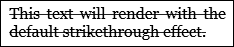
L’exemple suivant montre comment définir l’attribut TextDecorations d’un Inline élément (Run).
<FlowDocument ColumnWidth="200">
  <Paragraph>
    <Run TextDecorations="Strikethrough">
      This text will render with the strikethrough effect.
    </Run>
  </Paragraph>
</FlowDocument>
La figure suivante montre comment cet exemple s’affiche.
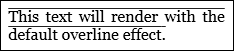
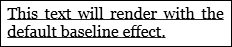
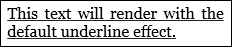
Les illustrations suivantes montrent comment les décorations Overline, Baseline et Soulignement sont affichées respectivement.
L’exemple suivant montre comment définir la TextDecorations propriété par programmation.
Run run1 = new Run("This text will render with the strikethrough effect.");
run1.TextDecorations = TextDecorations.Strikethrough;
Dim run1 As New Run("This text will render with the strikethrough effect.")
run1.TextDecorations = TextDecorations.Strikethrough
Remarques
Un TextDecoration objet est une ornementation visuelle que vous pouvez ajouter au texte. Il existe quatre types de décorations de texte : soulignement, ligne de base, barré et surligne. Pour plus d’informations sur les décorations de texte, consultez Guide pratique pour créer une décoration de texte.
Informations sur les propriétés de dépendance
| Élément | Valeur |
|---|---|
| Champ d’identificateur | TextDecorationsProperty |
Propriétés de métadonnées définies sur true |
AffectsRender |
