הערה
הגישה לדף זה מחייבת הרשאה. באפשרותך לנסות להיכנס או לשנות מדריכי כתובות.
הגישה לדף זה מחייבת הרשאה. באפשרותך לנסות לשנות מדריכי כתובות.
הערה
מאמר זה מתאר תכונות המשמשות בסוכנים או בזרימות סוכנים המופעלים על ידי הרתמה הסטנדרטית.
בד הציור של הסוכן קובע כיצד הסוכן נראה למשתמשים. באפשרותך להתאים אישית את בד הציור בשתי דרכים:
התאם אישית את בד הציור המהווה ברירת מחדל באמצעות JavaScript ו- CSS באתר האינטרנט שלך. השתמש באפשרות זו עבור שינויים פשוטים.
שימוש בבד ציור מותאם אישית בהתבסס על בד הציור של Bot Framework צ'אט באינטרנט. אפשרות זו דורשת חוויית פיתוח ותומך בהתאמה אישית מלאה.
באפשרותך גם לשלב את בד הציור המותאם אישית עם קביעת תצורה של התחלת שיחה אוטומטית.
באפשרותך לשנות את שם הסוכן ואת הסמל בפורטל.
לאחר פרסום הסוכן, המשתמשים יכולים לקיים איתו אינטראקציה באמצעות הממשק של צ'אט באינטרנט.
Important
באפשרותך להתקין את הקוד לדוגמה הכלול במאמר זה ולהשתמש בו לשימוש עם Copilot Studio. הקוד לדוגמה ניתן ברשיון "כפי שהוא" ולא נכלל בהסכמים ברמת השירות או משירותי התמיכה. אתה נוטל על הסיכון להשתמש בו.
Microsoft אינה מעניקה כל אחריות, ערבויות או תנאים מפורשים, ושאינה כוללת כל אחריות משתמעת, כולל מסחריות, התאמה למטרה מסוימת ואי-הפרה.
שינוי השם וסמל הסוכן
Important
- לאחר עדכון הסמל של סוכן, ייתכן שיחלפו עד 24 שעות עד שהמל החדש יופיע בכל מקום.
- אם הסוכן שלך מחובר ל- Omnichannel לשירות לקוחות, המאפיין Display name ברישום הפורטל של Azure מגדיר את שמו.
- אם הסוכן שלך אמור להתפרסם ב> Teams, עיין ב- דרישות עבור סמלים בתיעוד המפתח של Microsoft Teams.
לך אל דף ה-סקירה של הסוכן שלך.
בחר ערוך לצד פרטים.
שנה את השם ואת הסמל של הסוכן כברצונך לעשות זאת.
בחר שמור.
התאמה אישית של בד הציור המהווה ברירת מחדל (פשוט)
השתמש ב- JavaScript וב- CSS כדי להתאים את בד הציור המהווה ברירת מחדל.
בתחילה, הגדר את המיקום שבו אתה פורש את ממשק העבודה של הסוכן שלך.
העתק את קוד ה- HTML לדוגמה לקובץ בשם
index.html. באפשרותך גם להשתמש בעורך ה- HTML try-it.<!DOCTYPE html> <html lang="en"> <head> <meta charset="UTF-8" /> <meta name="viewport" content="width=device-width, initial-scale=1.0" /> <meta name="description" content="Contoso Web Chat Assistant" /> <title>Contoso Sample Web Chat Test</title> <script src="https://cdn.botframework.com/botframework-webchat/latest/webchat.js"></script> <script> let webChatInstance = null; let directLineUrl = null; // Replace with your token endpoint const tokenEndpoint = "<YOUR TOKEN ENDPOINT>"; const styleOptions = { "accent": "#0078D4", "autoScrollSnapOnPage": true, "autoScrollSnapOnPageOffset": 0, "avatarBorderRadius": "7%", "avatarSize": 31, "backgroundColor": "#e8e9eb", "botAvatarBackgroundColor": "#ffffff00", "botAvatarImage": "https://powercatexternal.blob.core.windows.net/creatorkit/Assets/ChatbotLogoBlue.png", "botAvatarInitials": "B", "bubbleAttachmentMaxWidth": 480, "bubbleAttachmentMinWidth": 250, "bubbleBackground": "#f0eded", "bubbleBorderColor": "#f5f5f5", "bubbleBorderRadius": 41, "bubbleBorderStyle": "solid", "bubbleBorderWidth": 1, "bubbleFromUserBackground": "#ebefff", "bubbleFromUserBorderColor": "#f5f5f5", "bubbleFromUserBorderRadius": 41, "bubbleFromUserBorderStyle": "solid", "bubbleFromUserBorderWidth": 1, "bubbleFromUserNubOffset": 0, "bubbleFromUserNubSize": 0, "bubbleFromUserTextColor": "#242424", "bubbleImageHeight": 10, "bubbleImageMaxHeight": 240, "bubbleImageMinHeight": 240, "bubbleMessageMaxWidth": 480, "bubbleMessageMinWidth": 120, "bubbleMinHeight": 50, "bubbleNubOffset": 0, "bubbleTextColor": "#242424", "emojiSet": true, "fontSizeSmall": "70%", "hideUploadButton": false, "messageActivityWordBreak": "break-word", "monospaceFont": "Consolas", "paddingRegular": 10, "paddingWide": 10, "primaryFont": null, "sendBoxBackground": "#e8e9eb", "sendBoxBorderTop": "solid 1px #808080", "sendBoxButtonColor": "#0078d4", "sendBoxButtonColorOnHover": "#006cbe", "sendBoxButtonShadeBorderRadius": 40, "sendBoxButtonShadeColorOnHover": "", "sendBoxHeight": 60, "sendBoxPlaceholderColor": "#171616", "sendBoxTextColor": "#2e2d2d", "showAvatarInGroup": "status", "spinnerAnimationHeight": 16, "spinnerAnimationPadding": 12, "spinnerAnimationWidth": 16, "subtleColor": "#000000FF", "suggestedActionBackgroundColor": "#006FC4FF", "suggestedActionBackgroundColorOnHover": "#0078D4", "suggestedActionBorderColor": "", "suggestedActionBorderRadius": 10, "suggestedActionBorderWidth": 1, "suggestedActionLayout": "flow", "suggestedActionTextColor": "#FFFFFFFF", "typingAnimationBackgroundImage": "url('https://wpamelia.com/wp-content/uploads/2018/11/ezgif-2-6d0b072c3d3f.gif')", "typingAnimationDuration": 5000, "typingAnimationHeight": 20, "typingAnimationWidth": 64, "userAvatarBackgroundColor": "#222222", "userAvatarImage": "https://avatars.githubusercontent.com/u/8174072?v=4&size=64", "userAvatarInitials": "U" }; const backgroundImage = ""; document.addEventListener('DOMContentLoaded', () => { const root = document.documentElement; root.style.setProperty('--primary-color', createGradient(styleOptions.accent)); root.style.setProperty('--header-textColor', styleOptions.suggestedActionTextColor); if (backgroundImage) { const webchatElement = document.getElementById('webchat'); webchatElement.style.backgroundImage = `url(${backgroundImage})`; webchatElement.style.backgroundSize = 'cover'; webchatElement.style.backgroundPosition = 'center'; webchatElement.style.backgroundRepeat = 'no-repeat'; const overlay = document.createElement('div'); overlay.className = 'webchat-overlay'; webchatElement.appendChild(overlay); } }); function createGradient(baseColor) { const r = parseInt(baseColor.slice(1, 3), 16); const g = parseInt(baseColor.slice(3, 5), 16); const b = parseInt(baseColor.slice(5, 7), 16); const lighterColor = `#${Math.min(255, r + 30).toString(16).padStart(2, '0')}${Math.min(255, g + 30).toString(16).padStart(2, '0')}${Math.min(255, b + 30).toString(16).padStart(2, '0')}`; const darkerColor = `#${Math.max(0, r - 30).toString(16).padStart(2, '0')}${Math.max(0, g - 30).toString(16).padStart(2, '0')}${Math.max(0, b - 30).toString(16).padStart(2, '0')}`; return `linear-gradient(135deg, ${lighterColor}, ${baseColor}, ${darkerColor})`; } const environmentEndPoint = tokenEndpoint.slice( 0, tokenEndpoint.indexOf("/powervirtualagents") ); const apiVersion = tokenEndpoint .slice(tokenEndpoint.indexOf("api-version")) .split("=")[1]; const regionalChannelSettingsURL = `${environmentEndPoint}/powervirtualagents/regionalchannelsettings?api-version=${apiVersion}`; function showChat() { const popup = document.getElementById("chatbot-popup"); const openButton = document.getElementById("open-chat"); popup.classList.add("visible"); openButton.classList.add("hidden"); } function hideChat() { const popup = document.getElementById("chatbot-popup"); const openButton = document.getElementById("open-chat"); popup.classList.remove("visible"); openButton.classList.remove("hidden"); } function createCustomStore() { return window.WebChat.createStore( {}, ({ dispatch }) => (next) => (action) => { if (action.type === "DIRECT_LINE/CONNECT_FULFILLED") { dispatch({ type: "DIRECT_LINE/POST_ACTIVITY", meta: { method: "keyboard" }, payload: { activity: { channelData: { postBack: true }, name: "startConversation", type: "event", }, }, }); } return next(action); } ); } async function restartConversation() { try { if (!directLineUrl) { console.error("DirectLine URL not initialized"); return; } const response = await fetch(tokenEndpoint); const conversationInfo = await response.json(); if (!conversationInfo.token) { throw new Error("Failed to get conversation token"); } const newDirectLine = window.WebChat.createDirectLine({ domain: `${directLineUrl}v3/directline`, token: conversationInfo.token, }); const webchatElement = document.getElementById("webchat"); webChatInstance = window.WebChat.renderWebChat( { directLine: newDirectLine, styleOptions, store: createCustomStore(), }, webchatElement ); } catch (err) { console.error("Failed to restart conversation:", err); } } async function initializeChat() { try { const response = await fetch(regionalChannelSettingsURL); const data = await response.json(); directLineUrl = data.channelUrlsById.directline; if (!directLineUrl) { throw new Error("Failed to get DirectLine URL"); } const conversationResponse = await fetch(tokenEndpoint); const conversationInfo = await conversationResponse.json(); if (!conversationInfo.token) { throw new Error("Failed to get conversation token"); } const directLine = window.WebChat.createDirectLine({ domain: `${directLineUrl}v3/directline`, token: conversationInfo.token, }); webChatInstance = window.WebChat.renderWebChat( { directLine, styleOptions, store: createCustomStore(), }, document.getElementById("webchat") ); } catch (err) { console.error("Failed to initialize chat:", err); } } initializeChat(); </script> <style> :root { --primary-gradient: var(--primary-color); --chat-width: 450px; --chat-height: 520px; --header-height: 56px; --border-radius: 16px; --transition-speed: 0.3s; } * { margin: 0; padding: 0; box-sizing: border-box; font-family: system-ui, -apple-system, BlinkMacSystemFont, "Segoe UI", Roboto, sans-serif; } body { min-height: 100vh; background-color: #f3f4f6; } #chatbot-popup { display: none; position: fixed; bottom: 32px; right: 32px; width: var(--chat-width); height: var(--chat-height); background: white; border-radius: var(--border-radius); box-shadow: 0 18px 40px -5px rgba(0, 0, 0, 0.2), 0 15px 20px -5px rgba(0, 0, 0, 0.1); overflow: hidden; opacity: 0; transform-origin: bottom right; transform: scale(0.95); transition: all var(--transition-speed) ease-in-out; z-index: 999; } #chatbot-popup.visible { display: block; opacity: 1; transform: scale(1); } #chatbot-header { background: var(--primary-color); padding: 16px 20px; height: var(--header-height); display: flex; justify-content: space-between; align-items: center; color: var(--header-textColor); } .header-title { display: flex; align-items: center; gap: 12px; font-size: 16px; font-weight: 500; } .header-buttons { display: flex; gap: 12px; align-items: center; } .icon-button { background: none; border: none; color: var(--header-textColor); cursor: pointer; padding: 8px; border-radius: 8px; display: flex; align-items: center; justify-content: center; transition: all 0.2s ease; } .icon-button:hover { color: var(--header-textColor); background: rgba(255, 255, 255, 0.1); } .icon-button:focus { outline: 2px solid rgba(255, 255, 255, 0.5); outline-offset: 2px; } #webchat { height: calc(100% - var(--header-height)); background-color: #f9fafb; position: relative; } .webchat-overlay { position: absolute; top: 0; left: 0; right: 0; bottom: 0; background: rgba(255, 255, 255, 0.85); pointer-events: none; z-index: 1; } #webchat > div { position: relative; z-index: 2; } #webchat .webchat__basic-transcript__content { white-space: pre-wrap !important; word-break: break-word !important; } #webchat .webchat__bubble__content { padding: 8px 12px !important; } #webchat .webchat__bubble { max-width: 85% !important; margin: 8px !important; } #webchat .webchat__basic-transcript__content ul, #webchat .webchat__basic-transcript__content ol, #webchat .webchat__bubble__content ul, #webchat .webchat__bubble__content ol { padding-left: 24px !important; margin: 8px 0 !important; list-style-position: outside !important; } #webchat .webchat__basic-transcript__content li, #webchat .webchat__bubble__content li { margin: 4px 0 !important; padding-left: 4px !important; } #open-chat { position: fixed; bottom: 32px; right: 32px; width: 64px; height: 64px; border-radius: 50%; background: var(--primary-gradient); border: none; cursor: pointer; display: flex; align-items: center; justify-content: center; box-shadow: 0 4px 6px -1px rgba(0, 0, 0, 0.1); transition: all var(--transition-speed) ease-in-out; z-index: 998; } #open-chat.hidden { opacity: 0; transform: scale(0.95) translateY(10px); pointer-events: none; } #open-chat:hover { transform: translateY(-4px); box-shadow: 0 10px 15px -3px rgba(0, 0, 0, 0.1); } #open-chat:focus { outline: 3px solid rgba(79, 70, 229, 0.5); outline-offset: 2px; } #open-chat svg { width: 28px; height: 28px; color: white; transition: transform 0.2s ease; } .main-content { max-width: 1200px; margin: 0 auto; padding: 48px 24px; } .main-content h1 { font-size: 36px; color: #111827; text-align: center; } .main-content p { font-size: 18px; color: #4b5563; line-height: 1.6; margin-bottom: 48px; text-align: center; max-width: 800px; margin-left: auto; margin-right: auto; } .content-grid { display: grid; grid-template-columns: repeat(2, 1fr); gap: 32px; margin-bottom: 32px; } .content-box { background: linear-gradient(135deg, #e6e6e6, #c4c4c4, #9f9f9f); padding: 32px; border-radius: 12px; box-shadow: 0 4px 6px -1px rgba(0, 0, 0, 0.1), 0 2px 4px -1px rgba(0, 0, 0, 0.06); min-height: 300px; display: flex; flex-direction: column; justify-content: center; align-items: center; text-align: center; position: relative; overflow: hidden; } .content-box::before { content: ''; position: absolute; top: 0; left: 0; right: 0; height: 4px; } .content-box.featured { grid-column: span 2; min-height: 350px; background: linear-gradient(135deg, #e6e6e6, #c4c4c4, #9f9f9f); color: #000000; } .content-box h2 { font-size: 24px; margin-bottom: 16px; position: relative; } .content-box p { font-size: 16px; color: #6b7280; margin-bottom: 0; } .content-box.featured p { color: #000000; } @media (max-width: 768px) { .content-grid { grid-template-columns: 1fr; } .content-box.featured { grid-column: span 1; } .main-content { padding: 24px 16px; } .main-content h1 { font-size: 28px; } #chatbot-popup { width: 100%; height: 100%; bottom: 0; right: 0; border-radius: 0; } } </style> </head> <body> <div class="main-content"> <h1>Header</h1> <p>Lorem ipsum dolor sit amet consectetur adipiscing elit. Quisque faucibus ex sapien vitae pellentesque sem placerat.</p> <div class="content-grid"> <div class="content-box featured"> <h2>Featured Content</h2> <p>Primary content area with custom styling and gradient background</p> </div> <div class="content-box"> <h2>Section One</h2> <p>Content box with minimal design</p> </div> <div class="content-box"> <h2>Section Two</h2> <p>Another content section with consistent styling</p> </div> </div> </div> <div id="chatbot-popup" role="complementary" aria-label="Chat Assistant"> <div id="chatbot-header"> <div class="header-title"> <svg class="chat-icon" width="24" height="24" viewBox="0 0 24 24" fill="none" stroke="currentColor" stroke-width="2" stroke-linecap="round" stroke-linejoin="round" aria-hidden="true" > <path d="M21 15a2 2 0 0 1-2 2H7l-4 4V5a2 2 0 0 1 2-2h14a2 2 0 0 1 2 2z" ></path> </svg> <span>Contoso Assistant</span> </div> <div class="header-buttons"> <button class="icon-button" id="restart-button" onclick="restartConversation()" aria-label="Restart Conversation" > <svg width="20" height="20" viewBox="0 0 24 24" fill="none" stroke="currentColor" stroke-width="2" stroke-linecap="round" stroke-linejoin="round" aria-hidden="true" > <path d="M3 12a9 9 0 1 0 9-9 9.75 9.75 0 0 0-6.74 2.74L3 8" ></path> <path d="M3 3v5h5"></path> </svg> </button> <button class="icon-button" id="close-button" onclick="hideChat()" aria-label="Close Chat" > <svg width="20" height="20" viewBox="0 0 24 24" fill="none" stroke="currentColor" stroke-width="2" stroke-linecap="round" stroke-linejoin="round" aria-hidden="true" > <line x1="18" y1="6" x2="6" y2="18"></line> <line x1="6" y1="6" x2="18" y2="18"></line> </svg> </button> </div> </div> <div id="webchat" role="main"></div> </div> <button id="open-chat" onclick="showChat()" aria-label="Open Chat Assistant" > <svg viewBox="0 0 24 24" fill="none" stroke="currentColor" stroke-width="2" stroke-linecap="round" stroke-linejoin="round" aria-hidden="true" > <path d="M21 15a2 2 0 0 1-2 2H7l-4 4V5a2 2 0 0 1 2-2h14a2 2 0 0 1 2 2z" ></path> </svg> </button> </body> </html>ב
index.html- , החלף:const tokenEndpoint = "<YOUR TOKEN ENDPOINT>";עם נקודת הקצה של האסימון שלך.
פתח
index.htmlבדפדפן מודרני, כגון Microsoft Edge.בדוק את הסוכן.
אם הסוכן אינו מגיב:
- ודא שהסוכן פורסם.
- אמת את ערך נקודת הקצה של האסימון.
- אשר ש נקודת הקצה של האסימון מופיעה לאחר
=, המוקפת במרכאות כפולות".
אחזר את נקודת הקצה האסימון עבור הסוכן שלך
כדי להתאים אישית את בד הציור, בין אם זהו בד הציור המהווה ברירת מחדל או בד ציור מותאם אישית שאתה מתחבר לו, דרושה לך נקודת הקצה של האסימון עבור הסוכן שלך.
בהגדרות, בחר ערוצים.
בחר דואר אלקטרוני.
לצד נקודת קצה של אסימון, בחר העתק.
התאמה אישית של סמל הסוכן, צבע הרקע וה שם
השתמש באובייקט styleOptions כדי לקבוע תצורה של סגנונות מוגדרים מראש.
לקבלת מידע נוסף על הפעולות שניתן להתאים אישית וקישורים לקובץ defaultStyleOptions.js, ראה צ'אט באינטרנט התאמה אישית.
שינוי סמל הסוכן
עדכן
index.htmlאת הקובץ עם הקוד לדוגמה הבא:const styleOptions = { "accent": "#00809d", "botAvatarBackgroundColor": "#FFFFFF", "botAvatarImage": "https://learn.microsoft.com/azure/bot-service/v4sdk/media/logo_bot.svg", "botAvatarInitials": "BT", "userAvatarImage": "https://avatars.githubusercontent.com/u/661465", "userAvatarInitials": "U" };החלף את שתי תמונות האוואטאר בתמונות החברה שלך. אם אין לך כתובת URL לתמונה, השתמש במחרוזת תמונה מקודדת ב-Base64 במקום.
שינוי צבע הרקע
בהוספת
index.htmlbackgroundColorרכיב להגדרהstyleOptionsשלך:const styleOptions = { "backgroundColor": "lightgray", // ... };שנה
backgroundColorלכל צבע שתרצה. השתמש בשמות צבעי CSS סטנדרטיים, ערכי RGB או HEX.
שינוי שם הסוכן
עדכן
<h1>את טקסט הכותרת בקובץindex.htmlבאמצעות הקוד הבא:<body> <div id="banner"> <h1><img src="contoso-agent.png"> Contoso agent name</h1> </div> <!-- ... -->שנה את הטקסט לשם שתרצה לתת לסוכן. באפשרותך גם להוסיף תמונה, אך ייתכן שיהיה עליך לסגנון אותה כדי להתאים אותה למקטע הכותרת.
התאמה אישית ואירוח של בד הציור של הצ'אט (מתקדם)
ניתן לחבר את סוכן Copilot Studio שלך לקנבס מותאם אישית שאתה מארח כאפליקציית אינטרנט עצמאית. אפשרות זו פועלת בצורה הטובה ביותר אם עליך להטביע iFrame מותאם אישית בין דפי אינטרנט מרובים.
הערה
אירוח בד ציור מותאם אישית דורש פיתוח תוכנה. הדרכה זו מיועדת עבור מומחי IT מנוסים, כגון מנהלי IT או מפתחים בעלי הבנה טובה של כלי פיתוח, כלי שירות וסביבות פיתוח משולבות (IDEs).
התחל עם אחת מדוגמאות אלה שנבנתה באופן מותאם אישית כדי לעבוד עם Copilot Studio:
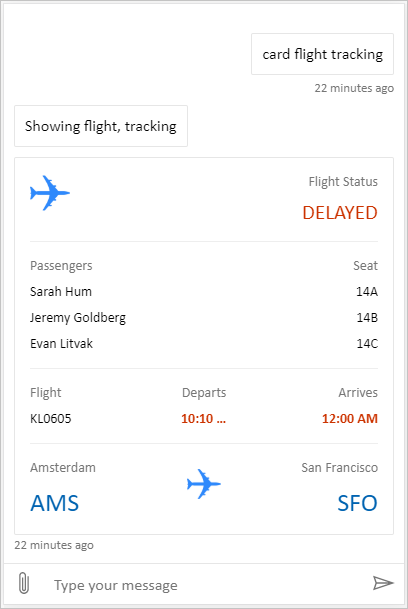
חבילה כוללת הוא בד ציור מותאם אישית שיכול להציג את כל התוכן העשיר Copilot Studio. לדוגמה:
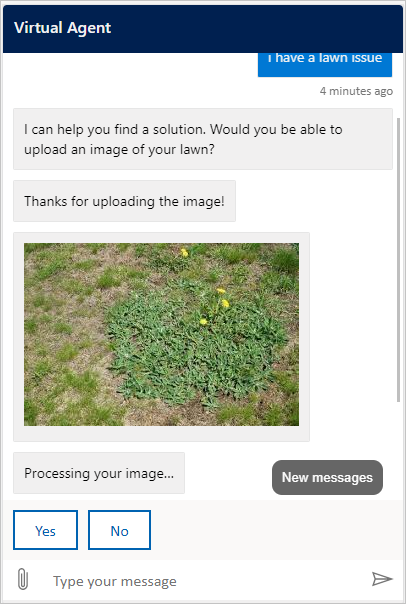
Location והעלאת קבצים הוא מסך מותאם אישית המסוגל לקבל את מיקום המשתמש ולשלוח אותו לסוכן ב-Copilot Studio. לדוגמה:
לחלופין, נסה דוגמאות צ'אט ווב אחרות ממסגרת הבוטים.
בדומה לבד הציור המוגדר כברירת מחדל, באפשרותך להשתמש בו styleSetOptions כדי לכוונן את בד הציור המותאם אישית. כל המאפיינים הניתנים להתאמה אישית מפורטים ב-defaultStyleOptions.js. לקבלת מידע נוסף אודות הפעולות שניתן להתאים אישית, ראה צ'אט באינטרנט התאמה אישית.
תמיכה בהגדרת חיבור בקנבס מותאם אישית
כאשר סוכן המופעל על ידי Harness הסטנדרטי זקוק לחיבור משתמש, קנבס הצ'אט מקבל כרטיס אדפטיבי הדורש חיבור. הקנבס המותאם אישית שלך חייב להתמודד עם פעולת Action.OpenUrlDialog הכרטיס. בלי מנגנון זה, בחירת Connect לא פותחת את חלון החיבור הממוקד.
פתח את חלון החיבור
- רשום את
Action.OpenUrlDialogבמעבד ה-כרטיסים מסתגלים שלך וקרא אתurlהמאפיין שלו. קבל רק כתובת URL מוחלטת מסוגhttp://אוhttps://. - החליטו אם ה-origin של היעד אמין לפני שפותחים אותו. סמוך רק על מקורות שאתה שולט בהם או שצוות האבטחה שלך בדק ואישר והוסיף לרשימת ההיתרים.
- פתח את כתובת ה-URL ישירות מבחירת המשתמש באמצעות
window.open(url, "_blank", "popup"). פתיחת החלון מתוך פעולת המשתמש מפחיתה את הסיכוי שהדפדפן יחסום אותו. - עבור יעד מהימן, בארגומנט
windowFeaturesשלwindow.open, השמט אתnoopenerו-noreferrerכדי שחלון החיבור יוכל להחזיר תוצאה ל-window.opener. לכל יעד אחר, השתמש ב-noopener,noreferrerואל תאפשר הודעת חזרה. - שמור את ההפניה שהוחזרה
Windowואת מזהה הפעילות של הכרטיס הדורש חיבור. אם הפופ-אפ חסום, או אם המשתמש סוגר אותו ללא תוצאה תקפה, השאר את המשך או פעולת שחזור אחרת זמינים. אל תפרש סגירת חלון כיצירת חיבור מוצלחת.
ה-SDK של כרטיסים מסתגלים JavaScript לא מממש Action.OpenUrlDialog כברירת מחדל. רשום את הפעולה דרך SerializationContext.actionRegistry, או טפל בפעולה ישירות ברנדרר שבבעלותך. חלופה Action.OpenUrl יכולה לפתוח את היעד בלקוחות שאינם תומכים בפעולת הדיאלוג, אך החלופה לא יכולה להחזיר תוצאת חלון קופץ.
Important
חלון חיבור עם גישה לwindow.opener יכול לנווט או להשפיע בדרך אחרת על דף הצ'אט. בדוק את היעד וההפניות שלו עם צוות אבטחת האתרים שלך. אל תאפשר ליעד אמין להפנות לאתר לא מהימן תוך שמירה על גישה לפותח.
אם תשלב Bot Framework צ'אט באינטרנט, הטיפול ב-Action.OpenUrlDialog שלו פותח את חלון החיבור. חלונות מאותו מקור מהימנים כברירת מחדל. עבור יעד חוצה-מקורות שנבדק, הגדר את styleOptions.callURLActionTrustedOrigin למקור המותר המדויק. הפרד מקורות מרובים באמצעות פסיקים. ניתן גם להגדיר callURLActionPopupWindowHeight ו- callURLActionPopupWindowWidth. אל תוסיף origin שלא בדקת אותו.
המשך לאחר יצירת חיבור בהצלחה (תצוגה מקדימה)
[מקטע זה הוא תיעוד קדם-הפצה והוא עשוי להשתנות.]
Important
מאמר זה מכיל תיעוד תצוגה מקדימה עבור Microsoft Copilot Studio והוא כפוף לשינויים.
תכונות Preview אינן מיועדות לשימוש בסביבת ייצור והפונקציונליות שלהן עשויה להיות מוגבלת. תכונות אלה זמינות לפני ההפצה הרשמית, כך שתוכל לקבל גישה מוקדמת ולספק משוב.
אם אתה בונה סוכן המוכן לייצור, ראה Microsoft Copilot Studio Overview.
חלון החיבור המהימן יכול לשלוח תוצאת השלמה לדף הצ'אט עם window.opener.postMessage. השתמש במקור המדויק של דף הצ'אט כמקור היעד, לא *.
בדף הצ'אט:
אם
window.openהחזירnull, אל תקבל הודעה עבור הניסיון הזה. אחרת, קבל הודעה רק כאשרevent.sourceתואם את הפופ-אפ השמור ו-event.originתואם את המקור הצפוי.ודא שנתוני ההודעה כוללים
type: "postback"וערך בצורה המצופה מהסוכן או מסביבת זמן הריצה שלך.הדוגמה הבאה שולחת הודעה עם טקסט "hello-world" לסוכן. זה לא נראה בממשק הצ'אט.
{ "type": "postback", "value": { hello: "World!" } }הדוגמה הבאה שולחת הודעה עם JSON
{ hello: "World!" }לסוכן.{ "type": "postback", "value": { hello: "World!" } }שלח את הערך שהתקבל דרך מנגנון הפוסטבק של Bot Framework. השתמש במזהה הפעילות השמור כ-
replyToId; אל תקבל מזהה פעילות של תשובה מהחלון הקופץ.קבל לכל היותר תוצאה אחת לכל חלון קופץ. הסר את מאזין האירוע ונקה את הטיימר שלו לאחר קבלת תוצאה, דחיית הודעה מעוותת מהחלון הקופץ המהימן, זיהוי שהחלון נסגר, או הגעה למגבלת הזמן. צ'אט באינטרנט משתמש במגבלה של חמש דקות.
תאם עם הסוכן או עם סביבת זמן הריצה כדי לקשר את הפוסטבק לאינטראקציה המקורית שדרשה חיבור ולהמשיך את הפנייה הזו בדיוק פעם אחת.
העברת הודעות בדפדפן פועלת על בסיס מיטב המאמץ. חוסמי קופצים, ניווט, מדיניות פותח בין-מקורית או חלון סגור יכולים למנוע המשך אוטומטי. השאר את Continue או נתיב שחזור אחר זמין, ואל תפרש הודעה חסרה כהצלחה.
פריסת בד הציור המותאם אישית שלך
כדי לארח את בד הציור המותאם אישית שלך, פרוס את כל הקבצים ביישום אינטרנט.