Catatan
Akses ke halaman ini memerlukan otorisasi. Anda dapat mencoba masuk atau mengubah direktori.
Akses ke halaman ini memerlukan otorisasi. Anda dapat mencoba mengubah direktori.
Tip
Microsoft Fabric Data Warehouse adalah gudang relasional skala perusahaan pada fondasi data lake, dengan arsitektur siap masa depan, AI bawaan, dan fitur baru. Jika Anda baru menggunakan pergudangan data, mulailah dengan Fabric Data Warehouse. Beban kerja kumpulan SQL terdedikasi yang ada dapat ditingkatkan ke Fabric untuk mengakses kemampuan baru di seluruh ilmu data, analitik waktu nyata, dan pelaporan.
Nota
Artikel ini berlaku untuk Azure SQL Database, Azure SQL Managed Instance, dan Azure Synapse Analytics (kumpulan SQL khusus (sebelumnya SQL DW)). Untuk dokumentasi tentang Enkripsi Data Transparan untuk kumpulan SQL khusus di dalam ruang kerja Synapse, lihat enkripsi Azure Synapse Analytics.
Izin yang Diperlukan
Untuk mengaktifkan Enkripsi Data Transparan (TDE), Anda harus menjadi administrator atau anggota peran dbmanager.
Mengaktifkan Enkripsi
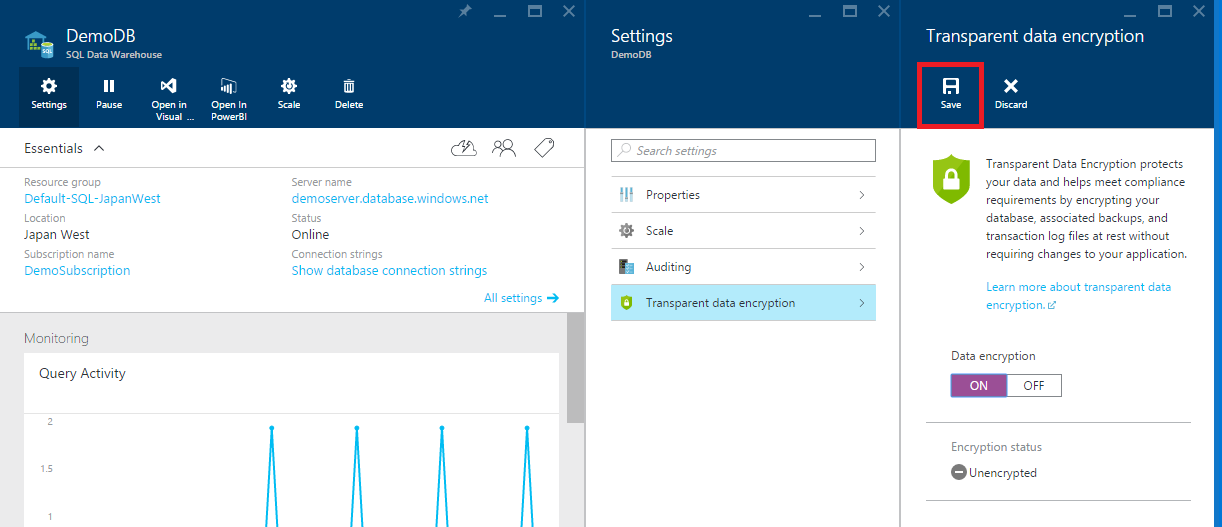
Untuk mengaktifkan TDE, ikuti langkah-langkah di bawah ini:
- Buka database di portal Microsoft Azure
- Di bilah database, klik tombol Pengaturan
- Pilih opsi portal settingsEnkripsi data transparan
- Pilih pengaturan Aktif

- Pilih Simpan
Menonaktifkan Enkripsi
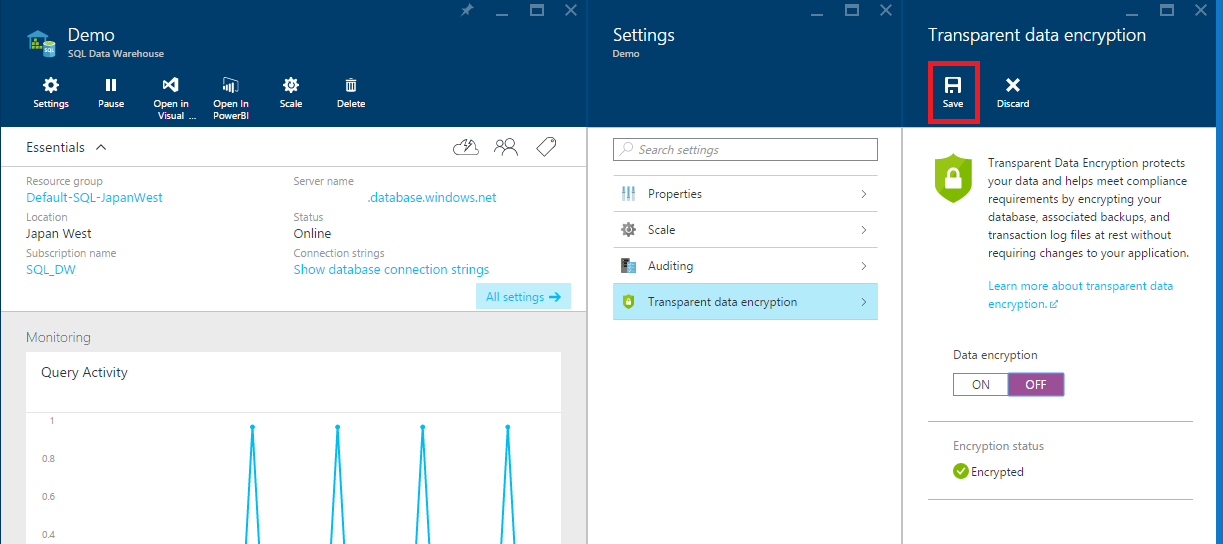
Untuk menonaktifkan TDE, ikuti langkah-langkah di bawah ini:
- Buka database di portal Microsoft Azure
- Di bilah database, klik tombol Pengaturan
- Pilih opsi portal settingsEnkripsi data transparan
- Pilih pengaturan Nonaktif

- Pilih Simpan
DMV enkripsi
Enkripsi dapat dikonfirmasi dengan DMV berikut: