Catatan
Akses ke halaman ini memerlukan otorisasi. Anda dapat mencoba masuk atau mengubah direktori.
Akses ke halaman ini memerlukan otorisasi. Anda dapat mencoba mengubah direktori.
Artikel ini menunjukkan cara membuat jaringan blok aliran data yang melakukan pemrosesan gambar di aplikasi Windows Forms.
Contoh ini memuat file gambar dari folder yang ditentukan, membuat gambar komposit, dan menampilkan hasilnya. Contohnya menggunakan model aliran data untuk merutekan gambar melalui jaringan. Dalam model aliran data, komponen independen program berkomunikasi satu sama lain dengan mengirim pesan. Ketika komponen menerima pesan, komponen melakukan beberapa tindakan lalu meneruskan hasilnya ke komponen lain. Bandingkan ini dengan model alur kontrol, di mana aplikasi menggunakan struktur kontrol, misalnya, pernyataan kondisional, perulangan, dan sebagainya, untuk mengontrol urutan operasi dalam program.
Prasyarat
Baca Aliran Data sebelum Anda memulai panduan ini.
Nota
Pustaka aliran data TPL (System.Threading.Tasks.Dataflow namespace) disertakan dalam .NET 6 dan versi yang lebih baru. Untuk proyek .NET Framework dan .NET Standard, Anda perlu menginstal 📦 paket System.Threading.Tasks.Dataflow NuGet.
Bagian-bagian
Panduan ini berisi bagian berikut:
Membuat Aplikasi Formulir Windows
Bagian ini menjelaskan cara membuat aplikasi Windows Forms dasar dan menambahkan kontrol ke formulir utama.
Untuk Membuat Aplikasi Formulir Windows
Di Visual Studio, buat proyek Aplikasi Visual C# atau Visual Basic Windows Forms . Dalam dokumen ini, proyek diberi nama
CompositeImages.Pada desainer formulir untuk formulir utama, Form1.cs (Form1.vb untuk Visual Basic), tambahkan kontrol ToolStrip.
Tambahkan kontrol ToolStripButton ke kontrol ToolStrip. Atur properti DisplayStyle ke Text dan atur properti Text ke Pilih Folder.
Tambahkan ToolStripButton kontrol kedua ke ToolStrip kontrol. Atur DisplayStyle properti ke Text, Text properti ke Batal, dan Enabled properti ke
False.PictureBox Tambahkan objek ke formulir utama. Atur properti Dock ke Fill.
Membuat Jaringan Aliran Data
Bagian ini menjelaskan cara membuat jaringan aliran data yang melakukan pemrosesan gambar.
Untuk Membuat Jaringan Aliran Data
Tambahkan referensi ke System.Threading.Tasks.Dataflow.dll ke proyek Anda.
Pastikan Form1.cs (Form1.vb untuk Visual Basic) berisi pernyataan berikut (
usingUsingdi Visual Basic):using System; using System.Collections.Generic; using System.Drawing; using System.Drawing.Imaging; using System.IO; using System.Linq; using System.Threading; using System.Threading.Tasks; using System.Threading.Tasks.Dataflow; using System.Windows.Forms;Tambahkan anggota data berikut ke
Form1kelas :// The head of the dataflow network. ITargetBlock<string> headBlock = null; // Enables the user interface to signal cancellation to the network. CancellationTokenSource cancellationTokenSource;Tambahkan metode berikut,
CreateImageProcessingNetwork, keForm1kelas . Metode ini membuat jaringan pemrosesan gambar.// Creates the image processing dataflow network and returns the // head node of the network. ITargetBlock<string> CreateImageProcessingNetwork() { // // Create the dataflow blocks that form the network. // // Create a dataflow block that takes a folder path as input // and returns a collection of Bitmap objects. var loadBitmaps = new TransformBlock<string, IEnumerable<Bitmap>>(path => { try { return LoadBitmaps(path); } catch (OperationCanceledException) { // Handle cancellation by passing the empty collection // to the next stage of the network. return Enumerable.Empty<Bitmap>(); } }); // Create a dataflow block that takes a collection of Bitmap objects // and returns a single composite bitmap. var createCompositeBitmap = new TransformBlock<IEnumerable<Bitmap>, Bitmap>(bitmaps => { try { return CreateCompositeBitmap(bitmaps); } catch (OperationCanceledException) { // Handle cancellation by passing null to the next stage // of the network. return null; } }); // Create a dataflow block that displays the provided bitmap on the form. var displayCompositeBitmap = new ActionBlock<Bitmap>(bitmap => { // Display the bitmap. pictureBox1.SizeMode = PictureBoxSizeMode.StretchImage; pictureBox1.Image = bitmap; // Enable the user to select another folder. toolStripButton1.Enabled = true; toolStripButton2.Enabled = false; Cursor = DefaultCursor; }, // Specify a task scheduler from the current synchronization context // so that the action runs on the UI thread. new ExecutionDataflowBlockOptions { TaskScheduler = TaskScheduler.FromCurrentSynchronizationContext() }); // Create a dataflow block that responds to a cancellation request by // displaying an image to indicate that the operation is cancelled and // enables the user to select another folder. var operationCancelled = new ActionBlock<object>(delegate { // Display the error image to indicate that the operation // was cancelled. pictureBox1.SizeMode = PictureBoxSizeMode.CenterImage; pictureBox1.Image = pictureBox1.ErrorImage; // Enable the user to select another folder. toolStripButton1.Enabled = true; toolStripButton2.Enabled = false; Cursor = DefaultCursor; }, // Specify a task scheduler from the current synchronization context // so that the action runs on the UI thread. new ExecutionDataflowBlockOptions { TaskScheduler = TaskScheduler.FromCurrentSynchronizationContext() }); // // Connect the network. // // Link loadBitmaps to createCompositeBitmap. // The provided predicate ensures that createCompositeBitmap accepts the // collection of bitmaps only if that collection has at least one member. loadBitmaps.LinkTo(createCompositeBitmap, bitmaps => bitmaps.Count() > 0); // Also link loadBitmaps to operationCancelled. // When createCompositeBitmap rejects the message, loadBitmaps // offers the message to operationCancelled. // operationCancelled accepts all messages because we do not provide a // predicate. loadBitmaps.LinkTo(operationCancelled); // Link createCompositeBitmap to displayCompositeBitmap. // The provided predicate ensures that displayCompositeBitmap accepts the // bitmap only if it is non-null. createCompositeBitmap.LinkTo(displayCompositeBitmap, bitmap => bitmap != null); // Also link createCompositeBitmap to operationCancelled. // When displayCompositeBitmap rejects the message, createCompositeBitmap // offers the message to operationCancelled. // operationCancelled accepts all messages because we do not provide a // predicate. createCompositeBitmap.LinkTo(operationCancelled); // Return the head of the network. return loadBitmaps; }Mengimplementasikan metode
LoadBitmaps.// Loads all bitmap files that exist at the provided path. IEnumerable<Bitmap> LoadBitmaps(string path) { List<Bitmap> bitmaps = new List<Bitmap>(); // Load a variety of image types. foreach (string bitmapType in new string[] { "*.bmp", "*.gif", "*.jpg", "*.png", "*.tif" }) { // Load each bitmap for the current extension. foreach (string fileName in Directory.GetFiles(path, bitmapType)) { // Throw OperationCanceledException if cancellation is requested. cancellationTokenSource.Token.ThrowIfCancellationRequested(); try { // Add the Bitmap object to the collection. bitmaps.Add(new Bitmap(fileName)); } catch (Exception) { // TODO: A complete application might handle the error. } } } return bitmaps; }Mengimplementasikan metode
CreateCompositeBitmap.// Creates a composite bitmap from the provided collection of Bitmap objects. // This method computes the average color of each pixel among all bitmaps // to create the composite image. Bitmap CreateCompositeBitmap(IEnumerable<Bitmap> bitmaps) { Bitmap[] bitmapArray = bitmaps.ToArray(); // Compute the maximum width and height components of all // bitmaps in the collection. Rectangle largest = new Rectangle(); foreach (var bitmap in bitmapArray) { if (bitmap.Width > largest.Width) largest.Width = bitmap.Width; if (bitmap.Height > largest.Height) largest.Height = bitmap.Height; } // Create a 32-bit Bitmap object with the greatest dimensions. Bitmap result = new Bitmap(largest.Width, largest.Height, PixelFormat.Format32bppArgb); // Lock the result Bitmap. var resultBitmapData = result.LockBits( new Rectangle(new Point(), result.Size), ImageLockMode.WriteOnly, result.PixelFormat); // Lock each source bitmap to create a parallel list of BitmapData objects. var bitmapDataList = (from bitmap in bitmapArray select bitmap.LockBits( new Rectangle(new Point(), bitmap.Size), ImageLockMode.ReadOnly, PixelFormat.Format32bppArgb)) .ToList(); // Compute each column in parallel. Parallel.For(0, largest.Width, new ParallelOptions { CancellationToken = cancellationTokenSource.Token }, i => { // Compute each row. for (int j = 0; j < largest.Height; j++) { // Counts the number of bitmaps whose dimensions // contain the current location. int count = 0; // The sum of all alpha, red, green, and blue components. int a = 0, r = 0, g = 0, b = 0; // For each bitmap, compute the sum of all color components. foreach (var bitmapData in bitmapDataList) { // Ensure that we stay within the bounds of the image. if (bitmapData.Width > i && bitmapData.Height > j) { unsafe { byte* row = (byte*)(bitmapData.Scan0 + (j * bitmapData.Stride)); byte* pix = (byte*)(row + (4 * i)); a += *pix; pix++; r += *pix; pix++; g += *pix; pix++; b += *pix; } count++; } } //prevent divide by zero in bottom right pixelless corner if (count == 0) break; unsafe { // Compute the average of each color component. a /= count; r /= count; g /= count; b /= count; // Set the result pixel. byte* row = (byte*)(resultBitmapData.Scan0 + (j * resultBitmapData.Stride)); byte* pix = (byte*)(row + (4 * i)); *pix = (byte)a; pix++; *pix = (byte)r; pix++; *pix = (byte)g; pix++; *pix = (byte)b; } } }); // Unlock the source bitmaps. for (int i = 0; i < bitmapArray.Length; i++) { bitmapArray[i].UnlockBits(bitmapDataList[i]); } // Unlock the result bitmap. result.UnlockBits(resultBitmapData); // Return the result. return result; }Nota
Versi C# dari
CreateCompositeBitmapmetode ini menggunakan pointer untuk memungkinkan pemrosesan objek yang System.Drawing.Bitmap efisien. Oleh karena itu, Anda harus mengaktifkan opsi Izinkan kode yang tidak aman dalam proyek Anda untuk menggunakan kata kunci yang tidak aman . Untuk informasi selengkapnya tentang cara mengaktifkan kode tidak aman dalam proyek Visual C#, lihat Halaman Build, Perancang Proyek (C#).
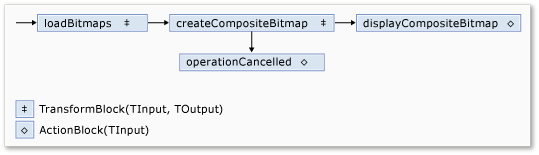
Tabel berikut ini menjelaskan anggota jaringan.
| Anggota | Tipe | Description |
|---|---|---|
loadBitmaps |
TransformBlock<TInput,TOutput> | Mengambil jalur folder sebagai input dan menghasilkan kumpulan Bitmap objek sebagai output. |
createCompositeBitmap |
TransformBlock<TInput,TOutput> | Mengambil kumpulan Bitmap objek sebagai input dan menghasilkan bitmap komposit sebagai output. |
displayCompositeBitmap |
ActionBlock<TInput> | Menampilkan bitmap komposit pada formulir. |
operationCancelled |
ActionBlock<TInput> | Menampilkan gambar untuk menunjukkan bahwa operasi dibatalkan dan memungkinkan pengguna untuk memilih folder lain. |
Untuk menyambungkan blok aliran data untuk membentuk jaringan, contoh ini menggunakan LinkTo metode . Metode LinkTo ini berisi versi yang di-overload yang menggunakan objek Predicate<T> untuk menentukan apakah blok target menerima atau menolak pesan. Mekanisme pemfilteran ini memungkinkan blok pesan hanya menerima nilai tertentu. Dalam contoh ini, jaringan dapat bercabang dengan salah satu dari dua cara. Cabang utama memuat gambar dari disk, membuat gambar komposit, dan menampilkan gambar tersebut pada formulir. Cabang alternatif membatalkan operasi saat ini. Objek Predicate<T> memungkinkan blok aliran data di sepanjang cabang utama untuk beralih ke cabang alternatif dengan menolak pesan tertentu. Misalnya, jika pengguna membatalkan operasi, blok createCompositeBitmap aliran data menghasilkan null (Nothing di Visual Basic) sebagai outputnya. Blok displayCompositeBitmap aliran data menolak null nilai input, dan oleh karena itu, pesan ditawarkan ke operationCancelled. Blok operationCancelled aliran data menerima semua pesan dan oleh karena itu, menampilkan gambar untuk menunjukkan bahwa operasi dibatalkan.
Ilustrasi berikut menunjukkan jaringan pemrosesan gambar:
Karena blok aliran data displayCompositeBitmap dan operationCancelled bertindak pada antarmuka pengguna, penting bahwa tindakan ini terjadi pada utas antarmuka pengguna. Untuk melakukannya, selama proses konstruksi, objek-objek ini masing-masing menyediakan sebuah objek ExecutionDataflowBlockOptions yang sudah memiliki properti TaskScheduler diatur menjadi TaskScheduler.FromCurrentSynchronizationContext. Metode TaskScheduler.FromCurrentSynchronizationContext ini membuat objek TaskScheduler yang menjalankan tugas pada konteks sinkronisasi saat ini. Karena metode CreateImageProcessingNetwork dipanggil dari handler tombol Pilih Folder, yang berjalan pada utas antarmuka pengguna, tindakan untuk blok aliran data displayCompositeBitmap dan operationCancelled juga berjalan pada utas antarmuka pengguna.
Contoh ini menggunakan token pembatalan bersama alih-alih mengatur CancellationToken properti karena CancellationToken properti membatalkan eksekusi blok aliran data secara permanen. Token pembatalan memungkinkan contoh ini untuk menggunakan kembali jaringan aliran data yang sama beberapa kali, bahkan ketika pengguna membatalkan satu atau beberapa operasi. Untuk contoh yang menggunakan CancellationToken untuk membatalkan eksekusi blok aliran data secara permanen, lihat Cara: Membatalkan Blok Aliran Data.
Menyambungkan Jaringan Aliran Data ke Antarmuka Pengguna
Bagian ini menjelaskan cara menyambungkan jaringan aliran data ke antarmuka pengguna. Pembuatan gambar komposit dan pembatalan operasi dimulai dari tombol Pilih Folder dan Batalkan . Ketika pengguna memilih salah satu tombol ini, tindakan yang sesuai dimulai dengan cara asinkron.
Untuk Menyambungkan Jaringan Aliran Data ke Antarmuka Pengguna
Pada perancang formulir untuk formulir utama, buat penanganan aktivitas untuk Click peristiwa untuk tombol Pilih Folder .
Terapkan Click event untuk tombol Pilih Folder.
// Event handler for the Choose Folder button. private void toolStripButton1_Click(object sender, EventArgs e) { // Create a FolderBrowserDialog object to enable the user to // select a folder. FolderBrowserDialog dlg = new FolderBrowserDialog { ShowNewFolderButton = false }; // Set the selected path to the common Sample Pictures folder // if it exists. string initialDirectory = Path.Combine( Environment.GetFolderPath(Environment.SpecialFolder.CommonPictures), "Sample Pictures"); if (Directory.Exists(initialDirectory)) { dlg.SelectedPath = initialDirectory; } // Show the dialog and process the dataflow network. if (dlg.ShowDialog() == DialogResult.OK) { // Create a new CancellationTokenSource object to enable // cancellation. cancellationTokenSource = new CancellationTokenSource(); // Create the image processing network if needed. headBlock ??= CreateImageProcessingNetwork(); // Post the selected path to the network. headBlock.Post(dlg.SelectedPath); // Enable the Cancel button and disable the Choose Folder button. toolStripButton1.Enabled = false; toolStripButton2.Enabled = true; // Show a wait cursor. Cursor = Cursors.WaitCursor; } }Pada perancang formulir untuk formulir utama, buat penanganan aktivitas untuk Click acara untuk tombol Batalkan .
Terapkan event Click untuk tombol Batalkan.
// Event handler for the Cancel button. private void toolStripButton2_Click(object sender, EventArgs e) { // Signal the request for cancellation. The current component of // the dataflow network will respond to the cancellation request. cancellationTokenSource.Cancel(); }
Contoh Lengkap
Contoh berikut menunjukkan kode lengkap untuk panduan ini.
using System;
using System.Collections.Generic;
using System.Drawing;
using System.Drawing.Imaging;
using System.IO;
using System.Linq;
using System.Threading;
using System.Threading.Tasks;
using System.Threading.Tasks.Dataflow;
using System.Windows.Forms;
namespace CompositeImages
{
public partial class Form1 : Form
{
// The head of the dataflow network.
ITargetBlock<string> headBlock = null;

// Enables the user interface to signal cancellation to the network.
CancellationTokenSource cancellationTokenSource;
public Form1()
{
InitializeComponent();
}
// Creates the image processing dataflow network and returns the
// head node of the network.
ITargetBlock<string> CreateImageProcessingNetwork()
{
   //
   // Create the dataflow blocks that form the network.
   //

   // Create a dataflow block that takes a folder path as input
   // and returns a collection of Bitmap objects.
   var loadBitmaps = new TransformBlock<string, IEnumerable<Bitmap>>(path =>
      {
         try
         {
            return LoadBitmaps(path);
         }
         catch (OperationCanceledException)
         {
            // Handle cancellation by passing the empty collection
            // to the next stage of the network.
            return Enumerable.Empty<Bitmap>();
         }
      });

   // Create a dataflow block that takes a collection of Bitmap objects
   // and returns a single composite bitmap.
   var createCompositeBitmap = new TransformBlock<IEnumerable<Bitmap>, Bitmap>(bitmaps =>
      {
         try
         {
            return CreateCompositeBitmap(bitmaps);
         }
         catch (OperationCanceledException)
         {
            // Handle cancellation by passing null to the next stage
            // of the network.
            return null;
         }
      });

   // Create a dataflow block that displays the provided bitmap on the form.
   var displayCompositeBitmap = new ActionBlock<Bitmap>(bitmap =>
      {
         // Display the bitmap.
         pictureBox1.SizeMode = PictureBoxSizeMode.StretchImage;
         pictureBox1.Image = bitmap;

         // Enable the user to select another folder.
         toolStripButton1.Enabled = true;
         toolStripButton2.Enabled = false;
         Cursor = DefaultCursor;
      },
      // Specify a task scheduler from the current synchronization context
      // so that the action runs on the UI thread.
      new ExecutionDataflowBlockOptions
      {
          TaskScheduler = TaskScheduler.FromCurrentSynchronizationContext()
      });

   // Create a dataflow block that responds to a cancellation request by
   // displaying an image to indicate that the operation is cancelled and
   // enables the user to select another folder.
   var operationCancelled = new ActionBlock<object>(delegate
      {
         // Display the error image to indicate that the operation
         // was cancelled.
         pictureBox1.SizeMode = PictureBoxSizeMode.CenterImage;
         pictureBox1.Image = pictureBox1.ErrorImage;

         // Enable the user to select another folder.
         toolStripButton1.Enabled = true;
         toolStripButton2.Enabled = false;
         Cursor = DefaultCursor;
      },
      // Specify a task scheduler from the current synchronization context
      // so that the action runs on the UI thread.
      new ExecutionDataflowBlockOptions
      {
         TaskScheduler = TaskScheduler.FromCurrentSynchronizationContext()
      });

   //
   // Connect the network.
   //

   // Link loadBitmaps to createCompositeBitmap.
   // The provided predicate ensures that createCompositeBitmap accepts the
   // collection of bitmaps only if that collection has at least one member.
   loadBitmaps.LinkTo(createCompositeBitmap, bitmaps => bitmaps.Count() > 0);

   // Also link loadBitmaps to operationCancelled.
   // When createCompositeBitmap rejects the message, loadBitmaps
   // offers the message to operationCancelled.
   // operationCancelled accepts all messages because we do not provide a
   // predicate.
   loadBitmaps.LinkTo(operationCancelled);

   // Link createCompositeBitmap to displayCompositeBitmap.
   // The provided predicate ensures that displayCompositeBitmap accepts the
   // bitmap only if it is non-null.
   createCompositeBitmap.LinkTo(displayCompositeBitmap, bitmap => bitmap != null);

   // Also link createCompositeBitmap to operationCancelled.
   // When displayCompositeBitmap rejects the message, createCompositeBitmap
   // offers the message to operationCancelled.
   // operationCancelled accepts all messages because we do not provide a
   // predicate.
   createCompositeBitmap.LinkTo(operationCancelled);

   // Return the head of the network.
   return loadBitmaps;
}
// Loads all bitmap files that exist at the provided path.
IEnumerable<Bitmap> LoadBitmaps(string path)
{
   List<Bitmap> bitmaps = new List<Bitmap>();

   // Load a variety of image types.
   foreach (string bitmapType in
      new string[] { "*.bmp", "*.gif", "*.jpg", "*.png", "*.tif" })
   {
      // Load each bitmap for the current extension.
      foreach (string fileName in Directory.GetFiles(path, bitmapType))
      {
         // Throw OperationCanceledException if cancellation is requested.
         cancellationTokenSource.Token.ThrowIfCancellationRequested();

         try
         {
            // Add the Bitmap object to the collection.
            bitmaps.Add(new Bitmap(fileName));
         }
         catch (Exception)
         {
            // TODO: A complete application might handle the error.
         }
      }
   }
   return bitmaps;
}
// Creates a composite bitmap from the provided collection of Bitmap objects.
// This method computes the average color of each pixel among all bitmaps
// to create the composite image.
Bitmap CreateCompositeBitmap(IEnumerable<Bitmap> bitmaps)
{
   Bitmap[] bitmapArray = bitmaps.ToArray();

   // Compute the maximum width and height components of all
   // bitmaps in the collection.
   Rectangle largest = new Rectangle();
   foreach (var bitmap in bitmapArray)
   {
      if (bitmap.Width > largest.Width)
         largest.Width = bitmap.Width;
      if (bitmap.Height > largest.Height)
         largest.Height = bitmap.Height;
   }

   // Create a 32-bit Bitmap object with the greatest dimensions.
   Bitmap result = new Bitmap(largest.Width, largest.Height,
      PixelFormat.Format32bppArgb);

   // Lock the result Bitmap.
   var resultBitmapData = result.LockBits(
      new Rectangle(new Point(), result.Size), ImageLockMode.WriteOnly,
      result.PixelFormat);

   // Lock each source bitmap to create a parallel list of BitmapData objects.
   var bitmapDataList = (from bitmap in bitmapArray
                         select bitmap.LockBits(
                           new Rectangle(new Point(), bitmap.Size),
                           ImageLockMode.ReadOnly, PixelFormat.Format32bppArgb))
                        .ToList();

   // Compute each column in parallel.
   Parallel.For(0, largest.Width, new ParallelOptions
   {
      CancellationToken = cancellationTokenSource.Token
   },
   i =>
   {
      // Compute each row.
      for (int j = 0; j < largest.Height; j++)
      {
         // Counts the number of bitmaps whose dimensions
         // contain the current location.
         int count = 0;

         // The sum of all alpha, red, green, and blue components.
         int a = 0, r = 0, g = 0, b = 0;

         // For each bitmap, compute the sum of all color components.
         foreach (var bitmapData in bitmapDataList)
         {
            // Ensure that we stay within the bounds of the image.
            if (bitmapData.Width > i && bitmapData.Height > j)
            {
               unsafe
               {
                  byte* row = (byte*)(bitmapData.Scan0 + (j * bitmapData.Stride));
                  byte* pix = (byte*)(row + (4 * i));
                  a += *pix; pix++;
                  r += *pix; pix++;
                  g += *pix; pix++;
                  b += *pix;
               }
               count++;
            }
         }

         //prevent divide by zero in bottom right pixelless corner
         if (count == 0)
             break;

         unsafe
         {
            // Compute the average of each color component.
            a /= count;
            r /= count;
            g /= count;
            b /= count;

            // Set the result pixel.
            byte* row = (byte*)(resultBitmapData.Scan0 + (j * resultBitmapData.Stride));
            byte* pix = (byte*)(row + (4 * i));
            *pix = (byte)a; pix++;
            *pix = (byte)r; pix++;
            *pix = (byte)g; pix++;
            *pix = (byte)b;
         }
      }
   });

   // Unlock the source bitmaps.
   for (int i = 0; i < bitmapArray.Length; i++)
   {
      bitmapArray[i].UnlockBits(bitmapDataList[i]);
   }

   // Unlock the result bitmap.
   result.UnlockBits(resultBitmapData);

   // Return the result.
   return result;
}
// Event handler for the Choose Folder button.
private void toolStripButton1_Click(object sender, EventArgs e)
{
   // Create a FolderBrowserDialog object to enable the user to
   // select a folder.
   FolderBrowserDialog dlg = new FolderBrowserDialog
   {
      ShowNewFolderButton = false
   };

   // Set the selected path to the common Sample Pictures folder
   // if it exists.
   string initialDirectory = Path.Combine(
      Environment.GetFolderPath(Environment.SpecialFolder.CommonPictures),
      "Sample Pictures");
   if (Directory.Exists(initialDirectory))
   {
      dlg.SelectedPath = initialDirectory;
   }

   // Show the dialog and process the dataflow network.
   if (dlg.ShowDialog() == DialogResult.OK)
   {
      // Create a new CancellationTokenSource object to enable
      // cancellation.
      cancellationTokenSource = new CancellationTokenSource();

      // Create the image processing network if needed.
      headBlock ??= CreateImageProcessingNetwork();

      // Post the selected path to the network.
      headBlock.Post(dlg.SelectedPath);

      // Enable the Cancel button and disable the Choose Folder button.
      toolStripButton1.Enabled = false;
      toolStripButton2.Enabled = true;

      // Show a wait cursor.
      Cursor = Cursors.WaitCursor;
   }
}
// Event handler for the Cancel button.
private void toolStripButton2_Click(object sender, EventArgs e)
{
   // Signal the request for cancellation. The current component of
   // the dataflow network will respond to the cancellation request.
   cancellationTokenSource.Cancel();
}
~Form1()
{
cancellationTokenSource.Dispose();
}
}
}
Ilustrasi berikut menunjukkan output umum untuk folder \Sample Pictures\ umum.

Lihat juga
Berkolaborasi dengan kami di GitHub
Sumber untuk konten ini dapat ditemukan di GitHub, yang juga dapat Anda gunakan untuk membuat dan meninjau masalah dan menarik permintaan. Untuk informasi selengkapnya, lihat panduan kontributor kami.
