Copilot Studio と Dynamics 365 for Customer Service プラットフォームは、チャネルとリッチ メディア メッセージ タイプに基づいてリッチ メディア メッセージをサポートする方法が若干異なります。 この記事では、Copilot Studio でリッチ メディア メッセージをサポートする方法について説明します。
Apple Messages for Business のエージェント JSON の取得
- Copilot サービス管理センターのサイト マップで、[サポート エクスペリエンスの生産性] を選択します。
- 生産性 ページで、リッチ メッセージの 管理 を選択します。
- 使用可能なすべてのリストメッセージのリストから、会話に送信するリッチメッセージを選択します。
- Apple Messages for Business リッチ メッセージの場合は、 Microsoft.Omnichannel.sendMessageToConversation API を使用して JSON ファイルを送信します。
ライブチャットフォーム、ライブチャットカスタムJSON、WhatsAppの提案された返信のエージェントJSONを取得する
Copilot サービス管理センターのサイト マップで、[サポート エクスペリエンスの生産性] を選択します。
生産性 ページで、リッチ メッセージの 管理 を選択します。
エージェントに送信するリッチ メディア メッセージを見つけ、JSON が利用可能な場合は、 Copilot Studio の JSON 列の下に表示されます。 [ JSON の表示 ] と [特定のチャネルの種類] を選択して、JSON をコピーします。
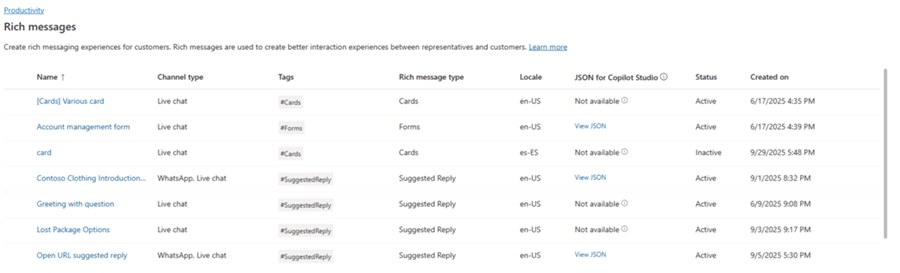
ライブ チャットと WhatsApp リッチ メディア テンプレートの場合、JSON を Copilot Studio のアダプティブ カード ノードに直接貼り付けることができます。
Apple Messages for Business のリッチメッセージの JSON サンプル
このセクションには、Customer Service 用オムニチャネルの Apple Messages for Business チャネルで使用できるリッチ メッセージ タイプの JSON サンプルが含まれています。 詳細: リッチ メッセージの管理
注
フォームタイプのリッチメッセージを会話に送信することはできません。
Apple Pay
let applePayJSON = // <copy_and_paste_details_content>
applePayJSON.survey = { Questions: JSON.parse(applePayJSON.survey)[0].Questions, Answers: JSON.parse(applePayJSON.survey)[1].Answers };
applePayJSON.survey.Answers.AppleMessagesforBusinessJSON = JSON.parse(applePayJSON.survey.Answers.AppleMessagesforBusinessJSON);
applePayJSON.survey.Answers.AppleMessagesforBusinessJSON = JSON.stringify(applePayJSON.survey.Answers.AppleMessagesforBusinessJSON);
applePayJSON.survey = JSON.stringify(applePayJSON.survey);

// Can now send this payload using the API
Microsoft.Omnichannel.sendMessageToConversation(applePayJSON, false);

// Or take the JSON elsewhere for use in bringing your own logic
copy(applePayJSON);
Authentication
let authJSON = // <copy_and_paste_details_content>
authJSON.survey = { Questions: JSON.parse(authJSON.survey)[0].Questions, Answers: JSON.parse(authJSON.survey)[1].Answers };
authJSON.survey = JSON.stringify(authJSON.survey);

// Can now send this payload using the API
Microsoft.Omnichannel.sendMessageToConversation(authJSON, false);

// Or take the JSON elsewhere for use in bringing your own logic
copy(authJSON);
カスタム JSON (iMessage アプリケーション)
let customJSON = // <copy_and_paste_details_content>
customJSON.survey = { Questions: JSON.parse(customJSON.survey)[0].Questions, Answers: JSON.parse(customJSON.survey)[1].Answers };
customJSON.survey.Answers.AppleMessagesforBusinessJSON = JSON.parse(customJSON.survey.Answers.AppleMessagesforBusinessJSON);
customJSON.survey.Answers.AppleMessagesforBusinessJSON = JSON.stringify(customJSON.survey.Answers.AppleMessagesforBusinessJSON);
customJSON.survey = JSON.stringify(customJSON.survey);

// Can now send this payload using the API
Microsoft.Omnichannel.sendMessageToConversation(customJSON, false);

// Or take the JSON elsewhere for use in bringing your own logic
copy(customJSON);
リストピッカー
listPickerJSON = // <copy_and_paste_details_content>
listPickerJSON.survey = { Questions: JSON.parse(lpFromDetails.survey)[0].Questions, Answers: JSON.parse(listPickerJSON.survey)[1].Answers };
listPickerJSON.survey = JSON.stringify(listPickerJSON.survey);

// Can now send this payload using the API
Microsoft.Omnichannel.sendMessageToConversation(listPickerJSON, false);

// Or take the JSON elsewhere for use in bringing your own logic
copy(listPickerJSON);
返信の提案
suggestedReplyJSON = // <copy_and_paste_details_content>
suggestedReplyJSON.survey = { Questions: JSON.parse(suggestedReplyJSON.survey)[0].Questions, Answers: JSON.parse(suggestedReplyJSON.survey)[1].Answers };
suggestedReplyJSON.survey = JSON.stringify(suggestedReplyJSON.survey);

// Can now send this payload using the API
Microsoft.Omnichannel.sendMessageToConversation(suggestedReplyJSON, false);

// Or take the JSON elsewhere for use in bringing your own logic
copy(suggestedReplyJSON);
時刻の選択
timePickerJSON = // <copy_and_paste_details_content>
timePickerJSON.survey = { Questions: JSON.parse(timePickerJSON.survey)[0].Questions, Answers: JSON.parse(timePickerJSON.survey)[1].Answers };
timePickerJSON.survey = JSON.stringify(timePickerJSON.survey);

// Can now send this payload using the API
Microsoft.Omnichannel.sendMessageToConversation(timePickerJSON, false);

// Or take the JSON elsewhere for use in bringing your own logic
copy(timePickerJSON);
動画リッチリンク
videoRichLinkJSON = // <copy_and_paste_details_content>
videoRichLinkJSON.survey = { Questions: JSON.parse(videoRichLinkJSON.survey)[0].Questions, Answers: JSON.parse(videoRichLinkJSON.survey)[1].Answers };
timePickerJSON.survey = JSON.stringify(videoRichLinkJSON.survey);

// Can now send this payload using the API
Microsoft.Omnichannel.sendMessageToConversation(videoRichLinkJSON, false);

// Or take the JSON elsewhere for use in bringing your own logic
copy(videoRichLinkJSON);
ウェブサイトのリッチリンク
websiteRichLinkJSON = // <copy_and_paste_details_content>
websiteRichLinkJSON.survey = { Questions: JSON.parse(websiteRichLinkJSON.survey)[0].Questions, Answers: JSON.parse(websiteRichLinkJSON.survey)[1].Answers };
timePickerJSON.survey = JSON.stringify(websiteRichLinkJSON.survey);

// Can now send this payload using the API
Microsoft.Omnichannel.sendMessageToConversation(websiteRichLinkJSON, false);

// Or take the JSON elsewhere for use in bringing your own logic
copy(websiteRichLinkJSON);
ライブチャットの提案された返信とカード/カルーセルを送信するようにエージェントを構成する
Copilot Studio は、提案された返信と基本的なカードをすぐにサポートしています。 詳細については、「 メッセージの送信 - Microsoft Copilot Studio」を参照してください。
注
Copilot Studio では、提案された返信をクイック返信と呼びます。
関連情報
ライブチャットSDK JavaScript APIリファレンス
オムニチャネル JavaScript API リファレンス
メッセージへの会話の送信