[この記事はプレリリース ドキュメントであり、変更されることがあります。]
Azure アプリケーション Insightsを使って、管理環境からエクスポートされたCopilot Studioエージェントのトレースを監視してください。 エクスポートの設定後は、Azure MonitorとApplication Insightsを使ってエージェントの実行を検証し、ノードやツールの実行を監視し、アラートを作成し、運用分析用のカスタムクエリやダッシュボードを構築しましょう。
Note
- 環境レベルのテレメトリは、標準ハーネスとGitHub Copilotハーネスの両方で動作するエージェント向けに利用可能です。
- プライベートプレビューの後、ルートエージェントの呼び出し(
invoke_agent)はdependenciesではなく、他のすべてのスパンとともにrequestsとして発行されます。 その結果、エージェントのルート呼び出しトレースはグローバル展開が完了するまでrequestsテーブルに現れ続けることがあります。 - 最新のテレメトリー戦略と機能を使ってこのプレビュー機能を評価するには、 Early Release サイクル を有効にした非本番環境でテストできます。
- この機能は現在世界中で展開中で、まだあなたの環境で完全に利用可能ではないかもしれません。
- この機能は 管理環境でのみ利用可能です。
- Copilot Studioで構築されたエージェントのログのみ(宣言的エージェントを除く)はApplication Insightsで利用可能です。
- Copilot Studioエージェントテレメトリに対して環境レベルのアプリケーションインサイト戦略のみを採用する場合、組織はエージェントレベルのアプリケーションインサイトテレメトリを無効にすることができます。
この記事では、Power Platform管理センターを通じてCopilot StudioエージェントのトレースをAzure アプリケーション Insightsに環境レベルでエクスポートする方法を説明しています。
Important
この記事には、Microsoft Copilot Studio のプレビュー ドキュメントが含まれており、変更される可能性があります。
プレビュー機能は運用環境での使用を想定しておらず、機能が制限される可能性があります。 これらの機能は公式リリースの前に利用できるため、早期にアクセスして フィードバックを提供できます。
運用対応エージェントを構築する場合は、 Microsoft Copilot Studio の概要を参照してください。
前提条件
データエクスポート接続を設定する前に、「 Application Insightsへのデータエクスポート」の前提条件を満たしてください。
エクスポートされる内容
エクスポートを有効にすると、Copilot Studioエージェントのトレーステレメトリは、調査、ダッシュボード、アラートをサポートするトレース指向のOpenTelemetryに準拠した観測可能性形式でApplication Insightsに書き込みます。
Copilot Studio のエージェント イベントは、dependencies テーブルにスパンとして記録されます。 各エクスポートされたイベント(InvokeAgent、 ExecuteTool、 OutputMessages)は単一のスパン行(itemType = dependency)です。
スパンがどのようにしてトレースを形成するか
テレメトリはOpenTelemetryのトレース&スパンモデルに従い、
- 各エージェントターンは独立した トレースであり、共有
operation_Idで識別されるため、Application Insightsはターンをグループ化し、エンドツーエンドのトランザクションビューでレンダリングできます。 -
InvokeAgentスパンはターンの軌跡の根点です。 そのExecuteToolと接続されたOutputMessagesスパンはその下にネストされ、それぞれoperation_ParentId=InvokeAgentスパンのidを保持しています。 - 会話は 複数のターンにまたがり、それぞれが別々の痕跡として発せられる。
gen_ai.conversation.idごとにグループ化やフィルターをかけて、会話の展開を再びつなげてください。 -
OutputMessagesスパンは必ずしもInvokeAgentルートを生成するとは限らないため、(設計上)対応する親がないまま到着し、独立した単一ノードのトレースとして表示されることがあります。
エクスポート パッケージの作成
エクスポートタイプをCopilot Studioに設定したエクスポートパッケージを作成し、Power Platform管理センターのドキュメントの「Create a export package」の指示に従って作成してください。
構成を検証する
エクスポート設定を保存した後、エージェントとテスト会話を行い、テレメトリがApplication Insightsに届くか確認してください。 新しい構成ではテレメトリの配達には最大24時間かかることがあります。 次の点を検証します。
- エージェント スパンは
dependenciesテーブルに表示されます。 - 各ターンにおける
InvokeAgent、ExecuteTool、OutputMessagesのスパンは、operation_Idを共有します。
Application Insights フィールド
以下の表は dependencies 表のフィールドと、3つのエクスポートされたエージェントイベントそれぞれ( InvokeAgent、 ExecuteTool、 OutputMessages)ごとに入力されているフィールドを示しています。 エージェントおよびオペレーションの意味論は、ネイティブカラムではなく、 customDimensions ( gen_ai.* キー、例えば gen_ai.operation.name)に含まれます。
dependencies テーブル内のフィールド |
インヴォークエージェント | 実行ツール | OutputMessages | サンプル値 |
|---|---|---|---|---|
timestamp [UTC] |
✔️ | ✔️ | ✔️ | 6/11/2026, 5:02:13.501 AM |
id |
✔️ | ✔️ | ✔️ | 1111aaa1-aa11-11aa-11a1-a1aaa1111aa1 |
name |
✔️ | ✔️ | ✔️ | InvokeAgent / ExecuteTool / OutputMessages |
resultCode |
✔️ | ✔️ | ✔️ |
OK、ERROR |
type |
✔️ | ✔️ | ✔️ | GenAI |
target |
✔️ | ✔️ | ✔️ | GenAI |
data |
✔️ | ✔️ | ✔️ | invoke_agent / execute_tool / output_messages |
success |
✔️ | ✔️ | ✔️ | True |
duration |
✔️ | ✔️ | ✔️ | 0 |
performanceBucket |
✔️ | ✔️ | ✔️ | <250ms |
itemType |
✔️ | ✔️ | ✔️ | dependency |
customDimensions |
✔️ | ✔️ | ✔️ | 詳細は customDimension プロパティをご覧ください |
operation_Id |
✔️ | ✔️ | ✔️ |
trace-1111aaa1-aa11-11aa-11a1-a1aaa1111aa1(ターン内のすべてのスパンで共有) |
operation_ParentId |
✔️ | ✔️ | ✔️ | 子スパン用のターンの InvokeAgentid、InvokeAgent スパンのトレースルート |
client_Type |
✔️ | ✔️ | ✔️ | PC |
client_IP |
✔️ | ✔️ | ✔️ | 0.0.0.0 |
client_City |
✔️ | ✔️ | ✔️ | San Jose |
client_StateOrProvince |
✔️ | ✔️ | ✔️ | California |
client_CountryOrRegion |
✔️ | ✔️ | ✔️ | United States |
appId |
✔️ | ✔️ | ✔️ | 11111a1a-1111-1111-a111-1a1a1a11111a |
appName |
✔️ | ✔️ | ✔️ | - |
iKey |
✔️ | ✔️ | ✔️ | aa111a1a-a1aa-111a-111a-a111a111111a |
sdkVersion |
✔️ | ✔️ | ✔️ | dotnetc:2.23.0-29 |
itemId |
✔️ | ✔️ | ✔️ | a1a1111a-1111-11a1-1111-111111aa1a1a |
itemCount |
✔️ | ✔️ | ✔️ | 1 |
_ResourceId |
✔️ | ✔️ | ✔️ | - |
customDimensions プロパティ
すべてのスパンには customDimensions JSONが含まれています。 以下の表は、すべてのスパンに共通する鍵を示しています。
| 鍵 | サンプル値 |
|---|---|
SpanId |
1111aaa1-aa11-11aa-11a1-a1aaa1111aa1 |
error.type |
404 |
Status.code |
1、2 |
Status.message |
Descriptive failure message |
gen_ai.agent.id |
1aa11a11-1a1a-1a11-1a1a-1111aa1111aa |
gen_ai.agent.name |
MCS Agent |
gen_ai.conversation.id |
aaaaa111-1a1a-1111-1aa1-a111111a11a1 |
gen_ai.request.model |
Sonnet46 |
gen_ai.operation.name |
invoke_agent / execute_tool / output_messages |
env.id |
111a1aa1-a1aa-aaa1-a11a-11a111111111 |
microsoft.tenant.id |
11aaa111-1a11-1a1a-a111-aa1a111a111a |
microsoft.a365.agent.blueprint.id |
1111111a-aa11-1a11-a1a1-a11a1111a1a1 |
microsoft.a365.agent.platform.id |
111a1aa1-…_1a11111a-… |
microsoft.channel.name |
Copilot Studio Test Pane |
resource.provider |
copilot studio |
signal.category |
default |
a365.enabled |
True |
appinsights.enabled |
True |
user.id |
- |
user.email |
My.User@mytenant.onmicrosoft.com |
user.name |
My User |
client.address |
::ffff:00.00.00.00 |
telemetry.sdk.name |
A365ObservabilitySDK |
telemetry.sdk.language |
dotnet |
telemetry.sdk.version |
1.1.9.43597 |
イベント固有のキー
以下の表はイベント固有のキーを示しています:
| 鍵 | インヴォークエージェント | 実行ツール | OutputMessages | Description |
|---|---|---|---|---|
gen_ai.input.messages |
✔️ | - | - | JSON配列の {role, parts:[{content, type}]}—ユーザープロンプト |
gen_ai.output.messages |
- | - | ✔️ | JSON配列—エージェントの返信 |
gen_ai.tool.name |
- | ✔️ | - | たとえば、workiqsharepoint:mcp_SharePointRemoteServer のように指定します。 |
gen_ai.tool.type |
- | ✔️ | - | たとえば、MCP - Power Platform Connector のように指定します。 |
gen_ai.tool.call.id |
- | ✔️ | - | ツール呼び出し識別子 |
gen_ai.tool.call.arguments |
- | ✔️ | - | ツールに送信されたJSONペイロード |
gen_ai.tool.call.result |
- | ✔️ | - | ツールが返すJSONペイロード |
現在のスキーマを発見する
この記事で記録されているスキーマは時間とともに進化する可能性があります。 先に述べたテーブルだけに頼るのではなく、以下のクエリを使って自分の環境で最新のスキーマを検証してください。
ネイティブ テーブルの列を一覧表示する
次のクエリは dependencies テーブルのカラムレベルのスキーマを返します。 クエリ、ダッシュボード、アラートを作成する際に利用可能なネイティブカラムを確認するために使います。
dependencies
| getschema
| project ColumnName, ColumnType
| order by ColumnName asc
customDimensions キー (動的プロパティ) を確認する
以下のクエリは、customDimensionsテーブル内のdependencies JSON内のすべてのキーを一覧にします。プロパティ名、どのエージェントイベント(InvokeAgent、ExecuteTool、OutputMessages)、そしてサンプル値です。 ネイティブのカラムスキーマとは異なり、これらのプロパティは動的であるため、SDKが新しい gen_ai.* や他のキーを追加してもこのクエリは正確さを保ちます。 利用可能な属性の真実のライブソースとして活用しましょう。
dependencies
| where timestamp > ago(7d)
| mv-expand Key = bag_keys(customDimensions) to typeof(string)
| summarize Events = make_set(name), SampleValue = take_any(tostring(customDimensions[Key])) by Key
| order by Key asc
エクスポートされたテレメトリをモニターします
Application Insights Logs を使ってエージェントの活動を照会し、エージェントやツールの実行を調査してください。 エクスポートされたすべてのテレメトリは、 dependencies テーブルにスパンとして格納されます:
- 各エージェントのターンは1つのトレースであり、共通の
operation_Idによってグループ化されます。 -
InvokeAgentスパンはトレースルートであり、ExecuteToolを通ってOutputMessagesスパンとoperation_ParentIdスパンがその下に巣を作っています。 -
gen_ai.conversation.idごとにグループ化して同じ会話の複数ターンをスレッドし、そのIDを_分割してサブエージェントのトレースも含めます。
エージェント(プレビュー)ブレード
ログに加え、Application InsightsはKustoクエリを書かずにエクスポートされたGenAIテレメトリーを可視化する組み込みのエージェント(プレビュー)ビューを提供しています。 Copilot Studioがスパンを dependencies テーブルに書き込むと、これらのブレードはそのデータから直接読み込みます:
-
エージェントラン:
InvokeAgentスパンから構築されたエージェント呼び出し、その持続時間、成功、各ランが属する会話を一覧化します。 いくつかの制限があります。「 既知の制限と考慮事項」で詳しく学びましょう。 -
ツール:
ExecuteToolスパンを集約し、エージェントがどのツールをどの頻度で、どのように機能させるかを示します。 - モデル:ランを通じたモデルの使用をまとめ、呼び出されたモデルとそのコールパターンを明らかにします。
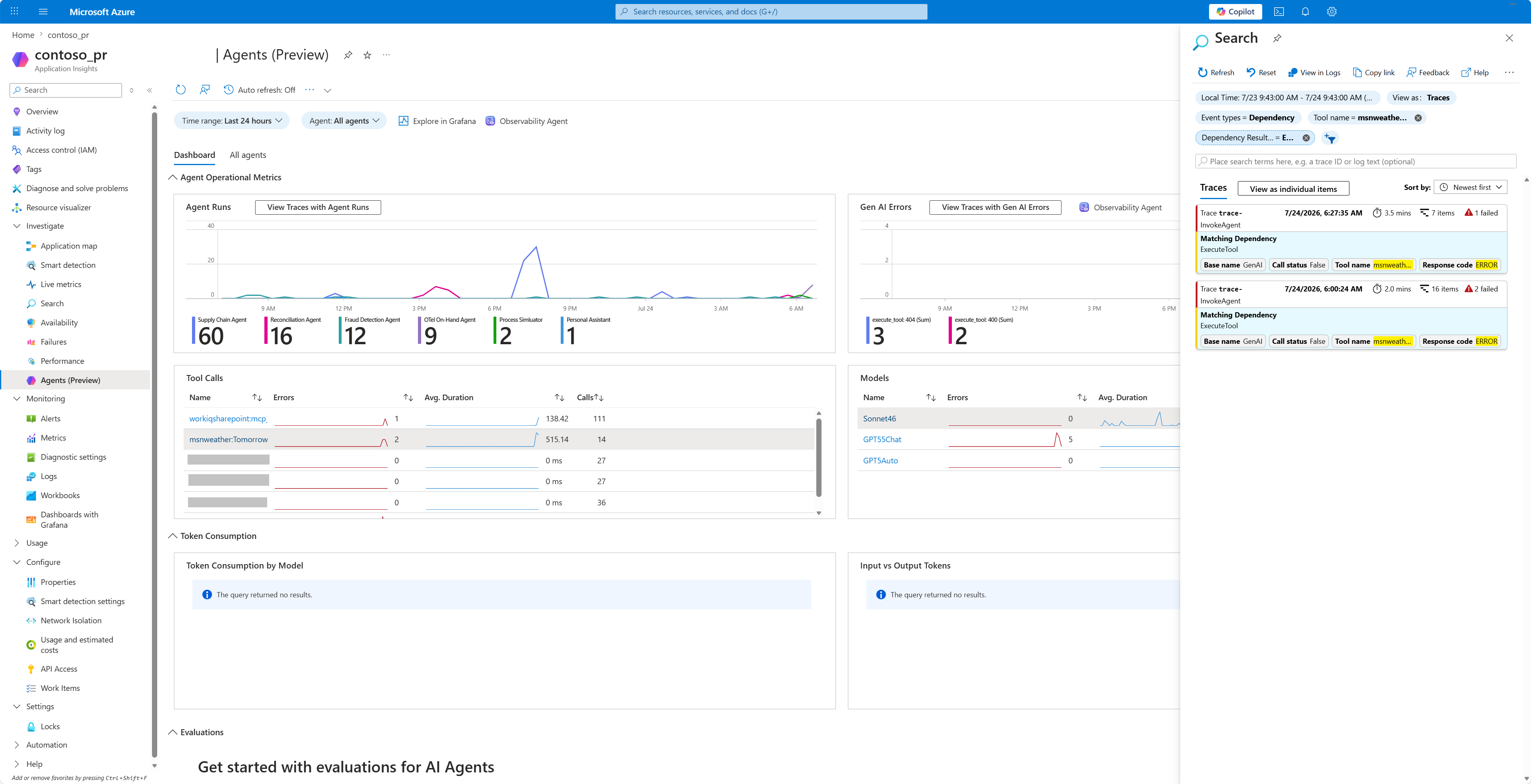
Application Insightsでエージェントのテレメトリを分析
環境を Application Insights に接続すると、Copilot Studio 内でのテスト時を含め、ユーザーがエージェントと対話した際のエージェント テレメトリ データが記録されます。 ログされたテレメトリデータを閲覧するには、AzureのApplication InsightsリソースのLogsセクションにアクセスしてください。 ここでは Kustoクエリ を使ってデータをクエリ・分析できます。 詳細は 「例クエリ」をご覧ください。
クエリの例
以下のKustoクエリ例は、Application InsightsのdependenciesテーブルからエージェントCopilot Studio会話を再構築したものです。 各ターンでは、すべてのスパンがトレース operation_Id を共有するため、クエリは各トレース内でスパンをルート優先(InvokeAgent スパンをその子スパンより前)に順序付けます。
クエリ1:特定の会話IDに対して完全なトレースを返す
このクエリは、既知の会話1件について、各ルートスパンをその子スパンより前に並べた時系列順で、すべてのスパンを返します。
会話IDのプレースホルダーをエージェントの会話IDに置き換えてください。 カスタムエージェントのテスト中に以下のコマンドを入力して見つけられます: /debug conversationid。
let LatestConvo = "<Conversation ID>";
dependencies
| where tostring(customDimensions["gen_ai.conversation.id"]) == LatestConvo
| order by operation_Id asc, iff(name == "InvokeAgent", 0, 1) asc, timestamp asc
| project timestamp, name, id, operation_Id,
          operation_ParentId, duration, target, type, cloud_RoleName,
          resultCode, customDimensions
クエリ2:特定のエージェントの最新の会話を返す
このクエリは指定された時間ウィンドウ内の名前付きエージェントの最新の会話を見つけます。 その会話のすべてのスパンを同じ時系列のルート優先順で返します。 エージェント名のプレースホルダーをエージェント名に置き換えてください。
let Window = 7d;
let AgentName = "<Agent name>";
let LatestConvo = toscalar(
    dependencies
    | where timestamp > ago(Window)
    | where tostring(customDimensions["gen_ai.agent.name"]) == AgentName
    | where isnotempty(tostring(customDimensions["gen_ai.conversation.id"]))
    | top 1 by timestamp desc
    | project tostring(customDimensions["gen_ai.conversation.id"])
);
dependencies
| where timestamp > ago(Window)
| where tostring(customDimensions["gen_ai.conversation.id"]) == LatestConvo
| order by operation_Id asc, iff(name == "InvokeAgent", 0, 1) asc, timestamp asc
| project timestamp, name, id, operation_Id,
          operation_ParentId, duration, target, type, cloud_RoleName,
          resultCode, customDimensions
クエリ3:既知のGenAI OpenTelemetryプロパティを列に展開する
このクエリはクエリ2と同じトレースを返しますが、既知の各OpenTelemetryセマンティックコンベンションキーを独自の名前付き列に解析します。 その結果、ツール名、モデル、ユーザープロンプト、エージェントの返信、会話IDなどの生成AIフィールドを直接ソート、フィルタリング、スキャンできるフラットで明示的に定義されたテーブルが完成します。 エージェント名のプレースホルダーをエージェント名に置き換えてください。
let Window = 7d;
let AgentName = "<Agent name>";
let LatestConvo =
    toscalar(
        dependencies
        | where timestamp > ago(Window)
        | extend
            AgentName_ = tostring(customDimensions["gen_ai.agent.name"]),
            ConversationId_ = tostring(customDimensions["gen_ai.conversation.id"])
        | where AgentName_ == AgentName
        | where isnotempty(ConversationId_)
        | summarize arg_max(timestamp, ConversationId_)
        | project ConversationId_
    );
dependencies
| where timestamp > ago(Window)
| extend
    ConversationId = tostring(customDimensions["gen_ai.conversation.id"])
| where ConversationId == LatestConvo
| extend
    OperationName    = tostring(customDimensions["gen_ai.operation.name"]),
    AgentId          = tostring(customDimensions["gen_ai.agent.id"]),
    AgentName        = tostring(customDimensions["gen_ai.agent.name"]),
    Model            = tostring(customDimensions["gen_ai.request.model"]),
    ToolName         = tostring(customDimensions["gen_ai.tool.name"]),
    ToolType         = tostring(customDimensions["gen_ai.tool.type"]),
    ToolCallId       = tostring(customDimensions["gen_ai.tool.call.id"]),
    ToolArguments    = tostring(customDimensions["gen_ai.tool.call.arguments"]),
    ToolResult       = tostring(customDimensions["gen_ai.tool.call.result"]),
    EnvironmentId    = tostring(customDimensions["env.id"]),
    TenantId         = tostring(customDimensions["microsoft.tenant.id"]),
    ChannelName      = tostring(customDimensions["microsoft.channel.name"]),
    BlueprintId      = tostring(customDimensions["microsoft.a365.agent.blueprint.id"]),
    PlatformId       = tostring(customDimensions["microsoft.a365.agent.platform.id"]),
    ResourceProvider = tostring(customDimensions["resource.provider"]),
    SignalCategory   = tostring(customDimensions["signal.category"]),
    UserId           = tostring(customDimensions["user.id"]),
    UserName         = tostring(customDimensions["user.name"]),
    UserEmail        = tostring(customDimensions["user.email"])
| extend
    InputMessages  = parse_json(tostring(customDimensions["gen_ai.input.messages"])),
    OutputMessages = parse_json(tostring(customDimensions["gen_ai.output.messages"]))
| extend
    UserInput   = tostring(InputMessages[0].parts[0].content),
    AgentOutput = tostring(OutputMessages[0].parts[0].content)
| order by
    operation_Id asc,
    iff(name == "InvokeAgent", 0, 1) asc,
    timestamp asc
| project
    timestamp, name, id, operation_Id, operation_ParentId, OperationName, ConversationId,
    AgentId, AgentName, Model, ToolName, ToolType, ToolCallId, ToolArguments, ToolResult,
    UserInput, AgentOutput, EnvironmentId, TenantId, ChannelName, BlueprintId, PlatformId,
    ResourceProvider, SignalCategory, UserId, UserName, UserEmail, duration, target, type,
    cloud_RoleName, resultCode, customDimensions
クエリ4:すべてのgenAI OpenTelemetryプロパティを動的に展開する
このクエリはクエリ3と同じスパンを返しますが、すべての gen_ai.* キーは customDimensions から動的にアンパックされ、独自の ga_接頭辞付き列に展開されます。 投影は動的であるため、SDKが後に新しい gen_ai.* 属性を出す際にはクエリを変更せずに自動的に表示されます。
エージェント名のプレースホルダーをエージェント名に置き換えてください。
let Window = 7d;
let AgentName = "<Agent name>";
let LatestConvo = toscalar(
    dependencies
    | where timestamp > ago(Window)
    | where tostring(customDimensions["gen_ai.agent.name"]) == AgentName
    | where isnotempty(tostring(customDimensions["gen_ai.conversation.id"]))
    | top 1 by timestamp desc
    | project tostring(customDimensions["gen_ai.conversation.id"])
);
dependencies
| where timestamp > ago(Window)
| where tostring(customDimensions["gen_ai.conversation.id"]) == LatestConvo
| order by operation_Id asc, iff(name == "InvokeAgent", 0, 1) asc, timestamp asc
| mv-apply Key = bag_keys(customDimensions) on (
    where Key startswith "gen_ai."
    | summarize OTelGenAI = make_bag(bag_pack(tostring(Key), customDimensions[tostring(Key)]))
  )
| project timestamp, name, id, operation_Id, operation_ParentId,
          duration, target, type, cloud_RoleName, resultCode,
          OTelGenAI, customDimensions
| evaluate bag_unpack(OTelGenAI, 'ga_')
クエリ 5: ルートエージェントと、その配下のすべての子エージェント(サブエージェントを含む)の最新の会話を返す
このクエリは、名前のあるエージェントの最新の会話を返します。 その会話についてのすべてのスパンと、それが呼び出したすべての第1レベルのサブエージェントについてのスパンを返します。 エージェントがツールとして別のエージェントを呼ぶ場合、サブエージェントは親の会話IDを _<subConversationId> の接尾辞付きで継承します。 ツリー全体はトップレベルのIDでマッチングすることで再構築されます。
エージェント名のプレースホルダーをエージェント名に置き換えてください。
let Window = 7d;
let AgentName = "<Agent name>";
let LatestRoot =
    toscalar(
        dependencies
        | where timestamp > ago(Window)
        | extend
            AgentName_ = tostring(customDimensions["gen_ai.agent.name"]),
            ConversationId = tostring(customDimensions["gen_ai.conversation.id"])
        | where AgentName_ == AgentName
        | where isnotempty(ConversationId)
        | where ConversationId !has "_"
        | summarize arg_max(timestamp, ConversationId)
        | project ConversationId
    );
dependencies
| where timestamp > ago(Window)
| extend
    ConversationId = tostring(customDimensions["gen_ai.conversation.id"]),
    AgentName_ = tostring(customDimensions["gen_ai.agent.name"]),
    ToolName = tostring(customDimensions["gen_ai.tool.name"]),
    ToolResult = tostring(customDimensions["gen_ai.tool.callresult"])
| where isnotempty(ConversationId)
| where ConversationId == LatestRoot
    or ConversationId startswith strcat(LatestRoot, "_")
| extend
    Depth = countof(ConversationId, "_"),
    AgentRole = iff(ConversationId == LatestRoot, "root", "sub-agent")
| extend
    InputMessages = parse_json( tostring(customDimensions["gen_ai.input.messages"]) ),
    OutputMessages = parse_json( tostring(customDimensions["gen_ai.output.messages"]) )
| extend
    UserInput = tostring(InputMessages[0].parts[0].content),
    AgentOutput = tostring(OutputMessages[0].parts[0].content)
| order by timestamp asc
| project
    timestamp, name, AgentRole, Depth, AgentName, ToolName, ToolResult, UserInput,
    AgentOutput, id, operation_Id, operation_ParentId, ConversationId, duration,
    target, type, cloud_RoleName, resultCode, customDimensions
既知の制限と考慮事項
- 標準ハーネスを使用するエージェントのトレースでは、
durationの値は利用できません。 - エージェントやツールの実行エラーは現在、トレースステータスに正しく反映されていません。
- データレジデンシーの要件に応じて、各環境地域ごとに専用のApplication Insightsリソースを使用することを検討してください。
- サブエージェントスパンは現在、自身のトレース内の
InvokeAgentスパンではなく、エージェントを呼び出したInvokeAgentスパンを親にしています。 - トレース ID とスパン ID は現在、OpenTelemetry 標準に完全に準拠した 32 桁の16進数のトレース ID および 16 桁の16進数のスパン ID としてではなく、必要に応じてプレフィックス付きの GUID として出力されます。
- ターゲットとなるApplication Insightsリソースで ローカル認証 が有効になっていることを確認してください。
- テレメトリのエクスポートはトランザクションではありません。 一時的なサービスイベント中には、少量のデータ損失が発生することがあります。
- スキーマ関連の取り込み更新が展開される際に、データの不整合が生じることがあります。
-
TopicStart、TopicAction、TopicEndなどのトピック関連イベントは、環境レベルのテレメトリで記録されません。 - レポートやトラブルシューティングを簡素化するために、エージェントレベルと環境レベルのテレメトリを同じApplication Insightsインスタンスに送信するのは避けてください。
- GitHub Copilotハーネスで駆動されるエージェントで作成されたエージェントのテレメトリは、標準ハーネス作成体験で動作するエージェントと異なる場合があります。