Nota
L-aċċess għal din il-paġna jeħtieġ l-awtorizzazzjoni. Tista’ tipprova tidħol jew tibdel id-direttorji.
L-aċċess għal din il-paġna jeħtieġ l-awtorizzazzjoni. Tista’ tipprova tibdel id-direttorji.
Note
The Power Platform Virtual Network community on Microsoft Viva Engage is available. Post any questions or feedback that you have about this functionality. Join by filling out a request through the following form: Request access to Finance and Operations Viva Engage Community.
By using Azure Virtual Network (VNet) support for Power Platform, you can integrate Power Platform with resources inside your virtual network without exposing them over the public internet. VNet support uses Azure subnet delegation to manage outbound traffic from Power Platform at runtime. By using Azure subnet delegation, protected resources don't need to be available over the internet to integrate with Power Platform. By using VNet support, Power Platform components can call resources owned by your enterprise inside your network, whether they're hosted in Azure or on-premises, and use plugins and connectors to make outbound calls.
Power Platform typically integrates with enterprise resources over public networks. With public networks, enterprise resources must be accessible from a list of Azure IP ranges or service tags, which describe public IP addresses. However, VNet support for Power Platform allows you to use a private network and still integrate with cloud services or services that are hosted inside your enterprise network.
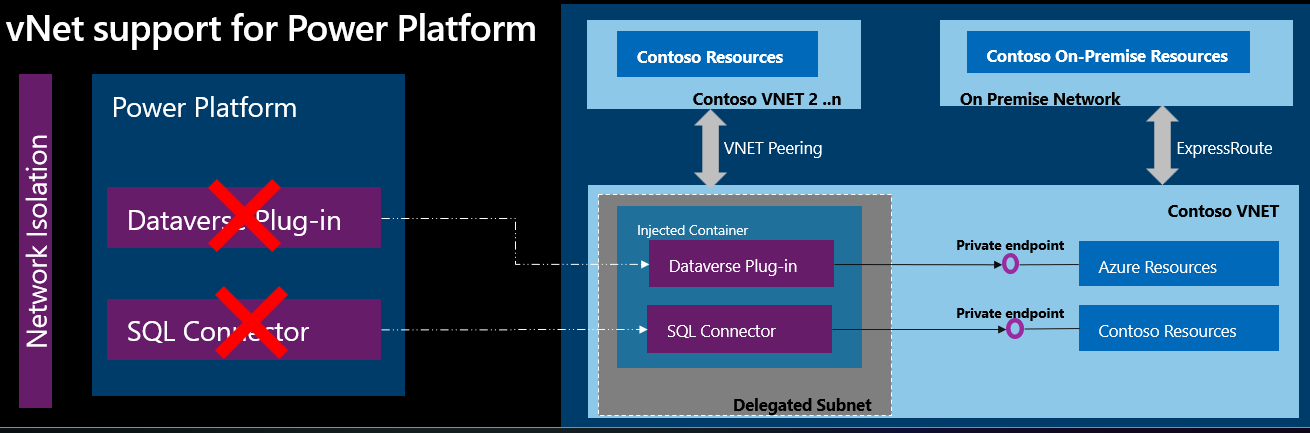
Azure services are protected inside a virtual network by private endpoints. You can use ExpressRoute to bring your on-premises resources inside the virtual network.
Power Platform uses the VNet service and subnets that you delegate to make outbound calls to enterprise resources over the enterprise private network. By using a private network, you don't need to route the traffic over the public internet, which could expose enterprise resources.
In a virtual network, you have full control over the outbound traffic from Power Platform. The network administrator applies network policies to the traffic. The following diagram shows how resources inside your network interact with a virtual network.
Benefits of Azure VNet support
By using VNet support, your Power Platform and Dataverse components get all the benefits that Azure subnet delegation provides, such as:
Data protection: VNet support allows Power Platform services to connect to your private and protected resources without exposing them to the internet.
No unauthorized access: VNet support connects with your resources without needing Power Platform IP ranges or service tags in the connection.
Estimating subnet size for Power Platform environments
Telemetry data and observations from the past year indicate that production environments typically require 25 to 30 IP addresses, with most use cases falling within this range. Based on this information, allocate 25 to 30 IPs for production environments and 6 to 10 IPs for nonproduction environments, such as sandbox or developer environments. Containers connected to the virtual network primarily use IP addresses within the subnet. When the environment starts being used, it creates a minimum of four containers, which dynamically scale based on call volume, though they typically remain within the 10 to 30 container range. These containers execute all requests for their respective environments and efficiently handle parallel connection requests.
Planning for multiple environments
If you use the same delegated subnet for multiple Power Platform environments, you might need a larger block of classless inter-domain routing (CIDR) IP addresses. Consider the recommended number of IP addresses for production and nonproduction environments when you link environments to a single policy. Each subnet reserves five IP addresses, so include these reserved addresses in your estimation.
Note
To enhance visibility into resource utilization, the product team is working on exposing delegated subnet IP consumption for enterprise policies and subnets.
Example IP allocation
Consider a tenant with two enterprise policies. The first policy is for production environments, and the second policy is for nonproduction environments.
Production enterprise policy
If you have four production environments associated with your enterprise policy, and each environment requires 30 IP addresses, the total IP allocation is:
(Four environments x 30 IPs) + 5 reserved IPs = 125 IPs
This scenario requires a CIDR block of /25, which has capacity for 128 IPs.
Nonproduction enterprise policy
For a nonproduction enterprise policy with 20 developer and sandbox environments, and each environment requires 10 IP addresses, the total IP allocation is:
(Twenty environments x 10 IPs) + 5 reserved IPs = 205 IPs
This scenario requires a CIDR block of /24, which has capacity for 256 IPs and has enough space to add more environments to the enterprise policy.
Supported scenarios
Power Platform supports VNet for both Dataverse plugins and connectors. By using this support, you can create secured, private, outbound connectivity from Power Platform to resources within your virtual network. Dataverse plugins and connectors improve data integration security by connecting to external data sources from Power Apps, Power Automate, and Dynamics 365 apps. For example, you can:
- Use Dataverse plugins to connect to your cloud data sources, such as Azure SQL, Azure Storage, blob storage, or Azure Key Vault. You can protect your data from data exfiltration and other incidents.
- Use Dataverse plugins to securely connect to private, endpoint-protected resources in Azure, such as Web API, or any resources within your private network, such as SQL and Web API. You can protect your data from data breaches and other external threats.
- Use virtual network–supported connectors such as SQL Server to securely connect to your cloud-hosted data sources, such as Azure SQL or SQL Server, without exposing them to the internet. Similarly, you can use Azure Queue connector to establish secure connections to private, endpoint-enabled Azure Queues.
- Use Azure Key Vault connector to securely connect to private, endpoint-protected Azure Key Vault.
- Use custom connectors to securely connect to your services that are protected by private endpoints in Azure or services that are hosted within your private network.
- Use Azure File Storage to securely connect to private, endpoint-enabled Azure file storage.
- Use HTTP with Microsoft Entra ID (preauthorized) to securely fetch resources over virtual networks from various web services, authenticated by Microsoft Entra ID or from an on-premises web service.
Limitations
- Dataverse low-code plugins that use connectors aren't supported until those connector types are updated to use subnet delegation.
- You use copy, backup, and restore environment lifecycle operations on virtual network-supported Power Platform environments. You can perform the restore operation within the same virtual network, and across different environments, provided they're connected to the same virtual network. Additionally, the restore operation is permissible from environments that don't support virtual networks to those that do.
- SQL Server connections that use an on-premises data gateway aren't supported in Power Platform environments linked to a virtual network.
Supported regions
Before creating your virtual network and enterprise policy, validate that your Power Platform environment is in a supported region. Use the Get-EnvironmentRegion cmdlet from the subnet diagnostics PowerShell module to retrieve your environment's region information.
After confirming your environment's region, ensure you configure your enterprise policy and Azure resources in the corresponding supported Azure regions. For example, if your Power Platform environment is in the United Kingdom, then your virtual network and subnets must be in the uksouth and ukwest Azure regions. If a Power Platform region has more than two available region pairs, you must use the specific region pair that matches your environment's region. For example, if Get-EnvironmentRegion returns westus for your environment, then your virtual network and subnets must be in eastus and westus.
| Power Platform region | Azure region |
|---|---|
| United States | eastus, westus |
| South Africa | southafricanorth, southafricawest |
| UK | uksouth, ukwest |
| Japan | japaneast, japanwest |
| India | centralindia, southindia |
| France | francecentral, francesouth |
| Europe | westeurope, northeurope |
| Germany | germanynorth, germanywestcentral |
| Switzerland | switzerlandnorth, switzerlandwest |
| Canada | canadacentral, canadaeast |
| Brazil | brazilsouth |
| Australia | australiasoutheast, australiaeast |
| Asia | eastasia, southeastasia |
| UAE | uaenorth, uaecentral |
| Korea | koreasouth, koreacentral |
| Norway | norwaywest, norwayeast |
| Singapore | southeastasia |
| Sweden | swedencentral |
| Italy | italynorth |
| US Government | usgovtexas, usgovvirginia |
| US Department of Defense (DoD) | usdodeat, susdodcentral |
Note
Support in US government cloud environments is currently only available for environments deployed in Government Community Cloud – High (GCC High) or Department of Defense (DoD). Support for Government Community Cloud (GCC) environments isn't available.
Supported services
The following table lists the services that support Azure subnet delegation for VNet support for Power Platform.
| Area | Power Platform services | VNet support availability |
|---|---|---|
| Dataverse | Dataverse plugins | Generally available |
| Connectors | Generally available | |
| Connectors | Generally available |
Supported environments
VNet support for Power Platform isn't available for all Power Platform environments. The following table lists which environment types support VNet.
| Environment type | Supported |
|---|---|
| Production | Yes |
| Default | Yes |
| Sandbox | Yes |
| Developer | Yes |
| Trial | No |
| Microsoft Dataverse for Teams | No |
Considerations to enable VNet support for Power Platform environment
When you use VNet support in a Power Platform environment, all supported services, like Dataverse plugins and connectors, execute requests at runtime in your delegated subnet and are subject to your network policies. The calls to publicly available resources start to break.
Important
Before you enable the virtual environment support for a Power Platform environment, check the code of the plugins and the connectors. Update the URLs and connections to work with private connectivity.
For example, a plugin might try to connect to a publicly available service, but your network policy doesn't allow public internet access within your virtual network. The network policy blocks the call from the plugin. To avoid the blocked call, you can host the publicly available service in your virtual network. Alternatively, if your service is hosted in Azure, you can use a private endpoint on the service before you turn on VNet support in the Power Platform environment.
Frequently asked questions
What's the difference between a virtual network data gateway and VNet support for Power Platform?
A virtual network data gateway is a managed gateway that you use to access Azure and Power Platform services from within your virtual network without having to set up an on-premises data gateway. For example, the gateway is optimized for ETL (extract, transform, load) workloads in Power BI and Power Platform dataflows.
Azure VNet support for Power Platform uses an Azure subnet delegation for your Power Platform environment. Subnets are used by workloads in the Power Platform environment. Power Platform API workloads use VNet support because the requests are short-lived and optimized for a large number of requests.
What are the scenarios where I should use VNet support for Power Platform and the virtual network data gateway?
VNet support for Power Platform is the only supported option for all the scenarios for outbound connectivity from Power Platform except Power BI and Power Platform dataflows.
Power BI and Power Platform dataflows continue to use virtual network (VNet) data gateway.
How do you ensure that a virtual network subnet or data gateway from one customer isn't used by another customer in Power Platform?
VNet support for Power Platform uses Azure subnet delegation.
Each Power Platform environment is linked to one virtual network subnet. Only calls from that environment are allowed to access that virtual network.
Delegation allows you to designate a specific subnet for any Azure platform as a service (PaaS) that needs to be injected into your virtual network.
Does VNet support for Power Platform failover?
Yes, you need to delegate the virtual networks for both Azure regions that are associated with your Power Platform region. For example, if your Power Platform environment is in Canada, you need to create, delegate, and configure virtual networks in CanadaCentral and CanadaEast.
How can a Power Platform environment in one region connect to resources hosted in another region?
A virtual network linked to a Power Platform environment must reside in the Power Platform environment's region. If the virtual network is in a different region, create a virtual network in the Power Platform environment's region and use VNet peering on both Azure region's subnet delegated virtual networks to bridge the gap with the virtual network in the separate region.
Can I monitor outbound traffic from delegated subnets?
Yes. You can use a network security group and firewalls to monitor outbound traffic from delegated subnets. For more information, see Monitor Azure Virtual Network.
Can I make internet-bound calls from plugins or connectors after my environment is subnet-delegated?
Yes. Internet-bound access is available by default from plugins and connectors in a subnet-delegated environment. Attach an Azure NAT gateway to the delegated subnet so your organization can control and secure outbound access. For more information, see Best practices for securing outbound connections from Power Platform services.
Can I update the subnet IP address range after it's delegated to Microsoft.PowerPlatform/enterprisePolicies?
No, not while the feature is used in your environment. You can't change the IP address range of the subnet after it's delegated to "Microsoft.PowerPlatform/enterprisePolicies." If you change the IP address range, the delegation configuration breaks and the environment stops working. To change the IP address range, use Disable-SubnetInjection, make the necessary changes, and then turn on the feature for your environment.
Can I update the DNS address of my virtual network after it's delegated to Microsoft.PowerPlatform/enterprisePolicies?
No, not while the feature is used in your environment. You can't change the DNS address of the virtual network after it's delegated to Microsoft.PowerPlatform/enterprisePolicies. If you change the DNS address, the change isn't picked up in the configuration, and your environment might stop working. To change the DNS address, use Disable-SubnetInjection to unlink all of your environments from the policy, make the necessary updates to your VNet, wait 30 minutes to ensure your changes are propagated, and then reenable subnet injection using Enable-SubnetInjection.
Can I use the same enterprise policy for multiple Power Platform environments?
Yes. You can use the same enterprise policy for multiple Power Platform environments. However, there's a limitation that early release cycle environments can't be used with the same enterprise policy as other environments.
My virtual network has a custom DNS configured. Does Power Platform use my custom DNS?
Yes. Power Platform uses the custom DNS you configure in the virtual network that holds the delegated subnet to resolve all endpoints. After you delegate the environment, you can update plugins to use the correct endpoint so that your custom DNS can resolve them.
My environment has ISV-provided plugins. Would these plugins run in the delegated subnet?
Yes. All customer plugins and ISV plugins can run by using your subnet. If the ISV plugins have outbound connectivity, you might need to list those URLs in your firewall.
My on-premises endpoint TLS certificates aren't signed by well-known root certification authorities (CA). Do you support unknown certificates?
No. Power Platform requires the endpoint to present a TLS certificate with the complete chain. You can't add your custom root CA to the list of well-known CAs.
What's the recommended setup of a virtual network within a customer tenant?
Power Platform doesn't recommend any specific topology. However, customers widely use the Hub-spoke network topology in Azure.
Is linking an Azure subscription to my Power Platform tenant necessary to activate VNet support?
Yes, to enable VNet support for Power Platform environments, you must associate an Azure subscription with the Power Platform tenant.
How does Power Platform use Azure subnet delegation?
When you assign a delegated Azure subnet to a Power Platform environment, it uses VNet injection to inject the container at runtime into the delegated subnet. During this process, the network interface card (NIC) of the container gets an IP address from the delegated subnet. The host (Power Platform) and the container communicate through a local port on the container, and the traffic flows over Azure Fabric.
Can I use an existing virtual network for Power Platform?
Yes, you can use an existing virtual network for Power Platform, if you delegate a single, new subnet within the virtual network specifically to Power Platform. You must dedicate the delegated subnet for subnet delegation and can't use it for other purposes.
Can I reuse the same delegated subnet in multiple enterprise policies?
No. You can't reuse the same subnet in multiple enterprise policies. Each Power Platform enterprise policy must have its own unique subnet for delegation.
What is a Dataverse plugin?
A Dataverse plugin is a piece of custom code that you can deploy in a Power Platform environment. You can configure this plugin to run during events (such as a change in data) or trigger it as a Custom API. For more information, see Dataverse plugins.
How does a Dataverse plugin run?
A Dataverse plugin runs within a container. When you assign a delegated subnet to a Power Platform environment, the network interface card (NIC) of the container gets an IP address from that subnet's address space. The host (Power Platform) and the container communicate through a local port on the container, and the traffic flows over Azure Fabric.
Can multiple plugins run within the same container?
Yes. In a given Power Platform or Dataverse environment, multiple plugins can run within the same container. Each container uses one IP address from the subnet address space, and each container can run multiple requests.
How does the infrastructure handle an increase in concurrent plugin executions?
As the number of concurrent plugin executions increases, the infrastructure automatically scales out or in to accommodate the load. The subnet delegated to a Power Platform environment should have enough address spaces to handle the peak volume of executions for the workloads in that Power Platform environment.
Who controls the virtual network and network policies associated with it?
You have ownership and control over the virtual network and its associated network policies. On the other hand, Power Platform uses the allocated IP addresses from the delegated subnet within that virtual network.
Do Azure-aware plugins support VNet?
No, Azure-aware plugins don't support VNet.