Merk
Tilgang til denne siden krever autorisasjon. Du kan prøve å logge på eller endre kataloger.
Tilgang til denne siden krever autorisasjon. Du kan prøve å endre kataloger.
Copilot Studio- og Dynamics 365 for Customer Service-plattformene er litt forskjellige i hvordan de støtter rike mediemeldinger basert på kanal og rik mediemeldingstype. Denne artikkelen beskriver hvordan du kan støtte rich media-meldinger i Copilot Studio.
Hent agent JSON for Apple Messages for Business
- Velg Produktivitet i støtteopplevelsen i områdekartet til administrasjonssenteret for Copilot-tjenesten.
- På Produktivitet-siden velger du Administrer for rike meldinger.
- Velg en rik melding du vil sende til samtalen, fra listen over alle tilgjengelige listemeldinger.
- For rike Apple Messages for Business-meldinger bruker du API-en Microsoft.Omnichannel.sendMessageToConversation til å sende JSON-filer.
Hent agent JSON for Live Chat-skjemaer, Live Chat tilpasset JSON og WhatsApp foreslåtte svar
Velg Produktivitet i støtteopplevelsen i områdekartet til administrasjonssenteret for Copilot-tjenesten.
På Produktivitet-siden velger du Administrer for rike meldinger.
Finn rich media-meldingen du vil at en agent skal sende, og hvis den har JSON tilgjengelig, vises den under JSON for Copilot Studio-kolonnen . Velg Vis JSON og den spesifikke kanaltypen for å kopiere JSON.
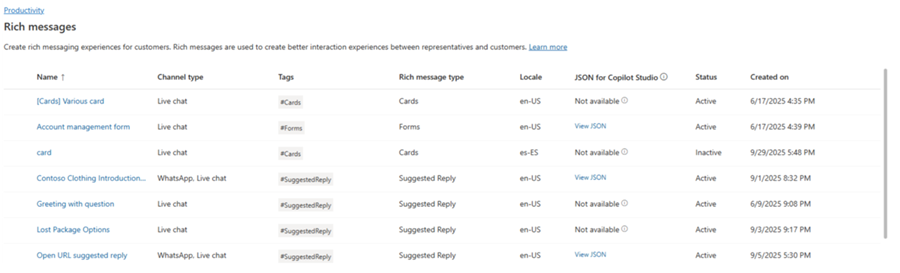
For Live Chat og WhatsApp rich media-maler kan du lime inn JSON direkte i en adaptiv kortnode i Copilot Studio.
JSON-eksempler for rike meldinger for Apple Messages for Business
Denne delen inneholder JSON-eksempler for de rike meldingstypene som er tilgjengelige i Apple Messages for Business-kanalen i Omnikanal for Customer Service. Mer informasjon: Behandle rike meldinger
Note
Du kan ikke sende rike meldinger av typen Skjemaer til samtaler.
Apple Pay
let applePayJSON = // <copy_and_paste_details_content>
applePayJSON.survey = { Questions: JSON.parse(applePayJSON.survey)[0].Questions, Answers: JSON.parse(applePayJSON.survey)[1].Answers };
applePayJSON.survey.Answers.AppleMessagesforBusinessJSON = JSON.parse(applePayJSON.survey.Answers.AppleMessagesforBusinessJSON);
applePayJSON.survey.Answers.AppleMessagesforBusinessJSON = JSON.stringify(applePayJSON.survey.Answers.AppleMessagesforBusinessJSON);
applePayJSON.survey = JSON.stringify(applePayJSON.survey);

// Can now send this payload using the API
Microsoft.Omnichannel.sendMessageToConversation(applePayJSON, false);

// Or take the JSON elsewhere for use in bringing your own logic
copy(applePayJSON);
Authentication
let authJSON = // <copy_and_paste_details_content>
authJSON.survey = { Questions: JSON.parse(authJSON.survey)[0].Questions, Answers: JSON.parse(authJSON.survey)[1].Answers };
authJSON.survey = JSON.stringify(authJSON.survey);

// Can now send this payload using the API
Microsoft.Omnichannel.sendMessageToConversation(authJSON, false);

// Or take the JSON elsewhere for use in bringing your own logic
copy(authJSON);
Tilpasset JSON (iMessage-applikasjon)
let customJSON = // <copy_and_paste_details_content>
customJSON.survey = { Questions: JSON.parse(customJSON.survey)[0].Questions, Answers: JSON.parse(customJSON.survey)[1].Answers };
customJSON.survey.Answers.AppleMessagesforBusinessJSON = JSON.parse(customJSON.survey.Answers.AppleMessagesforBusinessJSON);
customJSON.survey.Answers.AppleMessagesforBusinessJSON = JSON.stringify(customJSON.survey.Answers.AppleMessagesforBusinessJSON);
customJSON.survey = JSON.stringify(customJSON.survey);

// Can now send this payload using the API
Microsoft.Omnichannel.sendMessageToConversation(customJSON, false);

// Or take the JSON elsewhere for use in bringing your own logic
copy(customJSON);
Listevelger
listPickerJSON = // <copy_and_paste_details_content>
listPickerJSON.survey = { Questions: JSON.parse(lpFromDetails.survey)[0].Questions, Answers: JSON.parse(listPickerJSON.survey)[1].Answers };
listPickerJSON.survey = JSON.stringify(listPickerJSON.survey);

// Can now send this payload using the API
Microsoft.Omnichannel.sendMessageToConversation(listPickerJSON, false);

// Or take the JSON elsewhere for use in bringing your own logic
copy(listPickerJSON);
Foreslått svar
suggestedReplyJSON = // <copy_and_paste_details_content>
suggestedReplyJSON.survey = { Questions: JSON.parse(suggestedReplyJSON.survey)[0].Questions, Answers: JSON.parse(suggestedReplyJSON.survey)[1].Answers };
suggestedReplyJSON.survey = JSON.stringify(suggestedReplyJSON.survey);

// Can now send this payload using the API
Microsoft.Omnichannel.sendMessageToConversation(suggestedReplyJSON, false);

// Or take the JSON elsewhere for use in bringing your own logic
copy(suggestedReplyJSON);
Tidsvelger
timePickerJSON = // <copy_and_paste_details_content>
timePickerJSON.survey = { Questions: JSON.parse(timePickerJSON.survey)[0].Questions, Answers: JSON.parse(timePickerJSON.survey)[1].Answers };
timePickerJSON.survey = JSON.stringify(timePickerJSON.survey);

// Can now send this payload using the API
Microsoft.Omnichannel.sendMessageToConversation(timePickerJSON, false);

// Or take the JSON elsewhere for use in bringing your own logic
copy(timePickerJSON);
Rik lenke til video
videoRichLinkJSON = // <copy_and_paste_details_content>
videoRichLinkJSON.survey = { Questions: JSON.parse(videoRichLinkJSON.survey)[0].Questions, Answers: JSON.parse(videoRichLinkJSON.survey)[1].Answers };
timePickerJSON.survey = JSON.stringify(videoRichLinkJSON.survey);

// Can now send this payload using the API
Microsoft.Omnichannel.sendMessageToConversation(videoRichLinkJSON, false);

// Or take the JSON elsewhere for use in bringing your own logic
copy(videoRichLinkJSON);
Rik lenke til nettstedet
websiteRichLinkJSON = // <copy_and_paste_details_content>
websiteRichLinkJSON.survey = { Questions: JSON.parse(websiteRichLinkJSON.survey)[0].Questions, Answers: JSON.parse(websiteRichLinkJSON.survey)[1].Answers };
timePickerJSON.survey = JSON.stringify(websiteRichLinkJSON.survey);

// Can now send this payload using the API
Microsoft.Omnichannel.sendMessageToConversation(websiteRichLinkJSON, false);

// Or take the JSON elsewhere for use in bringing your own logic
copy(websiteRichLinkJSON);
Konfigurer agenter til å sende Live Chat foreslåtte svar og kort/karuseller
Copilot Studio støtter foreslåtte svar og grunnleggende kort rett ut av esken. Finn ut mer i Send en melding – Microsoft Copilot Studio.
Note
Copilot Studio refererer til foreslåtte svar som raske svar.
Relatert informasjon
Referanse for JavaScript-API for SDK for direktechat
Referanse for JavaScript-API for omnikanal
sendMessageToConversation