AI 代理入门

使用马赛克 AI 代理框架生成第一个 AI 代理。 在本教程中,你将:

  • 使用代理框架创作代理。
  • 将工具添加到代理。
  • 将代理部署到 Databricks 模型服务端点。

有关代理和其他第一代 AI 应用的概念性简介,请参阅 什么是 Gen AI 应用?

要求

工作区必须启用以下功能:

示例笔记本

此笔记本包含创作和部署第一个 AI 代理所需的所有代码。 将笔记本导入 Azure Databricks 工作区以运行它。

马赛克 AI 代理演示

获取笔记本

定义代理

AI 代理人包括以下组成部分:

  • 可以推理和做出决策的大型语言模型 (LLM)
  • 大语言模型可以使用的工具,不仅可以用于生成文本,还可以执行更多操作,例如运行 Python 代码或获取数据。

在 Databricks 笔记本中运行以下代码以定义简单的工具调用代理:

  1. 安装所需的 Python 包:

    %pip install -U -qqqq mlflow databricks-openai databricks-agents"
    dbutils.library.restartPython()
    
    • mlflow:用于代理开发和代理跟踪。
    • databricks-openai:用于连接到 Databricks 托管的 LLM 并访问 Unity 目录工具。
    • databricks-agents:用于打包和部署代理。
  2. 定义代理。 此代码片段执行以下作:

    • 使用 OpenAI 客户端连接到 Databricks 模型服务终结点。
    • 使用 autolog(). 启用 MLflow 跟踪。 这会添加检测工具,以便在提交查询时查看代理的工作。
    • system.ai.python_exec 工具添加到代理。 此内置 Unity 目录函数允许代理运行 Python 代码。
    • 使用 MLflow 帮助程序函数 (output_to_responses_items_streamcreate_function_call_output_item) 将流式 LLM 输出转换为与响应 API 兼容的格式。
    import json
    import mlflow
    from databricks.sdk import WorkspaceClient
    from databricks_openai import UCFunctionToolkit, DatabricksFunctionClient
    # Import MLflow utilities for converting from chat completions to Responses API format
    from mlflow.types.responses import output_to_responses_items_stream, create_function_call_output_item
    
    # Enable automatic tracing for easier debugging
    mlflow.openai.autolog()
    
    # Get an OpenAI client configured to connect to Databricks model serving endpoints
    openai_client = WorkspaceClient().serving_endpoints.get_open_ai_client()
    
    # Load Databricks built-in tools (Python code interpreter)
    client = DatabricksFunctionClient()
    builtin_tools = UCFunctionToolkit(function_names=["system.ai.python_exec"], client=client).tools
    for tool in builtin_tools:
      del tool["function"]["strict"]
    
    def call_tool(tool_name, parameters):
      if tool_name == "system__ai__python_exec":
        return DatabricksFunctionClient().execute_function("system.ai.python_exec", parameters=parameters).value
      raise ValueError(f"Unknown tool: {tool_name}")
    
    def call_llm(prompt):
      for chunk in openai_client.chat.completions.create(
        model="databricks-claude-3-7-sonnet",
        messages=[{"role": "user", "content": prompt}],
        tools=builtin_tools,
        stream=True
      ):
        yield chunk.to_dict()
    
    def run_agent(prompt):
      """
      Send a user prompt to the LLM, and yield LLM + tool call responses
      The LLM is allowed to call the code interpreter tool if needed, to respond to the user
      """
      # Convert output into Responses API-compatible events
      for chunk in output_to_responses_items_stream(call_llm(prompt)):
        yield chunk.model_dump(exclude_none=True)
      # If the model executed a tool, call it and yield the tool call output in Responses API format
      if chunk.item.get('type') == 'function_call':
        tool_name = chunk.item["name"]
        tool_args = json.loads(chunk.item["arguments"])
        tool_result = call_tool(tool_name, tool_args)
        yield {"type": "response.output_item.done", "item": create_function_call_output_item(call_id=chunk.item["call_id"], output=tool_result)}
    

测试代理

使用需要运行 Python 代码的提示对其进行查询来测试代理:

for output_chunk in run_agent("What is the square root of 429?"):
  print(output_chunk)

除了 LLM 的输出,你还将直接在笔记本中看到详细的跟踪信息。 这些跟踪有助于调试慢速或失败的代理调用。 这些跟踪是使用自动添加的 mlflow.openai.autolog()

部署代理

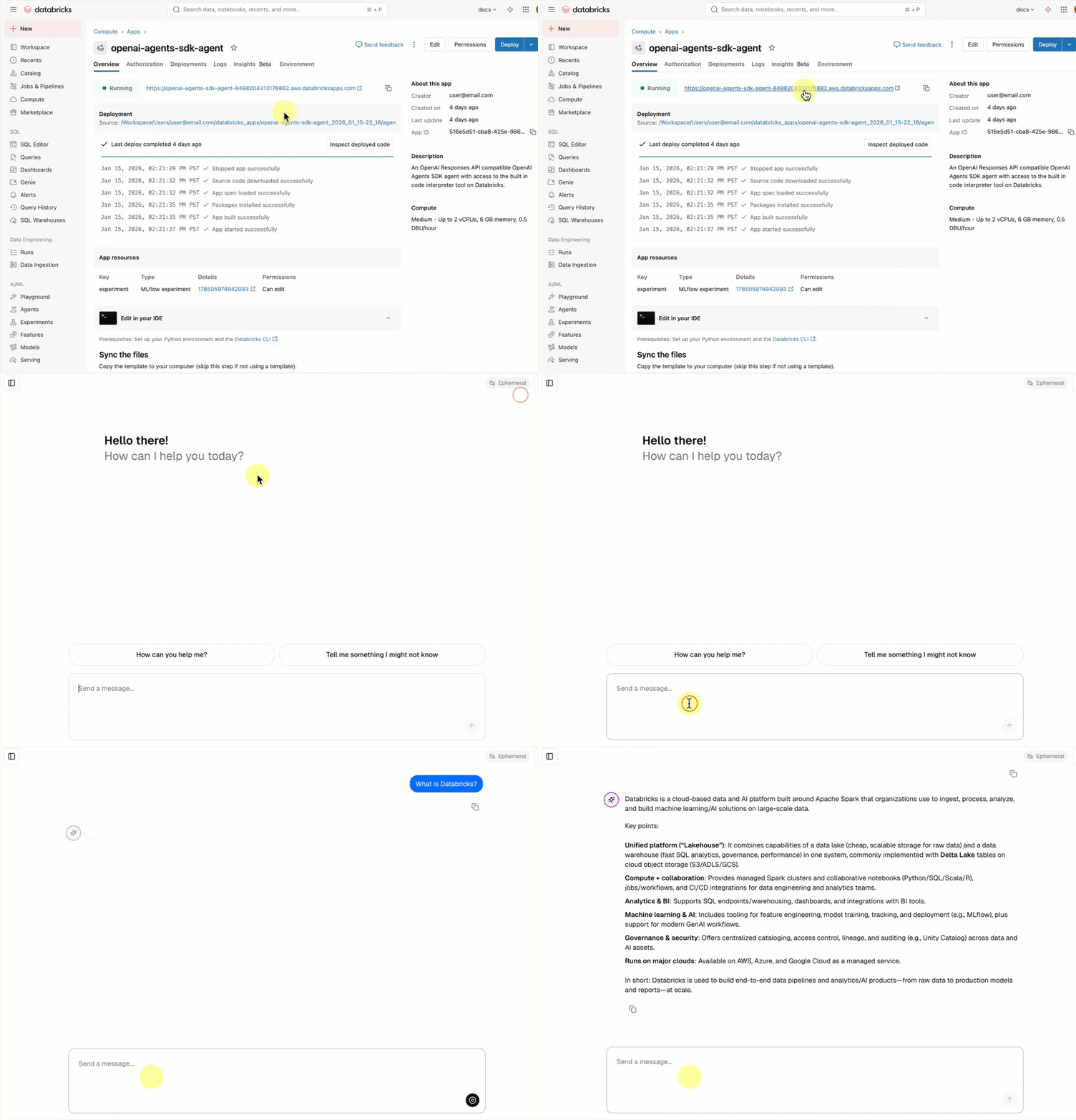
拥有代理后,可以打包并将其部署到 Databricks 服务终结点。 开始收集已部署代理的反馈,方法是与他人共享该代理,并使用内置聊天 UI 与之聊天。

准备代理代码进行部署

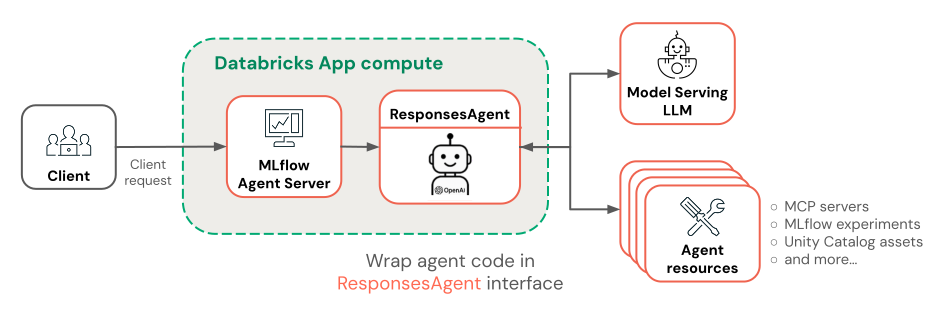
若要为部署准备代理代码,请使用 MLflow 的 ResponsesAgent 接口包装它。 此 ResponsesAgent 接口是打包代理以在 Azure Databricks 上进行部署的建议方法。

  1. 若要实现 ResponsesAgent 接口,请同时定义 predict_stream() (对于流式处理响应)和 predict() (对于非流式处理请求)方法。 由于基础代理逻辑已输出响应 API 兼容的事件,因此实现非常简单:

    from mlflow.pyfunc import ResponsesAgent
    from mlflow.types.responses import ResponsesAgentRequest, ResponsesAgentResponse, ResponsesAgentStreamEvent
    
    class QuickstartAgent(ResponsesAgent):
      def predict_stream(self, request: ResponsesAgentRequest):
        # Extract the user's prompt from the request
        prompt = request.input[-1].content
        # Stream response items from our agent
        for chunk in run_agent(prompt):
          yield ResponsesAgentStreamEvent(**chunk)
    
      def predict(self, request: ResponsesAgentRequest) -> ResponsesAgentResponse:
        outputs = [
          event.item
          for event in self.predict_stream(request)
          if event.type == "response.output_item.done"
        ]
        return ResponsesAgentResponse(output=outputs)
    
  2. 将以下代码添加到笔记本来测试 ResponsesAgent 类:

    from mlflow.types.responses import ResponsesAgentRequest
    
    AGENT = QuickstartAgent()
    
    # Create a ResponsesAgentRequest with input messages
    request = ResponsesAgentRequest(
      input=[
        {
          "role": "user",
          "content": "What's the square root of 429?"
        }
      ]
    )
    
    for event in AGENT.predict_stream(request):
      print(event)
    
  3. 将所有代理代码合并到单个文件中,以便可以记录和部署它。

  • 将所有代理代码合并到一个笔记本单元中。
  • 在单元格顶部,添加 %%writefile quickstart_agent.py magic 命令,将代理保存到文件中。
  • 在单元格底部,使用代理对象进行调用 mlflow.models.set_model() 。 这会告知 MLflow 在提供预测时要使用的代理对象。 此步骤正确地配置我们的代理程序代码的入口。

笔记本单元格应如下所示:

%%writefile quickstart_agent.py

import json
from databricks.sdk import WorkspaceClient
from databricks_openai import UCFunctionToolkit, DatabricksFunctionClient

import mlflow
from mlflow.pyfunc import ResponsesAgent
from mlflow.types.responses import (
  ResponsesAgentRequest,
  ResponsesAgentResponse,
  ResponsesAgentStreamEvent,
  output_to_responses_items_stream,
  create_function_call_output_item
)

# Enable automatic tracing for deployed agent
mlflow.openai.autolog()

# Get an OpenAI client configured to talk to Databricks model serving endpoints
openai_client = WorkspaceClient().serving_endpoints.get_open_ai_client()

# Load Databricks built-in tools (Python code interpreter)
client = DatabricksFunctionClient()
builtin_tools = UCFunctionToolkit(function_names=["system.ai.python_exec"], client=client).tools
for tool in builtin_tools:
  del tool["function"]["strict"]

def call_tool(tool_name, parameters):
  if tool_name == "system__ai__python_exec":
    return DatabricksFunctionClient().execute_function("system.ai.python_exec", parameters=parameters).value
  raise ValueError(f"Unknown tool: {tool_name}")

def call_llm(prompt):
  for chunk in openai_client.chat.completions.create(
    model="databricks-claude-3-7-sonnet",
    messages=[{"role": "user", "content": prompt}],
    tools=builtin_tools,
    stream=True
  ):
    yield chunk.to_dict()

def run_agent(prompt):
  """
  Send a user prompt to the LLM, and yield LLM + tool call responses
  The LLM is allowed to call the code interpreter tool if needed, to respond to the user
  """
  # Convert output into Responses API-compatible events
  for chunk in output_to_responses_items_stream(call_llm(prompt)):
    yield chunk.model_dump(exclude_none=True)
  # If the model executed a tool, call it and yield the tool call output in Responses API format
  if chunk.item.get('type') == 'function_call':
    tool_name = chunk.item["name"]
    tool_args = json.loads(chunk.item["arguments"])
    tool_result = call_tool(tool_name, tool_args)
    yield {"type": "response.output_item.done", "item": create_function_call_output_item(call_id=chunk.item["call_id"], output=tool_result)}

class QuickstartAgent(ResponsesAgent):
  def predict_stream(self, request: ResponsesAgentRequest):
    # Extract the user's prompt from the request
    prompt = request.input[-1].content
    # Stream response items from our agent
    for chunk in run_agent(prompt):
      yield ResponsesAgentStreamEvent(**chunk)

  def predict(self, request: ResponsesAgentRequest) -> ResponsesAgentResponse:
    outputs = [
      event.item
      for event in self.predict_stream(request)
      if event.type == "response.output_item.done"
    ]
    return ResponsesAgentResponse(output=outputs)

AGENT = QuickstartAgent()
mlflow.models.set_model(AGENT)

记录代理信息

登陆你的代理并将其注册到 Unity 目录服务。 这会将代理及其依赖项打包到单个项目进行部署。

import mlflow
from mlflow.models.resources import DatabricksFunction, DatabricksServingEndpoint
from pkg_resources import get_distribution

# Change the catalog name ("main") and schema name ("default") to register the agent to a different location
registered_model_name = "main.default.quickstart_agent"

# Specify Databricks resources that the agent needs to access.
# This step lets Databricks automatically configure authentication
# so the agent can access these resources when it's deployed.
resources = [
  DatabricksServingEndpoint(endpoint_name="databricks-claude-3-7-sonnet"),
  DatabricksFunction(function_name="system.ai.python_exec"),
]

mlflow.set_registry_uri("databricks-uc")
logged_agent_info = mlflow.pyfunc.log_model(
  artifact_path="agent",
  python_model="quickstart_agent.py",
  extra_pip_requirements=[f"databricks-connect=={get_distribution('databricks-connect').version}"],
  resources=resources,
  registered_model_name=registered_model_name
)

部署代理

将已注册的代理部署到服务端点:

from databricks import agents

deployment_info = agents.deploy(
  model_name=registered_model_name,
  model_version=logged_agent_info.registered_model_version,
  scale_to_zero=True
)

代理终结点启动后,可以使用 AI Playground 与其聊天,或 与利益干系人共享以获取 反馈。

后续步骤

根据目标选择下一步的位置:

衡量和改进代理的质量:请参阅 代理评估快速入门

生成更高级代理:创建使用非结构化数据执行 RAG 的代理,处理多轮次对话,并使用代理评估来衡量质量。 请参阅 教程:生成、评估和部署检索代理

了解如何使用其他框架生成代理:了解如何使用 LangGraph、纯 Python 和 OpenAI 等常用库生成代理。 请参阅 代码中的作者 AI 代理