你当前正在访问 Microsoft Azure Global Edition 技术文档网站。 如果需要访问由世纪互联运营的 Microsoft Azure 中国技术文档网站,请访问 https://docs.azure.cn。
在本快速入门中,你将构建一个 Web 应用程序,用于在交互式地图上显示来自 GeoCatalog 的卫星图像和地理空间数据。 您可以在浏览器的 JavaScript 中使用 Microsoft Entra ID 对用户进行身份验证,查询 STAC 集合,以及呈现地图磁贴。
学习内容:
- 使用 MSAL.js 对用户进行身份验证并获取访问令牌
- 查询 STAC API 来发现集合和条目
- 通过授权标头在 MapLibre GL 地图上显示光栅图块
- 跨整个集合创建无缝马赛克层
- 使用 SAS 令牌下载原始资产
代码模式适用于任何新式 JavaScript 框架(React、Vue、Angular)或 vanilla JavaScript。 GeoCatalog API 具有完整的 CORS 支持,因此可以直接从 localhost 开发期间调用它们,无需代理。
可以从 Microsoft行星计算机 Pro 公共 GitHub 存储库下载并测试此代码。
先决条件
- 拥有有效订阅的 Azure 帐户。 免费创建帐户。
- 部署的 GeoCatalog 资源 ,其中包含至少一个包含项的集合。
- 你的用户标识必须对 GeoCatalog 资源拥有 GeoCatalog 读取者(或更高)权限。 请参阅 “管理对 GeoCatalog 资源的访问权限”。
- Node.js 版本 18 或更高版本。
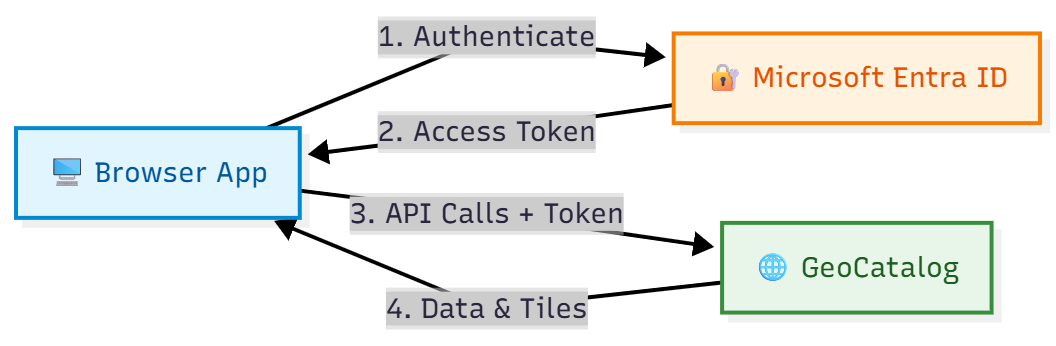
体系结构概述
典型的 GeoCatalog Web 应用程序遵循以下体系结构:
在 Microsoft Entra ID 中注册应用程序
在 Web 应用程序对用户进行身份验证之前,请在 Microsoft Entra ID 中注册它。 本快速入门使用 单页应用程序(SPA) 注册,非常适合客户端 JavaScript 应用程序和本地开发。 后续步骤中显示的 API 集成模式适用于任何应用程序类型。
注释
对于具有后端服务器的生产应用程序,请考虑选择其他注册类型(Web、Native 等)。 有关为方案选择合适的方法的指导,请参阅 “配置应用程序身份验证 ”。
注册为单页应用程序
- 在 Azure 门户中转到 Microsoft Entra ID 。
- 从侧面板中选择 “应用注册 ”。
- 选择“新注册”。
- 输入应用程序的名称(例如,“GeoCatalog Web App”)。
- 在“支持的帐户类型”下,选择“仅此组织目录中的帐户”。
- 在“重定向 URI”下,选择“单页应用程序”(SPA),然后输入开发 URL(例如,
http://localhost:5173)。 - 选择“注册”。
注册后,请注意 “概述 ”页中的以下值:
- 应用程序(客户端)ID
- 目录(租户)ID
有关详细信息,请查看应用快速入门注册。
授予 API 权限
应用程序需要代表已登录用户调用 GeoCatalog API 的权限:
- 在应用注册中,选择 “API 权限>添加权限”。
- 选择 我的组织使用的 API 并搜索 Azure Orbital Spatio。
- 选择委派权限并选中user_impersonation。
- 选择“添加权限”。
- 请选取授予管理员同意以代表租户中所有用户进行同意,如果你是管理员。
配置应用程序
应用程序需要以下配置值。 提供这些值的方式取决于生成工具(环境变量、配置文件等):
| 配置 | 价值 | Description |
|---|---|---|
| 目录 URL | https://{name}.{region}.geocatalog.spatio.azure.com |
你的 GeoCatalog 终结点 |
| 租户 ID | 从应用注册 | Microsoft Entra 租户 |
| 客户 ID | 从应用注册 | 应用程序的客户端 ID |
| API 范围 | https://geocatalog.spatio.azure.com/.default |
始终使用此确切值 |
安装依赖项
为浏览器应用程序和映射库安装Microsoft身份验证库(MSAL):
npm install @azure/msal-browser maplibre-gl
- @azure/msal-browser - 使用 Microsoft Entra ID 处理 OAuth 2.0 身份验证
- maplibre-gl - 用于磁贴可视化的开源地图库
小窍门
项目结构: 本快速入门中的代码示例是独立的函数,您可以按照您的喜好进行组织。 常见模式:
-
auth.js:MSAL 配置和令牌函数 -
api.js:STAC API、Tiler API 和 SAS 令牌函数 -
map.js:MapLibre 初始化和图块层管理 -
App.js或main.js:将所有内容与 UI 连接在一起
每个函数接收其依赖项(访问令牌、URL)作为参数,使其易于集成到任何框架或项目结构中。
实现 MSAL 身份验证
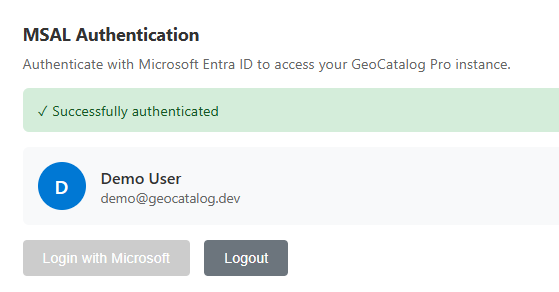
为浏览器身份验证配置 MSAL。 以下示例显示了密钥配置和令牌获取模式:
import { PublicClientApplication, InteractionRequiredAuthError } from '@azure/msal-browser';

// Configuration - replace with your values or load from environment/config
const msalConfig = {
  auth: {
    clientId: 'YOUR_CLIENT_ID',
    authority: 'https://login.microsoftonline.com/YOUR_TENANT_ID',
    redirectUri: window.location.origin,
  },
  cache: {
    cacheLocation: 'sessionStorage',
    storeAuthStateInCookie: false,
  },
};

// Create MSAL instance
const msalInstance = new PublicClientApplication(msalConfig);

// GeoCatalog API scope - always use this exact value
const scopes = ['https://geocatalog.spatio.azure.com/.default'];

/**
 * Acquire an access token for GeoCatalog API calls.
 * Tries silent acquisition first, falls back to popup if needed.
 */
async function getAccessToken() {
  const account = msalInstance.getActiveAccount() || msalInstance.getAllAccounts()[0];

  if (!account) {
    throw new Error('No authenticated account. Call login() first.');
  }

  try {
    // Try silent token acquisition (uses cached token)
    const result = await msalInstance.acquireTokenSilent({ account, scopes });
    return result.accessToken;
  } catch (error) {
    // If silent fails (token expired), fall back to popup
    if (error instanceof InteractionRequiredAuthError) {
      const result = await msalInstance.acquireTokenPopup({ scopes });
      return result.accessToken;
    }
    throw error;
  }
}

/**
 * Sign in the user via popup.
 */
async function login() {
  const result = await msalInstance.loginPopup({ scopes });
  msalInstance.setActiveAccount(result.account);
  return result.account;
}

/**
 * Sign out the user.
 */
function logout() {
  msalInstance.logoutPopup();
}
STAC API:查询集合和项目
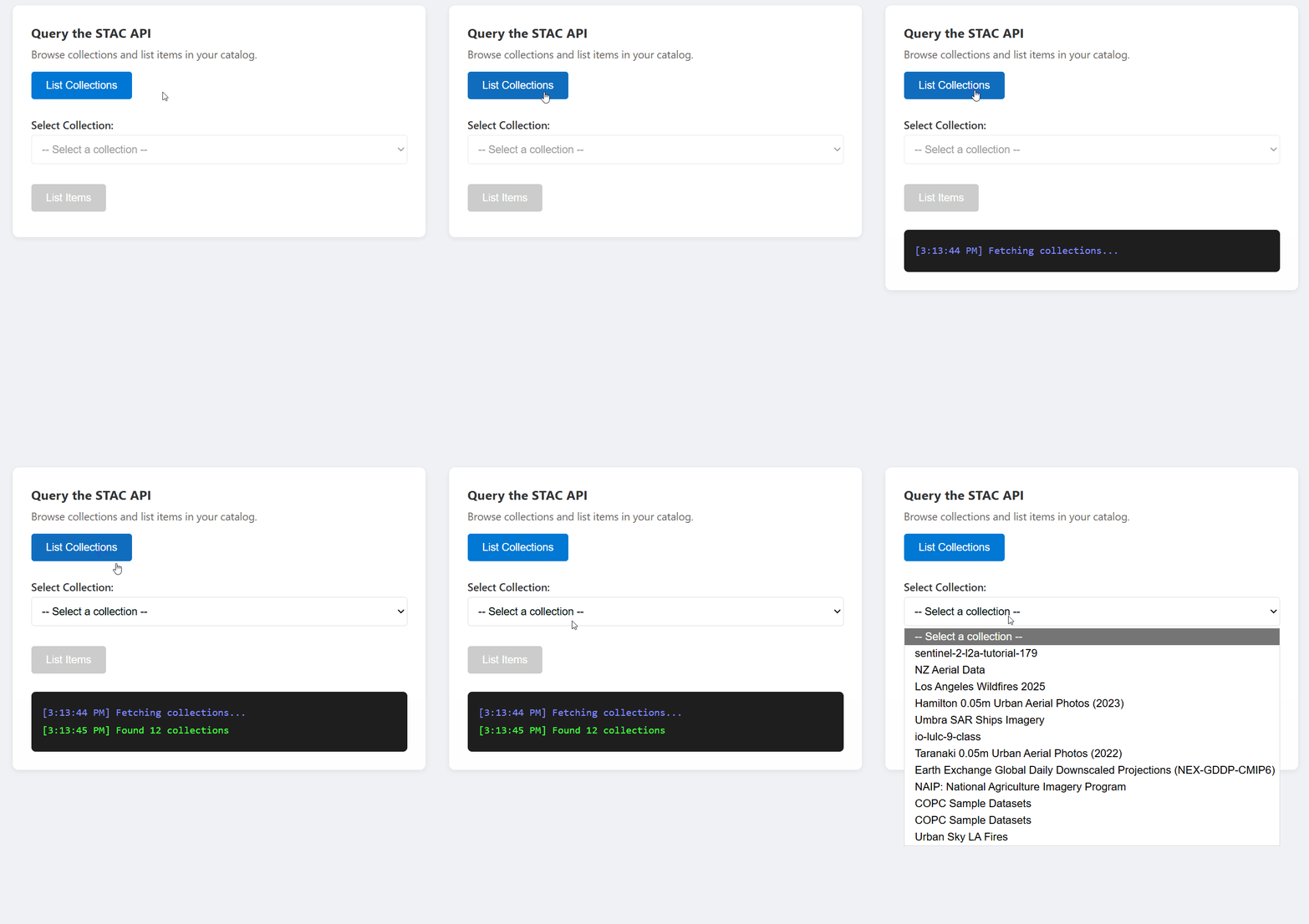
GeoCatalog STAC API 提供用于发现和查询地理空间数据的终结点。 所有请求都需要一个 Authorization 标头,其中包含从 实现 MSAL 身份验证获取的 Bearer 令牌。
列出集合
const API_VERSION = '2026-04-15';

async function listCollections(accessToken, catalogUrl) {
  const url = `${catalogUrl}/stac/collections?api-version=${API_VERSION}`;

  const response = await fetch(url, {
    headers: {
      'Authorization': `Bearer ${accessToken}`,
    },
  });

  if (!response.ok) {
    throw new Error(`Failed to list collections: ${response.statusText}`);
  }

  const data = await response.json();
  return data.collections; // Array of STAC Collection objects
}
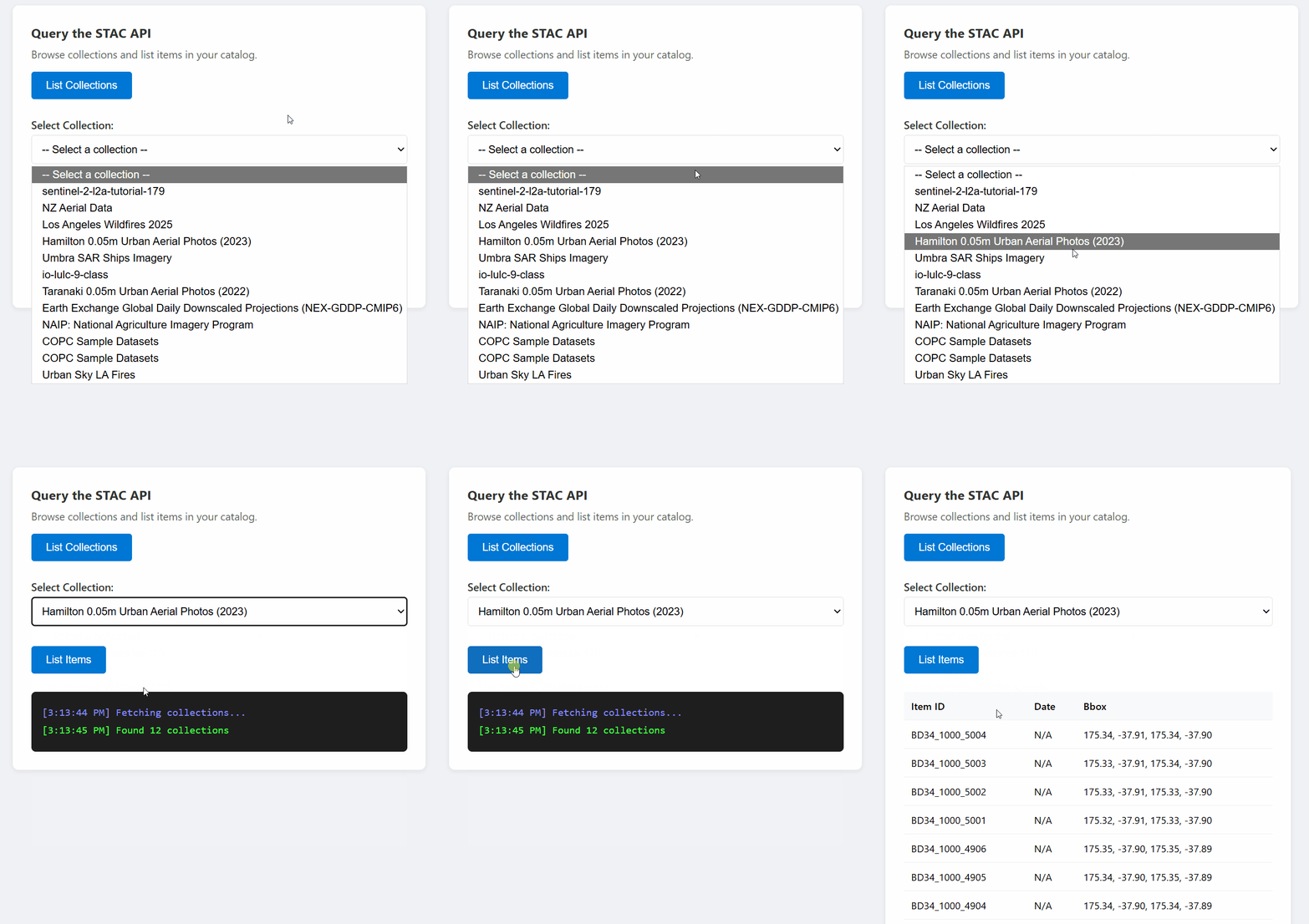
列出集合中的项
const API_VERSION = '2026-04-15';

async function listItems(accessToken, catalogUrl, collectionId, limit = 10) {
  const url = `${catalogUrl}/stac/collections/${collectionId}/items?limit=${limit}&api-version=${API_VERSION}`;

  const response = await fetch(url, {
    headers: {
      'Authorization': `Bearer ${accessToken}`,
    },
  });

  if (!response.ok) {
    throw new Error(`Failed to list items: ${response.statusText}`);
  }

  const data = await response.json();
  return data.features; // Array of STAC Item objects
}
跨集合搜索
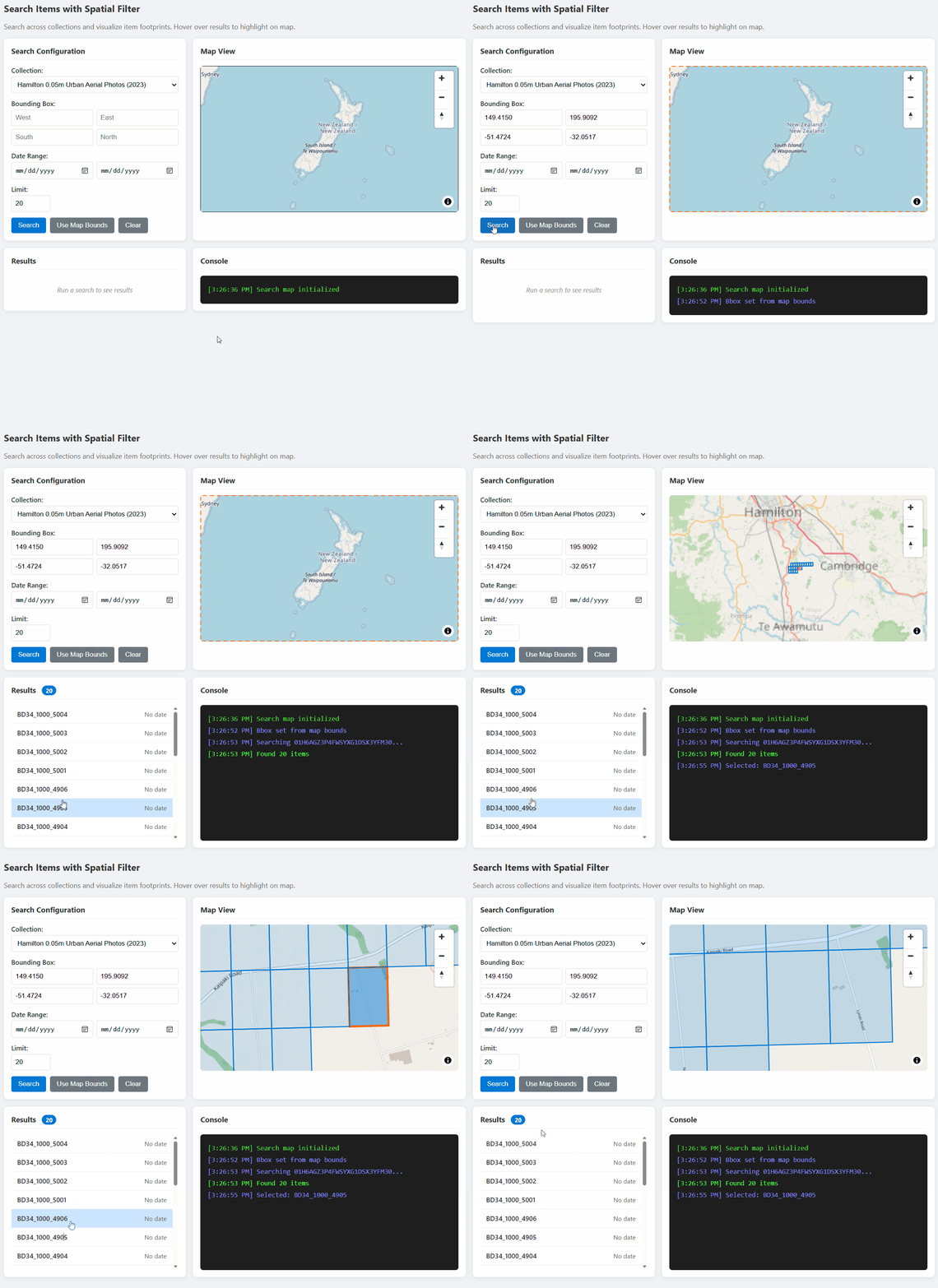
const API_VERSION = '2026-04-15';

async function searchItems(accessToken, catalogUrl, searchParams) {
  const url = `${catalogUrl}/stac/search?api-version=${API_VERSION}`;

  const response = await fetch(url, {
    method: 'POST',
    headers: {
      'Authorization': `Bearer ${accessToken}`,
      'Content-Type': 'application/json',
    },
    body: JSON.stringify(searchParams),
  });

  if (!response.ok) {
    throw new Error(`Search failed: ${response.statusText}`);
  }

  return await response.json();
}

// Example usage:
const results = await searchItems(token, catalogUrl, {
  collections: ['my-collection'],
  bbox: [-122.5, 37.5, -122.0, 38.0],  // [west, south, east, north]
  datetime: '2024-01-01/2024-12-31',
  limit: 20,
});
图块网址:构建用于地图可视化的 URL
GeoCatalog Tiler API 将栅格数据作为地图图块提供。 使用以下模式构造磁贴 URL:
单个项目图块
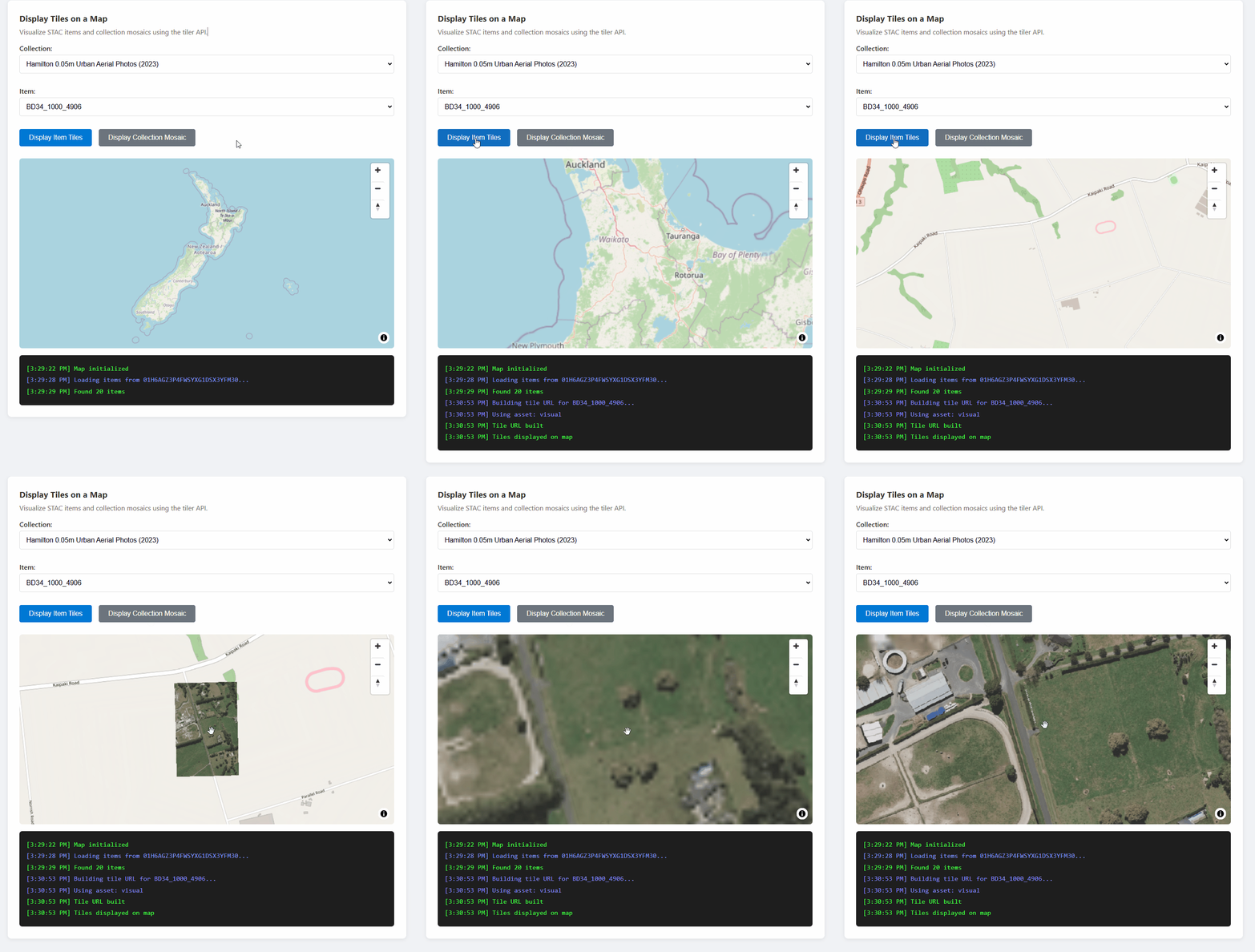
{catalogUrl}/data/mosaic/collections/{collectionId}/items/{itemId}/tiles/{z}/{x}/{y}@1x.png
  ?api-version=2026-04-15
  &tileMatrixSetId=WebMercatorQuad
  &assets=visual
磁贴 URL 生成器函数
const API_VERSION = '2026-04-15';

/**
 * Build a tile URL template for a STAC item.
 * Returns a URL with {z}/{x}/{y} placeholders for use with map libraries.
 */
function buildTileUrl(catalogUrl, collectionId, itemId, options = {}) {
  const { assets = 'visual', colormap, rescale } = options;

  const base = `${catalogUrl}/data/mosaic/collections/${collectionId}/items/${itemId}/tiles/{z}/{x}/{y}@1x.png`;

  const params = new URLSearchParams();
  params.set('api-version', API_VERSION);
  params.set('tileMatrixSetId', 'WebMercatorQuad');
  params.set('assets', assets);

  if (colormap) params.set('colormap_name', colormap);
  if (rescale) params.set('rescale', rescale);

  return `${base}?${params.toString()}`;
}

// Example usage:
const tileUrl = buildTileUrl(
  'https://mygeocatalog.northcentralus.geocatalog.spatio.azure.com',
  'aerial-imagery',
  'image-001',
  { assets: 'visual' }
);
关键磁贴参数
| 参数 | 必选 | Description |
|---|---|---|
api-version |
是的 | API 版本 (2026-04-15) |
tileMatrixSetId |
是的 | 使用 WebMercatorQuad 用于 Web 地图 |
assets |
是的 | 要呈现的资产名称(例如: visual, image) |
colormap_name |
否 | 命名颜色图 (示例: viridis, terrain) |
rescale |
否 | 缩放的数值范围(示例: 0,255) |
asset_bidx |
否 | 波段索引(示例:image\|1,2,3 用于 RGB) |
注释
对于具有四波段图像的集合(如 NAIP 的 RGB + NIR 图像),使用 asset_bidx=image|1,2,3 仅选择 RGB 波段。 图块生成器无法将四个波段编码为 PNG 格式。
地图集成:使用 MapLibre GL 显示图块
MapLibre GL、Leaflet 和 OpenLayers 等地图库可以显示光栅磁贴。 关键挑战是向磁贴请求 添加授权标头 ,因为这些库直接提取磁贴。
MapLibre GL 示例
MapLibre GL 提供了一个 transformRequest 选项来注入标头:
import maplibregl from 'maplibre-gl';
import 'maplibre-gl/dist/maplibre-gl.css';

// Store the current access token
let currentAccessToken = null;

function initializeMap(containerId, accessToken) {
  currentAccessToken = accessToken;

  const map = new maplibregl.Map({
    container: containerId,
    style: {
      version: 8,
      sources: {
        osm: {
          type: 'raster',
          tiles: ['https://tile.openstreetmap.org/{z}/{x}/{y}.png'],
          tileSize: 256,
          attribution: '© OpenStreetMap contributors',
        },
      },
      layers: [{ id: 'osm', type: 'raster', source: 'osm' }],
    },
    center: [0, 0],
    zoom: 2,
    // Add authorization header to tile requests
    transformRequest: (url, resourceType) => {
      // Only add auth for GeoCatalog tile requests
      if (url.includes('geocatalog.spatio.azure.com') && currentAccessToken) {
        return {
          url,
          headers: { 'Authorization': `Bearer ${currentAccessToken}` },
        };
      }
      return { url };
    },
  });

  return map;
}

function addTileLayer(map, tileUrl, bounds) {
  // Remove existing layer and source if present
  if (map.getLayer('data-layer')) {
    map.removeLayer('data-layer');
  }
  if (map.getSource('data-tiles')) {
    map.removeSource('data-tiles');
  }

  // Add tile source
  map.addSource('data-tiles', {
    type: 'raster',
    tiles: [tileUrl],
    tileSize: 256,
    minzoom: 10,  // Many aerial collections require zoom 10+
    maxzoom: 18,
  });

  // Add tile layer
  map.addLayer({
    id: 'data-layer',
    type: 'raster',
    source: 'data-tiles',
  });

  // Zoom to bounds [west, south, east, north]
  if (bounds) {
    map.fitBounds([[bounds[0], bounds[1]], [bounds[2], bounds[3]]], { padding: 50 });
  }
}
重要
每次块请求时都会调用 transformRequest 函数。 将访问令牌存储在可以访问的 transformRequest 变量中,并在令牌刷新时对其进行更新。
马赛克磁贴:显示集合范围的图像
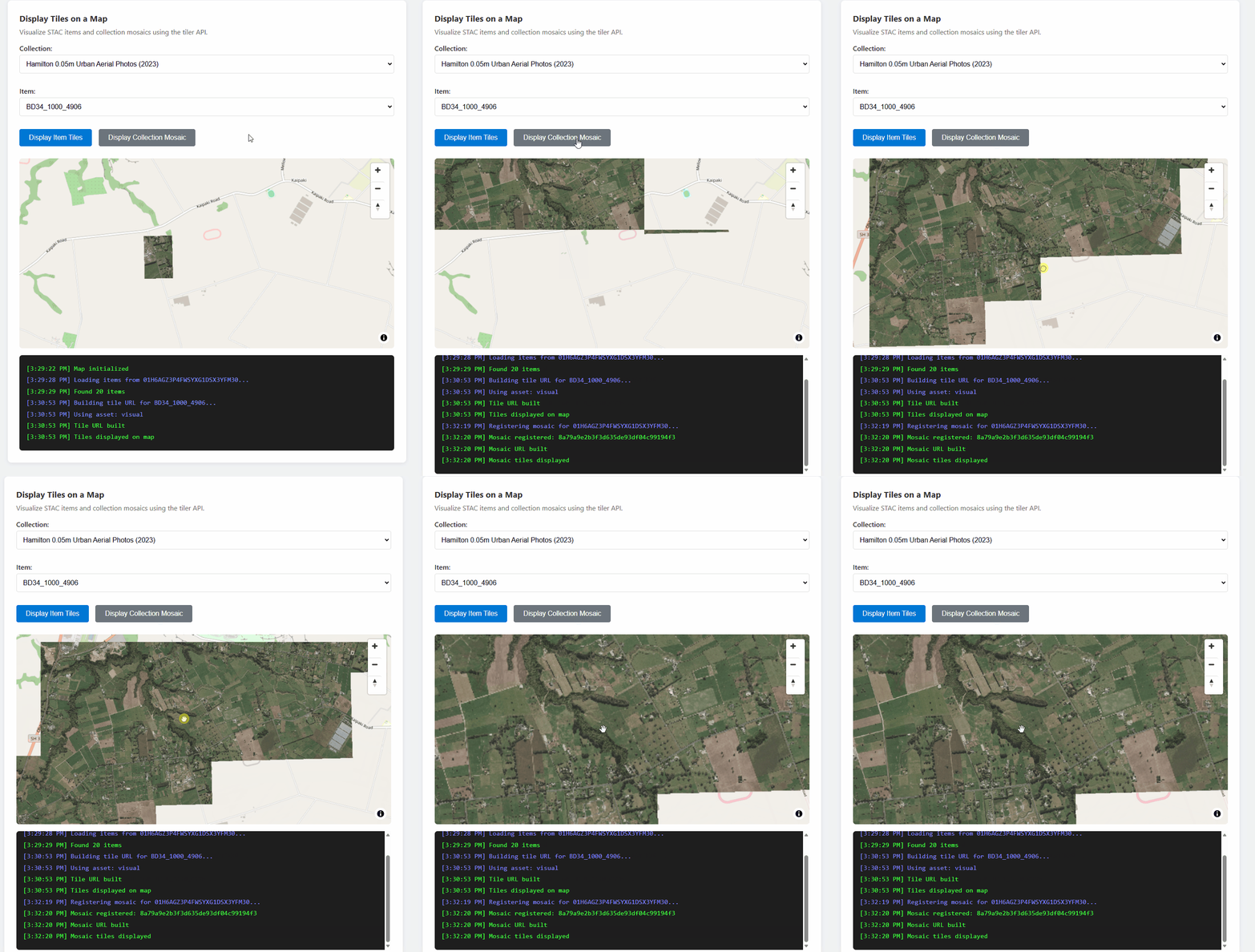
若要将集合中的所有项作为无缝层查看,请注册马赛克搜索并使用返回的搜索 ID:
const API_VERSION = '2026-04-15';

/**
 * Register a mosaic search for a collection.
 * Returns a search ID that can be used to fetch mosaic tiles.
 */
async function registerMosaic(catalogUrl, collectionId, accessToken) {
  const url = `${catalogUrl}/data/mosaic/register?api-version=${API_VERSION}`;

  const response = await fetch(url, {
    method: 'POST',
    headers: {
      'Authorization': `Bearer ${accessToken}`,
      'Content-Type': 'application/json',
    },
    body: JSON.stringify({
      collections: [collectionId],
    }),
  });

  if (!response.ok) {
    throw new Error(`Failed to register mosaic: ${response.statusText}`);
  }

  const data = await response.json();
  // Note: API returns 'searchid' (lowercase), not 'searchId'
  return data.searchid;
}

/**
 * Build a mosaic tile URL template.
 */
function buildMosaicTileUrl(catalogUrl, searchId, collectionId, options = {}) {
  const { assets = 'visual' } = options;

  const base = `${catalogUrl}/data/mosaic/searches/${searchId}/tiles/{z}/{x}/{y}@1x.png`;

  const params = new URLSearchParams();
  params.set('api-version', API_VERSION);
  params.set('tileMatrixSetId', 'WebMercatorQuad');
  params.set('collection', collectionId);
  params.set('assets', assets);

  return `${base}?${params.toString()}`;
}
SAS 令牌:下载原始资源
SAS API 提供限时令牌,用于直接从 Azure Blob 存储下载原始资产文件(GeoTIFF、COG 和其他文件)。 如果需要原始源文件而不是呈现的磁贴,请使用此选项。
重要
SAS 令牌仅允许在浏览器应用中下载。 由于 Azure Blob 存储 CORS 策略,浏览器无法通过 JavaScript fetch()读取 Blob 数据。 请参阅 “浏览器限制 ”部分。
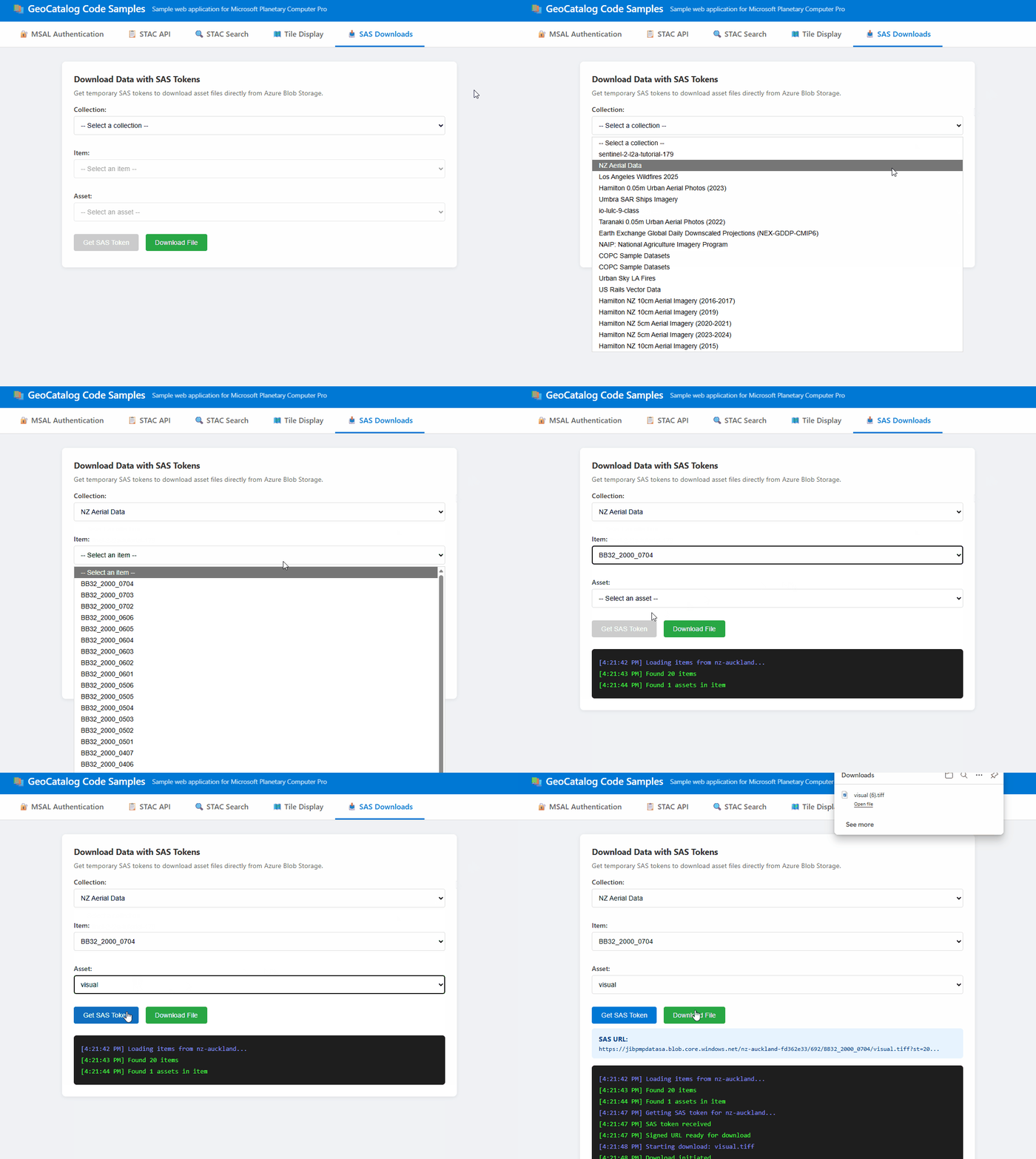
获取 SAS 令牌
const API_VERSION = '2026-04-15';

/**
 * Get a SAS token for accessing assets in a collection.
 * Returns a token string that can be appended to asset URLs.
 */
async function getCollectionSasToken(accessToken, catalogUrl, collectionId) {
  const url = `${catalogUrl}/sas/token/${collectionId}?api-version=${API_VERSION}`;

  const response = await fetch(url, {
    headers: {
      'Authorization': `Bearer ${accessToken}`,
    },
  });

  if (!response.ok) {
    throw new Error(`Failed to get SAS token: ${response.statusText}`);
  }

  const data = await response.json();
  return data.token; // SAS token string
}
生成已签名的下载 URL
/**
 * Build a signed URL for downloading an asset.
 * Appends the SAS token to the asset's href.
 */
function buildSignedAssetUrl(assetHref, sasToken) {
  const separator = assetHref.includes('?') ? '&' : '?';
  return `${assetHref}${separator}${sasToken}`;
}

// Example usage:
const sasToken = await getCollectionSasToken(accessToken, catalogUrl, 'my-collection');
const assetHref = item.assets['visual'].href;
const signedUrl = buildSignedAssetUrl(assetHref, sasToken);
触发文件下载
/**
 * Trigger a browser download for an asset file.
 * Works by creating a temporary anchor element.
 */
function downloadAsset(signedUrl, filename) {
  const link = document.createElement('a');
  link.href = signedUrl;
  link.download = filename || 'download';
  document.body.appendChild(link);
  link.click();
  document.body.removeChild(link);
}

// Example: Download an asset
downloadAsset(signedUrl, 'aerial-image.tif');
浏览器限制
SAS 令牌在浏览器与服务器端代码中的工作方式不同:
| 用例 | Browser | Server-side |
|---|---|---|
| 下载文件(用户选择链接) | ✅ 可用 | ✅ 可用 |
通过 fetch() 读取 Blob 数据 |
❌ CORS 被阻止 | ✅ 可用 |
| 在 JavaScript 中处理原始像素 | ❌ 不可能 | ✅ 可用 |
浏览器的下载功能正常运作,因为导航(点选链接)会绕过 CORS。 但是,对 Azure Blob 存储的 fetch() 请求会被阻止,因为存储帐户的 CORS 策略中未包含你的应用程序源。
如果应用程序需要在浏览器中读取和处理原始资产数据,请实现服务器端代理:
注释
以下代码是演示代理模式的简化示例。 对于生产应用程序,代理终结点应对请求进行身份验证(例如,通过转发用户的持有者令牌或使用会话身份验证),并验证用户是否有权访问请求的资源。
// ❌ Browser: This fails due to CORS
const response = await fetch(signedUrl);
const data = await response.arrayBuffer(); // Error!

// ✅ Browser: Call your backend instead
const response = await fetch('/api/proxy-asset', {
  method: 'POST',
  body: JSON.stringify({ collectionId, itemId, assetName })
});
const data = await response.json(); // Works!
后端可以使用 SAS 令牌提取 Blob 并返回处理的结果。
开发注意事项
CORS 支持
GeoCatalog API 包含完整的 CORS 支持Access-Control-Allow-Origin: *。 基于浏览器的应用程序可以从任何源(包括在开发期间的 http://localhost)向 GeoCatalog 发出直接请求。 不需要代理或解决方法。
API 允许 CORS 请求中的 Authorization 标头,因此经过身份验证的 fetch() 调用可以直接从浏览器的 JavaScript 中执行。
选择正确的数据访问方法
| 方法 | 浏览器 fetch() |
浏览器下载 | Server-side | 最适用于 |
|---|---|---|---|---|
| Tiler API | ✅ 完全支持 | ✅ 是 | ✅ 是 | 地图可视化 |
| SAS 令牌 | ❌ CORS 被阻止 | ✅ 是 | ✅ 是 | 原始文件下载 |
Tiler API:用于在地图上显示图像。 返回提供完整 CORS 支持的已渲染 PNG 或 WebP 切片。 请参阅 磁贴 URL 和 地图集成。
SAS 令牌:用于下载原始源文件(GeoTIFF、COG)。 浏览器下载工作,但
fetch()受 Azure Blob 存储 CORS 策略阻止。 有关详细信息和解决方法,请参阅 SAS 令牌 。
令牌刷新
访问令牌通常会在一小时后过期。 应用程序应:
- 通过获取新令牌来处理 401 错误。
- 使用 MSAL 的无感令牌获取功能,该功能会自动刷新过期的令牌。
- 更新地图
transformRequest所使用的令牌引用。
错误处理
处理常见错误情形
| HTTP 状态 | 原因 | 解决方案 |
|---|---|---|
| 401 | 令牌已过期或无效 | 刷新访问令牌 |
| 404 | 找不到项或集合 | 验证 ID 是否存在 |
| 424 | 数据范围外的图块 | 预期情况 — 顺利处理 |
Troubleshooting
| 错误 | 原因 | 解决方案 |
|---|---|---|
| “AADSTS50011:回复 URL 不匹配” | 代码中的重定向 URI 与 Microsoft Entra ID 注册不匹配 | 在应用注册中将开发 URL(例如 http://localhost:3000)添加为 SPA 重定向 URI |
| “范围无效”错误 | 使用 GeoCatalog URL 而不是 API 范围 | 将 https://geocatalog.spatio.azure.com/.default 用作范围 |
| 图块请求出现 401 未授权错误 | 地图库不包括授权标头 | 使用 transformRequest (MapLibre) 添加持有者令牌;确保令牌是最新的 |
| 图块与底图不一致 | 错误的图块矩阵集 | 对于 Web Mercator 投影 (EPSG:3857),使用 tileMatrixSetId=WebMercatorQuad |
| “无法解码图像” | 资产名称、多波段影像或外部数据范围不正确 | 检查 item_assets 以获取有效名称;对于 RGB,使用 asset_bidx=image\|1,2,3;覆盖范围外出现 404/424 错误属于预期情况 |