Customer Service 全渠道提供了一套功能,扩展了 Dynamics 365 Customer Service Enterprise 的能力,使组织能够通过数字消息传递渠道与客户即时联系和互动。 访问 Customer Service 全渠道需要额外的许可证。 有关详细信息,请参见 Dynamics 365 Customer Service 定价概述和 Dynamics 365 Customer Service 定价计划页面。
设置实时聊天频道的上下文提供程序。 调用上下文提供程序函数时,返回用于初始化聊天会话的上下文。
重要
- setContextProvider 方法仅支持未经身份验证的聊天。 对于经过身份验证的聊天,您必须使用 JSON Web 令牌 (JWT)。 详细信息: 发送身份验证令牌
- 在每个聊天会话期间只能传递 100 个自定义上下文变量。
- 应在引发 lcw:ready 事件 后调用实时聊天 SDK 方法。 您可以通过在窗口对象上添加自己的事件侦听器来监听此事件。
- 如果使用
setContextProviderSDK API 传递上下文并初始化聊天会话,则无需使用该startChat方法。
Syntax
Microsoft.Omnichannel.LiveChatWidget.SDK.setContextProvider(contextProvider);
参数
| 参数 | 类型 | Description |
|---|---|---|
| 上下文提供程序 | 功能 | 调用时返回自定义上下文的函数 |
返回值
None
Example
window.addEventListener("lcw:ready", function handleLivechatReadyEvent(){
        // Set the custom context provider
        // Throws error if contextProvider is not a function
        Microsoft.Omnichannel.LiveChatWidget.SDK.setContextProvider(function contextProvider(){
                   //Here it is assumed that the corresponding work stream would have context variables with logical name of 'contextKey1', 'contextKey2', 'contextKey3'. If no context variable exists with a matching logical name, items are created assuming Type:string
	               return {
                             'contextKey1': {'value': 'contextValue1', 'isDisplayable': true},
                             'contextKey2': {'value': 12.34, 'isDisplayable': false},
                             'contextKey3': {'value': true}
                   };
        });
});
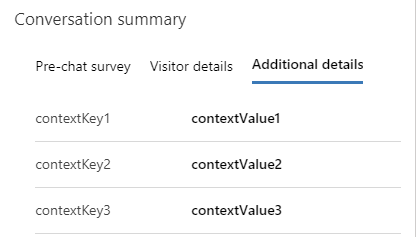
在前面的示例代码中,该 value 属性包含上下文变量的值。
如果将该 isDisplayable 属性设置为 true,则将在对话的“对话摘要控件”的第三个选项卡中显示传递的项目。
注释
如果未在实时工作流下创建具有匹配逻辑名称的上下文变量,则在运行时创建类型为 String 的变量。 详细信息: 上下文变量
将客户的自助服务传递为上下文
您可以在与客户对话开始时将客户的自助服务作为上下文传递。 该 setContextProvider 方法将最近的客户作作为自助服务类型的上下文的一部分传递,用于客户和代理之间的新对话。 为每个自助服务作创建访客旅程记录。
下面是一个示例代码,演示如何使用该 setContextProvider 方法。
window.addEventListener("lcw:ready", function handleLivechatReadyEvent(){

Microsoft.Omnichannel.LiveChatWidget.SDK.setContextProvider(function contextProvider(){
    return {
            'SelfService': { 'value' :
                '[ {"msdyn_displaytitle":"Page visited", "msdyn_starttime":"yyyy-mm-ddThh:mm:ssZ","msdyn_type":192350000}, \
                   {"msdyn_displaytitle":"Phrase searched", "msdyn_starttime":"yyyy-mm-ddThh:mm:ssZ","msdyn_type":192350001}, \
                   {"msdyn_displaytitle":"Knowledge article viewed", "msdyn_starttime":"yyyy-mm-ddThh:mm:ssZ","msdyn_type":192350002}, \
                   {"msdyn_displaytitle":"Custom action performed", "msdyn_starttime":"yyyy-mm-ddThh:mm:ssZ","msdyn_type":192350003} \
                 ]'
             }, // Additional context can be added as shown below
                //Here it is assumed that the corresponding work stream would have context variables with logical name of 'contextKey1', 'contextKey2', 'contextKey3'. If no context variable exists with a matching logical name, items are created assuming Type:string
                'contextKey1': {'value': 'contextValue1', 'isDisplayable': true},
                'contextKey2': {'value': 12.34, 'isDisplayable': false},
                'contextKey3': {'value': true}
         };
    });
});
有关跟踪可包含在自助服务门户中的自助服务作的示例脚本,请参阅 自助服务示例代码。
错误代码
此方法可能会发生以下错误。
| 错误代码 | 错误消息 |
|---|---|
| 1 | 上下文提供程序方法执行失败 |