本文演示在 Power Platform 中使用 GitHub Actions 和 Power Automate 云端流扩展管道。 当提交管道部署时,云端流将触发下载 GitHub 工作流、解压缩项目的源代码,并将其提交到 GitHub 分支。
工作流详细信息
工作流通过 workflow_dispatch 事件触发。 工作流在 ubuntu-latest 上运行,具有 contents: write 权限,可以将更改提交到 GitHub 存储库分支。
工作流包括以下步骤:
-
actions/checkout@v3:检查库。 -
create new branch if specified:如果输入中指定了target_branch,则创建一个新分支。 -
download solution from artifact:从管道创建的工件中下载解决方案。 -
unpack solution:解压解决方案。 -
commit changes:将更改提交到现有分支或新分支。 -
push to branch:将已提交的变更推送到源分支。
工作流输入
以下工作流输入是必需输入或可选输入:
-
artifact_url(必填):管道创建的工件的 Microsoft Dataverse 行(记录)ID 的 URL。 -
solution_name(必填):Dataverse 环境中解决方案的名称。 -
source_branch(必填):解决方案提交的分支。 -
target_branch(可选):为解决方案提交创建的分支。 如果未指定,将使用source_branch。 -
commit_message(必填):为提交提供的信息。
工作流机密
使用在 Dataverse 和 Microsoft Entra ID (AD) 中配置的应用程序用户连接到 Dataverse 需要以下密码。 在 GitHub 存储库设置中配置这些机密。
-
CLIENT_ID:已注册 Microsoft Entra 应用程序的客户端 ID。 -
TENANT_ID:与 Microsoft Entra 应用程序相关联的 Microsoft Entra 目录的租户 ID。 -
CLIENT_SECRET:已注册 Microsoft Entra 应用程序的客户端密钥。
工作流代码
下面列出的是 GitHub Actions 工作流代码。
name: Download, unpack and commit the solution to git
run-name: Getting ${{ github.event.inputs.solution_name }} from pipelines host environment and committing
on:
  workflow_dispatch:
    inputs:
      artifact_url:
        description: "The url of the Dataverse record ID for the artifact created by the pipelines (Example: https://[your-env].crm.dynamics.com/api/data/v9.0/deploymentartifacts([your-artifact-id])/artifactfile/$value)."
        required: true
      solution_name:
        description: "Name of the Solution in Dataverse environment"
        required: true
      user_name:
        description: "User name for the commit"
        required: true
      source_branch:
        description: "Branch for the solution commit"
        required: true
      target_branch:
        description: "Branch to create for the solution commit"
        required: false
      commit_message:
        description: "Message to provide for the commit"
        required: true
permissions:
  contents: write
jobs:
  export-unpack-commit:
    runs-on: ubuntu-latest

    steps:
      - uses: actions/checkout@v3
        with:
            ref: ${{ github.event.inputs.source_branch }}

      # Commit changes to the existing or new branch
      - name: create new branch if specified
        shell: pwsh
        run: |
            if('${{ github.event.inputs.target_branch }}' -ne '') {
                git checkout -b ${{ github.event.inputs.target_branch }} ${{ github.event.inputs.source_branch }}
            }

      # Export the solution from the artifact created by pipelines
      - name: download solution from artifact
        env:
            CLIENT_ID: ${{secrets.CLIENT_ID}}
            TENANT_ID: ${{secrets.TENANT_ID}}
            CLIENT_SECRET: ${{secrets.CLIENT_SECRET}}
        shell: pwsh
        run: |
            $aadHost = "login.microsoftonline.com"
            $url = "${{ github.event.inputs.artifact_url }}"
            $options = [System.StringSplitOptions]::RemoveEmptyEntries
            $dataverseHost = $url.Split("://", $options)[1].Split("/")[0]

            $body = @{client_id = $env:CLIENT_ID; client_secret = $env:CLIENT_SECRET; grant_type = "client_credentials"; scope = "https://$dataverseHost/.default"; }
            $OAuthReq = Invoke-RestMethod -Method Post -Uri "https://$aadHost/$env:TENANT_ID/oauth2/v2.0/token" -Body $body
            $spnToken = $OAuthReq.access_token
            $headers = New-Object "System.Collections.Generic.Dictionary[[String],[String]]"
            $headers.Add("Authorization", "Bearer $spnToken")
            $headers.Add("Content-Type", "application/json")

            # Download the managed solution
            $response = Invoke-RestMethod "${{ github.event.inputs.artifact_url }}" -Method 'GET' -Headers $headers
            $bytes = [Convert]::FromBase64String($response.value)
            [IO.File]::WriteAllBytes("${{ github.event.inputs.solution_name }}_managed.zip", $bytes)

            # Download the unmanaged solution (for now we will need to use string manipulation to get the unmanaged solution URL, until the API provides this value)
            $unmanaged_artifact_url = "${{ github.event.inputs.artifact_url }}".Replace("artifactfile", "artifactfileunmanaged")
            $response = Invoke-RestMethod "$unmanaged_artifact_url" -Method 'GET' -Headers $headers
            $bytes = [Convert]::FromBase64String($response.value)
            [IO.File]::WriteAllBytes("${{ github.event.inputs.solution_name }}.zip", $bytes)

      # Unpack the solution
      - name: unpack solution
        uses: microsoft/powerplatform-actions/unpack-solution@v0
        with:
          solution-file: "${{ github.event.inputs.solution_name }}.zip"
          solution-folder: "${{ github.event.repository.name }}"
          solution-type: 'Both'
          process-canvas-apps: false
          overwrite-files: true

      # Commit changes to the existing or new branch
      - name: commit changes
        shell: pwsh
        run: |
          rm -rf ${{ github.event.inputs.solution_name }}.zip
          rm -rf ${{ github.event.inputs.solution_name }}_managed.zip
          git config user.name ${{ github.event.inputs.user_name }}
          git pull
          git add --all
          git commit -am "${{ github.event.inputs.commit_message }}" --allow-empty

      # Push the committed changes to the source branch
      - name: push to branch
        shell: pwsh
        run: |
          if('${{ github.event.inputs.target_branch }}' -ne '') {
              git push origin ${{ github.event.inputs.target_branch }}
          } else {
              git push origin ${{ github.event.inputs.source_branch }}
          }
备注
用于下载解决方案项目的 Dataverse Web API 的最大文件大小限制为 16 MB。
示例 Power Automate 流
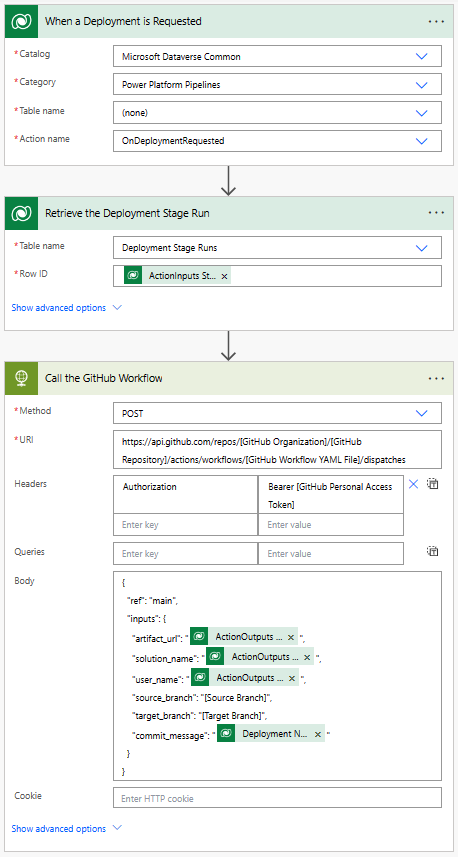
要调用 GitHub 工作流,您可以创建在 Dataverse 中发出部署请求时触发的 Power Automate 流。 此流可以配置为将所需的输入传递给 GitHub 工作流。 有关如何创建 Power Automate 流的更多信息,请转至创建流。
流详细信息
当在 Dataverse 中运行 OnDeploymentRequested 操作时,流将触发。 流将调用 HTTP 连接器来触发 GitHub 工作流。 流将所需的输入传递给 GitHub 工作流。 在请求正文中包括以下输入:
-
artifact_url:管道创建的 Dataverse 解决方案工件的 URL。 -
solution_name:Dataverse 环境中解决方案的名称。 -
user_name:提交的用户名。 -
source_branch:解决方案提交的源分支。 -
target_branch:要为解决方案提交创建的分支。 -
commit_message:要为提交提供的信息。
传递到 artifact_url、solution_name 和 user_name 的值从触发管道的操作的输出拉取。
commit_message 从 Dataverse 中的部署阶段运行行拉取。
-
artifact_url:@{triggerOutputs()?['body/OutputParameters/ArtifactFileDownloadLink']} -
solution_name:@{triggerOutputs()?['body/OutputParameters/ArtifactName']} -
user_name:@{triggerOutputs()?['body/OutputParameters/DeployAsUser']} -
commit_message:@{outputs('Retrieve_the_Deployment_Stage_Run')?['body/deploymentnotes']}
流还使用个人访问令牌 (PAT) 在 GitHub 上进行身份验证。 有关如何创建 GitHub 个人访问令牌的更多信息,请参阅创建个人访问令牌。 PAT 在 HTTP 请求的 Authorization 标头中传递。
更新流中的以下值:
-
[GitHub Personal Access Token]- 替换为您的 GitHub 个人访问令牌。 -
[GitHub Organization]- 替换为您的 GitHub 组织名称。 -
[GitHub Repository]- 替换为 GitHub 库名称。 -
[GitHub Workflow YAML File]- 替换为您的 GitHub 工作流 YAML 文件名。 -
[Source Branch]- 替换为要提交解决方案的 Git 分支。 -
[Target Branch]- 替换为为提交解决方案而创建的 Git 分支。Target Branch为可选项。 如果您没有指定目标分支,您的解决方案将被提交到Source Branch。