BackgroundWorker 類別
定義
重要
部分資訊涉及發行前產品,在發行之前可能會有大幅修改。 Microsoft 對此處提供的資訊,不做任何明確或隱含的瑕疵擔保。
在個別線程上執行作業。
public ref class BackgroundWorker : IDisposablepublic ref class BackgroundWorker : System::ComponentModel::Componentpublic class BackgroundWorker : IDisposablepublic class BackgroundWorker : System.ComponentModel.Componenttype BackgroundWorker = class
interface IDisposabletype BackgroundWorker = class
inherit ComponentPublic Class BackgroundWorker
Implements IDisposablePublic Class BackgroundWorker
Inherits Component- 繼承
-
BackgroundWorker
- 繼承
- 實作
範例
以下程式碼範例展示了該類別在非同步執行耗時操作的基礎 BackgroundWorker 知識。 以下示意圖展示了輸出的範例。
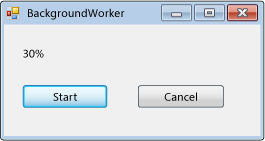
要嘗試這段程式碼,請建立一個 Windows 表單應用程式。 新增一個 Label 名為 resultLabel 的控制項,並新增兩個 Button 名為 startAsyncButton 和 cancelAsyncButton的控制項。 為兩個按鈕建立 Click 事件處理程序。 從工具箱的 元件 分頁中,新增 BackgroundWorker 一個名為 backgroundWorker1. 建立 DoWork、 ProgressChanged,以及RunWorkerCompleted事件處理程序。BackgroundWorker 在表格的程式碼中,將現有程式碼替換為以下程式碼。
using System;
using System.ComponentModel;
using System.Windows.Forms;

namespace BackgroundWorkerSimple;

public partial class Form1 : Form
{
    public Form1()
    {
        InitializeComponent();
        backgroundWorker1.WorkerReportsProgress = true;
        backgroundWorker1.WorkerSupportsCancellation = true;
    }

    void startAsyncButton_Click(object sender, EventArgs e)
    {
        if (!backgroundWorker1.IsBusy)
        {
            // Start the asynchronous operation.
            backgroundWorker1.RunWorkerAsync();
        }
    }

    void cancelAsyncButton_Click(object sender, EventArgs e)
    {
        if (backgroundWorker1.WorkerSupportsCancellation)
        {
            // Cancel the asynchronous operation.
            backgroundWorker1.CancelAsync();
        }
    }

    // This event handler is where the time-consuming work is done.
    void backgroundWorker1_DoWork(object sender, DoWorkEventArgs e)
    {
        BackgroundWorker worker = sender as BackgroundWorker;

        for (int i = 1; i <= 10; i++)
        {
            if (worker.CancellationPending)
            {
                e.Cancel = true;
                break;
            }
            else
            {
                // Perform a time consuming operation and report progress.
                System.Threading.Thread.Sleep(500);
                worker.ReportProgress(i * 10);
            }
        }
    }

    // This event handler updates the progress.
    void backgroundWorker1_ProgressChanged(object sender, ProgressChangedEventArgs e) =>
        resultLabel.Text = e.ProgressPercentage.ToString() + "%";

    // This event handler deals with the results of the background operation.
    void backgroundWorker1_RunWorkerCompleted(object sender, RunWorkerCompletedEventArgs e) =>
        resultLabel.Text = e.Cancelled ?
        "Canceled!"
        : e.Error != null ? "Error: " + e.Error.Message : "Done!";
}
Imports System.ComponentModel

Public Class Form1

    Public Sub New()
        InitializeComponent()
        backgroundWorker1.WorkerReportsProgress = True
        backgroundWorker1.WorkerSupportsCancellation = True
    End Sub

    Private Sub startAsyncButton_Click(ByVal sender As System.Object, _
    ByVal e As System.EventArgs) Handles startAsyncButton.Click
        If Not backgroundWorker1.IsBusy Then
            ' Start the asynchronous operation.
            backgroundWorker1.RunWorkerAsync()
        End If
    End Sub

    Private Sub cancelAsyncButton_Click(ByVal sender As System.Object, _
    ByVal e As System.EventArgs) Handles cancelAsyncButton.Click
        If backgroundWorker1.WorkerSupportsCancellation Then
            ' Cancel the asynchronous operation.
            backgroundWorker1.CancelAsync()
        End If
    End Sub

    ' This event handler is where the time-consuming work is done.
    Private Sub backgroundWorker1_DoWork(ByVal sender As System.Object, _
    ByVal e As DoWorkEventArgs) Handles backgroundWorker1.DoWork
        Dim worker As BackgroundWorker = CType(sender, BackgroundWorker)
        Dim i As Integer

        For i = 1 To 10
            If (worker.CancellationPending) Then
                e.Cancel = True
                Exit For
            Else
                ' Perform a time consuming operation and report progress.
                System.Threading.Thread.Sleep(500)
                worker.ReportProgress(i * 10)
            End If
        Next
    End Sub

    ' This event handler updates the progress.
    Private Sub backgroundWorker1_ProgressChanged(ByVal sender As System.Object, _
    ByVal e As ProgressChangedEventArgs) Handles backgroundWorker1.ProgressChanged
        resultLabel.Text = (e.ProgressPercentage.ToString() + "%")
    End Sub

    ' This event handler deals with the results of the background operation.
    Private Sub backgroundWorker1_RunWorkerCompleted(ByVal sender As System.Object, _
    ByVal e As RunWorkerCompletedEventArgs) Handles backgroundWorker1.RunWorkerCompleted
        If e.Cancelled Then
            resultLabel.Text = "Canceled!"
        ElseIf e.Error IsNot Nothing Then
            resultLabel.Text = "Error: " & e.Error.Message
        Else
            resultLabel.Text = "Done!"
        End If
    End Sub
End Class
以下程式碼範例展示了該 BackgroundWorker 類別用於非同步執行耗時操作的方法。 以下示意圖展示了輸出的範例。
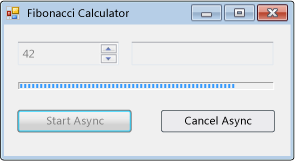
操作會計算所選的斐波那契數,隨著計算進行報告進度更新,並允許取消待處理的計算。
#using <System.Drawing.dll>
#using <System.dll>
#using <System.Windows.Forms.dll>

using namespace System;
using namespace System::Collections;
using namespace System::ComponentModel;
using namespace System::Drawing;
using namespace System::Threading;
using namespace System::Windows::Forms;

public ref class FibonacciForm: public System::Windows::Forms::Form
{
private:

   int numberToCompute;
   int highestPercentageReached;

   System::Windows::Forms::NumericUpDown^ numericUpDown1;
   System::Windows::Forms::Button^ startAsyncButton;
   System::Windows::Forms::Button^ cancelAsyncButton;
   System::Windows::Forms::ProgressBar^ progressBar1;
   System::Windows::Forms::Label ^ resultLabel;
   System::ComponentModel::BackgroundWorker^ backgroundWorker1;

public:
   FibonacciForm()
   {
      InitializeComponent();
      numberToCompute = highestPercentageReached = 0;
      InitializeBackgoundWorker();
   }


private:

   // Set up the BackgroundWorker object by
   // attaching event handlers.
   void InitializeBackgoundWorker()
   {
      backgroundWorker1->DoWork += gcnew DoWorkEventHandler( this, &FibonacciForm::backgroundWorker1_DoWork );
      backgroundWorker1->RunWorkerCompleted += gcnew RunWorkerCompletedEventHandler( this, &FibonacciForm::backgroundWorker1_RunWorkerCompleted );
      backgroundWorker1->ProgressChanged += gcnew ProgressChangedEventHandler( this, &FibonacciForm::backgroundWorker1_ProgressChanged );
   }

   void startAsyncButton_Click( System::Object^ /*sender*/, System::EventArgs^ /*e*/ )
   {

      // Reset the text in the result label.
      resultLabel->Text = String::Empty;

      // Disable the UpDown control until
      // the asynchronous operation is done.
      this->numericUpDown1->Enabled = false;

      // Disable the Start button until
      // the asynchronous operation is done.
      this->startAsyncButton->Enabled = false;

      // Enable the Cancel button while
      // the asynchronous operation runs.
      this->cancelAsyncButton->Enabled = true;

      // Get the value from the UpDown control.
      numberToCompute = (int)numericUpDown1->Value;

      // Reset the variable for percentage tracking.
      highestPercentageReached = 0;

      // Start the asynchronous operation.
      backgroundWorker1->RunWorkerAsync( numberToCompute );
   }

   void cancelAsyncButton_Click( System::Object^ /*sender*/, System::EventArgs^ /*e*/ )
   {
      // Cancel the asynchronous operation.
      this->backgroundWorker1->CancelAsync();

      // Disable the Cancel button.
      cancelAsyncButton->Enabled = false;
   }

   // This event handler is where the actual,
   // potentially time-consuming work is done.
   void backgroundWorker1_DoWork( Object^ sender, DoWorkEventArgs^ e )
   {
      // Get the BackgroundWorker that raised this event.
      BackgroundWorker^ worker = dynamic_cast<BackgroundWorker^>(sender);

      // Assign the result of the computation
      // to the Result property of the DoWorkEventArgs
      // object. This is will be available to the
      // RunWorkerCompleted eventhandler.
      e->Result = ComputeFibonacci( safe_cast<Int32>(e->Argument), worker, e );
   }

   // This event handler deals with the results of the
   // background operation.
   void backgroundWorker1_RunWorkerCompleted( Object^ /*sender*/, RunWorkerCompletedEventArgs^ e )
   {
      // First, handle the case where an exception was thrown.
      if ( e->Error != nullptr )
      {
         MessageBox::Show( e->Error->Message );
      }
      else
      if ( e->Cancelled )
      {
         // Next, handle the case where the user cancelled
         // the operation.
         // Note that due to a race condition in
         // the DoWork event handler, the Cancelled
         // flag may not have been set, even though
         // CancelAsync was called.
         resultLabel->Text = "Cancelled";
      }
      else
      {
         // Finally, handle the case where the operation
         // succeeded.
         resultLabel->Text = e->Result->ToString();
      }

      // Enable the UpDown control.
      this->numericUpDown1->Enabled = true;

      // Enable the Start button.
      startAsyncButton->Enabled = true;

      // Disable the Cancel button.
      cancelAsyncButton->Enabled = false;
   }

   // This event handler updates the progress bar.
   void backgroundWorker1_ProgressChanged( Object^ /*sender*/, ProgressChangedEventArgs^ e )
   {
      this->progressBar1->Value = e->ProgressPercentage;
   }

   // This is the method that does the actual work. For this
   // example, it computes a Fibonacci number and
   // reports progress as it does its work.
   long ComputeFibonacci( int n, BackgroundWorker^ worker, DoWorkEventArgs ^ e )
   {
      // The parameter n must be >= 0 and <= 91.
      // Fib(n), with n > 91, overflows a long.
      if ( (n < 0) || (n > 91) )
      {
         throw gcnew ArgumentException( "value must be >= 0 and <= 91","n" );
      }

      long result = 0;

      // Abort the operation if the user has cancelled.
      // Note that a call to CancelAsync may have set
      // CancellationPending to true just after the
      // last invocation of this method exits, so this
      // code will not have the opportunity to set the
      // DoWorkEventArgs.Cancel flag to true. This means
      // that RunWorkerCompletedEventArgs.Cancelled will
      // not be set to true in your RunWorkerCompleted
      // event handler. This is a race condition.
      if ( worker->CancellationPending )
      {
         e->Cancel = true;
      }
      else
      {
         if ( n < 2 )
         {
            result = 1;
         }
         else
         {
            result = ComputeFibonacci( n - 1, worker, e ) + ComputeFibonacci( n - 2, worker, e );
         }

         // Report progress as a percentage of the total task.
         int percentComplete = (int)((float)n / (float)numberToCompute * 100);
         if ( percentComplete > highestPercentageReached )
         {
            highestPercentageReached = percentComplete;
            worker->ReportProgress( percentComplete );
         }
      }

      return result;
   }

   void InitializeComponent()
   {
      this->numericUpDown1 = gcnew System::Windows::Forms::NumericUpDown;
      this->startAsyncButton = gcnew System::Windows::Forms::Button;
      this->cancelAsyncButton = gcnew System::Windows::Forms::Button;
      this->resultLabel = gcnew System::Windows::Forms::Label;
      this->progressBar1 = gcnew System::Windows::Forms::ProgressBar;
      this->backgroundWorker1 = gcnew System::ComponentModel::BackgroundWorker;
      (dynamic_cast<System::ComponentModel::ISupportInitialize^>(this->numericUpDown1))->BeginInit();
      this->SuspendLayout();

      //
      // numericUpDown1
      //
      this->numericUpDown1->Location = System::Drawing::Point( 16, 16 );
      array<Int32>^temp0 = {91,0,0,0};
      this->numericUpDown1->Maximum = System::Decimal( temp0 );
      array<Int32>^temp1 = {1,0,0,0};
      this->numericUpDown1->Minimum = System::Decimal( temp1 );
      this->numericUpDown1->Name = "numericUpDown1";
      this->numericUpDown1->Size = System::Drawing::Size( 80, 20 );
      this->numericUpDown1->TabIndex = 0;
      array<Int32>^temp2 = {1,0,0,0};
      this->numericUpDown1->Value = System::Decimal( temp2 );

      //
      // startAsyncButton
      //
      this->startAsyncButton->Location = System::Drawing::Point( 16, 72 );
      this->startAsyncButton->Name = "startAsyncButton";
      this->startAsyncButton->Size = System::Drawing::Size( 120, 23 );
      this->startAsyncButton->TabIndex = 1;
      this->startAsyncButton->Text = "Start Async";
      this->startAsyncButton->Click += gcnew System::EventHandler( this, &FibonacciForm::startAsyncButton_Click );

      //
      // cancelAsyncButton
      //
      this->cancelAsyncButton->Enabled = false;
      this->cancelAsyncButton->Location = System::Drawing::Point( 153, 72 );
      this->cancelAsyncButton->Name = "cancelAsyncButton";
      this->cancelAsyncButton->Size = System::Drawing::Size( 119, 23 );
      this->cancelAsyncButton->TabIndex = 2;
      this->cancelAsyncButton->Text = "Cancel Async";
      this->cancelAsyncButton->Click += gcnew System::EventHandler( this, &FibonacciForm::cancelAsyncButton_Click );

      //
      // resultLabel
      //
      this->resultLabel->BorderStyle = System::Windows::Forms::BorderStyle::Fixed3D;
      this->resultLabel->Location = System::Drawing::Point( 112, 16 );
      this->resultLabel->Name = "resultLabel";
      this->resultLabel->Size = System::Drawing::Size( 160, 23 );
      this->resultLabel->TabIndex = 3;
      this->resultLabel->Text = "(no result)";
      this->resultLabel->TextAlign = System::Drawing::ContentAlignment::MiddleCenter;

      //
      // progressBar1
      //
      this->progressBar1->Location = System::Drawing::Point( 18, 48 );
      this->progressBar1->Name = "progressBar1";
      this->progressBar1->Size = System::Drawing::Size( 256, 8 );
      this->progressBar1->Step = 2;
      this->progressBar1->TabIndex = 4;

      //
      // backgroundWorker1
      //
      this->backgroundWorker1->WorkerReportsProgress = true;
      this->backgroundWorker1->WorkerSupportsCancellation = true;

      //
      // FibonacciForm
      //
      this->ClientSize = System::Drawing::Size( 292, 118 );
      this->Controls->Add( this->progressBar1 );
      this->Controls->Add( this->resultLabel );
      this->Controls->Add( this->cancelAsyncButton );
      this->Controls->Add( this->startAsyncButton );
      this->Controls->Add( this->numericUpDown1 );
      this->Name = "FibonacciForm";
      this->Text = "Fibonacci Calculator";
      (dynamic_cast<System::ComponentModel::ISupportInitialize^>(this->numericUpDown1))->EndInit();
      this->ResumeLayout( false );
   }
};

[STAThread]
int main()
{
   Application::Run( gcnew FibonacciForm );
}
using System;
using System.ComponentModel;
using System.Drawing;
using System.Windows.Forms;

namespace BackgroundWorkerExample;

public class FibonacciForm : Form
{
    int numberToCompute;
    int highestPercentageReached;

    NumericUpDown numericUpDown1;
    Button startAsyncButton;
    Button cancelAsyncButton;
    ProgressBar progressBar1;
    Label resultLabel;
    BackgroundWorker backgroundWorker1;

    public FibonacciForm()
    {
        InitializeComponent();

        InitializeBackgroundWorker();
    }

    // Set up the BackgroundWorker object by
    // attaching event handlers.
    void InitializeBackgroundWorker()
    {
        backgroundWorker1.DoWork +=
             backgroundWorker1_DoWork;
        backgroundWorker1.RunWorkerCompleted +=

        backgroundWorker1_RunWorkerCompleted;
        backgroundWorker1.ProgressChanged +=

        backgroundWorker1_ProgressChanged;
    }

    void startAsyncButton_Click(object sender,
        EventArgs e)
    {
        // Reset the text in the result label.
        resultLabel.Text = string.Empty;

        // Disable the UpDown control until
        // the asynchronous operation is done.
        numericUpDown1.Enabled = false;

        // Disable the Start button until
        // the asynchronous operation is done.
        startAsyncButton.Enabled = false;

        // Enable the Cancel button while
        // the asynchronous operation runs.
        cancelAsyncButton.Enabled = true;

        // Get the value from the UpDown control.
        numberToCompute = (int)numericUpDown1.Value;

        // Reset the variable for percentage tracking.
        highestPercentageReached = 0;

        // Start the asynchronous operation.
        backgroundWorker1.RunWorkerAsync(numberToCompute);
    }

    void cancelAsyncButton_Click(object sender,
        EventArgs e)
    {
        // Cancel the asynchronous operation.
        backgroundWorker1.CancelAsync();

        // Disable the Cancel button.
        cancelAsyncButton.Enabled = false;
    }

    // This event handler is where the actual,
    // potentially time-consuming work is done.
    void backgroundWorker1_DoWork(object sender,
        DoWorkEventArgs e)
    {
        // Get the BackgroundWorker that raised this event.
        BackgroundWorker worker = sender as BackgroundWorker;

        // Assign the result of the computation
        // to the Result property of the DoWorkEventArgs
        // object. This is will be available to the
        // RunWorkerCompleted eventhandler.
        e.Result = ComputeFibonacci((int)e.Argument, worker, e);
    }

    // This event handler deals with the results of the
    // background operation.
    void backgroundWorker1_RunWorkerCompleted(
        object sender, RunWorkerCompletedEventArgs e)
    {
        // First, handle the case where an exception was thrown.
        if (e.Error != null)
        {
            _ = MessageBox.Show(e.Error.Message);
        }
        else if (e.Cancelled)
        {
            // Next, handle the case where the user canceled
            // the operation.
            // Note that due to a race condition in
            // the DoWork event handler, the Cancelled
            // flag may not have been set, even though
            // CancelAsync was called.
            resultLabel.Text = "Canceled";
        }
        else
        {
            // Finally, handle the case where the operation
            // succeeded.
            resultLabel.Text = e.Result.ToString();
        }

        // Enable the UpDown control.
        numericUpDown1.Enabled = true;

        // Enable the Start button.
        startAsyncButton.Enabled = true;

        // Disable the Cancel button.
        cancelAsyncButton.Enabled = false;
    }

    // This event handler updates the progress bar.
    void backgroundWorker1_ProgressChanged(object sender,
        ProgressChangedEventArgs e) => progressBar1.Value = e.ProgressPercentage;

    // This is the method that does the actual work. For this
    // example, it computes a Fibonacci number and
    // reports progress as it does its work.
    long ComputeFibonacci(int n, BackgroundWorker worker, DoWorkEventArgs e)
    {
        // The parameter n must be >= 0 and <= 91.
        // Fib(n), with n > 91, overflows a long.
        if (n is < 0 or > 91)
        {
            throw new ArgumentException(
                "value must be >= 0 and <= 91", nameof(n));
        }

        long result = 0;

        // Abort the operation if the user has canceled.
        // Note that a call to CancelAsync may have set
        // CancellationPending to true just after the
        // last invocation of this method exits, so this
        // code will not have the opportunity to set the
        // DoWorkEventArgs.Cancel flag to true. This means
        // that RunWorkerCompletedEventArgs.Cancelled will
        // not be set to true in your RunWorkerCompleted
        // event handler. This is a race condition.

        if (worker.CancellationPending)
        {
            e.Cancel = true;
        }
        else
        {
            result = n < 2
                ? 1
                : ComputeFibonacci(n - 1, worker, e) +
                         ComputeFibonacci(n - 2, worker, e);

            // Report progress as a percentage of the total task.
            int percentComplete =
                (int)(n / (float)numberToCompute * 100);
            if (percentComplete > highestPercentageReached)
            {
                highestPercentageReached = percentComplete;
                worker.ReportProgress(percentComplete);
            }
        }

        return result;
    }

    #region Windows Form Designer generated code

    void InitializeComponent()
    {
        numericUpDown1 = new NumericUpDown();
        startAsyncButton = new Button();
        cancelAsyncButton = new Button();
        resultLabel = new Label();
        progressBar1 = new ProgressBar();
        backgroundWorker1 = new BackgroundWorker();
        ((ISupportInitialize)numericUpDown1).BeginInit();
        SuspendLayout();
        //
        // numericUpDown1
        //
        numericUpDown1.Location = new Point(16, 16);
        numericUpDown1.Maximum = new decimal(new int[] {
            91,
            0,
            0,
            0});
        numericUpDown1.Minimum = new decimal(new int[] {
            1,
            0,
            0,
            0});
        numericUpDown1.Name = "numericUpDown1";
        numericUpDown1.Size = new Size(80, 20);
        numericUpDown1.TabIndex = 0;
        numericUpDown1.Value = new decimal(new int[] {
            1,
            0,
            0,
            0});
        //
        // startAsyncButton
        //
        startAsyncButton.Location = new Point(16, 72);
        startAsyncButton.Name = "startAsyncButton";
        startAsyncButton.Size = new Size(120, 23);
        startAsyncButton.TabIndex = 1;
        startAsyncButton.Text = "Start Async";
        startAsyncButton.Click += startAsyncButton_Click;
        //
        // cancelAsyncButton
        //
        cancelAsyncButton.Enabled = false;
        cancelAsyncButton.Location = new Point(153, 72);
        cancelAsyncButton.Name = "cancelAsyncButton";
        cancelAsyncButton.Size = new Size(119, 23);
        cancelAsyncButton.TabIndex = 2;
        cancelAsyncButton.Text = "Cancel Async";
        cancelAsyncButton.Click += cancelAsyncButton_Click;
        //
        // resultLabel
        //
        resultLabel.BorderStyle = BorderStyle.Fixed3D;
        resultLabel.Location = new Point(112, 16);
        resultLabel.Name = "resultLabel";
        resultLabel.Size = new Size(160, 23);
        resultLabel.TabIndex = 3;
        resultLabel.Text = "(no result)";
        resultLabel.TextAlign = ContentAlignment.MiddleCenter;
        //
        // progressBar1
        //
        progressBar1.Location = new Point(18, 48);
        progressBar1.Name = "progressBar1";
        progressBar1.Size = new Size(256, 8);
        progressBar1.Step = 2;
        progressBar1.TabIndex = 4;
        //
        // backgroundWorker1
        //
        backgroundWorker1.WorkerReportsProgress = true;
        backgroundWorker1.WorkerSupportsCancellation = true;
        //
        // FibonacciForm
        //
        ClientSize = new Size(1794, 927);
        Controls.Add(progressBar1);
        Controls.Add(resultLabel);
        Controls.Add(cancelAsyncButton);
        Controls.Add(startAsyncButton);
        Controls.Add(numericUpDown1);
        Name = "FibonacciForm";
        Text = "Fibonacci Calculator";
        ((ISupportInitialize)numericUpDown1).EndInit();
        ResumeLayout(false);
    }
    #endregion

    [STAThread]
    static void Main() => Application.Run(new FibonacciForm());
}
Imports System.ComponentModel
Imports System.Windows.Forms

Public Class FibonacciForm
    Inherits Form

    Private numberToCompute As Integer = 0
    Private highestPercentageReached As Integer = 0

    Private numericUpDown1 As NumericUpDown
    Private WithEvents startAsyncButton As Button
    Private WithEvents cancelAsyncButton As Button
    Private progressBar1 As ProgressBar
    Private resultLabel As Label
    Private WithEvents backgroundWorker1 As System.ComponentModel.BackgroundWorker


    Public Sub New()
        InitializeComponent()
    End Sub

    Private Sub startAsyncButton_Click(ByVal sender As System.Object,
    ByVal e As System.EventArgs) _
    Handles startAsyncButton.Click

        ' Reset the text in the result label.
        resultLabel.Text = [String].Empty

        ' Disable the UpDown control until
        ' the asynchronous operation is done.
        numericUpDown1.Enabled = False

        ' Disable the Start button until
        ' the asynchronous operation is done.
        startAsyncButton.Enabled = False

        ' Enable the Cancel button while
        ' the asynchronous operation runs.
        cancelAsyncButton.Enabled = True

        ' Get the value from the UpDown control.
        numberToCompute = CInt(numericUpDown1.Value)

        ' Reset the variable for percentage tracking.
        highestPercentageReached = 0


        ' Start the asynchronous operation.
        backgroundWorker1.RunWorkerAsync(numberToCompute)
    End Sub

    Private Sub cancelAsyncButton_Click(
    ByVal sender As System.Object,
    ByVal e As System.EventArgs) _
    Handles cancelAsyncButton.Click

        ' Cancel the asynchronous operation.
        backgroundWorker1.CancelAsync()

        ' Disable the Cancel button.
        cancelAsyncButton.Enabled = False

    End Sub

    ' This event handler is where the actual work is done.
    Private Sub backgroundWorker1_DoWork(
    ByVal sender As Object,
    ByVal e As DoWorkEventArgs) _
    Handles backgroundWorker1.DoWork

        ' Get the BackgroundWorker object that raised this event.
        Dim worker As BackgroundWorker =
            CType(sender, BackgroundWorker)

        ' Assign the result of the computation
        ' to the Result property of the DoWorkEventArgs
        ' object. This is will be available to the
        ' RunWorkerCompleted eventhandler.
        e.Result = ComputeFibonacci(e.Argument, worker, e)
    End Sub

    ' This event handler deals with the results of the
    ' background operation.
    Private Sub backgroundWorker1_RunWorkerCompleted(
    ByVal sender As Object, ByVal e As RunWorkerCompletedEventArgs) _
    Handles backgroundWorker1.RunWorkerCompleted

        ' First, handle the case where an exception was thrown.
        If (e.Error IsNot Nothing) Then
            MessageBox.Show(e.Error.Message)
        ElseIf e.Cancelled Then
            ' Next, handle the case where the user canceled the
            ' operation.
            ' Note that due to a race condition in
            ' the DoWork event handler, the Cancelled
            ' flag may not have been set, even though
            ' CancelAsync was called.
            resultLabel.Text = "Canceled"
        Else
            ' Finally, handle the case where the operation succeeded.
            resultLabel.Text = e.Result.ToString()
        End If

        ' Enable the UpDown control.
        numericUpDown1.Enabled = True

        ' Enable the Start button.
        startAsyncButton.Enabled = True

        ' Disable the Cancel button.
        cancelAsyncButton.Enabled = False
    End Sub

    ' This event handler updates the progress bar.
    Private Sub backgroundWorker1_ProgressChanged(
    ByVal sender As Object, ByVal e As ProgressChangedEventArgs) _
    Handles backgroundWorker1.ProgressChanged

        progressBar1.Value = e.ProgressPercentage

    End Sub

    ' This is the method that does the actual work. For this
    ' example, it computes a Fibonacci number and
    ' reports progress as it does its work.
    Function ComputeFibonacci(
        ByVal n As Integer,
        ByVal worker As BackgroundWorker,
        ByVal e As DoWorkEventArgs) As Long

        ' The parameter n must be >= 0 and <= 91.
        ' Fib(n), with n > 91, overflows a long.
        If n < 0 OrElse n > 91 Then
            Throw New ArgumentException(
                "value must be >= 0 and <= 91", "n")
        End If

        Dim result As Long = 0

        ' Abort the operation if the user has canceled.
        ' Note that a call to CancelAsync may have set
        ' CancellationPending to true just after the
        ' last invocation of this method exits, so this
        ' code will not have the opportunity to set the
        ' DoWorkEventArgs.Cancel flag to true. This means
        ' that RunWorkerCompletedEventArgs.Cancelled will
        ' not be set to true in your RunWorkerCompleted
        ' event handler. This is a race condition.
        If worker.CancellationPending Then
            e.Cancel = True
        Else
            If n < 2 Then
                result = 1
            Else
                result = ComputeFibonacci(n - 1, worker, e) +
                         ComputeFibonacci(n - 2, worker, e)
            End If

            ' Report progress as a percentage of the total task.
            Dim percentComplete As Integer =
                CSng(n) / CSng(numberToCompute) * 100
            If percentComplete > highestPercentageReached Then
                highestPercentageReached = percentComplete
                worker.ReportProgress(percentComplete)
            End If

        End If

        Return result

    End Function


    Private Sub InitializeComponent()
        numericUpDown1 = New NumericUpDown
        startAsyncButton = New Button
        cancelAsyncButton = New Button
        resultLabel = New Label
        progressBar1 = New ProgressBar
        backgroundWorker1 = New System.ComponentModel.BackgroundWorker
        CType(numericUpDown1, System.ComponentModel.ISupportInitialize).BeginInit()
        SuspendLayout()
        '
        'numericUpDown1
        '
        numericUpDown1.Location = New System.Drawing.Point(16, 16)
        numericUpDown1.Maximum = New Decimal(New Integer() {91, 0, 0, 0})
        numericUpDown1.Minimum = New Decimal(New Integer() {1, 0, 0, 0})
        numericUpDown1.Name = "numericUpDown1"
        numericUpDown1.Size = New System.Drawing.Size(80, 20)
        numericUpDown1.TabIndex = 0
        numericUpDown1.Value = New Decimal(New Integer() {1, 0, 0, 0})
        '
        'startAsyncButton
        '
        startAsyncButton.Location = New System.Drawing.Point(16, 72)
        startAsyncButton.Name = "startAsyncButton"
        startAsyncButton.Size = New System.Drawing.Size(120, 23)
        startAsyncButton.TabIndex = 1
        startAsyncButton.Text = "Start Async"
        '
        'cancelAsyncButton
        '
        cancelAsyncButton.Enabled = False
        cancelAsyncButton.Location = New System.Drawing.Point(153, 72)
        cancelAsyncButton.Name = "cancelAsyncButton"
        cancelAsyncButton.Size = New System.Drawing.Size(119, 23)
        cancelAsyncButton.TabIndex = 2
        cancelAsyncButton.Text = "Cancel Async"
        '
        'resultLabel
        '
        resultLabel.BorderStyle = BorderStyle.Fixed3D
        resultLabel.Location = New System.Drawing.Point(112, 16)
        resultLabel.Name = "resultLabel"
        resultLabel.Size = New System.Drawing.Size(160, 23)
        resultLabel.TabIndex = 3
        resultLabel.Text = "(no result)"
        resultLabel.TextAlign = System.Drawing.ContentAlignment.MiddleCenter
        '
        'progressBar1
        '
        progressBar1.Location = New System.Drawing.Point(18, 48)
        progressBar1.Name = "progressBar1"
        progressBar1.Size = New System.Drawing.Size(256, 8)
        progressBar1.TabIndex = 4
        '
        'backgroundWorker1
        '
        backgroundWorker1.WorkerReportsProgress = True
        backgroundWorker1.WorkerSupportsCancellation = True
        '
        'FibonacciForm
        '
        ClientSize = New System.Drawing.Size(292, 118)
        Controls.Add(progressBar1)
        Controls.Add(resultLabel)
        Controls.Add(cancelAsyncButton)
        Controls.Add(startAsyncButton)
        Controls.Add(numericUpDown1)
        Name = "FibonacciForm"
        Text = "Fibonacci Calculator"
        CType(numericUpDown1, System.ComponentModel.ISupportInitialize).EndInit()
        ResumeLayout(False)

    End Sub

    <STAThread()> _
    Shared Sub Main()
        Application.Run(New FibonacciForm)
    End Sub
End Class
備註
這個 BackgroundWorker 類別允許你在獨立的專用執行緒上執行操作。 像下載和資料庫交易這類耗時操作,可能會讓你的使用者介面(UI)在執行時看起來像是停止了回應。 當你想要一個響應式的使用者介面,但遇到長時間延遲時,這 BackgroundWorker 門課提供了方便的解決方案。
若要在背景執行耗時的操作,請建立一個 BackgroundWorker 並監聽能回報作業進度並表示作業結束的事件。 你可以用程式化建立,BackgroundWorker也可以從工具箱的元件標籤拖到表單上。 如果你在 Windows 表單設計器中建立 , BackgroundWorker 它會出現在元件托盤,屬性也會顯示在屬性視窗中。
要設定背景操作,請為該事件新增一個事件 DoWork 處理器。 在這個事件處理程序中呼叫你耗時的操作。 要開始操作,請呼叫 RunWorkerAsync。 要接收進度更新通知,請處理事件。ProgressChanged 若要在操作完成時收到通知,請處理該 RunWorkerCompleted 事件。
Note
你必須小心,不要在事件 DoWork 處理程序中操作任何使用者介面物件。 相反地,應該透過 ProgressChanged and RunWorkerCompleted 事件與使用者介面溝通。
BackgroundWorker 事件不會跨越 AppDomain 界限進行。 不要用一個 BackgroundWorker 元件在多個 AppDomain中執行多執行緒操作。
如果你的背景操作需要參數,請用你的參數呼叫 RunWorkerAsync 。 在事件處理程序 DoWork 中,你可以從 DoWorkEventArgs.Argument 屬性中擷取參數。
如需有關 BackgroundWorker 的更多資訊,請參閱 如何在背景中執行作業。
建構函式
| 名稱 | Description |
|---|---|
| BackgroundWorker() |
初始化 BackgroundWorker 類別的新執行個體。 |
屬性
| 名稱 | Description |
|---|---|
| CancellationPending |
會取得一個值,表示應用程式是否已請求取消背景操作。 |
| CanRaiseEvents |
取得值,指出元件是否可以引發事件。 (繼承來源 Component) |
| Container |
取得包含 IContainer的 Component。 (繼承來源 Component) |
| DesignMode |
取得值,這個值表示 Component 目前是否處於設計模式。 (繼承來源 Component) |
| Events |
取得附加至這個 Component之事件處理程序的清單。 (繼承來源 Component) |
| IsBusy |
會得到一個值,表示是否 BackgroundWorker 正在執行非同步操作。 |
| Site | (繼承來源 Component) |
| WorkerReportsProgress |
會取得或設定一個值,表示是否 BackgroundWorker 能回報進度更新。 |
| WorkerSupportsCancellation |
取得或設定一個值,表示是否 BackgroundWorker 支援非同步消去。 |
方法
事件
| 名稱 | Description |
|---|---|
| Disposed |
當呼叫 Dispose() 方法時,就會發生元件。 (繼承來源 Component) |
| DoWork |
當 RunWorkerAsync() 被叫到時發生。 |
| ProgressChanged |
當 ReportProgress(Int32) 被叫到時發生。 |
| RunWorkerCompleted |
當背景操作已完成、已被取消或提出例外時,會發生這種情況。 |
適用於
另請參閱
- 如何在背景執行操作:
- 管理執行緒最佳做法
- 在背景中下載檔案
