Note
本文說明由標準執行架構驅動的 Agent 或 Agent 流程中所使用的功能。
代理畫布控制代理在使用者眼中的呈現方式。 你可以用兩種方式自訂畫布:
在你的網站上使用 JavaScript 和 CSS 自訂預設畫布。 使用這個選項進行簡單的更改。
使用基於Bot Framework 網路聊天畫布 的自訂畫布。 此選項需具備開發經驗,並支援完全自訂。
你也可以將自訂畫布與設定 自動對話開始結合。
你可以 在入口網站更改代理名稱和圖示。
當你發佈代理程式後,使用者可以透過 網路聊天 canvas 與它互動。
Important
您可以安裝和使用本文中包含的範例程序代碼,僅適用於 Copilot Studio。 範例程式碼是依「現況」授權,不包含在任何服務等級協定或支援服務中。 您必須承擔使用本文件的風險。
Microsoft 不提供任何明示擔保、保證或條件,並排除所有默示擔保,包括適售性、適合特定用途,以及未侵權。
變更 Agent 名稱和圖示
Important
- 更新代理程式的圖示之後,新圖示最多可能需要 24 小時才會出現在任何地方。
- 如果您的客服人員連接到 Omnichannel for Customer Service,Azure入口註冊中的 Display name 屬性會定義其名稱。
- 如果你的代理程式是要發佈到 Teams,請先在Microsoft Teams開發者文件中檢視 圖示需求。
前往您的代理程式的概觀頁面。
選擇「 編輯 」在 「詳情」旁邊。
視需要變更代理程式的名稱和圖示。
選取 [儲存]。
自訂預設畫布 (簡易)
請使用 JavaScript 和 CSS 來調整預設畫布。
首先,設定你部署代理畫布的位置。
將範例 HTML 程式碼複製到一個名為
index.html. 的檔案中。 你也可以使用 HTML 試用編輯器。<!DOCTYPE html> <html lang="en"> <head> <meta charset="UTF-8" /> <meta name="viewport" content="width=device-width, initial-scale=1.0" /> <meta name="description" content="Contoso Web Chat Assistant" /> <title>Contoso Sample Web Chat Test</title> <script src="https://cdn.botframework.com/botframework-webchat/latest/webchat.js"></script> <script> let webChatInstance = null; let directLineUrl = null; // Replace with your token endpoint const tokenEndpoint = "<YOUR TOKEN ENDPOINT>"; const styleOptions = { "accent": "#0078D4", "autoScrollSnapOnPage": true, "autoScrollSnapOnPageOffset": 0, "avatarBorderRadius": "7%", "avatarSize": 31, "backgroundColor": "#e8e9eb", "botAvatarBackgroundColor": "#ffffff00", "botAvatarImage": "https://powercatexternal.blob.core.windows.net/creatorkit/Assets/ChatbotLogoBlue.png", "botAvatarInitials": "B", "bubbleAttachmentMaxWidth": 480, "bubbleAttachmentMinWidth": 250, "bubbleBackground": "#f0eded", "bubbleBorderColor": "#f5f5f5", "bubbleBorderRadius": 41, "bubbleBorderStyle": "solid", "bubbleBorderWidth": 1, "bubbleFromUserBackground": "#ebefff", "bubbleFromUserBorderColor": "#f5f5f5", "bubbleFromUserBorderRadius": 41, "bubbleFromUserBorderStyle": "solid", "bubbleFromUserBorderWidth": 1, "bubbleFromUserNubOffset": 0, "bubbleFromUserNubSize": 0, "bubbleFromUserTextColor": "#242424", "bubbleImageHeight": 10, "bubbleImageMaxHeight": 240, "bubbleImageMinHeight": 240, "bubbleMessageMaxWidth": 480, "bubbleMessageMinWidth": 120, "bubbleMinHeight": 50, "bubbleNubOffset": 0, "bubbleTextColor": "#242424", "emojiSet": true, "fontSizeSmall": "70%", "hideUploadButton": false, "messageActivityWordBreak": "break-word", "monospaceFont": "Consolas", "paddingRegular": 10, "paddingWide": 10, "primaryFont": null, "sendBoxBackground": "#e8e9eb", "sendBoxBorderTop": "solid 1px #808080", "sendBoxButtonColor": "#0078d4", "sendBoxButtonColorOnHover": "#006cbe", "sendBoxButtonShadeBorderRadius": 40, "sendBoxButtonShadeColorOnHover": "", "sendBoxHeight": 60, "sendBoxPlaceholderColor": "#171616", "sendBoxTextColor": "#2e2d2d", "showAvatarInGroup": "status", "spinnerAnimationHeight": 16, "spinnerAnimationPadding": 12, "spinnerAnimationWidth": 16, "subtleColor": "#000000FF", "suggestedActionBackgroundColor": "#006FC4FF", "suggestedActionBackgroundColorOnHover": "#0078D4", "suggestedActionBorderColor": "", "suggestedActionBorderRadius": 10, "suggestedActionBorderWidth": 1, "suggestedActionLayout": "flow", "suggestedActionTextColor": "#FFFFFFFF", "typingAnimationBackgroundImage": "url('https://wpamelia.com/wp-content/uploads/2018/11/ezgif-2-6d0b072c3d3f.gif')", "typingAnimationDuration": 5000, "typingAnimationHeight": 20, "typingAnimationWidth": 64, "userAvatarBackgroundColor": "#222222", "userAvatarImage": "https://avatars.githubusercontent.com/u/8174072?v=4&size=64", "userAvatarInitials": "U" }; const backgroundImage = ""; document.addEventListener('DOMContentLoaded', () => { const root = document.documentElement; root.style.setProperty('--primary-color', createGradient(styleOptions.accent)); root.style.setProperty('--header-textColor', styleOptions.suggestedActionTextColor); if (backgroundImage) { const webchatElement = document.getElementById('webchat'); webchatElement.style.backgroundImage = `url(${backgroundImage})`; webchatElement.style.backgroundSize = 'cover'; webchatElement.style.backgroundPosition = 'center'; webchatElement.style.backgroundRepeat = 'no-repeat'; const overlay = document.createElement('div'); overlay.className = 'webchat-overlay'; webchatElement.appendChild(overlay); } }); function createGradient(baseColor) { const r = parseInt(baseColor.slice(1, 3), 16); const g = parseInt(baseColor.slice(3, 5), 16); const b = parseInt(baseColor.slice(5, 7), 16); const lighterColor = `#${Math.min(255, r + 30).toString(16).padStart(2, '0')}${Math.min(255, g + 30).toString(16).padStart(2, '0')}${Math.min(255, b + 30).toString(16).padStart(2, '0')}`; const darkerColor = `#${Math.max(0, r - 30).toString(16).padStart(2, '0')}${Math.max(0, g - 30).toString(16).padStart(2, '0')}${Math.max(0, b - 30).toString(16).padStart(2, '0')}`; return `linear-gradient(135deg, ${lighterColor}, ${baseColor}, ${darkerColor})`; } const environmentEndPoint = tokenEndpoint.slice( 0, tokenEndpoint.indexOf("/powervirtualagents") ); const apiVersion = tokenEndpoint .slice(tokenEndpoint.indexOf("api-version")) .split("=")[1]; const regionalChannelSettingsURL = `${environmentEndPoint}/powervirtualagents/regionalchannelsettings?api-version=${apiVersion}`; function showChat() { const popup = document.getElementById("chatbot-popup"); const openButton = document.getElementById("open-chat"); popup.classList.add("visible"); openButton.classList.add("hidden"); } function hideChat() { const popup = document.getElementById("chatbot-popup"); const openButton = document.getElementById("open-chat"); popup.classList.remove("visible"); openButton.classList.remove("hidden"); } function createCustomStore() { return window.WebChat.createStore( {}, ({ dispatch }) => (next) => (action) => { if (action.type === "DIRECT_LINE/CONNECT_FULFILLED") { dispatch({ type: "DIRECT_LINE/POST_ACTIVITY", meta: { method: "keyboard" }, payload: { activity: { channelData: { postBack: true }, name: "startConversation", type: "event", }, }, }); } return next(action); } ); } async function restartConversation() { try { if (!directLineUrl) { console.error("DirectLine URL not initialized"); return; } const response = await fetch(tokenEndpoint); const conversationInfo = await response.json(); if (!conversationInfo.token) { throw new Error("Failed to get conversation token"); } const newDirectLine = window.WebChat.createDirectLine({ domain: `${directLineUrl}v3/directline`, token: conversationInfo.token, }); const webchatElement = document.getElementById("webchat"); webChatInstance = window.WebChat.renderWebChat( { directLine: newDirectLine, styleOptions, store: createCustomStore(), }, webchatElement ); } catch (err) { console.error("Failed to restart conversation:", err); } } async function initializeChat() { try { const response = await fetch(regionalChannelSettingsURL); const data = await response.json(); directLineUrl = data.channelUrlsById.directline; if (!directLineUrl) { throw new Error("Failed to get DirectLine URL"); } const conversationResponse = await fetch(tokenEndpoint); const conversationInfo = await conversationResponse.json(); if (!conversationInfo.token) { throw new Error("Failed to get conversation token"); } const directLine = window.WebChat.createDirectLine({ domain: `${directLineUrl}v3/directline`, token: conversationInfo.token, }); webChatInstance = window.WebChat.renderWebChat( { directLine, styleOptions, store: createCustomStore(), }, document.getElementById("webchat") ); } catch (err) { console.error("Failed to initialize chat:", err); } } initializeChat(); </script> <style> :root { --primary-gradient: var(--primary-color); --chat-width: 450px; --chat-height: 520px; --header-height: 56px; --border-radius: 16px; --transition-speed: 0.3s; } * { margin: 0; padding: 0; box-sizing: border-box; font-family: system-ui, -apple-system, BlinkMacSystemFont, "Segoe UI", Roboto, sans-serif; } body { min-height: 100vh; background-color: #f3f4f6; } #chatbot-popup { display: none; position: fixed; bottom: 32px; right: 32px; width: var(--chat-width); height: var(--chat-height); background: white; border-radius: var(--border-radius); box-shadow: 0 18px 40px -5px rgba(0, 0, 0, 0.2), 0 15px 20px -5px rgba(0, 0, 0, 0.1); overflow: hidden; opacity: 0; transform-origin: bottom right; transform: scale(0.95); transition: all var(--transition-speed) ease-in-out; z-index: 999; } #chatbot-popup.visible { display: block; opacity: 1; transform: scale(1); } #chatbot-header { background: var(--primary-color); padding: 16px 20px; height: var(--header-height); display: flex; justify-content: space-between; align-items: center; color: var(--header-textColor); } .header-title { display: flex; align-items: center; gap: 12px; font-size: 16px; font-weight: 500; } .header-buttons { display: flex; gap: 12px; align-items: center; } .icon-button { background: none; border: none; color: var(--header-textColor); cursor: pointer; padding: 8px; border-radius: 8px; display: flex; align-items: center; justify-content: center; transition: all 0.2s ease; } .icon-button:hover { color: var(--header-textColor); background: rgba(255, 255, 255, 0.1); } .icon-button:focus { outline: 2px solid rgba(255, 255, 255, 0.5); outline-offset: 2px; } #webchat { height: calc(100% - var(--header-height)); background-color: #f9fafb; position: relative; } .webchat-overlay { position: absolute; top: 0; left: 0; right: 0; bottom: 0; background: rgba(255, 255, 255, 0.85); pointer-events: none; z-index: 1; } #webchat > div { position: relative; z-index: 2; } #webchat .webchat__basic-transcript__content { white-space: pre-wrap !important; word-break: break-word !important; } #webchat .webchat__bubble__content { padding: 8px 12px !important; } #webchat .webchat__bubble { max-width: 85% !important; margin: 8px !important; } #webchat .webchat__basic-transcript__content ul, #webchat .webchat__basic-transcript__content ol, #webchat .webchat__bubble__content ul, #webchat .webchat__bubble__content ol { padding-left: 24px !important; margin: 8px 0 !important; list-style-position: outside !important; } #webchat .webchat__basic-transcript__content li, #webchat .webchat__bubble__content li { margin: 4px 0 !important; padding-left: 4px !important; } #open-chat { position: fixed; bottom: 32px; right: 32px; width: 64px; height: 64px; border-radius: 50%; background: var(--primary-gradient); border: none; cursor: pointer; display: flex; align-items: center; justify-content: center; box-shadow: 0 4px 6px -1px rgba(0, 0, 0, 0.1); transition: all var(--transition-speed) ease-in-out; z-index: 998; } #open-chat.hidden { opacity: 0; transform: scale(0.95) translateY(10px); pointer-events: none; } #open-chat:hover { transform: translateY(-4px); box-shadow: 0 10px 15px -3px rgba(0, 0, 0, 0.1); } #open-chat:focus { outline: 3px solid rgba(79, 70, 229, 0.5); outline-offset: 2px; } #open-chat svg { width: 28px; height: 28px; color: white; transition: transform 0.2s ease; } .main-content { max-width: 1200px; margin: 0 auto; padding: 48px 24px; } .main-content h1 { font-size: 36px; color: #111827; text-align: center; } .main-content p { font-size: 18px; color: #4b5563; line-height: 1.6; margin-bottom: 48px; text-align: center; max-width: 800px; margin-left: auto; margin-right: auto; } .content-grid { display: grid; grid-template-columns: repeat(2, 1fr); gap: 32px; margin-bottom: 32px; } .content-box { background: linear-gradient(135deg, #e6e6e6, #c4c4c4, #9f9f9f); padding: 32px; border-radius: 12px; box-shadow: 0 4px 6px -1px rgba(0, 0, 0, 0.1), 0 2px 4px -1px rgba(0, 0, 0, 0.06); min-height: 300px; display: flex; flex-direction: column; justify-content: center; align-items: center; text-align: center; position: relative; overflow: hidden; } .content-box::before { content: ''; position: absolute; top: 0; left: 0; right: 0; height: 4px; } .content-box.featured { grid-column: span 2; min-height: 350px; background: linear-gradient(135deg, #e6e6e6, #c4c4c4, #9f9f9f); color: #000000; } .content-box h2 { font-size: 24px; margin-bottom: 16px; position: relative; } .content-box p { font-size: 16px; color: #6b7280; margin-bottom: 0; } .content-box.featured p { color: #000000; } @media (max-width: 768px) { .content-grid { grid-template-columns: 1fr; } .content-box.featured { grid-column: span 1; } .main-content { padding: 24px 16px; } .main-content h1 { font-size: 28px; } #chatbot-popup { width: 100%; height: 100%; bottom: 0; right: 0; border-radius: 0; } } </style> </head> <body> <div class="main-content"> <h1>Header</h1> <p>Lorem ipsum dolor sit amet consectetur adipiscing elit. Quisque faucibus ex sapien vitae pellentesque sem placerat.</p> <div class="content-grid"> <div class="content-box featured"> <h2>Featured Content</h2> <p>Primary content area with custom styling and gradient background</p> </div> <div class="content-box"> <h2>Section One</h2> <p>Content box with minimal design</p> </div> <div class="content-box"> <h2>Section Two</h2> <p>Another content section with consistent styling</p> </div> </div> </div> <div id="chatbot-popup" role="complementary" aria-label="Chat Assistant"> <div id="chatbot-header"> <div class="header-title"> <svg class="chat-icon" width="24" height="24" viewBox="0 0 24 24" fill="none" stroke="currentColor" stroke-width="2" stroke-linecap="round" stroke-linejoin="round" aria-hidden="true" > <path d="M21 15a2 2 0 0 1-2 2H7l-4 4V5a2 2 0 0 1 2-2h14a2 2 0 0 1 2 2z" ></path> </svg> <span>Contoso Assistant</span> </div> <div class="header-buttons"> <button class="icon-button" id="restart-button" onclick="restartConversation()" aria-label="Restart Conversation" > <svg width="20" height="20" viewBox="0 0 24 24" fill="none" stroke="currentColor" stroke-width="2" stroke-linecap="round" stroke-linejoin="round" aria-hidden="true" > <path d="M3 12a9 9 0 1 0 9-9 9.75 9.75 0 0 0-6.74 2.74L3 8" ></path> <path d="M3 3v5h5"></path> </svg> </button> <button class="icon-button" id="close-button" onclick="hideChat()" aria-label="Close Chat" > <svg width="20" height="20" viewBox="0 0 24 24" fill="none" stroke="currentColor" stroke-width="2" stroke-linecap="round" stroke-linejoin="round" aria-hidden="true" > <line x1="18" y1="6" x2="6" y2="18"></line> <line x1="6" y1="6" x2="18" y2="18"></line> </svg> </button> </div> </div> <div id="webchat" role="main"></div> </div> <button id="open-chat" onclick="showChat()" aria-label="Open Chat Assistant" > <svg viewBox="0 0 24 24" fill="none" stroke="currentColor" stroke-width="2" stroke-linecap="round" stroke-linejoin="round" aria-hidden="true" > <path d="M21 15a2 2 0 0 1-2 2H7l-4 4V5a2 2 0 0 1 2-2h14a2 2 0 0 1 2 2z" ></path> </svg> </button> </body> </html>在
index.html中,替換:const tokenEndpoint = "<YOUR TOKEN ENDPOINT>";搭配您的權杖端點。
在現代瀏覽器(如 Microsoft Edge)中開啟
index.html。測試代理程式。
如果客服沒有回應:
- 請確認 Agent 已發佈。
- 驗證代幣端點的值。
- 確認標記端點出現在
=之後,並被雙引號"包圍。
擷取 Agent 的權杖端點
要自訂畫布,無論它是預設畫布還是您連接的自訂畫布,您都需要 Agent 的權杖端點。
在 設定中,選擇 頻道。
選擇 Email。
在權杖端點旁邊,選取複製。
自訂 Agent 圖示、背景顏色和名稱
使用物件 styleOptions 來設定預先定義的樣式。
關於可自訂內容及 defaultStyleOptions.js 檔案連結,請參見 網路聊天 customization。
變更代理程式圖示
index.html使用下列範例程式代碼更新檔案:const styleOptions = { "accent": "#00809d", "botAvatarBackgroundColor": "#FFFFFF", "botAvatarImage": "https://learn.microsoft.com/azure/bot-service/v4sdk/media/logo_bot.svg", "botAvatarInitials": "BT", "userAvatarImage": "https://avatars.githubusercontent.com/u/661465", "userAvatarInitials": "U" };把兩個頭像圖片都替換成你的公司圖片。 如果您沒有影像 URL,則可以改用 Base64 編碼的影像字串。
變更背景色彩
在
index.html中,將backgroundColor元素新增至您的styleOptions定義:const styleOptions = { "backgroundColor": "lightgray", // ... };換
backgroundColor成你想要的任何顏色。 您可以使用標準 CSS 色彩名稱、RGB 值或十六進位。
變更 Agent 名稱
用以下程式碼更新
<h1>檔案中的index.html標頭文字:<body> <div id="banner"> <h1><img src="contoso-agent.png"> Contoso agent name</h1> </div> <!-- ... -->將文字改成您想要用來稱呼代理程式的名稱。 你也可以插入圖片,但可能需要做樣式讓它能融入標題區塊。
自訂和主控您的聊天畫布 (進階)
你可以將 Copilot Studio 代理程式與自訂畫布連接,並作為獨立網頁應用程式來架設。 這個選項最適合在需要將自訂 iFrame 嵌入多個網頁時。
Note
託管自訂畫布需要軟體開發。 本指南針對有經驗的 IT 專業人員,例如對開發工具、工具及整合開發環境(IDE)有良好理解的 IT 管理員或開發者。
先從這些為 Copilot Studio 客製化製作的範例開始:
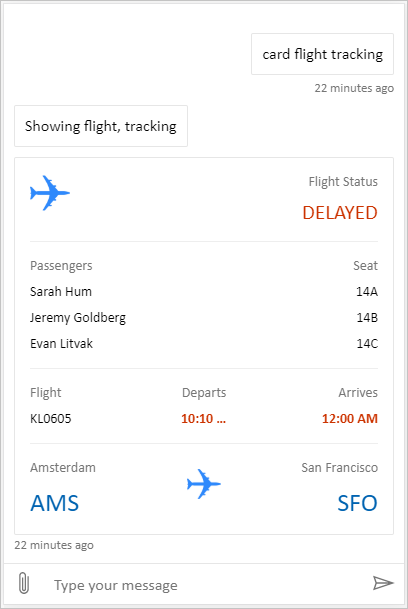
完整套裝 是一個自訂畫布,能顯示 Copilot Studio 中所有豐富的內容。 例如:
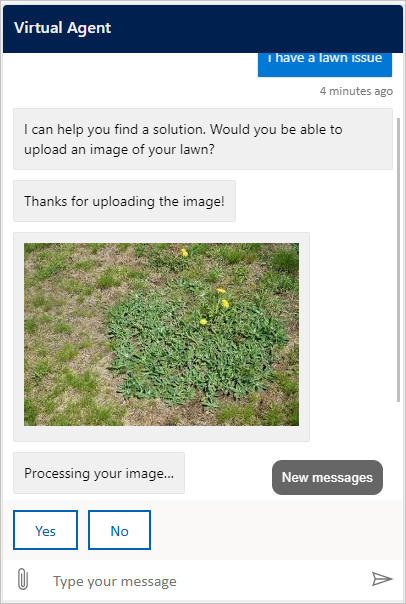
Location and file uploading 是一個自訂畫布,能取得使用者的位置並將其傳送給 Copilot Studio 代理程式。 例如:
或者,也可以試試 Bot Framework 裡的其他 sample 網路聊天 canvases。
和預設畫布一樣,你可以用 styleSetOptions 來調整自訂畫布。 所有可自訂的屬性都會列在 defaultStyleOptions.js中。 想了解更多自訂內容,請參考 網路聊天 customization。
部署您的自訂畫布
若要裝載您的自定義畫布,請將所有檔案部署至 Web 應用程式。