Bemærk
Adgang til denne side kræver godkendelse. Du kan prøve at logge på eller ændre mapper.
Adgang til denne side kræver godkendelse. Du kan prøve at ændre mapper.
Faster release cycles are a major advantage of microservices architectures. Without a reliable continuous integration and continuous delivery (CI/CD) process, you lose the agility that microservices provide. This article outlines common CI/CD challenges in microservices architectures and recommends approaches to build, validate, secure, and deploy services independently.
What is CI/CD?
CI/CD refers to several related processes: continuous integration, continuous delivery, and continuous deployment.
Continuous integration (CI): Code changes are frequently merged into the main branch. Automated build and test processes ensure that code in the main branch is always production quality.
Continuous delivery (CD): Code changes that pass the CI process are automatically published to a production-like environment. Deployment into the live production environment might require manual approval, but is otherwise automated. The goal is that your code is always ready to deploy to production.
Continuous deployment: Code changes that pass the previous two steps are automatically deployed into production.
Consider the following goals of a robust CI/CD process for a microservices architecture:
Each team can build and deploy the services that it owns independently, without affecting or disrupting other teams.
Before a new version of a service is deployed to production, it's deployed to dev/test and QA environments for validation. Quality gates are enforced at each stage.
A new version of a service can be deployed side by side with the previous version.
Sufficient access control policies are in place. Pipelines authenticate to Azure with federated, short-lived credentials instead of long-lived secrets.
For containerized workloads, you can trust the container images that are deployed to production. That trust is established through signed images, software bill of materials (SBOM) attestations, and vulnerability scanning enforced in the pipeline.
Why a robust CI/CD pipeline matters
In a traditional monolithic application, a single build pipeline produces the application executable. All development work feeds into this pipeline. If the team finds a high-priority bug, the fix must be integrated, tested, and published, which can delay the release of new features. You can reduce these problems by using well-factored modules and feature branches to limit the effect of code changes. But as the application grows more complex and more features are added, the release process for a monolith tends to become more complicated and likely to fail.
According to the microservices philosophy, there should never be a long release train where every team has to get in line. The team that builds service A can release an update when it chooses and doesn't have to wait for changes in service B to merge, test, and deploy.
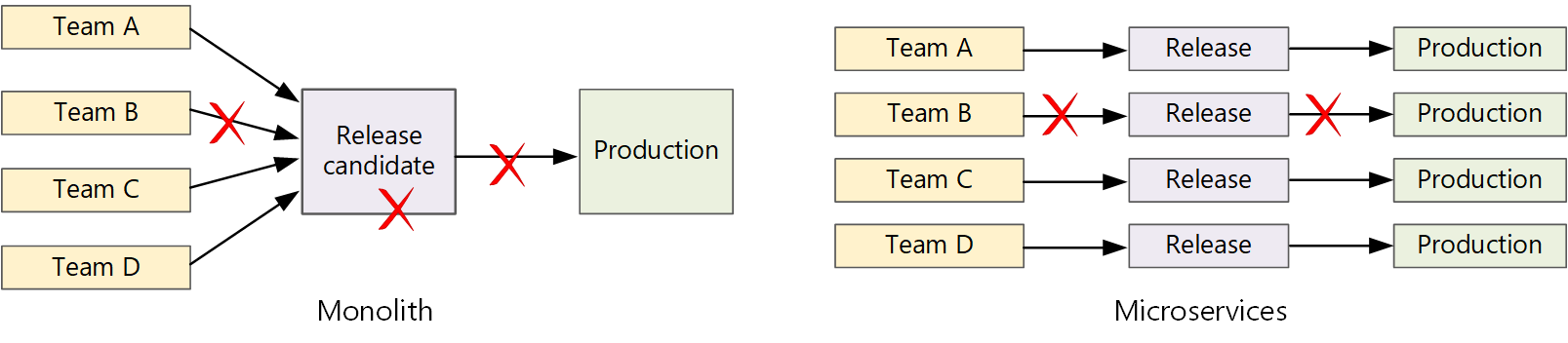
To achieve a high release velocity, your release pipeline must be automated and highly reliable to minimize risk. If you release to production one or more times daily, regressions or service disruptions must be rare. At the same time, if you deploy a bad update, you must have a reliable way to quickly roll back or roll forward to a previous version of a service.
Challenges
Many small independent code bases: Each team is responsible for building its own service, with its own build pipeline. In some organizations, teams might use separate code repositories. Separate repositories can scatter the knowledge of how to build the system across teams. As a result, nobody in the organization knows how to deploy the entire application.
Mitigation: Have a unified and automated pipeline or at least common pipeline infrastructure to build and deploy services so that this knowledge isn't hidden within each team. Reusable pipeline templates, like GitHub Actions reusable workflows or Azure Pipelines templates, help standardize the build, test, scan, and deploy steps across every service.
Multiple languages and frameworks: Each team uses its own mix of technologies, so it can be difficult to create a single build process that works across the workload. The build process must be flexible enough that every team can adapt it for their chosen language or framework.
Mitigation: Containerize the build process for each service so that the build system only needs to run the containers. Platforms like GitHub Actions, Azure Pipelines, and Azure Container Registry tasks can build and publish container images consistently regardless of the source language.
Integration and load testing: Teams release updates at their own pace, so it can be challenging to design robust end-to-end testing, especially when services have dependencies on other services. Running a full production cluster can be costly, so it's unlikely that every team runs its own full cluster at production scale only for testing.
Mitigation: Use ephemeral preview environments, like per-pull-request namespaces in Kubernetes or Azure Container Apps environments that are created on demand. Use contract tests so that you surface integration problems early without requiring a full-scale duplicate of production.
Release management: Every team should be able to deploy an update to production. That requirement doesn't mean that every team member has permissions to deploy. A centralized release manager role can reduce deployment velocity.
Mitigation: The more your CI/CD process is automated and reliable, the less you need a central authority. You might still have different policies for releasing major feature updates versus minor bug fixes. A decentralized approach doesn't mean zero governance. Enforce approvals by using Azure Pipelines environments and approvals or GitHub Actions deployment environments and required reviewers, and codify cluster-side policy by using Azure Policy for Azure Kubernetes Service (AKS) or OPA Gatekeeper.
Service updates: When you update a service to a new version, the update shouldn't cause other services that depend on it to fail.
Mitigation: Use deployment techniques like blue-green or canary releases for nonbreaking changes. For breaking API changes, deploy the new version side by side with the previous version. With this approach, services that consume the previous API can be updated and tested for the new API. For more information, see Update services.
Pipeline identity and secret management: Long-lived service principal secrets stored in pipelines are a frequent source of compromise and operational work. Service principal secrets expire, can leak, and require rotation across many independent microservice pipelines.
Mitigation: Authenticate pipelines to Azure with workload identity federation, which uses OpenID Connect (OIDC), so no client secret is stored in the pipeline. For more information, see Workload identities for Azure Pipelines and Configure OpenID Connect in Azure for GitHub Actions. Store any remaining secrets in Azure Key Vault and reference them at runtime.
Supply-chain security: Everything that you ship to production must be traceable to the code and dependencies that it was built from. Microservices increase the number of images, registries, and pipelines, which increases your supply-chain attack surface.
Mitigation: Sign container images by using Notation and Key Vault, and verify signatures at admission time by using AKS image integrity or Ratify. Generate an SBOM as a build artifact. Scan code, dependencies, and pipelines by using Microsoft Defender for Cloud DevOps security and GitHub Advanced Security. Scan runtime images by using Microsoft Defender for Containers. Require all scans to pass before a release can proceed.
Monorepo vs. multirepo
Before you create a CI/CD workflow, you must know how the code base is structured and managed, including:
- Whether teams work in separate repositories or a monorepo.
- Your branching strategy.
- Who can push code to production and whether a release manager exists.
Teams widely use both approaches in production. Your choice depends on team topology, tooling maturity, and how much code is shared across services.
| Monorepo | Multiple repos | |
|---|---|---|
| Advantages | - Code sharing - Easier to standardize code and tooling - Easier to refactor code - Discoverability (a single view of the code) |
- Clear ownership per team - Potentially fewer merge conflicts - Helps enforce microservice decoupling |
| Challenges | - Changes to shared code can affect multiple microservices - Greater potential for merge conflicts - Tooling must scale to a large code base - Access control - More complex deployment process |
- Harder to share code - Harder to enforce coding standards - Dependency management - Diffuse code base, poor discoverability - Lack of shared infrastructure |
Regardless of the model that you choose, use path-scoped triggers in your pipelines, like path filters in GitHub Actions or trigger paths in Azure Pipelines. Path-scoped triggers help ensure that only affected microservices rebuild and redeploy on each commit.
Update services
There are various strategies for updating a service that's already in production, including rolling update, blue-green deployment, and canary release. These patterns are often coordinated through a GitOps workflow. For more information, see GitOps and progressive delivery.
Rolling updates
In a rolling update, you deploy new instances of a service, and the new instances start to receive requests immediately. As the new instances become ready, the previous instances are removed.
Example in Kubernetes: In Kubernetes, rolling updates are the default behavior when you update the pod spec for a deployment. The deployment controller creates a new ReplicaSet for the updated pods. Then it scales up the new ReplicaSet while scaling down the previous ReplicaSet to maintain the desired replica count. It doesn't delete previous pods until the new pods are ready. Kubernetes keeps a history of the update, so you can roll back an update if needed.
Example in Container Apps: Container Apps uses revisions to manage rolling updates. When you deploy a new revision, Container Apps can gradually shift traffic from the previous revision to the new revision by using traffic-splitting rules. If the new revision encounters problems, you can roll back by redirecting traffic to the previous revision. You can configure multiple active revisions simultaneously and control the percentage of traffic each revision receives.
One challenge of rolling updates is that during the update process, a mix of previous and new versions run and receive traffic. During this period, the system can route any request to either version.
For breaking API changes, a good practice is to support both versions side by side, until all clients of the previous version are updated. For more information, see API versioning.
Blue-green deployment
In a blue-green deployment, you deploy the new version alongside the previous version. After you validate the new version, you switch all traffic at once from the previous version to the new version. After the switch, you monitor the application for any problems. If there's a problem, you can switch traffic back to the previous version. If there are no problems, you can delete the previous version.
With a more traditional monolithic or N-tier application, blue-green deployment generally means that you create two identical environments. You deploy the new version to a staging environment and then redirect client traffic to that environment, like by swapping a virtual IP address. In a microservices architecture, updates occur at the microservice level, so you typically deploy the update into the same environment and use a service discovery mechanism to switch traffic.
Example in Kubernetes: In Kubernetes, you don't need to create a separate cluster to do blue-green deployments. Instead, you can take advantage of selectors. Create a new deployment resource with a new pod spec and a different set of labels. Create this deployment, but don't delete the previous deployment or modify the service that points to it. After the new pods run, you can update the service's selector to match the new deployment.
One drawback of blue-green deployment is that during the update, you run twice as many pods for the service (current and next). If the pods use substantial CPU or memory resources, you might need to scale out the cluster temporarily to meet the higher resource demand.
Canary release
In a canary release, you deploy an updated version to a small subset of clients and then monitor the behavior of the new service before you roll it out to all clients. With this approach, you can roll out gradually in a controlled way, monitor real data, and identify problems before they affect all customers.
A canary release is more complex to manage than either a blue-green or rolling update because you must route requests dynamically to different versions of the service.
Example in Kubernetes: In Kubernetes, you can configure a service to span two replica sets (one for each version) and adjust the replica counts manually. However, this approach is coarse-grained because of how Kubernetes load balances across pods. For example, if you have a total of 10 replicas, you can only shift traffic in 10% increments. If you use a service mesh, you can use the service mesh routing rules to implement a more sophisticated canary release strategy.
Example in Container Apps: In Container Apps, you can use traffic split to send a defined percentage of traffic to a new revision (like 10% to v2 while 90% remains on v1) and shift the weights as confidence grows, with no external service mesh required.
Progressive delivery and GitOps
For teams that operate many microservices on Kubernetes, a GitOps pull-based model complements the earlier push-based examples. The desired cluster state lives in Git, and an in-cluster operator reconciles the cluster to that state. CI builds, tests, scans, signs, and pushes the image. CD reconciles the cluster to the manifest. This separation gives you audit trails and easier disaster recovery (DR). It also removes the need for the CI runner to hold direct cluster credentials.
Next steps
- Learning path: Define and implement CI
- Training: Development for Enterprise DevOps
- Microservices architecture