Bemærk
Adgang til denne side kræver godkendelse. Du kan prøve at logge på eller ændre mapper.
Adgang til denne side kræver godkendelse. Du kan prøve at ændre mapper.
Azure NetApp Files
Microsoft Fabric
Azure AI Search
Microsoft Foundry
Azure Machine Learning
Solution ideas
This article describes a solution idea. Your cloud architect can use this guidance to help visualize the major components for a typical implementation of this architecture. Use this article as a starting point to design a well-architected solution that aligns with your workload's specific requirements.
This solution idea describes how the Azure NetApp Files Object REST API helps organizations use existing enterprise file data for analytics and AI without first copying it to a separate object store. Amazon S3-compatible applications can support document search and AI-assisted analysis while existing NFS and SMB workflows continue to access that data. Avoiding a separate source-data copy can reduce the time to onboard analytics workloads, reduce duplicate storage costs, and remove the synchronization pipelines that teams would otherwise build, monitor, and troubleshoot. Fewer source-data repositories also mean fewer copies to govern and protect. This approach supports incremental modernization without requiring organizations to replace their existing file-based applications.
Architecture
This architecture focuses on Microsoft Fabric integration with Azure NetApp Files through the Object REST API. The diagram also shows Azure Databricks as an alternative analytics consumer of the same Azure NetApp Files data. You don't need to deploy both platforms. Existing applications continue to access the data through NFS or SMB, depending on the volume configuration and client requirements.
Azure Databricks compute accesses the Azure NetApp Files Object REST API endpoint through S3-compatible requests by using the Hadoop S3A connector. This alternative analytics path doesn't use the on-premises data gateway or Microsoft OneLake.
The downstream AI services in the diagram are illustrative. Their ingestion integration isn't shown.
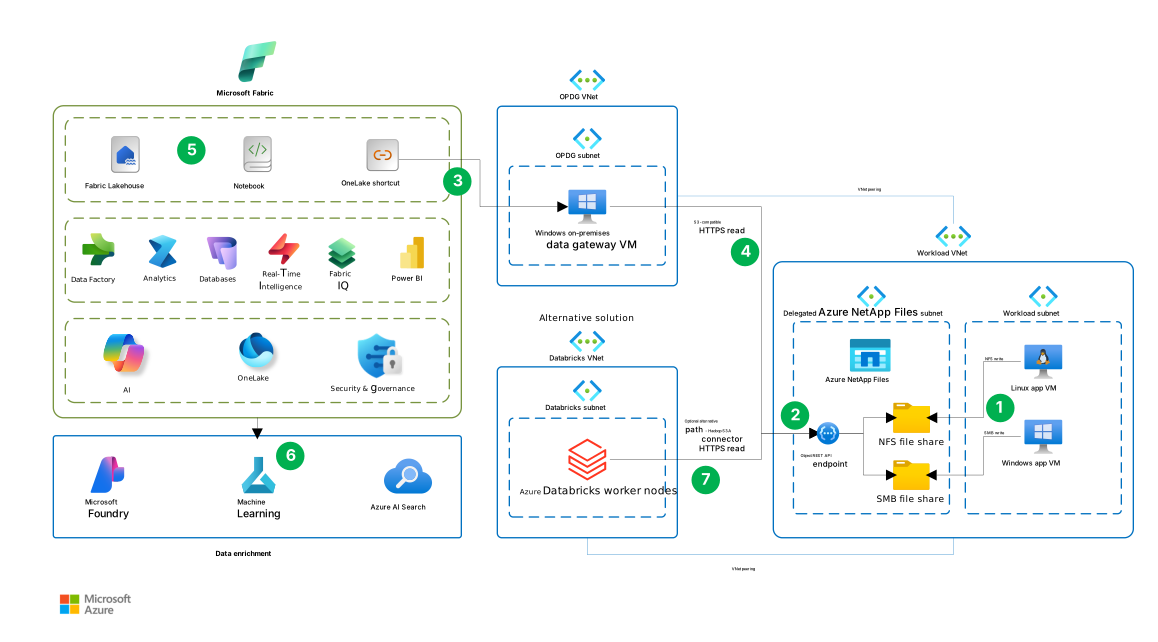
Download a Visio file of this architecture.
Data flow
The following numbered interactions describe the architecture diagram. Steps 1 through 5 describe the primary Microsoft Fabric path. Step 6 represents optional downstream data enrichment. Step 7 is an alternative analytics path, not a continuation of the Fabric flow. The arrows labeled HTTPS read show requests toward the Object REST API endpoint; the requested data returns to the consumer.
Applications write file data. In the Workload subnet, the Linux application VM writes to the NFS file share, and the Windows application VM writes to the SMB file share. Azure NetApp Files hosts both shares in the delegated subnet.
The Object REST API exposes the file data. The endpoint in the Delegated ANF subnet provides S3-compatible access to configured directories on the Azure NetApp Files volumes. The connections from the endpoint to the NFS and SMB shares represent access to the existing data, not a copy into a separate object store.
Fabric accesses the data through a OneLake shortcut. The shortcut references the Azure NetApp Files data through a connection that uses the Windows on-premises data gateway VM in the OPDG (on-premises data gateway) subnet. The OneLake shortcut is connected to this gateway.
The gateway reads from the Object REST API. The gateway uses the peering between the OPDG VNet and the Workload VNet to reach the endpoint. The S3-compatible HTTPS read path connects the gateway to the endpoint, which accesses the referenced file data for Fabric. For the connection requirements, see Connect OneLake to an Azure NetApp Files volume.
Fabric processes and analyzes the data. Supported Fabric workloads consume the data through the shortcut. For example, notebooks read the referenced files and write derived results to lakehouse tables for analysis and Power BI reporting. The Fabric box in the diagram shows these processing and analytics capabilities.
Optional downstream services enrich the data. The arrow below Fabric leads to the Data enrichment group, which contains Microsoft Foundry, Azure Machine Learning, and Azure AI Search. This step represents optional downstream processing. The diagram doesn't show the ingestion or orchestration needed to connect these services, and the OneLake shortcut doesn't establish those integrations.
Alternatively, Azure Databricks reads the file data directly. Worker nodes in the Databricks subnet use the Hadoop S3A connector to send HTTPS read requests to the same Object REST API endpoint over the peered virtual networks. This path replaces the Fabric access and processing path in steps 3 through 5. It doesn't pass through the on-premises data gateway or OneLake.
Choose the shortcut location based on how you intend to consume the data:
- Existing compatible Delta tables. Create a table shortcut in the lakehouse's Tables section, targeting the complete Delta table, including its transaction log. Fabric recognizes the target as a table that you can query through Spark and the SQL analytics endpoint, while the source data remains on Azure NetApp Files.
- Files for direct access or processing. Create shortcuts in the lakehouse's Files section. Compatible workloads can read standalone Parquet, CSV, and JSON files, in addition to documents, without first copying the source files into OneLake. When downstream analytics requires lakehouse tables, transform or load the source data into derived Delta tables in OneLake.
Standalone Parquet files aren't automatically Delta tables. A shortcut in Files doesn't automatically register its target as a table. For more information, see Where to place shortcuts in a lakehouse.
Components
The following components support the Fabric-focused architecture and the optional Azure Databricks alternative.
Azure NetApp Files is a fully managed file storage service built on NetApp technology. In this architecture, it stores the enterprise dataset and provides NFS, SMB, and S3-compatible object access via the Object REST API. It also provides snapshot and replication capabilities.
Azure NetApp Files Object REST API exposes existing file data through an S3-compatible interface. In this architecture, it allows compatible analytics and AI applications to access the data without first creating a separate object-storage copy. The interface supports a subset of Amazon S3 operations. Confirm that the supported operations meet your application's requirements before choosing this integration.
Microsoft Fabric is an analytics platform that unifies data movement, data processing, ingestion, transformation, stream processing through Real-Time Intelligence, and report building. In this architecture, it provides the analytics platform for processing and analyzing data from Azure NetApp Files via OneLake shortcuts.
OneLake is the unified logical data lake for Fabric. In this architecture, OneLake shortcuts make the referenced Azure NetApp Files data available to supported Fabric workloads.
Azure Virtual Network provides private connectivity between the Azure resources in this architecture. Virtual network peering enables the gateway virtual machine and optional Azure Databricks compute to reach the Azure NetApp Files Object REST API endpoint.
An on-premises data gateway connects OneLake shortcuts to the Azure NetApp Files bucket endpoint. Despite its name, in this architecture, the gateway runs in standard mode on an Azure virtual machine with a supported Windows operating system. Choose an image that meets the gateway installation requirements. Server Core installations and Windows containers aren't supported. The gateway initiates outbound connections through Azure Relay to communicate with Fabric. No inbound connections from Fabric are required. Configure your firewall or proxy to allow the outbound endpoints described in Adjust communication settings for the on-premises data gateway.
Azure Databricks is an optional alternative analytics platform for data engineering and machine learning workloads. Its Spark jobs use the Hadoop S3A connector configured for the Object REST API endpoint to access the Azure NetApp Files dataset instead of using the Fabric integration path.
Alternatives
This architecture includes multiple components that you can substitute with other Azure services or approaches, depending on your workload's functional and nonfunctional requirements. Consider the following alternatives and their trade-offs.
Storage
Consider the applications' protocol requirements and measured performance when you choose between Azure Blob Storage and Azure NetApp Files:
Choose Blob Storage when clients can use the Blob Storage REST API or NFS 3.0 and don't require SMB or NFS 4.1. Both interfaces can access the same data. The Blob Storage NFS 3.0 access path is optimized for high-throughput, read-heavy sequential workloads where throughput matters more than low latency.
Choose Azure NetApp Files when applications and analytics workloads need to access the same files through SMB or NFS 4.1 and the S3-compatible Object REST API, or when file applications require low-latency random I/O. For data already on Azure NetApp Files, the Object REST API adds analytics access without migrating source applications or data.
For either option, measure end-to-end latency and throughput under concurrent source-application and analytics load. NFS or SMB performance doesn't establish Object REST API or Fabric performance, so test the intended access path against the workload's requirements. Compare total costs, including application changes, migration, and any ongoing duplication and synchronization. For a protocol and workload comparison, see Compare Azure storage services.
Integration
Azure Databricks jobs can use the Hadoop S3A connector to read Azure NetApp Files data through the Object REST API, without OneLake or the on-premises data gateway. Configure TLS trust and securely stored credentials, and validate required write operations before relying on write-back. If you need initialization scripts, use cluster-scoped scripts stored in Unity Catalog volumes on supported compute, following the current Azure Databricks init-script guidance.
Scenario details
Use this pattern when the same dataset must serve applications that expect a mounted file system and analytics or AI services that expect an S3-compatible object interface.
Applications running on virtual machines or in containers can continue to use Azure NetApp Files through NFS or SMB. For example, they can use existing file-access code, mounted shares, and directory structures. The Azure NetApp Files Object REST API maps a volume's root directory or a subdirectory to an S3-compatible bucket so that compatible object clients can access the same underlying files.
This approach is useful when you want to add analytics or AI capabilities to existing file-based workloads without changing the source applications to use object storage. Downstream workflows can still create derived data, such as transformed datasets, indexes, embeddings, and caches, as needed.
When file and object clients access the same data, account for differences in identity, permissions, locking, and application-consistency requirements. Define how producers signal that a file or batch is complete before object consumers process it. Producers should finish writing and close files before signaling readiness and leave those files unchanged while consumers process them. Test this handoff for interrupted writes and processing retries.
The identity and authorization models also differ across access methods. Original per-user file permissions don't automatically carry into Fabric. Configure Fabric permissions for the intended consumers and ensure that the identity used by the Object REST API has access only to the required source data. For more information, see Security.
Map directories to separate buckets when consumers require different levels of access. Data classification, retention, downstream authorization, and governance of derived data remain workload responsibilities. For more information, see Create a bucket.
Potential use cases
This architecture can support workloads that need to analyze structured or unstructured data already stored in Azure NetApp Files. The following examples illustrate different ways that Fabric can consume that data.
Document processing
Applications can save documents, images, or other unstructured files to Azure NetApp Files by using NFS or SMB. A Fabric notebook can read completed files by using a OneLake shortcut and send their content to a document-processing service, such as Azure Document Intelligence, for extraction. Store the resulting structured data in lakehouse tables for validation, analysis, and reporting.
For integration guidance, see Document Intelligence integration through SynapseML.
Data analytics
Applications can write structured data, such as CSV or Parquet files, to an Azure NetApp Files share. Fabric notebooks can read completed files by using the OneLake shortcut, combine them with other lakehouse data, and write derived results to lakehouse tables.
This pattern can support scenarios such as engineering and quality analysis, sensor-data analysis, and operational reporting without requiring the source applications to change how they store their files.
For existing compatible Delta datasets, create a OneLake shortcut in the lakehouse's Tables section that targets the complete Delta table, including its transaction log. Fabric can then recognize the target as a table, and the source data can remain on Azure NetApp Files. For more information, see Where to place shortcuts in a lakehouse.
AI search and retrieval
Documents stored on Azure NetApp Files can also serve as source content for AI workloads. For example, a processing workflow can read documents through the OneLake shortcut and use them to build an Azure AI Search index for retrieval-augmented generation (RAG).
The search index and any embeddings are derived data and are stored separately from the source files. Design the workflow to keep indexed content synchronized with source updates, renames, and deletions. Also enforce the appropriate access controls when retrieving indexed content because the original SMB and NFS permissions don't automatically become per-user search permissions.
The same pattern can be extended to other AI workloads. For example, Fabric notebooks can prepare datasets from source files and store the prepared data in OneLake for consumption by Azure Machine Learning. For integration options and limitations, see Integrate OneLake with Azure Machine Learning.
Considerations
These considerations implement the pillars of the Azure Well-Architected Framework, which is a set of guiding tenets that you can use to improve the quality of a workload. For more information, see Well-Architected Framework. For further guidance, see Well-Architected Framework recommendations for Azure NetApp Files.
Reliability
Reliability helps ensure that your application can meet the commitments that you make to your customers. For more information, see Design review checklist for Reliability.
Azure NetApp Files runs on a fault-tolerant bare-metal fleet powered by ONTAP and provides a high-availability SLA. For additional protection against availability-zone or regional outages, you can optionally configure cross-zone or cross-region replication. This replication is asynchronous and requires customer-initiated failover to the destination volume. Choose the replication option and schedule according to your workload's recovery objectives. For more information, see Azure NetApp Files reliability.
Sharing one dataset also makes storage availability a common dependency for file applications and analytics. These storage capabilities don't establish end-to-end availability for the gateway, indexing pipeline, or consuming applications. Align recovery objectives with the complete workload, including the gateway, downstream processing, and derived data.
A single gateway virtual machine is a single point of failure for the Fabric integration path. For business-critical workloads, deploy at least two gateway members on separate virtual machines in a gateway cluster. Ensure that every member can reach the Object REST API endpoint and establish the required outbound connections. Test the workload's behavior when a gateway member becomes unavailable.
- File and volume recovery is supported through space-efficient, point-in-time snapshots. Teams can restore an individual file, revert a complete volume, or create a new volume from a recovery point after accidental deletion, corruption, or a failed analytics process. For the available recovery operations, see Azure NetApp Files snapshot-based data protection.
Security
Security provides assurances against deliberate attacks and the misuse of your valuable data and systems. For more information, see Design review checklist for Security.
Maintaining fewer source-data copies can reduce the number of repositories to protect. Azure NetApp Files encrypts data at rest, and the Object REST API uses TLS to protect data in transit. File access permissions depend on the protocol:
SMB and NFS clients continue to use their existing authentication and authorization models. Existing NTFS access control lists (ACLs), NFS permissions, and identity-mapping rules remain in effect for those clients.
Object REST API clients authenticate by using an S3 access key. Bucket permissions define whether the client has read-only or read-write access within the mapped directory. Object requests don't include the identity of the individual SMB, NFS, or downstream user. Azure NetApp Files performs every object operation as the bucket's configured impersonated file-system identity. Existing file permissions and ACLs are evaluated only against that identity.
The impersonated file-system identity is a user ID (UID) and group ID (GID) for NFS volumes, or a user account for SMB volumes. Dual-protocol volumes use the identity type that matches their configured security style. This identity determines file access permissions. The S3 access key authenticates the object client. For more information, see Object REST API security and permissions.
A OneLake S3-compatible shortcut authenticates to the bucket by using an access key ID and secret access key. Source NTFS ACLs, NFS permissions, and individual file-owner identities aren't copied or mapped into OneLake. Fabric users are authorized through OneLake and Fabric permissions. They can access only the content exposed to the shortcut through the bucket and its impersonated identity, but OneLake doesn't enforce the original per-user file permissions. Microsoft Entra-based OAuth, service principals, and RoleArn aren't supported for this shortcut type.
For example, a Fabric user might be able to read a document by using the shortcut even when their personal SMB account can't read it directly, if Fabric permissions allow access and the bucket's impersonated identity can read the document. Before exposing a directory, verify that the intended Fabric audience is authorized to access its content.
Configure the bucket's impersonated identity with only the source permissions that the workload requires. Restrict access to the shortcut and lakehouse. Use the Azure Key Vault-based certificate workflow and credential storage to manage TLS certificates and S3 access keys. Define and test a rotation procedure that coordinates certificate and credential changes with updates to Fabric connections and other consumers. Generating new bucket credentials immediately invalidates the existing pair, so plan for interruption while you update consumers and verify access after rotation.
If you use a self-signed TLS certificate, ensure that every gateway host trusts it. For more information, see OneLake gateway prerequisites.
Security and compliance depend on the configuration of storage, access, and downstream services. Include downstream processing and derived data in your governance and compliance scope. Requirements such as GDPR and HIPAA apply to the complete workload, where applicable. For more information, see Object REST API security and permissions and Create an Amazon S3-compatible shortcut in OneLake.
Cost Optimization
Cost Optimization focuses on ways to reduce unnecessary expenses and improve operational efficiencies. For more information, see Design review checklist for Cost Optimization.
Avoiding a separate source-data copy can reduce duplicate storage and synchronization costs. Balance these savings against Azure NetApp Files capacity and performance costs, gateway compute, Fabric capacity, and downstream processing and storage.
This example pricing estimate includes a 1-TiB Azure NetApp Files Standard capacity pool, a Windows D8s_v5 virtual machine for the on-premises data gateway, two 128-GiB P10 managed disks, a NAT gateway with a public IP address and outbound data processing, Fabric F2 capacity, and 100 GB of native OneLake storage.
The single-gateway configuration isn't highly available. Optional AI Search, embedding services, and Azure Databricks costs are excluded. Adjust the resources for your workload's capacity, networking, and availability requirements.
Cool access: Tier inactive data blocks, including snapshot data, to lower-cost storage while retaining file and object access. Evaluate retrieval charges, latency, and service-level-specific throughput changes against the workload's access pattern.
Service levels and right-sizing: Choose an Azure NetApp Files service level that matches the dataset's capacity and throughput requirements. The Flexible service level allows you to provision pool capacity and throughput independently. Review billable pool capacity and throughput as demand changes to avoid persistent over-provisioning.
Operational Excellence
Operational Excellence covers the operations processes that deploy an application and keep it running in production. For more information, see Design review checklist for Operational Excellence.
OneLake shortcuts reduce operational complexity by avoiding a pipeline that maintains a separate source-data copy for analytics. Without a separate copy pipeline, teams don't need to schedule copy jobs, recover from transfer failures, or reconcile source and copied data as part of routine operations.
Source-application and analytics teams must coordinate changes and incident response for the shared Azure NetApp Files dataset. Establish ownership for monitoring, processing failures, and Object REST API credential and certificate management.
Monitor storage, gateway, and Fabric performance to identify constraints and adjust capacity or throughput:
Use Azure Monitor to track volume read and write throughput, read and write IOPS, other IOPS, average read and write latency, capacity consumption, and the throughput-limit-reached indicator. Alert on sustained latency increases, repeated QoS limiting, and capacity thresholds rather than isolated spikes; Azure NetApp Files metrics are aggregated over intervals and storage latency doesn't include every client-side REST component.
Correlate storage metrics with client-side measurements such as request latency percentiles, object size, concurrency, retries, HTTP status codes, CPU, memory, and network throughput. Doing so distinguishes a volume throughput limit from an undersized compute client, inefficient SDK settings, small-object overhead, or network distance.
Monitor each gateway virtual machine's CPU, memory, available disk space, and network throughput alongside gateway errors and workload completion times. Configure alerts for sustained resource pressure and low disk space, using thresholds established during representative workload tests. Use gateway diagnostic logs when troubleshooting errors or slow access. Monitor the virtual machine and network separately because gateway diagnostics don't provide complete infrastructure coverage.
Monitor Fabric capacity utilization and throttling with the Fabric Capacity Metrics app. Configure capacity utilization notifications for the responsible administrators. Correlate capacity usage with gateway and storage measurements to identify whether delays originate in source access or Fabric processing before changing capacity.
Performance Efficiency
Performance Efficiency refers to your workload's ability to scale to meet user demands efficiently. For more information, see Design review checklist for Performance Efficiency.
Azure NetApp Files can support both latency-sensitive NFS or SMB applications and S3-compatible analytics or AI consumers using the same dataset. Keeping the source data on one volume can remove the copy stage that would otherwise delay indexing, training, or batch processing and consume client, network, and destination-storage bandwidth.
Sub-millisecond storage latency on supported Azure NetApp Files service levels is most directly relevant to NFS and SMB workloads. It doesn't guarantee end-to-end latency for HTTPS Object REST API requests. Benchmark the S3-compatible access path with representative objects and concurrency before setting a latency objective.
Storage sizing: Size throughput for the combined demand of file applications and object consumers. Automatic QoS ties volume throughput to volume quota. Manual QoS allows separate allocation within the pool's throughput budget. Benchmark representative workloads before adjusting performance.
Gateway sizing: Size the gateway virtual machines for the combined demand of workloads that access Azure NetApp Files through OneLake shortcuts. Use gateway sizing and scaling guidance as a starting point. Validate sizing with representative data volumes and concurrent access through the shortcuts. Measure gateway CPU, memory, and network throughput alongside workload completion times to determine whether to increase virtual-machine resources or add gateway members.
Fabric capacity sizing: Size Fabric capacity for the combined processing and reporting workload, including Power BI. Follow the guidance in the Fabric capacity planning guide to estimate initial capacity, test with a representative pilot, and adjust capacity based on measured utilization and throttling.
Place compute close to the volume, size client networking appropriately, and test with the real workload. Increase parallelism and use suitably large requests for sequential analytics, but cap concurrency when latency or errors increase. For NFS or SMB, validate mount, protocol, and application settings. For REST, verify support for the client's required API operations, and test connection reuse, upload behavior, retries, and object listing.
Validate end-to-end throughput and latency under concurrent load, and balance analytics demand with source-application performance requirements.
Contributors
Microsoft maintains this article. The following contributors wrote this article.
Principal authors:
- Dan Jackson | Cloud Solutions Architect, NetApp
- Anthony Mashford | Cloud Solutions Architect, NetApp
- Daniel Söderholm | Senior Solution Engineer, Cloud + AI Platforms, Microsoft
Other contributors:
- Heather Grandy | Senior Solution Engineer, Data Platforms, Microsoft
To see nonpublic LinkedIn profiles, sign in to LinkedIn.
Next steps
- Object REST API introduction for Azure NetApp Files
- Connect OneLake to an Azure NetApp Files volume
- Init scripts in Azure Databricks
- Integrate OneLake with Azure Machine Learning