Note
Access to this page requires authorization. You can try signing in or changing directories.
Access to this page requires authorization. You can try changing directories.
Azure Application Gateway
Azure Front Door
Azure Private Link
Azure Web Application Firewall
Azure Key Vault
Azure Container Registry
Azure Kubernetes Service (AKS)
Azure Bastion
This solution uses Application Gateway for Containers as the shared ingress for a multitenant Azure Kubernetes Service (AKS) cluster. Azure Web Application Firewall provides centralized protection against common web exploits.
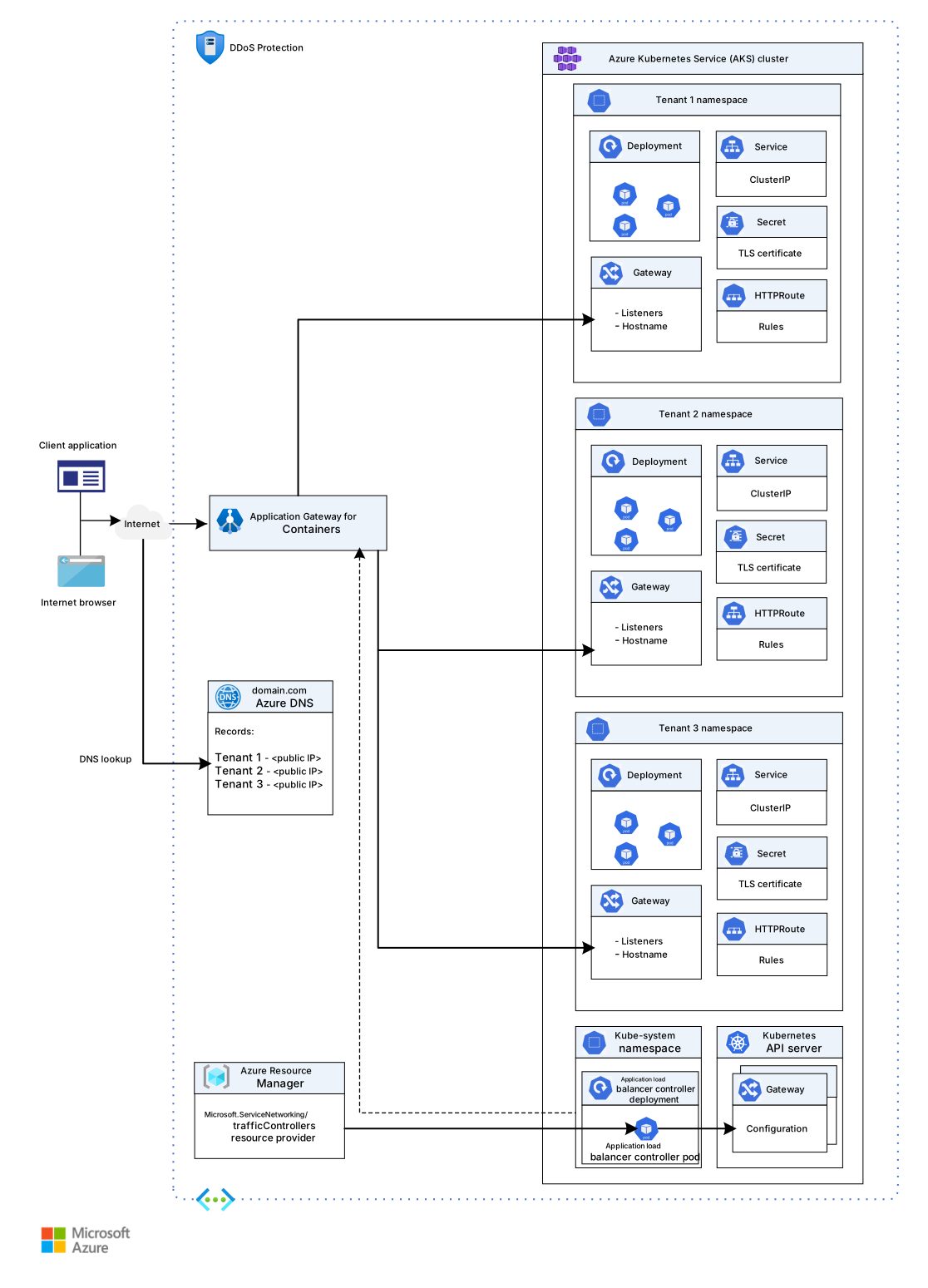
Application Gateway for Containers is a single-tenant Azure resource. One instance has one owner and one configuration surface. Multitenancy in this architecture resides inside the AKS cluster. Each tenant has its own namespace, its own Kubernetes Gateway and HTTPRoute resources, and its own Transport Layer Security (TLS) certificate. One Application Gateway for Containers instance serves all of them. The platform team retains sole ownership of the underlying Azure resource. Tenants don't need access to it to manage their own routing.
You can associate a WAF policy with Application Gateway for Containers to help protect web applications from malicious attacks, such as SQL injection and cross-site scripting. This approach protects web applications that run on an AKS cluster and are exposed through Application Gateway for Containers. The WAF policy uses Default Rule Set (DRS) 2.1 and supports custom rules.
Architecture
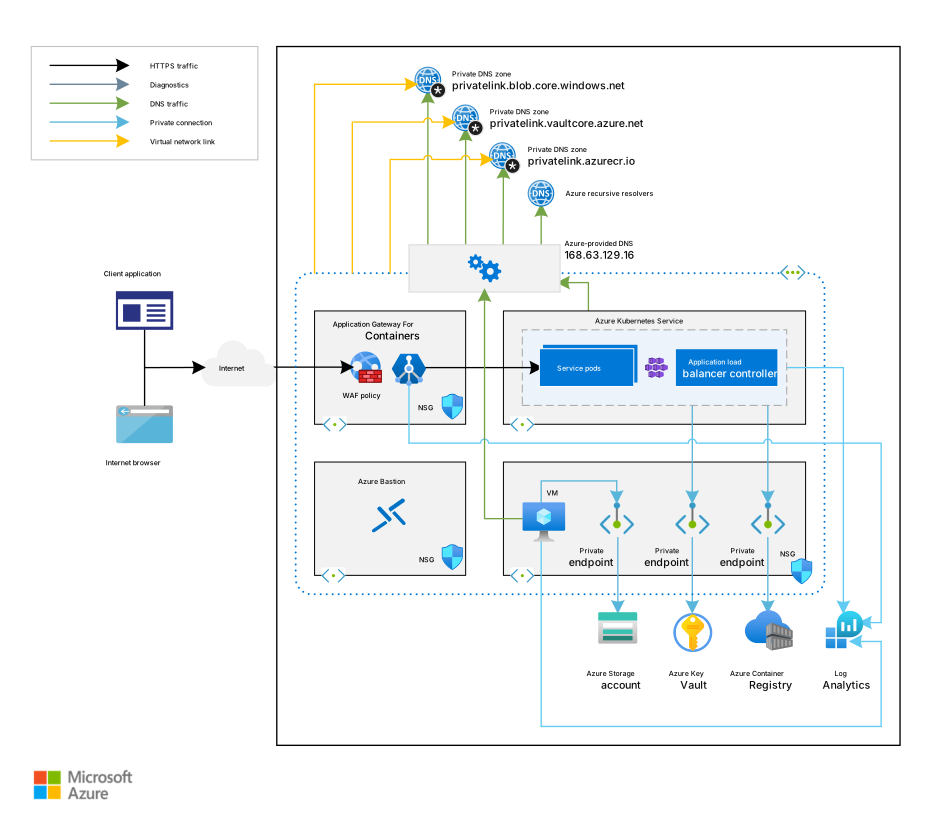
Download a Visio file of this architecture.
Workflow
This architecture uses a companion Azure Resource Manager template (ARM template) to deploy a new virtual network that has four subnets:
AksSubnet hosts the AKS cluster.
VmSubnet hosts private endpoints and, optionally, an operator VM for cluster administration tasks that require local tools.
AppGatewaySubnet hosts the delegated subnet for Application Gateway for Containers. This subnet requires the
Microsoft.ServiceNetworking/trafficControllersdelegation and an address space that's /24 or larger (at least 256 available addresses).AzureBastionSubnet hosts Azure Bastion.
The AKS cluster uses a user-defined managed identity to create more resources, such as load balancers and managed disks, in Azure. You can use the ARM template to deploy an AKS cluster that has the following features:
- Container Storage Interface (CSI) drivers for Azure disks and Azure Files
- AKS-managed Microsoft Entra integration
- Azure role-based access control (RBAC) for Kubernetes Authorization
- A managed identity in place of a service principal
- Microsoft Entra Workload ID
- Azure network policies
- Azure Monitor Container insights add-on
- Application Gateway for Containers AKS add-on support
- Dynamic allocation of IP addresses and enhanced subnet support
The AKS cluster has the following node pools:
The system node pool hosts only critical system pods and services. The worker nodes have node taints that prevent application pods from being scheduled on this node pool.
The user node pool hosts user workloads and artifacts.
A VM is deployed in the same virtual network that hosts the AKS cluster. When you deploy AKS as a private cluster, system admins can use this VM to manage the cluster by using the Kubernetes command-line tool. The boot diagnostics logs of the VM are stored in an Azure Storage account.
Azure Bastion connects admins directly to the private AKS cluster API server by using native AKS private cluster integration. This approach eliminates the need for a dedicated jump box in most scenarios. When operators require a workstation with tooling such as kubectl or Helm installed, you can connect to an optional VM in VmSubnet through Azure Bastion. This solution uses Azure Container Registry to build, store, and manage container images and artifacts, such as Helm charts.
This architecture includes Application Gateway for Containers. Application Gateway for Containers is deployed in a dedicated subnet and exposed to the public internet through a public IP address that all tenant workloads share. A WAF policy protects tenant workloads from malicious attacks.
WAF for Application Gateway for Containers is configured through a security policy resource, which maps to an Azure Web Application Firewall policy. You can configure the policy in prevention mode with DRS 2.1 to block intrusions and attacks that rules detect. The attacker receives a 403 Forbidden response, and the connection closes. Prevention mode records these attacks in the WAF logs.
Workloads that run on AKS use a key vault as a secret store to retrieve keys, certificates, and secrets via a client library, Secrets Store CSI Driver, or Dapr. Azure Private Link enables AKS workloads to access Azure platform as a service (PaaS) solutions, such as Azure Key Vault, over a private endpoint in the virtual network.
This architecture includes private endpoints to the following components:
- The Azure Blob Storage account
- Container Registry
- Key Vault
- The API server of the Kubernetes cluster, if you use a private AKS cluster
The architecture also includes private Domain Name System (DNS) zones to resolve the fully qualified domain name (FQDN) of a PaaS service to the private IP address of its associated private endpoint. This architecture includes private DNS zones that resolve the private endpoints to the following components:
- The Blob Storage account
- Container Registry
- Key Vault
- The Kubernetes Server API, if you deploy the cluster as private
A virtual network link exists between the virtual network that hosts the AKS cluster and the preceding private DNS zones. A Log Analytics workspace collects diagnostics logs and metrics from the following sources:
- The AKS cluster
- The optional operator VM, if deployed
- Application Gateway for Containers
- Key Vault
- Azure network security groups (NSGs)
Components
Container Registry is a managed, private Docker registry service that's based on the open-source Docker Registry 2.0. You can use Azure container registries with your existing container development and deployment pipelines. Or you can use Container Registry tasks to build container images in Azure. You can build container images on demand or fully automate builds with triggers, such as source code commits and base image updates. In this architecture, Container Registry stores and manages container images and artifacts, such as Helm charts, for deployment to the AKS cluster.
AKS is a managed Kubernetes service that simplifies deploying a Kubernetes cluster in Azure by offloading the operational overhead to Azure. As a hosted Kubernetes service, Azure handles critical tasks, such as health monitoring and maintenance. Azure manages Kubernetes control plane nodes, so you only manage and maintain the agent nodes. In this architecture, AKS hosts the multitenant workloads across separate namespaces, with system and user node pools that isolate critical system services from tenant applications.
Key Vault is a cloud service that securely stores and controls access to secrets, such as API keys, passwords, and cryptographic keys. Workloads on AKS can retrieve Key Vault secrets by using the Secrets Store CSI Driver or Dapr. In this architecture, Key Vault provides a centralized secret store that workloads access through a private endpoint by using the Secrets Store CSI Driver or Dapr.
Note
Application Gateway for Containers doesn't support Key Vault certificate integration. Store certificates for Application Gateway for Containers as Kubernetes secrets.
Application Gateway for Containers is an Azure-managed layer-7 load balancer and ingress solution for AKS. It consists of an application gateway for containers resource that Azure manages and the application load balancer controller. The application load balancer controller is an in-cluster component that watches Kubernetes Gateway API and Ingress resources and configures Application Gateway for Containers accordingly. Traffic is processed at the Azure network layer, outside the AKS node pool, so ingress capacity scales independently of cluster nodes. Application Gateway for Containers supports multiple-namespace routing, SSL/TLS termination, session affinity, and WAF integration through security policy resources. In this architecture, Application Gateway for Containers provides shared ingress for all tenant workloads and routes traffic to the appropriate namespace based on Gateway and HTTPRoute resources.
Web Application Firewall (WAF) on Application Gateway for Containers is a WAF feature that provides centralized protection of your AKS-hosted web applications from common exploits and vulnerabilities. WAF is delivered through an Application Gateway for Containers security policy resource that you associate with a Gateway or HTTPRoute. It uses rules from the OWASP Core Rule Set (CRS) and supports custom rules that are evaluated per request. In this architecture, WAF applies DRS 2.1 rules on a route‑specific basis across all tenant workloads through a security policy resource associated with Application Gateway for Containers.
Azure Bastion is a fully managed PaaS that you provision inside your virtual network. Azure Bastion provides Remote Desktop Protocol (RDP) and SSH connectivity to the VMs in your virtual network, directly from the Azure portal over TLS. In this architecture, Azure Bastion provides secure administrative access to the private AKS cluster API server and to the optional operator VM without exposure to the public internet.
Azure Virtual Machines is an infrastructure as a service (IaaS) offering that provides on-demand, scalable computing resources that give you the flexibility of virtualization without requiring you to buy and maintain the physical hardware. In this architecture, an optional VM serves as an operator workstation for cluster administration tasks that require local tools, such as kubectl or Helm.
Azure Virtual Network is the fundamental building block for Azure private networks. With Virtual Network, Azure resources, such as virtual machines (VMs), can communicate with each other, the internet, and on-premises networks. An Azure virtual network is similar to a traditional on-premises network, but it includes Azure infrastructure benefits, such as scalability, availability, and isolation. In this architecture, the virtual network provides network isolation and connectivity for the AKS cluster, Application Gateway for Containers, private endpoints, and support infrastructure across dedicated subnets.
Virtual network interfaces are network adapters that establish communication between Azure VMs and the internet, Azure, and on-premises resources. You can add several NICs to one Azure VM so that child VMs can have their own dedicated network interface devices and IP addresses. In this architecture, network interfaces connect the optional operator VM to the virtual network for cluster management operations.
Azure managed disks are block-level storage volumes that Azure manages on Azure VMs. The disk types include Azure Ultra Disk Storage, Azure Premium SSD, and Azure Standard SSD. In this architecture, managed disks provide persistent storage for the optional operator VM and for AKS node pool VMs.
Blob Storage is a Microsoft object storage solution for the cloud. Blob Storage is optimized for storing massive amounts of unstructured data. Unstructured data is data that doesn't adhere to a specific data model or definition, such as text data or binary data. In this architecture, Blob Storage stores boot diagnostics logs for the optional operator VM.
Private Link is an Azure networking service that provides a private endpoint in your virtual network so that you can access Azure PaaS services, such as Blob Storage and Key Vault, and access Azure-hosted, customer-owned, or partner services. In this architecture, Private Link provides secure, private connectivity from the AKS cluster to Container Registry, Key Vault, and Blob Storage without traversal of the public internet.
How Application Gateway for Containers works
This architecture uses Application Gateway for Containers. When you create a new AKS cluster or a new Application Gateway for Containers deployment, you can install the Application Gateway for Containers AKS add-on by using the Azure CLI. You can also install the application load balancer controller by using Helm.
Application Gateway for Containers supports two management models for its Azure resources: bring-your-own (BYO) and application load balancer controller-managed.
In the BYO model, you create and manage the Application Gateway for Containers Azure resources directly in Azure by using tools such as Bicep, Terraform, or the Azure portal. You then reference these resources from Kubernetes by using their resource IDs.
In the application load balancer controller-managed model, Kubernetes resources drive the lifecycle of the Azure resources. Each
ApplicationLoadBalancercustom resource provisions its own Application Gateway for Containers Azure resource. The creation, deletion, and updates of that Azure resource are driven entirely by Kubernetes configuration.
Important
Use the BYO management model in this multitenant architecture.
All tenants in this architecture share a single Application Gateway for Containers resource (the Azure parent resource that deploys the control plane). With BYO, the platform team provisions that one Azure resource centrally, like through Bicep or Terraform, and each tenant namespace references the same resource from its own Gateway resource. This approach keeps the Azure resource under platform-team governance while tenants manage only their Kubernetes routing.
In the application load balancer controller-managed model, the application load balancer controller creates a new Application Gateway for Containers Azure resource for each ApplicationLoadBalancer custom resource defined on the cluster. In this multitenant architecture, that approach creates one Azure resource per tenant, not the single shared resource that this pattern depends on.
The application load balancer controller deploys into your AKS cluster and manages the Application Gateway for Containers resource in Azure. Application Gateway for Containers supports both the Kubernetes Ingress API and the Gateway API. Key capabilities include:
Kubernetes Gateway API support: Application Gateway for Containers implements the Gateway API specification. This specification enables cross-namespace routing and role-based configuration separation between infrastructure operators and application developers.
Azure-managed data plane: Traffic processing runs on Azure-managed infrastructure outside the AKS node pool, so ingress capacity scales independently of cluster nodes.
Multiple-namespace routing: A single Application Gateway for Containers deployment routes traffic across multiple Kubernetes namespaces, with cross-namespace access controlled through
ReferenceGrantresources.WAF integration: Application Gateway for Containers integrates with Azure Web Application Firewall through security policy resources, providing DRS 2.1-based protection and custom rule support.
Alternatives
When you expose workloads hosted in an AKS cluster, you have several solutions to consider. You can also use the Kubernetes Gateway API with the application routing add-on as an alternative. These solutions provide different capabilities for managing and securing traffic to your AKS cluster.
Scenario details
This architecture shares a multitenant Kubernetes cluster among multiple users and workloads that are commonly referred to as tenants. This definition includes different teams or divisions within an organization that share Kubernetes clusters. It also includes clusters that per-customer instances of a software as a service (SaaS) application share. Cluster multitenancy is an alternative to managing many single-tenant dedicated clusters. The operators of a multitenant Kubernetes cluster must isolate tenants from each other. This isolation minimizes the damage that a compromised or malicious tenant can do to the cluster and to other tenants. When several users or teams share the same cluster that has a fixed number of nodes, one team might use more resources than they need. Admins can use resource quotas to address this concern.
When you plan to build a multitenant AKS cluster, you should consider the layers of resource isolation that Kubernetes provides, including cluster, namespace, node, pod, and container isolation. You should also consider the security implications of sharing different types of resources among multiple tenants. For example, if you schedule pods from different tenants on the same node, you can reduce the number of machines that you need in the cluster. However, you might need to prevent certain workloads from being colocated. For example, you might not allow untrusted code from outside your organization to run on the same node as containers that process sensitive information. You can use Azure Policy so that only trusted registries can deploy to AKS.
Kubernetes doesn't fully isolate tenants from each other, but it provides isolation features that meet common multitenancy requirements. As a best practice, you should separate each tenant and its Kubernetes resources into their own namespaces. You can then use Kubernetes RBAC and network policies to help enforce tenant isolation. In a typical SaaS provider model, the cluster hosts multiple instances of the same application, one per tenant, with each application in a separate namespace. When tenants need a higher level of physical isolation and predictable performance, their workloads can be deployed to a dedicated set of nodes, a dedicated pool, or a dedicated cluster.
Application Gateway for Containers is an Azure-managed load balancing and ingress solution for AKS. It consists of an Application Gateway for Containers resource that Azure manages and the application load balancer controller, which runs as a deployment in the AKS cluster. The application load balancer controller monitors Kubernetes Ingress and Gateway API resources for changes and translates cluster state into Application Gateway for Containers configuration. This architecture describes proven practices for deploying a public or private AKS cluster with Application Gateway for Containers.
Multitenancy in this architecture resides inside the AKS cluster. Application Gateway for Containers is a single-tenant Azure resource, so one instance has one owner and one configuration surface. The multitenant boundary sits in the cluster, which includes namespaces, HTTPRoutes, and tenant workloads. A single Application Gateway for Containers instance provides shared ingress for all of them. A single application load balancer controller can ingest events from multiple Kubernetes namespaces. This capability in Application Gateway for Containers is what makes this pattern possible.
Note
Multitenancy can be implemented in several ways. This article focuses on one approach: a single AKS cluster shared by multiple tenant namespaces, with one Application Gateway for Containers instance acting as the shared ingress. In this approach, the ingress component routes each tenant's domain through Kubernetes Gateway API or Ingress resources. Other patterns, such as a cluster per tenant, a node pool per tenant, or a dedicated Application Gateway for Containers instance per tenant, balance isolation, cost, and operational overhead differently. For a side-by-side comparison, see the AKS multitenancy guidance.
Potential use cases
Application Gateway for Containers is a strong fit for multitenant AKS clusters for several reasons:
Per-namespace isolation via Kubernetes Gateway API: Each tenant's Gateway and HTTPRoute resources live in the tenant's own namespace. The shared ingress uses
ReferenceGrantto control cross-namespace access. This Kubernetes resource ensures that tenants can't accidentally route traffic into each other's services.Per-tenant TLS without shared key material: Each tenant supplies its own certificate as a Kubernetes secret in its own namespace, so tenants don't share private keys and can rotate their certificates independently.
Namespace-scoped RBAC for self-service: Tenants can manage their own Gateway, HTTPRoute, and certificate secret resources in their namespaces without needing access to the shared Application Gateway for Containers Azure resource, which the platform team owns.
Shared ingress with per-tenant hostnames or paths: A single Application Gateway for Containers front end can host many tenant domains or path prefixes, which keeps the per-tenant baseline cost low and the public IP address and DNS surface manageable for the platform team.
Per-tenant WAF policies: Application Gateway for Containers security policy resources attach at the Gateway or HTTPRoute level, so different tenants can run different rule sets, exclusions, or custom rules on the same shared Application Gateway for Containers instance.
Tenant-aware observability: HTTPRoute and back-end identity flow into application load balancer controller Prometheus metrics. This data gives you a per-tenant view of request volume, latency, and errors without bespoke instrumentation.
Use Application Gateway for Containers to expose and protect internet-facing workloads that run on an AKS cluster in a multitenant environment.
Considerations
These considerations implement the pillars of the Azure Well-Architected Framework, which is a set of guiding tenets that you can use to improve the quality of a workload. For more information, see Well-Architected Framework.
Some considerations don't directly relate to multitenancy in AKS, but they're essential requirements for this solution. These considerations include security, performance, availability, reliability, storage, scheduler, service mesh, and monitoring guidance.
Reliability
Reliability helps ensure that your application can meet the commitments that you make to your customers. For more information, see Design review checklist for Reliability.
Consider the following ways to optimize availability for your AKS cluster and workloads.
Containers
Use Kubernetes health probes to ensure that your containers are alive and healthy:
The livenessProbe indicates whether the container is running. If the liveness probe fails, the kubelet terminates the container, and the container is subjected to its restart policy.
The readinessProbe indicates whether the container is ready to respond to requests. If the readiness probe fails, the endpoint controller removes the pod's IP address from the endpoints of all services that match the pod. The default state of readiness before the initial delay is failure.
The startupProbe indicates whether the application within the container is started. If you have a startup probe, all other probes are turned off until the startup probe succeeds. If the startup probe fails, the kubelet terminates the container, and the container is subjected to its restart policy.
Resource contention can affect service availability. Define container resource constraints so that no single container can overwhelm the cluster memory and CPU resources. You can use AKS diagnostics to identify any problems in the cluster.
Use the resource limit to restrict the total resources allocated to a container so that one container can't deprive others.
Container Registry
Store container images in Container Registry. Use Container Registry geo-replication to geo-replicate the registry to each AKS region. Geo-replication is a feature of Container Registry Premium.
Scan your container images for vulnerabilities. Only deploy images that pass validation. Regularly update the base images and application runtime, and then redeploy your workloads in the AKS cluster.
Limit the image registries that pods and deployments can use. Restrict access to trusted registries where you can validate and control the images that are available.
Scan container images for vulnerabilities as part of a continuous integration and continuous delivery (CI/CD) pipeline before you publish images to Container Registry. As you use base images for application images, use automation to build new images when you update the base image. The base images typically include security fixes, so you must update any downstream application container images. We recommend that you integrate Microsoft Defender for Containers into CI/CD workflows. For more information, see Automate container image builds.
Use Container Registry tasks to automate OS and framework patching for your Docker containers. Container Registry tasks support an automated build process when you update a container's base image. For example, you might patch the OS or application framework in one of your base images.
Intraregion resiliency
Consider deploying the node pools of your AKS cluster across all the availability zones within a region. Use Azure Load Balancer or Application Gateway in front of your node pools. This topology provides better resiliency if a single datacenter outage occurs. This method distributes cluster nodes across multiple datacenters that reside in three separate availability zones within a region.
Enable zone redundancy in Container Registry for intraregion resiliency and high availability (HA).
Use pod topology spread constraints to control how you spread pods across your AKS cluster among failure domains, such as regions, availability zones, and nodes.
Use an uptime service-level agreement (SLA) for AKS clusters that host production workloads. An uptime SLA is an optional feature to enable a financially backed, higher SLA for a cluster. For the specific availability targets and conditions, see the AKS uptime SLA documentation and the Azure SLA for AKS. AKS uses control plane node replicas across update and fault domains to help meet these SLA targets.
Business continuity and disaster recovery
Consider deploying your solution to at least two paired Azure regions within a geography. You should also adopt a global load balancer, such as Azure Traffic Manager or Azure Front Door. Combine the load balancer with an active-active or active-passive routing method to support business continuity and disaster recovery (BC/DR).
Script, document, and periodically test any regional failover processes in a quality assurance (QA) environment. Failover processes help avoid unpredictable problems if an outage in the primary region affects a core service.
Use failover-process tests to verify whether the DR approach meets the recovery point objective (RPO) and recovery time objective (RTO) targets. Include manual processes and interventions in your verification.
Test fail-back procedures to ensure that they work as expected.
Store your container images in Container Registry. Geo-replicate the registry to each AKS region. For more information, see Geo-replication in Container Registry.
Avoid storing service state inside a container, where possible. Instead, use an Azure PaaS that supports multiple-region replication.
Prepare and test how to migrate your storage from the primary region to the backup region if you use Storage.
Consider using GitOps to deploy the cluster configuration. GitOps provides uniformity between the primary and DR clusters and also provides a quick way to rebuild a new cluster if one becomes unavailable.
Consider backing up and restoring the cluster configuration by using tools such as AKS backup or Velero.
Service mesh
Consider using an open-source service mesh, such as Istio, Linkerd, or Consul, in your AKS cluster. A service mesh uses mutual TLS to help improve observability, reliability, and security for your microservices. You can also implement traffic-splitting strategies, such as blue-green deployments and canary deployments. A service mesh is a dedicated infrastructure layer that helps make service-to-service communication safer, faster, and more reliable. For more information, see Istio service mesh AKS add-on.
Consider adopting Dapr to build resilient microservice-based applications, whether they're stateless or stateful. You can use any programming language and developer framework.
Security
Security provides assurances against deliberate attacks and the misuse of your valuable data and systems. For more information, see Design review checklist for Security.
Multitenancy
Design AKS clusters for multitenancy. Kubernetes provides features that you can use to logically isolate teams and workloads in the same cluster. Provide the least number of privileges to the resources that each team needs. A namespace in Kubernetes creates a logical isolation boundary.
Use logical isolation to separate teams and projects. Minimize the number of physical AKS clusters that you deploy to isolate teams or applications. The logical separation of clusters usually provides a higher pod density than physically isolated clusters.
Use dedicated node pools or dedicated AKS clusters when you need to implement strict physical isolation. For example, you can dedicate a pool of worker nodes or an entire cluster to a team or a tenant in a multitenant environment.
Use a combination of taints and tolerations to control the deployment of pods to a specific node pool. You can only taint a node in AKS at the time of node pool creation. Alternatively, you can use labels and nodePool selectors to deploy the workload to specific node pools only.
Network security
Create a private endpoint for any PaaS service that your AKS workloads use, such as Key Vault, Azure Service Bus, or Azure SQL Database. A private endpoint helps ensure that the traffic between the applications and these services isn't exposed to the public internet. For more information, see Private Link overview.
Configure your Kubernetes ingress resource to expose workloads via HTTPS. Use a separate subdomain and digital certificate for each tenant. Configure SSL/TLS termination on the Application Gateway for Containers front end by using the Gateway API listener configuration. Certificates must be stored as Kubernetes secrets. Application Gateway for Containers doesn't support Key Vault certificate integration through the Secrets Store CSI Driver because it requires certificates to be local to the cluster. For automated certificate lifecycle management, consider using cert-manager with an issuer that fits your environment, such as Let's Encrypt for nonproduction or development scenarios, or your organization's internal certificate authority or a Key Vault-issued certificate stored as a Kubernetes secret for enterprise production workloads.
Configure Application Gateway for Containers to use a WAF policy to help protect public-facing workloads that run on AKS from malicious attacks. WAF for Application Gateway for Containers is configured through a security policy resource that maps to an Azure Web Application Firewall policy. Associate the security policy with your Application Gateway for Containers Gateway or HTTPRoute configuration to enforce DRS 2.1-based protection and custom rules across all tenant namespaces.
Use Azure CNI networking in AKS to integrate with existing virtual networks or on-premises networks. This network model also allows greater separation of resources and controls in an enterprise environment.
Use network policies to segregate and secure intraservice communications by controlling which components can communicate with each other. By default, all pods in a Kubernetes cluster can send and receive traffic without limitations. To improve security, you can use Azure network policies or Calico network policies to define rules that control the traffic flow between various microservices. For more information, see Network policy.
Don't expose remote connectivity to your AKS nodes. Use Azure Bastion-native AKS private cluster integration for direct administrative access to the cluster API server. For tooling-heavy operator tasks, route through a Bastion-fronted operator VM in a management subnet.
Consider using authorized IP address ranges in AKS to create a private AKS cluster in your production environment. If you can't use a private AKS cluster, at least secure access to the API server.
Combine Azure DDoS Protection with application-design best practices to add another layer of defense against DDoS attacks. Enable DDoS Protection on perimeter virtual networks.
Authentication and authorization
Deploy AKS clusters with Microsoft Entra integration. For more information, see AKS-managed Microsoft Entra integration. Microsoft Entra ID centralizes the identity management component.
Use Kubernetes RBAC to define the permissions that users or groups have to resources in the cluster. Use roles or ClusterRoles and bindings to scope users or groups to the least number of permissions needed. Integrate Kubernetes RBAC with Microsoft Entra ID so that any change in user status or group membership automatically updates the access to cluster resources. For more information, see Kubernetes RBAC.
Use Azure RBAC to define the minimum required permissions that users or groups have to AKS resources in one or more subscriptions. For more information, see Use Azure RBAC for Kubernetes authorization.
Use Microsoft Entra Workload ID to assign a managed identity to individual microservices for Azure resource access. The microservice can then access managed resources, such as Key Vault, SQL Database, Service Bus, and Azure Cosmos DB. The microservice doesn't need to store and retrieve connection strings or credentials from Kubernetes secrets.
Use the Secrets Store CSI Driver for Key Vault to access secrets, such as credentials and connection strings, from Key Vault rather than from Kubernetes secrets.
Combine the Dapr secret store building block with the Key Vault store and managed identities on Kubernetes to retrieve secrets, such as credentials and connection strings, from Key Vault.
Workload and cluster
Secure access to the Kubernetes API server to help secure your cluster. Integrate Kubernetes RBAC with Microsoft Entra ID to control access to the API server. Use these controls to help secure AKS the same way that you do for Azure subscription access.
Limit access to actions that containers can perform. Use the Pod Security Admission feature to enable the fine-grained authorization of pod creation and updates. Provide the least number of permissions, and avoid the use of root or privileged escalation. For more information, see Secure pod access to resources.
Avoid running containers as a root user when possible.
Use the AppArmor Linux kernel security module to limit the actions that containers can do.
Upgrade your AKS clusters to the latest Kubernetes version regularly to take advantage of new features and bug fixes.
Use the kured DaemonSet to watch for pending reboots, cordon and drain nodes, and apply updates. AKS automatically downloads and installs security fixes on each Linux node, but it doesn't automatically reboot the node if necessary. For Windows Server nodes, regularly run an AKS upgrade operation to safely cordon and drain pods and to deploy any updated nodes.
Consider using HTTPS and gRPC secure transport protocols for all intra-pod communications. Use a more advanced authentication mechanism that doesn't require you to send the plain credentials on every request, like Open Authorization (OAuth) or JSON Web Tokens (JWTs). Establish more secure intraservice communication by using a service mesh, like Istio, Linkerd, or Consul. Or you can use Dapr.
Container Registry
Scan your container images for vulnerabilities, and only deploy images that pass validation. Regularly update the base images and application runtime. Then redeploy workloads in the AKS cluster. Your CI/CD deployment workflow should include a process to scan container images. You can use Microsoft Defender for DevOps security to scan code for vulnerabilities in your automated pipelines during the build and deploy phases. Alternatively, you can use tools such as Prisma Cloud or Aqua to scan and allow only verified images to be deployed.
Cost Optimization
Cost Optimization focuses on ways to reduce unnecessary expenses and improve operational efficiencies. For more information, see Design review checklist for Cost Optimization.
The cost of this architecture depends on configuration specifics, such as the following components:
Service tiers
Scalability, or the number of instances that services dynamically allocate to support a specific level of demand
Automation scripts
Your DR level
After you assess these details, use the Azure pricing calculator to estimate your costs. For more information, see the Well-Architected Framework principles of Cost Optimization.
Operational Excellence
Operational Excellence covers the operations processes that deploy an application and keep it in production. For more information, see Design review checklist for Operational Excellence.
Storage
Consider deploying your AKS cluster with ephemeral OS disks that provide lower read and write latency, along with faster node scaling and cluster upgrades.
Understand the needs of your application so that you can choose the right storage. Use high-performance, SSD-backed storage for production workloads. Plan for a network-based storage system, such as Azure Files, when multiple pods need to concurrently access the same files. For more information, see Storage options for applications in AKS.
Plan for your application demands so that you deploy the appropriate size of nodes. Each node size supports a maximum number of disks. Different node sizes also provide different amounts of local storage and network bandwidth.
Use dynamic provisioning. To reduce management overhead and enable scaling, don't statically create and assign persistent volumes. In your storage classes, define the appropriate reclaim policy to minimize unnecessary storage costs after you delete pods.
DevOps
Use a DevOps system, such as GitHub Actions or Azure DevOps, to deploy your workloads to AKS via a Helm chart in a CI/CD pipeline. For more information, see Build and deploy to AKS.
Introduce A/B testing and canary deployments in your application lifecycle management to properly test an application before you introduce it to all users. There are several techniques that you can use to split the traffic across different versions of the same service.
As an alternative, you can use the traffic-management capabilities that a service mesh provides. For more information, see Istio traffic management.
Use Container Registry or another registry store, like Docker Hub, to catalog and serve the private Docker images that you deploy to the cluster. AKS can use its Microsoft Entra identity to authenticate with Container Registry.
If you need to change settings on Application Gateway for Containers, make the change by using the supported Kubernetes Gateway API or Ingress API resources, including documented annotations. After you migrate from AGIC to Application Gateway for Containers, the application load balancer controller reconciles the Application Gateway for Containers configuration from these Kubernetes resources.
Monitoring
Consider Azure-integrated monitoring options to monitor the health status of the AKS cluster and workloads.
Enable Azure Monitor managed service for Prometheus on your AKS cluster to scrape metrics from the application load balancer controller and workload pods. The application load balancer controller exposes metrics in Prometheus format, including request counts, latency histograms, and connection state per front-end and back-end routing rule. Use recording rules to preaggregate high-cardinality Application Gateway for Containers metrics for efficient querying.
Use Azure Managed Grafana to visualize Application Gateway for Containers and AKS metrics collected by Azure Monitor managed Prometheus. Import the AKS node monitoring dashboard to track node-level CPU, memory, disk, and network usage across the cluster. Create custom Grafana dashboards that combine application load balancer controller request metrics, WAF rule hit counts, and AKS pod readiness signals in a single operational view.
Send Application Gateway for Containers resource logs and metrics to a Log Analytics workspace by enabling diagnostic settings on the Application Gateway for Containers resource. Use sample KQL queries for AGCAccessLogs to analyze traffic patterns, detect 4xx/5xx error spikes per tenant namespace, and correlate WAF block events with upstream pod health.
Configure all the PaaS services, such as Container Registry and Key Vault, to collect diagnostics logs and metrics and send them to Log Analytics.
Set up Azure Monitor alerts on key Application Gateway for Containers metrics: unhealthy back-end count, WAF blocked request rate, and front-end connection errors. Route alert notifications to the appropriate on-call team by using action groups.
Performance Efficiency
Performance Efficiency refers to your workload's ability to scale to meet user demands efficiently. For more information, see Design review checklist for Performance Efficiency.
Consider the following performance recommendations:
For low-latency workloads, consider deploying a dedicated node pool in a proximity placement group (PPG). When you deploy your application in Azure, VM instances that are spread across regions or availability zones create network latency, which might affect the overall performance of your application. A PPG is a logical grouping that you can use to ensure that Azure compute resources are physically located close to each other. Some use cases, such as gaming, engineering simulations, and high-frequency trading, require low latency and tasks that complete quickly. For high-performance computing (HPC) scenarios such as these, consider using PPGs for your cluster's node pools.
Use smaller container images where possible to reduce build times and reduce the attack surface.
Use Kubernetes autoscaling to dynamically scale out the number of worker nodes in an AKS cluster when traffic increases. With the Horizontal Pod Autoscaler (HPA) and a cluster autoscaler, node and pod volumes get adjusted dynamically in real time to match the traffic condition and to avoid downtimes that capacity problems cause. For more information, see Use the cluster autoscaler in AKS.
Scheduler
Review and implement best practices for cluster operators and application developers to build and run applications successfully on AKS.
Plan and apply resource quotas at the namespace level for all namespaces. If pods don't define resource requests and limits, then reject the deployment. Monitor resource usage, and then adjust quotas as needed. When several teams or tenants share an AKS cluster that has a fixed number of nodes, you can use resource quotas to assign a fair share of resources to each team or tenant.
Adopt limit ranges to constrain resource allocations to pods or containers in a namespace, in terms of CPU and memory.
Define resource requests and limits explicitly for CPU and memory usage for your pods in the YAML manifests or Helm charts that you use to deploy applications. When you specify the resource request for containers in a pod, the Kubernetes scheduler uses this information to decide which node to place the pod on. When you specify resource limits for a container, such as the CPU or memory, the kubelet enforces those limits so that the running container can't exceed the limits that you set.
Maintain the availability of applications by defining pod disruption budgets to make sure that a minimum number of pods are available in the cluster.
Use priority classes to indicate the importance of a pod. If the scheduler can't schedule a pod, it tries to preempt, or evict, lower-priority pods so that it can schedule the pending pod.
Use Kubernetes taints and tolerations to place resource-intensive applications on dedicated nodes so that they don't contend with other workloads for CPU and memory. Keep those node resources available for the workloads that require them, and prevent other workloads from being scheduled on the same nodes.
Use node selectors, node affinity, or inter-pod affinity to control the scheduling of pods on nodes. Use inter-pod affinity and anti-affinity settings to colocate pods that have chatty communications, to place pods on different nodes, and to avoid running multiple instances of the same kind of pod on the same node.
Contributors
Microsoft maintains this article. The following contributors wrote this article.
Principal authors:
- Vyshnavi Namani | Product Manager, Application Gateway for Containers
- Paolo Salvatori | Principal Service Engineer
To see nonpublic LinkedIn profiles, sign in to LinkedIn.
Next steps
- AKS cluster best practices
- Best practices for basic scheduler features in AKS
- Create a private AKS cluster
- Deploy the Application Gateway for Containers application load balancer controller add-on
- How an application gateway works