Note
Access to this page requires authorization. You can try signing in or changing directories.
Access to this page requires authorization. You can try changing directories.
SharePoint Advanced Management (SAM) provides administrative governance controls for SharePoint and OneDrive that help organizations:
SAM capabilities are helpful as organizations prepare for Microsoft Copilot and agents.
Video: SharePoint Advanced Management overview
Watch the following video to get an overview of SharePoint Advanced Management:
Administrators primarily manage SAM through the SharePoint admin center. It's designed for SharePoint and Microsoft 365 administrators who are responsible for governance, risk reduction, and audit readiness. You can also use the SharePoint Admin Agent to make your SharePoint administration more productive and efficient.
Manage content sprawl
SAM helps administrators identify, assess, and reduce unnecessary or unmanaged SharePoint and OneDrive content to help strengthen your governance posture, improve storage utilization, and enhance the relevance of Copilot and Agentic responses.
- Create a site ownership policy: Define who should be responsible for each site, set minimum owner or admin counts, and automate notifications when sites don't meet your criteria.
- Manage inactive SharePoint sites: Detect inactive sites and notify site owners via email.
- Request site attestations: Request regular reviews by site owners or admins to check and confirm the accuracy of site information, including the site's necessity, its owners, members, permissions, and sharing settings.
Manage the content lifecycle
SAM provides administrators with auditability and traceability over SharePoint configuration changes, supporting compliance, operational reviews, and incident investigation.
- Use catalog management to group SharePoint sites: Organize and govern SharePoint sites by grouping them into logical categories based on regions, departments, users, information barriers, and custom properties.
- Create change history reports: Use history reports to track changes made to individual SharePoint sites or settings over the last 180 days.
- Review recent changes to SharePoint site properties: Review and monitor recent changes admins made to a SharePoint site's properties (such as renaming a site, deleting a site, or changing the storage quota) within the last 30 days.
- Restrict site creation by apps: Specify the non-Microsoft applications that can create SharePoint sites in your organization.
Prevent oversharing
SAM provides layered controls to manage permissions and access, and enforce least-privilege access across SharePoint and OneDrive. SAM capabilities help prevent oversharing by empowering your administrators with reports, insights, and policies that help protect your organization's sensitive information.
- Use Conditional Access policies: Use authentication contexts to connect a Microsoft Entra Conditional Access policy to a SharePoint site.
- Use restricted access control (RAC): Restrict access to SharePoint or OneDrive sites to specific groups.
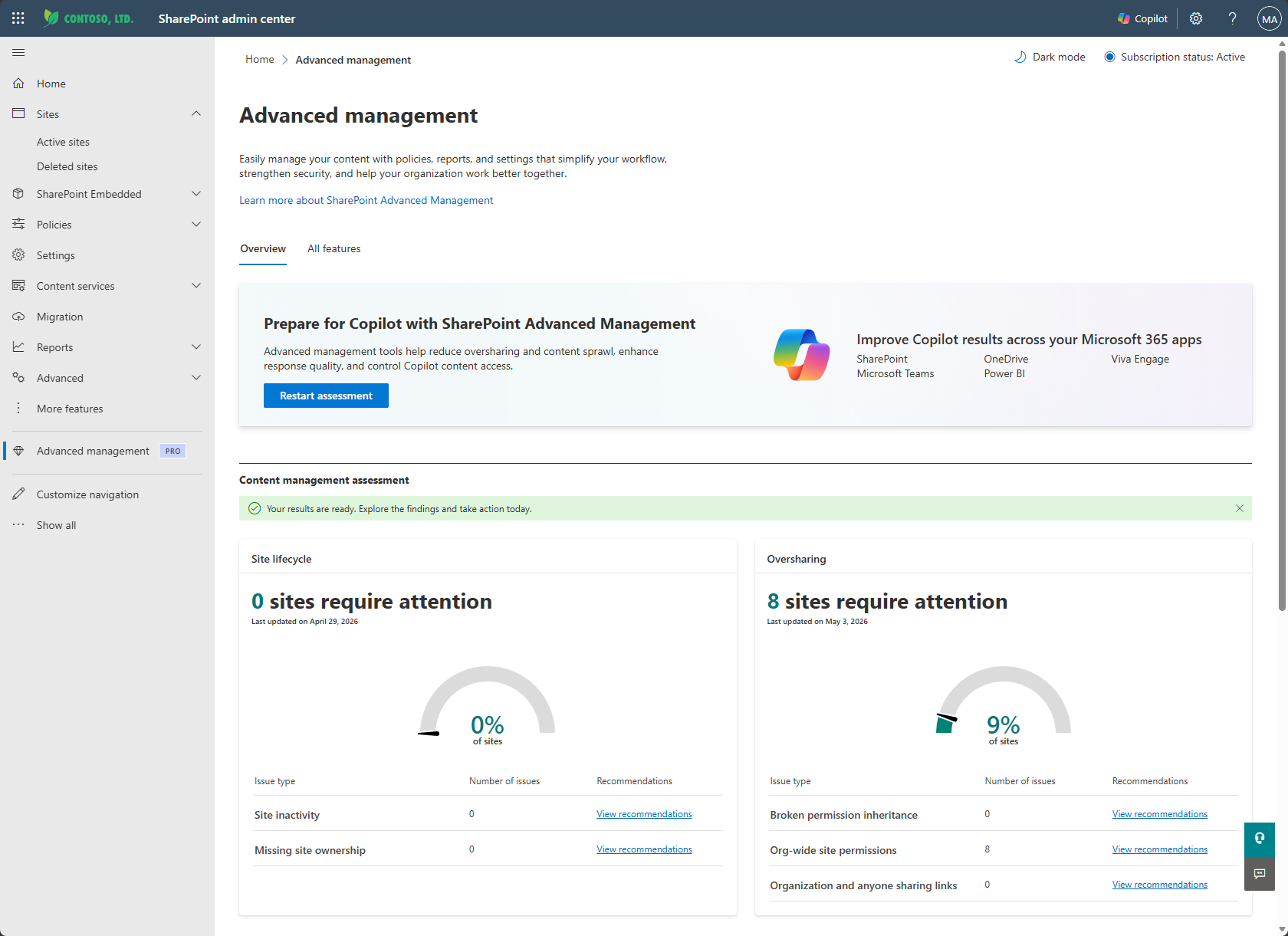
- Use the content management assessment: This hub provides a comprehensive set of tools for assessing and improving your organization's content management practices with actionable insights and recommendations.
- Set up a "block download" policy: Create and manage policies to block the ability to move or download files in SharePoint and OneDrive sites, and Teams meeting recordings.
- Generate app insights: Gain insights on the various non-Microsoft applications registered to your Microsoft Entra admin center and how they access your SharePoint content.
- Get AI insights: Use the Get AI insights button next to various reports in the SharePoint admin center. The AI insights feature extracts patterns from the report and offers a list of potential actions.
- Get insights on agents in SharePoint: Use this report to identify recently created agents across SharePoint and OneDrive sites, and identify sites with the highest number of agents created.
- Use restricted content discovery (RCD): Prevent high-risk SharePoint sites and files from surfacing in Microsoft Copilot and Agentic experiences.
- Use data access governance (DAG) reports for SharePoint and OneDrive sites: Identify sites that might contain overshared or sensitive content. AI insights can be generated from DAG reports to highlight access risk patterns and recommend next steps. You can also initiate site access reviews from a DAG report. DAG reports include:
- Permission state reports for sites, OneDrive sites, and files: Use this report to get a snapshot of your organization's current permission structure across all SharePoint and OneDrive sites, helping you understand how broadly your data is exposed and identify potential oversharing risks.
- Site permissions for a given user report: Use this report to get a list of all the sites a user can access and how access is granted.
- Sensitivity label snapshot report: Use this report to get a snapshot of sensitivity label distribution across all SharePoint and OneDrive sites.
- Sharing links activity reports: Use these reports to identify sites where users have created the most new sharing links within the last 28 days.
- Everyone except external users (EEEU) insights: Identify the top items or groups shared with EEEU in the last 28 days and policies applied to those sites.
- DAG reports and PowerShell: You can use the SharePoint Online PowerShell module to generate DAG reports.
- Initiate site access reviews: Initiate site access reviews to delegate the process of reviewing DAG reports to site owners of overshared sites.
- Use site policy comparison reports: Select one or more sites as your baseline, and then compare them to up to 10,000 target sites using AI.
- Monitor agent access to SharePoint and OneDrive sites: Use the agent access insights report to see how agents interact with SharePoint and OneDrive content.
- Restrict access to OneDrive sites with security groups: If necessary, you can restrict certain users from accessing or sharing OneDrive content by using security groups in Microsoft Entra ID.
- Restrict access to a specific user's OneDrive site: If necessary, you can restrict access to an individual's OneDrive site by using a security group in Microsoft Entra ID.
- Restrict OneDrive and SharePoint site creation: Using PowerShell, you can designate who can create OneDrive or SharePoint sites by using security groups in Microsoft Entra ID.
SAM prerequisites
To see the prerequisites for SAM, including the required licenses, roles, and PowerShell module, see SharePoint Advanced Management prerequisites.