Note
Access to this page requires authorization. You can try signing in or changing directories.
Access to this page requires authorization. You can try changing directories.
Azure Migrate provides a unified platform to discover, assess, plan, and migrate existing workloads to Azure. It supports workload identification, migration readiness evaluation, and planning for a move to Azure Container Apps.
Azure Migrate currently supports discovery of Java web apps running on Apache Tomcat and .NET Web Apps running on .NET Core. Use the discovered inventory and assessment insights to understand existing web apps, identify migration requirements, and plan their transition to Azure Container Apps.
The migration workflow continues in GitHub Copilot app modernization for application-level execution, including code changes, containerization, and deployment. Azure Migrate provides the discovery, assessment, and planning context; GitHub Copilot app modernization carries out the application migration to Azure Container Apps.
Migration approach
Moving web apps to Azure Container Apps involves the following phases:
| Phase | Description |
|---|---|
| Discover | Use Azure Migrate to inventory web apps and the servers that host them. Review dependencies to identify components that need to move together. |
| Assess | Review application readiness, migration issues, resource requirements, and available cost estimates. |
| Decide | Evaluate assessment findings and business requirements to select the apps and migration approach. |
| Plan migration | Generate a wave plan for the selected assessment and migration path, review the recommendations, and commit approved waves. |
| Migrate | Use GitHub Copilot app modernization to prepare, containerize, and deploy the applications to Azure Container Apps, then validate and switch traffic. |
Prerequisites
The migration requires:
- An Azure subscription and the permissions needed to use Azure Migrate.
- An Azure Migrate project.
- A configured Azure Migrate appliance with access to the servers that host the web apps.
- Supported web apps and the credentials required for discovery. Review the web app discovery requirements for the source VMware, Hyper-V, or physical server environment.
- Access to the application artifacts and configuration needed to prepare the apps for deployment.
- Tools to build and test a container image, and access to a container registry.
- A plan for databases, storage, messaging, and other services that the application uses.
Azure Container Apps supports Linux-based x86-64 (linux/amd64) container images. Review operating system and runtime dependencies as part of migration planning. Applications that depend on Windows-specific features need changes before they can run in Linux containers. For more information, see Containers in Azure Container Apps.
Discover
Use an Azure Migrate project to build an inventory of the web apps in the source environment.
- Configure the Azure Migrate appliance for the source environment and provide the credentials required to discover workloads.
- Enable web app discovery and allow the appliance to collect application configuration data.
- Review the discovered web apps, their hosting servers, and their dependencies.
- Identify the apps to migrate together and confirm that the discovery data is complete.
In the Azure Migrate project, use Explore inventory to review discovered workloads. Select Web apps to focus on the web app inventory.
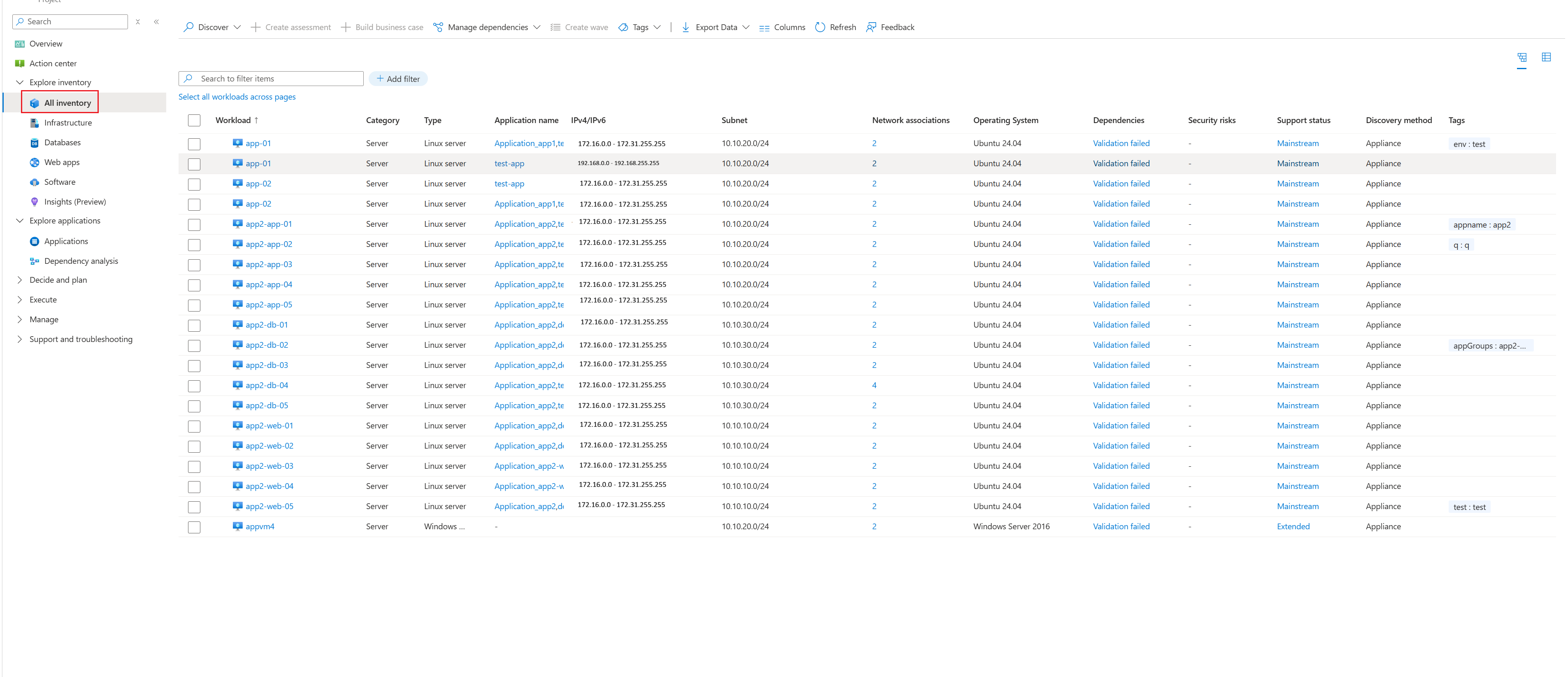
For guidance on the inventory views, see Review discovered inventory in Azure Migrate.
For more information, see Discover web apps in an existing Azure Migrate project and Dependency analysis.
Assess
Assess the discovered web apps in Azure Migrate to understand migration readiness and requirements before selecting a migration approach.
- In the Azure Migrate project, open Assessments under Decide and Plan, and select Create assessment.
- Name the assessment, add the discovered web apps, and review the selected workloads.
- Configure the applicable assessment settings, including target region, environment, and sizing criteria.
- Create the assessment and review readiness, migration warnings, resource recommendations, and available cost estimates.
Assessment findings identify apps that are ready to move, require changes, or need further investigation. Review the findings together with operating system compatibility, dependencies, and application requirements for Container Apps.
For the assessment workflow and report details, see Create a web app assessment and Review a web app assessment.
Decide
Use the discovery and assessment results to decide which web apps to migrate to Azure Container Apps and which changes must be completed first.
- Confirm suitability. Evaluate runtime compatibility, application state, networking, security, and scaling requirements against Container Apps capabilities.
- Evaluate business value and cost. Compare expected operational benefits and hosting costs with the current environment. Include application changes and dependent services in the estimate. Review Azure Container Apps billing for target-specific cost considerations.
- Choose the migration approach. Identify apps that can be containerized with limited changes and apps that require modernization before migration.
- Set priorities. Consider business criticality, technical complexity, dependencies, and acceptable downtime when choosing the initial migration scope.
Where applicable, use an Azure Migrate business case to support the broader investment decision. Review its scope and assumptions rather than treating estimates for other workload configurations as Container Apps cost estimates.
Plan migration
After reviewing the assessment and selecting a migration path, use wave planning in Azure Migrate (preview) to organize the assessed applications and workloads into migration batches. Azure Migrate recommends wave assignments and sequencing based on the assessment, application mappings, and available dependency data.
- In the Azure Migrate project, open Plan > Wave plan.
- Under Planning based on assessment, select the assessment. Under Selected path, select the migration path.
- Generate a wave plan if one isn't available for the selection.
- Review the proposed waves, recommended sequence, dependencies, risks, and estimates. Configure wave assignments if changes are needed.
- Download the plan for review with application owners and stakeholders.
- After approval, select Review and commit waves, select the approved waves, and commit them.
Committing a wave accepts the plan; it doesn't start migration. Committed waves are available under Execute > Waves. For the complete workflow, see Configure a wave plan in Azure Migrate.
Use the approved application scope and assessment findings to prepare the handoff to GitHub Copilot app modernization described in the next section.
Migrate
Continue the approved migration plan in GitHub Copilot app modernization, using the Azure Migrate assessment findings, application scope, and dependency information as context. The tooling handles application code changes, validation, containerization, and deployment to Azure Container Apps.
Follow the workflow for the application's language:
- Java: Migrate with GitHub Copilot app modernization, including containerization and deployment to Azure Container Apps.
- .NET: GitHub Copilot modernization overview and deployment workflow.
Review and approve the proposed actions, validate the deployed application, and complete the planned traffic cutover.