Note
Access to this page requires authorization. You can try signing in or changing directories.
Access to this page requires authorization. You can try changing directories.
Every Fabric data agent runs on a runtime. The runtime determines the agent's core components: the orchestration, planning, and routing logic, along with the built-in query-generation tools that translate natural-language questions into queries against your data sources.
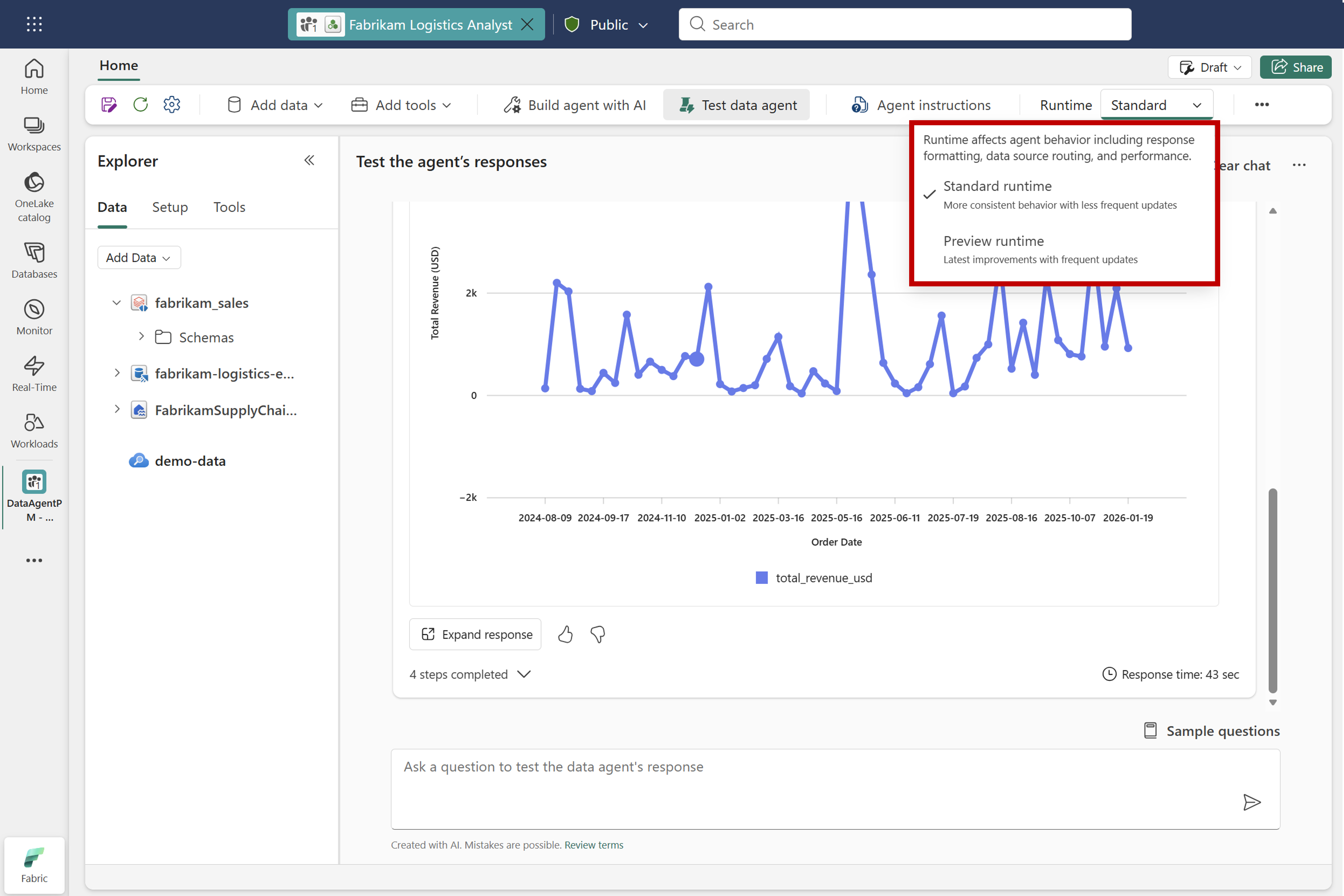
Fabric offers two runtimes:
- Standard runtime — the generally available (GA) runtime, optimized for stable, predictable behavior.
- Preview runtime — a runtime with the latest improvements and modifications to core components (for example, the built-in query-generation tools or the agent's routing logic), before those changes graduate to GA.
The runtime you choose determines how and when changes to the agent's core components reach your agent. It doesn't determine which data sources you can add. Some preview configurations, such as schema object descriptions and topics, are available only on the preview runtime.
Important
Model upgrades to the underlying large language model (LLM) are applied consistently across both the standard and preview runtimes. Runtime selection doesn't control which model the data agent uses.
Standard runtime
The standard runtime is the GA runtime and is the default for new data agents. It contains the generally available implementations of the agent's core components, including:
- Built-in query-generation tools that translate natural-language questions into queries against supported data sources, including Lakehouse, Data Warehouse, SQL Database, Mirrored Database, Eventhouse KQL Database, and Power BI semantic model.
- The core agent orchestration, planning, and routing logic.
Updates to the standard runtime are infrequent. Changes land here only after they pass validation in the preview runtime and graduate to GA. Choose the standard runtime for production data agents where consistent behavior and minimal churn between releases are important.
Preview runtime
The preview runtime contains the latest improvements to the built-in tools and orchestration before they graduate to GA. These updates can include:
- New built-in tools that aren't yet available on the standard runtime.
- Modifications and quality improvements to existing built-in tools (for example, updates to how the agent generates or validates queries for a given data source).
- Changes to the agent's core orchestration, planning, or routing logic.
Updates to the preview runtime are more frequent, and behavior can change between releases. Choose the preview runtime when you want to evaluate upcoming changes, validate that your agents continue to work as expected, or provide feedback on improvements before they reach GA.
What's currently in the preview runtime
The following updates are included in the preview runtime today. This list changes as new improvements land and as existing ones graduate to GA.
| Improvement | Feature | Description |
|---|---|---|
| Schema context for SQL data sources | Schema object descriptions (Preview) | Add business context for tables, columns, and other schema elements to help the data agent interpret large or ambiguous SQL schemas and generate more accurate queries. |
| Topic-based context for SQL data sources | Topics (Preview) | Add up to 1 million characters of instructions organized by topic. The data agent finds the sections relevant to a question and provides them to NL2SQL. |
| Newer model for SQL query generation | Advanced NL2SQL | Advanced NL2SQL runs on a newer model to improve query accuracy and reduce latency. |
| Better example query following | Advanced NL2SQL | NL2SQL adheres more closely to the patterns shown in your example query library, instead of adding extra logic or constraints that weren't in the examples. |
| Filter value substitution | Advanced NL2SQL | NL2SQL reasons through implied filter values and substitutes the correct ones, including when multiple categorical or boolean filters are implied rather than explicitly stated. |
| Ambiguity handling | Advanced NL2SQL | NL2SQL detects ambiguous questions and asks a clarifying question before generating SQL, instead of committing to an assumption that may produce the wrong answer. |
| More accurate complex question handling | Advanced DAX generation | DAX generation reasons across multiple steps, inspects results, resolves ambiguity, and refines its approach to answer complex questions more accurately. |
| More reliable filter generation | Advanced DAX generation | DAX generation searches values within semantic model columns to identify the correct filter values and generate more reliable queries. |
| Improved cross-source joins | Ontology as context | Improves responses to questions that require joining data across multiple sources within an Ontology. |
| Larger query results | - | The data agent can return up to 1,000 rows from a query, up from 25. |
You can also switch a data agent to the preview runtime programmatically by using the Fabric data agent Python SDK:
data_agent = FabricDataAgentManagement(data_agent_name)

# Switch to the preview runtime
data_agent.update_configuration(enable_preview_features=True)
config = data_agent.get_configuration()
print(f"Preview runtime enabled: {config.enable_experimental_features}")

# Switch back to the standard runtime
data_agent.update_configuration(enable_preview_features=False)
config = data_agent.get_configuration()
print(f"Preview runtime enabled: {config.enable_experimental_features}")
Note
The runtime that a published data agent uses is set by the agent's configuration at the time of publishing. If you publish a data agent while it's configured to use the preview runtime, the published version continues to run on the preview runtime until you republish the agent with a different runtime selection.