Note
Access to this page requires authorization. You can try signing in or changing directories.
Access to this page requires authorization. You can try changing directories.
Welcome to Employee Self-Service! We're excited to help your employees get answers and get things done across HR and IT, from finding a policy to updating their details or opening a ticket, all in one conversation.
What this guide is for: Employee Self-Service offers many options, and it can be hard to know where to begin. This guide gives you a prescriptive path from planning to a production rollout: what to do at each stage, who is involved, what to expect, and how you know you are ready to move on. It is a map, not a manual.
Recommended path: Start with personalized answers grounded in your HR policies and IT processes. The agent uses your existing policies, FAQs, and how-to guides to respond to employees' requests, and can tailor responses to their region and role when you configure user context. Employee Self-Service agents can also complete tasks for employees, but begin with grounded answers to keep your first launch small and manageable: one area (HR or IT), content you already have, and the connections needed for knowledge and user context.
Important
This playbook uses Agent lifecycle management (ALM), the opt-in Copilot Studio experience for authoring, validating, and promoting agent releases. Dev, Test, and Prod are deployment quality gates within the same Power Platform environment. Author and publish changes in Dev, deploy to Test for validation, and promote the validated version unchanged to Prod.
How long it takes: Plan for about 12 weeks from the start of planning to grounded, personalized answers available in production for a pilot group. The stage timeframes in this playbook are a recommended starting point based on a 12 week plan, not a fixed schedule. Your organization's staffing, review cadence, and scope decide the actual pace.
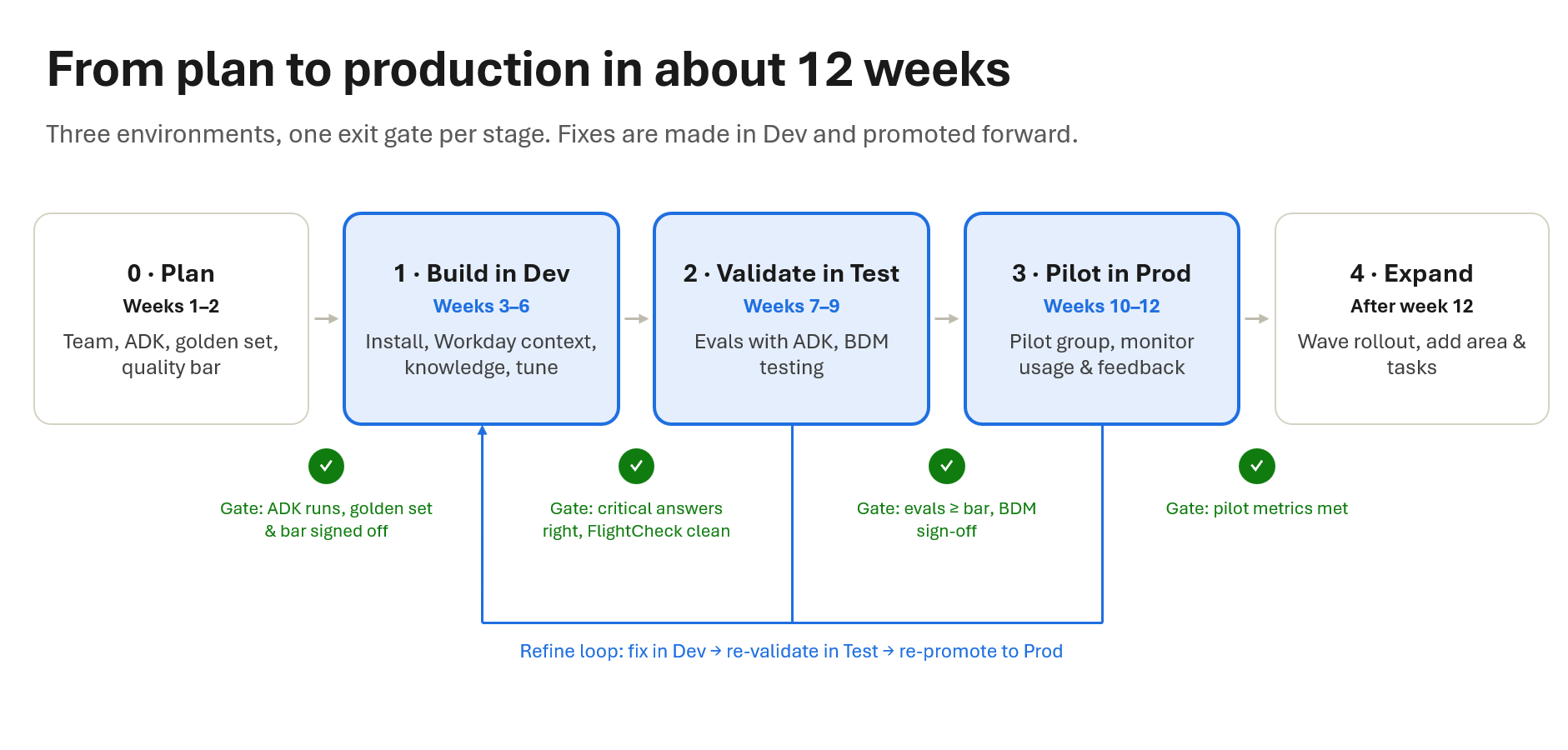 View the full-size deployment diagram
Playbook overview
Use the following stages to move from planning to a production pilot.
| Stage | Recommended timeframe* | Led by | Goal |
|---|---|---|---|
| Stage 0: Plan | Weeks 1-2 | HR or IT program owner | Everyone knows what you're building, who's doing it, and how you'll judge success. |
| Stage 1: Build in Dev | Weeks 3-6 | Copilot Studio maker | A working agent in Dev that gives credible answers to your golden set. |
| Stage 2: Validate in Test | Weeks 7-9 | Copilot Studio maker, with business decision makers (BDMs) | Evidence that your agent meets your quality bar, from automated evaluations and from the people who own the business outcome. |
| Stage 3: Pilot in Prod | Weeks 10-12 | HR or IT program owner, with the maker | Real usage and feedback that show you're ready to roll out broadly. |
| Stage 4: Expand | After week 12 | HR or IT program owner | Scale what works, and keep quality high as you grow. |
*Timeframes in this playbook are a recommended starting point based on a 12 week plan, not a fixed schedule. Your organization's staffing, review cadence, and scope decide the actual pace.
Stage 0: Plan — Set up your team, tools, golden set, and quality bar
Led by: HR or IT program owner.
Involved: Business sponsor, Copilot Studio maker, Power Platform administrator, Microsoft 365 administrator, content owners, and business decision makers (BDMs).
Goal: Everyone knows what you're building, who's doing it, and how you'll judge success.
- [ ] Assemble your team. You need an HR or IT program owner, a Copilot Studio maker (the person who builds the agent), a Power Platform administrator, a Microsoft 365 administrator, your content owners, and the business decision makers (BDMs) who will test and sign off. Involve legal, privacy, and security early. To set up user context, you'll also need an administrator of the HR system that stores employee attributes (such as Workday) starting in Stage 1.
- [ ] Pick one area. Start with HR or IT. You can add the other later.
- [ ] Confirm prerequisites. Confirm licenses and admin permissions, select the Power Platform environment where you'll manage the agent, and confirm that the selected Employee Self-Service template and declarative agent lifecycle experience are available in your tenant. Learn more: Deployment overview and its installation prerequisites.
- [ ] Make sure your maker can install and run the Agent Developer Kit (ADK). Install the Employee Self-Service Agent Developer Kit with the one-shot installer. Learn more: Agent Developer Kit overview · Install ADK with the one-shot installer.
- [ ] Build your golden set. Your golden set is the list of real employee questions your agent must answer well, and it drives your testing at every stage. See How to build your golden set.
- [ ] Get your content ready. Make sure the documents that answer your golden-set questions are current, consistent, and stored where Employee Self-Service can reach them (SharePoint or ServiceNow knowledge bases). Outdated or conflicting content is the most common cause of wrong answers, so fix it now.
- [ ] Agree on your quality bar. Adopt the recommended quality bar, or adjust it for your organization. Get sign-off from your program owner and BDMs before you start building.
Building the golden set and cleaning up content take the most time in this stage. Rushing them slows down every stage that follows.
Recommended quality bar
Agree on these targets in Stage 0 and use them at every gate. You can adjust the numbers for your organization, but keep the structure: a must-pass Critical set, zero tolerance for wrong answers on high-stakes questions, and sign-off from the business.
| Gate | What you measure | Recommended bar |
|---|---|---|
| Dev → Test | Manual review of the Critical golden set | Most answers correct, no blocking issues, FlightCheck clean. |
| Test → Pilot | Evaluation pass rate against your reporting target, Critical scenario group | 90% or higher. |
| Test → Pilot | Evaluation pass rate against your reporting target, Standard scenario group | 80% or higher. |
| Test → Pilot | Wrong answers on high-stakes questions (pay, leave, benefits, security) | Zero. |
| Test → Pilot | BDM sign-off | Signed off by the BDMs for the area. |
| Pilot → Rollout | Thumbs-up rate | [X]% or higher (set your target in Stage 0). |
| Pilot → Rollout | Fallback or unanswered rate | Trending down week over week. |
| Pilot → Rollout | Stability | No P1 issues for two consecutive weeks. |
Why this works: a high bar on a small Critical set protects employees on the questions that matter most. A lower bar on the broader Standard set keeps you moving, because the pilot teaches you more than further testing in Test. Set these as the reporting target for each scenario group when you review your evaluation results.
How to build your golden set
Your golden set is the list of real employee questions your agent must answer well. It's the foundation for manual review in Dev, automated evaluations in Test, and monitoring during your pilot. Build it with your content owners and business decision makers.
- Pull your ticket data. Export three to six months of HR cases or IT help desk tickets.
- Group by topic. Cluster tickets into topics, such as parental leave, time-off balance, password reset, or VPN access.
- Pick the top questions. Choose the 30 to 50 questions that cover about 80% of ticket volume. Write them the way employees actually ask them.
- Add high-stakes questions. Include questions where a wrong answer causes real harm, such as pay, leave, benefits, and security, even if they're less common.
- Add variants. Where the answer differs by region or role, add a version of the question for each major variant.
- Write the expected answer and source. For each question, record the correct answer and the document it comes from, and have content owners review them.
- Tag priority. Mark each question Critical (must pass) or Standard. High-stakes and highest-volume questions are Critical.
Use the template in Golden set template in the appendix. For more on choosing an evaluation approach, see Agent evaluations.
Exit gate: ADK is set up, and your golden set and quality bar are signed off by your program owner and BDMs.
Stage 1: Build in Dev — Set up your agent and tune its first responses
Led by: Copilot Studio maker.
Involved: Environment administrator, release manager, knowledge owners, SharePoint administrators, domain owners, and privacy and responsible AI reviewers.
Goal: A working agent in Dev that gives credible answers to your golden set.
- [ ] Install the Employee Self-Service agent if you haven't already. Follow Install an Employee Self-Service agent template, or use ADK to install the Employee Self-Service HR or IT agent in your selected Power Platform environment; ADK creates the agent in Copilot Studio for you. Learn more: ADK commands reference.
- [ ] Set up ALM. Enroll the installed agent in ALM to use the Dev, Test, and Prod quality gates within the same Power Platform environment. Author and publish changes at the Dev quality gate. Learn more: ALM enrollment.
- [ ] Set up user context. Connect an external system, such as Workday, so the agent knows who each employee is, such as their region and role, and tailors answers to them. Learn more: Customize Employee Self-Service .
- [ ] Connect knowledge sources. Connect the SharePoint sites or ServiceNow knowledge bases where your policies and articles live, confirm source permissions with your security team, and start with the sources that answer your golden set. Learn more: Configure SharePoint as a knowledge source · Connect ServiceNow Knowledge.
- [ ] Set the basics. Set the agent's name, logo, and description; instructions that guide its tone and behavior, including how it handles sensitive topics; a few starter prompts from your golden set; and a fallback that tells employees where to go when the agent can't help. Learn more: Customize Employee Self-Service.
- [ ] Run FlightCheck. Run
/flightcheckin ADK and follow the prescriptions in the FlightCheck report to resolve any blockers. Learn more: ADK commands reference · Run FlightCheck without the full ADK. - [ ] Review the first responses. Ask the agent every question in your critical golden set, including the region and role variants, and note what's right, wrong, or incomplete.
- [ ] Fine-tune with ADK. For each issue, give ADK the prompt, the agent's response (including any error message), the source content you expected it to use, and the expected answer. ADK identifies next steps and can change the agent configuration directly. If the problem is the content itself, fix the content.
First responses won't be perfect. Gaps usually trace back to missing or conflicting content, or knowledge sources that are too broad or too narrow. Expect several rounds of tuning and retesting.
Exit gate: Most critical golden-set answers are correct in manual review, there are no blocking issues, and FlightCheck is clean.
Stage 2: Validate in Test — Prove quality with evaluations and business testing
Led by: Copilot Studio maker, with business decision makers (BDMs).
Involved: Evaluation lead, QA team, domain owners, and security reviewers.
Goal: Evidence that your agent meets your quality bar, from automated evaluations and from the people who own the business outcome.
- [ ] Promote to Test using your ALM process, then run FlightCheck again. Learn more: Agent lifecycle management.
- [ ] Generate evaluations with ADK. Run
/evaluatein ADK to generate test cases from your golden set, then tag each as a Critical or Standard scenario group. Review them: check that each expected answer is correct. Learn more: Generate test cases in ADK ·/evaluatecommand. - [ ] Run your evaluations. Publish and run the test set from ADK, or upload it to the Copilot Studio evaluator, and record the pass rate against your reporting target for each scenario group. Learn more: Publish and run the test set from ADK.
- [ ] Have BDMs test hands-on. BDMs ask their own questions as well as golden-set questions, and score each response with the Business decision maker scoring rubric in the appendix. They catch issues evaluations miss, such as tone, completeness, and policy nuance.
- [ ] Refine and repeat. Fix issues in Dev, promote again, and rerun your evaluations. Add a new evaluation for every gap BDMs find, so it stays fixed.
Two or three refine cycles are normal. Aim for confidence, not perfection: real users will teach you more.
Exit gate: Critical scenario group pass rate of 90% or higher against your reporting target, Standard scenario group pass rate of 80% or higher, zero wrong answers on high-stakes questions, and BDM sign-off.
Stage 3: Pilot in Prod — Learn from real employees
Led by: HR or IT program owner, with the maker.
Involved: Release manager, Microsoft 365 administrator, operations team, adoption lead, pilot champions, service desk, domain owners, and capacity owner.
Goal: Real usage and feedback that show you're ready to roll out broadly.
- [ ] Promote to Production. Complete your organizational go/no-go review, then promote the validated Test version to Prod unchanged and run FlightCheck again. Learn more: Publish the Employee Self-Service declarative agent.
- [ ] Launch to a pilot group. Have the Microsoft 365 administrator review the agent request and assign about 5-10% of employees, across a mix of regions and roles. Tell employees the agent is in preview, and encourage them to try a variety of questions using thumbs up/thumbs down and detailed feedback.
- [ ] Monitor usage and feedback weekly. Track usage, satisfaction (thumbs-up rate), unanswered or fallback questions, and escalations to live support.
- [ ] Triage weekly. Review feedback and analytics every week. Fix issues in Dev, validate them in Test, and promote again. Add evaluations for new failure patterns, so each stays fixed.
Real employees will ask questions you didn't anticipate. Your golden set and evaluations will grow during the pilot, and that's the point.
Exit gate: Deployment readiness: your thumbs-up rate meets your target, the fallback rate is trending down, and there have been no P1 issues for two consecutive weeks.
Stage 4: Expand — Roll out to your organization and unlock more scenarios
Led by: HR or IT program owner.
Involved: Maker, external-system administrators, identity and security teams, and domain owners.
Goal: Scale what works, and keep quality high as you grow.
For more scenario coverage or a new domain (HR or IT), follow Stages 0 through 3 again — plan, build, validate, and pilot — before you add it to this rollout.
- [ ] Roll out in waves. Expand to larger groups in steps, up to your whole organization, and check analytics after each wave.
- [ ] Add the other area. Add HR or IT, starting again from a golden set for that area.
- [ ] Add additional scenarios. Let employees view or update their records in HR systems like Workday, or open ServiceNow tickets. Use pilot evidence to select one integration and one scenario and follow the guidance: Workday or ServiceNow HR and IT.
- [ ] Keep quality up. Rerun your evaluations before every change, and keep reviewing analytics and feedback.
Exit gate: For a selected integration, system owners approve access tests and connection readiness. For audience-only expansion, validate the new group's access, experience, support, and capacity.
Appendix
Use these templates to support the stages described earlier in this playbook.
Golden set template
Example golden set template:
| # | Question (as employees ask it) | Topic | Region / role variant | Expected answer | Source document | Priority |
|---|---|---|---|---|---|---|
| 1 | How many weeks of parental leave do I get? | Leave | US, full-time | [Answer from policy] | US Parental Leave Policy | Critical |
| 2 | How many weeks of parental leave do I get? | Leave | UK, full-time | [Answer from policy] | UK Family Leave Policy | Critical |
| 3 | Can I carry over unused vacation days? | Time off | All | [Answer from policy] | Time Off Policy | Standard |
| 4 | How do I reset my password? | IT access | All | [Answer from KB] | Password Reset KB article | Critical |
Business decision maker scoring rubric
Example scoring rubric:
| Score | Meaning |
|---|---|
| 3 – Correct | Accurate, complete, right for this employee, and based on the right source. |
| 2 – Partially correct | Accurate but incomplete, or needs minor fixes to wording or tone. |
| 1 – Incorrect | Wrong, outdated, or not tailored to this employee. |
| 0 – Harmful or no answer | Could cause harm, or the agent failed to answer a question it should have. |
Fix any score of 0 or 1 on a Critical question before BDMs sign off.
Related content
- Manage the lifecycle of Employee Self-Service declarative agents.
- Deploy Employee Self-Service declarative agents.
- Customize the Employee Self-Service declarative agent.
- Craft instructions for the Employee Self-Service declarative agent.
- Connect ServiceNow Knowledge to the Employee Self-Service declarative agent.
- Integrate ServiceNow HR and IT with the Employee Self-Service declarative agent.
- Set up the Employee Self-Service hub for declarative agents.