Note
Access to this page requires authorization. You can try signing in or changing directories.
Access to this page requires authorization. You can try changing directories.
[This article is prerelease documentation and is subject to change.]
Use Azure Application Insights to monitor Copilot Studio agent traces exported from a managed environment. After you configure export, use Azure Monitor and Application Insights to validate agent runs, monitor node and tool execution, create alerts, and build custom queries and dashboards for operational analysis.
Note
- Environment-level telemetry is available for agents powered by both the standard harness and the GitHub Copilot harness.
- Following the private preview, root agent invocations (
invoke_agent) are now emitted asdependencies(together with all other spans), rather thanrequests. As a result, agent root invocation traces might still appear in therequeststable until the global rollout is complete. - To evaluate this preview feature using the latest telemetry strategy and capabilities, you can test in a non-production environment with the Early release cycle enabled.
- This feature is currently rolling out globally and might not yet be fully available in your environments.
- This feature is available only for managed environments.
- Only logs for agents that are built in Copilot Studio, excluding declarative agents, are available in Application Insights.
- To adopt only an environment-level Application Insights strategy for Copilot Studio agent telemetry, organizations can choose to disable agent-level Application Insights telemetry.
This article explains how to configure environment-level export of Copilot Studio agent traces to Azure Application Insights through the Power Platform admin center.
Important
This article contains Microsoft Copilot Studio preview documentation and is subject to change.
Preview features aren't meant for production use and may have restricted functionality. These features are available before an official release so that you can get early access and provide feedback.
If you're building a production-ready agent, see Microsoft Copilot Studio Overview.
Prerequisites
Before you set up the data export connection, complete the prerequisites of Export data to Application Insights.
What gets exported
When you enable export, Copilot Studio agent trace telemetry is written to Application Insights in a trace-oriented, OpenTelemetry-aligned observability format that supports investigation, dashboards, and alerting.
Copilot Studio agent events are written to the dependencies table as spans. Each exported event (InvokeAgent, ExecuteTool, and OutputMessages) is a single span row (itemType = dependency).
How spans form a trace
The telemetry follows the OpenTelemetry trace-and-span model, reconstructed through the operation_Id and operation_ParentId columns:
- Each agent turn is its own trace, identified by a shared
operation_Idwhich enables Application Insights to group the turn and render it in the end-to-end transaction view. - The
InvokeAgentspan is the root of its turn's trace. ItsExecuteTooland connectedOutputMessagesspans nest beneath it, each carryingoperation_ParentId= theInvokeAgentspan'sid. - A conversation spans multiple turns, each emitted as a separate trace. Group or filter by
gen_ai.conversation.idto thread the turns of one conversation back together. OutputMessagesspans don't always emit anInvokeAgentroot, which means they can (by design) arrive with no matching parent and appear as a standalone, single-node trace.
Create an export package
Create an export package with the export type set to Copilot Studio by following the instructions in Create an export package of the Power Platform admin center documentation.
Validate the configuration
After you save the export configuration, run a test conversation with the agent and confirm that telemetry arrives in Application Insights. Telemetry delivery can take up to 24 hours on new configurations. Validate that:
- Agent spans appear in the
dependenciestable. - Each turn's
InvokeAgent,ExecuteTool, andOutputMessagesspans share anoperation_Id.
Application Insights fields
The following table shows the fields in the dependencies table, and which fields are populated for each of the three exported agent events: InvokeAgent, ExecuteTool, and OutputMessages. Agent and operation semantics are in customDimensions (the gen_ai.* keys, such as gen_ai.operation.name), not in the native columns.
Fields in dependencies table |
InvokeAgent | ExecuteTool | OutputMessages | Sample value |
|---|---|---|---|---|
timestamp [UTC] |
✔️ | ✔️ | ✔️ | 6/11/2026, 5:02:13.501 AM |
id |
✔️ | ✔️ | ✔️ | 1111aaa1-aa11-11aa-11a1-a1aaa1111aa1 |
name |
✔️ | ✔️ | ✔️ | InvokeAgent / ExecuteTool / OutputMessages |
resultCode |
✔️ | ✔️ | ✔️ | OK, ERROR |
type |
✔️ | ✔️ | ✔️ | GenAI |
target |
✔️ | ✔️ | ✔️ | GenAI |
data |
✔️ | ✔️ | ✔️ | invoke_agent / execute_tool / output_messages |
success |
✔️ | ✔️ | ✔️ | True |
duration |
✔️ | ✔️ | ✔️ | 0 |
performanceBucket |
✔️ | ✔️ | ✔️ | <250ms |
itemType |
✔️ | ✔️ | ✔️ | dependency |
customDimensions |
✔️ | ✔️ | ✔️ | Learn more in customDimension properties |
operation_Id |
✔️ | ✔️ | ✔️ | trace-1111aaa1-aa11-11aa-11a1-a1aaa1111aa1 (shared by every span in the turn) |
operation_ParentId |
✔️ | ✔️ | ✔️ | The turn's InvokeAgent id for child spans; the trace root for the InvokeAgent span |
client_Type |
✔️ | ✔️ | ✔️ | PC |
client_IP |
✔️ | ✔️ | ✔️ | 0.0.0.0 |
client_City |
✔️ | ✔️ | ✔️ | San Jose |
client_StateOrProvince |
✔️ | ✔️ | ✔️ | California |
client_CountryOrRegion |
✔️ | ✔️ | ✔️ | United States |
appId |
✔️ | ✔️ | ✔️ | 11111a1a-1111-1111-a111-1a1a1a11111a |
appName |
✔️ | ✔️ | ✔️ | - |
iKey |
✔️ | ✔️ | ✔️ | aa111a1a-a1aa-111a-111a-a111a111111a |
sdkVersion |
✔️ | ✔️ | ✔️ | dotnetc:2.23.0-29 |
itemId |
✔️ | ✔️ | ✔️ | a1a1111a-1111-11a1-1111-111111aa1a1a |
itemCount |
✔️ | ✔️ | ✔️ | 1 |
_ResourceId |
✔️ | ✔️ | ✔️ | - |
customDimensions properties
Every span includes the customDimensions JSON. The following table shows common keys that appear on every span:
| Key | Sample value |
|---|---|
SpanId |
1111aaa1-aa11-11aa-11a1-a1aaa1111aa1 |
error.type |
404 |
Status.code |
1, 2 |
Status.message |
Descriptive failure message |
gen_ai.agent.id |
1aa11a11-1a1a-1a11-1a1a-1111aa1111aa |
gen_ai.agent.name |
MCS Agent |
gen_ai.conversation.id |
aaaaa111-1a1a-1111-1aa1-a111111a11a1 |
gen_ai.request.model |
Sonnet46 |
gen_ai.operation.name |
invoke_agent / execute_tool / output_messages |
env.id |
111a1aa1-a1aa-aaa1-a11a-11a111111111 |
microsoft.tenant.id |
11aaa111-1a11-1a1a-a111-aa1a111a111a |
microsoft.a365.agent.blueprint.id |
1111111a-aa11-1a11-a1a1-a11a1111a1a1 |
microsoft.a365.agent.platform.id |
111a1aa1-…_1a11111a-… |
microsoft.channel.name |
Copilot Studio Test Pane |
resource.provider |
copilot studio |
signal.category |
default |
a365.enabled |
True |
appinsights.enabled |
True |
user.id |
- |
user.email |
My.User@mytenant.onmicrosoft.com |
user.name |
My User |
client.address |
::ffff:00.00.00.00 |
telemetry.sdk.name |
A365ObservabilitySDK |
telemetry.sdk.language |
dotnet |
telemetry.sdk.version |
1.1.9.43597 |
Event-specific keys
The following table shows the event-specific keys:
| Key | InvokeAgent | ExecuteTool | OutputMessages | Description |
|---|---|---|---|---|
gen_ai.input.messages |
✔️ | - | - | JSON array of {role, parts:[{content, type}]}—the user prompt |
gen_ai.output.messages |
- | - | ✔️ | JSON array—the agent's reply |
gen_ai.tool.name |
- | ✔️ | - | For example, workiqsharepoint:mcp_SharePointRemoteServer |
gen_ai.tool.type |
- | ✔️ | - | For example, MCP - Power Platform Connector |
gen_ai.tool.call.id |
- | ✔️ | - | Tool invocation identifier |
gen_ai.tool.call.arguments |
- | ✔️ | - | JSON payload sent to the tool |
gen_ai.tool.call.result |
- | ✔️ | - | JSON payload returned by the tool |
Discover the current schema
The schema documented in this article might evolve over time. Rather than relying solely on the tables mentioned earlier, use the following queries to inspect the latest schema live in your own environment.
List native table columns
The following query returns the column-level schema of the dependencies table. Use it to confirm available native columns when building queries, dashboards, or alerts.
dependencies
| getschema
| project ColumnName, ColumnType
| order by ColumnName asc
Discover customDimensions keys (dynamic properties)
The following query lists every key inside the customDimensions JSON in the dependencies table: the property name, which agent events it appears on (InvokeAgent, ExecuteTool, OutputMessages), and a sample value. Unlike the native column schema, these properties are dynamic, so this query stays accurate as the SDK adds new gen_ai.* or other keys. Use it as the live source of truth for available attributes.
dependencies
| where timestamp > ago(7d)
| mv-expand Key = bag_keys(customDimensions) to typeof(string)
| summarize Events = make_set(name), SampleValue = take_any(tostring(customDimensions[Key])) by Key
| order by Key asc
Monitor exported telemetry
Use the Application Insights Logs to query agent activity and investigate agent or tool execution. All exported telemetry lands in the dependencies table as spans:
- Each agent turn is a trace, grouped by a shared
operation_Id. - The
InvokeAgentspan is the trace root;ExecuteToolandOutputMessagesspans nest beneath it throughoperation_ParentId. - Group by
gen_ai.conversation.idto thread multiple turns of the same conversation, and split that ID on_to include sub-agent traces.
Agents (preview) blades
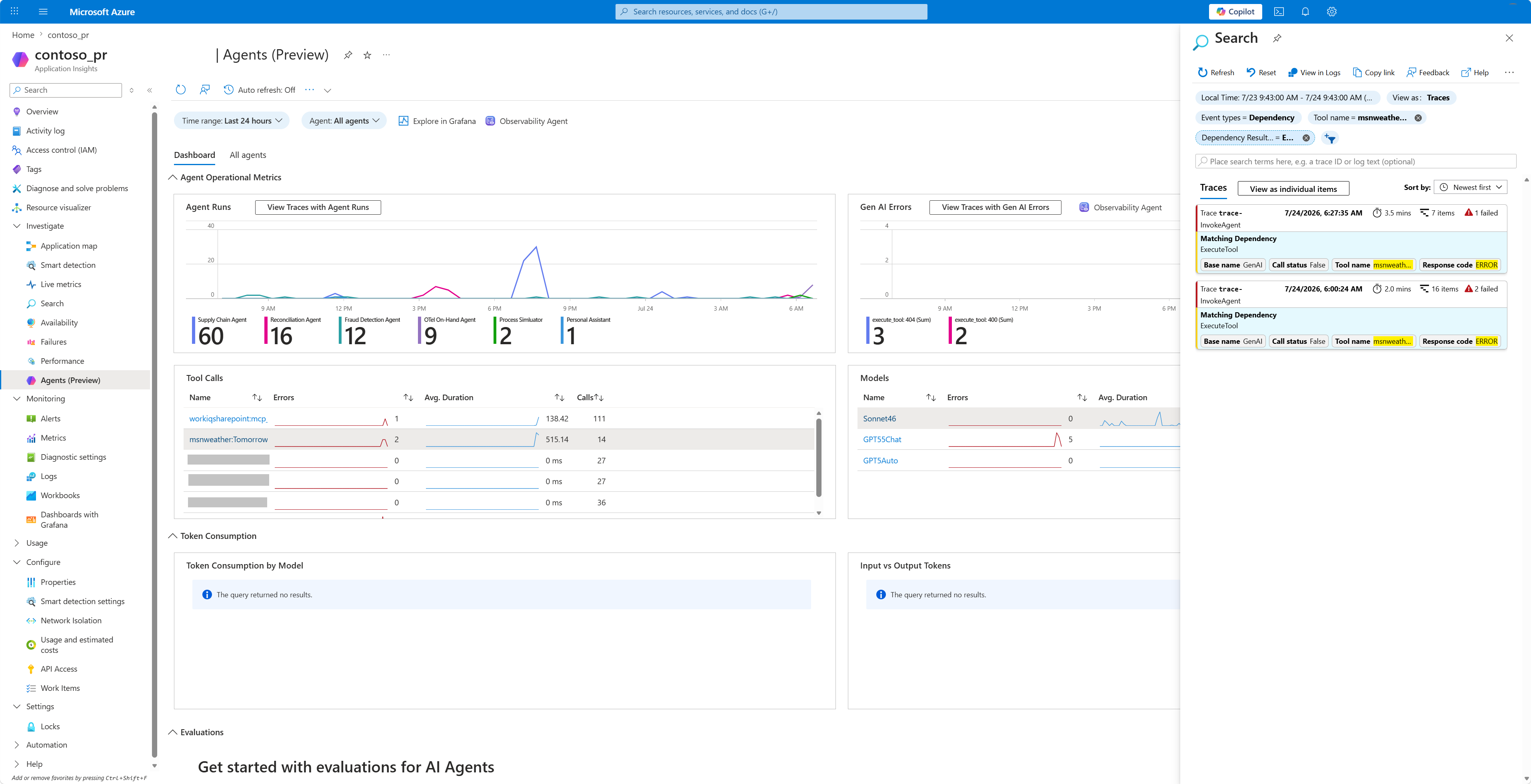
In addition to Logs, Application Insights provides built-in Agents (preview) views that visualize the exported GenAI telemetry without writing Kusto queries. As Copilot Studio writes its spans to the dependencies table, these blades read directly from that data:
- Agent Runs: Lists agent invocations built from the
InvokeAgentspans, with their duration, success, and the conversation each run belongs to. Some limitations apply; learn more in Known limitations and considerations. - Tools: Aggregates the
ExecuteToolspans to show which tools the agents call, how often, and how they perform. - Models: Summarizes model usage across runs, surfacing the models invoked and their call patterns.
Analyze agent telemetry with Application Insights
After you connect your environment to Application Insights, it logs agent telemetry data when users interact with the agent, including during testing within Copilot Studio. To view the logged telemetry data, go to the Logs section of your Application Insights resource in Azure. Here, you can use Kusto queries to query and analyze your data. Learn more in Example queries.
Example queries
The following Kusto query examples reconstruct Copilot Studio agent conversations from the dependencies table in Application Insights. As every span shares a trace operation_Id per turn, the queries order spans root-first (the InvokeAgent span before its child spans) within each trace.
Query 1: Return a full trace for a specific conversation ID
This query returns every span for one known conversation, ordered chronologically with each root span listed before its child spans. Replace the Conversation ID placeholder with your agent's conversation ID. You can find it by entering the following command while testing your custom agent: /debug conversationid.
let LatestConvo = "<Conversation ID>";
dependencies
| where tostring(customDimensions["gen_ai.conversation.id"]) == LatestConvo
| order by operation_Id asc, iff(name == "InvokeAgent", 0, 1) asc, timestamp asc
| project timestamp, name, id, operation_Id,
          operation_ParentId, duration, target, type, cloud_RoleName,
          resultCode, customDimensions
Query 2: Return the latest conversation for a specific agent
This query finds the most recent conversation for a named agent within the specified time window. It returns every span for that conversation in the same chronological, root-first order. Replace the Agent name placeholder with your agent's name.
let Window = 7d;
let AgentName = "<Agent name>";
let LatestConvo = toscalar(
    dependencies
    | where timestamp > ago(Window)
    | where tostring(customDimensions["gen_ai.agent.name"]) == AgentName
    | where isnotempty(tostring(customDimensions["gen_ai.conversation.id"]))
    | top 1 by timestamp desc
    | project tostring(customDimensions["gen_ai.conversation.id"])
);
dependencies
| where timestamp > ago(Window)
| where tostring(customDimensions["gen_ai.conversation.id"]) == LatestConvo
| order by operation_Id asc, iff(name == "InvokeAgent", 0, 1) asc, timestamp asc
| project timestamp, name, id, operation_Id,
          operation_ParentId, duration, target, type, cloud_RoleName,
          resultCode, customDimensions
Query 3: Expand known genAI OpenTelemetry properties into columns
This query returns the same trace as query 2, but it also parses each known OpenTelemetry semantic-convention key into its own named column. The result is a flat, explicitly defined table where you can sort, filter, and scan the generative AI fields such as tool name, model, user prompt, agent reply, and conversation ID directly. Replace the Agent name placeholder with your agent's name.
let Window = 7d;
let AgentName = "<Agent name>";
let LatestConvo =
    toscalar(
        dependencies
        | where timestamp > ago(Window)
        | extend
            AgentName_ = tostring(customDimensions["gen_ai.agent.name"]),
            ConversationId_ = tostring(customDimensions["gen_ai.conversation.id"])
        | where AgentName_ == AgentName
        | where isnotempty(ConversationId_)
        | summarize arg_max(timestamp, ConversationId_)
        | project ConversationId_
    );
dependencies
| where timestamp > ago(Window)
| extend
    ConversationId = tostring(customDimensions["gen_ai.conversation.id"])
| where ConversationId == LatestConvo
| extend
    OperationName    = tostring(customDimensions["gen_ai.operation.name"]),
    AgentId          = tostring(customDimensions["gen_ai.agent.id"]),
    AgentName        = tostring(customDimensions["gen_ai.agent.name"]),
    Model            = tostring(customDimensions["gen_ai.request.model"]),
    ToolName         = tostring(customDimensions["gen_ai.tool.name"]),
    ToolType         = tostring(customDimensions["gen_ai.tool.type"]),
    ToolCallId       = tostring(customDimensions["gen_ai.tool.call.id"]),
    ToolArguments    = tostring(customDimensions["gen_ai.tool.call.arguments"]),
    ToolResult       = tostring(customDimensions["gen_ai.tool.call.result"]),
    EnvironmentId    = tostring(customDimensions["env.id"]),
    TenantId         = tostring(customDimensions["microsoft.tenant.id"]),
    ChannelName      = tostring(customDimensions["microsoft.channel.name"]),
    BlueprintId      = tostring(customDimensions["microsoft.a365.agent.blueprint.id"]),
    PlatformId       = tostring(customDimensions["microsoft.a365.agent.platform.id"]),
    ResourceProvider = tostring(customDimensions["resource.provider"]),
    SignalCategory   = tostring(customDimensions["signal.category"]),
    UserId           = tostring(customDimensions["user.id"]),
    UserName         = tostring(customDimensions["user.name"]),
    UserEmail        = tostring(customDimensions["user.email"])
| extend
    InputMessages  = parse_json(tostring(customDimensions["gen_ai.input.messages"])),
    OutputMessages = parse_json(tostring(customDimensions["gen_ai.output.messages"]))
| extend
    UserInput   = tostring(InputMessages[0].parts[0].content),
    AgentOutput = tostring(OutputMessages[0].parts[0].content)
| order by
    operation_Id asc,
    iff(name == "InvokeAgent", 0, 1) asc,
    timestamp asc
| project
    timestamp, name, id, operation_Id, operation_ParentId, OperationName, ConversationId,
    AgentId, AgentName, Model, ToolName, ToolType, ToolCallId, ToolArguments, ToolResult,
    UserInput, AgentOutput, EnvironmentId, TenantId, ChannelName, BlueprintId, PlatformId,
    ResourceProvider, SignalCategory, UserId, UserName, UserEmail, duration, target, type,
    cloud_RoleName, resultCode, customDimensions
Query 4: Expand all genAI OpenTelemetry properties dynamically
This query returns the same spans as query 3, but every gen_ai.* key is dynamically unpacked from customDimensions into its own ga_-prefixed column. As the projection is dynamic, any new gen_ai.* attribute that the SDK emits later appears automatically without changing the query. Replace the Agent name placeholder with your agent's name.
let Window = 7d;
let AgentName = "<Agent name>";
let LatestConvo = toscalar(
    dependencies
    | where timestamp > ago(Window)
    | where tostring(customDimensions["gen_ai.agent.name"]) == AgentName
    | where isnotempty(tostring(customDimensions["gen_ai.conversation.id"]))
    | top 1 by timestamp desc
    | project tostring(customDimensions["gen_ai.conversation.id"])
);
dependencies
| where timestamp > ago(Window)
| where tostring(customDimensions["gen_ai.conversation.id"]) == LatestConvo
| order by operation_Id asc, iff(name == "InvokeAgent", 0, 1) asc, timestamp asc
| mv-apply Key = bag_keys(customDimensions) on (
    where Key startswith "gen_ai."
    | summarize OTelGenAI = make_bag(bag_pack(tostring(Key), customDimensions[tostring(Key)]))
  )
| project timestamp, name, id, operation_Id, operation_ParentId,
          duration, target, type, cloud_RoleName, resultCode,
          OTelGenAI, customDimensions
| evaluate bag_unpack(OTelGenAI, 'ga_')
Query 5: Return the latest conversation for a root agent with all its children, including sub-agents
This query returns the most recent conversation for a named agent. It returns every span for that conversation and for all first-level sub-agents it invoked. When an agent calls another agent as a tool, the sub-agent inherits the parent's conversation ID with a _<subConversationId> suffix. The whole tree is reconstructed by matching on the top-level ID. Replace the Agent name placeholder with your agent's name.
let Window = 7d;
let AgentName = "<Agent name>";
let LatestRoot =
    toscalar(
        dependencies
        | where timestamp > ago(Window)
        | extend
            AgentName_ = tostring(customDimensions["gen_ai.agent.name"]),
            ConversationId = tostring(customDimensions["gen_ai.conversation.id"])
        | where AgentName_ == AgentName
        | where isnotempty(ConversationId)
        | where ConversationId !has "_"
        | summarize arg_max(timestamp, ConversationId)
        | project ConversationId
    );
dependencies
| where timestamp > ago(Window)
| extend
    ConversationId = tostring(customDimensions["gen_ai.conversation.id"]),
    AgentName_ = tostring(customDimensions["gen_ai.agent.name"]),
    ToolName = tostring(customDimensions["gen_ai.tool.name"]),
    ToolResult = tostring(customDimensions["gen_ai.tool.callresult"])
| where isnotempty(ConversationId)
| where ConversationId == LatestRoot
    or ConversationId startswith strcat(LatestRoot, "_")
| extend
    Depth = countof(ConversationId, "_"),
    AgentRole = iff(ConversationId == LatestRoot, "root", "sub-agent")
| extend
    InputMessages = parse_json( tostring(customDimensions["gen_ai.input.messages"]) ),
    OutputMessages = parse_json( tostring(customDimensions["gen_ai.output.messages"]) )
| extend
    UserInput = tostring(InputMessages[0].parts[0].content),
    AgentOutput = tostring(OutputMessages[0].parts[0].content)
| order by timestamp asc
| project
    timestamp, name, AgentRole, Depth, AgentName, ToolName, ToolResult, UserInput,
    AgentOutput, id, operation_Id, operation_ParentId, ConversationId, duration,
    target, type, cloud_RoleName, resultCode, customDimensions
Known limitations and considerations
- The
durationvalue isn't available for traces of agents powered by the standard harness. - Agent and tool execution errors aren't currently reflected correctly in trace statuses.
- Based on your data residency requirements, you might want to use dedicated Application Insights resources for each environment region.
- Sub-agent spans currently parent to the
InvokeAgentspan that invoked the agent, instead of theInvokeAgentspan inside their own trace. - Trace and span IDs currently emit as GUIDs (with prefix where needed) rather than fully OpenTelemetry-standard 32-hex-char trace ID and 16-hex-char span ID aligned.
- Make sure local authentication is enabled on the target Application Insights resource.
- Telemetry export isn't transactional. During transient service events, small amounts of data loss can occur.
- Data inconsistencies might occur as schema-related ingestion updates are rolled out.
- Topic-related events such as
TopicStart,TopicAction, andTopicEndaren't captured with environment-level telemetry. - To simplify reporting and troubleshooting, avoid sending both agent-level and environment-level telemetry to the same Application Insights instance.
- The telemetry emitted for agents authored in the agents powered by the GitHub Copilot harness might differ from agents built in the agents powered by the standard harness authoring experience.