Remarque
L’accès à cette page requiert une autorisation. Vous pouvez essayer de vous connecter ou de modifier des répertoires.
L’accès à cette page requiert une autorisation. Vous pouvez essayer de modifier des répertoires.
Importante
Les plug-ins MCP et API sont pris en charge en tant qu’actions dans les agents déclaratifs. Elles ne sont pas activées en tant qu’expériences autonomes dans Microsoft 365 Copilot.
Les plug-ins d’API sont des actions personnalisées pour les agents déclaratifs qui connectent une API REST avec une spécification OpenAPI à Microsoft 365 Copilot. Ce guide montre comment ajouter un plug-in d’API à un agent déclaratif à l’aide de TypeSpec et de Microsoft 365 Agents Toolkit.
Configuration requise
- Configuration requise spécifiée dans Configuration requise pour les options d’extensibilité de Copilot
- Une API REST existante (cette procédure pas à pas utilise l’API d’espace réservé JSON)
- Visual Studio Code
- Microsoft 365 Agents Toolkit
- Un agent créé avec Microsoft 365 Agents Toolkit et TypeSpec pour Microsoft 365 Copilot
Conseil
Pour obtenir de meilleurs résultats, assurez-vous que l’API que vous générez respecte les instructions détaillées dans Comment rendre un document OpenAPI efficace dans l’extension de Copilot.
Configurer le projet de plug-in API dans VS Code
Cet article part du principe que vous disposez déjà d’un projet d’agent déclaratif créé avec Microsoft 365 Agents Toolkit et TypeSpec. Vous ajoutez un plug-in d’API à ce projet en définissant ses opérations d’API REST dans TypeSpec, puis en mettant en service l’agent. Les sections suivantes décrivent chaque opération.
- Si vous n’avez pas encore de projet d’agent, créez-en un en suivant Créer un agent déclaratif. Lorsque vous y êtes invité, sélectionnez Démarrer avec TypeSpec pour Microsoft 365 Copilot.
- Ouvrez votre projet d’agent dans Visual Studio Code, puis ouvrez le fichier à la
main.tspracine du projet. - Définissez votre plug-in d’API en ajoutant des opérations comme
main.tspindiqué dans les sections suivantes. Lorsque vous avez terminé, provisionnez l’agent comme décrit dans Configurer et testez les actions personnalisées.
Ajout d’une GET opération
Pour commencer, ajoutez une GET opération pour répertorier tous les éléments de publication. Ouvrez le main.tsp fichier et ajoutez un nouvel espace PostsAPI de noms dans l’espace de MyAgent noms avec le contenu suivant.
// Omitted for brevity
namespace MyAgent {
  // Omitted for brevity
  @service
  @server("https://jsonplaceholder.typicode.com")
  @actions(#{
    nameForHuman: "Posts APIs",
    descriptionForHuman: "Manage blog post items with the JSON Placeholder API.",
    descriptionForModel: "Read, create, update and delete blog post items with the JSON Placeholder API."
  })
  namespace PostsAPI {

    /**
     * List all blog post items.
     */
    @route("/posts")
    @get op listPosts(): PostItem[];

    /**
     * Structure of a blog post item.
     */
    model PostItem {
      /**
       * The ID of the user who created the post.
       */
      userId: integer;

      /**
       * The ID of the post.
       */
      @visibility(Lifecycle.Read)
      id: integer;

      /**
       * The title of the post.
       */
      title: string;

      /**
       * The body of the post.
       */
      body: string;
    }
  }
  // Omitted for brevity
}
Ce code définit le PostItem modèle et l’API GET /postsREST.
Ajout d’une GET opération avec un paramètre de requête
L’opération GET de l’exemple précédent ne prend aucun paramètre. Pour activer le filtrage par ID d’utilisateur, mettez à jour l’opération GET avec un paramètre de requête facultatif pour filtrer les résultats par ID d’utilisateur.
Ouvrez le main.tsp fichier et remplacez l’opération existante listPosts par le contenu suivant.
/**
 * List all blog post items.
  * @param userId The ID of the user who created the post. If not provided, all posts will be returned.
  */
@route("/posts")
@get op listPosts(@query userId?: integer): PostItem[];
Le @query userId? paramètre ajouté met à listPosts jour l’API REST vers GET /posts?userId={userId}.
Ajouter une carte adaptative à une GET opération
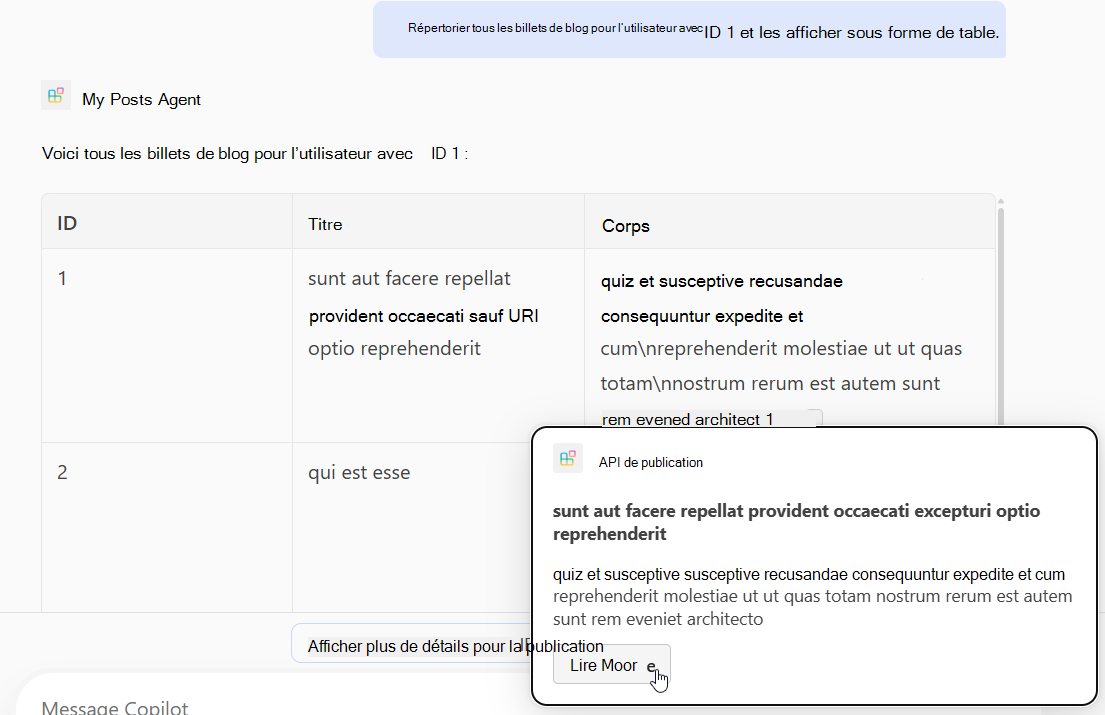
L’ajout d’une carte adaptative à l’opération listPosts modifie la façon dont les citations dans la réponse générée sont rendues.
Créez un fichier nommé post-carte.json dans le répertoire appPackage et ajoutez le contenu suivant.
{
  "type": "AdaptiveCard",
  "$schema": "http://adaptivecards.io/schemas/adaptive-card.json",
  "version": "1.5",
  "body": [
    {
      "type": "Container",
      "$data": "${$root}",
      "items": [
        {
          "type": "TextBlock",
          "text": "**${if(title, title, 'N/A')}**",
          "wrap": true
        },
        {
          "type": "TextBlock",
          "text": "${if(body, body, 'N/A')}",
          "wrap": true
        }
      ]
    }
  ],
  "actions": [
    {
      "type": "Action.OpenUrl",
      "title": "Read More",
      "url": "https://www.bing.com/search?q=https://jsonplaceholder.typicode.com/posts/${id}"
    }
  ]
}
Ouvrez le main.tsp fichier et ajoutez le @card décorateur à l’opération listPosts , comme illustré dans l’extrait de code suivant.
/**
 * List all blog post items.
  * @param userId The ID of the user who created the post. If not provided, all posts will be returned.
  */
@route("/posts")
@card(#{ dataPath: "$", file: "post-card.json", properties: #{ title: "$.title" } })
@get op listPosts(@query userId?: integer): PostItem[];
Ajout d’une POST opération
Ouvrez le main.tsp fichier et, dans l’espace de PostsAPI noms, ajoutez le contenu suivant.
/**
 * Create a new blog post item.
 * @param post The post item to create.
 */
@route("/posts")
@post op createPost(@body post: PostItem): PostItem;
Ce code définit l’API POST /postsREST, qui crée un nouvel article de blog.
Ajout d’une PATCH opération
Ouvrez le main.tsp fichier et, dans l’espace de PostsAPI noms, ajoutez le contenu suivant.
/**
 * Updates a blog post item.
 * @param id The ID of the post to update.
 * @param post The updated post item.
 */
@route("/posts/{id}")
@patch op updatePost(@path id: integer, @body post: PostItem): PostItem;
Ce code définit l’API PATCH /posts/{id}REST , qui met à jour un billet de blog existant.
Ajout d’une DELETE opération
Ouvrez le main.tsp fichier et, dans l’espace de PostsAPI noms, ajoutez le contenu suivant.
/**
 * Deletes a blog post item.
 * @param id The ID of the post to delete.
 */
@route("/posts/{id}")
@delete op deletePost(@path id: integer): void;
Ce code définit l’API DELETE /posts/{id}REST , qui supprime un billet de blog existant.
Configurer et tester les actions personnalisées
Utilisez le volet Cycle de vie de Microsoft 365 Agents Toolkit pour configurer votre agent et son plug-in d’API, puis testez les actions personnalisées dans Microsoft 365 Copilot.
- Sélectionnez l’icône Microsoft 365 Agents Toolkit dans la barre d’activité à gauche.
- Dans le volet Cycle de vie , sélectionnez Provisionner.
- Attendez la fin de l’approvisionnement, puis ouvrez https://m365.cloud.microsoft/ dans votre navigateur.
- Sélectionnez votre agent dans la liste des agents.
- Testez l’agent à l’aide des invites suivantes ou essayez les vôtres.
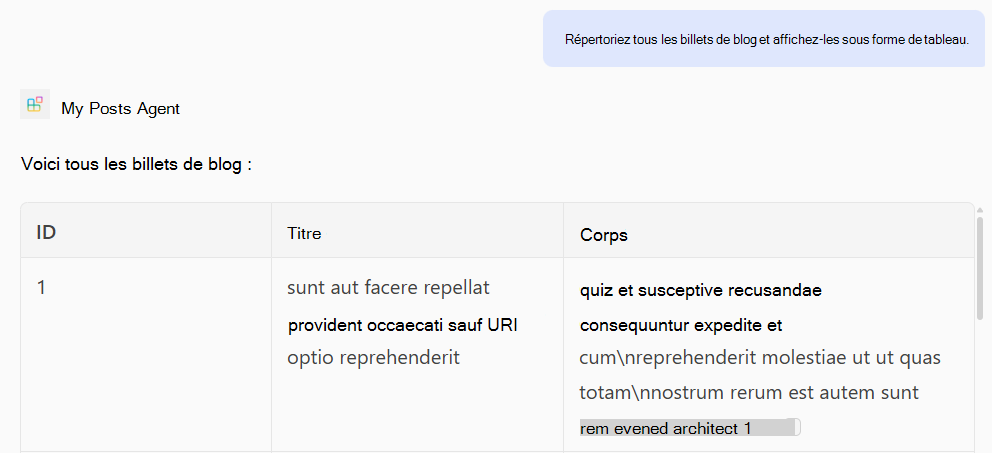
Tester l’opération GET
Invite : « Répertorier tous les billets de blog et les afficher sous forme de tableau. »
Invite : « Répertorier tous les billets de blog pour l’utilisateur avec l’ID 1 et les afficher sous forme de tableau. »
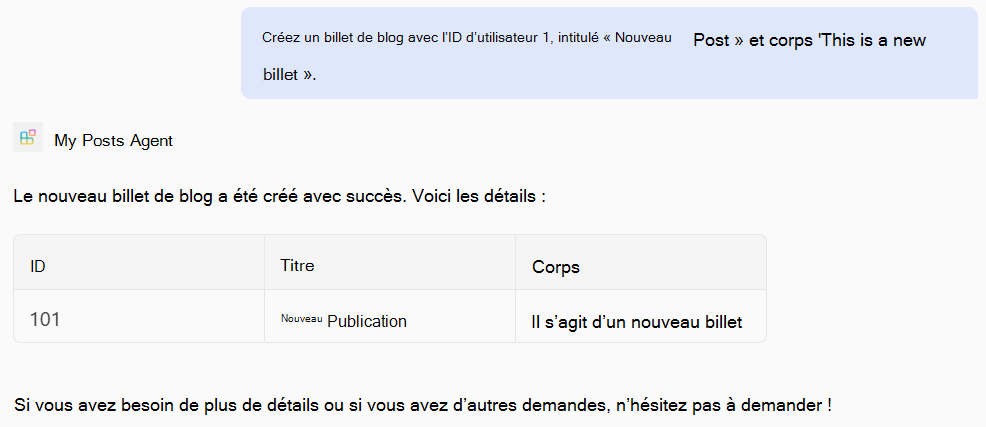
Tester l’opération POST
Invite : « Créez un billet de blog avec l’ID utilisateur 1, le titre « Nouveau message » et le corps « Ceci est un nouveau billet ». »
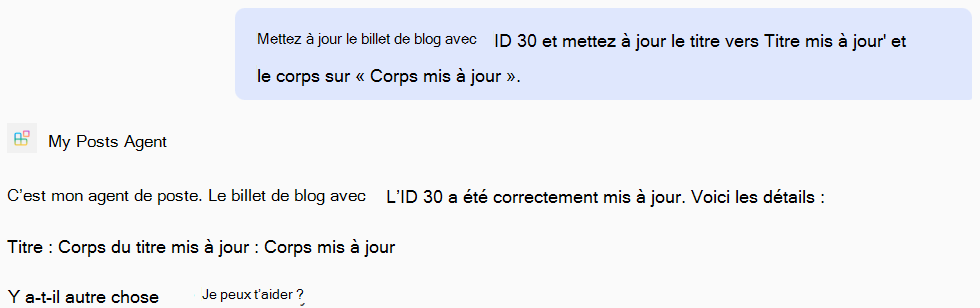
Tester l’opération PATCH
Invite : « Mettez à jour le billet de blog avec l’ID 30 et mettez à jour le titre en « Titre mis à jour » et le corps en « Corps mis à jour ». »
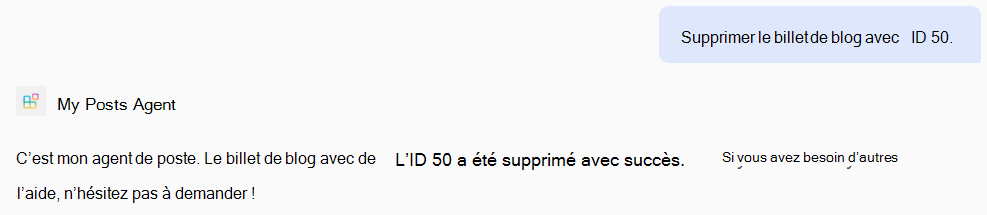
Tester l’opération DELETE
Invite : « Supprimez le billet de blog avec l’ID 50. »
Exemple de fichier complet main.tsp
Voici un exemple de fichier complet main.tsp auquel les GETopérations , POST, , PATCHet DELETE ont été ajoutées.
import "@typespec/http";
import "@typespec/openapi3";
import "@microsoft/typespec-m365-copilot";

using TypeSpec.Http;
using TypeSpec.M365.Copilot.Actions;
using TypeSpec.M365.Copilot.Agents;

@agent(
  "My Posts Agent",
  "Declarative agent focusing on blog posts management."
)

@instructions("""
  You should help users with blog posts management.
  You can read, create, update and delete blog post items.
  You can also search for blog posts by user ID.
""")

@conversationStarter(#{
  title: "List Blog Posts",
  text: "List all blog posts and render them as a table."
})

@conversationStarter(#{
  title: "Lists a user's blog posts",
  text: "List all blog posts for the user with ID 1 and render them as a table."
})

@conversationStarter(#{
  title: "Delete a blog post",
  text: "Delete the blog post with ID 50."
})

@conversationStarter(#{
  title: "Update a blog post",
  text: "Update the blog post with ID 30 and update the title to 'Updated Title' and body to 'Updated Body'."
})

@conversationStarter(#{
  title: "Create a blog post",
  text: "Create a new blog post with user ID 1, title 'New Post' and body 'This is a new post'."
})

@conversationStarter(#{
  title: "Get a blog post",
  text: "Get all the details about the blog post with ID 10."
})

namespace MyAgent {
  @service
  @server("https://jsonplaceholder.typicode.com")
  @actions(#{
    nameForHuman: "Posts APIs",
    descriptionForHuman: "Manage blog post items on JSON Placeholder APIs.",
    descriptionForModel: "Read, create, update and delete blog post items on the JSON Placeholder APIs."
  })
  namespace PostsAPI {
    /**
     * List all blog post items.
     * @param userId The ID of the user who created the post. If not provided, all posts will be returned.
     */
    @route("/posts")
    @card(#{ dataPath: "$", file: "post-card.json", properties: #{ title: "$.title" } })
    @get op listPosts(@query userId?: integer): PostItem[];

    /**
     * Get a blog post item by ID.
     */
    @route("/posts/{id}")
    @card(#{ dataPath: "$", file: "post-card.json", properties: #{ title: "$.title" } })
    @get op getPost(@path id: integer): PostItem;

    /**
     * Create a new blog post item.
     * @param post The post item to create.
     */
    @route("/posts")
    @post op createPost(@body post: PostItem): PostItem;

    /**
     * Updates a blog post item.
     * @param id The ID of the post to update.
     * @param post The updated post item.
     */
    @route("/posts/{id}")
    @patch op updatePost(@path id: integer, @body post: PostItem): PostItem;

    /**
     * Deletes a blog post item.
     * @param id The ID of the post to delete.
     */
    @route("/posts/{id}")
    @delete op deletePost(@path id: integer): void;

    model PostItem {
      /**
       * The ID of the user who created the post.
       */
      userId: integer;

      /**
       * The ID of the post.
       */
      @visibility(Lifecycle.Read)
      id: integer;

      /**
       * The title of the post.
       */
      title: string;

      /**
       * The body of the post.
       */
      body: string;
    }
  }
}