Note
이 글에서는 표준 하네스로 구동되는 에이전트 또는 에이전트 플로우에서 사용되는 기능에 대해 설명합니다.
에이전트 캔버스는 에이전트가 사용자에게 표시되는 방식을 제어합니다. 다음 두 가지 방법으로 캔버스를 사용자 지정할 수 있습니다.
웹 사이트에서 JavaScript 및 CSS를 사용하여 기본 캔버스를 사용자 지정합니다. 간단한 변경에는 이 옵션을 사용합니다.
Bot Framework 웹 채팅 캔버스를 기반으로 하는 사용자 지정 캔버스를 사용하세요. 이 옵션은 개발 환경이 필요하며 전체 사용자 지정을 지원합니다.
사용자 지정된 캔버스를 자동 대화 시작 구성과 결합할 수도 있습니다.
포털에서 에이전트 이름 및 아이콘을 변경할 수 있습니다.
에이전트를 게시하면 사용자는 웹 채팅 캔버스 통해 상호 작용할 수 있습니다.
Important
이 문서에 포함된 샘플 코드는 Copilot Studio에서만 설치하고 사용할 수 있습니다. 샘플 코드는 "있는 그대로" 라이선스가 부여되며 서비스 수준 약정 또는 지원 서비스에서 제외됩니다. 이 문서의 사용으로 발생하는 위험은 귀하의 책임입니다.
Microsoft는 어떠한 명시적 보증, 보장 또는 조건을 제공하지 않으며 상품성, 특정 목적에의 적합성 및 비침해를 비롯한 모든 묵시적 보증을 제외합니다.
에이전트 이름 및 아이콘 변경
Important
- 에이전트의 아이콘을 업데이트한 후 새 아이콘이 어디에나 표시되는 데 최대 24시간이 걸릴 수 있습니다.
- 에이전트가 고객 서비스용Omnichannel에 연결된 경우 Azure 포털 등록의 디플레이 이름 속성은 해당 이름을 정의합니다.
- Teams에 에이전트를 게시하려는 경우 Microsoft Teams 개발자 설명서에서 아이콘에 대한 요구 사항을 검토하십시오.
해당 에이전트의 개요 페이지로 이동하세요.
세부 정보 옆에 있는 편집을 선택하세요.
에이전트의 이름과 아이콘을 원하는 대로 변경합니다.
저장을 선택합니다.
기본 캔버스 사용자 지정(단순)
JavaScript 및 CSS를 사용하여 기본 캔버스를 조정합니다.
먼저, 에이전트 캔버스를 어디에 배포할지 설정하세요.
샘플 HTML 코드를 이름이 지정된
index.html파일에 복사합니다. HTML try-it 편집기를 사용할 수도 있습니다.<!DOCTYPE html> <html lang="en"> <head> <meta charset="UTF-8" /> <meta name="viewport" content="width=device-width, initial-scale=1.0" /> <meta name="description" content="Contoso Web Chat Assistant" /> <title>Contoso Sample Web Chat Test</title> <script src="https://cdn.botframework.com/botframework-webchat/latest/webchat.js"></script> <script> let webChatInstance = null; let directLineUrl = null; // Replace with your token endpoint const tokenEndpoint = "<YOUR TOKEN ENDPOINT>"; const styleOptions = { "accent": "#0078D4", "autoScrollSnapOnPage": true, "autoScrollSnapOnPageOffset": 0, "avatarBorderRadius": "7%", "avatarSize": 31, "backgroundColor": "#e8e9eb", "botAvatarBackgroundColor": "#ffffff00", "botAvatarImage": "https://powercatexternal.blob.core.windows.net/creatorkit/Assets/ChatbotLogoBlue.png", "botAvatarInitials": "B", "bubbleAttachmentMaxWidth": 480, "bubbleAttachmentMinWidth": 250, "bubbleBackground": "#f0eded", "bubbleBorderColor": "#f5f5f5", "bubbleBorderRadius": 41, "bubbleBorderStyle": "solid", "bubbleBorderWidth": 1, "bubbleFromUserBackground": "#ebefff", "bubbleFromUserBorderColor": "#f5f5f5", "bubbleFromUserBorderRadius": 41, "bubbleFromUserBorderStyle": "solid", "bubbleFromUserBorderWidth": 1, "bubbleFromUserNubOffset": 0, "bubbleFromUserNubSize": 0, "bubbleFromUserTextColor": "#242424", "bubbleImageHeight": 10, "bubbleImageMaxHeight": 240, "bubbleImageMinHeight": 240, "bubbleMessageMaxWidth": 480, "bubbleMessageMinWidth": 120, "bubbleMinHeight": 50, "bubbleNubOffset": 0, "bubbleTextColor": "#242424", "emojiSet": true, "fontSizeSmall": "70%", "hideUploadButton": false, "messageActivityWordBreak": "break-word", "monospaceFont": "Consolas", "paddingRegular": 10, "paddingWide": 10, "primaryFont": null, "sendBoxBackground": "#e8e9eb", "sendBoxBorderTop": "solid 1px #808080", "sendBoxButtonColor": "#0078d4", "sendBoxButtonColorOnHover": "#006cbe", "sendBoxButtonShadeBorderRadius": 40, "sendBoxButtonShadeColorOnHover": "", "sendBoxHeight": 60, "sendBoxPlaceholderColor": "#171616", "sendBoxTextColor": "#2e2d2d", "showAvatarInGroup": "status", "spinnerAnimationHeight": 16, "spinnerAnimationPadding": 12, "spinnerAnimationWidth": 16, "subtleColor": "#000000FF", "suggestedActionBackgroundColor": "#006FC4FF", "suggestedActionBackgroundColorOnHover": "#0078D4", "suggestedActionBorderColor": "", "suggestedActionBorderRadius": 10, "suggestedActionBorderWidth": 1, "suggestedActionLayout": "flow", "suggestedActionTextColor": "#FFFFFFFF", "typingAnimationBackgroundImage": "url('https://wpamelia.com/wp-content/uploads/2018/11/ezgif-2-6d0b072c3d3f.gif')", "typingAnimationDuration": 5000, "typingAnimationHeight": 20, "typingAnimationWidth": 64, "userAvatarBackgroundColor": "#222222", "userAvatarImage": "https://avatars.githubusercontent.com/u/8174072?v=4&size=64", "userAvatarInitials": "U" }; const backgroundImage = ""; document.addEventListener('DOMContentLoaded', () => { const root = document.documentElement; root.style.setProperty('--primary-color', createGradient(styleOptions.accent)); root.style.setProperty('--header-textColor', styleOptions.suggestedActionTextColor); if (backgroundImage) { const webchatElement = document.getElementById('webchat'); webchatElement.style.backgroundImage = `url(${backgroundImage})`; webchatElement.style.backgroundSize = 'cover'; webchatElement.style.backgroundPosition = 'center'; webchatElement.style.backgroundRepeat = 'no-repeat'; const overlay = document.createElement('div'); overlay.className = 'webchat-overlay'; webchatElement.appendChild(overlay); } }); function createGradient(baseColor) { const r = parseInt(baseColor.slice(1, 3), 16); const g = parseInt(baseColor.slice(3, 5), 16); const b = parseInt(baseColor.slice(5, 7), 16); const lighterColor = `#${Math.min(255, r + 30).toString(16).padStart(2, '0')}${Math.min(255, g + 30).toString(16).padStart(2, '0')}${Math.min(255, b + 30).toString(16).padStart(2, '0')}`; const darkerColor = `#${Math.max(0, r - 30).toString(16).padStart(2, '0')}${Math.max(0, g - 30).toString(16).padStart(2, '0')}${Math.max(0, b - 30).toString(16).padStart(2, '0')}`; return `linear-gradient(135deg, ${lighterColor}, ${baseColor}, ${darkerColor})`; } const environmentEndPoint = tokenEndpoint.slice( 0, tokenEndpoint.indexOf("/powervirtualagents") ); const apiVersion = tokenEndpoint .slice(tokenEndpoint.indexOf("api-version")) .split("=")[1]; const regionalChannelSettingsURL = `${environmentEndPoint}/powervirtualagents/regionalchannelsettings?api-version=${apiVersion}`; function showChat() { const popup = document.getElementById("chatbot-popup"); const openButton = document.getElementById("open-chat"); popup.classList.add("visible"); openButton.classList.add("hidden"); } function hideChat() { const popup = document.getElementById("chatbot-popup"); const openButton = document.getElementById("open-chat"); popup.classList.remove("visible"); openButton.classList.remove("hidden"); } function createCustomStore() { return window.WebChat.createStore( {}, ({ dispatch }) => (next) => (action) => { if (action.type === "DIRECT_LINE/CONNECT_FULFILLED") { dispatch({ type: "DIRECT_LINE/POST_ACTIVITY", meta: { method: "keyboard" }, payload: { activity: { channelData: { postBack: true }, name: "startConversation", type: "event", }, }, }); } return next(action); } ); } async function restartConversation() { try { if (!directLineUrl) { console.error("DirectLine URL not initialized"); return; } const response = await fetch(tokenEndpoint); const conversationInfo = await response.json(); if (!conversationInfo.token) { throw new Error("Failed to get conversation token"); } const newDirectLine = window.WebChat.createDirectLine({ domain: `${directLineUrl}v3/directline`, token: conversationInfo.token, }); const webchatElement = document.getElementById("webchat"); webChatInstance = window.WebChat.renderWebChat( { directLine: newDirectLine, styleOptions, store: createCustomStore(), }, webchatElement ); } catch (err) { console.error("Failed to restart conversation:", err); } } async function initializeChat() { try { const response = await fetch(regionalChannelSettingsURL); const data = await response.json(); directLineUrl = data.channelUrlsById.directline; if (!directLineUrl) { throw new Error("Failed to get DirectLine URL"); } const conversationResponse = await fetch(tokenEndpoint); const conversationInfo = await conversationResponse.json(); if (!conversationInfo.token) { throw new Error("Failed to get conversation token"); } const directLine = window.WebChat.createDirectLine({ domain: `${directLineUrl}v3/directline`, token: conversationInfo.token, }); webChatInstance = window.WebChat.renderWebChat( { directLine, styleOptions, store: createCustomStore(), }, document.getElementById("webchat") ); } catch (err) { console.error("Failed to initialize chat:", err); } } initializeChat(); </script> <style> :root { --primary-gradient: var(--primary-color); --chat-width: 450px; --chat-height: 520px; --header-height: 56px; --border-radius: 16px; --transition-speed: 0.3s; } * { margin: 0; padding: 0; box-sizing: border-box; font-family: system-ui, -apple-system, BlinkMacSystemFont, "Segoe UI", Roboto, sans-serif; } body { min-height: 100vh; background-color: #f3f4f6; } #chatbot-popup { display: none; position: fixed; bottom: 32px; right: 32px; width: var(--chat-width); height: var(--chat-height); background: white; border-radius: var(--border-radius); box-shadow: 0 18px 40px -5px rgba(0, 0, 0, 0.2), 0 15px 20px -5px rgba(0, 0, 0, 0.1); overflow: hidden; opacity: 0; transform-origin: bottom right; transform: scale(0.95); transition: all var(--transition-speed) ease-in-out; z-index: 999; } #chatbot-popup.visible { display: block; opacity: 1; transform: scale(1); } #chatbot-header { background: var(--primary-color); padding: 16px 20px; height: var(--header-height); display: flex; justify-content: space-between; align-items: center; color: var(--header-textColor); } .header-title { display: flex; align-items: center; gap: 12px; font-size: 16px; font-weight: 500; } .header-buttons { display: flex; gap: 12px; align-items: center; } .icon-button { background: none; border: none; color: var(--header-textColor); cursor: pointer; padding: 8px; border-radius: 8px; display: flex; align-items: center; justify-content: center; transition: all 0.2s ease; } .icon-button:hover { color: var(--header-textColor); background: rgba(255, 255, 255, 0.1); } .icon-button:focus { outline: 2px solid rgba(255, 255, 255, 0.5); outline-offset: 2px; } #webchat { height: calc(100% - var(--header-height)); background-color: #f9fafb; position: relative; } .webchat-overlay { position: absolute; top: 0; left: 0; right: 0; bottom: 0; background: rgba(255, 255, 255, 0.85); pointer-events: none; z-index: 1; } #webchat > div { position: relative; z-index: 2; } #webchat .webchat__basic-transcript__content { white-space: pre-wrap !important; word-break: break-word !important; } #webchat .webchat__bubble__content { padding: 8px 12px !important; } #webchat .webchat__bubble { max-width: 85% !important; margin: 8px !important; } #webchat .webchat__basic-transcript__content ul, #webchat .webchat__basic-transcript__content ol, #webchat .webchat__bubble__content ul, #webchat .webchat__bubble__content ol { padding-left: 24px !important; margin: 8px 0 !important; list-style-position: outside !important; } #webchat .webchat__basic-transcript__content li, #webchat .webchat__bubble__content li { margin: 4px 0 !important; padding-left: 4px !important; } #open-chat { position: fixed; bottom: 32px; right: 32px; width: 64px; height: 64px; border-radius: 50%; background: var(--primary-gradient); border: none; cursor: pointer; display: flex; align-items: center; justify-content: center; box-shadow: 0 4px 6px -1px rgba(0, 0, 0, 0.1); transition: all var(--transition-speed) ease-in-out; z-index: 998; } #open-chat.hidden { opacity: 0; transform: scale(0.95) translateY(10px); pointer-events: none; } #open-chat:hover { transform: translateY(-4px); box-shadow: 0 10px 15px -3px rgba(0, 0, 0, 0.1); } #open-chat:focus { outline: 3px solid rgba(79, 70, 229, 0.5); outline-offset: 2px; } #open-chat svg { width: 28px; height: 28px; color: white; transition: transform 0.2s ease; } .main-content { max-width: 1200px; margin: 0 auto; padding: 48px 24px; } .main-content h1 { font-size: 36px; color: #111827; text-align: center; } .main-content p { font-size: 18px; color: #4b5563; line-height: 1.6; margin-bottom: 48px; text-align: center; max-width: 800px; margin-left: auto; margin-right: auto; } .content-grid { display: grid; grid-template-columns: repeat(2, 1fr); gap: 32px; margin-bottom: 32px; } .content-box { background: linear-gradient(135deg, #e6e6e6, #c4c4c4, #9f9f9f); padding: 32px; border-radius: 12px; box-shadow: 0 4px 6px -1px rgba(0, 0, 0, 0.1), 0 2px 4px -1px rgba(0, 0, 0, 0.06); min-height: 300px; display: flex; flex-direction: column; justify-content: center; align-items: center; text-align: center; position: relative; overflow: hidden; } .content-box::before { content: ''; position: absolute; top: 0; left: 0; right: 0; height: 4px; } .content-box.featured { grid-column: span 2; min-height: 350px; background: linear-gradient(135deg, #e6e6e6, #c4c4c4, #9f9f9f); color: #000000; } .content-box h2 { font-size: 24px; margin-bottom: 16px; position: relative; } .content-box p { font-size: 16px; color: #6b7280; margin-bottom: 0; } .content-box.featured p { color: #000000; } @media (max-width: 768px) { .content-grid { grid-template-columns: 1fr; } .content-box.featured { grid-column: span 1; } .main-content { padding: 24px 16px; } .main-content h1 { font-size: 28px; } #chatbot-popup { width: 100%; height: 100%; bottom: 0; right: 0; border-radius: 0; } } </style> </head> <body> <div class="main-content"> <h1>Header</h1> <p>Lorem ipsum dolor sit amet consectetur adipiscing elit. Quisque faucibus ex sapien vitae pellentesque sem placerat.</p> <div class="content-grid"> <div class="content-box featured"> <h2>Featured Content</h2> <p>Primary content area with custom styling and gradient background</p> </div> <div class="content-box"> <h2>Section One</h2> <p>Content box with minimal design</p> </div> <div class="content-box"> <h2>Section Two</h2> <p>Another content section with consistent styling</p> </div> </div> </div> <div id="chatbot-popup" role="complementary" aria-label="Chat Assistant"> <div id="chatbot-header"> <div class="header-title"> <svg class="chat-icon" width="24" height="24" viewBox="0 0 24 24" fill="none" stroke="currentColor" stroke-width="2" stroke-linecap="round" stroke-linejoin="round" aria-hidden="true" > <path d="M21 15a2 2 0 0 1-2 2H7l-4 4V5a2 2 0 0 1 2-2h14a2 2 0 0 1 2 2z" ></path> </svg> <span>Contoso Assistant</span> </div> <div class="header-buttons"> <button class="icon-button" id="restart-button" onclick="restartConversation()" aria-label="Restart Conversation" > <svg width="20" height="20" viewBox="0 0 24 24" fill="none" stroke="currentColor" stroke-width="2" stroke-linecap="round" stroke-linejoin="round" aria-hidden="true" > <path d="M3 12a9 9 0 1 0 9-9 9.75 9.75 0 0 0-6.74 2.74L3 8" ></path> <path d="M3 3v5h5"></path> </svg> </button> <button class="icon-button" id="close-button" onclick="hideChat()" aria-label="Close Chat" > <svg width="20" height="20" viewBox="0 0 24 24" fill="none" stroke="currentColor" stroke-width="2" stroke-linecap="round" stroke-linejoin="round" aria-hidden="true" > <line x1="18" y1="6" x2="6" y2="18"></line> <line x1="6" y1="6" x2="18" y2="18"></line> </svg> </button> </div> </div> <div id="webchat" role="main"></div> </div> <button id="open-chat" onclick="showChat()" aria-label="Open Chat Assistant" > <svg viewBox="0 0 24 24" fill="none" stroke="currentColor" stroke-width="2" stroke-linecap="round" stroke-linejoin="round" aria-hidden="true" > <path d="M21 15a2 2 0 0 1-2 2H7l-4 4V5a2 2 0 0 1 2-2h14a2 2 0 0 1 2 2z" ></path> </svg> </button> </body> </html>index.html에서 대체하십시오.const tokenEndpoint = "<YOUR TOKEN ENDPOINT>";당신의 토큰 엔드포인트와 함께.
Microsoft Edge 같은 최신 브라우저에서
index.html엽니다.에이전트를 테스트하세요.
에이전트가 응답하지 않는 경우:
- 에이전트가 게시되었는지 확인하십시오.
- 토큰 엔드포인트 값을 확인합니다.
- 토큰 엔드포인트가 큰따옴표
"로 묶인 후=뒤에 표시되는지 확인합니다.
에이전트에 대한 토큰 엔드포인트 검색
캔버스를 사용자 지정하려면, 기본 캔버스이든 연결한 사용자 지정 캔버스이든 상관없이, 에이전트에 대한 토큰 엔드포인트가 필요합니다.
설정에서 채널을 선택합니다.
전자 메일을 선택합니다.
토큰 엔드포인트 옆에 있는 복사를 선택합니다.
에이전트 아이콘, 배경색 및 이름 사용자 지정
개체를 styleOptions 사용하여 미리 정의된 스타일을 구성합니다.
사용자 지정할 수 있는 항목 및 defaultStyleOptions.js 파일에 대한 자세한 내용은 웹 채팅 사용자 지정 참조하세요.
에이전트 아이콘 변경
index.html다음 샘플 코드로 파일을 업데이트합니다.const styleOptions = { "accent": "#00809d", "botAvatarBackgroundColor": "#FFFFFF", "botAvatarImage": "https://learn.microsoft.com/azure/bot-service/v4sdk/media/logo_bot.svg", "botAvatarInitials": "BT", "userAvatarImage": "https://avatars.githubusercontent.com/u/661465", "userAvatarInitials": "U" };두 아바타 이미지를 회사 이미지로 교체하세요. 이미지 URL이 없다면 Base64로 인코딩된 이미지 문자열을 사용하세요.
배경 색상을 변경합니다.
정의
index.html에backgroundColor요소를styleOptions에 추가하세요.const styleOptions = { "backgroundColor": "lightgray", // ... };원하는 색상으로
backgroundColor를 변경하세요. 표준 CSS 색상 이름, RGB 값, 또는 HEX를 사용하세요.
에이전트 이름 변경
파일 내
<h1>헤더 텍스트를index.html다음 코드로 업데이트하세요:<body> <div id="banner"> <h1><img src="contoso-agent.png"> Contoso agent name</h1> </div> <!-- ... -->에이전트를 지칭하려는 텍스트로 변경합니다. 이미지를 삽입할 수도 있지만, 제목 섹션에 맞게 스타일링이 필요할 수도 있습니다.
채팅 캔버스 사용자 지정 및 호스팅(고급)
Copilot Studio 에이전트를 독립 실행형 웹앱으로 호스트하는 사용자 지정 캔버스에 연결할 수 있습니다. 이 옵션은 여러 웹페이지에 맞춤형 iFrame을 임베드해야 할 때 가장 잘 작동합니다.
Note
사용자 지정 캔버스를 호스팅하려면 소프트웨어 개발이 필요합니다. 이 지침은 개발자 도구, 유틸리티 및 IDE(통합 개발 환경)를 잘 알고 있는 IT 관리자 또는 개발자와 같은 숙련된 IT 전문가를 위한 것입니다.
Copilot Studio에서 작동하도록 사용자 지정 빌드된 다음 샘플 중 하나로 시작합니다.
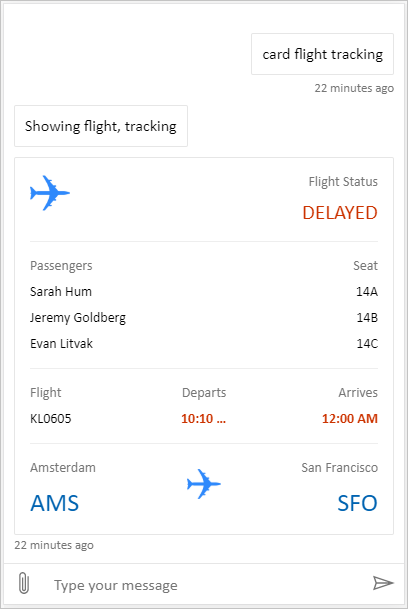
풀 번들은 Copilot Studio의 모든 풍부한 콘텐츠를 표시할 수 있는 사용자 지정 캔버스입니다. 다음은 그 예입니다.
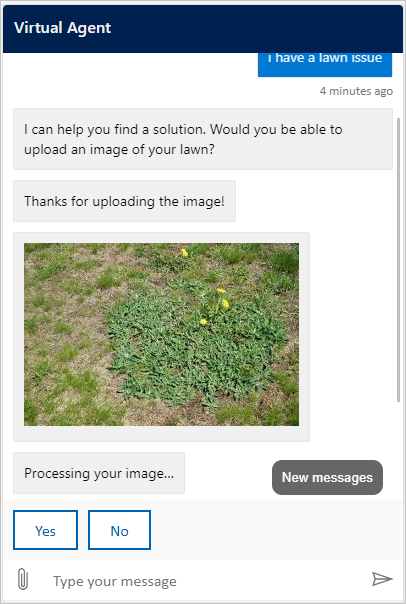
로케이션 및 파일 업로드 사용자의 위치를 가져오고 Copilot Studio 에이전트로 보낼 수 있는 사용자 지정 캔버스입니다. 다음은 그 예입니다.
또는 Bot Framework에서 다른 샘플 웹 채팅 캔버스 사용해 보세요.
기본 캔버스와 마찬가지로 커스텀 캔버스를 조정할 수 있습니다 styleSetOptions . 모든 사용자 지정 가능한 속성은 defaultStyleOptions.js나열됩니다. 사용자 지정할 수 있는 항목에 대한 자세한 내용은 웹 채팅 사용자 지정 참조하세요.
커스텀 캔버스에서 연결 설정 지원
표준 하네스로 구동되는 에이전트가 사용자 연결이 필요할 때, 채팅 캔버스는 연결이 필요한 적응형 카드를 받습니다. 사용자 지정 캔버스가 카드의 Action.OpenUrlDialog 작업을 처리해야 합니다. 이 처리 방식이 없으면 Connect를 선택해도 포커스된 연결 창이 열리지 않습니다.
연결 창을 열어
-
url를 적응형 카드 렌더러에 등록하고 그Action.OpenUrlDialog속성을 읽으세요. 절대http://또는https://URL만 허용하세요. - 열기 전에 목적지 출발지가 신뢰할 수 있는지 여부를 결정합니다. 본인이 통제하거나 보안팀이 검토하고 허용한 출처만 신뢰하세요.
- 사용자 선택에서 URL을
window.open(url, "_blank", "popup")로 직접 엽니다. 사용자 행동으로 창을 열면 브라우저가 차단할 확률이 줄어듭니다. - 신뢰할 수 있는 대상의 경우,
windowFeatures의window.open인수에서noopener및noreferrer를 생략하고 연결 창이window.opener에 결과를 반환할 수 있도록 합니다. 다른 목적지의 경우noopener,noreferrer을(를) 사용하고 반환 메시지를 수락하지 마세요. -
Window반환된 참조와 연결 필수 카드의 활동 ID를 유지하세요. 팝업이 차단되었거나 사용자가 유효한 결과 없이 닫을 경우, 계속 또는 다른 복구 작업을 사용할 수 있도록 유지합니다. 창 닫기를 성공적인 연결 설정으로 해석하지 마세요.
적응형 카드 자바스크립트 SDK는 Action.OpenUrlDialog를 기본적으로 구현하지 않습니다.
SerializationContext.actionRegistry를 통해 작업을 등록하거나, 소유한 렌더러에서 직접 처리하세요.
Action.OpenUrl 폴백은 대화 동작을 지원하지 않는 클라이언트에서 목적지를 열 수 있지만, 팝업 결과를 반환할 수는 없습니다.
Important
window.opener에 접근 권한이 있는 연결 창이 채팅 페이지를 탐색하거나 다른 방식으로 영향을 미칠 수 있습니다. 웹 보안팀과 목적지와 해당 목적지의 리디렉션을 검토하세요. 신뢰할 수 있는 대상이 오프너 접근은 유지하면서 신뢰할 수 없는 사이트로 리디렉트되지 않도록 하세요.
Bot Framework 웹 채팅을 임베드하면, Action.OpenUrlDialog 처리 시 연결 창이 열립니다. 동일 출처 창은 기본적으로 신뢰됩니다. 검토된 교차 출처 대상의 경우, styleOptions.callURLActionTrustedOrigin를 정확히 허용된 출처로 설정합니다. 여러 기원을 쉼표로 구분하세요.
callURLActionPopupWindowHeight 및 callURLActionPopupWindowWidth도 설정할 수 있습니다. 검토하지 않은 원본을 추가하지 마십시오.
성공적인 연결 설정 후 계속 진행 (미리보기)
[이 섹션은 사전 출시 설명서이며 변경될 수 있습니다.]
Important
이 문서에는 Microsoft Copilot Studio 미리 보기 설명서가 포함되어 있으며 변경될 수 있습니다.
미리 보기 기능은 프로덕션용이 아니며 기능이 제한되었을 수 있습니다. 이러한 기능은 공식 릴리스 이전에 제공되므로 사용자가 조기에 액세스하고 피드백을 제공할 수 있습니다.
프로덕션이 가능한 에이전트를 빌드하는 경우 Microsoft Copilot Studio 개요를 참조하세요.
신뢰할 수 있는 연결 창은 window.opener.postMessage를 사용해 채팅 페이지에 완료 결과를 보낼 수 있습니다.
*이(가) 아니라 채팅 페이지의 정확한 출처를 목표 출처로 사용하십시오.
채팅 페이지에서:
null이window.open을 반환한 경우 해당 시도에 대한 메시지를 수락하지 마세요. 그렇지 않으면,event.origin가 유지된 팝업 참조와 일치하고event.source가 예상 출처와 일치할 때만 메시지를 받아들입니다.메시지 데이터에
type: "postback"가 포함되어 있고 에이전트나 런타임에서 기대하는 형태의 값이 있는지 검증하세요.다음 예시는 에이전트에게 "hello-world"라는 텍스트가 포함된 메시지를 보냅니다. 채팅 UI에서는 보이지 않습니다.
{ "type": "postback", "value": { hello: "World!" } }다음 예시는 에이전트에게 JSON
{ hello: "World!" }메시지를 보냅니다.{ "type": "postback", "value": { hello: "World!" } }Bot Framework 포스트백 메커니즘을 통해 승인된 값을 전송하세요. 유지된 활동 ID를
replyToId(으)로 사용합니다. 팝업에서 회신 활동 ID를 수락하지 마십시오.각 팝업마다 최대 하나의 결과를 받아들이세요. 결과를 수락하거나, 신뢰하는 팝업에서 잘못된 메시지를 거부하거나, 팝업이 닫혔음을 감지하거나, 시간 제한에 도달하면 이벤트 리스너를 제거하고 타이머를 비우세요. 웹 채팅에는 5분 제한이 있습니다.
에이전트나 런타임과 협력하여 포스트백과 원래 연결이 필요한 상호작용을 연관 짓고, 그 턴을 정확히 한 번 재개합니다.
브라우저 메시징은 베스트 에포트 방식입니다. 팝업 차단기, 내비게이션, 교차 출처 오프너 정책 또는 닫힌 창은 자동 진행을 막을 수 있습니다. 계속 또는 다른 복구 경로를 사용할 수 있게 두고, 누락된 메시지를 성공으로 해석하지 마세요.
맞춤형 캔버스를 배포하세요
사용자 지정 캔버스를 호스트하려면 모든 파일을 웹앱에 배포합니다.