Nota
O acesso a esta página requer autorização. Pode tentar iniciar sessão ou alterar os diretórios.
O acesso a esta página requer autorização. Pode tentar alterar os diretórios.
As plataformas Copilot Studio e Dynamics 365 for Customer Service diferem ligeiramente na forma como dão suporte a mensagens rich media com base no canal e no tipo de mensagem rich media. Este artigo descreve como você pode oferecer suporte a mensagens de mídia avançada no Copilot Studio.
Recuperar JSON do agente para Apple Messages for Business
- No mapa do site do Centro de administração do Copilot Service, selecione Produtividade na experiência de suporte.
- Na página Produtividade , selecione Gerenciar para mensagens avançadas.
- Na lista de todas as mensagens da lista disponíveis, selecione uma mensagem avançada que você gostaria de enviar para a conversa.
- Para mensagens ricas do Apple Messages for Business, use a API Microsoft.Omnichannel.sendMessageToConversation para enviar arquivos JSON.
Recuperar JSON do agente para formulários de bate-papo ao vivo, JSON personalizado do bate-papo ao vivo e respostas sugeridas do WhatsApp
No mapa do site do Centro de administração do Copilot Service, selecione Produtividade na experiência de suporte.
Na página Produtividade , selecione Gerenciar para mensagens avançadas.
Encontre a mensagem rich media que você deseja que um agente envie e, se ela tiver JSON disponível, ela aparecerá na coluna JSON for Copilot Studio . Selecione Exibir JSON e o tipo de canal específico para copiar o JSON.
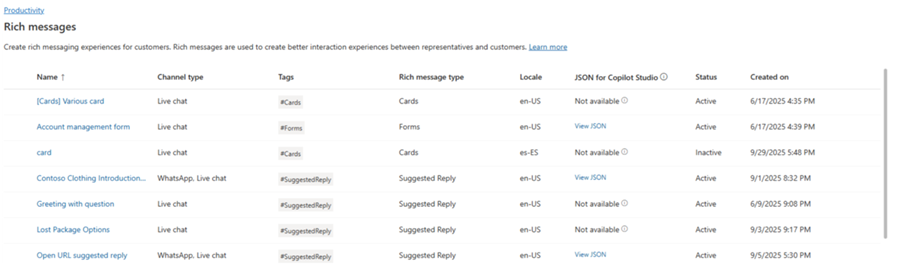
Para modelos de mídia avançada do Live Chat e do WhatsApp, você pode colar o JSON diretamente em um nó de cartão adaptável no Copilot Studio.
Exemplos JSON para mensagens avançadas para o Apple Messages for Business
Esta seção inclui exemplos JSON para os tipos de mensagens avançados disponíveis no canal Apple Messages for Business no Omnichannel for Customer Service. Para obter mais informações: Gerenciar mensagens avançadas
Observação
Não é possível enviar mensagens avançadas do tipo Formulários para conversas.
Apple Pay
let applePayJSON = // <copy_and_paste_details_content>
applePayJSON.survey = { Questions: JSON.parse(applePayJSON.survey)[0].Questions, Answers: JSON.parse(applePayJSON.survey)[1].Answers };
applePayJSON.survey.Answers.AppleMessagesforBusinessJSON = JSON.parse(applePayJSON.survey.Answers.AppleMessagesforBusinessJSON);
applePayJSON.survey.Answers.AppleMessagesforBusinessJSON = JSON.stringify(applePayJSON.survey.Answers.AppleMessagesforBusinessJSON);
applePayJSON.survey = JSON.stringify(applePayJSON.survey);

// Can now send this payload using the API
Microsoft.Omnichannel.sendMessageToConversation(applePayJSON, false);

// Or take the JSON elsewhere for use in bringing your own logic
copy(applePayJSON);
Authentication
let authJSON = // <copy_and_paste_details_content>
authJSON.survey = { Questions: JSON.parse(authJSON.survey)[0].Questions, Answers: JSON.parse(authJSON.survey)[1].Answers };
authJSON.survey = JSON.stringify(authJSON.survey);

// Can now send this payload using the API
Microsoft.Omnichannel.sendMessageToConversation(authJSON, false);

// Or take the JSON elsewhere for use in bringing your own logic
copy(authJSON);
JSON personalizado (aplicativo iMessage)
let customJSON = // <copy_and_paste_details_content>
customJSON.survey = { Questions: JSON.parse(customJSON.survey)[0].Questions, Answers: JSON.parse(customJSON.survey)[1].Answers };
customJSON.survey.Answers.AppleMessagesforBusinessJSON = JSON.parse(customJSON.survey.Answers.AppleMessagesforBusinessJSON);
customJSON.survey.Answers.AppleMessagesforBusinessJSON = JSON.stringify(customJSON.survey.Answers.AppleMessagesforBusinessJSON);
customJSON.survey = JSON.stringify(customJSON.survey);

// Can now send this payload using the API
Microsoft.Omnichannel.sendMessageToConversation(customJSON, false);

// Or take the JSON elsewhere for use in bringing your own logic
copy(customJSON);
Seletor de Lista
listPickerJSON = // <copy_and_paste_details_content>
listPickerJSON.survey = { Questions: JSON.parse(lpFromDetails.survey)[0].Questions, Answers: JSON.parse(listPickerJSON.survey)[1].Answers };
listPickerJSON.survey = JSON.stringify(listPickerJSON.survey);

// Can now send this payload using the API
Microsoft.Omnichannel.sendMessageToConversation(listPickerJSON, false);

// Or take the JSON elsewhere for use in bringing your own logic
copy(listPickerJSON);
Sugestão de resposta
suggestedReplyJSON = // <copy_and_paste_details_content>
suggestedReplyJSON.survey = { Questions: JSON.parse(suggestedReplyJSON.survey)[0].Questions, Answers: JSON.parse(suggestedReplyJSON.survey)[1].Answers };
suggestedReplyJSON.survey = JSON.stringify(suggestedReplyJSON.survey);

// Can now send this payload using the API
Microsoft.Omnichannel.sendMessageToConversation(suggestedReplyJSON, false);

// Or take the JSON elsewhere for use in bringing your own logic
copy(suggestedReplyJSON);
Seletor de hora
timePickerJSON = // <copy_and_paste_details_content>
timePickerJSON.survey = { Questions: JSON.parse(timePickerJSON.survey)[0].Questions, Answers: JSON.parse(timePickerJSON.survey)[1].Answers };
timePickerJSON.survey = JSON.stringify(timePickerJSON.survey);

// Can now send this payload using the API
Microsoft.Omnichannel.sendMessageToConversation(timePickerJSON, false);

// Or take the JSON elsewhere for use in bringing your own logic
copy(timePickerJSON);
Link rico em vídeo
videoRichLinkJSON = // <copy_and_paste_details_content>
videoRichLinkJSON.survey = { Questions: JSON.parse(videoRichLinkJSON.survey)[0].Questions, Answers: JSON.parse(videoRichLinkJSON.survey)[1].Answers };
timePickerJSON.survey = JSON.stringify(videoRichLinkJSON.survey);

// Can now send this payload using the API
Microsoft.Omnichannel.sendMessageToConversation(videoRichLinkJSON, false);

// Or take the JSON elsewhere for use in bringing your own logic
copy(videoRichLinkJSON);
Link rico para sites
websiteRichLinkJSON = // <copy_and_paste_details_content>
websiteRichLinkJSON.survey = { Questions: JSON.parse(websiteRichLinkJSON.survey)[0].Questions, Answers: JSON.parse(websiteRichLinkJSON.survey)[1].Answers };
timePickerJSON.survey = JSON.stringify(websiteRichLinkJSON.survey);

// Can now send this payload using the API
Microsoft.Omnichannel.sendMessageToConversation(websiteRichLinkJSON, false);

// Or take the JSON elsewhere for use in bringing your own logic
copy(websiteRichLinkJSON);
Configurar agentes para enviar respostas sugeridas do Chat ao vivo e cartões/carrosséis
O Copilot Studio suporta respostas sugeridas e cartões básicos prontos para uso. Saiba mais em Enviar uma mensagem - Microsoft Copilot Studio.
Observação
O Copilot Studio refere-se às respostas sugeridas como respostas rápidas.
Informações adicionais
Referência da API JavaScript do SDK de chat ao vivo
Referência da API JavaScript omnichannel
sendMessageToConversation