在這個快速入門中,你將建立一個網頁應用程式,將來自地理目錄的衛星影像和地理空間資料顯示在互動式地圖上。 你可以用 Microsoft Entra ID 驗證使用者、查詢 STAC 集合,以及繪製地圖磚塊——全部都是透過瀏覽器的 JavaScript 進行。
你學到的是什麼:
- 使用 MSAL.js 來驗證使用者並取得存取權憑證
- 查詢 STAC API 以發現集合與項目
- 在帶有授權標頭的 MapLibre GL 地圖上顯示點陣圖塊
- 在整個系列中創建無縫的馬賽克圖層
- 使用 SAS 代幣下載原始資產
這些程式碼範本可適用於任何現代 JavaScript 框架(React、Vue、Angular)或原生 JavaScript。 GeoCatalog API 支援完整的 CORS,因此你可以直接在 localhost 開發階段呼叫它們——不需要代理。
你可以從 Microsoft Planetary Computer Pro 公開的 GitHub 倉庫下載並測試此程式碼。
先決條件
- 具有有效訂閱的 Azure 帳戶。 免費建立帳戶。
- 一個已部署的 GeoCatalog 資源,其至少有一個集合包含項目。
- 您的使用者身份必須具備 GeoCatalog Reader (或更高等級)對 GeoCatalog 資源的存取權限。 請參閱 管理 GeoCatalog 資源存取。
- Node.js 18 或更新版本。
架構概觀
典型的 GeoCatalog 網頁應用程式遵循以下架構:

請在 Microsoft Entra ID 中註冊您的應用程式
在你的網頁應用程式能驗證使用者之前,先在 Microsoft Entra ID 註冊。 此快速入門使用 單頁應用程式(SPA) 註冊,非常適合用戶端 JavaScript 應用程式及本地開發。 後續步驟中展示的 API 整合模式適用於任何應用程式類型。
備註
對於帶有後端伺服器的生產應用,可以考慮選擇不同的註冊類型(Web、原生等)。 請參閱 「設定應用程式認證 」以獲得選擇適合您情境的正確方法的指引。
註冊為單頁應用程式
- 在 Azure 入口網站,前往 Microsoft Entra ID。
- 從側邊面板選擇 應用程式註冊 。
- 選取新增註冊。
- 輸入您的應用程式名稱(例如「GeoCatalog Web App」)。
- 在 支援的帳戶類型下,選取 僅限此組織目錄中的帳戶。
- 在 Redirect URI 中,選擇 單頁應用程式(SPA), 並輸入你的開發網址(例如
http://localhost:5173)。 - 選取 註冊。
註冊後,請注意以下概 覽 頁面的數值:
- 應用程式 (用戶端) 識別碼
- 目錄 (租用戶) ID
欲了解更多資訊,請參閱 快速啟動應用程式註冊。
授予 API 權限
您的應用程式需要授權才能代表已登入的使用者呼叫 GeoCatalog API:
- 在你的應用程式註冊中,選擇 API 權限>新增權限。
- 選擇 我組織使用的 API ,並搜尋 Azure Orbital Spatio。
- 選擇 委派權限 並勾選 user_impersonation。
- 選取新增權限。
- 如果您是管理員,請選擇 授予管理員同意,以代表租戶中所有使用者同意。
設定您的應用程式
您的應用程式需要以下設定值。 你如何提供這些數值,取決於你的建置工具(環境變數、設定檔等):
| 設定 | 價值觀 | Description |
|---|---|---|
| 目錄網址 | https://{name}.{region}.geocatalog.spatio.azure.com |
您的 GeoCatalog 端點 |
| 租戶識別碼 | 從應用程式註冊 | 你的 Microsoft Entra 租戶 |
| 用戶端識別碼 | 從應用程式註冊 | 你的應用程式的客戶 ID |
| API 範圍 | https://geocatalog.spatio.azure.com/.default |
一定要用這個精確的數值 |
安裝依賴項
安裝 Microsoft 認證函式庫(MSAL)用於瀏覽器應用程式及地圖函式庫:
npm install @azure/msal-browser maplibre-gl
- @azure/msal-browser - 處理 Microsoft Entra ID 的 OAuth 2.0 認證
- maplibre-gl - 用於磁磚視覺化的開源地圖庫
小提示
專案結構: 這個快速入門中的程式碼範例是獨立函式,你可以依照自己的喜好組織。 一個常見的模式:
-
auth.js: MSAL 配置與標記函數 -
api.js: STAC API、Tiler API 及 SAS 令牌函式 -
map.js: MapLibre 初始化與圖塊圖層管理 -
App.js或者main.js:將所有東西與你的 UI 連接起來
每個函式都以參數形式接收其相依關係(存取權杖、URL),使其易於整合進任何框架或專案結構中。
實作 MSAL 認證
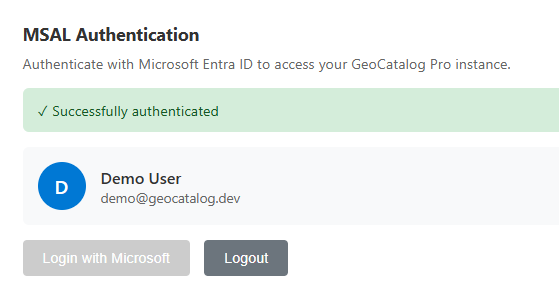
設定 MSAL 以進行瀏覽器認證。 以下範例展示了金鑰配置與令牌取得模式:
import { PublicClientApplication, InteractionRequiredAuthError } from '@azure/msal-browser';

// Configuration - replace with your values or load from environment/config
const msalConfig = {
  auth: {
    clientId: 'YOUR_CLIENT_ID',
    authority: 'https://login.microsoftonline.com/YOUR_TENANT_ID',
    redirectUri: window.location.origin,
  },
  cache: {
    cacheLocation: 'sessionStorage',
    storeAuthStateInCookie: false,
  },
};

// Create MSAL instance
const msalInstance = new PublicClientApplication(msalConfig);

// GeoCatalog API scope - always use this exact value
const scopes = ['https://geocatalog.spatio.azure.com/.default'];

/**
 * Acquire an access token for GeoCatalog API calls.
 * Tries silent acquisition first, falls back to popup if needed.
 */
async function getAccessToken() {
  const account = msalInstance.getActiveAccount() || msalInstance.getAllAccounts()[0];

  if (!account) {
    throw new Error('No authenticated account. Call login() first.');
  }

  try {
    // Try silent token acquisition (uses cached token)
    const result = await msalInstance.acquireTokenSilent({ account, scopes });
    return result.accessToken;
  } catch (error) {
    // If silent fails (token expired), fall back to popup
    if (error instanceof InteractionRequiredAuthError) {
      const result = await msalInstance.acquireTokenPopup({ scopes });
      return result.accessToken;
    }
    throw error;
  }
}

/**
 * Sign in the user via popup.
 */
async function login() {
  const result = await msalInstance.loginPopup({ scopes });
  msalInstance.setActiveAccount(result.account);
  return result.account;
}

/**
 * Sign out the user.
 */
function logout() {
  msalInstance.logoutPopup();
}
STAC API:查詢集合與項目
GeoCatalog STAC API 提供發現與查詢地理空間資料的端點。 所有請求都需要一個 Authorization 標頭,並附上從 實施 MSAL 認證中取得的承載令牌。
列出集合
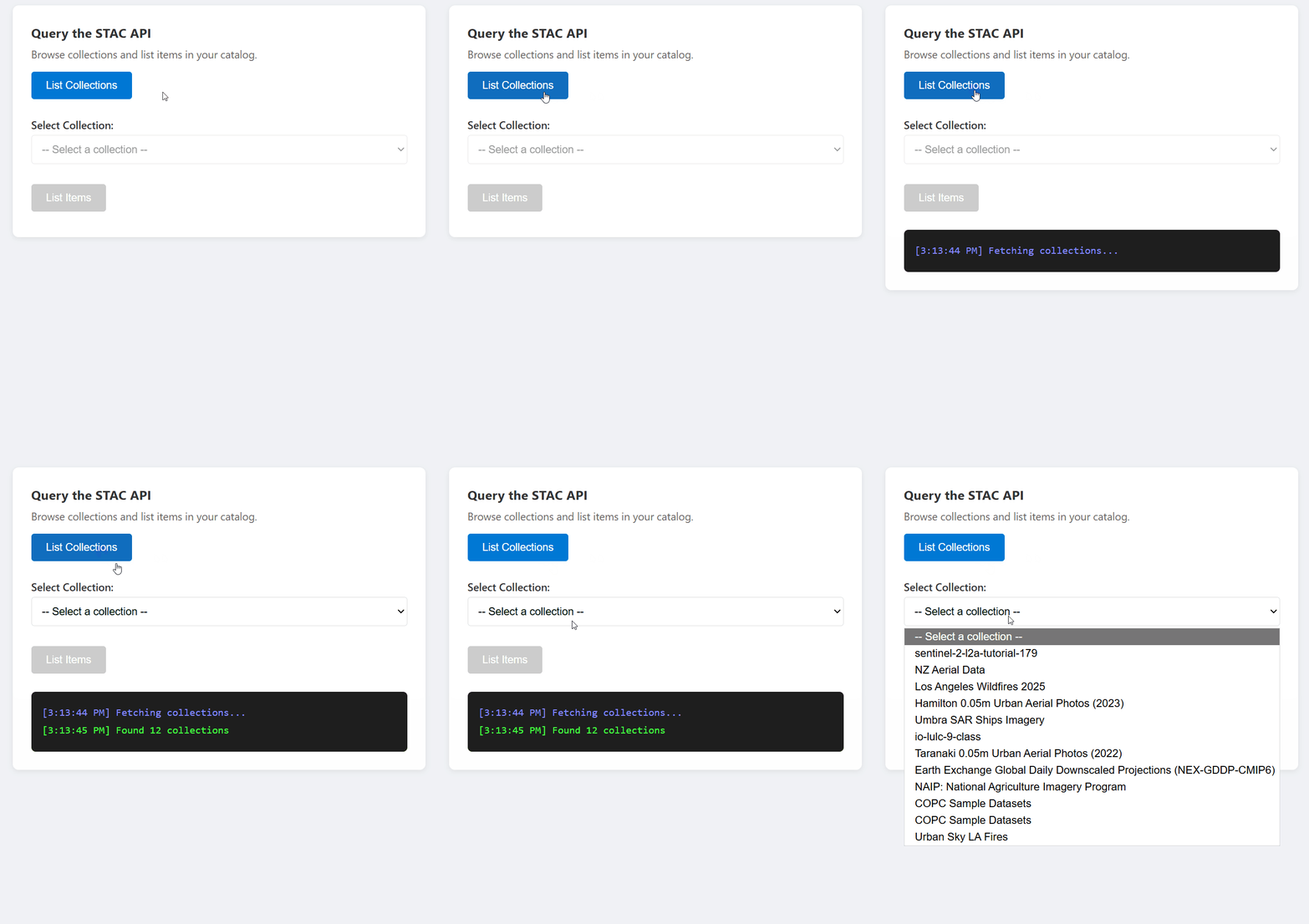
const API_VERSION = '2025-04-30-preview';

async function listCollections(accessToken, catalogUrl) {
  const url = `${catalogUrl}/stac/collections?api-version=${API_VERSION}`;

  const response = await fetch(url, {
    headers: {
      'Authorization': `Bearer ${accessToken}`,
    },
  });

  if (!response.ok) {
    throw new Error(`Failed to list collections: ${response.statusText}`);
  }

  const data = await response.json();
  return data.collections; // Array of STAC Collection objects
}
列出收藏中的項目
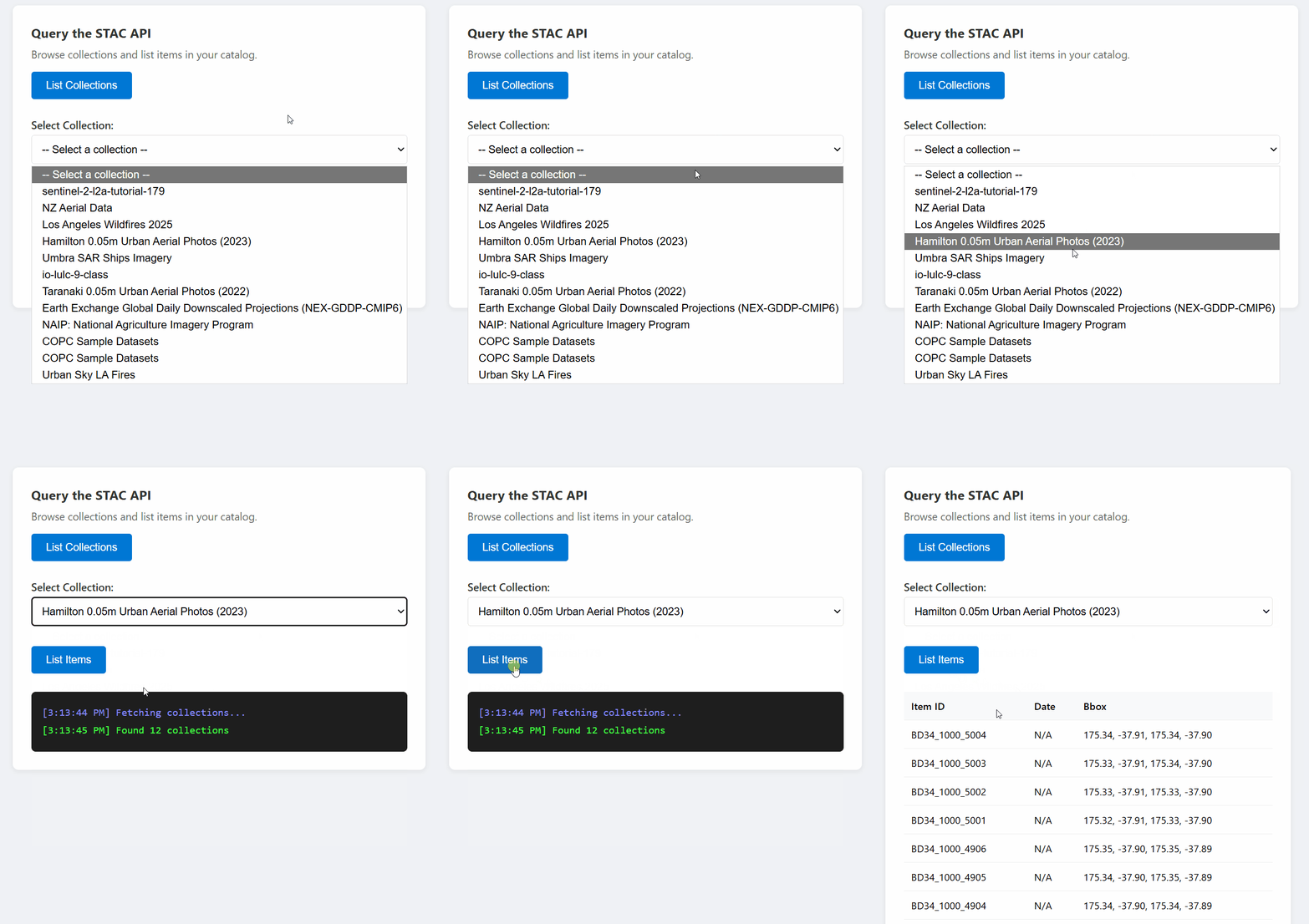
const API_VERSION = '2025-04-30-preview';

async function listItems(accessToken, catalogUrl, collectionId, limit = 10) {
  const url = `${catalogUrl}/stac/collections/${collectionId}/items?limit=${limit}&api-version=${API_VERSION}`;

  const response = await fetch(url, {
    headers: {
      'Authorization': `Bearer ${accessToken}`,
    },
  });

  if (!response.ok) {
    throw new Error(`Failed to list items: ${response.statusText}`);
  }

  const data = await response.json();
  return data.features; // Array of STAC Item objects
}
跨典藏搜尋
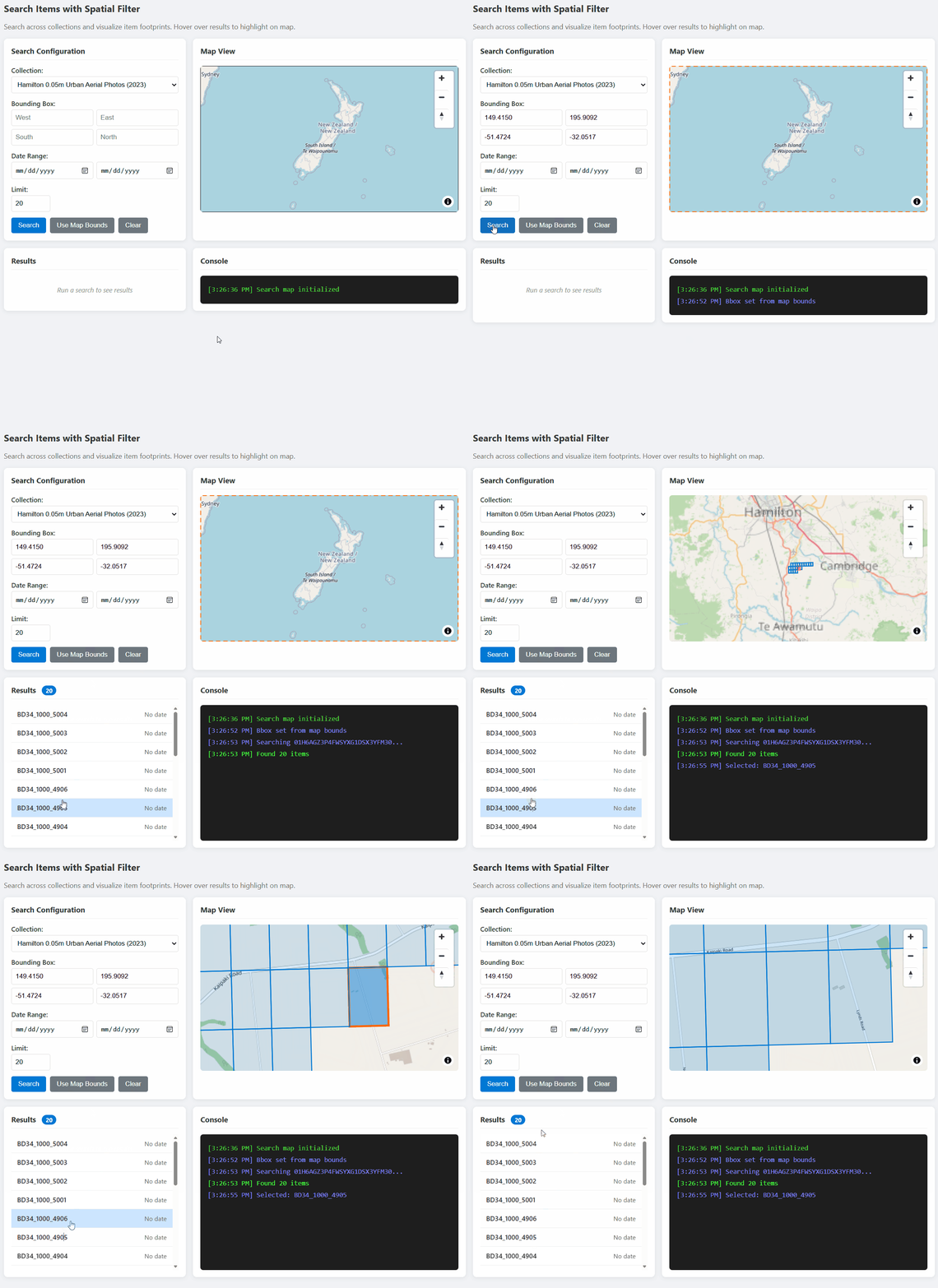
const API_VERSION = '2025-04-30-preview';

async function searchItems(accessToken, catalogUrl, searchParams) {
  const url = `${catalogUrl}/stac/search?api-version=${API_VERSION}`;

  const response = await fetch(url, {
    method: 'POST',
    headers: {
      'Authorization': `Bearer ${accessToken}`,
      'Content-Type': 'application/json',
    },
    body: JSON.stringify(searchParams),
  });

  if (!response.ok) {
    throw new Error(`Search failed: ${response.statusText}`);
  }

  return await response.json();
}

// Example usage:
const results = await searchItems(token, catalogUrl, {
  collections: ['my-collection'],
  bbox: [-122.5, 37.5, -122.0, 38.0],  // [west, south, east, north]
  datetime: '2024-01-01/2024-12-31',
  limit: 20,
});
圖塊網址:建立地圖視覺化的網址
GeoCatalog Tiler API 以地圖磚塊的形式提供柵格資料。 請以以下模式構造磚塊網址:
單一項目圖塊
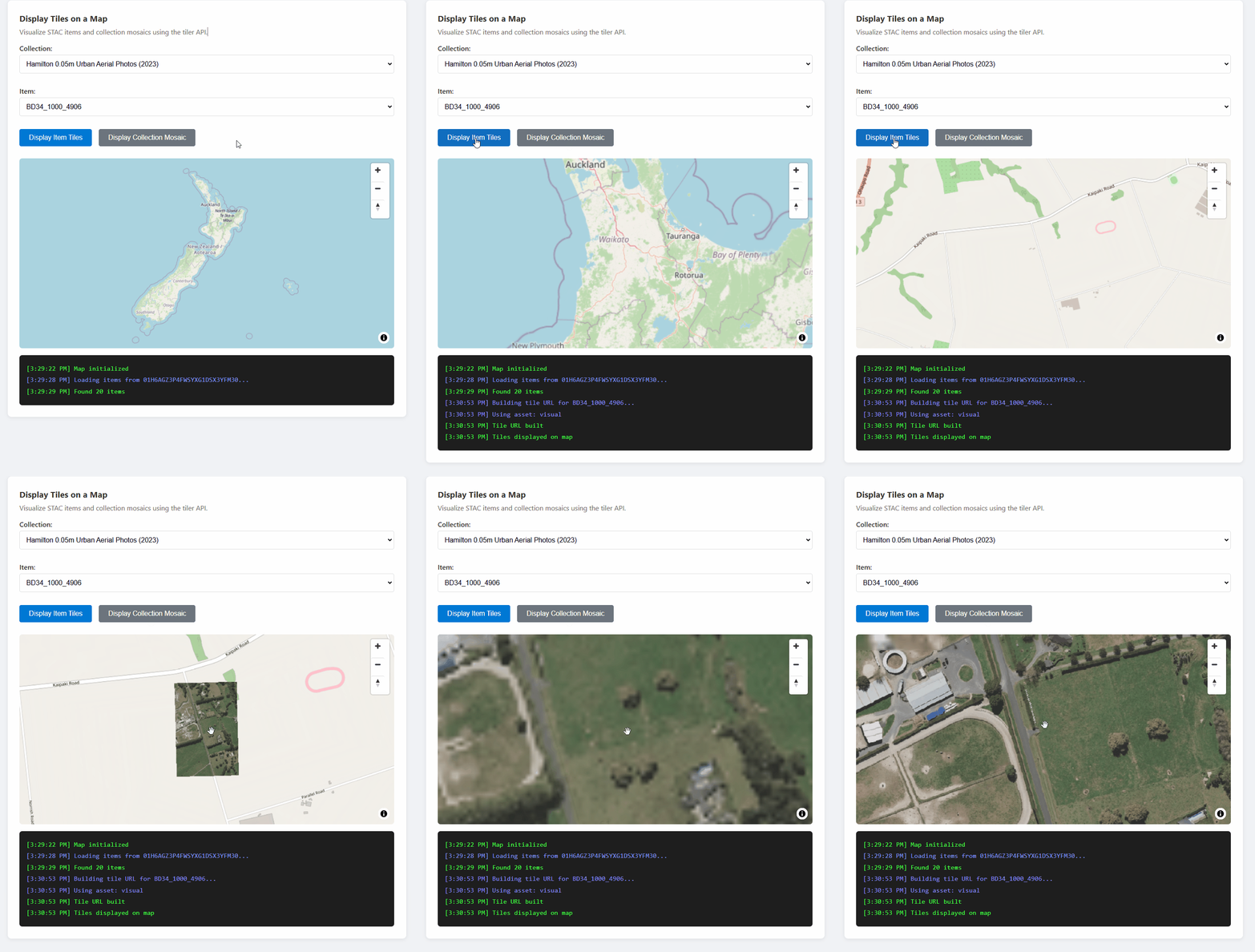
{catalogUrl}/data/collections/{collectionId}/items/{itemId}/tiles/{z}/{x}/{y}@1x.png
  ?api-version=2025-04-30-preview
  &tileMatrixSetId=WebMercatorQuad
  &assets=visual
圖塊 URL 生成函數
const API_VERSION = '2025-04-30-preview';

/**
 * Build a tile URL template for a STAC item.
 * Returns a URL with {z}/{x}/{y} placeholders for use with map libraries.
 */
function buildTileUrl(catalogUrl, collectionId, itemId, options = {}) {
  const { assets = 'visual', colormap, rescale } = options;

  const base = `${catalogUrl}/data/collections/${collectionId}/items/${itemId}/tiles/{z}/{x}/{y}@1x.png`;

  const params = new URLSearchParams();
  params.set('api-version', API_VERSION);
  params.set('tileMatrixSetId', 'WebMercatorQuad');
  params.set('assets', assets);

  if (colormap) params.set('colormap_name', colormap);
  if (rescale) params.set('rescale', rescale);

  return `${base}?${params.toString()}`;
}

// Example usage:
const tileUrl = buildTileUrl(
  'https://mygeocatalog.northcentralus.geocatalog.spatio.azure.com',
  'aerial-imagery',
  'image-001',
  { assets: 'visual' }
);
關鍵圖塊參數
| 參數 | 為必填項目 | Description |
|---|---|---|
api-version |
Yes | API 版本(2025-04-30-preview) |
tileMatrixSetId |
Yes | 請將WebMercatorQuad用於網頁地圖 |
assets |
Yes | 要渲染的資產名稱(例如: visual, image) |
colormap_name |
否 | 命名色彩映射(範例: viridis, terrain) |
rescale |
否 | 縮放的值範圍(範例: 0,255) |
asset_bidx |
否 | 頻段指數(例如:RGB的image\|1,2,3) |
備註
對於包含四頻段影像的集合(如 NAIP 搭配 RGB + 近紅外),請只 asset_bidx=image|1,2,3 選擇 RGB 頻段。 磚化程式無法將四個區塊編碼成 PNG。
地圖整合:使用 MapLibre GL 顯示磁磚
像 MapLibre GL、Leaflet 和 OpenLayers 這類地圖庫可以顯示點陣圖磚。 關鍵挑戰在於為磁磚請求 新增授權標頭 ,因為這些函式庫會直接擷取磁磚。
MapLibre GL 範例
MapLibre GL 提供 transformRequest 注入標頭的選項:
import maplibregl from 'maplibre-gl';
import 'maplibre-gl/dist/maplibre-gl.css';

// Store the current access token
let currentAccessToken = null;

function initializeMap(containerId, accessToken) {
  currentAccessToken = accessToken;

  const map = new maplibregl.Map({
    container: containerId,
    style: {
      version: 8,
      sources: {
        osm: {
          type: 'raster',
          tiles: ['https://tile.openstreetmap.org/{z}/{x}/{y}.png'],
          tileSize: 256,
          attribution: '© OpenStreetMap contributors',
        },
      },
      layers: [{ id: 'osm', type: 'raster', source: 'osm' }],
    },
    center: [0, 0],
    zoom: 2,
    // Add authorization header to tile requests
    transformRequest: (url, resourceType) => {
      // Only add auth for GeoCatalog tile requests
      if (url.includes('geocatalog.spatio.azure.com') && currentAccessToken) {
        return {
          url,
          headers: { 'Authorization': `Bearer ${currentAccessToken}` },
        };
      }
      return { url };
    },
  });

  return map;
}

function addTileLayer(map, tileUrl, bounds) {
  // Remove existing layer and source if present
  if (map.getLayer('data-layer')) {
    map.removeLayer('data-layer');
  }
  if (map.getSource('data-tiles')) {
    map.removeSource('data-tiles');
  }

  // Add tile source
  map.addSource('data-tiles', {
    type: 'raster',
    tiles: [tileUrl],
    tileSize: 256,
    minzoom: 10,  // Many aerial collections require zoom 10+
    maxzoom: 18,
  });

  // Add tile layer
  map.addLayer({
    id: 'data-layer',
    type: 'raster',
    source: 'data-tiles',
  });

  // Zoom to bounds [west, south, east, north]
  if (bounds) {
    map.fitBounds([[bounds[0], bounds[1]], [bounds[2], bounds[3]]], { padding: 50 });
  }
}
這很重要
每次有圖塊請求時都會呼叫transformRequest這個函式。 將存取權杖存入一個可存取的變數 transformRequest ,當權杖刷新時更新。
馬賽克磁磚:展示整個系列的圖像
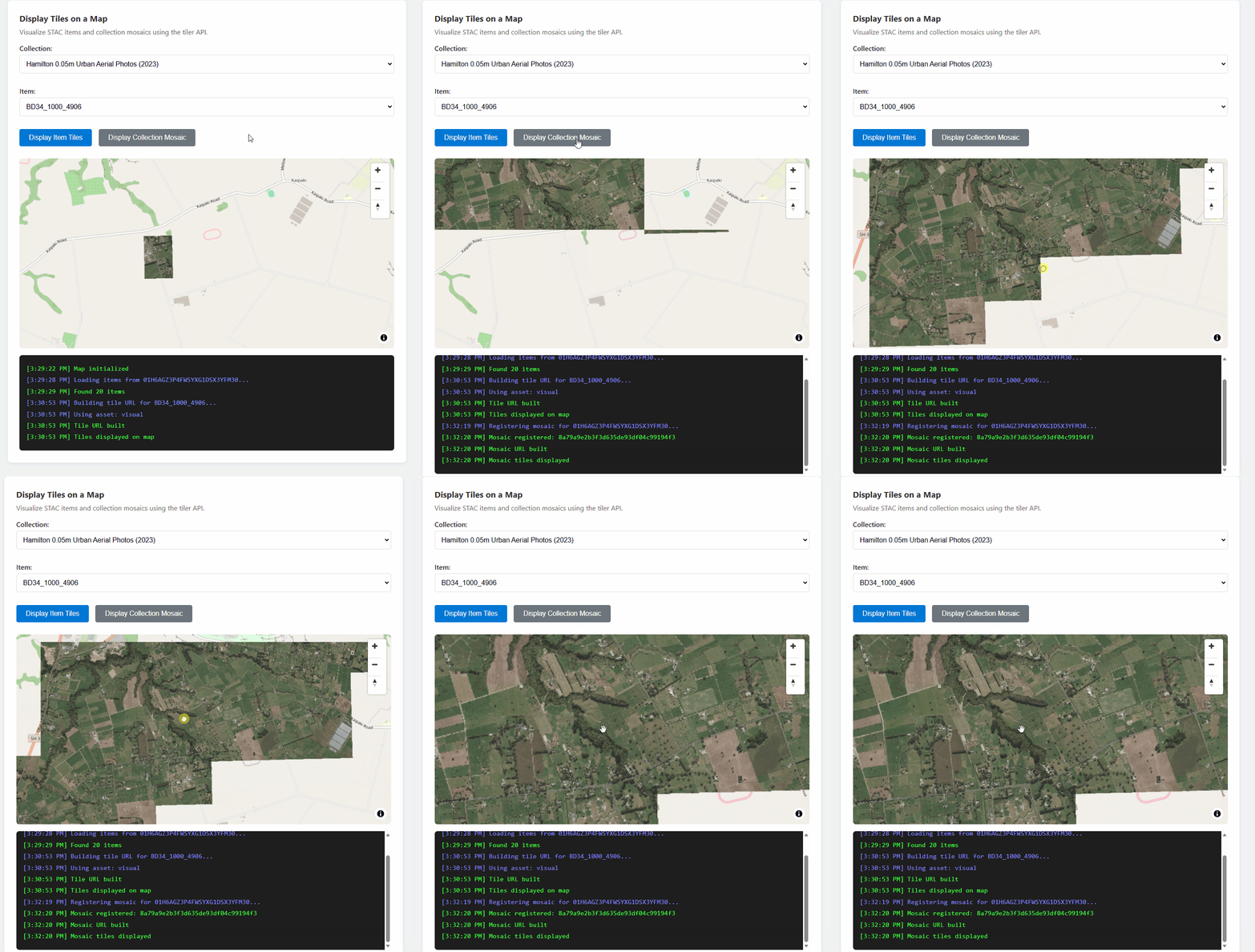
若要以無縫圖層瀏覽收藏中的所有項目,請註冊馬賽克搜尋並使用回傳的搜尋 ID:
const API_VERSION = '2025-04-30-preview';

/**
 * Register a mosaic search for a collection.
 * Returns a search ID that can be used to fetch mosaic tiles.
 */
async function registerMosaic(catalogUrl, collectionId, accessToken) {
  const url = `${catalogUrl}/data/mosaic/register?api-version=${API_VERSION}`;

  const response = await fetch(url, {
    method: 'POST',
    headers: {
      'Authorization': `Bearer ${accessToken}`,
      'Content-Type': 'application/json',
    },
    body: JSON.stringify({
      collections: [collectionId],
    }),
  });

  if (!response.ok) {
    throw new Error(`Failed to register mosaic: ${response.statusText}`);
  }

  const data = await response.json();
  // Note: API returns 'searchid' (lowercase), not 'searchId'
  return data.searchid;
}

/**
 * Build a mosaic tile URL template.
 */
function buildMosaicTileUrl(catalogUrl, searchId, collectionId, options = {}) {
  const { assets = 'visual' } = options;

  const base = `${catalogUrl}/data/mosaic/${searchId}/tiles/{z}/{x}/{y}@1x.png`;

  const params = new URLSearchParams();
  params.set('api-version', API_VERSION);
  params.set('tileMatrixSetId', 'WebMercatorQuad');
  params.set('collection', collectionId);
  params.set('assets', assets);

  return `${base}?${params.toString()}`;
}
SAS 代幣:下載原始資產
SAS API 提供限時令牌,可直接從 Azure Blob Storage 下載原始資產檔案(GeoTIFF、COG 及其他檔案)。 當你需要原始原始檔案而非渲染圖塊時,請使用此選項。
這很重要
在瀏覽器應用程式中,SAS 令牌僅能用於下載。 由於 Azure Blob Storage 的 CORS 政策,瀏覽器無法透過 JavaScript fetch()讀取 blob 資料。 請參閱 瀏覽器限制 章節。
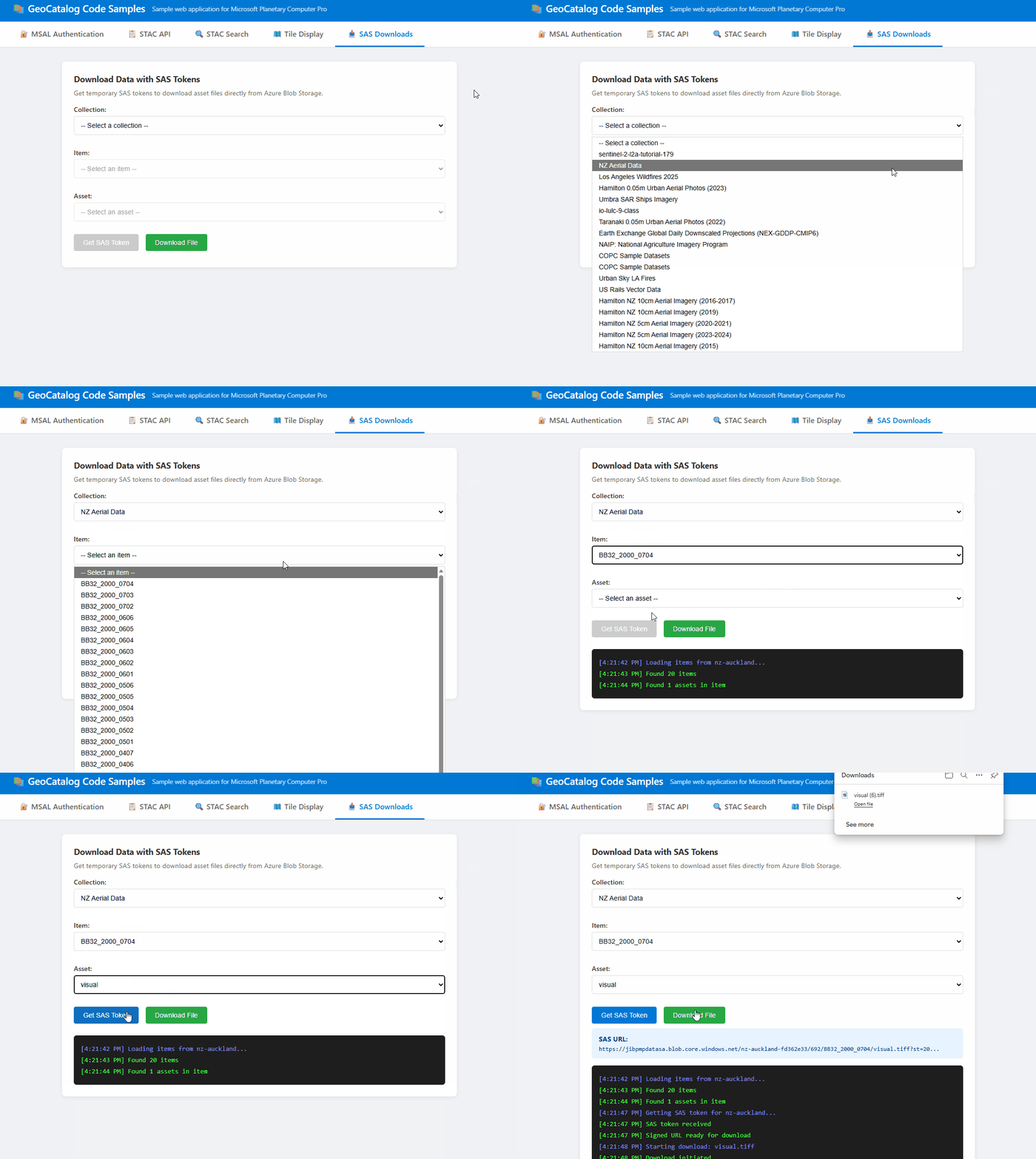
取得SAS代幣
const API_VERSION = '2025-04-30-preview';

/**
 * Get a SAS token for accessing assets in a collection.
 * Returns a token string that can be appended to asset URLs.
 */
async function getCollectionSasToken(accessToken, catalogUrl, collectionId) {
  const url = `${catalogUrl}/sas/token/${collectionId}?api-version=${API_VERSION}`;

  const response = await fetch(url, {
    headers: {
      'Authorization': `Bearer ${accessToken}`,
    },
  });

  if (!response.ok) {
    throw new Error(`Failed to get SAS token: ${response.statusText}`);
  }

  const data = await response.json();
  return data.token; // SAS token string
}
建立一個已簽署的下載網址
/**
 * Build a signed URL for downloading an asset.
 * Appends the SAS token to the asset's href.
 */
function buildSignedAssetUrl(assetHref, sasToken) {
  const separator = assetHref.includes('?') ? '&' : '?';
  return `${assetHref}${separator}${sasToken}`;
}

// Example usage:
const sasToken = await getCollectionSasToken(accessToken, catalogUrl, 'my-collection');
const assetHref = item.assets['visual'].href;
const signedUrl = buildSignedAssetUrl(assetHref, sasToken);
觸發檔案下載
/**
 * Trigger a browser download for an asset file.
 * Works by creating a temporary anchor element.
 */
function downloadAsset(signedUrl, filename) {
  const link = document.createElement('a');
  link.href = signedUrl;
  link.download = filename || 'download';
  document.body.appendChild(link);
  link.click();
  document.body.removeChild(link);
}

// Example: Download an asset
downloadAsset(signedUrl, 'aerial-image.tif');
瀏覽器限制
SAS 代幣在瀏覽器與伺服器端程式碼中運作方式不同:
| 用例 | Browser | Server-side |
|---|---|---|
| 下載檔案(使用者選擇連結) | ✅ 可用 | ✅ 可用 |
透過fetch()讀取 blob 資料 |
❌ CORS 封鎖 | ✅ 著作 |
| 在 JavaScript 中處理原始像素 | ❌ 不可能 | ✅ 著作 |
瀏覽器下載之所以能運作,是因為導航(點擊連結)會繞過 CORS。 然而, fetch() 對 Azure Blob Storage 的請求會被阻擋,因為該儲存帳號的 CORS 政策中沒有包含你應用程式的來源。
如果您的應用程式需要在瀏覽器中讀取並處理原始資產資料,請實作伺服器端代理:
備註
以下程式碼為簡化範例,用以說明代理模式。 對於生產應用程式,代理端點應對請求進行認證(例如透過轉發使用者的承載憑證或使用會話認證),並驗證使用者是否有權存取所請求的資源。
// ❌ Browser: This fails due to CORS
const response = await fetch(signedUrl);
const data = await response.arrayBuffer(); // Error!

// ✅ Browser: Call your backend instead
const response = await fetch('/api/proxy-asset', {
  method: 'POST',
  body: JSON.stringify({ collectionId, itemId, assetName })
});
const data = await response.json(); // Works!
你的後端可以用 SAS 代幣取得 blob,並回傳處理後的結果。
開發考量
CORS 支援
GeoCatalog API 包含完整的 CORS 支援。Access-Control-Allow-Origin: * 瀏覽器型應用程式可以從任何來源直接向 GeoCatalog 發出請求,包括開發過程中的 http://localhost。 不需要代理或變通方法。
API 允許在 CORS 請求中使用 Authorization 標頭,因此認證呼叫 fetch() 可直接從瀏覽器 JavaScript 運作。
選擇合適的資料存取方式
| 方法 | 瀏覽器 fetch() |
瀏覽器下載 | Server-side | 適用對象 |
|---|---|---|---|---|
| Tiler API | ✅ 完全支援 | ✅ 是 | ✅ 是 | 地圖視覺化 |
| SAS 代幣 | ❌ CORS 封鎖 | ✅ 是 | ✅ 是 | 原始檔案下載 |
Tiler API:用於在地圖上顯示影像。 提供具備完整 CORS 支援的已渲染 PNG 或 WebP 圖塊。 請參見 圖塊網址 與 地圖整合。
SAS 代幣:用於下載原始原始碼檔案(GeoTIFFs、COG)。 瀏覽器下載是可行的,但
fetch()會被 Azure Blob Storage CORS 政策阻擋。 詳情與解決方法請參見 SAS 代幣 。
權杖重新整理
存取權代幣通常在一小時後過期。 您的申請應該:
- 透過取得新的代幣來處理 401 錯誤。
- 使用 MSAL 的靜默代幣獲取功能,自動刷新過期代幣。
- 更新您地圖的
transformRequest所用的權杖參照。
錯誤處理
處理常見錯誤情境:
| HTTP 狀態 | 原因 | Solution |
|---|---|---|
| 401 | 令牌過期或無效 | 刷新存取令牌 |
| 404 | 未找到項目或收藏 | 確認身分證是否存在 |
| 424 | 圖磚外資料延伸區 | 預期之中,妥善處理 |
故障排除
| 錯誤 | 原因 | Solution |
|---|---|---|
| 「AADSTS50011:回覆網址不符」 | 程式碼中的 Redirect URI 與 Microsoft Entra ID 註冊不符 | 在應用程式註冊時,將你的開發網址(例如 http://localhost:3000)加入為 SPA 重定向 URI |
| 「無效範圍」錯誤 | 使用 GeoCatalog URL 取代 API 範圍 | 使用https://geocatalog.spatio.azure.com/.default作為範圍 |
| 401 未授權的圖磚請求 | 地圖函式庫不含認證標頭 | 使用 transformRequest (MapLibre) 加入持有者標記;確保標記為最新 |
| 圖塊和底圖不對齊 | 錯誤的圖塊矩陣集合 | 使用 tileMatrixSetId=WebMercatorQuad 進行網頁墨卡托投影(EPSG:3857) |
| 「無法解碼影像」 | 資產名稱錯誤、多頻段影像或外部資料範圍 | 檢查 item_assets 名稱是否有效;將 asset_bidx=image\|1,2,3 用於 RGB;涵蓋範圍預期會超出 404/424 |