此資源庫提供現成可用的設定範例,以可視化Microsoft行星計算機專業版中的常見地理空間數據類型。 每個範例都包含 拼接、 渲染選項、 切片設定和 SpatioTemporal 資產目錄(STAC)集合 元數據的完整 JSON 設定,適用於您自己的數據集。
目錄
Prerequisites
使用這些範例之前,您應該具有:
如何使用這些範例
此資源庫中的每個範例都包含:
- 描述和內容 - 數據源和視覺效果方法的相關信息
- 視覺範例 - Explorer 中轉譯數據的螢幕快照
-
以索引標籤組織的完整組態設定:
- 馬賽克 - 如何選擇要顯示的項目並進行篩選
- 轉譯選項 - 如何設定樣式並可視化數據
- 圖塊設定 — 如何優化顯示參數
- STAC 集合 - 基礎集合元數據結構
若要將這些範例套用至您自己的數據:
- 在 GeoCatalog 中建立新的集合
- 將數據匯入到集合中。
- 流覽至 集合的組態 頁面
- 修改範例 JSON 以符合數據集的特定頻帶、資產和屬性
- 將組態套用至您的集合
- 在檔案總管中檢視結果
Sentinel-2-l2a 集合設定
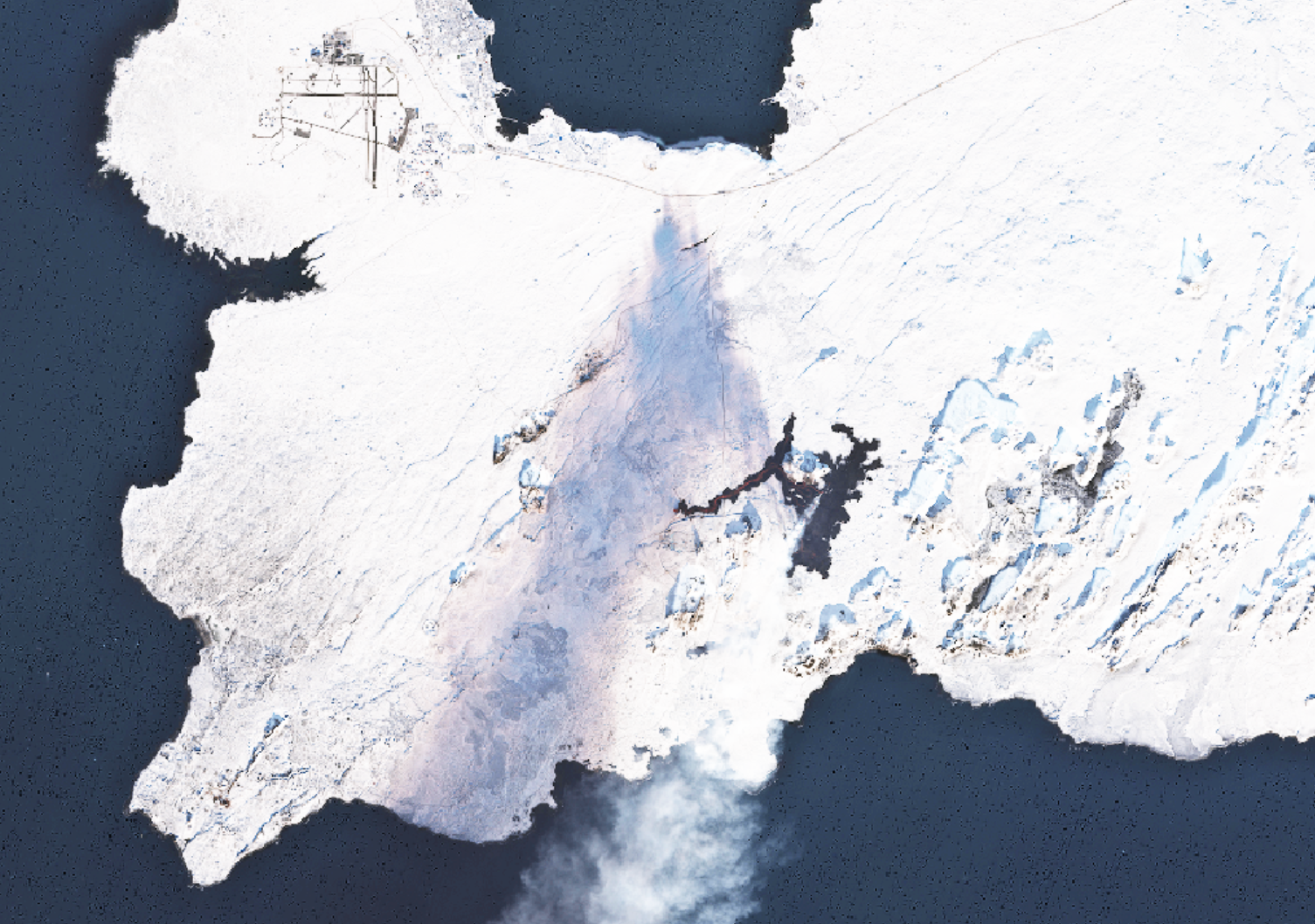
Sentinel-2 是歐洲航太局(ESA)作為科伯尼庫計劃一部分的高解析度、多光譜成像任務。
Sentinel-2 組態詳細數據
馬賽克配置
這個馬賽克設定會告訴檢視器顯示集合中最新的 Sentinel-2 影像,但只有雲層覆蓋小於或等於 40%的影像。 Common Query Language (CQL) 篩選可確保只包含相對清楚的影像,讓視覺效果對大多數應用程式更有用。 每個馬賽克專案都可以定義不同的準則來選取和結合影像,而這個馬賽克範例會使用以最近、低雲影像為主的單一「預設」馬賽克。
[
  {
    "id": "default",
    "name": "Most recent available",
    "description": "Most recent available imagery in this Sentinel-2 collection",
    "cql": [
      {
        "op": "<=",
        "args": [
          {
            "property": "eo:cloud_cover"
          },
          40
        ]
      }
    ]
  }
]
渲染選項配置
此轉譯組態會定義數種方式,以可視化 Explorer 中的 Sentinel-2 衛星影像。 每個項目都會描述不同的風格或科學產品,例如 自然色彩(您眼睛看到的)、彩色紅外(突出植被),或 標準化差異植被指數(NDVI)(一種植被健康指數)。
字串 options 會指定如何將資料視覺化:
assets=B04&assets=B03&assets=B02:
這個 asset 參數會告訴系統要使用哪些衛星資料層的波段來生成影像。 例如,B04 是紅色,B03 是綠色,B02 是藍色,它們一起製作真色影像。nodata=0:
任何值為 0 的像素都會被視為遺漏或透明。color_formula=Gamma RGB 3.2 Saturation 0.8 Sigmoidal RGB 25 0.35:
此伽瑪調整會套用色彩修正,讓影像看起來更自然或更具視覺吸引力。- Gamma 調整亮度
- 飽和度 會變更色彩強度
- Sigmoidal 調整對比
expression=(B08-B04)/(B08+B04):
對於 NDVI 和 NDWI,此運算式參數會使用波段來計算數學公式,生成強調植被或水分的新影像。rescale=-1,1:
這個重新調整參數會延展計算值以符合色階,因此結果很容易解譯。colormap_name=rdylgn:
此 colormap 參數會將調色盤(紅色-黃色-綠色)套用至結果,讓您更容易看到差異。
[
  {
    "id": "natural-color",
    "name": "Natural color",
    "description": "True color composite of visible bands (B04, B03, B02)",
    "type": "raster-tile",
    "options": "assets=B04&assets=B03&assets=B02&nodata=0&color_formula=Gamma RGB 3.2 Saturation 0.8 Sigmoidal RGB 25 0.35",
    "minZoom": 9
  },
  {
    "id": "natural-color-pre-feb-2022",
    "name": "Natural color (pre Feb, 2022)",
    "description": "Pre-Feb 2022 true color composite of visible bands (B04, B03, B02)",
    "type": "raster-tile",
    "options": "assets=B04&assets=B03&assets=B02&nodata=0&color_formula=Gamma RGB 3.7 Saturation 1.5 Sigmoidal RGB 15 0.35",
    "minZoom": 9
  },
  {
    "id": "color-infrared",
    "name": "Color infrared",
    "description": "Highlights healthy (red) and unhealthy (blue/gray) vegetation (B08, B04, B03).",
    "type": "raster-tile",
    "options": "assets=B08&assets=B04&assets=B03&nodata=0&color_formula=Gamma RGB 3.7 Saturation 1.5 Sigmoidal RGB 15 0.35",
    "minZoom": 9
  },
  {
    "id": "short-wave-infrared",
    "name": "Short wave infrared",
    "description": "Darker shades of green indicate denser vegetation. Brown is indicative of bare soil and built-up areas (B12, B8A, B04).",
    "type": "raster-tile",
    "options": "assets=B12&assets=B8A&assets=B04&nodata=0&color_formula=Gamma RGB 3.7 Saturation 1.5 Sigmoidal RGB 15 0.35",
    "minZoom": 9
  },
  {
    "id": "agriculture",
    "name": "Agriculture",
    "description": "Darker shades of green indicate denser vegetation (B11, B08, B02).",
    "type": "raster-tile",
    "options": "assets=B11&assets=B08&assets=B02&nodata=0&color_formula=Gamma RGB 3.7 Saturation 1.5 Sigmoidal RGB 15 0.35",
    "minZoom": 9
  },
  {
    "id": "normalized-difference-veg-inde",
    "name": "Normalized Difference Veg. Index (NDVI)",
    "description": "Normalized Difference Vegetation Index (B08-B04)/(B08+B04), darker green indicates healthier vegetation.",
    "type": "raster-tile",
    "options": "nodata=0&expression=(B08-B04)/(B08+B04)&rescale=-1,1&colormap_name=rdylgn&asset_as_band=true",
    "minZoom": 9
  },
  {
    "id": "moisture-index-ndwi",
    "name": "Moisture Index (NDWI)",
    "description": "Index indicating water stress in plants (B8A-B11)/(B8A+B11)",
    "type": "raster-tile",
    "options": "nodata=0&expression=(B8A-B11)/(B8A+B11)&rescale=-1,1&colormap_name=rdbu&asset_as_band=true",
    "minZoom": 9
  },
  {
    "id": "atmospheric-penetration",
    "name": "Atmospheric penetration",
    "description": "False color rendering with non-visible bands to reduce effects of atmospheric particles (B12, B11, B8A).",
    "type": "raster-tile",
    "options": "nodata=0&assets=B12&assets=B11&assets=B8A&color_formula=Gamma RGB 3.7 Saturation 1.5 Sigmoidal RGB 15 0.35",
    "minZoom": 9
  }
]
磁磚設定組態
磚設定組態會控制Explorer中Sentinel-2影像的顯示行為和效能特性。
關鍵參數:
minZoom: 8:設定 Sentinel-2 影像可見的最小縮放層級。 這個中度縮放層級設定適用於 Sentinel-2 的解析度(大多數光譜波段為 10 米,部分為 20 米,大氣頻帶為 60 米),使影像在區域至地方規模的分析中非常有用,從縮放層級 8-12 開始。maxItemsPerTile: 35:控制每個圖塊中可以合成多少個 Sentinel-2 場景。 此組合設定會平衡效能與時態涵蓋範圍完整性,確保可以結合多個場景,以取得更好的涵蓋範圍,同時維持轉譯效能。defaultLocation: null:未指定預設位置,可讓使用者全域流覽至任何感興趣的區域。
此磚設定組態可將 Sentinel-2 中度解析度影像的數據可見性與效能之間的平衡優化,使其適用於各種應用程式,從區域監視到詳細的本機分析。
{
  "minZoom": 8,
  "maxItemsPerTile": 35,
  "defaultLocation": null
}
STAC 集合組態
STAC 集合組態會定義這個 Sentinel-2 集合的核心元數據。
STAC 集合 JSON 中的 區 item_assets 段可作為集合中所有可用數據資產的重要目錄。 它會定義每個光譜波段(B01-B12、B8A 等)及其屬性,包括:
- 資產密鑰(例如 “B04”、“B03”),這些密鑰是渲染組態所參考的。
- 每個頻段的元資料(解析度、資料類型、功能)
- 樂隊描述,說明每個樂隊代表的內容(B04 是「紅色」,B08 是「近紅外」)
- 適用於科學應用程式的光譜資訊
轉譯組態會直接參考這些資產索引鍵來建立不同的視覺效果。 例如,當轉譯組態指定 assets=B04&assets=B03&assets=B02時,它會提取item_assets中定義的紅色、綠色和藍色帶,以建立自然色彩影像。
{
  "id": "sentinel-2-l2a_Grindavik",
  "type": "Collection",
  "links": [
    {
      "rel": "items",
      "type": "application/geo+json",
      "href": "https://{geocatalog_id}/stac/collections/sentinel-2-l2a_Grindavik/items"
    },
    {
      "rel": "parent",
      "type": "application/json",
      "href": "https://{geocatalog_id}/stac/"
    },
    {
      "rel": "root",
      "type": "application/json",
      "href": "https://{geocatalog_id}/stac/"
    },
    {
      "rel": "self",
      "type": "application/json",
      "href": "https://{geocatalog_id}/stac/collections/sentinel-2-l2a_Grindavik"
    },
    {
      "rel": "license",
      "href": "https://scihub.copernicus.eu/twiki/pub/SciHubWebPortal/TermsConditions/Sentinel_Data_Terms_and_Conditions.pdf",
      "title": "Copernicus Sentinel data terms"
    },
    {
      "rel": "describedby",
      "href": "https://planetarycomputer.microsoft.com/dataset/sentinel-2-l2a",
      "type": "text/html",
      "title": "Human readable dataset overview and reference"
    }
  ],
  "title": "Sentinel-2-l2a",
  "assets": {
    "thumbnail": {
      "href": "https://{storage_account}.blob.core.windows.net/{blob_container}/collection-assets/thumbnail/blob",
      "type": "image/png",
      "roles": [
        "thumbnail"
      ],
      "title": "sentinel-2-l2a_Grindavik thumbnail"
    }
  },
  "extent": {
    "spatial": {
      "bbox": [
        [
          -180,
          -90,
          180,
          90
        ]
      ]
    },
    "temporal": {
      "interval": [
        [
          "2015-06-27T10:25:31Z",
          null
        ]
      ]
    }
  },
  "license": "proprietary",
  "keywords": [
    "Sentinel",
    "Copernicus",
    "ESA",
    "Satellite",
    "Global",
    "Imagery",
    "Reflectance"
  ],
  "providers": [
    {
      "url": "https://sentinel.esa.int/web/sentinel/missions/sentinel-2",
      "name": "ESA",
      "roles": [
        "producer",
        "licensor"
      ]
    },
    {
      "url": "https://www.esri.com/",
      "name": "Esri",
      "roles": [
        "processor"
      ]
    },
    {
      "url": "https://planetarycomputer.microsoft.com",
      "name": "Microsoft",
      "roles": [
        "host",
        "processor"
      ]
    }
  ],
  "summaries": {
    "gsd": [
      10,
      20,
      60
    ],
    "eo:bands": [
      {
        "name": "AOT",
        "description": "aerosol optical thickness"
      },
      {
        "gsd": 60,
        "name": "B01",
        "common_name": "coastal",
        "description": "coastal aerosol",
        "center_wavelength": 0.443,
        "full_width_half_max": 0.027
      },
      {
        "gsd": 10,
        "name": "B02",
        "common_name": "blue",
        "description": "visible blue",
        "center_wavelength": 0.49,
        "full_width_half_max": 0.098
      },
      {
        "gsd": 10,
        "name": "B03",
        "common_name": "green",
        "description": "visible green",
        "center_wavelength": 0.56,
        "full_width_half_max": 0.045
      },
      {
        "gsd": 10,
        "name": "B04",
        "common_name": "red",
        "description": "visible red",
        "center_wavelength": 0.665,
        "full_width_half_max": 0.038
      },
      {
        "gsd": 20,
        "name": "B05",
        "common_name": "rededge",
        "description": "vegetation classification red edge",
        "center_wavelength": 0.704,
        "full_width_half_max": 0.019
      },
      {
        "gsd": 20,
        "name": "B06",
        "common_name": "rededge",
        "description": "vegetation classification red edge",
        "center_wavelength": 0.74,
        "full_width_half_max": 0.018
      },
      {
        "gsd": 20,
        "name": "B07",
        "common_name": "rededge",
        "description": "vegetation classification red edge",
        "center_wavelength": 0.783,
        "full_width_half_max": 0.028
      },
      {
        "gsd": 10,
        "name": "B08",
        "common_name": "nir",
        "description": "near infrared",
        "center_wavelength": 0.842,
        "full_width_half_max": 0.145
      },
      {
        "gsd": 20,
        "name": "B8A",
        "common_name": "rededge",
        "description": "vegetation classification red edge",
        "center_wavelength": 0.865,
        "full_width_half_max": 0.033
      },
      {
        "gsd": 60,
        "name": "B09",
        "description": "water vapor",
        "center_wavelength": 0.945,
        "full_width_half_max": 0.026
      },
      {
        "gsd": 20,
        "name": "B11",
        "common_name": "swir16",
        "description": "short-wave infrared, snow/ice/cloud classification",
        "center_wavelength": 1.61,
        "full_width_half_max": 0.143
      },
      {
        "gsd": 20,
        "name": "B12",
        "common_name": "swir22",
        "description": "short-wave infrared, snow/ice/cloud classification",
        "center_wavelength": 2.19,
        "full_width_half_max": 0.242
      }
    ],
    "platform": [
      "Sentinel-2A",
      "Sentinel-2B"
    ],
    "instruments": [
      "msi"
    ],
    "constellation": [
      "sentinel-2"
    ],
    "view:off_nadir": [
      0
    ]
  },
  "description": "The [Sentinel-2](https://sentinel.esa.int/web/sentinel/missions/sentinel-2) program provides global imagery in thirteen spectral bands at 10m-60m resolution and a revisit time of approximately five days.  This dataset represents the global Sentinel-2 archive, from 2016 to the present, processed to L2A (bottom-of-atmosphere) using [Sen2Cor](https://step.esa.int/main/snap-supported-plugins/sen2cor/) and converted to [cloud-optimized GeoTIFF](https://www.cogeo.org/) format.",
  "item_assets": {
    "AOT": {
      "gsd": 10,
      "type": "image/tiff; application=geotiff; profile=cloud-optimized",
      "roles": [
        "data"
      ],
      "title": "Aerosol optical thickness (AOT)"
    },
    "B01": {
      "gsd": 60,
      "type": "image/tiff; application=geotiff; profile=cloud-optimized",
      "roles": [
        "data"
      ],
      "title": "Band 1 - Coastal aerosol - 60m",
      "eo:bands": [
        {
          "name": "B01",
          "common_name": "coastal",
          "description": "Band 1 - Coastal aerosol",
          "center_wavelength": 0.443,
          "full_width_half_max": 0.027
        }
      ]
    },
    "B02": {
      "gsd": 10,
      "type": "image/tiff; application=geotiff; profile=cloud-optimized",
      "roles": [
        "data"
      ],
      "title": "Band 2 - Blue - 10m",
      "eo:bands": [
        {
          "name": "B02",
          "common_name": "blue",
          "description": "Band 2 - Blue",
          "center_wavelength": 0.49,
          "full_width_half_max": 0.098
        }
      ]
    },
    "B03": {
      "gsd": 10,
      "type": "image/tiff; application=geotiff; profile=cloud-optimized",
      "roles": [
        "data"
      ],
      "title": "Band 3 - Green - 10m",
      "eo:bands": [
        {
          "name": "B03",
          "common_name": "green",
          "description": "Band 3 - Green",
          "center_wavelength": 0.56,
          "full_width_half_max": 0.045
        }
      ]
    },
    "B04": {
      "gsd": 10,
      "type": "image/tiff; application=geotiff; profile=cloud-optimized",
      "roles": [
        "data"
      ],
      "title": "Band 4 - Red - 10m",
      "eo:bands": [
        {
          "name": "B04",
          "common_name": "red",
          "description": "Band 4 - Red",
          "center_wavelength": 0.665,
          "full_width_half_max": 0.038
        }
      ]
    },
    "B05": {
      "gsd": 20,
      "type": "image/tiff; application=geotiff; profile=cloud-optimized",
      "roles": [
        "data"
      ],
      "title": "Band 5 - Vegetation red edge 1 - 20m",
      "eo:bands": [
        {
          "name": "B05",
          "common_name": "rededge",
          "description": "Band 5 - Vegetation red edge 1",
          "center_wavelength": 0.704,
          "full_width_half_max": 0.019
        }
      ]
    },
    "B06": {
      "gsd": 20,
      "type": "image/tiff; application=geotiff; profile=cloud-optimized",
      "roles": [
        "data"
      ],
      "title": "Band 6 - Vegetation red edge 2 - 20m",
      "eo:bands": [
        {
          "name": "B06",
          "common_name": "rededge",
          "description": "Band 6 - Vegetation red edge 2",
          "center_wavelength": 0.74,
          "full_width_half_max": 0.018
        }
      ]
    },
    "B07": {
      "gsd": 20,
      "type": "image/tiff; application=geotiff; profile=cloud-optimized",
      "roles": [
        "data"
      ],
      "title": "Band 7 - Vegetation red edge 3 - 20m",
      "eo:bands": [
        {
          "name": "B07",
          "common_name": "rededge",
          "description": "Band 7 - Vegetation red edge 3",
          "center_wavelength": 0.783,
          "full_width_half_max": 0.028
        }
      ]
    },
    "B08": {
      "gsd": 10,
      "type": "image/tiff; application=geotiff; profile=cloud-optimized",
      "roles": [
        "data"
      ],
      "title": "Band 8 - NIR - 10m",
      "eo:bands": [
        {
          "name": "B08",
          "common_name": "nir",
          "description": "Band 8 - NIR",
          "center_wavelength": 0.842,
          "full_width_half_max": 0.145
        }
      ]
    },
    "B09": {
      "gsd": 60,
      "type": "image/tiff; application=geotiff; profile=cloud-optimized",
      "roles": [
        "data"
      ],
      "title": "Band 9 - Water vapor - 60m",
      "eo:bands": [
        {
          "name": "B09",
          "description": "Band 9 - Water vapor",
          "center_wavelength": 0.945,
          "full_width_half_max": 0.026
        }
      ]
    },
    "B11": {
      "gsd": 20,
      "type": "image/tiff; application=geotiff; profile=cloud-optimized",
      "roles": [
        "data"
      ],
      "title": "Band 11 - SWIR (1.6) - 20m",
      "eo:bands": [
        {
          "name": "B11",
          "common_name": "swir16",
          "description": "Band 11 - SWIR (1.6)",
          "center_wavelength": 1.61,
          "full_width_half_max": 0.143
        }
      ]
    },
    "B12": {
      "gsd": 20,
      "type": "image/tiff; application=geotiff; profile=cloud-optimized",
      "roles": [
        "data"
      ],
      "title": "Band 12 - SWIR (2.2) - 20m",
      "eo:bands": [
        {
          "name": "B12",
          "common_name": "swir22",
          "description": "Band 12 - SWIR (2.2)",
          "center_wavelength": 2.19,
          "full_width_half_max": 0.242
        }
      ]
    },
    "B8A": {
      "gsd": 20,
      "type": "image/tiff; application=geotiff; profile=cloud-optimized",
      "roles": [
        "data"
      ],
      "title": "Band 8A - Vegetation red edge 4 - 20m",
      "eo:bands": [
        {
          "name": "B8A",
          "common_name": "rededge",
          "description": "Band 8A - Vegetation red edge 4",
          "center_wavelength": 0.865,
          "full_width_half_max": 0.033
        }
      ]
    },
    "SCL": {
      "gsd": 20,
      "type": "image/tiff; application=geotiff; profile=cloud-optimized",
      "roles": [
        "data"
      ],
      "title": "Scene classification map (SCL)"
    },
    "WVP": {
      "gsd": 10,
      "type": "image/tiff; application=geotiff; profile=cloud-optimized",
      "roles": [
        "data"
      ],
      "title": "Water vapour (WVP)"
    },
    "visual": {
      "gsd": 10,
      "type": "image/tiff; application=geotiff; profile=cloud-optimized",
      "roles": [
        "data"
      ],
      "title": "True color image",
      "eo:bands": [
        {
          "name": "B04",
          "common_name": "red",
          "description": "Band 4 - Red",
          "center_wavelength": 0.665,
          "full_width_half_max": 0.038
        },
        {
          "name": "B03",
          "common_name": "green",
          "description": "Band 3 - Green",
          "center_wavelength": 0.56,
          "full_width_half_max": 0.045
        },
        {
          "name": "B02",
          "common_name": "blue",
          "description": "Band 2 - Blue",
          "center_wavelength": 0.49,
          "full_width_half_max": 0.098
        }
      ]
    },
    "preview": {
      "type": "image/tiff; application=geotiff; profile=cloud-optimized",
      "roles": [
        "thumbnail"
      ],
      "title": "Thumbnail"
    },
    "safe-manifest": {
      "type": "application/xml",
      "roles": [
        "metadata"
      ],
      "title": "SAFE manifest"
    },
    "granule-metadata": {
      "type": "application/xml",
      "roles": [
        "metadata"
      ],
      "title": "Granule metadata"
    },
    "inspire-metadata": {
      "type": "application/xml",
      "roles": [
        "metadata"
      ],
      "title": "INSPIRE metadata"
    },
    "product-metadata": {
      "type": "application/xml",
      "roles": [
        "metadata"
      ],
      "title": "Product metadata"
    },
    "datastrip-metadata": {
      "type": "application/xml",
      "roles": [
        "metadata"
      ],
      "title": "Datastrip metadata"
    }
  },
  "msft:region": "westeurope",
  "stac_version": "1.0.0",
  "msft:_created": "2024-04-05T19:04:14.168175Z",
  "msft:_updated": "2024-08-26T18:24:05.194898Z",
  "msft:container": "sentinel2-l2",
  "stac_extensions": [
    "https://stac-extensions.github.io/item-assets/v1.0.0/schema.json",
    "https://stac-extensions.github.io/table/v1.2.0/schema.json"
  ],
  "msft:storage_account": "sentinel2l2a01",
  "msft:short_description": "The Sentinel-2 program provides global imagery in thirteen spectral bands at 10m-60m resolution and a revisit time of approximately five days.  This dataset contains the global Sentinel-2 archive, from 2016 to the present, processed to L2A (bottom-of-atmosphere)."
}
國家農業圖像專案收集組態
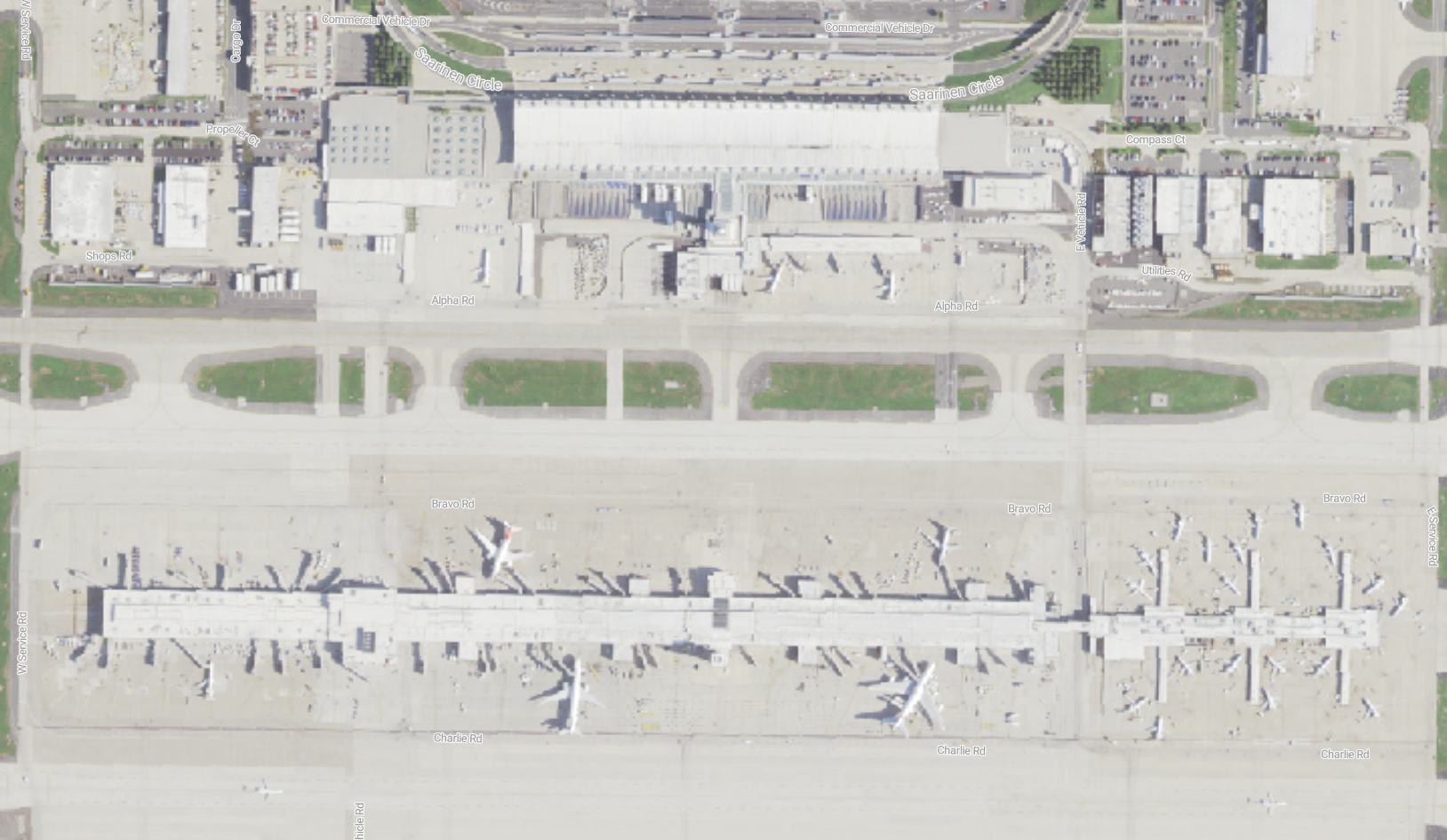 國家農業圖像計劃 (NAIP)在美國提供高解析度的空中圖像。 美國農業部農場服務機構至少每三年擷取一次 NAIP 圖像。
NAIP 數據提供絕佳的詳細數據,空間解析度從每圖元 0.3 公尺到 1 米不等。 影像會以雲端優化的 GeoTIFF 格式儲存,以便有效率地存取和處理。
每個 NAIP 影像都包含四個光譜波段:
- Red
- Green
- Blue
- 近紅外
這四個頻帶全都會儲存為單一多頻資產。 此頻帶結構可啟用數種類型的分析:
- 自然色彩視覺化 使用 RGB 波段(1-3)來建立看起來與人眼所見相似的影像。
- 彩色紅外線分析 結合 NIR、紅光和綠光波段來評估植被健康狀況
- NDVI 計算 使用公式 (NIR-Red)/(NIR+Red) 來測量植被密度和健康情況
NAIP 組態詳細數據
馬賽克配置
拼貼組態定義影像在檔案總管中顯示的組合方式,這個 NAIP 集合使用預設設定。
[
  {
    "id": "default",
    "name": "Default",
    "description": "",
    "cql": []
  }
]
渲染選項配置
此渲染配置定義了三種不同的方式來在瀏覽器中可視化 NAIP 空中影像。 每個項目都描述了不同的視覺化技術,例如 自然色彩(您用肉眼可見的)、彩色紅外線(用於突顯植被),或 標準化植被指數(NDVI)(用以測量植被健康)。
NAIP 影像包含四個光譜波段,儲存在名為 「image」 的單一多波段資產中:
- 波段 1:紅色
- 波段 2:綠色
- 波段 3:藍色
- 波段 4: 近紅外 (NIR)
字串 options 會指定如何將資料視覺化:
assets=image:
這個資產參數會指定要從 STAC 項目中使用的資產。 針對 NAIP,所有頻帶都會儲存在單一「影像」資產中。asset_bidx=image|1,2,3:
此 bidx 參數會從多波段影像中選取要使用的波段,以及如何將它們對應至色彩通道。 例如,1,2,3分別將帶 1、2 和 3 對應至紅色、綠色和藍色通道。color_formula=Sigmoidal RGB 15 0.35:
這個 gamma 參數會套用色彩更正,以改善視覺外觀和對比。expression=(image_b4 - image_b1)/(image_b4 + image_b1):
針對 NDVI 計算,此表達式公式會使用帶狀來建立醒目提示植物健康情況的植被索引。rescale=-1,1:
這個重新調整參數會延展導出的 NDVI 值,以符合標準色階,以便更容易解譯。colormap_name=rdylgn:
此 colormap 參數會將紅色-黃色-綠色調色盤套用至 NDVI 結果,讓植被模式更容易識別。
自然色彩(真色)
-
組態:
"options": "assets=image&asset_bidx=image|1,2,3" -
其運作方式:此自然色彩選項會將 NAIP 影像的前三個波段對應至對應的紅色、綠色和藍色通道以供顯示。
- 紅色頻道:頻帶 1 (紅色)
- 綠色頻道:樂隊 2 (綠色)
- 藍色頻道:波段 3 (藍色)
- 結果:此自然色彩對應會產生一個「真實色彩」影像,其近似人眼所見。
彩色紅外線
-
組態:
"options": "assets=image&asset_bidx=image|4,1,2&color_formula=Sigmoidal RGB 15 0.35" -
其運作方式:此色彩紅外選項是一種適用於植被分析的「誤色」複合。 它會對應頻帶,如下所示:
- 紅色通道:波段 4 (近紅外)
- 綠色頻道:帶 1 (紅色)
- 藍色頻道:樂隊 2 (綠色)
-
結果:健康植被在近紅外光譜中強烈反映,因此在產生的影像中顯示為鮮紅色。 城市區域或裸土呈現藍色或灰色。
color_formula用來增加影像的對比和視覺吸引力。
標準化差異植被指數 (NDVI)
-
組態:
"options": "expression=(image_b4 - image_b1)/(image_b4 + image_b1)&rescale=-1,1&colormap_name=rdylgn" -
運作方式:此 NDVI 選項不會直接顯示來源影像。 相反地,它會使用數學公式計算每個圖元的 NDVI:
(NIR - Red) / (NIR + Red)。 在這裡情況下,該計算會對應至(Band 4 - Band 1) / (Band 4 + Band 1)。 -
結果:NDVI 計算的結果是介於 -1 與 1 之間的值,這是植被健康和密度的量值。 參數會將
rescale=-1,1輸出色彩調整為這個 NDVI 範圍,而且colormap_name=rdylgn參數會套用 “Red-Yellow-Green” 色彩對應。 茂密、健康植被的地區呈現綠色,而幾乎沒有或沒有植被的區域則呈現紅色或黃色。
[
  {
    "id": "natural-color",
    "name": "Natural color",
    "description": "RGB from visual assets",
    "type": "raster-tile",
    "options": "assets=image&asset_bidx=image|1,2,3",
    "minZoom": 11
  },
  {
    "id": "color-infrared",
    "name": "Color infrared",
    "description": "Highlights healthy (red) and unhealthy (blue/gray) vegetation.",
    "type": "raster-tile",
    "options": "assets=image&asset_bidx=image|4,1,2&color_formula=Sigmoidal RGB 15 0.35",
    "minZoom": 12
  },
  {
    "id": "ndvi",
    "name": "Normalized Difference Veg. Index (NDVI)",
    "description": "Normalized Difference Vegetation Index (NIR-Red)/(NIR+Red), darker green indicates healthier vegetation.",
    "type": "raster-tile",
    "options": "expression=(image_b4 - image_b1)/(image_b4 + image_b1)&rescale=-1,1&colormap_name=rdylgn",
    "minZoom": 12
  }
]
磁磚設定組態
磚設定組態會控制 Explorer 中 NAIP 空照影像的顯示行為和效能特性。
關鍵參數:
minZoom: 4:設定 NAIP 資料可見的最低縮放層級。 雖然這個低縮放設定允許寬幅縮放層級的可見度,但 NAIP(0.3-1 米地面樣本距離)等高解析度影像在縮放層級 12-18 中最為有效,其中個別特徵會明顯區分。maxItemsPerTile: 35:限制可在單一地圖底圖中組合在一起的 NAIP 影像圖格數目。 此限制設定會平衡效能與涵蓋範圍完整性,確保可以結合多個重疊的影像,而不需要壓倒轉譯程式。defaultLocation: null:未指定預設位置,可讓使用者流覽至美國內可用的 NAIP 涵蓋範圍的任何區域。
此磚設定組態可優化廣泛的可用性與詳細視覺化之間的平衡,使使用者能在較低的縮放層級下探索 NAIP 數據,並在適當比例的縮放到高解析度分析時提供最大化的細節顯示。
{
  "minZoom": 4,
  "maxItemsPerTile": 35,
  "defaultLocation": null
}
STAC 集合組態
STAC 集合組態會定義此 NAIP 集合的核心元數據。
{
  "id": "naip-airports",
  "type": "Collection",
  "links": [
    {
      "rel": "items",
      "type": "application/geo+json",
      "href": "https://{geocatalog_id}/stac/collections/naip-airports/items"
    },
    {
      "rel": "parent",
      "type": "application/json",
      "href": "https://{geocatalog_id}/stac/"
    },
    {
      "rel": "root",
      "type": "application/json",
      "href": "https://{geocatalog_id}/stac/"
    },
    {
      "rel": "self",
      "type": "application/json",
      "href": "https://{geocatalog_id}/stac/collections/naip-airports"
    },
    {
      "rel": "license",
      "href": "https://www.fsa.usda.gov/help/policies-and-links/",
      "title": "Public Domain"
    },
    {
      "rel": "describedby",
      "href": "https://planetarycomputer.microsoft.com/dataset/naip",
      "type": "text/html",
      "title": "Human readable dataset overview and reference"
    }
  ],
  "title": "naip-airports",
  "assets": {
    "thumbnail": {
      "href": "https://{storage_account}.blob.core.windows.net/{blob_container}/collection-assets/thumbnail/blob",
      "type": "image/png",
      "roles": [
        "thumbnail"
      ],
      "title": "naip-airports thumbnail"
    }
  },
  "extent": {
    "spatial": {
      "bbox": [
        [
          -124.784,
          24.744,
          -66.951,
          49.346
        ],
        [
          -156.003,
          19.059,
          -154.809,
          20.127
        ],
        [
          -67.316,
          17.871,
          -65.596,
          18.565
        ],
        [
          -64.94,
          17.622,
          -64.56,
          17.814
        ]
      ]
    },
    "temporal": {
      "interval": [
        [
          "2010-01-01T00:00:00Z",
          "2022-12-31T00:00:00Z"
        ]
      ]
    }
  },
  "license": "proprietary",
  "keywords": [
    "NAIP",
    "Aerial",
    "Imagery",
    "USDA",
    "AFPO",
    "Agriculture",
    "United States"
  ],
  "providers": [
    {
      "url": "https://www.fsa.usda.gov/programs-and-services/aerial-photography/imagery-programs/naip-imagery/",
      "name": "USDA Farm Service Agency",
      "roles": [
        "producer",
        "licensor"
      ]
    },
    {
      "url": "https://www.esri.com/",
      "name": "Esri",
      "roles": [
        "processor"
      ]
    },
    {
      "url": "https://planetarycomputer.microsoft.com",
      "name": "Microsoft",
      "roles": [
        "host",
        "processor"
      ]
    }
  ],
  "summaries": {
    "gsd": [
      0.3,
      0.6,
      1
    ],
    "eo:bands": [
      {
        "name": "Red",
        "common_name": "red",
        "description": "visible red"
      },
      {
        "name": "Green",
        "common_name": "green",
        "description": "visible green"
      },
      {
        "name": "Blue",
        "common_name": "blue",
        "description": "visible blue"
      },
      {
        "name": "NIR",
        "common_name": "nir",
        "description": "near-infrared"
      }
    ]
  },
  "description": "The [National Agriculture Imagery Program](https://www.fsa.usda.gov/programs-and-services/aerial-photography/imagery-programs/naip-imagery/) (NAIP) \nprovides U.S.-wide, high-resolution aerial imagery, with four spectral bands (R, G, B, IR). \nNAIP is administered by the [Aerial Field Photography Office](https://www.fsa.usda.gov/programs-and-services/aerial-photography/) (AFPO) \nwithin the [US Department of Agriculture](https://www.usda.gov/) (USDA). \nData are captured at least once every three years for each state. \nThis dataset represents NAIP data from 2010-present, in [cloud-optimized GeoTIFF](https://www.cogeo.org/) format.\nYou can visualize the coverage of current and past collections [here](https://naip-usdaonline.hub.arcgis.com/). \n",
  "item_assets": {
    "image": {
      "type": "image/tiff; application=geotiff; profile=cloud-optimized",
      "roles": [
        "data"
      ],
      "title": "RGBIR COG tile",
      "eo:bands": [
        {
          "name": "Red",
          "common_name": "red"
        },
        {
          "name": "Green",
          "common_name": "green"
        },
        {
          "name": "Blue",
          "common_name": "blue"
        },
        {
          "name": "NIR",
          "common_name": "nir",
          "description": "near-infrared"
        }
      ]
    },
    "metadata": {
      "type": "text/plain",
      "roles": [
        "metadata"
      ],
      "title": "FGDC Metadata"
    },
    "thumbnail": {
      "type": "image/jpeg",
      "roles": [
        "thumbnail"
      ],
      "title": "Thumbnail"
    }
  },
  "msft:region": "westeurope",
  "stac_version": "1.0.0",
  "msft:_created": "2024-08-02T13:19:22.446214Z",
  "msft:_updated": "2024-08-21T17:21:13.132140Z",
  "stac_extensions": [
    "https://stac-extensions.github.io/item-assets/v1.0.0/schema.json",
    "https://stac-extensions.github.io/table/v1.2.0/schema.json"
  ],
  "msft:short_description": "NAIP provides US-wide, high-resolution aerial imagery.  This dataset includes NAIP images from 2010 to the present."
}
Umbra SAR 影像收集組態
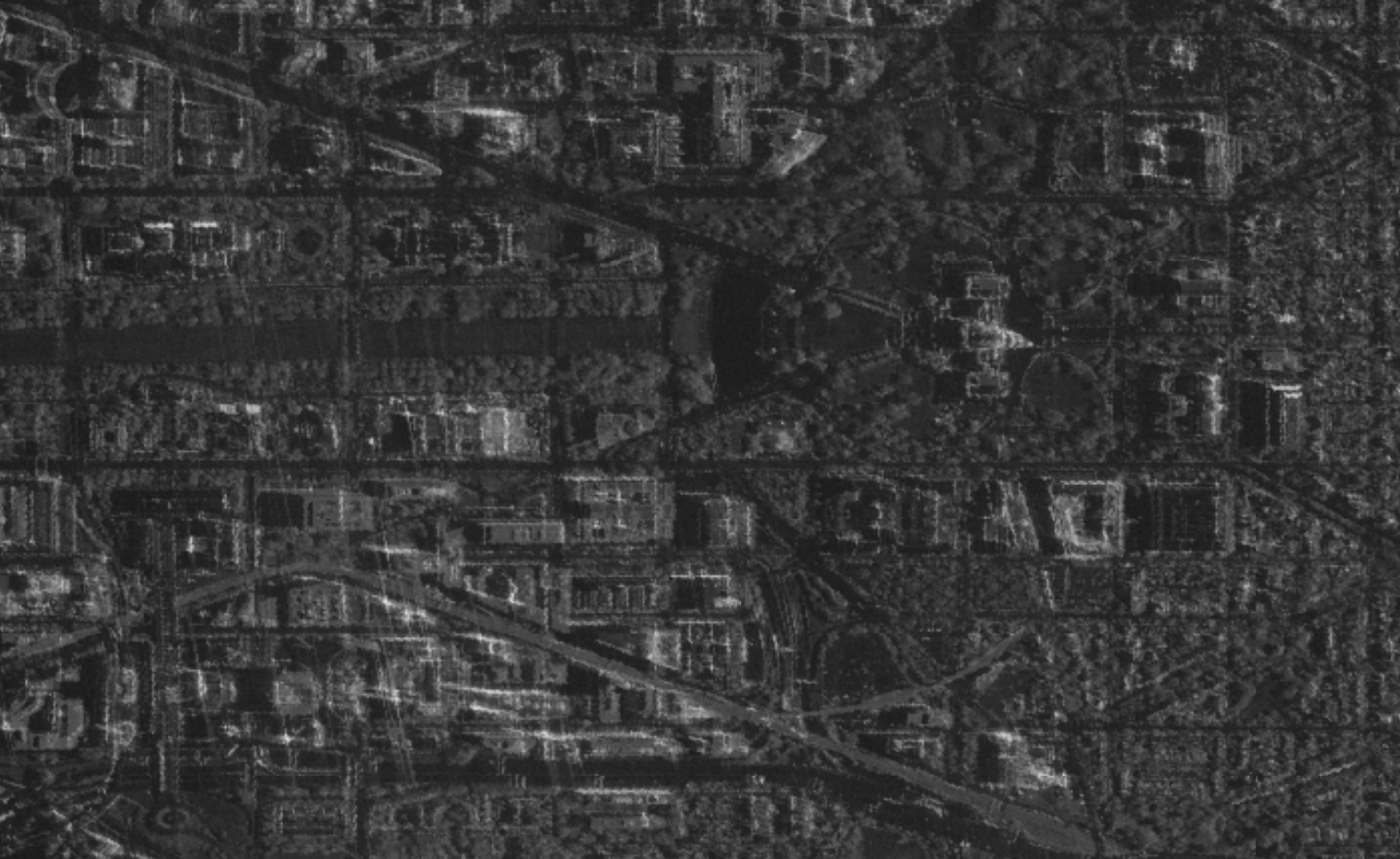
Umbra的合成孔徑雷達(SAR)圖像 使用從衛星發送的雷達信號生成地球表面的高解析度圖像,能夠穿透雲層、黑暗和會阻礙傳統光學衛星的天氣條件。 這種合成孔徑雷達技術非常有價值,不僅可以監測基礎設施、偵測城市地區的變化、追蹤船舶和車輛,還能評估自然災害後的損壞,因為它無論天氣狀況、任何時段(白天或夜晚)都能捕捉到詳細的影像。
SAR 設定詳細數據
馬賽克配置
此 SAR 集合是預設馬賽克組態。
[
  {
    "id": "default",
    "name": "Default",
    "description": "",
    "cql": []
  }
]
渲染選項配置
此渲染配置定義了如何在Explorer中呈現Umbra SAR影像。 SAR 影像會使用雷達信號來偵測表面特徵和結構,以灰階強度數據顯示,其中較亮的區域代表更強的雷達傳回。
此組態著重於 VV 極化 數據,其指的是「垂直傳輸、垂直接收」雷達訊號,可有效偵測人工結構和表面粗糙度。
字串 options 會指定如何將資料視覺化:
assets=GEC:
這個資產參數會從 STAC 專案選取已更正的地理編碼橢圓體 (GEC) 資產,其中包含已處理的 SAR 反散件數據。rescale=0,255:
這個重新調整參數會將雷達反向散射值轉換成 8 位範圍(0-255),以取得適當的視覺效果,將原始雷達數據轉換成可顯示的強度值。colormap_name=gray:
此 colormap 參數會套用適合 SAR 強度數據的灰階調色盤,其中較深的區域代表較弱的雷達傳回,較亮的區域代表更強的傳回。
視覺效果會建立灰階影像,其中建築物、崎嶇的地形和其他表面會強烈反射雷達訊號呈現明亮,而水等平滑表面則呈現深色。
[
  {
    "id": "vv-polarization",
    "name": "VV polarization",
    "description": "VV asset scaled to `0,.20`.",
    "type": "raster-tile",
    "options": "assets=GEC&rescale=0,255&colormap_name=gray",
    "minZoom": 8,
    "conditions": [
      {
        "property": "sar:polarizations",
        "value": [
          "VV"
        ]
      }
    ]
  }
]
磁磚設定組態
磚設定組態會控制 Explorer 中 Umbra SAR 影像的顯示行為和效能特性。
關鍵參數:
minZoom: 12:設定顯示 SAR 影像的最小縮放層級。 這個相對較高的縮放層級設定適用於Umbra的亞米級解析度數據(大約0.48公尺地面樣本間距),確保使用者在顯示數據時可以看到有意義的細節。 在較低的縮放層級,高解析度 SAR 數據會過於詳細,無法有用,而且可能會影響效能。maxItemsPerTile: 35:限制可以在單一地圖底圖中組合在一起的SAR 影像數目。 針對 SAR 資料,此限制設定可確保多個重疊的擷取不會淹沒磚產生流程,同時在需要時允許時態組合。defaultLocation: null:未指定預設位置,可讓用戶流覽至 Umbra SAR 涵蓋範圍可供使用的任何相關區域。
此地圖磚設定配置可優化數據可見度與效能之間的平衡,確保在使用者縮放至適當比例,使個別建築物、車輛和基礎設施元素可以清晰區分時,高解析度 SAR 影像資料能夠有效顯示。
{
  "minZoom": 12,
  "maxItemsPerTile": 35,
  "defaultLocation": null
}
STAC 集合組態
區 item_assets 段是 STAC 集合 JSON 的重要元件,可定義此 Umbra SAR 集合中每個專案內可用的資產(資料檔)。 針對此 Umbra SAR 集合:
此 GEC 資產區段會告訴我們:
資產金鑰:
GEC是用來在轉譯組態中參考此資產的金鑰標識碼(assets=GEC)數據格式:資產是雲端優化的 GeoTIFF,可讓您有效率地存取影像的部分
雷達特性:
- 此 GEC 影像包含 VV 極分化資料(垂直傳輸、垂直接收)
- 包含經輻射校正的地形校正伽馬值
技術規格:
-
nodata-32768的值表示沒有數據的像素 - 資料會儲存為 8 位無符號整數 (
uint8) - 空間解析度約為每圖元0.48公尺
-
此 GEC 資產定義會透過 assets=GEC直接在轉譯組態中參考,而轉譯參數 (rescale=0,255&colormap_name=gray) 是設計來適當地可視化此特定數據資產中的 SAR 背信值。
{
  "id": "umbra-sar",
  "type": "Collection",
  "links": [
    {
      "rel": "items",
      "type": "application/geo+json",
      "href": "https://{geocatalog_id}/stac/collections/umbra-sar/items"
    },
    {
      "rel": "parent",
      "type": "application/json",
      "href": "https://{geocatalog_id}/stac/"
    },
    {
      "rel": "root",
      "type": "application/json",
      "href": "https://{geocatalog_id}/stac/"
    },
    {
      "rel": "self",
      "type": "application/json",
      "href": "https://{geocatalog_id}/stac/collections/umbra-sar"
    }
  ],
  "title": "Umbra SAR Imagery",
  "assets": {
    "thumbnail": {
      "href": "https://{storage_account}.blob.core.windows.net/{blob_container}/collection-assets/thumbnail/blob",
      "type": "image/png",
      "roles": [
        "thumbnail"
      ],
      "title": "umbra-sar thumbnail"
    }
  },
  "extent": {
    "spatial": {
      "bbox": [
        [
          -180,
          -90,
          180,
          90
        ]
      ]
    },
    "temporal": {
      "interval": [
        [
          "2018-01-01T00:00:00Z",
          null
        ]
      ]
    }
  },
  "license": "CC-BY-4.0",
  "keywords": [
    "Umbra",
    "X-Band",
    "SAR",
    "RTC"
  ],
  "providers": [
    {
      "url": "https://umbra.space/",
      "name": "Umbra",
      "roles": [
        "processor"
      ]
    },
    {
      "url": "https://planetarycomputer.microsoft.com",
      "name": "Microsoft",
      "roles": [
        "host"
      ]
    }
  ],
  "description": "Umbra satellites offer the highest commercially available SAR imagery, surpassing 25 cm resolution. Capable of capturing images day or night, through clouds, smoke, and rain, our technology enables all-weather monitoring.",
  "item_assets": {
    "GEC": {
      "type": "image/tiff; application=geotiff; profile=cloud-optimized",
      "roles": [
        "data"
      ],
      "title": "VV: vertical transmit, vertical receive",
      "description": "Terrain-corrected gamma naught values of signal transmitted with vertical polarization and received with vertical polarization with radiometric terrain correction applied.",
      "raster:bands": [
        {
          "nodata": -32768,
          "data_type": "uint8",
          "spatial_resolution": 0.4770254115
        }
      ]
    }
  },
  "stac_version": "1.0.0",
  "msft:_created": "2024-04-05T17:55:17.930092Z",
  "msft:_updated": "2024-04-05T18:30:16.587869Z",
  "stac_extensions": [
    "https://{storage_account}.blob.core.windows.net/{blob_container}/json-schemas/json-schemas/msft/v0.1/schema.json"
  ],
  "msft:short_description": "Umbra Synthetic Aperture Radar (SAR) Imagery"
}
影響天文臺土地使用/土地覆蓋9級收集組態
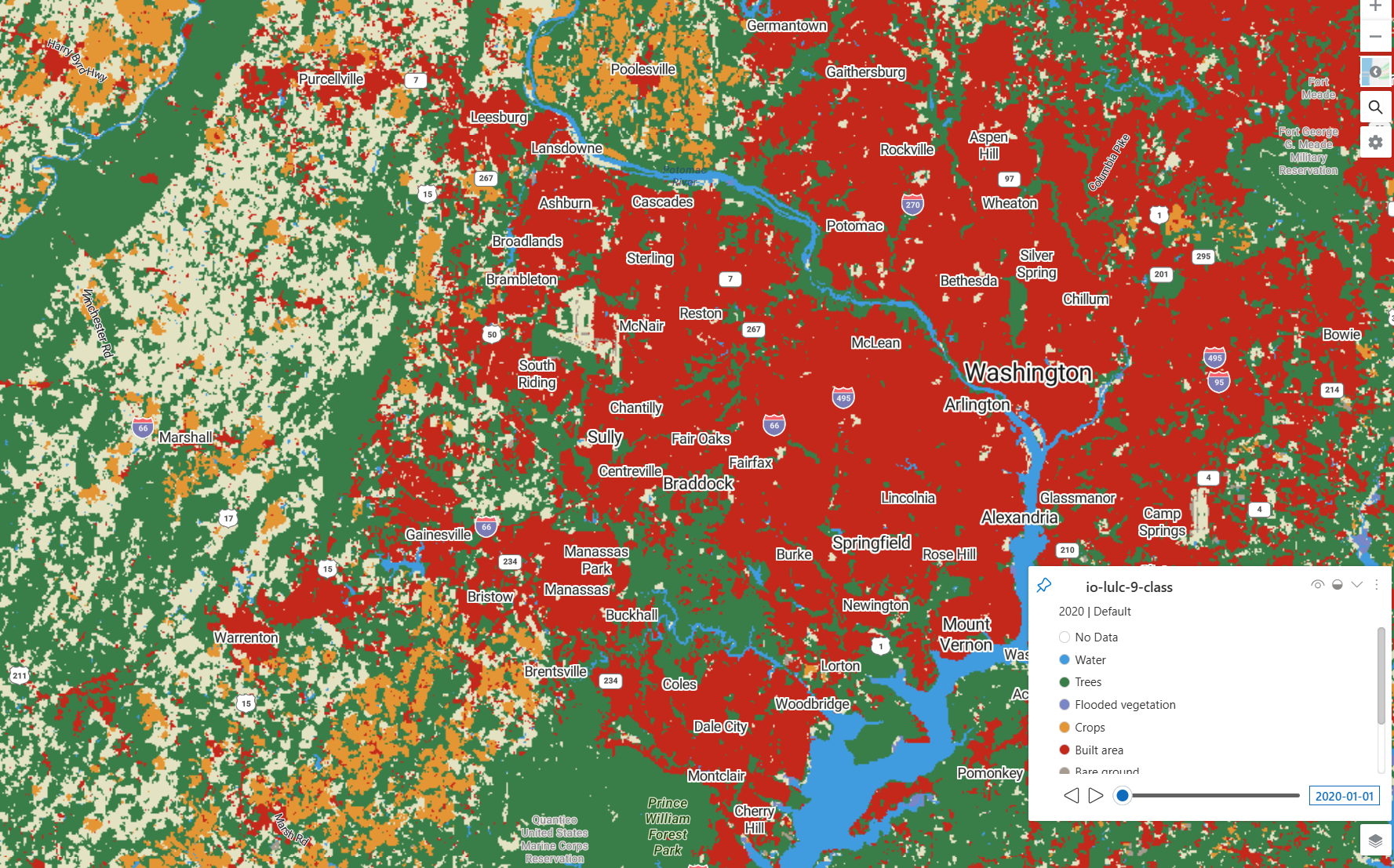
影響觀測站土地使用/土地覆蓋9級數據集提供年度全球土地利用和土地覆蓋地圖(LULC)。 此數據集 是使用數十億個人類標籤元來定型土地分類的深度學習模型,以 10 米解析度套用至 Sentinel-2 影像。
9 級系統包括:水、樹、洪水植被、作物、建區、裸地、雪/冰、雲層和 Rangeland。 更新的分類模型將先前分別的草地和灌木叢類別合併為單一的牧場類別,在整個時間序列中提供更一致的分類。
每個年度地圖代表全年 LULC 預測的復合,評估的平均精確度超過 75%。 這些數據對於監測土地使用變化、跟蹤森林砍伐、城市擴張和農業模式在全球規模具有價值。
土地使用/土地覆蓋組態詳細數據
馬賽克配置
此集合的馬賽克組態提供時態篩選選項,可讓用戶檢視特定年份的土地覆蓋數據。 每個馬賽克定義都會使用 Common Query Language (CQL) 表達式篩選數據,只顯示屬於特定年份的項目。 此時態篩選可讓用戶比較土地覆蓋變化逐年變化,或將焦點放在感興趣的特定時段
組態包括六個不同的馬賽克選項,涵蓋 2017-2022:
-
時態篩選:每個馬賽克都會使用
anyinteracts運算子來篩選datetime屬性與特定年份日期範圍交集的項目 -
日期範圍:該特定年份的每年篩選範圍從 1 月 1 日到 12 月 31 日(
2022-01-01T23:59:59Z至2022-12-31T23:59:59Z)
這種時態篩選方法對於土地掩護分析很有價值,因為它可讓用戶追蹤土地使用模式的變化、監測森林砍伐或造林、觀察城市擴張,以及評估一段時間自然災害或人類活動的影響。
[
  {
    "id": "2022",
    "name": "2022",
    "description": "2022 Use/Land Cover",
    "cql": [
      {
        "op": "anyinteracts",
        "args": [
          {
            "property": "datetime"
          },
          {
            "interval": [
              "2022-01-01T23:59:59Z",
              "2022-12-31T23:59:59Z"
            ]
          }
        ]
      }
    ]
  },
  {
    "id": "2021",
    "name": "2021",
    "description": "2021 Use/Land Cover",
    "cql": [
      {
        "op": "anyinteracts",
        "args": [
          {
            "property": "datetime"
          },
          {
            "interval": [
              "2021-01-01T23:59:59Z",
              "2021-12-31T23:59:59Z"
            ]
          }
        ]
      }
    ]
  },
  {
    "id": "2020",
    "name": "2020",
    "description": "2020 Use/Land Cover",
    "cql": [
      {
        "op": "anyinteracts",
        "args": [
          {
            "property": "datetime"
          },
          {
            "interval": [
              "2020-01-01T23:59:59Z",
              "2020-12-31T23:59:59Z"
            ]
          }
        ]
      }
    ]
  },
  {
    "id": "2019",
    "name": "2019",
    "description": "2019 Use/Land Cover",
    "cql": [
      {
        "op": "anyinteracts",
        "args": [
          {
            "property": "datetime"
          },
          {
            "interval": [
              "2019-01-01T23:59:59Z",
              "2019-12-31T23:59:59Z"
            ]
          }
        ]
      }
    ]
  },
  {
    "id": "2018",
    "name": "2018",
    "description": "2018 Land Use/Land Cover",
    "cql": [
      {
        "op": "anyinteracts",
        "args": [
          {
            "property": "datetime"
          },
          {
            "interval": [
              "2018-01-01T23:59:59Z",
              "2018-12-31T23:59:59Z"
            ]
          }
        ]
      }
    ]
  },
  {
    "id": "2017",
    "name": "2017",
    "description": "2017 Land Use/Land Cover",
    "cql": [
      {
        "op": "anyinteracts",
        "args": [
          {
            "property": "datetime"
          },
          {
            "interval": [
              "2017-01-01T23:59:59Z",
              "2017-12-31T23:59:59Z"
            ]
          }
        ]
      }
    ]
  }
]
渲染選項配置
此渲染配置定義三種不同方式來在 Explorer 瀏覽器 中可視化 Impact Observatory 土地覆蓋分類資料。 每個項目都會描述不同的視覺效果方法,例如 ESA CCI 分類 (使用標準科學色彩圖)、 預設 IO 9 級 (使用自定義影響觀察站色彩),或 ESA 色彩圖替代 專案(結合 ESA 色彩與增強處理)。 如需色彩地圖的詳細資訊,請檢閱 支援的色彩地圖指南。
土地覆蓋數據包含代表九種不同土地掩護類型的分類值,其儲存在單一「數據」資產中,需要色彩地圖應用程式有效地可視化類別。
字串 options 會指定如何將資料視覺化:
assets=data:
這個資產參數會從 STAC 項目選取分類數據資產,其中包含每個像素的類別土地覆蓋值。colormap_name=esa-cci-lc或colormap_name=io-lulc-9-class:
此 colormap 參數會套用預先定義的調色盤,將數值分類值對應至色彩。 ESA 色彩圖遵循科學標準,而 IO 色彩圖則針對 9 級系統優化。exitwhenfull=False:
即使磁磚快取已滿,此展開參數仍會繼續處理磁磚,以確保全面覆蓋。skipcovered=False:
此參數skipcovered會處理所有像素,包括已由其他磚涵蓋的像素,確保視覺效果中不留間隙。
視覺效果會建立彩色地圖,其中九個土地覆蓋類別(水、樹、作物、建置區域等)會以不同的色彩顯示,以便輕鬆識別和分析。
ESA CCI 土地覆蓋分類
-
組態:
"options": "assets=data&colormap_name=esa-cci-lc" - 目的:使用標準歐空局 CCI (歐洲航太局氣候變化倡議) 色彩圖來呈現土地覆蓋視覺效果
- 最適合:與其他歐空局土地覆蓋產品和科學出版物保持一致性
- 縮放層級:可從縮放層級 3 取得,適用於全球和大陸規模檢視
預設值 (IO 9 級色彩圖)
-
組態:
"options": "assets=data&exitwhenfull=False&skipcovered=False&colormap_name=io-lulc-9-class" - 目的:使用專為影響天文臺 9 級系統設計的自定義色彩圖
-
技術細節:
-
exitwhenfull=False:即使磚快取已滿,仍會繼續處理 -
skipcovered=False:處理所有圖元,包括已被其他區塊涵蓋的圖元
-
- 最適合:針對此分類系統,選用顏色以獲得 9 類土地覆蓋類別的最佳化視覺效果
預設值(ESA 色彩圖替代方案)
-
組態:
"options": "assets=data&exitwhenfull=False&skipcovered=False&colormap_name=esa-cci-lc" - 目的:將 ESA 色彩圖與預設組態相同的處理選項結合
- 最適合:偏好 ESA 色彩配置但想要增強處理選項的使用者
所有渲染選項都會使用 data 資產,其中包含分類的土地覆蓋值,並套用不同的色彩地圖,將 9 種土地覆蓋類別以不同顏色可視化。
[
  {
    "id": "esa-cci-class",
    "name": "Classification",
    "description": "ESA CCI land cover classification",
    "type": "raster-tile",
    "options": "assets=data&colormap_name=esa-cci-lc",
    "minZoom": 3
  },
  {
    "id": "default",
    "name": "Default",
    "description": "Land cover classification using 9 class custom colormap",
    "type": "raster-tile",
    "options": "assets=data&exitwhenfull=False&skipcovered=False&colormap_name=io-lulc-9-class",
    "minZoom": 4
  },
  {
    "id": "default-esa-colormap",
    "name": "Default",
    "description": "Land cover classification using 9 class custom colormap",
    "type": "raster-tile",
    "options": "assets=data&exitwhenfull=False&skipcovered=False&colormap_name=esa-cci-lc",
    "minZoom": 4
  }
]
磁磚設定組態
圖磚設定組態控制 Explorer 瀏覽器中地表覆蓋資料的顯示行為和效能特性。
關鍵參數:
minZoom: 3:設定土地覆蓋數據可見的最小縮放層級。maxItemsPerTile: 35:限制單一地圖底圖中可以複合在一起的 STAC 項目數目。 對於年度土地覆蓋數據,此限制設定可確保多個重疊專案(如果有的話)不會讓磚產生程式不堪重負。defaultLocation: null:未指定預設位置,可讓使用者全域流覽至任何感興趣的區域。
此設定可優化數據可見度與效能之間的平衡,確保當使用者放大適當的縮放比例進行分析時,可有效顯示 10 米解析度的土地覆蓋分類。
{
  "minZoom": 3,
  "maxItemsPerTile": 35,
  "defaultLocation": null
}
STAC 集合組態
STAC 集合組態會定義影響天文臺土地使用/土地覆蓋9級集合的核心元數據和結構。
重要元件:
項目資產 - 數據資產: 此組態最重要的部分是 item_assets.data 區段,該區段會定義土地覆蓋分類數據的結構化方式:
- 資產類型:雲端優化的 GeoTIFF 格式,可有效率地存取和處理
- 空間解析度:每個圖元 10 公尺,衍生自 Sentinel-2 影像
-
分類值:區段會定義9個
file:values土地覆蓋類別:- 0:無數據
- 1: 水 (海洋, 湖泊, 河流)
- 2: 樹木 (森林, 木地植被)
- 4: 洪水淹沒的植被 (濕地, 沼澤)
- 5:作物(農業區)
- 7:建築面積(城市、建築、基礎設施)
- 8: 裸地 (土壤, 岩石, 沙子)
- 9:雪/冰(永久和季節性積雪)
- 10:雲端(雲蓋)
- 11:牧場(草原,灌木地 - 合併了之前的草地和矮樹林類別)
時間涵蓋範圍:
- 範圍:2017-2022 年的全球涵蓋範圍
- 更新頻率:年度地圖,每張地圖代表全年預測的綜合圖
資料沿襲:
- 來源:ESA Sentinel-2 影像
- 處理:以數十億由人類標記的像素訓練的深度學習模型
- 精確度:平均精確度超過75%
- 製作單位:Impact Observatory 與 Esri 和 Microsoft 合作
此 STAC 組態可讓渲染配置參考 data 資產,並套用適當的色彩地圖,以便在 Explorer 工具中有效地視覺化分類的土地覆蓋值。
{
  "id": "io-9-class-collection",
  "type": "Collection",
  "links": [
    {
      "rel": "items",
      "type": "application/geo+json",
      "href": "https://{geocatalog_id}/stac/collections/IO-lulc-9-class-collection/items"
    },
    {
      "rel": "parent",
      "type": "application/json",
      "href": "https://{geocatalog_id}/stac/"
    },
    {
      "rel": "root",
      "type": "application/json",
      "href": "https://{geocatalog_id}/stac/"
    },
    {
      "rel": "self",
      "type": "application/json",
      "href": "https://{geocatalog_id}/stac/collections/IO-lulc-9-class-collection"
    },
    {
      "rel": "related",
      "href": "https://livingatlas.arcgis.com/landcover/"
    },
    {
      "rel": "license",
      "href": "https://creativecommons.org/licenses/by/4.0/",
      "type": "text/html",
      "title": "CC BY 4.0"
    },
    {
      "rel": "describedby",
      "href": "https://planetarycomputer.microsoft.com/dataset/io-lulc-9-class",
      "type": "text/html",
      "title": "Human readable dataset overview and reference"
    }
  ],
  "title": "IO-lulc-9-class-io-lulc-9-class",
  "extent": {
    "spatial": {
      "bbox": [
        [
          -180,
          -90,
          180,
          90
        ]
      ]
    },
    "temporal": {
      "interval": [
        [
          "2017-01-01T00:00:00Z",
          "2023-01-01T00:00:00Z"
        ]
      ]
    }
  },
  "license": "CC-BY-4.0",
  "keywords": [
    "Global",
    "Land Cover",
    "Land Use",
    "Sentinel"
  ],
  "providers": [
    {
      "url": "https://www.esri.com/",
      "name": "Esri",
      "roles": [
        "licensor"
      ]
    },
    {
      "url": "https://www.impactobservatory.com/",
      "name": "Impact Observatory",
      "roles": [
        "processor",
        "producer",
        "licensor"
      ]
    },
    {
      "url": "https://planetarycomputer.microsoft.com",
      "name": "Microsoft",
      "roles": [
        "host"
      ]
    }
  ],
  "summaries": {
    "raster:bands": [
      {
        "nodata": 0,
        "spatial_resolution": 10
      }
    ]
  },
  "description": "Time series of annual global maps of land use and land cover (LULC). It currently has data from 2017-2022. The maps are derived from ESA Sentinel-2 imagery at 10m resolution. Each map is a composite of LULC predictions for 9 classes throughout the year in order to generate a representative snapshot of each year.\n\nThis dataset was generated by [Impact Observatory](http://impactobservatory.com/), who used billions of human-labeled pixels (curated by the National Geographic Society) to train a deep learning model for land classification. The global map was produced by applying this model to the Sentinel-2 annual scene collections on the Planetary Computer. Each of the maps has an assessed average accuracy of over 75%.\n\nThis map uses an updated model from the [10-class model](https://planetarycomputer.microsoft.com/dataset/io-lulc) and combines Grass(formerly class 3) and Scrub (formerly class 6) into a single Rangeland class (class 11). The original Esri 2020 Land Cover collection uses 10 classes (Grass and Scrub separate) and an older version of the underlying deep learning model.  The Esri 2020 Land Cover map was also produced by Impact Observatory.  The map remains available for use in existing applications. New applications should use the updated version of 2020 once it is available in this collection, especially when using data from multiple years of this time series, to ensure consistent classification.\n\nAll years are available under a Creative Commons BY-4.0.",
  "item_assets": {
    "data": {
      "type": "image/tiff; application=geotiff; profile=cloud-optimized",
      "roles": [
        "data"
      ],
      "title": "Global land cover data",
      "file:values": [
        {
          "values": [
            0
          ],
          "summary": "No Data"
        },
        {
          "values": [
            1
          ],
          "summary": "Water"
        },
        {
          "values": [
            2
          ],
          "summary": "Trees"
        },
        {
          "values": [
            4
          ],
          "summary": "Flooded vegetation"
        },
        {
          "values": [
            5
          ],
          "summary": "Crops"
        },
        {
          "values": [
            7
          ],
          "summary": "Built area"
        },
        {
          "values": [
            8
          ],
          "summary": "Bare ground"
        },
        {
          "values": [
            9
          ],
          "summary": "Snow/ice"
        },
        {
          "values": [
            10
          ],
          "summary": "Clouds"
        },
        {
          "values": [
            11
          ],
          "summary": "Rangeland"
        }
      ]
    }
  },
  "msft:region": "westeurope",
  "stac_version": "1.0.0",
  "msft:_created": "2024-10-15T15:38:42.009851Z",
  "msft:_updated": "2024-10-15T15:38:42.009851Z",
  "msft:group_id": "io-land-cover",
  "msft:container": "io-lulc",
  "stac_extensions": [
    "https://stac-extensions.github.io/item-assets/v1.0.0/schema.json",
    "https://stac-extensions.github.io/raster/v1.0.0/schema.json",
    "https://stac-extensions.github.io/label/v1.0.0/schema.json",
    "https://stac-extensions.github.io/file/v2.1.0/schema.json",
    "https://stac-extensions.github.io/table/v1.2.0/schema.json",
    "https://{storage_account}.blob.core.windows.net/{blob_container}/json-schemas/json-schemas/msft/v0.1/schema.json"
  ],
  "msft:storage_account": "ai4edataeuwest",
  "msft:short_description": "Global land cover information with 9 classes for for 2017-2022 at 10m resolution"
}
相關內容
意見反應
此頁面對您有幫助嗎?
No
需要本主題的協助嗎?
想要嘗試使用 Ask Learn 來釐清或引導您完成本主題嗎?
其他資源
-
Last updated on
2026-06-11