Bemærk
Adgang til denne side kræver godkendelse. Du kan prøve at logge på eller ændre mapper.
Adgang til denne side kræver godkendelse. Du kan prøve at ændre mapper.
Important
Some information in this article relates to a prereleased product which may be substantially modified before it's commercially released. Microsoft makes no warranties, expressed or implied, with respect to the information provided here.
You can use streamlined device connectivity to onboard devices to Microsoft Defender for Endpoint through a consolidated domain or static IP ranges. Streamlined connectivity reduces the number of network destinations required for core Defender for Endpoint services. Devices might still require supporting endpoints for operating system services, updates, and deployment tools. Before you begin, verify the component and operating system requirements in Prerequisites.
This article describes the requirements and process for onboarding new devices. To update devices that are already onboarded, see Migrate devices to streamlined connectivity.
Understand the Defender for Endpoint-recognized simplified domain
Defender for Endpoint uses the following consolidated domains for streamlined connectivity:
- Commercial environments:
*.endpoint.security.microsoft.com - US Government environments (Preview):
*.endpoint.security.microsoft.us
The applicable domain consolidates connections to the following core Defender for Endpoint services:
- Cloud-delivered protection
- Malware sample submission storage
- Automated investigation and remediation sample storage
- Defender for Endpoint command and control
- Defender for Endpoint cyber and diagnostic data
For the complete network configuration process and current destination lists, see Configure network connectivity to Microsoft Defender for Endpoint.
For network devices that don't support wildcard-based rules, you can instead configure dedicated Defender for Endpoint static IP ranges. For more information, see Configure connectivity using static IP ranges.
Note
- Streamlined connectivity doesn't change Defender for Endpoint functionality or the user experience. It changes only the URLs or IP addresses that devices use to connect to the service.
- There are no plans to deprecate the standard service URLs. Devices onboarded with standard connectivity continue to function. For future services, maintain access to
*.endpoint.security.microsoft.comfor commercial environments or*.endpoint.security.microsoft.usfor US Government environments (Preview). - Service connections use certificate pinning and TLS. Traffic inspection is not supported. Connections are device-initiated, not user-initiated. Enforcing proxy (user) authentication breaks connectivity.
Prerequisites
Before you use streamlined connectivity, verify that devices meet the following component and operating system requirements.
Minimum component versions
- Defender for Endpoint sensor (SENSE):
10.8040.*(March 2022) or later. For the corresponding Windows updates, see the minimum update table in this section. - Microsoft Defender Antivirus antimalware client:
4.18.2211.5(November 2022) or later. - Microsoft Defender Antivirus engine:
1.1.19900.2(November 2022) or later. - Microsoft Defender Antivirus security intelligence:
1.391.345.0(June 2023) or later. - Defender for Endpoint on macOS and Linux:
101.24022.*(March 2024) or later.
Supported operating systems
The following operating systems support streamlined connectivity:
- Windows 11.
- Windows 10, version 1809 (October 2018) or later.
- Windows 10, versions 1607 (August 2016) to 1803 (April 2018). These versions support the streamlined onboarding package but require the longer URL list in Microsoft Defender for Endpoint streamlined connectivity URLs for commercial environments.
- Windows Server 2019 (November 2018) and later.
- Windows Server 2016 and Windows Server 2012 R2 when fully updated and running the Defender for Endpoint modern unified solution, which is installed through a Windows Installer (
.msi) package. - Supported macOS versions running Defender for Endpoint version
101.24022.*(March 2024) or later. - Supported Linux versions running Defender for Endpoint version
101.24022.*(March 2024) or later. - Azure Stack HCI OS, version 23H2 (February 2024) or later.
Important
- Devices that use Microsoft Monitoring Agent (MMA) don't support streamlined connectivity and must continue to use standard connectivity. These devices include Windows 7, Windows 8.1, Windows Server 2008 R2 with MMA, and Windows Server 2012 R2 (October 2013) or Windows Server 2016 (October 2016) that haven't been upgraded to the modern unified solution.
- Upgrade Windows Server 2012 R2 and Windows Server 2016 to the modern unified solution before you use streamlined connectivity.
| Windows operating system | Minimum update or requirement |
|---|---|
| Windows 11 (October 2021) | KB5011493 (March 8, 2022) |
| Windows 10, version 1809 (October 2018); Windows Server 2019 (November 2018) | KB5011503 (March 8, 2022) |
| Windows 10, version 1909 (November 2019) | KB5011485 (March 8, 2022) |
| Windows 10, versions 20H2 (October 2020) and 21H2 (November 2021) | KB5011487 (March 8, 2022) |
| Windows 10, version 22H2 (October 2022) | KB5020953 (October 28, 2022) |
| Windows 10, version 1803 (April 2018) | End of service |
| Windows 10, version 1709 (October 2017) | End of service |
| Windows Server 2022 (August 2021) | KB5011497 (March 8, 2022) |
| Windows Server 2012 R2 (October 2013) and Windows Server 2016 (October 2016) | Modern unified solution |
Streamlined connectivity process
The following illustration shows the stages for configuring and using streamlined connectivity:
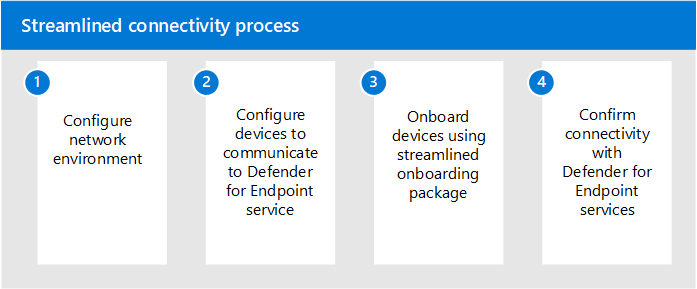
Stage 1. Configure your network environment for cloud connectivity
After you confirm that devices meet the prerequisites, follow Configure network connectivity to Microsoft Defender for Endpoint. Use the streamlined URL list for your cloud environment, and retain all supporting endpoints required for the operating system, update method, deployment method, and enabled features.
The consolidated domain (*.endpoint.security.microsoft.com or *.endpoint.security.microsoft.us) replaces the standard URLs only for the core Defender for Endpoint services listed earlier. Review the streamlined connectivity URL list for update, certificate validation, operating system, and scenario-specific dependencies. For example, Linux devices that use the Defender deployment tool also require the deployment tool download endpoint.
Choose one of the following options to configure connections to core Defender for Endpoint services:
Option 1: Configure connectivity using the simplified domain
Configure your environment to allow connections to the consolidated Defender for Endpoint domain:
- For commercial devices:
*.endpoint.security.microsoft.com - For US government devices (Preview):
*.endpoint.security.microsoft.us
For configuration instructions, see Configure network connectivity to Microsoft Defender for Endpoint.
Maintain connectivity with the supporting services listed in the Microsoft Defender for Endpoint streamlined connectivity URLs for commercial environments or Microsoft Defender for Endpoint streamlined connectivity URLs for government environments. Depending on the operating system, features, deployment method, and update method, these services can include certificate revocation lists, Windows Update, SmartScreen, Linux product repositories, and scenario-specific download endpoints.
Option 2: Configure connectivity using static IP ranges
If your network devices don't support wildcard-based rules, use the dedicated static IP ranges as an alternative to the consolidated domain. The MicrosoftDefenderForEndpoint service tag covers the following services:
- Microsoft Active Protection Service (MAPS)
- Malware Sample Submission Storage
- Automated investigation and remediation sample storage
- Defender for Endpoint command and control
Important
If you use static IP ranges, you must also allow the OneDsCollector service tag for Defender for Endpoint cyber and diagnostic data. The MicrosoftDefenderForEndpoint service tag doesn't include this traffic. Maintain access to all other required services, including SmartScreen, certificate revocation lists, Windows Update, and applicable supporting endpoints.
Use the following Azure service tags to keep the IP ranges current. For the latest ranges, see Azure IP ranges.
| Service tag name | Defender for Endpoint services included |
|---|---|
MicrosoftDefenderForEndpoint |
Cloud-delivered protection, malware sample submission storage, automated investigation and remediation sample storage, and Defender for Endpoint command and control. |
OneDsCollector |
Defender for Endpoint cyber and diagnostic data. Traffic under this service tag isn't limited to Defender for Endpoint and can include diagnostic data for other Microsoft services. |
For the latest list of Azure service tags, including the Defender for Endpoint-related tags listed in the preceding table, refer to the Azure service tags documentation.
Important
Defender for Endpoint processes and stores data according to the geographic location identified when your organization is provisioned. Based on the device location, traffic might flow through any associated IP region, which corresponds to an Azure datacenter region. For more information, see Data storage and privacy.
Stage 2. Configure your devices to connect to Defender for Endpoint service
Configure devices to use your proxy or other connectivity infrastructure. For operating system-specific proxy configuration methods, see Configure device proxy and internet connection settings.
Stage 3. Verify client connectivity pre-onboarding
Use the Microsoft Defender for Endpoint Client Analyzer to verify connectivity before onboarding. For the complete procedure, see Verify client connectivity.
On Windows, run the analyzer from the MDEClientAnalyzer folder by using one of the following methods:
- Run
mdeclientanalyzer.cmd -o <path to onboarding cmd file>. The analyzer reads the geographic parameters from the streamlined onboarding script and tests the applicable destinations. - Run
mdeclientanalyzer.cmd -g US,mdeclientanalyzer.cmd -g EU, ormdeclientanalyzer.cmd -g UKto test the specified region without an onboarding script.
As a supplementary check, you can use the Microsoft Defender for Endpoint Client Analyzer preview to test whether a device meets the prerequisites.
Note
On devices that aren't onboarded, the Client Analyzer tests the standard URL set by default. To test streamlined connectivity, use the -o switch with the onboarding script or the -g switch with the US, EU, or UK region value.
Stage 4. Apply the new onboarding package required for streamlined connectivity
After you configure and verify the required connections, download a streamlined onboarding package:
On the Onboarding page in the Microsoft Defender portal at https://security.microsoft.com/securitysettings/endpoints/onboarding, confirm that the devices meet the streamlined connectivity prerequisites.
For Step 1: Select an operating system to start deployment, select the operating-system version group for the devices. Don't select Windows, which starts the separate Defender deployment tool workflow.
For Connectivity type, select Streamlined.
Select the deployment method, and download the onboarding package.
Follow the applicable onboarding article:
Exclude the devices from existing onboarding policies that use the standard onboarding package.
To update devices that are already onboarded, see Migrate devices to streamlined connectivity. Follow the operating-system-specific restart guidance in that article after you apply the streamlined package.