Note
Access to this page requires authorization. You can try signing in or changing directories.
Access to this page requires authorization. You can try changing directories.
This guide describes how to create a private Azure Kubernetes Service (AKS) cluster in a hub-spoke network topology by using Terraform and Azure DevOps. Azure Firewall inspects traffic to and from the AKS cluster. The hub virtual network peers with one or more spoke virtual networks that host the cluster.
Architecture
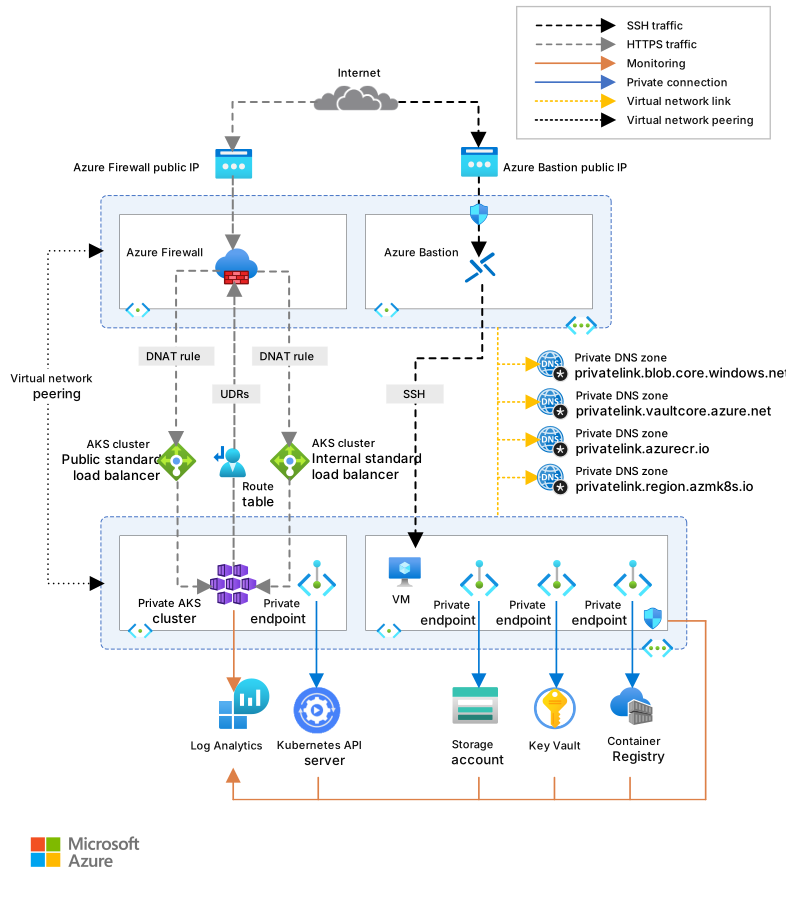
Download a Visio file of this architecture.
Workflow
The following workflow corresponds to the previous diagram:
Terraform modules deploy a new virtual network that has four subnets that host:
- The AKS cluster (AksSubnet).
- A jump box virtual machine (VM) and private endpoints (VmSubnet).
- Azure Application Gateway Web Application Firewall v2 (AppGatewaySubnet).
- Azure Bastion (AzureBastionSubnet).
The AKS cluster uses a user-defined managed identity to create other resources, like load balancers and managed disks in Azure. By using Terraform modules, you can optionally deploy an AKS cluster that has these features:
- Container Storage Interface (CSI) drivers for Azure disks and Azure Files
- AKS-managed Microsoft Entra integration
- Azure role-based access control (Azure RBAC) for Kubernetes authorization
- Managed identity instead of a service principal
- Azure network policies
- Azure Monitor Container insights
- Application Gateway Ingress Controller (AGIC)
- Dynamic allocation of IP addresses and enhanced subnet support
The AKS cluster is composed of:
- A system node pool that hosts only critical system pods and services.
- A user node pool that hosts user workloads and artifacts.
A VM is deployed in the virtual network that hosts the AKS cluster. When you deploy AKS as a private cluster, system admins can use this VM to manage the cluster via the Kubernetes command-line tool. An Azure Storage account stores the VM boot diagnostics logs.
An Azure Bastion host provides improved-security Secure Shell (SSH) connectivity to the jump box VM. Azure Container Registry is used to build, store, and manage container images and artifacts like Helm charts.
AKS doesn't provide a built-in solution to secure ingress and egress traffic between the cluster and external networks.
For this reason, the architecture in this article includes an Azure Firewall that controls inbound traffic by using destination network address translation (DNAT) rules and outbound traffic with network and application rules. The firewall applies source network address translation (SNAT) to outbound flows from the cluster. It replaces the pod IP address with one of the firewall's public IP addresses, which becomes the cluster's egress identity for partner allowlisting. The firewall also protects workloads by using threat intelligence-based filtering. Azure Firewall and Azure Bastion are deployed to a hub virtual network that's peered with the virtual network that hosts the private AKS cluster. A route table and user-defined routes (UDRs) direct outbound traffic from the AKS cluster to Azure Firewall.
Note
We strongly recommend that you use Azure Firewall Premium because it provides advanced threat protection.
Workloads that run on AKS use Azure Key Vault as a secret store to retrieve keys, certificates, and secrets via the Microsoft Entra Workload Identity, Secrets Store CSI Driver, or Dapr. Azure Private Link enables AKS workloads to access Azure platform as a service (PaaS) services, like Key Vault, over a private endpoint in the virtual network.
The topology includes private endpoints and private Domain Name System (DNS) zones for these services:
A virtual network link connects the virtual network that hosts the AKS cluster to the private DNS zones described previously.
A Log Analytics workspace collects the diagnostics logs and metrics from Azure services.
Components
Azure Firewall is a cloud-native, intelligent network firewall security service that provides threat protection for cloud workloads that run in Azure. In this architecture, Azure Firewall provides both east-west and north-south traffic inspection. It uses DNAT rules to publish inbound flows to private workloads, network and application rules to filter outbound flows, and SNAT to translate egress traffic to its public IP address. It also protects workloads by using threat intelligence-based filtering in the hub virtual network.
Container Registry is a managed, private Docker registry service that's based on the open-source Docker Registry 2.0. In this architecture, Container Registry builds, stores, and manages container images and artifacts like Helm charts that are deployed to the AKS cluster. It supports geo-replication for disaster recovery (DR) scenarios.
AKS is a managed Kubernetes service that simplifies Kubernetes cluster deployment and management. In this architecture, AKS hosts the private cluster with system and user node pools in a spoke virtual network.
Key Vault is a cloud-based service that stores and controls access to secrets like API keys, passwords, certificates, and cryptographic keys with improved security. In this architecture, Key Vault serves as a secret store for workloads that run on AKS.
Azure Bastion is a fully managed PaaS that provides Remote Desktop Protocol (RDP) and SSH connectivity to the VMs in your virtual network, directly from the Azure portal over Transport Layer Security (TLS). In this architecture, Azure Bastion provides more secure access to the jump box VM over TLS from the Azure portal, which eliminates the need to expose VMs directly to the public internet.
Azure Virtual Machines is a compute service that provides on-demand, scalable computing resources that give you the flexibility of virtualization. In this architecture, Virtual Machines serves as the jump box host deployed in the virtual network that hosts the AKS cluster. System admins use Virtual Machines to manage the private cluster via kubectl when direct access to the API server is restricted.
Azure Virtual Network is the fundamental building block for Azure private networks. Virtual Network enables Azure resources, like VMs, to communicate with each other, the internet, and on-premises networks with improved security. In this architecture, Virtual Network provides network isolation and connectivity with the spoke network that hosts the AKS cluster and subnets for different components. It's peered to the hub network that contains Azure Firewall and Azure Bastion.
Virtual network interfaces are networking components that enable Azure VMs to communicate with the internet, Azure, and on-premises resources. In this architecture, network interfaces provide connectivity for the jump box VM and AKS nodes. You can add several NICs to one Azure VM so that child VMs can have their own dedicated network interface devices and IP addresses.
Azure managed disks are block-level storage volumes that Azure manages on Azure VMs. Ultra Disks, Premium SSDs, Standard SSDs, and Standard HDDs are available. In this architecture, managed disks provide persistent storage for the jump box VM and AKS cluster nodes.
Blob Storage is an object storage solution for the cloud. Blob Storage is optimized for storing massive amounts of unstructured data. In this architecture, Blob Storage stores the boot diagnostics logs of the jump box VM.
Private Link is a networking service that helps you access Azure PaaS services over a private endpoint in your virtual network. In this architecture, Private Link provides secure connectivity to services like Blob Storage, Container Registry, and Key Vault. It ensures that traffic remains on the Azure backbone without exposure to the public internet. You can also use it to access Azure-hosted services that you own or that a Microsoft partner provides.
Alternatives
You can use a non-Microsoft firewall from the Microsoft Marketplace instead of Azure Firewall. With this approach, you must properly configure the firewall to inspect and allow or deny the inbound and outbound traffic from the AKS cluster.
Scenario details
AKS clusters are deployed on a managed or custom virtual network. The cluster still has outbound dependencies on services outside that network. For management and operational purposes, AKS cluster nodes must access specific ports and fully qualified domain names (FQDNs) associated with these dependencies. These requirements include access to your cluster's Kubernetes API server, access to ports for cluster component downloads, and access to Microsoft Container Registry to pull container images. These outbound dependencies are defined with FQDNs and don't have static IP addresses, which prevents you from locking down outbound traffic by using network security groups (NSGs). As a result, AKS clusters allow unrestricted outbound internet access by default so that nodes and services can reach required external resources.
However, in a production environment, it's usually preferable to protect the Kubernetes cluster from data exfiltration and other unwanted network traffic. All inbound and outbound network traffic must follow defined security rules. To meet this requirement, restrict egress traffic while still allowing access to required ports and addresses for routine cluster maintenance tasks, outbound dependencies, and workload requirements.
A simple solution is to use a firewall device that can control outbound traffic based on domain names. A firewall creates a barrier between a trusted network and the internet. Use Azure Firewall to restrict outbound traffic based on the destination's FQDN, protocol, and port to provide fine-grained egress traffic control. It also enables allowlisting to FQDNs associated with an AKS cluster's outbound dependencies, which isn't possible by using NSGs. Also, threat intelligence-based filtering on Azure Firewall deployed to a shared perimeter network can control ingress traffic and enhance security. This filtering can generate alerts and deny traffic to and from known malicious IP addresses and domains.
You can create a private AKS cluster in a hub-spoke network topology by using Terraform and Azure DevOps. Azure Firewall inspects traffic to and from the AKS cluster. The cluster is hosted by one or more spoke virtual networks peered to the hub virtual network.
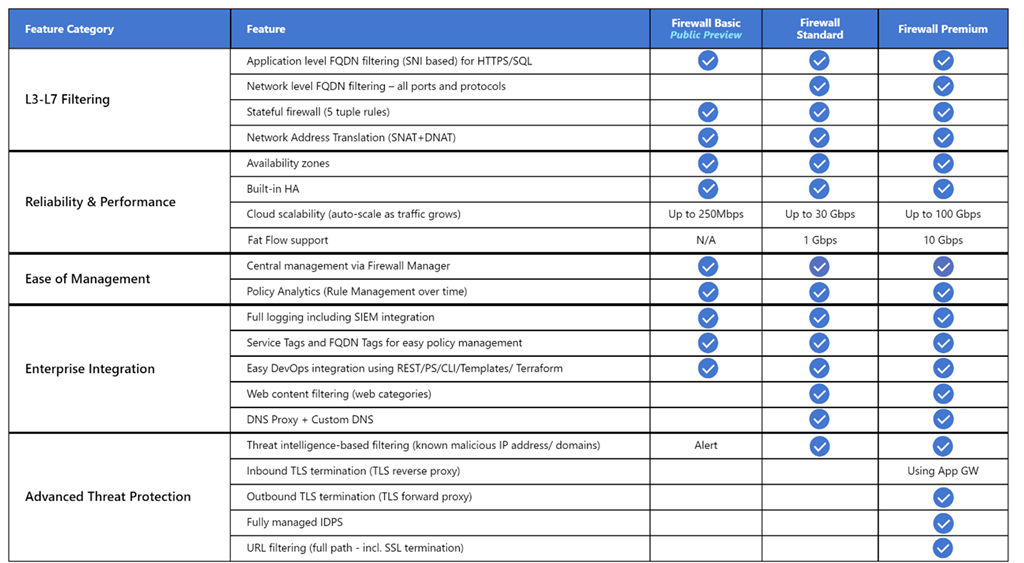
Azure Firewall supports three different SKUs to cater to a wide range of customer use cases and preferences:
Azure Firewall Premium is recommended for securing highly sensitive applications, such as payment processing. It supports advanced threat protection capabilities like malware-related threat detection and TLS inspection.
Azure Firewall Standard is recommended for customers who need layer-3 through layer-7 firewall capabilities and autoscaling that supports peak traffic up to 30 Gbps. It supports enterprise features, like threat intelligence, DNS proxy, custom DNS, and web categories.
Azure Firewall Basic is recommended for customers with throughput needs of less than 250 Mbps.
The following table shows the features of the three Azure Firewall SKUs. For more information, see Azure Firewall pricing.
By default, AKS clusters have unrestricted outbound internet access. This level of network access allows nodes and services that run in the AKS cluster to access external resources as needed. If you want to restrict egress traffic, a limited number of ports and addresses must remain reachable to maintain healthy cluster maintenance tasks. The simplest way to provide security for the outbound traffic from a Kubernetes cluster like AKS is to use a software firewall that can control outbound traffic based on domain names. Azure Firewall can restrict outbound HTTP and HTTPS traffic based on the FQDN of the destination. You can also configure your firewall and security rules to allow these required ports and addresses. For more information, see Control egress traffic for cluster nodes in AKS.
You can also control ingress traffic and improve security by enabling threat intelligence-based filtering on an Azure Firewall deployed to a shared perimeter network. This filtering can provide alerts and deny traffic to and from known malicious IP addresses and domains.
Potential use cases
This scenario addresses the need to improve security of inbound and outbound traffic to and from a Kubernetes cluster.
Configure the AKS cluster to egress through Azure Firewall
To force AKS egress through Azure Firewall, you must configure the cluster, not only the firewall and the route table. Make these decisions when you create the cluster:
Set the outbound type to
userDefinedRouting. With this outbound type, AKS doesn't provision a public standard load balancer for egress and doesn't add its own SNAT public IP addresses. All outbound traffic from the node pool subnets follows the UDR to the Azure Firewall private IP address, which gives the firewall full visibility into every outbound flow. For more information, see Configure cluster outbound types in AKS.Use the
AzureKubernetesServiceFQDN tag for the required egress allowlist. AKS requires outbound access to a long and frequently updated list of FQDNs for control plane communication, image pulls, identity, and other platform services. Instead of maintaining these FQDNs yourself, create an Azure Firewall application rule that uses theAzureKubernetesServiceFQDN tag. Azure Firewall keeps this tag current with the platform's required endpoints. Combine this tag with the targeted network rules for Network Time Protocol (NTP), the API server on TCP 9000 and UDP 1194, and container registries that your workloads use.Use API server virtual network integration to keep API server traffic on the private network. API server virtual network integration projects the API server endpoint into a delegated subnet in your virtual network. Node-to-API-server traffic remains on the private network and doesn't traverse Azure Firewall. This behavior removes the need for the AKS-tunnel network rules and reduces the number of egress flows that the firewall has to inspect. Combine API server virtual network integration with the private cluster setting if you also want to block public network access to the API server. For more information, see Create an AKS cluster with API server virtual network integration. API server virtual network integration is the recommended approach for new private clusters. The older private cluster implementation that uses Private Link is supported but adds DNS and tunnel complexity that virtual network integration removes.
Plan Azure Firewall public IP addresses and SNAT capacity
Azure Firewall uses SNAT for all outbound flows. Each public IP address attached to the firewall provides a fixed number of SNAT ports, about 2,496 ports per IP address per back-end instance. A production AKS cluster generates many concurrent outbound flows from pods, especially when pods open many short-lived connections to a small number of external destinations. If you underprovision public IP addresses, SNAT ports exhaust and outbound calls start to fail intermittently with connection timeouts that are difficult to diagnose.
The AKS guidance in Limit network traffic with Azure Firewall in AKS recommends a minimum of 20 front-end public IP addresses on Azure Firewall for production workloads to avoid SNAT port exhaustion. Treat this number as a starting point, not a fixed requirement. The right number depends on the workload's outbound concurrency, the destination diversity, and connection lifetimes.
Use Azure Firewall NAT Gateway integration or attach a public IP prefix to simplify management of many public IP addresses and expand the available SNAT port pool. NAT Gateway dramatically increases SNAT scale and is the preferred option for high-concurrency egress.
Monitor SNAT port utilization on Azure Firewall and scale public IP addresses on the firewall before they reach saturation. For more information, see Monitor Azure Firewall.
If a small number of workloads dominate the outbound flow profile (for example, log shippers or scrapers that run on every node but only send traffic to one or two endpoints), consider a dedicated egress path through a static egress gateway rather than scaling firewall IP addresses to accommodate one noisy workload.
Avoid asymmetric routing
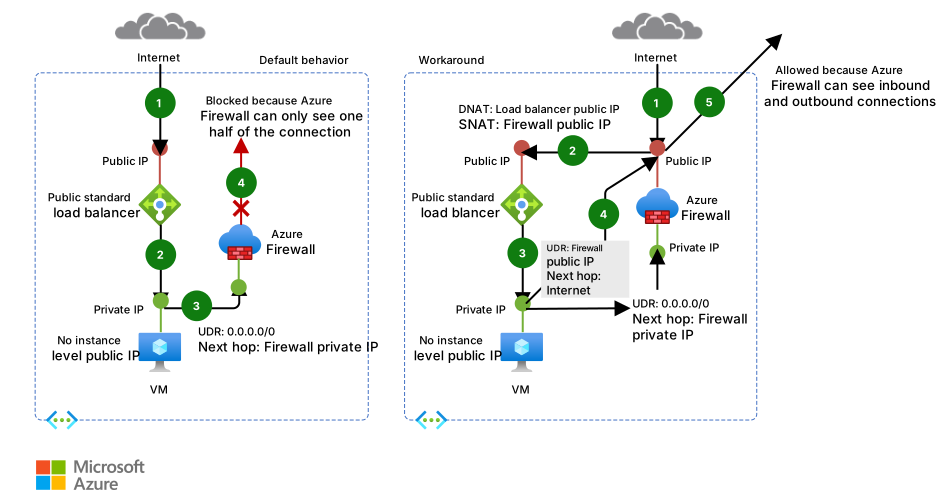
In this solution, Azure Firewall is deployed to a hub virtual network, and the private AKS cluster is deployed to a spoke virtual network. Azure Firewall uses network and application rule collections to control the egress traffic. In this situation, configure the ingress traffic to any public endpoint exposed by any service that runs on AKS to enter the system via one of the public IP addresses that the Azure Firewall uses.
Packets arrive on the firewall's public IP address but return to the firewall via the private IP address by using the default route. To avoid this problem, create another UDR for the firewall's public IP address, as shown in the following diagram. Packets that go to the firewall's public IP address are routed via the internet. This configuration avoids the default route to the firewall's private IP address.
To route the traffic of your AKS workloads to the Azure Firewall in the hub virtual network, you need to:
Create and associate a route table to each subnet that hosts the worker nodes of your cluster.
Create a UDR to forward the traffic for
0.0.0.0/0classless inter-domain routing (CIDR) to the private IP address of the Azure Firewall. Specify virtual appliance for the next hop type.
For more information, see Deploy and configure Azure Firewall by using the Azure portal.
For more information, see:
- Restrict egress traffic from an AKS cluster by using Azure Firewall
- Integrate Azure Firewall with Azure Standard Load Balancer
Deploy workloads to a private AKS cluster when you use Azure DevOps
If you use Azure DevOps, you can't use Azure DevOps Microsoft-hosted agents to deploy your workloads to a private AKS cluster because they don't have access to its API server. To deploy workloads to your private AKS cluster, you need to provision and use an Azure DevOps self-hosted agent in the same virtual network as your private AKS cluster, or in a peered virtual network. In the second case, create a virtual network link between the private DNS zone of the AKS cluster in the node resource group and the virtual network that hosts the Azure DevOps self-hosted agent.
You can deploy a single Windows or Linux Azure DevOps agent on a VM, or you can use an Azure Virtual Machine Scale Set. For more information, see Virtual Machine Scale Set agents. As an alternative, you can set up a self-hosted agent in Azure Pipelines to run inside a Windows Server Core container (for Windows hosts) or Ubuntu container (for Linux hosts) with Docker. Deploy it as a pod with one or multiple replicas in your private AKS cluster. For more information, see:
If the subnets that host the node pools of your private AKS cluster are configured to route the egress traffic to Azure Firewall via a route table and UDR, make sure to create the proper application and network rules. These rules need to allow the agent to access external sites to download and install tools like Docker, Kubectl, the Azure CLI, and Helm on the agent VM. For more information, see Run a self-hosted agent in Docker.
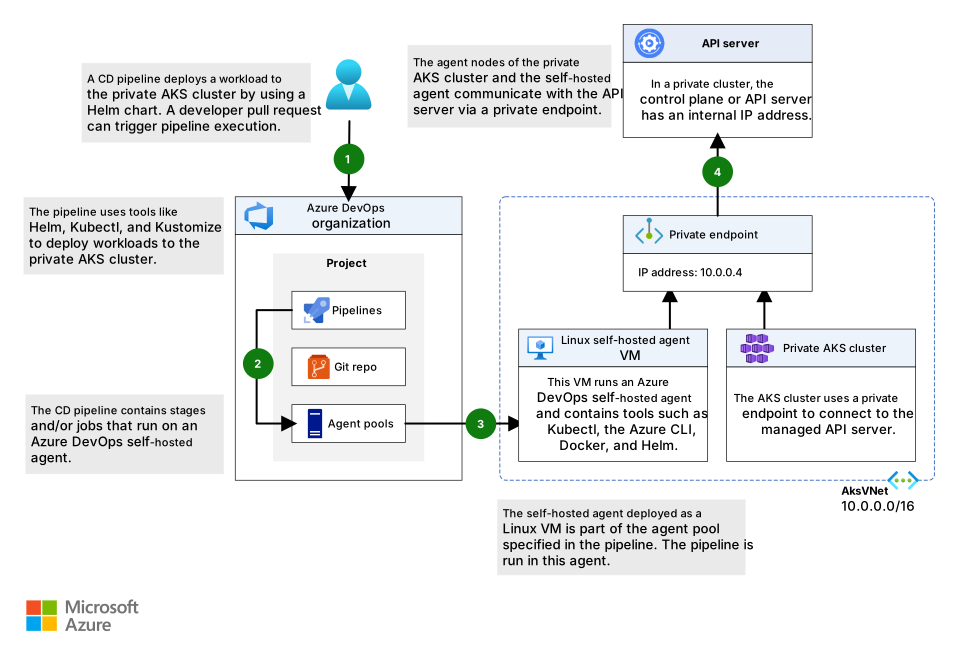
Alternatively, you can configure a Managed DevOps Pool in the virtual network that hosts your AKS cluster or in a peered virtual network. Managed DevOps Pools help development teams create Azure DevOps agent pools that are tailored to their specific needs. They implement security best practices, provide options to balance cost and performance, provide paths for common scenarios, and significantly reduce the time spent to create and maintain custom pools. For more information, see Microsoft Managed DevOps Pools architecture overview.
You can add agents from a Managed DevOps Pool in your virtual network so that CI/CD pipelines can interact with the Kubernetes API server of your private AKS cluster. These agents also let the pipelines access Azure resources, such as Container Registry, that block public network access and only allow connections through a private endpoint defined in the same virtual network or a peered network. For more information, see Configure Managed DevOps Pools networking.
Use Azure Firewall in front of a public load balancer
In this scenario, a workload that runs in AKS is exposed through a public Azure load balancer (a Kubernetes LoadBalancer service) in the cluster's node resource group. Azure Firewall sits in front of the load balancer and uses a dedicated public IP address and a DNAT rule to translate inbound traffic to the load balancer's public IP address and port. This pattern centralizes inbound inspection, DNAT, and threat intelligence-based filtering at the firewall, and lets AKS continue to manage the load balancer for the Kubernetes service. Use this approach when the workload needs to be reachable from the internet but you want all ingress traffic to traverse the hub firewall before it reaches the cluster.
This diagram shows the network topology of the scenario.
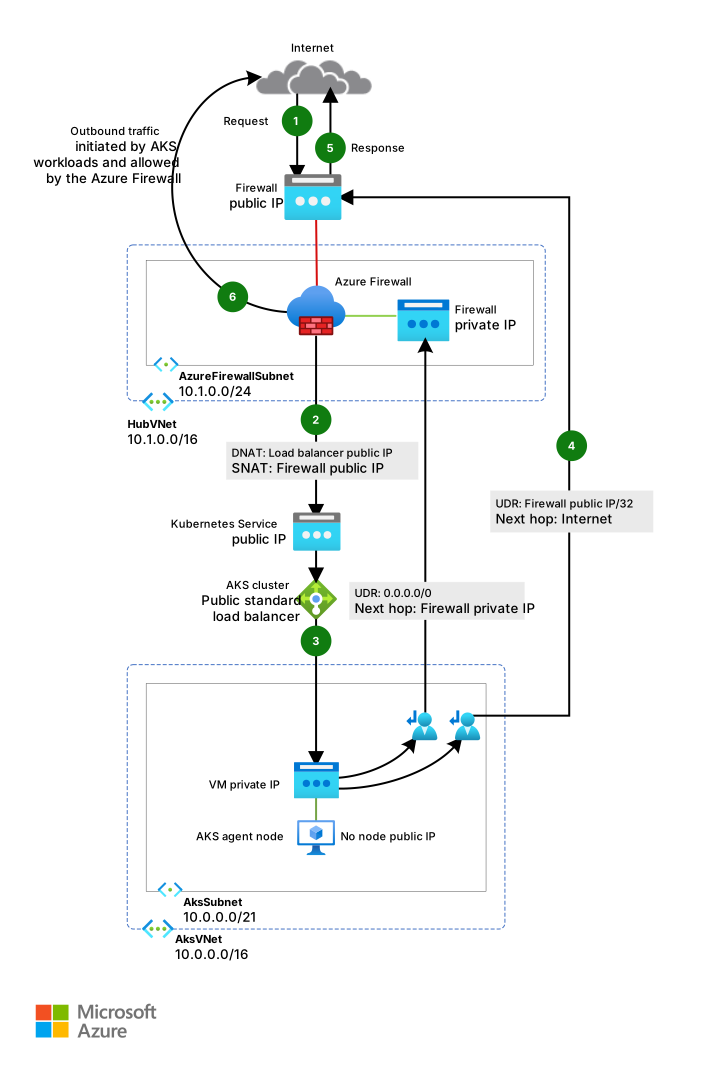
Here's the message flow:
A request for the AKS-hosted web application is sent to a public IP address that Azure Firewall exposes via a public IP address configuration. Both the public IP address and the public IP address configuration are dedicated to this workload.
An Azure Firewall DNAT rule translates the Azure Firewall public IP address and port to the public IP address and port that the workload uses in the public load balancer of the AKS cluster in the node resource group.
The load balancer sends the request to one Kubernetes service pod that runs on an agent node in the AKS cluster.
The response message is sent back to the original caller via a UDR. The route sets the Azure Firewall public IP address as the address prefix and the internet as the next hop type.
Any workload-initiated outbound call is routed to the private IP address of the Azure Firewall by the default UDR. The route uses
0.0.0.0/0as the address prefix and virtual appliance as the next hop type.
Use Azure Firewall in front of an internal load balancer
In this scenario, an ASP.NET Core application is hosted as a service by an AKS cluster and fronted by an ingress controller that an internal load balancer exposes. The recommended approaches for ingress in AKS are the application routing Gateway API implementation or Application Gateway for Containers. The application routing Gateway API implementation uses the Kubernetes Gateway API standard with an Istio-based control plane for in-cluster ingress traffic management. Application Gateway for Containers is a fully managed Azure-native layer-7 load balancer that also supports the Gateway API and provides advanced traffic management, TLS termination, and multisite hosting outside the cluster. Both options support configuration of an internal load balancer with a private IP address in the spoke virtual network that hosts the AKS cluster. When you deploy an ingress controller, or more generally a LoadBalancer or ClusterIP service, with the service.beta.kubernetes.io/azure-load-balancer-internal: "true" annotation in the metadata section, an internal load balancer called kubernetes-internal is created in the node resource group. For more information, see Use an internal load balancer with AKS. As shown in the following diagram, Azure Firewall exposes the test web application by using a dedicated Azure public IP address.
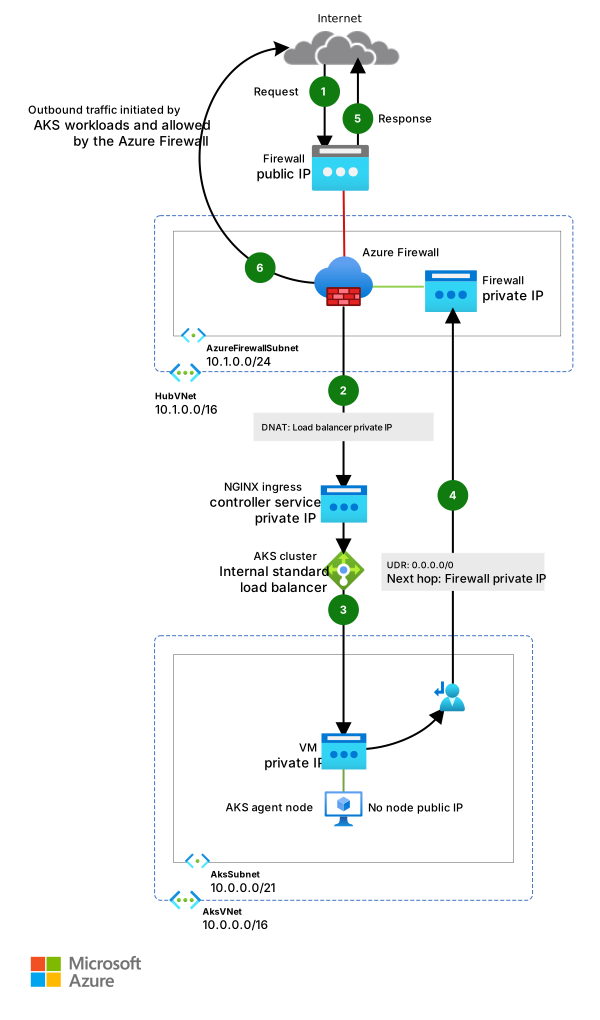
Here's the message flow:
A request for the AKS-hosted test web application is sent to a public IP address that the Azure Firewall exposes via a public IP configuration. Both the public IP address and the public IP address configuration are dedicated to this workload.
An Azure Firewall DNAT rule translates the Azure Firewall public IP address and port to the private IP address and port that the chosen Ingress or Gateway controller uses in the internal load balancer of the AKS cluster in the node resource group.
The internal load balancer sends the request to one Kubernetes service pod that runs on an agent node in the AKS cluster.
The response message returns to the original caller through a UDR. The route uses
0.0.0.0/0as the address prefix and virtual appliance as the next hop type.Any workload-initiated outbound call is routed by the UDR to the private IP address of Azure Firewall.
Considerations
These considerations implement the pillars of the Azure Well-Architected Framework, which is a set of guiding tenets that you can use to improve the quality of a workload. For more information, see Well-Architected Framework.
Some of the following considerations are general recommendations rather than Azure Firewall-specific guidance for protecting an AKS cluster. We consider these items essential requirements of the solution. This guidance applies to the security, performance, availability and reliability, storage, service mesh, and monitoring considerations.
Reliability
Reliability helps ensure that your application can meet the commitments that you make to your customers. For more information, see Design review checklist for Reliability.
Consider the following methods for optimizing the availability of your AKS cluster and workloads.
Intraregion resiliency
During deployment, you can configure Azure Firewall to span multiple availability zones for increased availability. For uptime percentages, see the Azure Firewall service-level agreement (SLA) in SLAs for Microsoft online services. You can also associate Azure Firewall with a specific zone for proximity. However, this configuration affects the SLA. No extra cost applies for a firewall deployed in an availability zone, including inter-availability zone data transfers.
Consider deploying the node pools of your AKS cluster across all availability zones in a region. Use an Azure load balancer or Application Gateway in front of the node pools. This topology provides better resiliency if there's a single datacenter outage. The cluster nodes are distributed across multiple datacenters, in three separate availability zones within a region.
Enable zone redundancy in Container Registry for intraregion resiliency and high availability.
Use pod topology spread constraints to control how pods are spread across your AKS cluster among failure domains like regions, availability zones, and nodes.
Consider using the Standard or Premium pricing tier for AKS clusters that host mission-critical workloads. These tiers include a financially backed uptime SLA for the cluster. The Standard tier guarantees 99.95% availability of the Kubernetes API server endpoint for clusters that use availability zones, or 99.9% for clusters that don't use availability zones. The Premium tier provides the same SLA guarantees with extra long-term support (LTS) for Kubernetes versions. For more information, see AKS pricing tiers. AKS uses control plane replicas across update and fault domains to ensure that SLA requirements are met.
Consider using the AKS Automatic SKU for new clusters that benefit from a fully managed node management experience with built-in best practices for reliability, security, and performance. AKS Automatic uses the Standard pricing tier by default.
Business continuity and disaster recovery
Consider deploying your solution to at least two paired Azure regions within a geography. Use a global load balancer, like Azure Traffic Manager or Azure Front Door, with an active-active or active-passive routing method, to guarantee business continuity and disaster recovery (BC/DR).
Azure Firewall is a regional service. If you deploy your solution across two or more regions, you need to create an Azure Firewall in each region. You can create a global Azure Firewall Policy to include organization-mandated rules that apply to all regional hubs. You can use this policy as a parent policy for regional Azure policies. Policies created with non-empty parent policies inherit all rule collections from the parent policy. Network rule collections inherited from a parent policy are always prioritized above network rule collections that are defined as part of a new policy. The same logic applies to application rule collections. However, network rule collections are always processed before application rule collections, regardless of inheritance. For more information about Standard and Premium policies, see Azure Firewall Manager policy overview.
Script, document, and regularly test your regional failover process in a QA environment. This testing helps you avoid unpredictable problems if an outage affects a core service in the primary region. These tests also verify whether your DR approach meets RPO and RTO targets, along with any manual steps or operator interventions required during a failover.
Test fail-back procedures to validate that they work as expected.
Store your container images in Container Registry. Geo-replicate the registry to each AKS region. For more information, see Geo-replication in Container Registry.
When a regional replica becomes degraded, Container Registry automatically reroutes pulls through its global endpoint (
<registry>.azurecr.io) to a healthy replica. This failover occurs internally within minutes and requires no AKS-side or DNS configuration changes.If possible, avoid storing service state in the container. Instead, use an Azure PaaS that supports multiple-region replication.
If you use Storage, prepare and test a process for migrating your storage from the primary region to the backup region.
Security
Security provides assurances against deliberate attacks and the misuse of your valuable data and systems. For more information, see Design review checklist for Security.
The Azure platform provides protection against various threats, such as network intrusion and DDoS attacks. Use a web application firewall (WAF) to help protect any AKS-hosted web applications and services that expose a public HTTPS endpoint. You need to protect against common threats like SQL injection, cross-site scripting, and other web exploits. Use Open Web Application Security Project (OWASP) rules and custom rules for this purpose. Azure Web Application Firewall provides centralized protection for your web applications from common exploits and vulnerabilities. You can deploy Azure Web Application Firewall with Azure Application Gateway, Azure Front Door, and Azure Content Delivery Network.
DDoS attacks are among the biggest availability and security concerns facing organizations that move their applications to the cloud. A DDoS attack attempts to exhaust an application's resources, which makes the application unavailable to legitimate users. DDoS attacks can target any endpoint that's publicly reachable via the internet. Every property in Azure includes protection via Azure DDoS infrastructure protection at no extra cost. The scale and capacity of the globally deployed Azure network provides defense against common network-layer attacks through always-on traffic monitoring and real-time mitigation. DDoS infrastructure protection requires no user configuration or application changes. It helps protect all Azure services, including PaaS services like Azure DNS.
Azure DDoS Network Protection, combined with application-design best practices, provides enhanced DDoS mitigation features to provide more defense against DDoS attacks. Enable DDoS Network Protection on perimeter virtual networks.
Other security considerations include:
Create a private endpoint for any PaaS service that AKS workloads use, like Key Vault, Azure Service Bus, and Azure SQL Database. Traffic between the applications and these services isn't exposed to the public internet. Traffic between the AKS cluster virtual network and an instance of a PaaS service via a private endpoint travels the Microsoft backbone network, but the communication doesn't pass through Azure Firewall. This mechanism provides better security and better protection against data leakage. For more information, see Private Link.
When you use Application Gateway in front of the AKS cluster, use a Web Application Firewall policy to help protect public-facing workloads that run on AKS from attacks.
Use network policies to segregate and help secure intraservice communications. Control which components can communicate with each other. By default, all pods in a Kubernetes cluster can send and receive traffic without limitations. Use Azure CNI Powered by Cilium to enforce network policies. Calico is also supported if you need it for compatibility with existing tooling. For more information, see Network policies in AKS.
Don't expose remote connectivity to your AKS nodes. Create a bastion host, or jump box, in a management virtual network. Use the bastion host to route traffic into your AKS cluster.
Consider using a private AKS cluster in your production environment, or at least secure access to the API server by using authorized IP address ranges in AKS. When you use authorized IP address ranges on a public cluster, allow all the egress IP addresses in the Azure Firewall network rule collection. In-cluster operations consume the Kubernetes API server.
If you enable DNS proxy in Azure Firewall, Azure Firewall can process and forward DNS queries from one or more virtual networks to a DNS server that you choose. This functionality is crucial and required for reliable FQDN filtering in network rules. You can enable DNS proxy in Azure Firewall and Firewall Policy settings. For more information about DNS proxy logs, see Azure Firewall log and metrics.
You can use Azure Firewall in front of a Gateway API-based ingress controller to expose workloads over HTTPS and use a separate subdomain and certificate for each application. The recommended managed ingress solutions for AKS are Application Gateway for Containers and the application routing Gateway API implementation. Application Gateway for Containers is a fully managed Azure-native layer-7 load balancer outside the cluster that supports the Kubernetes Gateway API and multisite hosting. The application routing Gateway API implementation uses an Istio-based control plane to provide in-cluster traffic routing through Kubernetes
GatewayandHTTPRouteresources. Don't use AGIC for new deployments.You can use Azure Firewall in front of a Gateway API-based ingress controller to expose workloads over HTTPS and use a separate subdomain and certificate for each application. The recommended managed ingress solutions for AKS are Application Gateway for Containers and the application routing Gateway API implementation. Application Gateway for Containers is a fully managed Azure-native layer-7 load balancer outside the cluster that supports the Kubernetes Gateway API and multisite hosting. The application routing Gateway API implementation uses an Istio-based control plane to provide in-cluster traffic routing through Kubernetes
GatewayandHTTPRouteresources. Don't use AGIC for new deployments.Configure TLS termination at the chosen ingress. For TLS with Application Gateway for Containers, see TLS policy with Application Gateway for Containers. For TLS with application routing, see Secure ingress by using the application routing Gateway API implementation. Alternatively, you can use cert-manager to automatically generate TLS certificates with Let's Encrypt.
Strict coordination among the Azure Firewall operator and the cluster and workload teams is necessary for initial cluster deployment and for ongoing operations as workload and cluster needs evolve. This coordination is especially important when you configure the authentication mechanisms, like OAuth 2.0 and OpenID Connect, that workloads use to authenticate their clients.
Use the following guidelines to help secure the environment described in this article:
Cost Optimization
Cost Optimization focuses on ways to reduce unnecessary expenses and improve operational efficiencies. For more information, see Design review checklist for Cost Optimization.
The cost of the resulting architecture depends on the following configuration details:
Service tiers
Scalability (the number of instances that services dynamically allocate to support a given demand)
Automation scripts
Your DR level
After you assess these configuration details, use the Azure pricing calculator to estimate your costs.
Operational Excellence
Operational Excellence covers the operations processes that deploy an application and keep it running in production. For more information, see Design review checklist for Operational Excellence.
DevOps
Deploy your workloads to AKS by using a Helm chart in a CI/CD pipeline. Use a DevOps system like GitHub Actions or Azure DevOps. For more information, see Build and deploy to AKS.
Test an application properly before you make it available to users by using A/B testing and canary deployments in your application life cycle management. You can use several techniques to split the traffic across different versions of the same service. Alternatively, you can use the traffic-splitting capabilities that a service mesh implementation provides. For more information, see Istio Traffic Management.
Use Azure Container Registry or another container registry (like Docker Hub) to store the private Docker images that are deployed to the cluster. AKS can authenticate with Azure Container Registry by using its Microsoft Entra identity.
Test ingress and egress on your workloads in a separate preproduction environment that mirrors the network topology and firewall rules of your production environment. A staged rollout strategy helps you detect any networking or security problems before you release a new feature or network rule into production.
Decide which Azure Firewall and routing resources your infrastructure as code (IaC) pipeline manages and which resources network or security operators manage out of band. If you use Terraform, you can use the life cycle meta-argument with ignore_changes on the Azure Firewall Policy and Azure Route Table resources. This configuration lets Terraform create and own the resources while allowing DNAT, application, and network rules on the firewall policy and UDRs on the route table to be managed outside of Terraform without being reverted on the next apply. The sample Terraform modules for this scenario use this pattern.
Monitoring
Azure Firewall is fully integrated with Azure Monitor for logging incoming and outgoing traffic that the firewall processes. For more information, see Azure Firewall threat intelligence-based filtering.
Enable Azure Firewall structured logs for detailed, schema-based logging that simplifies querying and analysis. Structured logs provide visibility into traffic patterns, rule hits, threat intelligence actions, and intrusion detection and prevention system (IDPS) signals in a format that integrates with Azure Monitor Log Analytics, Microsoft Sentinel, and non-Microsoft SIEM tools.
Use Kubernetes monitoring in Azure Monitor to monitor the health status of the AKS cluster and workloads.
Configure all PaaS services (like Container Registry and Key Vault) to collect diagnostic logs and metrics.
Contributors
Microsoft maintains this article. The following contributors originally wrote it.
Principal author:
- Paolo Salvatori | Principal Service Engineer
Other contributors:
- Sam Cogan | Senior Cloud Solution Architect
To see nonpublic LinkedIn profiles, sign in to LinkedIn.