Note
Access to this page requires authorization. You can try signing in or changing directories.
Access to this page requires authorization. You can try changing directories.
Note
Incident cases are in preview and are the recommended experience for managing incidents in the Microsoft Defender portal. The legacy incident experience remains available during this preview. This article provides incident response workflow guidance that applies to both incident cases and the legacy incident experience.
In the Microsoft Defender portal, security incidents bring together related alerts and investigation context to help your security operations team understand, manage, and respond to potential attacks.
This article provides workflow guidance for triaging, investigating, containing, resolving, and reviewing incidents. It also maps response activities to responder experience levels and security team roles.
Incident response workflow example in the Microsoft Defender portal
Here's a workflow example for responding to incidents in the Microsoft Defender portal.
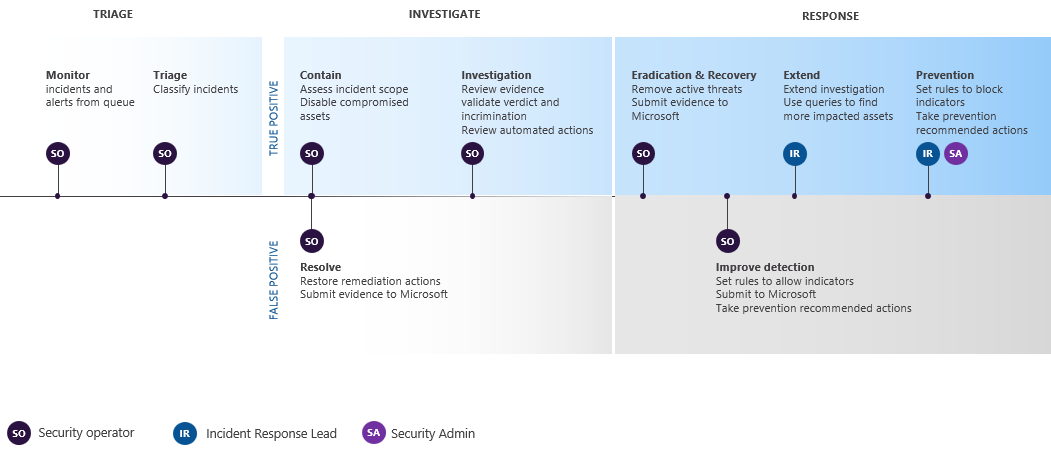
On an ongoing basis, identify the highest priority incidents for analysis and resolution and get them ready for response.
You can use automation rules to automatically triage, manage, or respond to some incidents as they're created.
Consider the following incident response workflow stages and actions for your own process:
| Stage | Actions |
|---|---|
| Triage and prioritize the incident. | Review the incident severity, priority, affected assets, related alerts, and available context. Identify incidents that require immediate action, escalation, or continued monitoring. For more information, see Prioritize incident cases in the Microsoft Defender portal. |
| Investigate and analyze the incident. | Review the attack story, alerts, impacted assets, evidence, automated investigations, and related activity to understand the scope, impact, and recommended response actions. For more information, see Investigate incident cases in the Microsoft Defender portal. |
| Contain and eradicate the threat. | Take response actions to reduce additional impact and remove the threat. For example, disable compromised users, isolate affected devices, block malicious IP addresses, or approve remediation actions. For more information, see Automated investigation and response in Microsoft Defender XDR. |
| Recover affected resources. | Restore affected users, devices, workloads, or other tenant resources to a trusted state. Validate that the threat is no longer active. |
| Resolve or close the incident. | Document the outcome, classification, determination, response actions, and resolution details. Make sure required tasks and handoffs are complete. For more information, see Manage incident cases in the Microsoft Defender portal. |
| Review and improve the process. | Review what happened, what actions were taken, and what can be improved. Update workflows, playbooks, policies, automation rules, detections, or security configuration as needed. For more information, see Incident response playbooks. |
For more information about incident response across Microsoft products, see Incident response overview.
Plan initial incident management tasks
Use the following guidance to plan initial incident management tasks based on your team's experience level and security operations role.
Assess responder experience levels
Use the following experience-level guidance for security analysis and incident response.
| Level | Guidance |
|---|---|
| New | Start with guided workflows and incident prioritization. Review which incidents need attention, assign ownership, document actions, and use the investigation experience to understand alerts, assets, evidence, and recommended response actions. |
| Experienced | Use filters, incident context, investigation details, automation results, and related threat intelligence to prioritize response. Manage incident work, investigate affected entities, perform containment and remediation, and document outcomes. |
| Advanced | Use advanced hunting, threat analytics, incident response playbooks, and automation to investigate complex incidents, identify related activity, improve detections, and refine response processes. |
Define tasks by security team role
Use the following role-based guidance for your security team.
| Role | Guidance |
|---|---|
| Incident responder (Tier 1) | Triage incidents, identify priority items, assign ownership, update status and severity, add tags and comments, follow standard response procedures, and escalate when needed. |
| Security investigator or analyst (Tier 2) | Investigate incidents, review alerts and evidence, analyze impacted assets, validate automated investigation results, perform containment or remediation actions, and document findings. |
| Advanced security analyst or threat hunter (Tier 3) | Investigate complex or high-impact incidents, use advanced hunting and threat analytics, identify related activity, improve detections, and update incident response playbooks. |
| SOC manager | Define response workflows, ownership models, escalation paths, service-level expectations, and post-incident review processes. Review incident trends and improve operational readiness. |
Related content
- Prioritize incident cases in the Microsoft Defender portal
- Manage incident cases in the Microsoft Defender portal
- Investigate incident cases in the Microsoft Defender portal
- Merge and split incident cases in the Microsoft Defender portal
- Microsoft Sentinel automation rules
- Incident response playbooks
- Incident response overview