नोट
इस पृष्ठ तक पहुंच के लिए प्राधिकरण की आवश्यकता होती है। आप साइन इन करने या निर्देशिकाएँ बदलने का प्रयास कर सकते हैं।
इस पृष्ठ तक पहुंच के लिए प्राधिकरण की आवश्यकता होती है। आप निर्देशिकाएँ बदलने का प्रयास कर सकते हैं।
आपके एजेंट का कैनवास उसके स्वरूप और अनुभव को निर्धारित करता है। आप इच्छित परिवर्तनों की जटिलता के आधार पर कैनवास को दो तरीकों से अनुकूलित कर सकते हैं:
उस वेबसाइट के HTML कोड में JavaScript स्टाइल का उपयोग करके डिफ़ॉल्ट कैनवास को अनुकूलित करें, जहां आप अपने एजेंट को तैनात करते हैं. यदि आप कोड विकास में निवेश किए बिना छोटे अनुकूलन करना चाहते हैं तो यह दृष्टिकोण उपयोगी है.
बॉट फ्रेमवर्क वेब चैट कैनवास पर आधारित कस्टम कैनवास का उपयोग करें। इस दृष्टिकोण के लिए व्यापक डेवलपर ज्ञान की आवश्यकता होती है। यह उन संगठनों के लिए उपयोगी है जो पूरी तरह से कस्टम अनुभव चाहते हैं।
आप अनुकूलित कैनवास को अपने एजेंट को स्वचालित रूप से वार्तालाप शुरू करने के लिए कॉन्फ़िगर करने के साथ संयुक्त कर सकते हैं.
अंत में, आप सीधे पोर्टल से अपने एजेंट का नाम और आइकन बदल सकते हैं।
आपके द्वारा किसी एजेंट को प्रकाशित करने के बाद, आपके ग्राहक उसके साथ सहभागिता करने के लिए एजेंट के वेब चैट कैनवास का उपयोग कर सकते हैं.
Important
आप इस लेख में शामिल नमूना कोड को केवल Copilot Studio के साथ उपयोग के लिए स्थापित और उपयोग कर सकते हैं। नमूना कोड "जैसा है" के रूप में लाइसेंसयुक्त है तथा किसी भी सेवा स्तर अनुबंध या समर्थन सेवाओं से बाहर रखा जाता है. इसका उपयोग करने का जोखिम आपका होगा.
Microsoft कोई अभिव्यक्त वारंटी, गारंटी या शर्तें नहीं देता है तथा जिसमें व्यापारिकता, किसी विशेष उद्देश्य के लिए फिटनेस और गैर-उल्लंघन सहित सभी निहित वारंटियां सम्मिलित नहीं होती हैं.
एजेंट का नाम और आइकन बदलें
Important
- आपके द्वारा किसी एजेंट के लिए आइकन अपडेट करने के बाद, नए आइकन को हर जगह दिखाई देने में 24 घंटे तक का समय लग सकता है।
- यदि आपका एजेंट ग्राहक सेवा के लिए ओमनीचैनल से कनेक्टेड है, तो Azure पोर्टल पंजीकरण में प्रदर्शन नाम गुण उसका नाम निर्धारित करता है.
- यदि आपका एजेंट Teams पर प्रकाशित होने के लिए है, तो Microsoft Teams डेवलपर दस्तावेज़ीकरण में आइकन की आवश्यकताओं की समीक्षा करें।
अपने एजेंट के लिए अवलोकन पृष्ठ पर जाएं।
विवरण के आगे संपादित करें चुनें.
इच्छानुसार एजेंट का नाम और आइकन बदलें।
सहेजें चुनें.
डिफ़ॉल्ट कैनवास (सरल) को अनुकूलित करें
सरल CSS और JavaScript स्टाइलिंग विकल्पों का उपयोग करके कॉन्फ़िगर करें कि चैट कैनवास कैसा दिखता है.
सबसे पहले, कॉन्फ़िगर करें कि आप अपने एजेंट कैनवास को कहां तैनात कर रहे हैं।
निम्नलिखित HTML कोड की प्रतिलिपि बनाएँ और इसे नाम
index.htmlकी फ़ाइल में सहेजें। वैकल्पिक रूप से, कोड को w3schools.com HTML में कॉपी और पेस्ट करें इसे संपादक आज़माएं।<!DOCTYPE html> <html lang="en"> <head> <meta charset="UTF-8" /> <meta name="viewport" content="width=device-width, initial-scale=1.0" /> <meta name="description" content="Contoso Web Chat Assistant" /> <title>Contoso Sample Web Chat Test</title> <script src="https://cdn.botframework.com/botframework-webchat/latest/webchat.js"></script> <script> let webChatInstance = null; let directLineUrl = null; // Replace with your token endpoint const tokenEndpoint = "<YOUR TOKEN ENDPOINT>"; const styleOptions = { "accent": "#0078D4", "autoScrollSnapOnPage": true, "autoScrollSnapOnPageOffset": 0, "avatarBorderRadius": "7%", "avatarSize": 31, "backgroundColor": "#e8e9eb", "botAvatarBackgroundColor": "#ffffff00", "botAvatarImage": "https://powercatexternal.blob.core.windows.net/creatorkit/Assets/ChatbotLogoBlue.png", "botAvatarInitials": "B", "bubbleAttachmentMaxWidth": 480, "bubbleAttachmentMinWidth": 250, "bubbleBackground": "#f0eded", "bubbleBorderColor": "#f5f5f5", "bubbleBorderRadius": 41, "bubbleBorderStyle": "solid", "bubbleBorderWidth": 1, "bubbleFromUserBackground": "#ebefff", "bubbleFromUserBorderColor": "#f5f5f5", "bubbleFromUserBorderRadius": 41, "bubbleFromUserBorderStyle": "solid", "bubbleFromUserBorderWidth": 1, "bubbleFromUserNubOffset": 0, "bubbleFromUserNubSize": 0, "bubbleFromUserTextColor": "#242424", "bubbleImageHeight": 10, "bubbleImageMaxHeight": 240, "bubbleImageMinHeight": 240, "bubbleMessageMaxWidth": 480, "bubbleMessageMinWidth": 120, "bubbleMinHeight": 50, "bubbleNubOffset": 0, "bubbleTextColor": "#242424", "emojiSet": true, "fontSizeSmall": "70%", "hideUploadButton": false, "messageActivityWordBreak": "break-word", "monospaceFont": "Consolas", "paddingRegular": 10, "paddingWide": 10, "primaryFont": null, "sendBoxBackground": "#e8e9eb", "sendBoxBorderTop": "solid 1px #808080", "sendBoxButtonColor": "#0078d4", "sendBoxButtonColorOnHover": "#006cbe", "sendBoxButtonShadeBorderRadius": 40, "sendBoxButtonShadeColorOnHover": "", "sendBoxHeight": 60, "sendBoxPlaceholderColor": "#171616", "sendBoxTextColor": "#2e2d2d", "showAvatarInGroup": "status", "spinnerAnimationHeight": 16, "spinnerAnimationPadding": 12, "spinnerAnimationWidth": 16, "subtleColor": "#000000FF", "suggestedActionBackgroundColor": "#006FC4FF", "suggestedActionBackgroundColorOnHover": "#0078D4", "suggestedActionBorderColor": "", "suggestedActionBorderRadius": 10, "suggestedActionBorderWidth": 1, "suggestedActionLayout": "flow", "suggestedActionTextColor": "#FFFFFFFF", "typingAnimationBackgroundImage": "url('https://wpamelia.com/wp-content/uploads/2018/11/ezgif-2-6d0b072c3d3f.gif')", "typingAnimationDuration": 5000, "typingAnimationHeight": 20, "typingAnimationWidth": 64, "userAvatarBackgroundColor": "#222222", "userAvatarImage": "https://avatars.githubusercontent.com/u/8174072?v=4&size=64", "userAvatarInitials": "U" }; const backgroundImage = ""; document.addEventListener('DOMContentLoaded', () => { const root = document.documentElement; root.style.setProperty('--primary-color', createGradient(styleOptions.accent)); root.style.setProperty('--header-textColor', styleOptions.suggestedActionTextColor); if (backgroundImage) { const webchatElement = document.getElementById('webchat'); webchatElement.style.backgroundImage = `url(${backgroundImage})`; webchatElement.style.backgroundSize = 'cover'; webchatElement.style.backgroundPosition = 'center'; webchatElement.style.backgroundRepeat = 'no-repeat'; const overlay = document.createElement('div'); overlay.className = 'webchat-overlay'; webchatElement.appendChild(overlay); } }); function createGradient(baseColor) { const r = parseInt(baseColor.slice(1, 3), 16); const g = parseInt(baseColor.slice(3, 5), 16); const b = parseInt(baseColor.slice(5, 7), 16); const lighterColor = `#${Math.min(255, r + 30).toString(16).padStart(2, '0')}${Math.min(255, g + 30).toString(16).padStart(2, '0')}${Math.min(255, b + 30).toString(16).padStart(2, '0')}`; const darkerColor = `#${Math.max(0, r - 30).toString(16).padStart(2, '0')}${Math.max(0, g - 30).toString(16).padStart(2, '0')}${Math.max(0, b - 30).toString(16).padStart(2, '0')}`; return `linear-gradient(135deg, ${lighterColor}, ${baseColor}, ${darkerColor})`; } const environmentEndPoint = tokenEndpoint.slice( 0, tokenEndpoint.indexOf("/powervirtualagents") ); const apiVersion = tokenEndpoint .slice(tokenEndpoint.indexOf("api-version")) .split("=")[1]; const regionalChannelSettingsURL = `${environmentEndPoint}/powervirtualagents/regionalchannelsettings?api-version=${apiVersion}`; function showChat() { const popup = document.getElementById("chatbot-popup"); const openButton = document.getElementById("open-chat"); popup.classList.add("visible"); openButton.classList.add("hidden"); } function hideChat() { const popup = document.getElementById("chatbot-popup"); const openButton = document.getElementById("open-chat"); popup.classList.remove("visible"); openButton.classList.remove("hidden"); } function createCustomStore() { return window.WebChat.createStore( {}, ({ dispatch }) => (next) => (action) => { if (action.type === "DIRECT_LINE/CONNECT_FULFILLED") { dispatch({ type: "DIRECT_LINE/POST_ACTIVITY", meta: { method: "keyboard" }, payload: { activity: { channelData: { postBack: true }, name: "startConversation", type: "event", }, }, }); } return next(action); } ); } async function restartConversation() { try { if (!directLineUrl) { console.error("DirectLine URL not initialized"); return; } const response = await fetch(tokenEndpoint); const conversationInfo = await response.json(); if (!conversationInfo.token) { throw new Error("Failed to get conversation token"); } const newDirectLine = window.WebChat.createDirectLine({ domain: `${directLineUrl}v3/directline`, token: conversationInfo.token, }); const webchatElement = document.getElementById("webchat"); webChatInstance = window.WebChat.renderWebChat( { directLine: newDirectLine, styleOptions, store: createCustomStore(), }, webchatElement ); } catch (err) { console.error("Failed to restart conversation:", err); } } async function initializeChat() { try { const response = await fetch(regionalChannelSettingsURL); const data = await response.json(); directLineUrl = data.channelUrlsById.directline; if (!directLineUrl) { throw new Error("Failed to get DirectLine URL"); } const conversationResponse = await fetch(tokenEndpoint); const conversationInfo = await conversationResponse.json(); if (!conversationInfo.token) { throw new Error("Failed to get conversation token"); } const directLine = window.WebChat.createDirectLine({ domain: `${directLineUrl}v3/directline`, token: conversationInfo.token, }); webChatInstance = window.WebChat.renderWebChat( { directLine, styleOptions, store: createCustomStore(), }, document.getElementById("webchat") ); } catch (err) { console.error("Failed to initialize chat:", err); } } initializeChat(); </script> <style> :root { --primary-gradient: var(--primary-color); --chat-width: 450px; --chat-height: 520px; --header-height: 56px; --border-radius: 16px; --transition-speed: 0.3s; } * { margin: 0; padding: 0; box-sizing: border-box; font-family: system-ui, -apple-system, BlinkMacSystemFont, "Segoe UI", Roboto, sans-serif; } body { min-height: 100vh; background-color: #f3f4f6; } #chatbot-popup { display: none; position: fixed; bottom: 32px; right: 32px; width: var(--chat-width); height: var(--chat-height); background: white; border-radius: var(--border-radius); box-shadow: 0 18px 40px -5px rgba(0, 0, 0, 0.2), 0 15px 20px -5px rgba(0, 0, 0, 0.1); overflow: hidden; opacity: 0; transform-origin: bottom right; transform: scale(0.95); transition: all var(--transition-speed) ease-in-out; z-index: 999; } #chatbot-popup.visible { display: block; opacity: 1; transform: scale(1); } #chatbot-header { background: var(--primary-color); padding: 16px 20px; height: var(--header-height); display: flex; justify-content: space-between; align-items: center; color: var(--header-textColor); } .header-title { display: flex; align-items: center; gap: 12px; font-size: 16px; font-weight: 500; } .header-buttons { display: flex; gap: 12px; align-items: center; } .icon-button { background: none; border: none; color: var(--header-textColor); cursor: pointer; padding: 8px; border-radius: 8px; display: flex; align-items: center; justify-content: center; transition: all 0.2s ease; } .icon-button:hover { color: var(--header-textColor); background: rgba(255, 255, 255, 0.1); } .icon-button:focus { outline: 2px solid rgba(255, 255, 255, 0.5); outline-offset: 2px; } #webchat { height: calc(100% - var(--header-height)); background-color: #f9fafb; position: relative; } .webchat-overlay { position: absolute; top: 0; left: 0; right: 0; bottom: 0; background: rgba(255, 255, 255, 0.85); pointer-events: none; z-index: 1; } #webchat > div { position: relative; z-index: 2; } #webchat .webchat__basic-transcript__content { white-space: pre-wrap !important; word-break: break-word !important; } #webchat .webchat__bubble__content { padding: 8px 12px !important; } #webchat .webchat__bubble { max-width: 85% !important; margin: 8px !important; } #webchat .webchat__basic-transcript__content ul, #webchat .webchat__basic-transcript__content ol, #webchat .webchat__bubble__content ul, #webchat .webchat__bubble__content ol { padding-left: 24px !important; margin: 8px 0 !important; list-style-position: outside !important; } #webchat .webchat__basic-transcript__content li, #webchat .webchat__bubble__content li { margin: 4px 0 !important; padding-left: 4px !important; } #open-chat { position: fixed; bottom: 32px; right: 32px; width: 64px; height: 64px; border-radius: 50%; background: var(--primary-gradient); border: none; cursor: pointer; display: flex; align-items: center; justify-content: center; box-shadow: 0 4px 6px -1px rgba(0, 0, 0, 0.1); transition: all var(--transition-speed) ease-in-out; z-index: 998; } #open-chat.hidden { opacity: 0; transform: scale(0.95) translateY(10px); pointer-events: none; } #open-chat:hover { transform: translateY(-4px); box-shadow: 0 10px 15px -3px rgba(0, 0, 0, 0.1); } #open-chat:focus { outline: 3px solid rgba(79, 70, 229, 0.5); outline-offset: 2px; } #open-chat svg { width: 28px; height: 28px; color: white; transition: transform 0.2s ease; } .main-content { max-width: 1200px; margin: 0 auto; padding: 48px 24px; } .main-content h1 { font-size: 36px; color: #111827; text-align: center; } .main-content p { font-size: 18px; color: #4b5563; line-height: 1.6; margin-bottom: 48px; text-align: center; max-width: 800px; margin-left: auto; margin-right: auto; } .content-grid { display: grid; grid-template-columns: repeat(2, 1fr); gap: 32px; margin-bottom: 32px; } .content-box { background: linear-gradient(135deg, #e6e6e6, #c4c4c4, #9f9f9f); padding: 32px; border-radius: 12px; box-shadow: 0 4px 6px -1px rgba(0, 0, 0, 0.1), 0 2px 4px -1px rgba(0, 0, 0, 0.06); min-height: 300px; display: flex; flex-direction: column; justify-content: center; align-items: center; text-align: center; position: relative; overflow: hidden; } .content-box::before { content: ''; position: absolute; top: 0; left: 0; right: 0; height: 4px; } .content-box.featured { grid-column: span 2; min-height: 350px; background: linear-gradient(135deg, #e6e6e6, #c4c4c4, #9f9f9f); color: #000000; } .content-box h2 { font-size: 24px; margin-bottom: 16px; position: relative; } .content-box p { font-size: 16px; color: #6b7280; margin-bottom: 0; } .content-box.featured p { color: #000000; } @media (max-width: 768px) { .content-grid { grid-template-columns: 1fr; } .content-box.featured { grid-column: span 1; } .main-content { padding: 24px 16px; } .main-content h1 { font-size: 28px; } #chatbot-popup { width: 100%; height: 100%; bottom: 0; right: 0; border-radius: 0; } } </style> </head> <body> <div class="main-content"> <h1>Header</h1> <p>Lorem ipsum dolor sit amet consectetur adipiscing elit. Quisque faucibus ex sapien vitae pellentesque sem placerat.</p> <div class="content-grid"> <div class="content-box featured"> <h2>Featured Content</h2> <p>Primary content area with custom styling and gradient background</p> </div> <div class="content-box"> <h2>Section One</h2> <p>Content box with minimal design</p> </div> <div class="content-box"> <h2>Section Two</h2> <p>Another content section with consistent styling</p> </div> </div> </div> <div id="chatbot-popup" role="complementary" aria-label="Chat Assistant"> <div id="chatbot-header"> <div class="header-title"> <svg class="chat-icon" width="24" height="24" viewBox="0 0 24 24" fill="none" stroke="currentColor" stroke-width="2" stroke-linecap="round" stroke-linejoin="round" aria-hidden="true" > <path d="M21 15a2 2 0 0 1-2 2H7l-4 4V5a2 2 0 0 1 2-2h14a2 2 0 0 1 2 2z" ></path> </svg> <span>Contoso Assistant</span> </div> <div class="header-buttons"> <button class="icon-button" id="restart-button" onclick="restartConversation()" aria-label="Restart Conversation" > <svg width="20" height="20" viewBox="0 0 24 24" fill="none" stroke="currentColor" stroke-width="2" stroke-linecap="round" stroke-linejoin="round" aria-hidden="true" > <path d="M3 12a9 9 0 1 0 9-9 9.75 9.75 0 0 0-6.74 2.74L3 8" ></path> <path d="M3 3v5h5"></path> </svg> </button> <button class="icon-button" id="close-button" onclick="hideChat()" aria-label="Close Chat" > <svg width="20" height="20" viewBox="0 0 24 24" fill="none" stroke="currentColor" stroke-width="2" stroke-linecap="round" stroke-linejoin="round" aria-hidden="true" > <line x1="18" y1="6" x2="6" y2="18"></line> <line x1="6" y1="6" x2="18" y2="18"></line> </svg> </button> </div> </div> <div id="webchat" role="main"></div> </div> <button id="open-chat" onclick="showChat()" aria-label="Open Chat Assistant" > <svg viewBox="0 0 24 24" fill="none" stroke="currentColor" stroke-width="2" stroke-linecap="round" stroke-linejoin="round" aria-hidden="true" > <path d="M21 15a2 2 0 0 1-2 2H7l-4 4V5a2 2 0 0 1 2-2h14a2 2 0 0 1 2 2z" ></path> </svg> </button> </body> </html>index.htmlमें,const tokenEndpoint = "<YOUR TOKEN ENDPOINT>";पंक्ति पर, प्लेसहोल्डर को अपने एजेंट के लिए टोकन एंडपॉइंट से बदलें.कस्टम कैनवास में एजेंट खोलने के लिए एक आधुनिक ब्राउज़र (उदाहरण के लिए, Microsoft Edge) का उपयोग करके खोलें
index.html।यह सुनिश्चित करने के लिए एजेंट का परीक्षण करें कि आप उससे प्रतिक्रियाएँ प्राप्त कर रहे हैं और यह सही तरीके से काम कर रहा है।
यदि आप समस्याओं का सामना करते हैं, तो सुनिश्चित करें कि आपने अपना एजेंट प्रकाशित किया है, और टोकन समापन बिंदु सही जगह पर है। टोकन एंडपॉइंट पंक्ति
const tokenEndpoint = "<YOUR TOKEN ENDPOINT>";पर बराबर चिह्न (=) के बाद होना चाहिए, तथा दोहरे उद्धरण चिह्नों (") से घिरा होना चाहिए.
अपने एजेंट के लिए टोकन समापन बिंदु पुनः प्राप्त करें
अपने कैनवास को कस्टमाइज़ करने के लिए, चाहे वह डिफ़ॉल्ट कैनवास हो या कोई कस्टम जिससे आप कनेक्ट हों, आपको अपने एजेंट के लिए टोकन एंडपॉइंट की आवश्यकता होती है।
सेटिंग के अंतर्गत नेविगेशन मेनू में, चैनल चुनें.
ईमेल चुनें. इस चैनल के लिए कॉन्फ़िगरेशन पैनल प्रकट होता है.
टोकन समापन बिंदु के आगे, कॉपी करें चुनें.
एजेंट आइकन, पृष्ठभूमि रंग और नाम को अनुकूलित करें
अपने एजेंट के लिए अनुकूलित कैनवास सेट करने के बाद, आप उसमें परिवर्तन कर सकते हैं।
पूर्वनिर्धारित शैलियों को कॉन्फ़िगर करने के लिए JavaScript styleOptions का उपयोग करें।
आप क्या अनुकूलित कर सकते हैं और फ़ाइल से लिंक defaultStyleOptions.js कर सकते हैं, इस बारे में अधिक जानकारी के लिए, वेब चैट अनुकूलन देखें.
एजेंट आइकन बदलें
निम्न नमूना कोड के
index.htmlसाथ फ़ाइल का अद्यतन करें:const styleOptions = { "accent": "#00809d", "botAvatarBackgroundColor": "#FFFFFF", "botAvatarImage": "https://learn.microsoft.com/azure/bot-service/v4sdk/media/logo_bot.svg", "botAvatarInitials": "BT", "userAvatarImage": "https://avatars.githubusercontent.com/u/661465", "userAvatarInitials": "U" };दोनों अवतार छवियों को अपनी कंपनी की छवियों से बदलें। यदि आपके पास एक तस्वीर URL नहीं है, तो आप इसके बजाय Base64-एन्कोडेड तस्वीर स्ट्रिंग का उपयोग कर सकते हैं.
पृष्ठभूमि का रंग बदलें
index.htmlअपनीstyleOptionsपरिभाषा में एकbackgroundColorतत्व जोड़ें:const styleOptions = { "backgroundColor": "lightgray", // ... };अपनी इच्छानुसार किसी भी रंग में बदलें
backgroundColor। आप मानक CSS रंग नामों, RGB मानों या HEX का उपयोग कर सकते हैं.
एजेंट का नाम बदलें
निम्न कोड के साथ फ़ाइल में शीर्ष
index.htmlलेख पाठ का<h1>अद्यतन करें:<body> <div id="banner"> <h1><img src="contoso-agent.png"> Contoso agent name</h1> </div> <!-- ... -->आप एजेंट से जो भी कॉल कराना चाहते हैं, उससे पाठ को बदलें. आप एक छवि भी सम्मिलित कर सकते हैं, लेकिन इसे शीर्षक अनुभाग में फिट करने के लिए आपको इसे स्टाइल करने की आवश्यकता हो सकती है।
अपने चैट कैनवास (उन्नत) को अनुकूलित और होस्ट करें
आप अपने Copilot Studio एजेंट को एक कस्टम कैनवास से कनेक्ट कर सकते हैं जिसे आप एक स्टैंडअलोन वेब ऐप के रूप में होस्ट करते हैं। यह विकल्प सबसे अच्छा काम करता है यदि आपको कई वेब पेजों में एक अनुकूलित iFrame एम्बेड करने की आवश्यकता है।
Note
कस्टम कैनवास होस्ट करने के लिए सॉफ़्टवेयर विकास की आवश्यकता होती है. यह मार्गदर्शन अनुभवी आईटी पेशेवरों, जैसे आईटी व्यवस्थापक या डेवलपर्स के लिए अभिप्रेत है, जिन्हें डेवलपर टूल, उपयोगिताओं और आईडीई की अच्छी समझ है।
Copilot Studio के साथ काम करने के लिए कस्टम-निर्मित इन नमूनों में से किसी एक से शुरुआत करें:
पूर्ण बंडल एक कस्टम कैनवास है जो Copilot Studio से सभी समृद्ध सामग्री दिखाने में सक्षम है। उदाहरण के लिए:
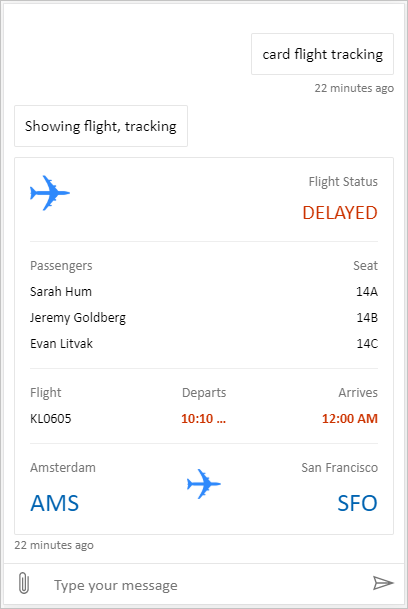
स्थान और फ़ाइल अपलोडिंग एक कस्टम कैनवास है जो उपयोगकर्ता का स्थान प्राप्त करने और उसे Copilot Studio एजेंट को भेजने में सक्षम है. उदाहरण के लिए:
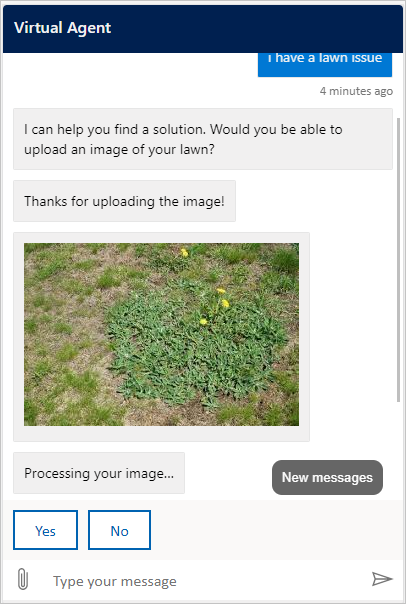
वैकल्पिक रूप से, बॉट फ्रेमवर्क से कुछ अन्य नमूना वेब चैट कैनवस आज़माएं ।
डिफ़ॉल्ट कैनवास की तरह, आप कस्टम कैनवास को ट्विक करने के लिए उपयोग कर styleSetOptions सकते हैं। अनुकूलन योग्य सभी गुण defaultStyleOptions.jsमें सूचीबद्ध हैं. आप क्या अनुकूलित कर सकते हैं, इस बारे में अधिक जानकारी के लिए, वेब चैट अनुकूलन देखें.
अपने अनुकूलित कैनवास को परिनियोजित करें
अपने कस्टम कैनवास को होस्ट करने के लिए, सभी फ़ाइलों को एक वेब ऐप में परिनियोजित करें।