หมายเหตุ
การเข้าถึงหน้านี้ต้องได้รับการอนุญาต คุณสามารถลอง ลงชื่อเข้าใช้หรือเปลี่ยนไดเรกทอรีได้
การเข้าถึงหน้านี้ต้องได้รับการอนุญาต คุณสามารถลองเปลี่ยนไดเรกทอรีได้
[บทความนี้เป็นเอกสารก่อนการนำออกใช้ และอาจเปลี่ยนแปลงได้]
ใช้ Azure Application Insights เพื่อตรวจสอบการติดตามตัวแทน Copilot Studio ที่ส่งออกจากสภาพแวดล้อมที่มีการจัดการ หลังจากที่คุณกําหนดค่าการส่งออกแล้ว ให้ใช้ Azure Monitor และ Application Insights เพื่อตรวจสอบการทํางานของเอเจนต์ ตรวจสอบการทํางานของโหนดและเครื่องมือ สร้างการแจ้งเตือน และสร้างคําสั่งค้นหาและแดชบอร์ดแบบกําหนดเองสําหรับการวิเคราะห์การดําเนินงาน
Note
- มีเทเลเมทรีในระดับสภาพแวดล้อมให้ใช้งานสำหรับเอเจนต์ที่ทำงานด้วยทั้งฮาร์เนสมาตรฐานและฮาร์เนส GitHub Copilot
- หลังจากการแสดงตัวอย่างส่วนตัว การเรียกใช้ตัวแทนราก (
invoke_agent) จะถูกปล่อยออกมาเป็นdependencies, แทนที่จะเป็นrequests. ดังนั้น ร่องรอยการเรียกรากเอเจนต์รุ่นเก่าอาจยังคงปรากฏในrequestsตาราง - เพื่อประเมินฟีเจอร์ตัวอย่างนี้โดยใช้กลยุทธ์และความสามารถเทเลเมทรีล่าสุด คุณสามารถทดสอบในสภาพแวดล้อมที่ไม่ใช่การผลิตจริงโดยเปิดใช้งานรอบการปล่อยล่วงหน้า
- ฟีเจอร์นี้มีให้เฉพาะ ในสภาพแวดล้อมที่มีการจัดการเท่านั้น
- มีเพียงบันทึกสําหรับเอเจนต์ที่สร้างใน Copilot Studio ยกเว้นเอเจนต์แบบประกาศเท่านั้น ที่จะมีใน Application Insights
- หากต้องการใช้กลยุทธ์ Application Insights ระดับสภาพแวดล้อมสําหรับเทเลเมทรีตัวแทน Copilot Studio องค์กรสามารถเลือกปิดการเทเลเมทรี Application Insights ระดับเอเจนต์ได้
บทความนี้อธิบายวิธีการกําหนดค่าการส่งออก Copilot Studio agent traces ไปยัง Azure Application Insights ในระดับสภาพแวดล้อมผ่านศูนย์ผู้ดูแลระบบ Power Platform
สำคัญ
บทความนี้มีเอกสารรุ่นพรีวิว Microsoft Copilot Studio และอาจจะมีการเปลี่ยนแปลงในอนาคต
คุณลักษณะพรีวิวไม่ได้มีไว้สำหรับการนำไปใช้งานจริงและอาจมีฟังก์ชันการทำงานที่จำกัด คุณลักษณะเหล่านี้สามารถใช้ได้ก่อนการเปิดตัวอย่างเป็นทางการเพื่อให้คุณสามารถเข้าใช้งานได้ก่อนเวลาและให้ข้อคิดเห็น
หากคุณกำลังสร้างเอเจนต์ที่พร้อมสำหรับการใช้งานจริง โปรดดู ภาพรวมของ Microsoft Copilot Studio
Prerequisites
ก่อนที่คุณจะตั้งค่าการเชื่อมต่อส่งออกข้อมูล ให้ทําข้อกําหนดเบื้องต้นสําหรับการส่งออกข้อมูลไปยัง Application Insights
สิ่งที่ถูกส่งออก
เมื่อคุณเปิดใช้งานการส่งออก เทเลเมตรีการติดตามตัวแทนของ Copilot Studio จะถูกเขียนไปยัง Application Insights ในรูปแบบการสังเกตที่สอดคล้องกับ OpenTelemetry ซึ่งรองรับการสืบสวน แดชบอร์ด และการแจ้งเตือน
เหตุการณ์ของเอเจนต์ Copilot Studio จะถูกเขียนลงในdependenciesตารางเป็นช่วง แต่ละเหตุการณ์ที่ส่งออก (, , และ ) เป็นแถว span เดียว (InvokeAgentExecuteToolOutputMessages)itemType = dependency
สแปนเกิดเป็นเทรซได้อย่างไร
เทเลเมตรีนี้ใช้โมเดล trace-and-span ของ OpenTelemetry ซึ่งสร้างใหม่ผ่าน operation_Id คอลัมน์และ operation_ParentId :
- แต่ละเทิร์นของตัวแทนเป็น เทรซของตัวเอง ซึ่งระบุด้วยการใช้ร่วมกัน
operation_Idซึ่งช่วยให้ Application Insights สามารถจัดกลุ่มเทิร์นและแสดงผลในมุมมองธุรกรรมแบบ end-to-end -
InvokeAgentสแปนนี้เป็นรากของเทรซของเทิร์นนั้น spanExecuteToolของมันและ spanOutputMessagesที่เชื่อมต่ออยู่จะซ้อนอยู่ด้านล่าง โดยแต่ละ span มีoperation_ParentId= ค่าInvokeAgentของ spanid - บทสนทนาหนึ่งครอบคลุม หลายเทิร์น โดยแต่ละเทิร์นจะถูกส่งออกเป็นเทรซแยกกัน จัดกลุ่มหรือกรองตามลําดับ
gen_ai.conversation.idเพื่อเชื่อมโยงการสนทนาในบทสนทนาเดียวกันกลับเข้าด้วยกัน -
OutputMessagesspan ไม่ได้สร้างInvokeAgentroot เสมอไป ซึ่งหมายความว่า span เหล่านั้นอาจมาถึงโดยไม่มี parent ที่สอดคล้องกัน และแสดงเป็นเทรซแบบเดี่ยวที่มีเพียงโหนดเดียวได้โดยการออกแบบ
สร้างแพคเกจการส่งออก
สร้างแพ็กเกจส่งออกโดยตั้งค่าประเภทการส่งออกเป็น Copilot Studio โดยทําตามคําแนะนําในหัวข้อ สร้างแพ็กเกจส่งออกของเอกสารศูนย์ผู้ดูแลระบบ Power Platform
ตรวจสอบการกําหนดค่า
หลังจากบันทึกการกําหนดค่าการส่งออกแล้ว ให้รันการสนทนาทดสอบกับเอเจนต์และยืนยันว่าเทเลเมทรีมาถึงใน Application Insights การส่งข้อมูลเทเลเมทรีอาจใช้เวลานานถึง 24 ชั่วโมงสําหรับการตั้งค่าใหม่ ตรวจสอบความถูกต้องของ:
- ช่วงของเอเจนต์ปรากฏอยู่ในตาราง
dependencies - ช่วง
InvokeAgent,ExecuteToolและOutputMessagesของแต่ละรอบ ใช้operation_Idร่วมกัน
ฟิลด์ข้อมูลเชิงลึกเกี่ยวกับแอปพลิเคชัน
ตารางต่อไปนี้แสดงฟิลด์ในตาราง dependencies และระบุว่าฟิลด์ใดมีการกรอกข้อมูลสำหรับเหตุการณ์ของเอเจนต์ที่ส่งออกทั้งสามรายการ ได้แก่ InvokeAgent, ExecuteTool และ OutputMessages. ความหมายของตัวแทนและการดําเนินการอยู่ใน customDimensions ( gen_ai.* คีย์ เช่น gen_ai.operation.name) ไม่ใช่ในคอลัมน์เนทีฟ
ฟิลด์ใน dependencies ตาราง |
InvokeAgent | ExecuteTool | OutputMessages | ค่าตัวอย่าง |
|---|---|---|---|---|
timestamp [UTC] |
✔️ | ✔️ | ✔️ | 6/11/2026, 5:02:13.501 AM |
id |
✔️ | ✔️ | ✔️ | 1111aaa1-aa11-11aa-11a1-a1aaa1111aa1 |
name |
✔️ | ✔️ | ✔️ | InvokeAgent / ExecuteTool / OutputMessages |
resultCode |
✔️ | ✔️ | ✔️ |
OK, ERROR |
type |
✔️ | ✔️ | ✔️ | GenAI |
target |
✔️ | ✔️ | ✔️ | GenAI |
data |
✔️ | ✔️ | ✔️ | invoke_agent / execute_tool / output_messages |
success |
✔️ | ✔️ | ✔️ | True |
duration |
✔️ | ✔️ | ✔️ | 0 |
performanceBucket |
✔️ | ✔️ | ✔️ | <250ms |
itemType |
✔️ | ✔️ | ✔️ | dependency |
customDimensions |
✔️ | ✔️ | ✔️ | ดูข้อมูลเพิ่มเติมใน คุณสมบัติ customDimension |
operation_Id |
✔️ | ✔️ | ✔️ |
trace-1111aaa1-aa11-11aa-11a1-a1aaa1111aa1 (ใช้ร่วมกันโดยทุกช่วงในรอบการหมุน) |
operation_ParentId |
✔️ | ✔️ | ✔️ | การหมุนInvokeAgentidสําหรับช่วงลูก; รากเทรซสําหรับช่วงนั้นInvokeAgent |
client_Type |
✔️ | ✔️ | ✔️ | PC |
client_IP |
✔️ | ✔️ | ✔️ | 0.0.0.0 |
client_City |
✔️ | ✔️ | ✔️ | San Jose |
client_StateOrProvince |
✔️ | ✔️ | ✔️ | California |
client_CountryOrRegion |
✔️ | ✔️ | ✔️ | United States |
appId |
✔️ | ✔️ | ✔️ | 11111a1a-1111-1111-a111-1a1a1a11111a |
appName |
✔️ | ✔️ | ✔️ | - |
iKey |
✔️ | ✔️ | ✔️ | aa111a1a-a1aa-111a-111a-a111a111111a |
sdkVersion |
✔️ | ✔️ | ✔️ | dotnetc:2.23.0-29 |
itemId |
✔️ | ✔️ | ✔️ | a1a1111a-1111-11a1-1111-111111aa1a1a |
itemCount |
✔️ | ✔️ | ✔️ | 1 |
_ResourceId |
✔️ | ✔️ | ✔️ | - |
คุณสมบัติ customDimensions
ทุกช่วงจะมี JSON อยู่ด้วยcustomDimensions ตารางต่อไปนี้แสดงคีย์ทั่วไปที่ปรากฏในทุกช่วง:
| กุญแจ | ค่าตัวอย่าง |
|---|---|
SpanId |
1111aaa1-aa11-11aa-11a1-a1aaa1111aa1 |
error.type |
404 |
Status.code |
1, 2 |
Status.message |
Descriptive failure message |
gen_ai.agent.id |
1aa11a11-1a1a-1a11-1a1a-1111aa1111aa |
gen_ai.agent.name |
MCS Agent |
gen_ai.conversation.id |
aaaaa111-1a1a-1111-1aa1-a111111a11a1 |
gen_ai.request.model |
Sonnet46 |
gen_ai.operation.name |
invoke_agent / execute_tool / output_messages |
env.id |
111a1aa1-a1aa-aaa1-a11a-11a111111111 |
microsoft.tenant.id |
11aaa111-1a11-1a1a-a111-aa1a111a111a |
microsoft.a365.agent.blueprint.id |
1111111a-aa11-1a11-a1a1-a11a1111a1a1 |
microsoft.a365.agent.platform.id |
111a1aa1-…_1a11111a-… |
microsoft.channel.name |
Copilot Studio Test Pane |
resource.provider |
copilot studio |
signal.category |
default |
a365.enabled |
True |
appinsights.enabled |
True |
user.id |
- |
user.email |
My.User@mytenant.onmicrosoft.com |
user.name |
My User |
client.address |
::ffff:00.00.00.00 |
telemetry.sdk.name |
A365ObservabilitySDK |
telemetry.sdk.language |
dotnet |
telemetry.sdk.version |
1.1.9.43597 |
คีย์เฉพาะเหตุการณ์
ตารางต่อไปนี้แสดงคีย์เฉพาะเหตุการณ์:
| กุญแจ | InvokeAgent | ExecuteTool | OutputMessages | คำอธิบาย |
|---|---|---|---|---|
gen_ai.input.messages |
✔️ | - | - | อาร์เรย์ JSON ของ {role, parts:[{content, type}]}—พรอมต์ผู้ใช้ |
gen_ai.output.messages |
- | - | ✔️ | JSON array—คําตอบของตัวแทน |
gen_ai.tool.name |
- | ✔️ | - | ตัวอย่างเช่น workiqsharepoint:mcp_SharePointRemoteServer |
gen_ai.tool.type |
- | ✔️ | - | ตัวอย่างเช่น MCP - Power Platform Connector |
gen_ai.tool.call.id |
- | ✔️ | - | ตัวระบุการเรียกใช้เครื่องมือ |
gen_ai.tool.call.arguments |
- | ✔️ | - | ส่ง JSON payload ไปยังเครื่องมือ |
gen_ai.tool.call.result |
- | ✔️ | - | เพย์โหลด JSON ที่ส่งกลับโดยเครื่องมือ |
ค้นพบสคีมาปัจจุบัน
สคีมาที่บันทึกไว้ในบทความนี้อาจเปลี่ยนแปลงไปตามกาลเวลา แทนที่จะพึ่งพาตารางที่กล่าวถึงก่อนหน้านี้เพียงอย่างเดียว ให้ใช้คําสั่งค้นหาต่อไปนี้เพื่อตรวจสอบสคีมาล่าสุดที่ใช้งานจริงในสภาพแวดล้อมของคุณเอง
แสดงคอลัมน์ตารางเนทีฟ
คําสั่งค้นหาต่อไปนี้จะคืนค่าสคีมาระดับคอลัมน์ของ dependencies ตาราง ใช้เพื่อยืนยันคอลัมน์เนทีฟที่มีอยู่เมื่อสร้างคําค้นหา แดชบอร์ด หรือการแจ้งเตือน
dependencies
| getschema
| project ColumnName, ColumnType
| order by ColumnName asc
ค้นพบคีย์ customDimensions (คุณสมบัติไดนามิก)
คําสั่งต่อไปนี้จะแสดงคีย์ทุกตัวภายใน customDimensions JSON ใน dependencies ตาราง: ชื่อคุณสมบัติ, เหตุการณ์เอเจนต์ที่ปรากฏบน (InvokeAgent, ExecuteTool, OutputMessages), และค่าตัวอย่าง แตกต่างจากสคีมาคอลัมน์เนทีฟ คุณสมบัติเหล่านี้เป็นแบบไดนามิก ดังนั้นการค้นหานี้จึงยังคงแม่นยําเมื่อ SDK เพิ่มคีย์ใหม่ gen_ai.* หรือคีย์อื่น ๆ ใช้มันเป็นแหล่งข้อมูลจริงสําหรับแอตทริบิวต์ที่มีอยู่
dependencies
| where timestamp > ago(7d)
| mv-expand Key = bag_keys(customDimensions) to typeof(string)
| summarize Events = make_set(name), SampleValue = take_any(tostring(customDimensions[Key])) by Key
| order by Key asc
ตรวจสอบเทเลเมทรีที่ส่งออก
ใช้ Application Insights Logs เพื่อสอบถามกิจกรรมของเอเจนต์และตรวจสอบการทํางานของเอเจนต์หรือเครื่องมือ เทเลเมทรีที่ส่งออกทั้งหมดจะปรากฏใน dependencies ตารางเป็นช่วง:
- แต่ละเทิร์นของเอเจนต์ถือเป็นเทรซ และถูกจัดกลุ่มด้วย
operation_Idที่ใช้ร่วมกัน -
InvokeAgentช่วงคือรากเทรซ;ExecuteToolและOutputMessagesช่วงซ้อนซ้อนกันอยู่ใต้มันผ่านoperation_ParentId. - จัดกลุ่มตาม
gen_ai.conversation.idเพื่อรวมหลายเทิร์นของการสนทนาเดียวกันไว้ในเธรดเดียว และแยก ID นั้นด้วย_เพื่อรวมร่องรอยของซับเอเจนต์
ใบมีดเอเจนต์ (พรีวิว)
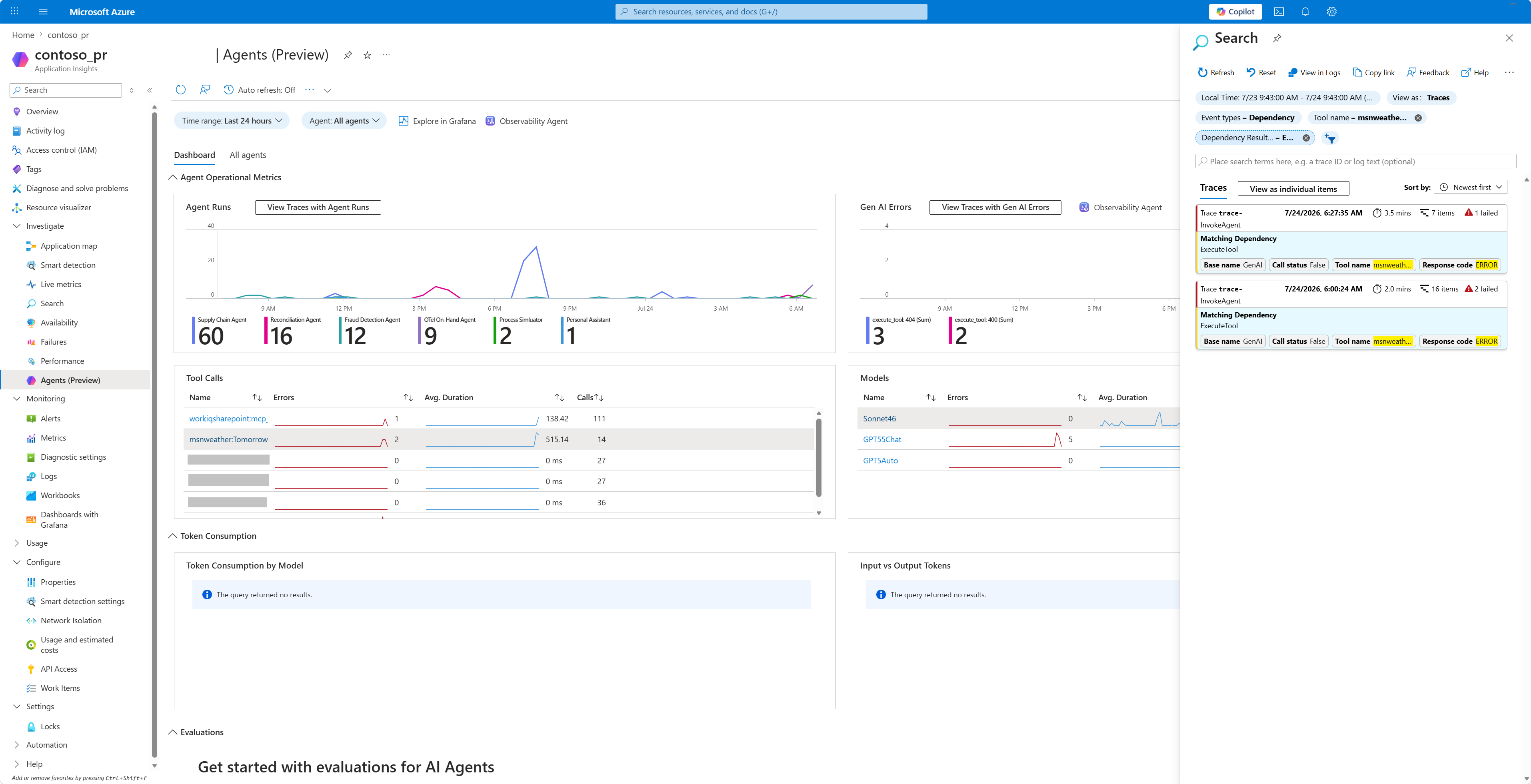
นอกจาก Logs แล้ว Application Insights ยังมีมุมมอง Agents (พรีวิว) ในตัวที่แสดงข้อมูลเทเลเมทรี GenAI ที่ส่งออกโดยไม่ต้องเขียนคําสั่ง Kusto ขณะที่ Copilot Studio เขียนช่วงของมันลงบนdependenciesตาราง ใบมีดเหล่านี้จะอ่านข้อมูลโดยตรงจากข้อมูลนั้น:
-
การรันของ Agent: แสดงรายการการเรียกใช้ agent ที่สร้างจาก
InvokeAgentspans พร้อมระยะเวลา ความสำเร็จ และการสนทนาที่การรันแต่ละครั้งอยู่ใน มีข้อจํากัดบางประการ; เรียนรู้เพิ่มเติมในส่วน ข้อจํากัดและข้อควรพิจารณาที่ทราบ -
เครื่องมือ: รวบรวม
ExecuteToolช่วงต่าง ๆ เพื่อแสดงว่าเอเจนต์เรียกใช้เครื่องมือใด, ความถี่ และประสิทธิภาพของพวกเขาเป็นอย่างไร - โมเดล: สรุปการใช้งานโมเดลในแต่ละรัน โดยแสดงโมเดลที่ถูกเรียกใช้และรูปแบบการเรียกใช้งาน
วิเคราะห์เทเลเมทรีของตัวแทนด้วย Application Insights
หลังจากที่คุณเชื่อมต่อสภาพแวดล้อมของคุณกับ Application Insights ระบบจะบันทึกข้อมูลเทเลเมทรีของเอเจนต์เมื่อผู้ใช้โต้ตอบกับเอเจนต์ รวมถึงในระหว่างการทดสอบภายใน Copilot Studio หากต้องการดูข้อมูลเทเลเมตรีที่บันทึกไว้ ให้ไปที่ส่วนบันทึกในทรัพยากร Application Insights ของคุณใน Azure ที่นี่ คุณสามารถใช้ คําสั่ง Kusto query เพื่อค้นหาและวิเคราะห์ข้อมูลของคุณ เรียนรู้เพิ่มเติมในตัวอย่างคําค้น
การสอบถามตัวอย่าง
ตัวอย่างคําสั่ง Kusto ต่อไปนี้สร้างบทสนทนาของตัวแทน Copilot Studio จากdependenciesตารางใน Application Insights เนื่องจากทุกสแปนมีเทรซ operation_Id ร่วมกันในแต่ละเทิร์น คิวรีจึงจัดลำดับสแปนโดยให้สแปนรากมาก่อน (คือสแปน InvokeAgent มาก่อนสแปนลูกของมัน) ภายในแต่ละเทรซ
คําค้นหา 1: ส่งคืนการติดตามเต็มรูปแบบสําหรับ ID การสนทนาเฉพาะ
คิวรีนี้จะส่งกลับทุก span สำหรับการสนทนาที่ทราบอยู่แล้วรายการหนึ่ง โดยเรียงตามลำดับเวลา และแสดง root span แต่ละรายการก่อน child span ของมัน แทนที่ตัวยึดตำแหน่ง Conversation ID ด้วยรหัสการสนทนาของเอเจนต์ของคุณ คุณสามารถค้นหาได้โดยป้อนคําสั่งต่อไปนี้ขณะทดสอบเอเจนต์แบบกําหนดเองของคุณ: /debug conversationid
let LatestConvo = "<Conversation ID>";
dependencies
| where tostring(customDimensions["gen_ai.conversation.id"]) == LatestConvo
| order by operation_Id asc, iff(name == "InvokeAgent", 0, 1) asc, timestamp asc
| project timestamp, name, id, operation_Id,
          operation_ParentId, duration, target, type, cloud_RoleName,
          resultCode, customDimensions
คําค้นหา 2: ส่งคืนการสนทนาล่าสุดสําหรับเอเจนต์เฉพาะ
คําค้นหานี้จะค้นหาการสนทนาล่าสุดสําหรับเอเจนต์ที่ระบุภายในช่วงเวลาที่กําหนด มันคืนค่าทุกช่วงของบทสนทนานั้นในลําดับเวลาเดียวกัน โดยเริ่มจากรากก่อน แทนที่ชื่อ ตัวแทน ด้วยชื่อตัวแทนของคุณ
let Window = 7d;
let AgentName = "<Agent name>";
let LatestConvo = toscalar(
    dependencies
    | where timestamp > ago(Window)
    | where tostring(customDimensions["gen_ai.agent.name"]) == AgentName
    | where isnotempty(tostring(customDimensions["gen_ai.conversation.id"]))
    | top 1 by timestamp desc
    | project tostring(customDimensions["gen_ai.conversation.id"])
);
dependencies
| where timestamp > ago(Window)
| where tostring(customDimensions["gen_ai.conversation.id"]) == LatestConvo
| order by operation_Id asc, iff(name == "InvokeAgent", 0, 1) asc, timestamp asc
| project timestamp, name, id, operation_Id,
          operation_ParentId, duration, target, type, cloud_RoleName,
          resultCode, customDimensions
คิวรี 3: แยกคุณสมบัติ genAI OpenTelemetry ที่รู้จักกันออกเป็นคอลัมน์
คําสั่งนี้คืนค่าการติดตามเดียวกับคําสั่งที่ 2 แต่จะแยกวิเคราะห์คีย์ semantic-convention ของ OpenTelemetry ที่รู้จักแต่ละอันให้เป็นคอลัมน์ที่มีชื่อของตัวเอง ผลลัพธ์คือตารางที่เรียบและกําหนดไว้อย่างชัดเจน ซึ่งคุณสามารถจัดเรียง กรอง และสแกนฟิลด์ AI เชิงสร้างสรรค์ เช่น ชื่อเครื่องมือ โมเดล พรอมต์ผู้ใช้ การตอบกลับของตัวแทน และรหัสการสนทนาได้โดยตรง แทนที่ชื่อ ตัวแทน ด้วยชื่อตัวแทนของคุณ
let Window = 7d;
let AgentName = "<Agent name>";
let LatestConvo =
    toscalar(
        dependencies
        | where timestamp > ago(Window)
        | extend
            AgentName_ = tostring(customDimensions["gen_ai.agent.name"]),
            ConversationId_ = tostring(customDimensions["gen_ai.conversation.id"])
        | where AgentName_ == AgentName
        | where isnotempty(ConversationId_)
        | summarize arg_max(timestamp, ConversationId_)
        | project ConversationId_
    );
dependencies
| where timestamp > ago(Window)
| extend
    ConversationId = tostring(customDimensions["gen_ai.conversation.id"])
| where ConversationId == LatestConvo
| extend
    OperationName    = tostring(customDimensions["gen_ai.operation.name"]),
    AgentId          = tostring(customDimensions["gen_ai.agent.id"]),
    AgentName        = tostring(customDimensions["gen_ai.agent.name"]),
    Model            = tostring(customDimensions["gen_ai.request.model"]),
    ToolName         = tostring(customDimensions["gen_ai.tool.name"]),
    ToolType         = tostring(customDimensions["gen_ai.tool.type"]),
    ToolCallId       = tostring(customDimensions["gen_ai.tool.call.id"]),
    ToolArguments    = tostring(customDimensions["gen_ai.tool.call.arguments"]),
    ToolResult       = tostring(customDimensions["gen_ai.tool.call.result"]),
    EnvironmentId    = tostring(customDimensions["env.id"]),
    TenantId         = tostring(customDimensions["microsoft.tenant.id"]),
    ChannelName      = tostring(customDimensions["microsoft.channel.name"]),
    BlueprintId      = tostring(customDimensions["microsoft.a365.agent.blueprint.id"]),
    PlatformId       = tostring(customDimensions["microsoft.a365.agent.platform.id"]),
    ResourceProvider = tostring(customDimensions["resource.provider"]),
    SignalCategory   = tostring(customDimensions["signal.category"]),
    UserId           = tostring(customDimensions["user.id"]),
    UserName         = tostring(customDimensions["user.name"]),
    UserEmail        = tostring(customDimensions["user.email"])
| extend
    InputMessages  = parse_json(tostring(customDimensions["gen_ai.input.messages"])),
    OutputMessages = parse_json(tostring(customDimensions["gen_ai.output.messages"]))
| extend
    UserInput   = tostring(InputMessages[0].parts[0].content),
    AgentOutput = tostring(OutputMessages[0].parts[0].content)
| order by
    operation_Id asc,
    iff(name == "InvokeAgent", 0, 1) asc,
    timestamp asc
| project
    timestamp, name, id, operation_Id, operation_ParentId, OperationName, ConversationId,
    AgentId, AgentName, Model, ToolName, ToolType, ToolCallId, ToolArguments, ToolResult,
    UserInput, AgentOutput, EnvironmentId, TenantId, ChannelName, BlueprintId, PlatformId,
    ResourceProvider, SignalCategory, UserId, UserName, UserEmail, duration, target, type,
    cloud_RoleName, resultCode, customDimensions
คําค้นหา 4: ขยายคุณสมบัติ genAI OpenTelemetry ทั้งหมดแบบไดนามิก
คิวรีนี้ส่งคืนสแปนเดียวกันกับคิวรี 3 แต่gen_ai.*คีย์แต่ละตัวจะถูกแยกแบบไดนามิกออกจากcustomDimensionsไปเป็นคอลัมน์ของตัวเองที่มีคำนำหน้าga_ เนื่องจากการฉายภาพเป็นแบบไดนามิก แอตทริบิวต์ใหม่ gen_ai.* ใด ๆ ที่ SDK ปล่อยออกมาในภายหลังจะปรากฏโดยอัตโนมัติโดยไม่เปลี่ยนแปลงคําสั่งค้นหา แทนที่ชื่อ ตัวแทน ด้วยชื่อตัวแทนของคุณ
let Window = 7d;
let AgentName = "<Agent name>";
let LatestConvo = toscalar(
    dependencies
    | where timestamp > ago(Window)
    | where tostring(customDimensions["gen_ai.agent.name"]) == AgentName
    | where isnotempty(tostring(customDimensions["gen_ai.conversation.id"]))
    | top 1 by timestamp desc
    | project tostring(customDimensions["gen_ai.conversation.id"])
);
dependencies
| where timestamp > ago(Window)
| where tostring(customDimensions["gen_ai.conversation.id"]) == LatestConvo
| order by operation_Id asc, iff(name == "InvokeAgent", 0, 1) asc, timestamp asc
| mv-apply Key = bag_keys(customDimensions) on (
    where Key startswith "gen_ai."
    | summarize OTelGenAI = make_bag(bag_pack(tostring(Key), customDimensions[tostring(Key)]))
  )
| project timestamp, name, id, operation_Id, operation_ParentId,
          duration, target, type, cloud_RoleName, resultCode,
          OTelGenAI, customDimensions
| evaluate bag_unpack(OTelGenAI, 'ga_')
ข้อจํากัดและข้อควรพิจารณาที่ทราบ
- ฟีเจอร์นี้ไม่รองรับสถานการณ์ การกําหนดค่าเอเจนต์ แบบไม่ผ่านการตรวจสอบสิทธิ์หรือแบบหลายผู้เช่า ดังนั้น Application Insights จึงไม่บันทึกข้อมูลเหล่านั้น
- ฟีเจอร์นี้มีให้ใช้งานเฉพาะในสภาพแวดล้อมคลาวด์สาธารณะของ Microsoft เท่านั้น
- ในบางกรณีของเอเจนต์ที่เชื่อมต่อกัน ความสัมพันธ์แบบพ่อแม่-ลูกระหว่างเทรซไม่ได้รับการจับคู่อย่างถูกต้อง
- ค่านี้
durationไม่สามารถใช้ได้กับร่องรอยของสารที่ขับเคลื่อนด้วยฮาร์เนสมาตรฐาน - ตรวจสอบให้แน่ใจว่าได้เปิดใช้งานคุณสมบัติ การตรวจสอบสิทธิ์ในเครื่อง ในแหล่งข้อมูล Application Insights เป้าหมาย
- การส่งออกเทเลเมทรีไม่ใช่ธุรกรรม ในช่วงเหตุการณ์บริการชั่วคราว อาจเกิดการสูญเสียข้อมูลเล็กน้อย
- ความไม่สอดคล้องของข้อมูลอาจเกิดขึ้นเมื่อมีการอัปเดตการนําเข้าที่เกี่ยวข้องกับสคีมา
- ฟีเจอร์นี้ไม่จับเหตุการณ์ที่เกี่ยวข้องกับหัวข้อ เช่น
TopicStart,TopicAction, และTopicEnd - ปัจจุบัน Trace ID และ span ID ใช้รูปแบบการแสดงผลแบบอิง GUID แทนที่จะใช้รูปแบบเลขฐานสิบหกตามมาตรฐาน OpenTelemetry สำหรับ Trace ID แบบ 32 อักขระ และ span ID แบบ 16 อักขระ
- เพื่อให้ง่ายต่อการรายงานและแก้ไขปัญหา หลีกเลี่ยงการส่งทั้งเทเลเมตรีระดับเอเจนต์และระดับสภาพแวดล้อมไปยังอินสแตนซ์ Application Insights เดียวกัน
- เทเลเมทรีอาจแตกต่างกันระหว่างเอเจนต์ที่ใช้ฮาร์เนส GitHub Copilot และเอเจนต์ที่ขับเคลื่อนด้วยฮาร์เนสมาตรฐาน
- ตรวจสอบให้แน่ใจว่าการกําหนดค่า Application Insights ในระดับสภาพแวดล้อมของคุณตรงตามข้อกําหนดการจัดเก็บข้อมูล ความเป็นส่วนตัว และการควบคุมการเข้าถึงตามบทบาท (RBAC) ของคุณ
- เนื้อหาบันทึกขนาดใหญ่ รวมถึงการตอบสนองของตัวแทนและอาร์กิวเมนต์เครื่องมือ อาจถูกตัดทอนได้