Note
Access to this page requires authorization. You can try signing in or changing directories.
Access to this page requires authorization. You can try changing directories.
A flat network is the simplest Azure network topology: one virtual network with multiple subnets hosting a single workload. This article explains when to use this pattern and how to implement it.
What this article covers
This article describes the simplest Azure network topology: a single virtual network with multiple subnets that hosts one workload. Use this pattern when you have a single application managed by one team and you don't need shared services like a central firewall or VPN gateway.
Who needs this article
Read this article if:
- You're deploying your first workload in Azure.
- A single team owns and operates all resources.
- You don't need shared network services (firewall, Bastion, gateway) across multiple workloads.
- You want the simplest network that still provides subnet-level isolation and security.
Lift-and-shift focus: A single flat VNet with a subnet per component is often the right first step for rehosting one workload in one region.
Modernize focus: Use a flat network for an early PaaS pilot or a single modernized workload, and design its subnets so it can graduate cleanly to hub-and-spoke when you add shared services or a second region.
Cross-cloud focus: Use a flat VNet as a single Azure foothold during cross-cloud migration: land the workload first, then plan its address space and segmentation so it can join a hub or Virtual WAN as the design matures.
Azure services and features
The flat network topology uses these core Azure services:
| Service | Role in this topology |
|---|---|
| Azure Virtual Network | Provides a private, isolated address space for your workload. A virtual network is scoped to a single Azure region. |
| Subnets + Network Security Groups (NSGs) | Subnets separate application tiers. NSGs filter inbound and outbound traffic at each subnet boundary. NSGs are stateful: return traffic for allowed connections is automatically permitted. |
| Azure Private DNS Zone | Provides internal name resolution for resources within the virtual network. Link the zone with autoregistration enabled so VMs automatically get DNS records. |
| Gateway subnet (optional) | Hosts a VPN or ExpressRoute gateway if you need a single connection to an on-premises network. |
How to choose: stay flat or graduate to hub-spoke?
Use the following decision table to determine whether the flat topology is appropriate for your environment or whether you should adopt a hub-and-spoke topology instead.
| Condition | Recommendation |
|---|---|
| Single workload, single team, no shared services | Stay flat: this article applies |
| A second independent workload needs its own network isolation | Graduate to hub-and-spoke topology |
| You need a shared firewall, VPN gateway, or Azure Bastion across workloads | Graduate to hub-and-spoke topology |
| Security policies must be managed centrally across multiple workloads | Graduate to hub-and-spoke topology |
Tip
If you anticipate adding a second workload within six to 12 months, consider starting with hub-and-spoke from day one. The overhead is minimal because you add only one extra virtual network and a peering connection. This approach avoids a disruptive migration later.
Design considerations
Lift-and-shift flat network design focus
- Use one VNet with a subnet for each application component (web, app, data) to mirror a typical on-premises three-tier layout with minimal redesign.
- Apply NSGs between subnets to recreate your existing segmentation, and keep address space aligned with on-premises ranges to avoid overlap.
- Stay flat while a single team owns the workload and you don't need shared firewall, gateway, or Bastion services.
- Plan the move to hub-and-spoke before you add a second workload, so shared services land in a hub instead of being retrofitted.
Modernize flat network design focus
- Use a flat network for an early PaaS pilot or a single modernized workload: place the app tiers in subnets and reach Azure PaaS through private endpoints in a dedicated subnet.
- Reserve dedicated subnets up front for the platform services you'll add, such as Application Gateway and private endpoints, so the network grows without readdressing.
- Apply NSGs and application security groups by tier so your segmentation is already in place if the workload later becomes a spoke in a hub-and-spoke design.
- Keep address space non-overlapping with your other regions and VNets so you can peer or graduate to a hub later without renumbering.
Cross-cloud flat network design focus
- Use a flat VNet as a single Azure foothold during cross-cloud migration: land the workload first, then attach connectivity from a hub as the design matures.
- Plan the flat VNet's address space to avoid overlap with AWS VPCs and Google Cloud networks so it can join IPsec or interconnect routing later without translation.
- Keep tier segmentation with NSGs so the workload's security posture carries over when it becomes a spoke behind a secured Virtual WAN hub.
- Standardize subnet naming and tagging to match your other clouds so the workload stays easy to correlate during and after migration.
Prerequisites
Before you implement this topology:
- An Azure subscription with permissions to create virtual networks and NSGs.
- A planned IP address space. A /16 address space provides 65,536 addresses, which is a common starting point for a single workload. Azure reserves 5 addresses per subnet for internal use. For detailed guidance, see Plan IP addressing.
- An understanding of your application tiers (for example, web, application, and data) so you can map them to subnets. For subnet design guidance, see Design virtual networks and subnets.
Network layout
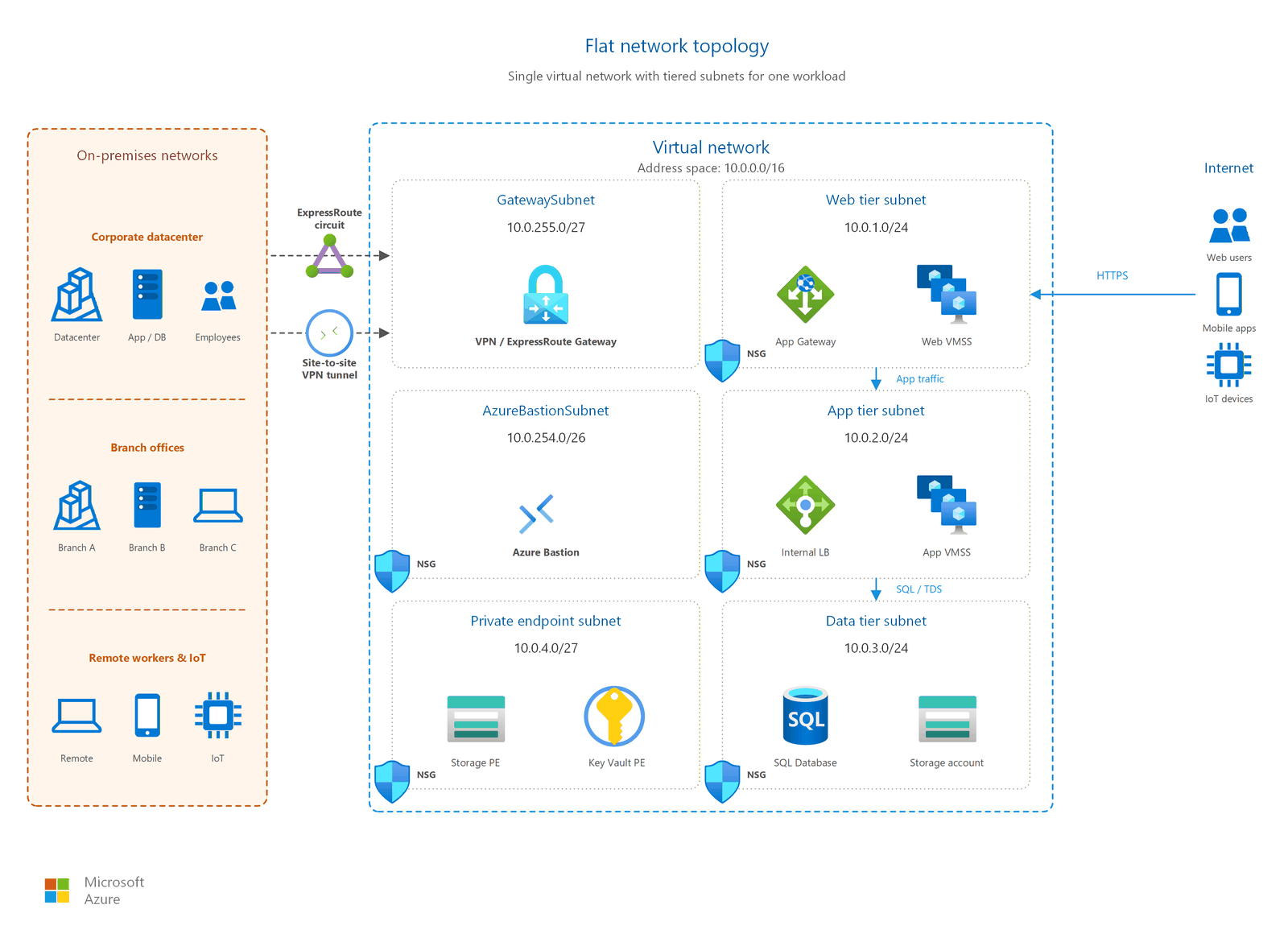
A flat network topology follows this structure:
- One virtual network with a single address space (for example, 10.0.0.0/16).
- Multiple subnets: one per application tier or component:
- Web tier subnet (for example, 10.0.1.0/24).
- Application tier subnet (for example, 10.0.2.0/24).
- Data tier subnet (for example, 10.0.3.0/24).
- Gateway subnet (optional, for example, 10.0.255.0/27).
- NSGs attached to each subnet with rules that allow only the traffic each tier needs.
- One Private DNS zone linked to the virtual network with autoregistration enabled.
Note
Plan your IP address ranges carefully. If you later migrate to a hub-and-spoke topology, the spoke virtual networks must have non-overlapping CIDR ranges with the hub. Choosing a well-structured address scheme now prevents conflicts during migration.
Security considerations
Apply these security practices to your flat network:
- NSGs on every subnet. Start with a deny-all-inbound baseline and add specific allow rules for legitimate traffic between tiers. For example, allow HTTPS from the web tier to the application tier, and allow SQL from the application tier to the data tier.
- No public IPs directly on VMs. Expose services through a load balancer or Application Gateway. Use Azure Bastion for administrative access.
- Private DNS for internal resolution. Private DNS zones prevent internal hostnames from exposure through public DNS queries.
- Gateway subnet isolation. If you add a VPN or ExpressRoute gateway, place it in a dedicated subnet (named
GatewaySubnet). NSGs on the gateway subnet aren't supported. Associating an NSG to this subnet might cause your virtual network gateway to stop functioning as expected.
Important
When you remove an NSG rule that allows a connection, existing active connections continue uninterrupted. Only new connections that match the removed rule are blocked.
Related articles
The following articles provide deeper guidance on related topics:
- Design virtual networks and subnets: subnet sizing and placement for your workload tiers
- Plan IP addressing: address space planning and CIDR selection
- Design network security groups: NSG rule design and application security groups
- Hub-and-spoke topology: the next topology to adopt when your network grows
- DDoS protection: if your workload exposes public endpoints
Learn more
For more information about the Azure services used in this topology, see:
- What is Azure Virtual Network?
- Network security groups overview
- What is Azure Private DNS?
- Virtual network planning
Next steps
Tip
Exploring on your own? Return to the overview navigator to find your next article by capability.
Next in your lift-and-shift journey:
Design your hub-and-spoke topology: Most lift-and-shift migrations outgrow a flat network quickly. Plan centralized shared services from the start.
Next in your modernization journey:
Design your hub-and-spoke topology: Modernized workloads with multiple services, security controls, and teams need hub-and-spoke from day one.
Next in your cross-cloud journey:
Plan your cross-cloud connectivity architecture: Cross-cloud estates need transit architecture, not flat networks. Design your multicloud connectivity model.