Note
Access to this page requires authorization. You can try signing in or changing directories.
Access to this page requires authorization. You can try changing directories.
This article explains how to control network traffic in Azure virtual networks by using network security groups (NSGs) for traffic filtering. It also covers application security groups (ASGs) for logical grouping of network interfaces.
What this article covers
Network security groups let you filter inbound and outbound traffic for resources in an Azure virtual network. Application security groups let you group network interfaces by role. Write NSG rules that reference logical groups instead of individual IP addresses.
Who needs this article
Read this article if you:
- Deploy any resource that connects to an Azure virtual network.
- Need to control the traffic that flows between subnets, virtual machines, or Azure services.
- Want to simplify rule management for environments where VMs scale frequently or IP addresses change.
- Are building a security baseline for a new Azure workload.
Lift-and-shift focus: Recreate your on-premises firewall and segmentation rules as NSGs between subnets, mirroring the tier-to-tier flows your applications already use.
Modernize focus: Use application security groups to express rules by workload role instead of IP address, and pair subnet NSGs with a hub firewall and user-defined routes that force inspected egress.
Cross-cloud focus: Mirror the security group rules from AWS and Google Cloud into Azure NSGs so traffic policy stays consistent as workloads move between clouds.
Azure services and features
The following table describes the services and features used for network traffic filtering in Azure virtual networks.
| Service or feature | What it provides | When to use it |
|---|---|---|
| Network security group (NSG) | A set of inbound and outbound security rules applied to a subnet or network interface. Rules are evaluated by priority: lowest number wins. | Control traffic at the subnet or individual VM level. Apply to every workload that uses a virtual network. |
| Application security group (ASG) | A logical grouping of network interfaces. Use ASGs as source or destination in NSG rules instead of IP addresses. | You have multiple VMs that serve the same role (web servers, app servers) and their IP addresses change with scaling. All grouped NICs must be in the same virtual network. |
| Service tags | Named groups of IP address prefixes for Azure services, managed and updated automatically by Microsoft. Examples: AzureCloud, Storage, AzureLoadBalancer, Sql. |
Reference Azure services in NSG rules without hardcoding IP ranges. Microsoft updates the underlying IP ranges automatically. You can't create custom service tags. |
Common service tags
The following table lists the most frequently used service tags in NSG rules.
| Service tag | Description |
|---|---|
Internet |
All public IP address space outside your virtual network. Matches any traffic originating from or destined to the public internet. |
VirtualNetwork |
Your virtual network address space, all connected address spaces (peered VNets), on-premises networks connected via VPN/ExpressRoute, and any service endpoints. Includes default routes. |
AzureLoadBalancer |
Azure infrastructure load balancer. Translates to the virtual IP of the host where Azure health probes originate. Used in inbound rules to allow health probe traffic. |
Storage |
Azure Storage service IP address space. Supports regional variants like Storage.WestUS2. Use to allow or restrict access to Azure Storage from within the VNet. |
AzureCloud |
All Azure datacenter public IP addresses. Supports regional variants like AzureCloud.EastUS. Useful for allowing outbound traffic to Azure services in general. |
Sql |
Azure SQL Database, Azure Database for MySQL, Azure Database for PostgreSQL, Azure Database for MariaDB, and Azure Synapse Analytics IP address prefixes. Supports regional variants. |
| Augmented security rules | Extended NSG rules that accept multiple IP addresses, IP ranges, and ports in a single rule. Reduce rule count when you need to allow or deny traffic for many IPs or port ranges. Supports multiple IPs and port ranges per rule, and up to 10 application security groups, but only one service tag per rule. |
How to choose
Use the following guidance to select the right security construct for your scenario.
NSG limits and quotas
Azure enforces the following default limits on NSG resources. To increase most limits, request an increase through Azure support.
| Resource | Default limit | Maximum limit |
|---|---|---|
| Rules per NSG | 2,000 | 2,000 |
| NSGs per subscription | 5,000 | 5,000 |
| NSGs per subnet | 1 | 1 |
| NSGs per NIC | 1 | 1 |
| ASGs per subscription | 3,000 | 3,000 |
| NICs per ASG | Varies by subscription | Contact support |
| ASGs referenced as source or destination per rule | 10 | 10 |
Note
The limit of 2,000 rules for each NSG includes both custom rules and default rules. If you approach this limit, use augmented security rules to combine multiple IPs or port ranges into fewer rules.
NSG versus ASG: when to use
Use the following table to determine the security construct that fits your scenario.
| Scenario | Use | Why |
|---|---|---|
| Control traffic for all VMs in a subnet | NSG at subnet level | One NSG applies to every resource in the subnet. Simplest to manage for uniform policies. |
| Control traffic for a specific VM independently of its subnet | NSG at NIC level | Allows exceptions without affecting other VMs. Useful for jump boxes or bastion hosts. |
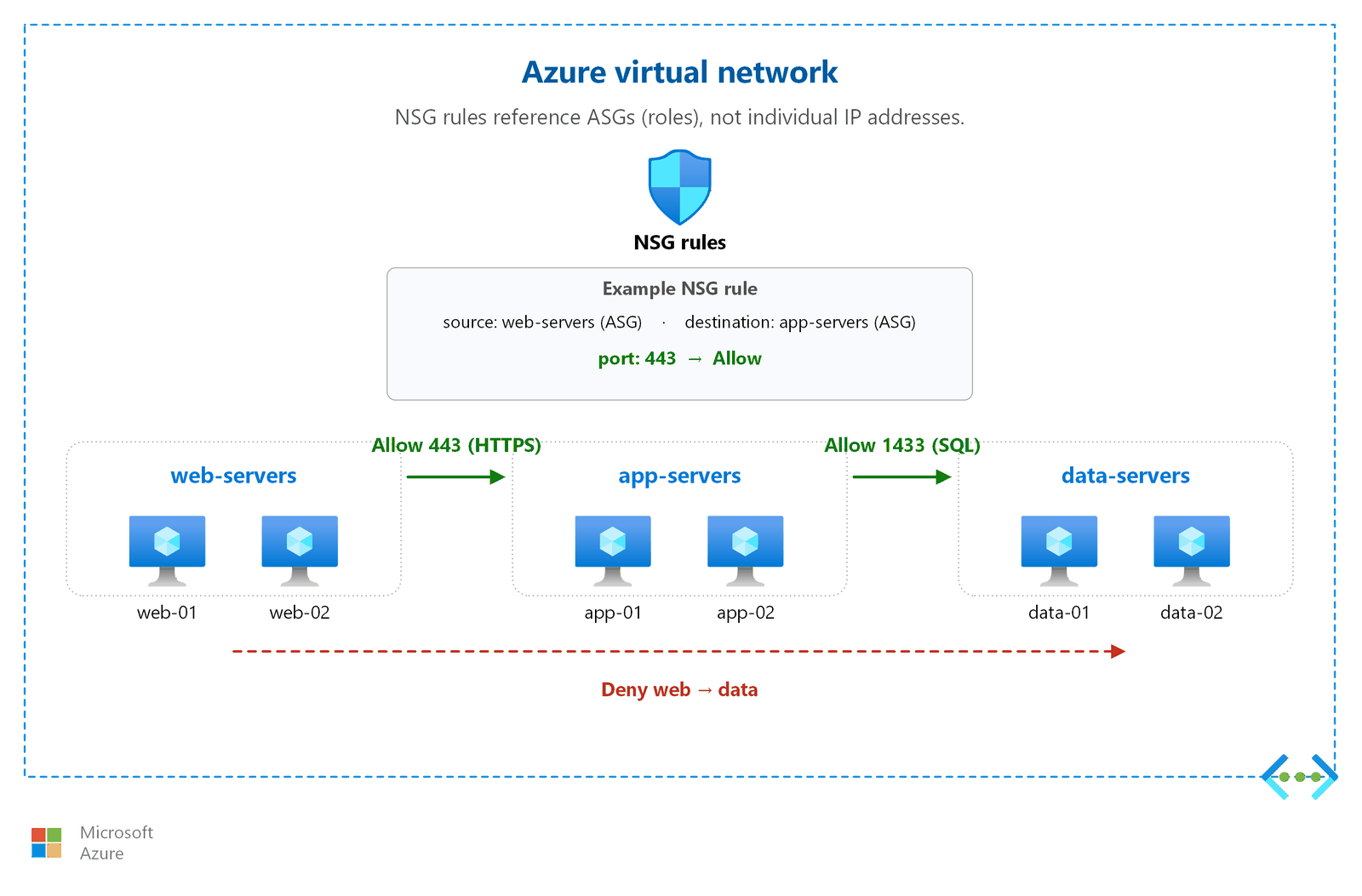
| Many VMs serve the same role and IP addresses change frequently | ASG | Add VMs to a group by role (web, app, data). Write rules against the group name. No updates needed when VMs scale or get new IPs. |
| Reference Azure services (Storage, SQL, Key Vault) as source or destination | NSG with service tags | Avoid hardcoding IP ranges that Microsoft might update. Service tags stay current automatically. |
The following diagram shows how ASGs let you group VMs by role and write NSG rules between logical groups instead of individual IP addresses.
Security posture checklist
Validate your NSG configuration against this checklist before deploying to production.
| Requirement | Action | Reference |
|---|---|---|
| Default-deny posture | Confirm that you rely on the default DenyAllInbound rule (priority 65500). Don't create broad allow-all rules that bypass default deny. |
Security considerations |
| No internet access on admin ports | Block inbound traffic from 0.0.0.0/0 on SSH (22) and RDP (3389). Use Azure Bastion or a VPN for administrative access. |
Security considerations |
| Combine with Azure Firewall for deep inspection | NSGs filter at layer 3/4 only. Add Azure Firewall for application-layer (layer 7) filtering, TLS inspection, and threat intelligence. | Azure Firewall and network segmentation |
| Enable flow logs for diagnostics | Use VNet flow logs to capture traffic data for security investigation and compliance. | Network monitoring and diagnostics |
Rule evaluation order
NSG rules use first-match-wins semantics:
- Azure evaluates rules in priority order: lowest number (highest priority) first.
- Azure evaluates each rule against a five-tuple: source, source port, destination, destination port, and protocol.
- When traffic matches a rule, processing stops. Azure doesn't evaluate further rules.
- If no custom rule matches, the default rules apply. You can't delete default rules, but you can override them by creating custom rules with priority numbers between 100 and 4096.
Default rules (six total):
| Direction | Rule name | Priority | Action |
|---|---|---|---|
| Inbound | AllowVNetInBound | 65000 | Allow |
| Inbound | AllowAzureLoadBalancerInBound | 65001 | Allow |
| Inbound | DenyAllInbound | 65500 | Deny |
| Outbound | AllowVnetOutBound | 65000 | Allow |
| Outbound | AllowInternetOutBound | 65001 | Allow |
| Outbound | DenyAllOutBound | 65500 | Deny |
ASG constraints
When you use application security groups, be aware of the following constraints:
- All network interfaces in an ASG must exist in the same virtual network as the first network interface assigned to the ASG.
- If you reference ASGs in both source and destination of a rule, the network interfaces in both groups must be in the same virtual network.
- You can reference up to 10 ASGs in a rule's source or destination.
Subnet-level and network interface-level NSGs together
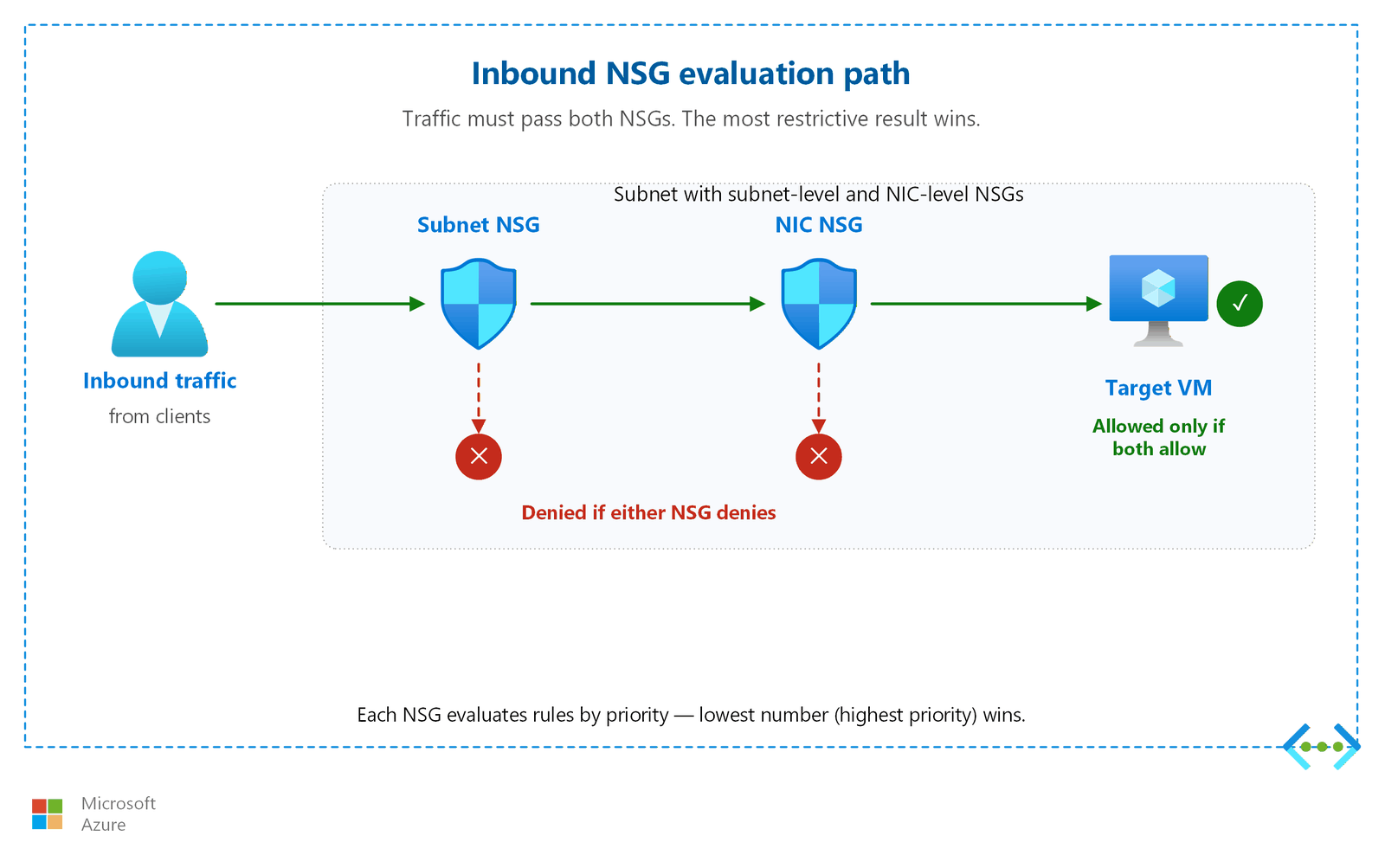
You can associate an NSG with both a subnet and a network interface on a VM within that subnet. When you do, Azure evaluates both NSGs and traffic must pass both. The most restrictive combination wins.
| Direction | First evaluated | Second evaluated |
|---|---|---|
| Inbound | Subnet NSG | NIC NSG |
| Outbound | NIC NSG | Subnet NSG |
Tip
For simpler troubleshooting, associate an NSG with either the subnet or the network interface, but not both. If you need both, document the intended rule interaction clearly.
Practical example: web tier with a jump box
Consider a subnet with a subnet-level NSG that allows inbound HTTPS (port 443) from the internet and denies everything else. A jump box VM in that subnet has a network interface-level NSG that also allows inbound SSH (port 22) from a specific management IP range.
- Web traffic (port 443): The subnet NSG allows it. The network interface NSG on web VMs has no deny rule for 443 (default
AllowVNetInBoundpermits). Traffic flows. - SSH to the jump box (port 22 from management IP): The subnet NSG denies traffic on port 22 from the internet. Even though the network interface NSG allows SSH from the management range, the subnet NSG blocks it first. Resolution: Add a rule in the subnet NSG to allow port 22 from the management IP range, or use Azure Bastion to bypass the public internet path entirely.
This example illustrates why dual NSGs add complexity. Both must independently allow the traffic.
The following diagram shows the inbound traffic evaluation path when you associate both a subnet NSG and a NIC NSG. Traffic must pass both NSGs. The most restrictive combination wins.
Azure Virtual Network Manager interaction
If your organization uses Azure Virtual Network Manager (AVNM) security admin rules, Azure evaluates those rules before NSG rules. Security admin rules can Allow (continue to NSG evaluation), Always Allow (bypass NSG), or Deny (block before NSG evaluation). For centralized network security management, see Azure Virtual Network Manager and centralized management.
Design considerations
Lift-and-shift NSG and ASG design focus
- Translate your on-premises segmentation into subnet-level NSGs: allow only the tier-to-tier flows your application already uses (for example, web-to-app and app-to-database) and deny everything else.
- Start from your current firewall rule base and tighten after migration, using NSG flow logs to confirm which flows are actually needed.
- Apply NSGs at the subnet level first for simplicity; add NIC-level rules only where individual VMs need exceptions.
- Use service tags (such as
VirtualNetworkandAzureLoadBalancer) instead of hardcoded IP addresses so rules survive re-addressing during migration.
Modernize NSG and ASG design focus
- Use application security groups to group network interfaces by role (web, app, data) so rules describe intent and adapt automatically as instances scale.
- Combine subnet NSGs with a hub Azure Firewall: NSGs handle microsegmentation between tiers, while the firewall inspects traffic that crosses trust boundaries.
- Allow only the private endpoint subnet to reach PaaS services, and force outbound traffic through the hub firewall with user-defined routes.
- If you use Azure Virtual Network Manager security admin rules, plan their precedence (they evaluate before NSGs) so platform-wide guardrails don't conflict with workload NSGs.
Cross-cloud NSG and ASG design focus
- Mirror the security group rules from AWS and Google Cloud into Azure NSGs so equivalent tiers enforce the same policy after migration.
- Allow only the specific ports and sources required for cross-cloud application dependencies, and route that traffic through inspected IPsec tunnels.
- Standardize application security group names across clouds so operations teams can correlate equivalent workloads when they troubleshoot.
- Pair NSGs with a secured Virtual WAN hub firewall so cross-cloud and branch traffic is both filtered by NSGs and inspected by the firewall.
Prerequisites
Before you implement NSGs and ASGs, make sure you have:
- A virtual network with subnets: NSGs attach to subnets or NICs within a virtual network. See Virtual networks and subnets for planning guidance.
- An IP addressing plan: NSG rules reference IP addresses and ranges. An IP plan ensures you can write precise rules. See IP address planning for guidance.
- A list of required traffic flows: Document which resources need to communicate, on which ports, and in which direction before writing rules.
Security considerations
Important
Default-deny is the correct posture. The default inbound rules in Azure deny all internet traffic that isn't explicitly allowed. Don't weaken this posture by creating broad allow rules.
Never allow 0.0.0.0/0 on administrative ports
Caution
Never create an NSG rule that allows inbound traffic from 0.0.0.0/0 (any source on the internet) on administrative ports such as SSH (port 22) or RDP (port 3389). Attackers continuously scan the internet for open admin ports. Instead, use Azure Bastion, a VPN, or Azure Private Link to access virtual machines securely.
Combine NSGs with Azure Firewall
NSGs operate at layer 3 and layer 4 (network and transport). They filter based on IP addresses, ports, and protocols but don't inspect packet content. For workloads that require application-layer filtering, threat intelligence, or TLS inspection, deploy Azure Firewall alongside NSGs. See Azure Firewall and network segmentation.
Use VNet flow logs for traffic visibility
Note
NSG flow logs are scheduled for retirement on September 30, 2027. No new NSG flow logs can be created after June 30, 2025. Migrate to VNet flow logs, which provide the same capabilities plus traffic analytics at the virtual-network level.
VNet flow logs capture per-flow state and throughput data for all workloads in a virtual network. Use them for:
- Security investigation: Identify unexpected traffic patterns.
- Compliance auditing: Prove that traffic flows match documented policy.
- Capacity planning: Understand bandwidth consumption between subnets.
For monitoring and diagnostics configuration, see Network monitoring and diagnostics.
Common mistakes to avoid
| Mistake | Why it's a problem | Better approach |
|---|---|---|
Creating allow-all inbound rules (priority 100, source *, destination *) |
Bypasses the default-deny posture and exposes all resources to internet traffic. | Allow only specific source/destination/port combinations. Use the highest priority numbers you can for allow rules. |
| Forgetting that default deny exists | Teams create allow rules for known traffic but don't test that everything else is blocked. Unintended open ports can go unnoticed. | After deploying NSGs, verify with VNet flow logs or NSG diagnostics that only expected traffic flows. Test denied paths explicitly. |
| Not using ASGs for dynamic workloads | IP-based rules break when VMs scale out or get new IPs. Teams end up updating rules constantly. | Group VMs by role using ASGs. Rules referencing ASGs stay valid as VMs are added or removed from the group. |
| Ignoring flow logs until a security incident | Without flow logs enabled, you have no historical traffic data for investigation or compliance audits. | Enable VNet flow logs from day one. Configure Traffic Analytics for visualization and alerting on anomalies. |
| Applying both subnet and NIC NSGs without documentation | Dual NSGs create confusing interactions where traffic is denied unexpectedly. Troubleshooting becomes time-consuming. | Choose subnet-level or NIC-level NSGs as your standard. If both are needed, document the intended interaction for each subnet. |
Related articles
- Virtual networks and subnets: Where you apply NSGs
- Azure Firewall and network segmentation: Layer 7 inspection to complement NSGs
- Network monitoring and diagnostics: VNet flow logs and NSG diagnostics
- Azure Virtual Network Manager and centralized management: Security admin rules and centralized NSG management
Learn more
- Network security groups overview
- Application security groups
- Virtual network service tags
- How network security groups filter traffic
- VNet flow logs overview
- NSG flow logs overview (retiring September 2027)
Next steps
Tip
Exploring on your own? Return to the overview navigator to find your next article by capability.
Next in your lift-and-shift journey:
Design your hub-and-spoke topology: Centralize shared services like DNS, firewall, and VPN Gateway across your migrated workloads.
Next in your modernization journey:
Design your hub-and-spoke topology: Set up dual-hub topology with IT-owned hubs and app-team-owned spokes for your PaaS workloads.
Next in your cross-cloud journey:
Set up encrypted tunnels to your other clouds: Configure VPN Gateway connections to Amazon Web Services (AWS) Virtual Private Gateway and Google Cloud VPN for cross-cloud transit.