Note
Access to this page requires authorization. You can try signing in or changing directories.
Access to this page requires authorization. You can try changing directories.
Azure virtual networks (VNets) and subnets are the foundational building blocks of every Azure network. This article explains how VNets provide isolation, how subnets organize resources, and how to size and structure your network for production workloads.
What this article covers
This article covers VNet isolation boundaries, subnet sizing and reserved addresses, dedicated platform subnets for services like Azure Firewall and Application Gateway, VNet peering, and common network layout patterns.
Who needs this article
Read this article if you:
- Are deploying your first workload to Azure and need to understand how networking works before you create resources.
- Are planning a multi-workload environment and need to decide how many VNets and subnets to create.
- Are migrating on-premises workloads to Azure and need to understand how Azure networking differs from physical networking.
- Need to size subnets correctly for Azure platform services such as Azure Firewall, VPN Gateway, or Azure Kubernetes Service (AKS).
- Want to understand when to separate workloads into different VNets versus keeping them in the same VNet.
Lift-and-shift focus: Mirror your on-premises subnet segmentation in Azure. Map existing VLANs and security zones to subnets, keep address spaces aligned with ranges your team already operates, and size subnets generously so you don't have to re-address during migration.
Modernize focus: Design subnets around platform services and automation. Right-size subnets for AKS, private endpoints, and dedicated platform services, and plan for Azure Virtual Network Manager to apply consistent configuration across many VNets.
Cross-cloud focus: Plan non-overlapping address space across Azure, AWS, and Google Cloud before you create any VNet. Reserve CIDR ranges that don't collide with existing VPCs so you can peer or VPN-connect clouds without NAT.
Azure services and features
The following services and features make up the virtual networking foundation in Azure:
| Service or Feature | What it provides | When to use it |
|---|---|---|
| Azure Virtual Network (VNet) | An isolated, private network in Azure. All Azure networking starts here. Resources in the same VNet can communicate by default; resources in different VNets can't communicate unless you explicitly connect them. | Always: every workload that needs network connectivity requires a VNet. |
| Subnet | A partition of the VNet address space. Subnets are the scope for network security group (NSG) and route table association. | Always: organize workload components into subnets by function or security boundary. |
| VNet peering | Low-latency, private connectivity between two VNets in the same region or across regions. Traffic stays on the Microsoft backbone. Peering isn't transitive; each peering is a direct link. | When resources in separate VNets need to communicate. For cross-region peering, see Cross-region connectivity. |
| Subnet peering (preview) | Peering between specific subnets rather than entire VNets. Provides granular control over which subnets participate in peering relationships. | When you need fine-grained peering control between specific subnets in different VNets. See the constraints section. |
| Route table / User Defined Routes (UDRs) | Override default system routes in Azure to control where traffic is sent. Applied at the subnet level. | When you need to force traffic through a firewall or network virtual appliance (NVA). Required for hub-and-spoke egress control. See Azure Firewall design and Hub-and-spoke topology. |
| Azure Virtual Network Manager (AVNM) | Centrally create, manage, and apply network configurations to VNets across subscriptions. | When managing many VNets across multiple subscriptions. See Centralized network management. |
How to choose
What's a virtual network?
A virtual network (VNet) is a software-defined, isolated network in Azure. Think of it as your private network in Azure. Unlike a physical network that uses cables, switches, and routers, a VNet is entirely software-defined. You create it, assign it an address space, and deploy resources into it.
Key characteristics:
- Region-scoped: A VNet exists in a single Azure region. All resources in that VNet must be in the same region. A VNet does span availability zones within that region.
- Isolation by default: Resources in one VNet can't communicate with resources in another VNet unless you explicitly create a connection (peering or VPN).
- Default internal connectivity: Resources within the same VNet can communicate with each other by default through system routes that Azure provides.
What's a subnet?
A subnet is a range of IP addresses within your VNet. Subnets let you:
- Segment your network by workload component (for example, web tier, application tier, data tier).
- Apply security rules: NSGs attach at the subnet level to filter traffic.
- Control routing: route tables attach at the subnet level to direct traffic.
Azure reserves five IP addresses in every subnet: the first four addresses and the last address. For example, in a /24 subnet (256 addresses), only 251 are usable. Factor this reservation into your sizing calculations.
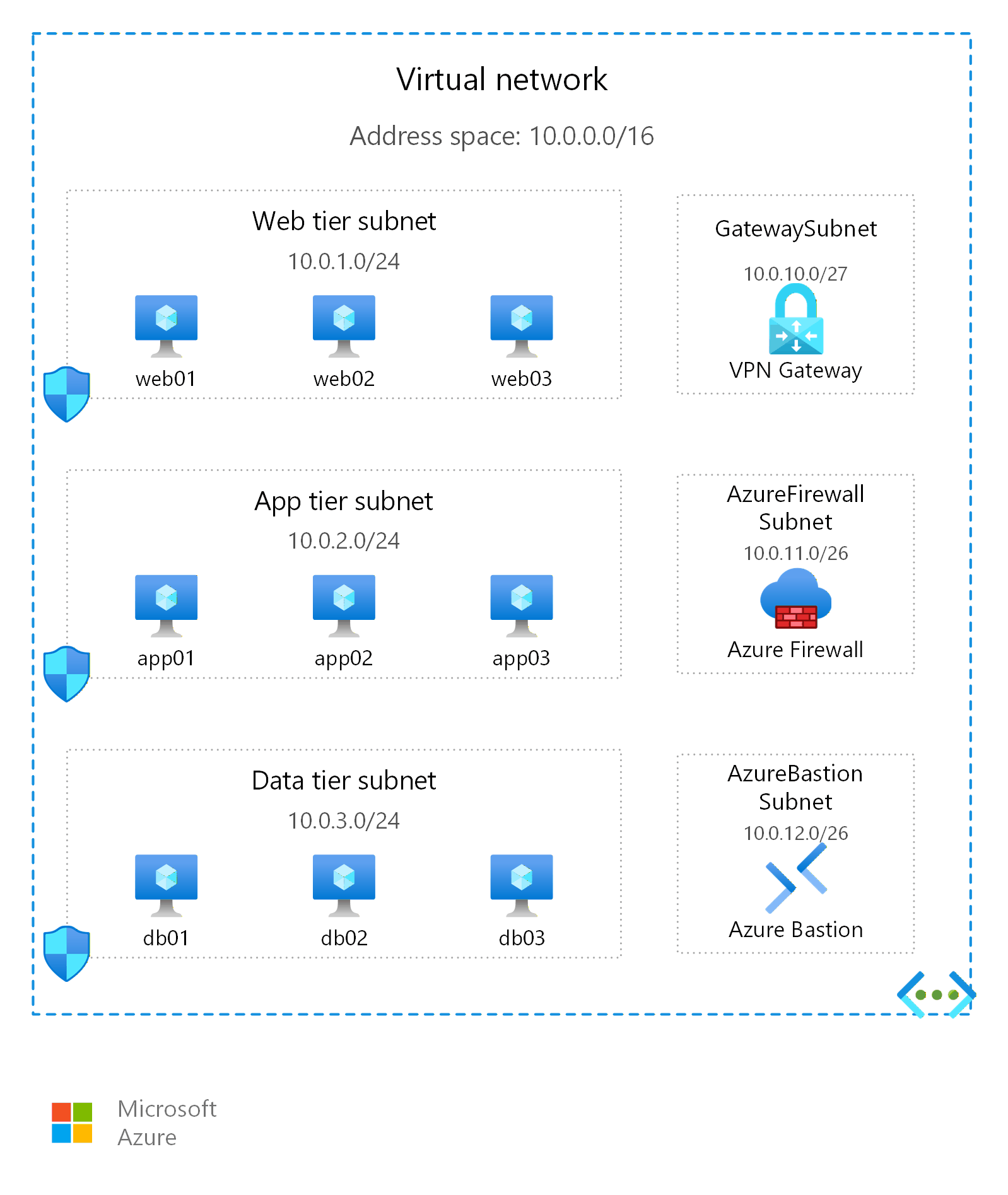
Example: Three-tier application
A typical three-tier web application uses three subnets to separate concerns and apply distinct security rules:
| Subnet | CIDR range | Purpose | Example resources |
|---|---|---|---|
web-subnet |
10.0.1.0/24 | Front-end web servers that accept inbound HTTP/HTTPS traffic from the internet or Application Gateway | Azure App Service Environment, Virtual Machine Scale Sets running NGINX |
app-subnet |
10.0.2.0/24 | Middle-tier application logic. Accepts traffic only from the web subnet. | Azure Functions (VNet-integrated), VMs running business logic |
data-subnet |
10.0.3.0/24 | Data stores. Accepts traffic only from the app subnet. No direct internet access. | Azure SQL Managed Instance, private endpoints for Azure SQL Database or Cosmos DB |
This layout lets you apply an NSG to each subnet that restricts traffic to only what that tier needs. The web subnet allows inbound HTTPS (port 443). The app subnet allows inbound traffic only from the web subnet's IP range. The data subnet allows inbound traffic only from the app subnet's IP range.
For an AKS-based modernization pattern, you might use an aks-nodes subnet such as 10.0.4.0/24 for the cluster node pools when you deploy Azure CNI Overlay. In that model, only the nodes consume VNet IP addresses from the subnet. Pods use a separate overlay CIDR, which lets you keep the node subnet smaller than a flat-network AKS design.
Common patterns
The following subnet layouts cover the most common Azure deployment scenarios:
| Pattern | Subnets | When to use |
|---|---|---|
| Simple web app | web + data |
Two-tier applications with a front end and database. Minimal complexity. |
| Three-tier enterprise | web + app + data + management |
Traditional enterprise workloads with distinct tiers and a jump box or Bastion subnet for administration. |
| AKS with shared services | aks-nodes + aks-ingress + appgw + shared |
Kubernetes workloads with a dedicated ingress controller subnet and Application Gateway for WAF. |
| Hub-and-spoke egress | AzureFirewallSubnet + GatewaySubnet + AzureBastionSubnet + management |
The hub VNet in a hub-and-spoke topology. Shared services that spoke VNets route traffic through. See Hub-and-spoke topology. |
| Data workload | compute + data + private-endpoints + management |
Analytics and data platform workloads where private endpoints for storage and databases need their own subnet for IP planning clarity. |
How many VNets and subnets?
The guiding principle is straightforward: use one virtual network per application and one subnet per component (tier). This default keeps each workload isolated, makes traffic between tiers easy to control with network security groups, and leaves room to grow. Adjust from there based on shared services, isolation requirements, and scale.
Use this decision table to determine your VNet and subnet strategy:
| Your situation | Recommended approach |
|---|---|
| Single workload, single team, no shared services needed | One VNet with subnets per application component (web, application logic, data). See Single-workload topology. |
| Multiple independent workloads that share a gateway or firewall | Hub VNet for shared services + one spoke VNet per workload. See Hub-and-spoke topology. |
| Strict isolation between workloads (blast radius, compliance requirements) | One VNet per workload with no peering between them. |
| Very large environment with many subscriptions and regions | Azure Virtual WAN with automated hub management. See Virtual WAN topology. |
Dedicated subnet sizing reference
Many Azure platform services require their own dedicated subnet with a specific name and minimum size. The following diagram shows the naming requirements and minimum sizes for dedicated platform subnets:
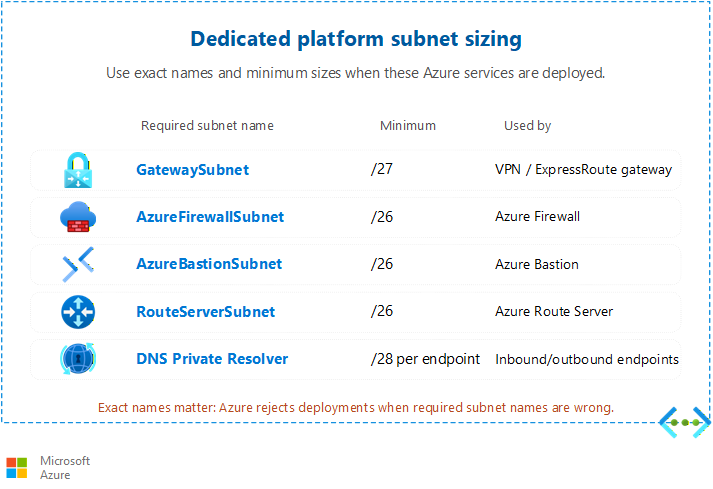
Use this table when planning your address space:
| Azure service | Minimum subnet size | Required subnet name | Notes |
|---|---|---|---|
| Azure Firewall | /26 (59 usable IPs) | AzureFirewallSubnet |
Required for all firewall SKUs. See Azure Firewall design. |
| VPN Gateway | /27 (27 usable IPs) | GatewaySubnet |
Microsoft recommends /27 or larger for scaling headroom. |
| Azure Bastion | /26 (59 usable IPs) | AzureBastionSubnet |
Minimum /26 for all deployments created after November 2021. |
| Application Gateway v2 | /24 recommended (251 usable IPs) | No required name | Highly recommended /24 to accommodate autoscaling. Minimum is formula-based (instances + 5 reserved + 1 private frontend IP). |
| App Service Environment | /24 (production), /23 (maximum scale) | No required name | Scaling consumes IPs from the subnet. Use /23 if you plan to scale near the 200-instance maximum. |
| Azure Route Server | /26 (59 usable IPs) | RouteServerSubnet |
Required for BGP route exchange with NVAs. |
| Azure DNS Private Resolver | /28 minimum per endpoint subnet | Dedicated inbound and outbound subnets | Requires separate subnets for inbound and outbound endpoints. Can't share with other resources. |
| AKS (Azure Kubernetes Service) | Formula-based (CNI-dependent) | No required name | See the AKS sizing guidance. |
Note
Private endpoints consume IP addresses from existing subnets. They don't require a dedicated subnet. Factor this IP consumption into your subnet sizing. For detailed IP planning, see IP address planning.
AKS subnet sizing
AKS subnet sizing depends on your Container Networking Interface (CNI) plugin choice. There's no single minimum size:
- Azure CNI Overlay: The subnet only needs to accommodate nodes because pods use a separate private CIDR (Classless Inter-Domain Routing) block. A significantly smaller subnet is acceptable compared to flat networking.
- Azure CNI (flat network): The subnet must accommodate both nodes AND pods. Formula:
(nodes + surge) × (max_pods + 1). A /21 or larger is common for clusters with 50 or more nodes. - Kubenet: Only nodes consume VNet subnet IPs. Pods get cluster-internal IP addresses.
For sizing formulas per CNI option, see Plan IP addressing for your AKS cluster.
Subnet peering constraints
Subnet peering connects specific subnets between VNets instead of entire address spaces. This approach provides granular control over which subnets participate in peering relationships.
Important
Subnet peering is currently in preview and has the following constraints:
- Requires subscription add to an approved list (not self-service enrollment)
- CLI, ARM template, Terraform, or PowerShell only (no portal support)
- Intel-based V5 SKUs (or AMD Genoa/Cobalt 100-based SKUs) are required for production use to avoid a known bug on older generation SKUs: see Configure subnet peering for current hardware requirements
- Maximum of 200 subnets per side per peering link
- Maximum of 1,000 total subnets across all peering links per VNet
- Subnets must belong to unique, non-overlapping address spaces
For current limitations and enrollment, see Configure subnet peering.
Note
Azure Virtual Network Manager (AVNM) can't distinguish subnet peering from VNet peering. If you use AVNM to manage peering configurations, be aware that subnet-level peering relationships appear as standard VNet peering in AVNM.
Design considerations
Lift-and-shift VNet and subnet design focus
- Recreate your on-premises segmentation: map each VLAN or security zone to a subnet so existing firewall boundaries and operational ownership carry over with minimal redesign.
- Size subnets with headroom. Readdressing after migration is disruptive, so allocate larger CIDR ranges than your current host count needs to absorb growth and Azure's five reserved addresses per subnet.
- Keep Azure address spaces aligned with on-premises ranges where possible to simplify routing and avoid overlap when you connect through VPN Gateway or ExpressRoute.
- Default to one VNet per migrated application with a subnet per tier. This design mirrors typical three-tier on-premises layouts and keeps the move predictable.
Modernize VNet and subnet design focus
- Design subnets around platform services first: dedicated subnets for Azure Firewall, Application Gateway, and Bastion, plus correctly sized subnets for AKS based on your CNI choice.
- Use Azure CNI Overlay for AKS to keep node subnets small, because pods draw from a separate overlay CIDR rather than the VNet address space.
- Reserve a dedicated subnet for private endpoints so IP consumption stays predictable as you adopt more Azure PaaS services.
- Adopt Azure Virtual Network Manager early to apply network groups, connectivity, and security configurations consistently as your VNet count grows across subscriptions.
Cross-cloud VNet and subnet design focus
- Establish a global address plan before you create any VNet. Reserve non-overlapping CIDR blocks for Azure that don't collide with existing AWS VPCs or Google Cloud VPC networks. This reservation is mandatory for routed VPN or interconnect.
- Map each cloud's network primitives to Azure: an AWS VPC or Google Cloud VPC network corresponds to an Azure VNet, and security groups correspond to NSGs.
- Reserve subnet space for cross-cloud connectivity components, such as a
GatewaySubnetfor VPN Gateway or the hub used by Azure Virtual WAN, so transit infrastructure has room to scale. - Standardize subnet naming and tagging across clouds so operations teams can correlate equivalent tiers when they troubleshoot multicloud traffic.
Prerequisites
Before you design your virtual network and subnet layout, make sure you have:
- Azure subscription: An active Azure subscription with permissions to create networking resources (Network Contributor role or higher).
- Resource group: A resource group in your target region to contain VNet resources.
- Region decision: Choose your primary Azure region based on proximity to users, compliance requirements, and service availability.
- Address space plan: Decide on an IP address range (CIDR block) that doesn't overlap with your on-premises networks or other VNets you intend to peer. See IP address planning for guidance.
Security considerations
Virtual networks and subnets are your first layer of network segmentation. Apply the following security practices:
- Network security groups (NSGs): Associate NSGs with every subnet to filter inbound and outbound traffic. Define allow rules specific to each subnet's role and deny everything else by default. For detailed guidance, see Network security groups and application security groups.
- Forced tunneling with UDRs: If your compliance requirements mandate that all internet-bound traffic passes through an on-premises inspection device or a cloud firewall, use route tables with user-defined routes to override default internet routing. See Outbound and egress connectivity.
- Subnet isolation: Place resources with different trust levels in separate subnets. For example, keep databases in a subnet that only allows inbound traffic from the application tier subnet. This separation limits lateral movement if an attacker compromises one component.
- Dedicated subnets for platform services: Many Azure platform services (Azure Firewall, Application Gateway, Bastion) deploy into dedicated subnets. This isolation ensures that platform service routing and security rules don't interfere with your workload subnets.
NSG and subnet interaction
When you associate an NSG with a subnet, the NSG rules apply to all resources in that subnet. Understand these interaction behaviors:
- Cumulative evaluation: If a VM's NIC also has an NSG, Azure evaluates both the subnet-level NSG and the NIC-level NSG. For inbound traffic, Azure evaluates the subnet NSG first, then the NIC NSG. For outbound traffic, Azure evaluates the NIC NSG first, then the subnet NSG.
- Default deny: Azure includes default rules that allow intra-VNet traffic and outbound internet access. After you add custom deny rules, verify that legitimate traffic (such as Azure Load Balancer health probes from IP address 168.63.129.16) isn't inadvertently blocked.
- Service tags and ASGs: Use service tags (like
AzureLoadBalancer,Internet,VirtualNetwork) and application security groups (ASGs) in NSG rules instead of raw IP addresses. This approach simplifies rule management and adapts automatically as Azure IP ranges change. - Flow logs for visibility: Enable NSG flow logs on every subnet-level NSG to capture accepted and denied traffic. Flow logs help you verify that security rules work as intended and provide evidence for compliance audits. See NSG flow logs for setup instructions.
Related articles
These articles in the Azure networking design guide cover related topics:
- IP address planning: Design your address space, avoid overlaps, and plan for growth.
- Network security groups and application security groups: Define traffic filtering rules at the subnet and NIC level.
- Single-workload topology: Design a simple network for one workload with no shared services.
- Hub-and-spoke topology: Connect multiple workload VNets through a shared services hub.
- Virtual WAN topology: Manage connectivity at scale with automated hub routing.
- Cross-region connectivity: Connect VNets across Azure regions by using global peering or Virtual WAN.
- Centralized network management: Manage VNet configurations across subscriptions by using Azure Virtual Network Manager.
Learn more
For more information about Azure virtual networking, see the following resources:
- What is Azure Virtual Network?
- Azure Virtual Network FAQ
- Virtual network subnet planning
- Virtual network peering
- Configure subnet peering (preview)
- Plan IP addressing for AKS clusters
Next steps
Tip
Exploring on your own? Return to the overview navigator to find your next article by capability.
Next in your lift-and-shift journey:
Plan your IP address space: Allocate a /16 CIDR pool that avoids overlap with your on-premises address ranges.
Next in your modernization journey:
Plan your IP address space: Allocate dual-region IP pools with non-overlapping ranges for active-active peering.
Next in your cross-cloud journey:
Plan your IP address space: Design non-overlapping addressing across Azure, Amazon Web Services (AWS), and Google Cloud.