Note
Access to this page requires authorization. You can try signing in or changing directories.
Access to this page requires authorization. You can try changing directories.
This article covers private and public IP address planning for Azure deployments. You learn how to allocate address space, avoid overlapping ranges, choose the right public IP type, and evaluate IPv6 dual-stack support.
What this article covers
This article covers private address allocation strategies, public IP types and SKUs, CIDR planning to avoid overlapping ranges, IPv6 dual-stack considerations, and IP Address Manager (IPAM) for large-scale environments.
Who needs this article
Read this article if you:
- Are deploying a virtual network (VNet) in Azure and need to decide which IP address ranges to use.
- Are connecting Azure networks to on-premises environments and need to prevent address conflicts.
- Need to choose between Standard Public IPs, Public IP Prefixes, or bringing your own IP ranges (BYOIP).
- Want to understand when IPv6 dual-stack is appropriate for your workloads.
- Are managing a large or growing environment and need a strategy to track IP allocations at scale.
Lift-and-shift focus: Choose private ranges that don't overlap with your on-premises network so VPN or ExpressRoute routing works without translation. Reserve one large landing-zone block with room for the workloads you'll migrate over the next few years.
Modernize focus: Plan non-overlapping address space across your primary and backup regions so active-active workloads can peer later, and reserve correctly sized subnets for App Service Environment and AKS.
Cross-cloud focus: Build a global address plan that doesn't collide with existing AWS VPC or Google Cloud CIDR ranges, which is mandatory before you connect clouds over VPN or interconnect.
Azure services and features
The following services and features support IP address planning in Azure:
| Service or Feature | What it provides | When to use it |
|---|---|---|
| RFC 1918 private address spaces | Three reserved ranges for private use: 10.0.0.0/8, 172.16.0.0/12, and 192.168.0.0/16. Azure VNets use these ranges for internal communication. | Always: every VNet requires at least one private address range from these spaces. |
| RFC 6598 shared address space | 100.64.0.0/10: treated as private address space in Azure. Originally designed for carrier-grade NAT (CGNAT) environments. | When your organization already uses RFC 6598 ranges on-premises, or when RFC 1918 space is exhausted. |
| Standard Public IP | A static, zone-redundant public IP address assigned to a single resource. Secure by default with closed inbound traffic. | When a resource needs a unique public endpoint, such as a load balancer, VPN gateway, or public-facing virtual machine. |
| Public IP Prefix | A reserved contiguous block of public IP addresses from a specific Azure region. | When you need predictable IP ranges for NAT Gateway, Virtual Machine Scale Sets, or external add to an approved list. |
| BYOIP / Custom IP Prefix | Onboard your own public IP ranges to Azure. Uses a three-phase process: validate ownership, provision the prefix, then commission it for use. | When you need to preserve existing IP reputation, maintain external approved list entries, or migrate workloads without changing public IPs. |
| Azure Virtual Network Manager IPAM | A built-in IP Address Management feature in Azure Virtual Network Manager. Generally available in most regions. Provides centralized visibility and allocation tracking across subscriptions. | When managing many VNets across multiple subscriptions and you need automated tracking of address utilization. See Centralized network management. |
How to choose
Use the following decision tables to guide your IP planning decisions.
IP planning best practices
| Practice | Why | Example |
|---|---|---|
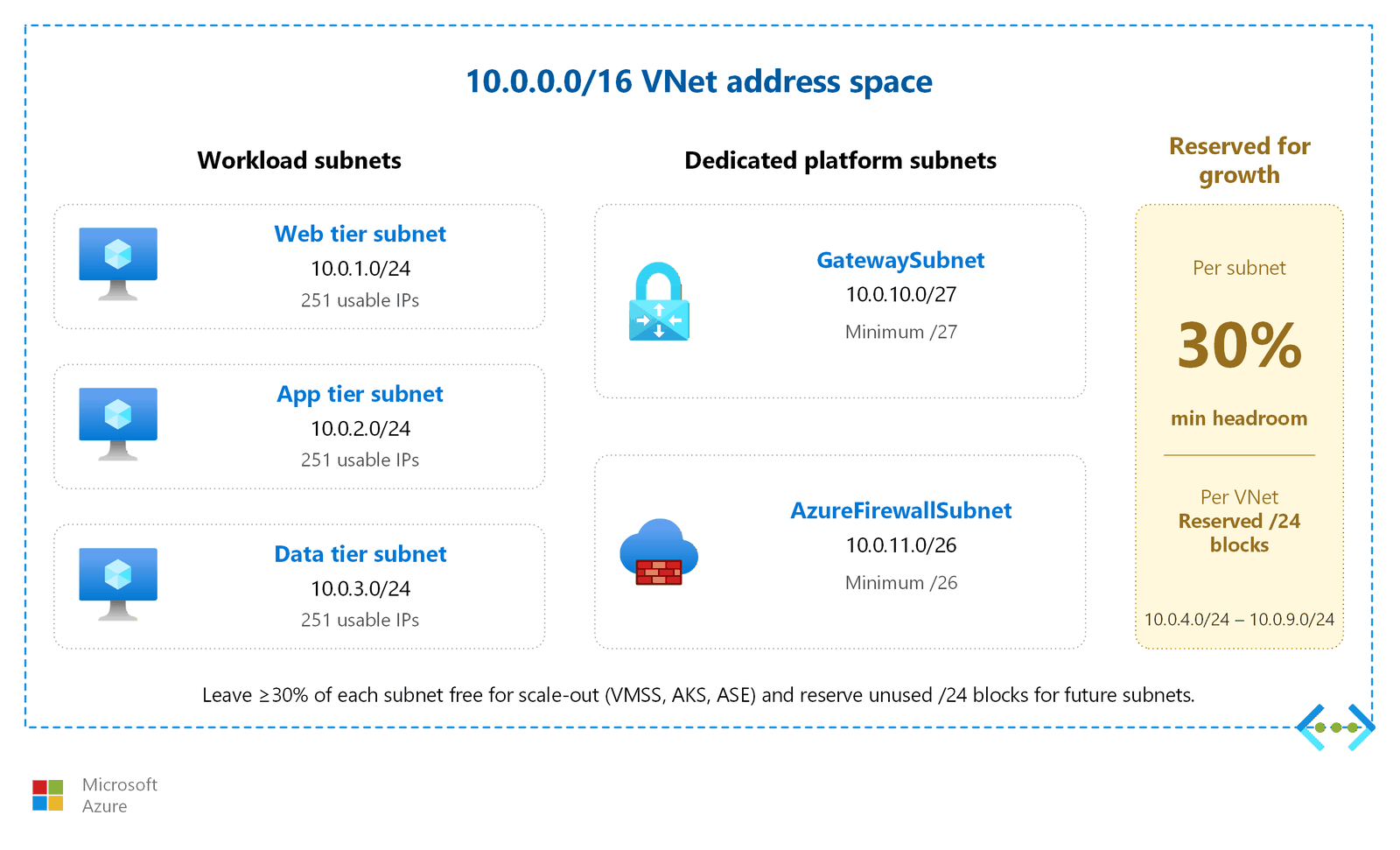
| Allocate a large parent CIDR (/16) and subdivide | Prevents address exhaustion as workloads grow. Easier to summarize routes. | Assign 10.1.0.0/16 to the production environment, then carve /24 subnets for each workload tier. |
| Leave at least 30% headroom in each subnet | Scaling services such as Virtual Machine Scale Sets, AKS, and App Service Environments consume IPs rapidly during scale-out. | A /24 subnet provides 251 usable IPs. If your baseline deployment uses 100, you have room to triple. |
| Use contiguous CIDR blocks for each environment | Simplifies route summarization and firewall rules. A single summary route represents the whole environment. | Production: 10.1.0.0/16. Staging: 10.2.0.0/16. Development: 10.3.0.0/16. |
| Avoid Azure platform-reserved and prohibited ranges | Using reserved ranges causes routing failures and deployment errors. | Don't assign 169.254.0.0/16, 168.63.129.16/32, 224.0.0.0/4, 127.0.0.0/8, or 255.255.255.255/32. |
| Document allocations in Azure IPAM or a spreadsheet | Prevents overlap as the environment grows. Centralizes visibility for network teams. | Use Azure Virtual Network Manager IPAM for automated tracking, or maintain a shared spreadsheet for smaller environments. |
Public IP address types
| Type | What it is | When to use it |
|---|---|---|
| Standard Public IP | An individually assigned static public IP. Zone-redundant by default in availability-zone-enabled regions. Secure by default: all inbound traffic is blocked until an NSG or load balancer rule allows it. | Public-facing load balancers, VPN gateways, Azure Bastion, application gateways, or any resource that needs a unique public endpoint. |
| Public IP Prefix | A reserved contiguous block of public IPs from a specific region. Guarantees sequential addresses. | NAT Gateway (requires prefix for multiple outbound IPs), Virtual Machine Scale Sets, or when external systems need to add to an approved list a predictable range of IPs. |
| BYOIP / Custom IP Prefix | Customer-owned public IP ranges onboarded to Azure through a three-phase process: validation, provisioning, and commissioning. Regional prefixes commission in approximately 30 minutes; global prefixes take 3–4 hours. | Preserving IP reputation during cloud migration, maintaining external approved list entries, or meeting regulatory requirements for IP ownership. IPs derived from a Custom IP Prefix can also use Azure DDoS Protection. |
Note
Basic SKU public IPs were retired on September 30, 2025. Existing Basic IPs continue to function but are unsupported and have no SLA. Upgrade to Standard SKU for all new deployments.
IPv6 decision
| Scenario | Recommendation | Rationale |
|---|---|---|
| Workload only serves IPv4 clients, no regulatory IPv6 requirement | IPv4-only | Simplest configuration. Avoids dual-stack management overhead. Most Azure services support IPv4 natively. |
| Workload must serve IPv6 clients, or regulations require IPv6 support | Dual-stack (IPv4 + IPv6) | Azure VNets support dual-stack subnets. Deploy IPv6 alongside IPv4 on the same resources. |
| Workload needs IPv6 but relies on Azure Firewall, Virtual WAN, or Route Server | IPv4-only (with external IPv6 termination) | Azure Firewall, Virtual WAN, and Route Server don't currently support IPv6. Terminate IPv6 at an external load balancer or edge device before traffic enters these services. VPN Gateway IPv6 is available in preview. |
IPv6 dual-stack in Azure
Azure supports IPv6 dual-stack deployments across virtual networks. When you enable dual-stack, each subnet gets both an IPv4 range and an IPv6 /64 range. Resources receive addresses from both families and can communicate over either protocol simultaneously.
IPv6 in Azure has specific sizing requirements. IPv6 subnets must be exactly /64. No other prefix length is supported. The IPv6 address space you assign to a VNet must be large enough to accommodate /64 subnets for each subnet that needs IPv6 connectivity. Plan your IPv6 address allocation alongside your IPv4 ranges during initial network design.
The following Azure services support IPv6 dual-stack configurations:
| Service | IPv6 support |
|---|---|
| Azure Virtual Network | Dual-stack subnets with /64 IPv6 ranges |
| Standard Load Balancer | Public and internal IPv6 frontends |
| VPN Gateway | IPv6 tunnel endpoints (preview; requires opt-in) |
| NAT Gateway | IPv6 outbound translation (StandardV2 SKU only; Standard SKU is IPv4 only) |
| Public IP (Standard SKU) | IPv6 public addresses |
| Virtual Machine Scale Sets | IPv6 network interfaces |
| VNet Peering | IPv6 traffic across peered VNets |
| Network Security Groups | IPv6 rules for filtering |
| DNS (Azure DNS) | AAAA record support |
Key services that don't support IPv6: Azure Firewall (requires an IPv4-only subnet), Virtual WAN (IPv4 only), and Route Server (IPv4 only). VPN Gateway supports IPv6 in dual-stack mode but only as a preview feature (requires opt-in). If your architecture depends on Azure Firewall, Virtual WAN, or Route Server for traffic inspection or routing, design your network so that IPv6 traffic is handled before reaching these components.
For detailed IPv6 capabilities, limitations, and configuration steps, see IPv6 for Azure Virtual Network.
Azure-reserved addresses
Azure reserves five IP addresses in every subnet:
| Reserved address | Purpose |
|---|---|
| First address (.0) | Network identifier |
| Second address (.1) | Default gateway |
| Third address (.2) | Azure DNS mapping |
| Fourth address (.3) | Azure DNS mapping |
| Last address (broadcast) | Broadcast address |
Factor these five reserved addresses into all subnet sizing calculations. A /24 subnet provides 256 total addresses minus 5 reserved, leaving 251 usable host IPs. The smallest supported IPv4 subnet is /29 (8 addresses minus 5 reserved = 3 usable). The largest supported IPv4 subnet is /2.
Tip
Standard SKU public IP addresses incur a charge whether or not they're attached to a resource. As part of IP hygiene, periodically delete public IP addresses you no longer use and release public IP prefixes you outgrew. Unattached public IPs are a frequent source of avoidable cost and an unnecessary attack surface.
Design considerations
Lift-and-shift IP planning design focus
- Reserve a single large CIDR block (a /16 is common) for the landing zone and subdivide it for each migrated application, leaving a buffer of roughly 20 percent for growth.
- Choose ranges that don't overlap with on-premises networks you connect through VPN Gateway or ExpressRoute, so routing works without address translation.
- Account for Azure's five reserved addresses per subnet and the dedicated subnets that platform services require, such as
GatewaySubnet(/27) andAzureFirewallSubnet(/26). - Where networks never peer, you can deliberately reuse private IPv4 ranges to conserve address space.
Modernize IP planning design focus
- Allocate non-overlapping ranges in your primary and backup regions so active-active workloads can use global peering later without re-addressing.
- Reserve a dedicated subnet sized for App Service Environment (/24, or /23 near maximum scale). For AKS with CNI Overlay, size the subnet for the nodes only, because pods draw from a separate overlay CIDR, which makes the node subnet far smaller than a flat CNI design requires.
- Reserve a dedicated subnet for private endpoints so PaaS adoption doesn't fragment your address plan.
- Use Azure Virtual Network Manager IP address management to track and automate allocations as your environment scales.
Cross-cloud IP planning design focus
- Establish a global address plan first: reserve Azure CIDR blocks that don't overlap with existing AWS VPCs or Google Cloud VPC networks, which is required for routed VPN or interconnect.
- Document the address ranges of each connected cloud and branch so you can plan summarized routes through Azure Virtual WAN.
- Reserve address space for transit components, such as the Virtual WAN hub and VPN gateway subnets, with room to scale as you add cloud edges and branches.
- Where overlaps are unavoidable, plan to NAT the affected VPN connections or re-address workloads during migration rather than after.
Prerequisites
Before planning your IP address allocation:
- Virtual network design: You have an existing or planned VNet structure. If you haven't designed your VNets yet, see Azure virtual networks and subnets first.
- On-premises IP inventory: Document existing on-premises address ranges, including any ranges used by branch offices, data centers, or other cloud providers. Non-overlapping addresses are required for hybrid connectivity.
- Growth projections: Estimate how many additional subnets and hosts you'll need over the next 2–3 years. Allocating address space up front is easier than expanding a VNet later.
Security considerations
IP planning has direct security implications. Follow these practices to reduce risk:
- Prevent address overlap: Overlapping IP ranges between on-premises networks, Azure VNets, and peered VNets cause routing failures. Traffic might reach the wrong destination or be silently dropped. Verify that every address range is unique across your entire network.
- Avoid prohibited ranges: Azure reserves the following ranges for platform operations. Never use them as VNet address space:
- 169.254.0.0/16 (link-local)
- 168.63.129.16/32 (Azure internal DNS)
- 224.0.0.0/4 (multicast)
- 127.0.0.0/8 (loopback)
- 255.255.255.255/32 (broadcast)
- Document and audit: Maintain a current record of all IP allocations. Undocumented ranges lead to accidental overlap when new workloads are deployed. Use Azure Virtual Network Manager IPAM for automated compliance tracking, or maintain a shared spreadsheet that is reviewed during every deployment.
- Protect public IPs: Associate Azure DDoS Protection with public IP resources in production environments. BYOIP ranges can also be protected by DDoS Protection.
Related articles
These articles cover topics that interact with IP address planning:
- Azure virtual networks and subnets: VNet and subnet structure where IP addresses are assigned.
- Network security groups and application security groups: Security rules that reference IP ranges.
- Hub-and-spoke topology: IP planning across shared and workload VNets in a hub-and-spoke design.
- Virtual WAN topology: Address planning for Virtual WAN hubs and connected VNets.
- Multi-region networking: IP planning across regions, including non-overlapping ranges for cross-region peering.
- Centralized network management: Azure Virtual Network Manager IPAM for large-scale IP tracking and allocation.
Learn more
- IP addressing for Azure virtual networks
- Public IP addresses in Azure
- Custom IP address prefix (BYOIP)
- What is Azure Virtual Network Manager IPAM?
- IPv6 for Azure Virtual Network
- Azure Virtual Network FAQ
Next steps
Tip
Exploring on your own? Return to the overview navigator to find your next article by capability.
Next in your lift-and-shift journey:
Secure your subnets with network security groups: Mirror your existing firewall rules as NSG rules to maintain your security posture in Azure.
Next in your modernization journey:
Secure your subnets with network security groups: Enforce strict segmentation so only load balancer traffic reaches your app subnets.
Next in your cross-cloud journey:
Secure your subnets with network security groups: Mirror your AWS Security Groups and Google Cloud firewall rules as Azure NSGs.