Note
Access to this page requires authorization. You can try signing in or changing directories.
Access to this page requires authorization. You can try changing directories.
Azure offers multiple DDoS protection tiers to defend your workloads from distributed denial-of-service (DDoS) attacks. This article compares infrastructure protection, DDoS Network Protection, and DDoS IP Protection to help you choose the right tier.
What this article covers
Azure provides multiple tiers of DDoS protection that defend public IP addresses against volumetric, protocol, and application-layer attacks. All Azure customers automatically receive infrastructure-level protection. Organizations with stricter availability requirements can enable enhanced protection plans. These plans provide adaptive tuning, attack analytics, and cost protection guarantees.
Who needs this article
Read this article if you:
- Deploy any resource with a public IP address in Azure.
- Need SLA-backed protection for internet-facing workloads.
- Require attack telemetry, rapid response support, or cost reimbursement during DDoS events.
- Run services behind Azure Firewall, Application Gateway, or Azure Load Balancer with public endpoints.
- Want to understand when the included tier is sufficient versus when to invest in enhanced protection.
Lift-and-shift focus: Most rehosted workloads expose few public IPs. Rely on the always-on included protection during migration, and add DDoS Network Protection only on VNets with internet-facing endpoints.
Modernize focus: Customer-facing, multiregion apps justify DDoS Network Protection across the VNets that hold your public IPs, including those fronting Azure Front Door, Application Gateway, and load balancers.
Cross-cloud focus: Protect the Azure ingress points that terminate cross-cloud and branch traffic. Apply DDoS protection to the public IPs on your Virtual WAN hub and internet-facing gateways.
Azure services and features
The following table compares the three DDoS protection options available in Azure.
| Protection tier | Cost | Scope | Key capabilities | Best for |
|---|---|---|---|---|
| Azure DDoS infrastructure protection | Free (automatic) | All Azure public IPs | Always-on monitoring, real-time mitigation of L3/L4 volumetric attacks, same protection that defends Microsoft's own services | All Azure customers. No configuration required. Protects against common network-layer attacks. |
| DDoS Network Protection | Per-plan (covers up to 100 public IPs per tenant) | Tenant-wide: one plan covers linked VNets across subscriptions | Adaptive tuning per public IP, attack analytics and reporting, DDoS Rapid Response (DRR) team access, cost protection, availability SLA, Application Gateway WAF discount | Production workloads requiring SLA guarantees, attack forensics, and financial protection against scale-out costs. |
| DDoS IP Protection | Per-IP | Individual public IPs | Same core mitigation engine as Network Protection, adaptive tuning, attack analytics | Smaller deployments or individual IPs where a full plan isn't cost-effective. Doesn't include DDoS Rapid Response, cost protection, WAF discount, or Public IP Basic tier protection. |
What each tier protects
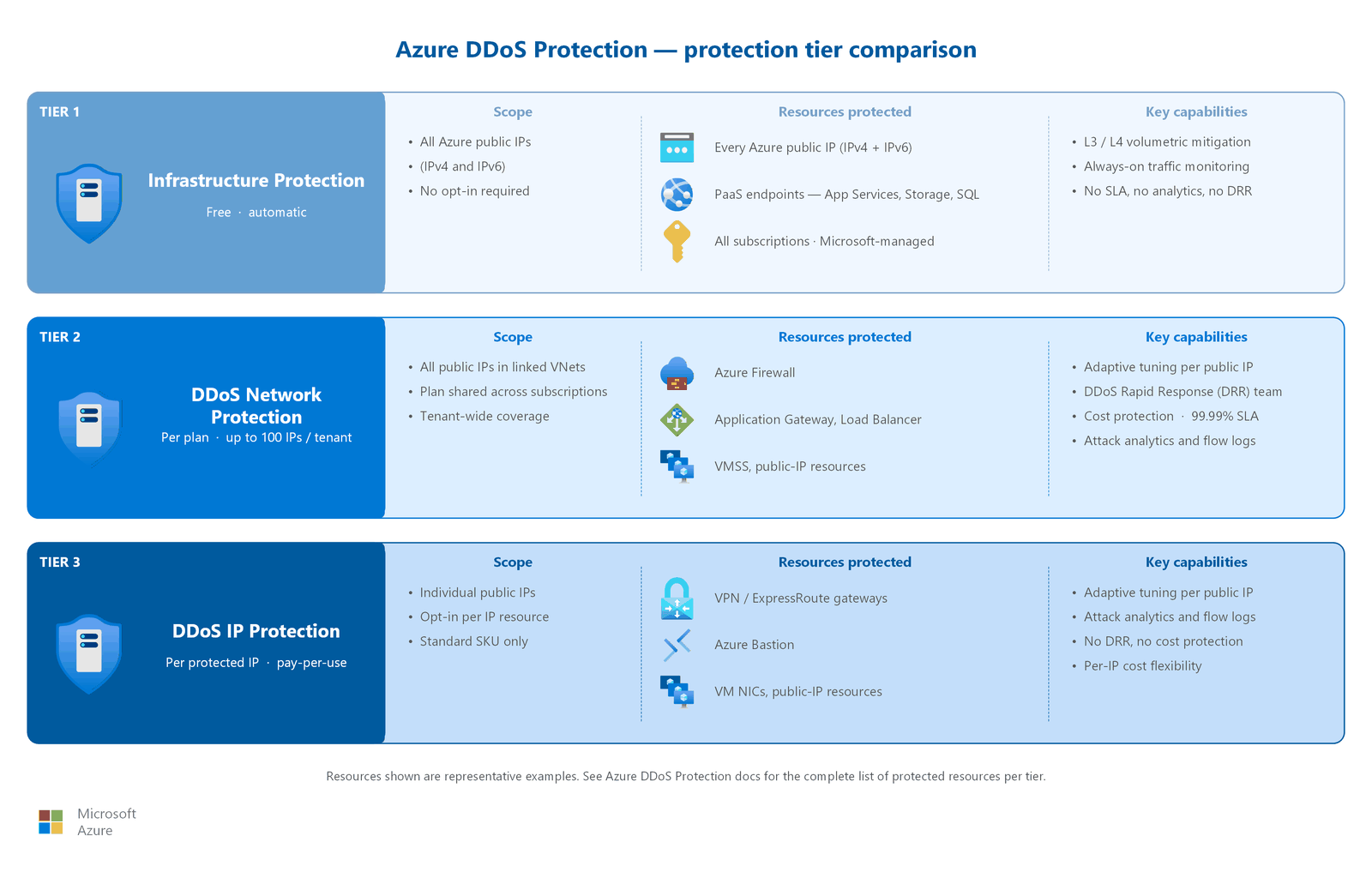
Azure DDoS infrastructure protection mitigates attacks at the Azure network edge before they reach your resources. This protection uses the same always-on detection and mitigation infrastructure that defends Microsoft 365, Xbox, and other Microsoft online services. Infrastructure protection handles common volumetric attacks such as UDP floods and ICMP amplification. It operates transparently: no configuration, no enrollment, and no additional cost.
DDoS Network Protection and DDoS IP Protection add intelligent per-IP profiling on top of the infrastructure layer. These tiers learn your application's normal traffic patterns over time (typically within seven to 14 days) and automatically tune three mitigation policies for each protected public IP address:
- TCP SYN policy: Protects against SYN flood attacks by tracking connection state and dropping illegitimate handshake attempts.
- TCP policy: Detects and mitigates anomalous TCP traffic patterns including ACK floods and connection exhaustion.
- UDP policy: Identifies and filters volumetric UDP floods while allowing legitimate application traffic.
The adaptive tuning ensures that mitigation thresholds match your specific traffic profile instead of applying generic limits. This approach minimizes false positives during traffic spikes from legitimate sources such as marketing campaigns or seasonal peaks.
How to choose
Use the following decision guidance to select the right DDoS protection tier for your workload.
When to upgrade from infrastructure protection
Azure DDoS infrastructure protection is always active and provides meaningful defense against common volumetric attacks. However, evaluate an upgrade to Network Protection or IP Protection when your workload meets any of the following criteria:
- Availability SLA requirements: Your business requires a 99.99% availability guarantee for public-facing services. Infrastructure protection has no customer-facing SLA.
- Compliance mandates: Regulatory frameworks require documented DDoS protection with attack reporting and incident response capabilities.
- High-value workloads: Revenue-generating services where a sustained attack could cause significant financial impact. Cost protection credits offset scale-out expenses during attacks.
- Multiple public endpoints: Environments with load balancers, firewalls, and application gateways that present multiple attack surfaces.
- Operational maturity: Security operations teams that can consume attack analytics, configure alerts, and engage the DDoS Rapid Response team during incidents.
Decision table
| Scenario | Recommended tier | Rationale |
|---|---|---|
| Dev/test environment with public IPs | Infrastructure protection (free) | Automatic protection with no cost. Sufficient for non-production workloads without SLA requirements. |
| Single production app with few public IPs | DDoS IP Protection | Per-IP pricing is cost-effective for small deployments. Provides adaptive tuning and attack analytics without requiring a full plan. |
| Enterprise with 10+ public IPs across subscriptions | DDoS Network Protection | One plan per tenant covers up to 100 public IPs. Includes cost protection, DDoS Rapid Response, WAF discount, and an availability SLA. |
| Regulated workloads requiring attack forensics | DDoS Network Protection | Attack flow logs, alert integration, and DDoS Rapid Response team access support compliance and incident response requirements. |
Cost model
DDoS Network Protection uses a fixed monthly fee that covers up to 100 public IP addresses across all linked VNets within your Microsoft Entra tenant. Additional IPs beyond 100 incur per-IP overage charges monthly. For organizations with fewer than 15 to 20 public IPs, evaluate whether DDoS IP Protection offers better cost efficiency by comparing the plan cost against the per-IP alternative.
Important
One DDoS protection plan per tenant covers all linked VNets across subscriptions. You don't need multiple plans for different regions or subscriptions. The plan is created in a specific region but protects VNets in any region within the tenant.
DDoS IP Protection charges per protected public IP per month. No plan required. This option suits organizations that need enhanced protection for a small number of IPs without the cost commitment of a full plan. However, DDoS IP Protection doesn't include DDoS Rapid Response team access, cost protection credits, or the Application Gateway WAF billing discount.
Application Gateway WAF discount
When you enable DDoS Network Protection on the virtual network containing an Application Gateway, you pay the Application Gateway Standard v2 rate for the WAF component instead of the higher WAF rate. This discount doesn't apply with DDoS IP Protection.
Design considerations
Lift-and-shift DDoS design focus
- Start with the always-on DDoS infrastructure protection that covers every Azure public IP, then layer DDoS Network Protection onto virtual networks with internet-exposed workloads.
- Prioritize the few public endpoints a rehosted estate typically exposes (for example, a single web tier or VPN gateway) rather than every subnet.
- One plan per tenant covers all linked virtual networks across subscriptions and regions, so you don't need a separate plan per migrated application.
- Capture attack telemetry early so you can baseline normal traffic before you tighten thresholds.
Modernize DDoS design focus
- Enable DDoS Network Protection on the virtual networks that hold public IPs for customer-facing apps, including those associated with Azure Front Door origins, Application Gateway, and public load balancers.
- Combine DDoS protection with WAF: the Application Gateway WAF component is billed at the Standard v2 rate when DDoS Network Protection is enabled on the virtual network.
- For active-active multi-region designs, confirm each region's public IPs are covered, because one tenant plan protects VNets in any region.
- Surface DDoS metrics and alerts in your operational monitoring so the platform team sees attacks alongside other network signals.
Cross-cloud DDoS design focus
- Protect the Azure-side ingress that terminates cross-cloud and branch traffic, such as the public IPs on a secured Virtual WAN hub and internet-facing gateways.
- Keep direct public IPs off virtual machines; front workloads with Application Gateway or Front Door and protect those endpoints instead.
- Extend the existing tenant plan to new Azure regions you add as you migrate clouds, rather than creating separate plans.
- Include DDoS telemetry in cross-cloud monitoring so you can correlate attacks that span multiple cloud edges.
Prerequisites
Before you enable enhanced DDoS protection, make sure you have:
- Public IP addresses: DDoS protection applies to Azure public IP resources. Resources without public IPs aren't exposed to internet-based DDoS attacks and don't need coverage.
- A virtual network: DDoS Network Protection is enabled at the VNet level. All public IPs within a protected VNet are automatically covered.
- Permissions: The Network Contributor role or a custom role with
Microsoft.Network/ddosProtectionPlanspermissions is required to create or manage DDoS plans. - One DDoS plan per tenant (Network Protection): Create a single plan and link it to the VNets that contain your protected public IPs. You can link VNets from multiple subscriptions to the same plan.
- Azure Monitor configuration: Configure diagnostic settings to send DDoS metrics and attack flow logs to Log Analytics, Event Hubs, or Azure Storage for monitoring and retention.
- Incident response plan: Document your team's response procedures for DDoS events including escalation paths, on-call contacts, and communication templates. If you use DDoS Network Protection, register with the DDoS Rapid Response team before an attack occurs.
Security considerations
The following sections describe how to layer DDoS protection with other Azure security services and how to monitor attacks.
Layered defense with Azure Firewall
DDoS protection and Azure Firewall operate at different layers but complement each other in a defense-in-depth strategy. DDoS protection mitigates volumetric attacks at the Azure network edge, preventing traffic floods from overwhelming your infrastructure. Azure Firewall inspects the traffic that survives DDoS filtering and applies granular application and network rules for access control, URL filtering, and threat intelligence.
Enable DDoS protection on VNets containing Azure Firewall public IPs to protect the firewall itself from volumetric attacks. Without this protection, a sustained volumetric attack could exhaust the firewall's capacity, disrupting all services routed through it.
Public IP coverage
When you enable DDoS Network Protection on a VNet, all public IPs within that VNet receive automatic protection. You don't need per-resource configuration. This coverage includes public IPs attached to:
- Azure Firewall
- Application Gateway and WAF
- Azure Load Balancer (public)
- Azure Bastion
- Virtual machine network interfaces
- VPN Gateway and ExpressRoute Gateway (protected by DDoS policy, but adaptive tuning isn't supported)
- Azure API Management (external VNet mode)
Note
Resources using only private IPs don't require DDoS protection because DDoS attacks target public endpoints. If a workload is accessible only through private endpoints or internal load balancers, it isn't exposed to internet-originated volumetric attacks.
Attack response and monitoring
DDoS Network Protection provides full attack visibility and response capabilities:
- Always-on monitoring: The platform monitors traffic around the clock for indicators of DDoS attacks. Mitigation activates automatically when traffic exceeds attack thresholds.
- Attack analytics: Detailed flow reports during and after attacks, with five-minute granularity and post-attack summary reports.
- Alert integration: Configurable alerts through Azure Monitor when an attack starts, stops, or when mitigation is active. Integrate with your SIEM for security operations workflows.
- DDoS Rapid Response (DRR): Access to the Microsoft DDoS response team during active attacks for custom mitigation tuning. Available only with Network Protection.
- Cost protection: Service credits for compute and data-transfer scale-out costs caused by documented DDoS attacks. Available only with Network Protection.
Caution
Cost protection requires a documented attack and a support claim. Credits aren't automatic. You must file a request after the attack is mitigated and provide attack evidence from DDoS analytics.
Related articles
Explore related networking design guidance:
- Azure Firewall and traffic inspection: Layered defense combining DDoS protection with firewall traffic inspection.
- Internet ingress and public-facing services: Protection strategies for inbound internet traffic.
- Network security groups and application security groups: Microsegmentation within the virtual network.
- Hub-spoke network topology: Centralized security model where DDoS protection applies to the hub VNet.
Learn more
For in-depth Azure DDoS Protection documentation, see:
- Azure DDoS Protection overview
- Azure DDoS Protection features
- Azure DDoS Protection best practices
- Configure Azure DDoS Protection
- Azure DDoS Protection pricing
Next steps
Tip
Exploring on your own? Return to the overview navigator to find your next article by capability.
Next in your lift-and-shift journey:
Set up monitoring for your migrated network: Validate connectivity and performance after enabling DDoS protection.
Next in your modernization journey:
Configure DNS and private name resolution: Set up public DNS zones, CNAME mapping to Front Door and Traffic Manager, and enable RBAC and DNSSEC.
Next in your cross-cloud journey:
Set up cross-cloud monitoring: Establish monitoring for your cross-cloud estate before going live.